
Our readers keep the lights on and the weekend projects moving. As an Amazon Associate, I earn from qualifying purchases.
The cramped feel of a full-size keyboard is a constant trade-off—your mouse has to reach further, your posture shifts, and the keys you never touch just collect dust. A 60% keyboard strips away everything unnecessary, bringing your hands closer together for a more natural, efficient setup that prioritizes speed and space.
I’m Rikta — the co-founder and writer behind FitlyFast. My approach to finding the best 60% keyboard involves cross-referencing switch quality, connectivity options, build materials, and real-world user feedback to isolate the models that actually deliver on their promises.
This guide covers seven carefully selected compact keyboards, ranging from hot-swappable entry-level boards to tournament-grade wireless models, so you can find the right fit for your desk and your style. best 60% keyboard choices hinge on switch feel, connectivity, and build quality, and we break down each one below.
How To Choose The Best 60% Keyboard
Selecting a 60% keyboard is a deliberate move toward a cleaner, more ergonomic desk setup. The small footprint saves space, but the key differences lie in the switch, build, and connectivity options that match your daily use.
Switch Type: Linear, Tactile, or Optical
Linear switches offer a smooth keystroke from top to bottom, favored by gamers for rapid presses. Tactile switches provide a noticeable bump, giving clear feedback for typists. Optical switches use light beams for actuation, resulting in faster response times and higher durability—a hallmark of premium gaming boards.
Build Quality and Keycaps
An aluminum top frame adds rigidity and weight, while plastic cases keep the board lighter and more portable. PBT keycaps resist shine and wear far better than ABS, maintaining their texture for years. Look for doubleshot molding, where the legend is molded through the keycap, ensuring it never fades.
Hot-Swappable vs. Soldered PCB
Hot-swappable PCBs let you change switches without soldering—a major advantage if you like experimenting with different feels or need to replace a faulty switch. Soldered boards are permanent and harder to modify. For beginners or enthusiasts, hot-swap offers freedom and longevity.
Wired vs. Wireless and Battery Life
Wired keyboards offer zero latency, ideal for competitive gaming. Wireless options use Bluetooth or 2.4GHz RF—Bluetooth is convenient for multi-device setups but adds slight latency, while 2.4GHz rivals wired response times. Battery life ranges from 40 hours to over 240 hours depending on RGB usage and connection type.
Form Factor and Key Layout
True 60% keyboards drop the function row, navigation cluster, and number pad. Some models include dedicated arrow keys or a volume knob, creating a 65% layout. Decide if you need those extra keys or if you prefer reprogramming layers to access functions—both approaches are common in this category.
Quick Comparison
On smaller screens, swipe sideways to see the full table.
| Model | Category | Best For | Key Spec | Amazon |
|---|---|---|---|---|
| Razer Huntsman Mini | Premium Wired | Competitive Gaming | Optical Switches, 1.0mm Actuation | Amazon |
| Logitech G PRO X 60 | Premium Wireless | Pro Esports | LIGHTSPEED Wireless, GX Optical | Amazon |
| Ducky One 3 White | Enthusiast Wired | Custom Builds | QUACK Mechanics, Dual-Layer Foam | Amazon |
| HITIME M67 | Wireless Enthusiast | RGB Aesthetics | IMD Tech, 4000mAh Battery | Amazon |
| RK ROYAL KLUDGE M65 | Wireless Value | Multi-Device | Volume Knob, 240h Battery | Amazon |
| HyperX Alloy Origins 60 | Sturdy Wired | Durable Build | Aircraft-Grade Aluminum Body | Amazon |
| Womier WK61 V2 | Entry-Level | Budget Customization | Hot-Swappable, Sound-Dampening Foam | Amazon |
In‑Depth Reviews
1. Razer Huntsman Mini

The Razer Huntsman Mini is built around Razer’s linear optical switch, which uses a light beam to register keystrokes at just 1.0 mm of actuation—significantly faster than traditional mechanical switches. That instant response gives a clear edge in fast-twitch gaming where every millisecond matters. The aluminum top frame adds rigidity, and the doubleshot PBT keycaps resist the oily shine that plagues cheaper ABS caps.
Razer Synapse 4 unlocks Snap Tap mode, which prioritizes the latest input between two assigned keys—a feature that makes strafing and counter-strafing feel almost telepathic. The per-key Chroma RGB is bright and fully customizable, and the onboard memory stores up to five profiles. The detachable USB-C cable makes it easy to pack for LAN events or tournaments.
The trade-off is the lack of hot-swappable sockets—you are locked into the optical switch platform. The software ecosystem, while powerful, can feel bloated to users who prefer plug-and-play simplicity. Still, for a dedicated gamer who values speed and a compact footprint, the Huntsman Mini delivers a noticeably snappier feel out of the box.
Why it’s great
- Optical switches actuate at 1.0 mm for faster response
- Aluminum top frame and doubleshot PBT keycaps
- Onboard memory with Snap Tap feature
Good to know
- Not hot-swappable—limited to Razer optical switches
- Software required for full customization
2. Logitech G PRO X 60 Lightspeed

Logitech’s PRO X 60 is a tournament-ready wireless board that uses LIGHTSPEED technology to deliver a 1 ms response rate—indistinguishable from a wired connection in blind testing. The GX optical switches (available in tactile or linear) offer zero debounce delay, meaning every press registers instantly with no software filtering. The 61-key layout maximizes mouse space without sacrificing key functionality.
KEYCONTROL technology allows remapping every key across five unique layers, all stored onboard for instant recall at events. The included carrying case and detachable USB-C cable make it a true travel companion. The volume roller and media controls are a practical addition to the compact frame, and the doubleshot PBT keycaps hold up well against heavy use.
Battery life is rated at up to 50 hours with RGB on, but expect closer to 30-40 hours with full brightness. The price is higher than many wired competitors, and the lack of a hot-swappable PCB means you cannot change switches without soldering. For a competitive player who needs reliable wireless performance, this is a top-tier choice.
Why it’s great
- 1 ms LIGHTSPEED wireless with zero-lag feel
- Five onboard layers via KEYCONTROL
- Carrying case included for travel
Good to know
- Non-hot-swappable soldered switches
- Premium price point
3. Ducky One 3 White

The Ducky One 3 White is a hot-swappable 60% board that ships with Cherry MX Red linear switches, but its real strength is compatibility with almost any 3- or 5-pin mechanical switch. The dual-layer hot-swap PCB uses Kailh yellow sockets, which are robust and support repeated switch changes. This makes it an ideal platform for enthusiasts who want to experiment with different tactile feels without soldering.
Ducky’s QUACK Mechanics philosophy is evident in the dual-layer sound dampening—high-grade silicone and EVA foam sit between the PCB and case, cutting out hollow resonance and producing a clean, muted thock. The thick PBT doubleshot keycaps have a textured, matte finish that resists shine even after months of daily typing. The detachable braided USB-C cable and three-level adjustable feet add practical flexibility.
The per-key RGB is programmable, but Ducky’s software is less polished than mainstream options—most customization is done through onboard controls. The Cherry MX Red switches are smooth but slightly scratchy out of the box compared to pre-lubed options from other brands. If you value a solid, moddable foundation with out-of-the-box sound dampening, this board is a strong contender.
Why it’s great
- Dual-layer hot-swap PCB for easy switch changes
- Integrated silicone and EVA foam dampening
- Thick PBT doubleshot keycaps
Good to know
- Onboard customization only; software is basic
- Stock switches may need lubrication for best feel
4. HITIME M67

The HITIME M67 stands out with its IMD (in-mold decoration) technology, which allows RGB light to pass through the topographic pattern on the keycaps rather than just around them. This creates a unique aesthetic where the artwork itself glows. Beyond looks, it supports tri-mode connectivity—Bluetooth 5.0, 2.4GHz, and USB-C—and packs a 4000mAh battery that keeps it running for weeks of moderate use.
The gasket mount design, combined with four layers of sound-dampening foam, delivers a soft, creamy typing feel that reduces hand fatigue over long sessions. The PCB supports single-key slotting, which improves stability and makes the board feel more refined than its price suggests. Pre-lubed transparent mechanical switches offer a thocky sound profile out of the box, and the hot-swappable PCB accepts both 3- and 5-pin switches.
QMK/VIA support is a huge plus for power users who want to remap every key and create complex macros. However, VIA programming works only in wired mode. The plastic enclosure, while lightweight, lacks the premium feel of an aluminum frame. The included keycaps look great but are thin ABS, so durability is a concern for heavy typists. Still, the feature set and RGB innovation make this a compelling wireless option.
Why it’s great
- IMD technology for unique pattern shine-through RGB
- Large 4000mAh battery with tri-mode connectivity
- QMK/VIA programmable with gasket mount
Good to know
- Thin ABS keycaps may wear faster
- Plastic case lacks weight of metal builds
5. RK ROYAL KLUDGE M65
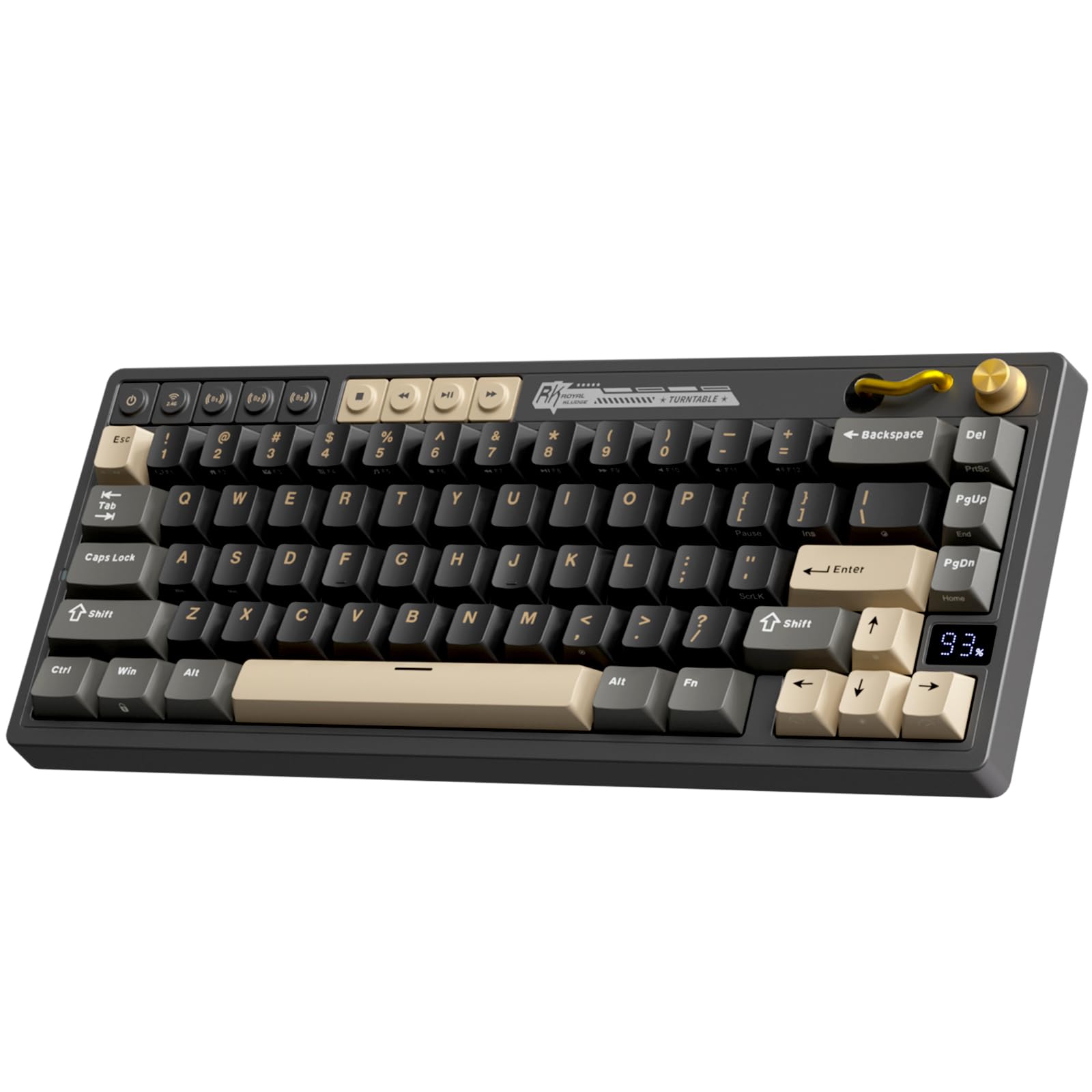
The RK ROYAL KLUDGE M65 is a 65% keyboard that keeps the dedicated arrow keys and adds a premium aluminum volume knob, making it more practical for daily productivity without sacrificing the compact desk footprint. The gasket mount design and sound-damping layers produce a quiet, crisp typing experience that feels more expensive than the asking price. The 2.4GHz wireless connection is stable and low-latency, and the Bluetooth option allows quick switching between up to three devices.
Battery life is a standout feature here—up to 240 hours with RGB off, so even with backlighting enabled, you are looking at weeks between charges. The PBT keycaps are doubleshot and resist shine well, and the included Cream switches are pre-lubed, offering a smooth linear feel with minimal scratchiness out of the box. The hot-swappable PCB lets you swap in any 3- or 5-pin switch to fine-tune the feel.
Some early units reported stiff gasket mounting with less bounce than expected, and the RGB/FN layer controls can feel unintuitive without the software. While the plastic chassis is functional, it does not convey the same heft as metal-framed boards. For a wireless board that balances features, battery life, and a user-friendly layout with arrow keys, the M65 is a strong value proposition.
Why it’s great
- Aluminum volume knob and dedicated arrow keys
- Up to 240 hours battery life with RGB off
- Hot-swappable with pre-lubed Cream switches
Good to know
- Gasket mount is stiffer than some competitors
- Software is needed for full key customization
6. HyperX Alloy Origins 60

The HyperX Alloy Origins 60 is built around a full aircraft-grade aluminum body that gives it a sturdy, premium feel unusual at its price tier. The metal casing keeps the board stable during intense gaming sessions and adds a satisfying weight that resists sliding. HyperX’s custom red linear switches are rated for 80 million keypresses and offer smooth, consistent travel that works well for both gaming and typing.
The doubleshot PBT keycaps are side-printed for secondary functions, keeping the top clean and legible. RGB brightness is a strong suit thanks to the exposed LED design—the lighting is vivid and true-to-color, especially visible through the included alternate spacebar and Esc key. The detachable USB-C cable and three adjustable tilt angles add convenience for travel and ergonomic setup.
The HyperX NGENUITY software allows per-key lighting and macro creation, but users frequently report crashes, profile erasure, and a generally clunky experience. The stabilizers have noticeable lateral rattle that may need aftermarket modding (a common complaint). The board is also not hot-swappable, so you cannot change switches without soldering. If a solid metal build and bright RGB are your priorities, this is a reliable choice despite the software shortfalls.
Why it’s great
- Full aircraft-grade aluminum frame for stability
- Bright RGB with exposed LED design
- Doubleshot PBT keycaps with side-printed functions
Good to know
- NGENUITY software is buggy and unreliable
- Stabilizers may rattle; not hot-swappable
7. Womier WK61 V2

The Womier WK61 V2 is the entry-level champion of the 60% world—a hot-swappable board that ships with linear red switches and multiple layers of sound-dampening foam, including a silicone pad that reduces hollow echoes. The translucent bottom cover diffuses RGB in all directions, creating an underglow effect that looks far more premium than the price suggests. For budget-conscious builders, this is a fantastic starting point.
The included 3-pcs sublimated keycaps let you personalize the look immediately, and the hot-swappable PCB supports standard 3-pin switches, making future upgrades straightforward. The WOMIER software provides macro and RGB customization, though it is not as polished as major brands. The linear red switches are rated for 50 million presses and feel smooth, though they lack the refinement of pre-lubed options.
The build is primarily plastic—lightweight and portable but not as sturdy as metal-frame competitors. Some users report that the USB-C port feels slightly recessed, requiring careful cable insertion. The foam dampening does a respectable job of taming ping and echo, but the stabilizers may rattle without additional modding. For the price, the WK61 V2 delivers hot-swap capability and decent acoustics that outshine many boards at double its price.
Why it’s great
- Hot-swappable PCB for easy switch upgrades
- Multi-layer sound-dampening foam included
- Translucent bottom cover for unique RGB underglow
Good to know
- Plastic build feels lightweight
- Stabilizers may rattle; USB-C port alignment varies
FAQ
Can I use a 60% keyboard without dedicated arrow keys?
What is the difference between a 60% and a 65% keyboard?
How important is hot-swappable support on a 60% keyboard?
Final Thoughts: The Verdict
For most users, the best 60% keyboard winner is the Razer Huntsman Mini because its optical switches deliver a noticeable speed advantage in competitive gaming, and the aluminum build with PBT keycaps ensures long-term durability. If you want wireless flexibility and tournament-grade performance, grab the Logitech G PRO X 60. And for a hot-swappable enthusiast board with top-tier sound dampening, nothing beats the Ducky One 3 White.