
Our readers keep the lights on and the weekend projects moving. As an Amazon Associate, I earn from qualifying purchases.
The difference between a stuttering mess and buttery 144 fps often comes down to a single component: the processor. Picking the right affordable CPU for gaming means balancing clock speed, core count, and platform longevity so every dollar you spend translates directly into higher frame rates, not marketing hype.
I’m Rikta — the co-founder and writer behind FitlyFast. I’ve spent countless hours filtering through benchmark data, real-user thermal reports, and platform upgrade paths to find the processors that deliver the most gaming performance per dollar.
This guide breaks down the top contenders in the affordable cpu for gaming category, focusing only on models that actually deliver smooth 1080p and 1440p gameplay without demanding a second mortgage.
How To Choose The Best Affordable CPU For Gaming
Finding the right balance between price and gaming performance is the central puzzle. You want a chip that won’t bottleneck your graphics card now but also leaves room for future GPU upgrades without forcing a full platform swap.
Understand Real Gaming Performance: Cores vs. Clock Speed
Most games rely heavily on single-threaded performance. A processor with a high boost clock on its primary cores will often outperform a chip with more cores but lower individual speed. Six strong cores with fast cache and a 4.8 GHz+ boost are the sweet spot for gaming. Eight or more cores help with background streaming, but the extra cores rarely raise your average frame rate in a pure gaming scenario.
Platform Longevity and Upgrade Path
Your CPU socket dictates whether you can swap to a faster chip in two years without replacing the motherboard. AMD’s AM5 platform promises multi-generation support, while Intel’s LGA1700 is at the end of its lifecycle. A mid-range board on a new socket costs a bit more upfront but saves hundreds on future upgrades.
Thermal Design Power and Cooler Budget
A chip with a 65W TDP can often be cooled adequately with the bundled stock cooler. Processors pulling 125W or more require an aftermarket tower cooler or an AIO liquid cooler, adding significant cost to the total build. Factor the cooler into your budget, especially if you plan to overclock.
Quick Comparison
On smaller screens, swipe sideways to see the full table.
| Model | Category | Best For | Key Spec | Amazon |
|---|---|---|---|---|
| Intel Core i5-14600KF | Premium Value | Future-proof 1440p gaming | 14 Cores / 5.3 GHz Turbo | Amazon |
| AMD Ryzen 5 7600X | Mid-Range High Boost | AM5 future upgrade path | 5.3 GHz Boost / 6 Cores | Amazon |
| AMD Ryzen 5 5600X | Mid-Range Classic | Budget AM4 DDR4 builds | 4.6 GHz Boost / 35 MB Cache | Amazon |
| INLAND R5 5500 + MSI A520M-A PRO | Entry-Level Combo | First gaming PC build bundle | 4.2 GHz / 6-Core / 19MB Cache | Amazon |
| Micro Center R5 5500 + ASUS TUF A520M | Entry-Level WiFi Combo | Compact mATX with built-in WiFi | 4.2 GHz / 65W TDP / WiFi | Amazon |
| Intel Core Ultra 7 270K | Premium Enthusiast | High-core multitasking & VR | 24 Cores / 5.5 GHz Boost | Amazon |
| Dell Gaming Tower i5-7500 | Renewed Prebuilt | Low-barrier entry with GPU | i5-7500 / GT 1030 / 16GB | Amazon |
| abytespark i7 Prebuilt | Budget Prebuilt | Casual 60 fps gaming | i7-4770 / RX 590 / 16GB | Amazon |
| MSI Codex Z2 R7-8700F | High-End Prebuilt | AAA 1440p/4K out of the box | RTX 5070 / 32GB DDR5 / 2TB | Amazon |
In‑Depth Reviews
1. Intel Core i5-14600KF

The Intel Core i5-14600KF packs 14 cores (6 performance + 8 efficient) into a single LGA1700 package, delivering a blistering 5.3 GHz max turbo frequency that cuts through modern game engines. Real-world users report pairing it with an RTX 3080 for flawless 1440p gaming and heavy multitasking involving Chrome, OBS, and Discord without any frame drops.
This chip supports both DDR4 and DDR5 memory, giving you flexibility on motherboard and RAM costs. The unlocked multiplier allows for overclocking, and reviewers consistently note that a 240mm AIO keeps temperatures well under control even under sustained loads. The lack of integrated graphics (KF suffix) means you must pair it with a dedicated GPU.
BIOS updates are essential for stability on 600-series motherboards, but once updated, the 14600KF runs with rock-solid reliability. For anyone building a mid-range to high-end gaming rig on a budget, this processor offers the best raw performance-per-dollar ratio in the current market.
Why it’s great
- Brilliant single-core performance for high-fps gaming
- Flexible DDR4/DDR5 support saves platform costs
- 14 cores handle streaming and rendering without slowdown
Good to know
- Requires a discrete GPU; no integrated graphics
- Needs a BIOS update on 600-series boards
- Recommended aftermarket cooler or AIO for best performance
2. AMD Ryzen 5 7600X

The Ryzen 5 7600X leverages the AM5 platform and a 5nm process to hit 5.3 GHz boost clocks straight out of the box. Real owners report smooth 1080p and 1440p gaming paired with RTX 4070 Super-class GPUs, and the AM5 socket guarantees an upgrade path to future Ryzen generations without replacing the motherboard.
Built-in AMD Radeon graphics provide display output for basic tasks, though a dedicated GPU is necessary for serious gaming. The 6-core/12-thread configuration handles modern titles effortlessly, and the 38 MB total cache (6 MB L2 + 32 MB L3) ensures quick data access for reduced load times.
The chip runs warm — users see 80-85°C under load with air coolers — so a quality aftermarket cooler is mandatory. The 7600X does not include a stock cooler in the box, so factor that into your total build cost. For gamers who want a modern socket with DDR5 and PCIe 5.0 support, this is the entry point to the AM5 ecosystem.
Why it’s great
- High single-core boost for responsive gaming
- AM5 socket allows future CPU upgrades
- Built-in graphics for troubleshooting and basic display
Good to know
- Runs hot under load; aftermarket cooler required
- No cooler included in the box
- Requires DDR5 RAM which costs more than DDR4
3. AMD Ryzen 5 5600X

The Ryzen 5 5600X has earned its reputation as a gaming legend. With 6 cores, 12 threads, and a 4.6 GHz max boost, it delivers 100+ FPS in titles like Cyberpunk 2077 and Shadow of the Tomb Raider according to verified benchmarks. The bundled Wraith Stealth cooler keeps noise down and temperatures acceptable for a 65W TDP chip.
This processor is built on the mature AM4 platform, which means you can pair it with affordable DDR4 memory and a B550 or X570 motherboard supporting PCIe 4.0. Users consistently report rock-solid stability and power efficiency that beats Intel’s 10th and 11th-gen offerings at similar price points.
The 5600X excels in pure gaming scenarios where single-threaded performance matters most. It is also unlocked for overclocking, though the stock cooler limits headroom. For budget-conscious builders who already own DDR4 RAM or want to spend less on memory, this chip offers an incredible price-to-performance ratio that remains hard to beat.
Why it’s great
- Excellent single-core gaming performance
- Included Wraith Stealth cooler works well at stock
- Low 65W TDP saves on power and cooling costs
Good to know
- No integrated graphics; dedicated GPU required
- DDR4 platform has no future CPU upgrade path
- Stock cooler is adequate but aftermarket boosts overclocking
4. MSI Codex Z2 R7-8700F & RTX 5070

The MSI Codex Z2 comes fully assembled with an AMD Ryzen 7 8700F (8 cores up to 5.0 GHz) and an NVIDIA GeForce RTX 5070 with 12 GB GDDR7 memory. This prebuilt delivers a massive generational leap in ray tracing and rasterization, handling AAA titles at 1440p and 4K without breaking a sweat, as confirmed by users running Frostpunk 2 and demanding sims.
With 32 GB of DDR5 RAM and a 2 TB NVMe SSD, storage and multitasking are future-proofed. The four-system fan configuration (three front intake, one rear exhaust) keeps thermals in check under sustained load, though the fans become audible during intense sessions. The ARGB lighting is customizable via the MSI LED button on the chassis.
Some users experienced SSD failures and Bluetooth issues, but MSI support resolved them through RMA and driver updates. For gamers who want a ready-to-play system with top-tier performance and no assembly required, this prebuilt represents a strong value proposition in the premium segment.
Why it’s great
- RTX 5070 delivers next-gen ray tracing performance
- 32 GB DDR5 and 2 TB SSD for heavy workloads
- Excellent thermal design with four chassis fans
Good to know
- Fans get loud under heavy gaming load
- Bluetooth module may need driver updates
- Premium price tier compared to DIY builds
5. Intel Core Ultra 7 270K

The Intel Core Ultra 7 270K redefines the value ceiling with 24 cores (8 P-cores + 16 E-cores) and a max turbo frequency of 5.5 GHz. This chip competes directly with AMD’s 9800X3D in VR gaming scenarios, achieving 87-90 FPS on the Pimax Crystal Super at 3560×3560 resolution when paired with an RTX 5090, according to user reports.
Built on the LGA1851 socket for Intel 800-series chipsets, it supports PCIe 5.0 and DDR5 memory up to 7200 MT/s. The 125W base power can spike to 250W under maximum turbo, demanding a robust cooler. Owners using large Noctua air coolers or 360mm AIOs report idle temperatures around 38°C and loads staying below 60°C with proper tuning.
The 270K is unlocked for performance tuning on Z-series boards, and early adopters note it sometimes outperforms the flagship 285K in benchmarks while costing significantly less. For serious enthusiasts who need heavy multitasking, rendering, and top-tier gaming, this is the high-end bargain.
Why it’s great
- 24 cores excel at rendering and heavy multitasking
- VR performance rivals top-tier AMD chips
- Unlocked multiplier for enthusiast overclocking
Good to know
- Requires a quality cooler; stock cooling not included
- LGA1851 socket requires new 800-series motherboard
- High power draw under load may need a strong PSU
6. INLAND R5 5500 + MSI A520M-A PRO

This bundle combines the AMD Ryzen 5 5500 (6 cores/12 threads, 4.2 GHz boost) with an MSI A520M-A PRO motherboard, making it a turnkey starter pack for a first gaming PC. The CPU includes the Wraith Stealth cooler with pre-applied thermal paste, and the motherboard supports DDR4 up to 4600 MHz (OC) and PCIe 3.0 for NVMe storage.
Users consistently praise the plug-and-play nature of this combo, noting that it booted immediately with Windows 11 installed in under five minutes. The MSI motherboard features Core Boost for better power delivery and DDR4 Boost for memory stability. Four SATA 6Gb/s ports provide ample storage expansion options.
A minority of buyers encountered a failed POST, but the majority report the bundle performs flawlessly for 1080p gaming. The R5 5500 delivers smooth 100+ FPS in popular titles when paired with a discrete GPU. For the lowest total entry cost into a functional gaming PC, this bundle is a reliable choice.
Why it’s great
- All-in-one CPU and motherboard bundle saves cost
- Pre-applied thermal paste simplifies installation
- MSI board has strong power delivery and audio features
Good to know
- Requires a 4-pin CPU power connector on the board
- Some units may have compatibility issues out of box
- PCIe 3.0 limits top-end NVMe speeds
7. Micro Center R5 5500 + ASUS TUF A520M WiFi

This Micro Center bundle pairs the Ryzen 5 5500 with an ASUS TUF Gaming A520M-PLUS WiFi motherboard in a compact mATX form factor. The board features integrated 802.11ac WiFi and Bluetooth, saving you the cost of a separate adapter. With four memory slots supporting up to 128 GB of DDR4, there is room for future upgrades.
Users report that the motherboard comes with a BIOS ready for the Ryzen 5500 out of the box, eliminating the common compatibility headache. The stock Wraith Stealth cooler is functional but tends to run warm, and several owners recommend a basic tower cooler to improve thermals and reduce noise.
Connectivity is a highlight with multiple USB 3.2 Gen 1 Type-A ports, a USB 3.2 Gen 2 Type-A port, and HDMI/DisplayPort outputs for CPUs with integrated graphics. The main drawback reported is Bluetooth connectivity dropping intermittently. For a budget mATX gaming build with built-in wireless, this combo offers compelling value.
Why it’s great
- Built-in WiFi and Bluetooth save money on adapters
- Compact mATX board fits smaller cases
- Four DDR4 slots support up to 128 GB RAM
Good to know
- Bluetooth connectivity can be unreliable
- Stock Wraith cooler is adequate but warm
- No PCIe 4.0 support for NVMe drives
8. abytespark i7 Prebuilt with RX 590

The abytespark prebuilt packs an Intel Core i7-4770 (3.4-3.9 GHz) with an AMD Radeon RX 590 8GB GDDR5 graphics card, 16 GB of RAM, and a 512 GB SSD — all inside a white sea-view chassis with four RGB fans. Users report it runs games like Fortnite, Call of Duty, and Minecraft at 60+ FPS out of the box, making it a simple entry point for casual gaming.
Setup takes about an hour, and the included RGB keyboard and mouse add a cohesive aesthetic. The chassis has good airflow and keeps CPU temperatures within safe limits during gaming sessions. The motherboard includes USB 3.0 and USB 2.0 ports, plus HDMI and DisplayPort outputs on the GPU.
However, the CPU is a decade-old Haswell architecture (2013), and the B85 chipset lacks NVMe support and TPM 2.0 for Windows 11 compliance. Some users flagged the listing as misleading for these reasons. For the price, it functions as a capable budget gaming rig, but upgrade potential is very limited.
Why it’s great
- Ready-to-play for popular titles at 60+ FPS
- RX 590 8GB handles moderate graphical settings well
- RGB fans and included peripherals for a complete setup
Good to know
- CPU is from 2013; no future upgrade path
- Motherboard lacks NVMe and TPM 2.0 support
- Windows 11 installed via unsupported workaround
9. Dell Gaming Tower i5-7500 (Renewed)
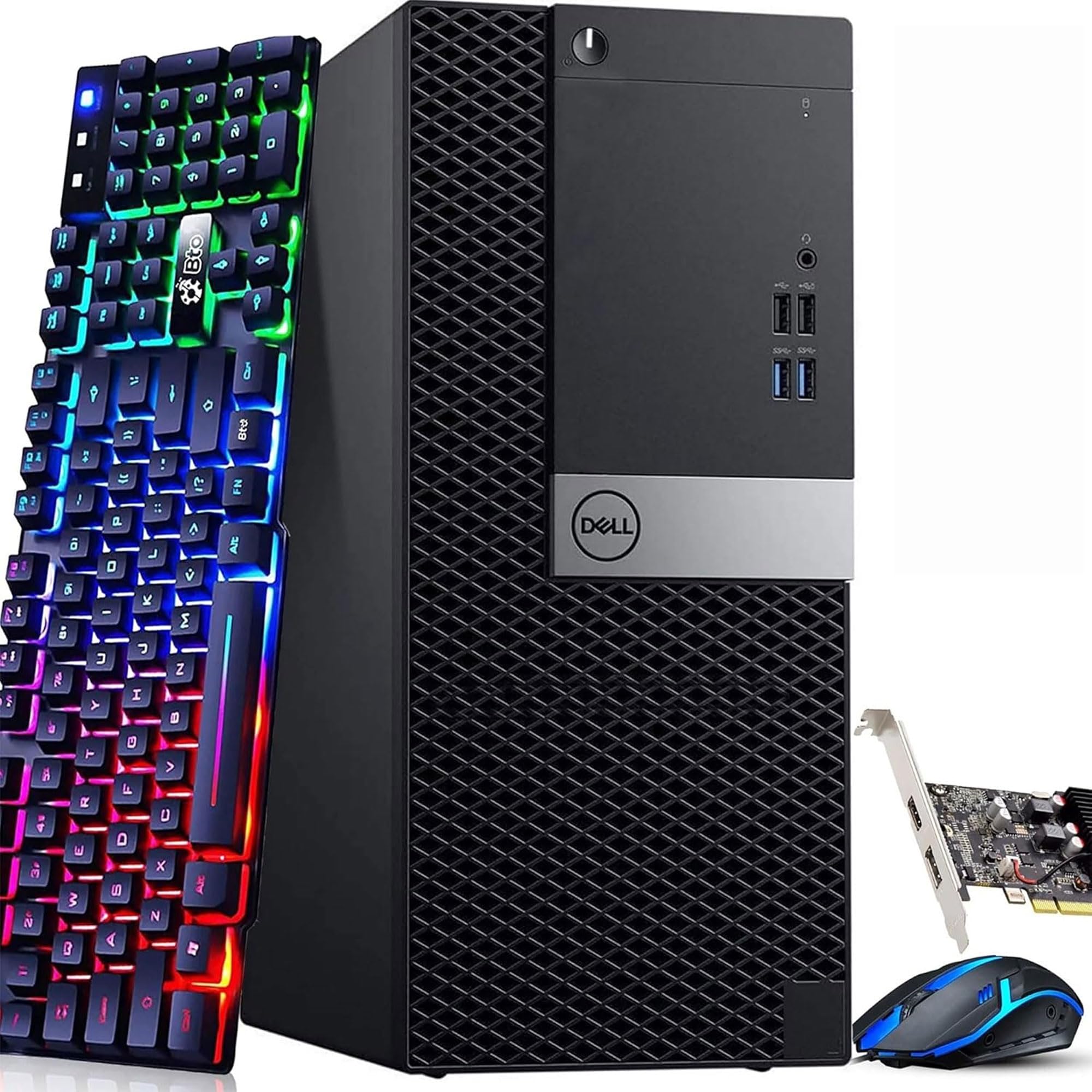
This Dell renewed tower features a 7th-gen Intel Core i5-7500 (3.4 GHz base, 3.8 GHz turbo), 16 GB of DDR4 RAM, a 256 GB SSD, and a GeForce GT 1030 2GB graphics card. It runs Windows 11 Pro and connects via built-in WiFi. Users report it handles World of Warcraft, Sims 4, and Farm Sim smoothly at modest settings.
The included RGB keyboard and mouse add a gaming aesthetic, and the compact tower design fits easily on a desk. Setup is straightforward, and the pre-installed OS eliminates driver headaches. The GT 1030 is an entry-level card that enables casual gaming at 1080p with lowered settings.
Reliability reports are mixed — some units experience crashes, BIOS issues, or random pop-ups requiring restarts. The unlocked CPU and 16GB RAM allow for moderate multitasking, but the GT 1030 will become a bottleneck for newer titles. For someone dipping a toe into PC gaming on a minimal budget, this renewed tower is a low-risk starting point.
Why it’s great
- Complete ready-to-use system with OS and peripherals
- 16GB RAM handles basic multitasking well
- Compact design with built-in WiFi
Good to know
- GT 1030 is entry-level; limited to older titles
- Reliability reports include crashes and boot issues
- 256GB SSD fills quickly with modern games
FAQ
Do I need a separate graphics card with an affordable gaming CPU?
Is a 6-core CPU enough for modern gaming in 2025?
Should I buy a CPU bundle or parts separately?
Does the stock cooler work for a budget gaming CPU?
What is the difference between DDR4 and DDR5 for gaming?
Final Thoughts: The Verdict
For most users, the affordable cpu for gaming winner is the Intel Core i5-14600KF because its 14-core hybrid architecture and high boost clock deliver top-tier gaming performance without breaking the budget. If you want a future-proof AM5 platform with an upgrade path, grab the AMD Ryzen 5 7600X. And for the tightest budget where every component counts, nothing beats the proven value of the AMD Ryzen 5 5600X with its included cooler and rock-solid gaming chops.