
Our readers keep the lights on and the weekend projects moving. As an Amazon Associate, I earn from qualifying purchases.
The jump to a 1440p 240Hz monitor is the single most transformative upgrade a competitive gamer can make — not just for the smoothness, but for the clarity of motion that lets you track targets at the edge of perception. With OLED panels now dominating the landscape, the choice is no longer between speed and image quality; it’s about picking the right sub-0.03ms response time panel that matches your specific GPU, console, and room lighting.
I’m Rikta — the co-founder and writer behind FitlyFast. I’ve spent hundreds of hours analyzing technical specifications, customer reliability reports, and real-world panel performance data across every major 1440p 240Hz monitor on the market today.
This guide breaks down the measurement-backed differences between QD-OLED, WOLED, and high-end IPS panels so you can confidently choose your next 1440p 240hz gaming monitor without confusion or buyer’s remorse.
How To Choose The Best 1440p 240Hz Gaming Monitor
With OLED taking over the premium segment, the choice has shifted from “IPS vs VA” to “QD-OLED vs WOLED” and how well each handles burn-in. Your GPU’s horsepower, the console you use, and the ambient light in your room are now the deciding factors — not just refresh rate numbers.
Panel Type: The OLED Distinction
A QD-OLED (Quantum Dot OLED) panel delivers higher color volume and peak brightness in well-lit rooms but has a slight magenta tint on reflections. A WOLED (White OLED) panel, like the LG and ASUS models, offers deeper near-black uniformity and better handling of text fringing thanks to a different subpixel layout. For pure competitive gaming with HDR on, QD-OLED wins on vibrancy; for mixed use with office work, WOLED is gentler on the eyes.
Adaptive Sync: G-Sync Compatible vs FreeSync Premium Pro
Nearly every 1440p 240Hz OLED now supports both G-Sync Compatible and FreeSync Premium Pro, but the implementation matters. Some panels — particularly non-OLED budget options — exhibit flicker when VRR fluctuates below 60Hz. Verified NVIDIA G-Sync Compatible monitors undergo a stricter certification process, making them safer for RTX users who plan to run demanding titles at frame rates below the monitor’s maximum.
Burn-In Prevention: What Actually Works
All modern OLED gaming monitors include pixel refresh cycles, logo dimming, and screen shift features. The difference lies in thermal management: models with a custom heatsink (ASUS, MSI) or graphene film (GIGABYTE) dissipate heat more effectively, slowing organic material degradation. Without a heatsink, aggressive pixel refresh automation becomes your only defense — prioritize monitors with fanless, heatsink-based cooling if you plan on using the monitor for 8+ hours daily.
Quick Comparison
On smaller screens, swipe sideways to see the full table.
| Model | Category | Best For | Key Spec | Amazon |
|---|---|---|---|---|
| Alienware AW2723DF | Fast IPS | Competitive FPS, budget conscious | 280Hz OC / 1ms GtG IPS | Amazon |
| AOC Agon PRO AG276QZD2 | QD-OLED | HDR gaming, vibrant color | 0.03ms / 1.5M:1 contrast | Amazon |
| LG 27GX704A-B | Glossy WOLED | Eye comfort, mixed use | 1300 nits peak / 0.03ms | Amazon |
| Samsung Odyssey G6 G61SH | QD-OLED | Pantone-accurate color work | 99% DCI-P3 / Glare-Free | Amazon |
| INNOCN 2780s | QD-OLED | Value OLED upgrade | 280Hz / 0.03ms QD-OLED | Amazon |
| ASUS ROG Strix XG27AQDMG | Glossy WOLED | Premium build, anti-flicker | Custom heatsink / 3yr warranty | Amazon |
| MSI MAG 271QPX QD-OLED E2 | QD-OLED | Silent operation, burn-in safety | Heatsink + Graphene film | Amazon |
| Amzfast 49 Inch DQHD | VA Ultrawide | Ultrawide multitasking | 5120×1440 / 32:9 aspect | Amazon |
| CRUA 45 Inch DQHD | VA Ultrawide | Budget ultrawide immersion | 240Hz VA / 3000:1 contrast | Amazon |
| GIGABYTE MO27U2 | 4K QD-OLED | 4K 240Hz dual use | 166 PPI / Graphene film | Amazon |
| ASUS ROG Swift PG27AQDM | WOLED | Pro-tier competitive | GSYNC / Glossy anti-glare | Amazon |
In‑Depth Reviews
1. ASUS ROG Swift OLED PG27AQDM

The PG27AQDM represents the pinnacle of 1440p WOLED engineering for esports. Its glossy anti-glare coating eliminates reflections without the hazing typical of matte finishes, preserving the full color saturation and micro-contrast that make OLED gaming so immersive. The G-SYNC module is native, not just compatible, ensuring flawless VRR operation down to extremely low frame rates.
Motion clarity at 240Hz with 0.03ms response time is effectively perfect — there is no perceivable ghosting or overshoot. The custom heatsink allows fanless operation, meaning zero fan noise during extended sessions. Text rendering on white backgrounds does show slight color fringing, a trait shared by all WOLED panels, but it’s less pronounced here than on QD-OLED rivals.
The premium price reflects the build quality and warranty: ASUS offers three-year burn-in coverage, and the monitor ships with a factory calibration report. If you want the absolute best responsiveness and image quality without compromising on reflection handling, this is the definitive choice for competitive play.
Why it’s great
- Native G-SYNC module eliminates flicker across full VRR range
- Glossy anti-glare coating preserves color punch without reflections
- Fanless custom heatsink design with zero noise
Good to know
- No built-in speakers
- Text fringing slightly visible on white backgrounds at 1440p
- Premium tier pricing requires significant investment
2. MSI MAG 271QPX QD-OLED E2

The MAG 271QPX combines a QD-OLED panel with a graphene film and custom heatsink, achieving fanless dissipation that keeps the panel running cool without active cooling. MSI’s OLED Care 2.0 suite includes pixel shift, panel protect, and taskbar dimming, all configurable through the intuitive OSD. The HDMI 2.1 port supports 1440p at 240Hz with full bandwidth for next-gen consoles.
Color accuracy out of the box is exceptional — the 99% DCI-P3 coverage and True Black HDR 400 certification deliver deep blacks with bright specular highlights. The stand is sturdy but bulky, and the monitor ships with a DisplayPort cable. Some users report the default pixel shift setting is too aggressive, but switching it to “slow” eliminates distraction.
MSI includes a three-year burn-in warranty, giving peace of mind for long ownership. Text clarity is good for a QD-OLED, though not quite as sharp as a high-PPI IPS. For users who value silent operation and robust thermal management in a vibrant QD-OLED package, this is a top-tier mid-range option.
Why it’s great
- Graphene film plus heatsink for fanless, silent cooling
- HDMI 2.1 supports full 240Hz on PS5/Xbox Series X
- Three-year burn-in warranty included
Good to know
- Stand is bulky and takes up desk space
- Pixel shift can be distracting at default speed
- Not as bright as Mini-LED for vivid HDR highlights
3. LG 27GX704A-B UltraGear OLED

The LG 27GX704A-B uses a glossy WOLED panel that achieves 1300 nits peak brightness, making it one of the brightest OLED monitors available. The triple UL certification — Anti-Glare, Flicker-Free, Low Blue Light — means extended gaming sessions cause noticeably less eye strain compared to QD-OLED alternatives. The 1.5M:1 contrast ratio delivers true blacks with zero haloing.
Connectivity includes dual HDMI 2.1 ports and DP 1.4, making it ideal for multi-console setups. The fully adjustable stand supports height, swivel, tilt, and pivot. Some users note that the Black Stabilizer setting needs fine-tuning for OLED newcomers, as the deep blacks can hide shadow details in dark games without adjustment.
The LG lacks Dolby Vision and smart features, keeping the focus purely on gaming performance. Colors are less punchy than QD-OLED but more accurate and easier on the eyes for long sessions. For competitive gamers who prioritize eye comfort and brightness over raw color saturation, this is an outstanding choice.
Why it’s great
- 1300 nits peak brightness for impactful HDR highlights
- Triple UL certification reduces eye strain effectively
- Dual HDMI 2.1 for multi-console setups
Good to know
- Black Stabilizer requires manual calibration for darker games
- No Dolby Vision or smart TV features
- Colors less vivid than QD-OLED alternatives
4. GIGABYTE MO27U2
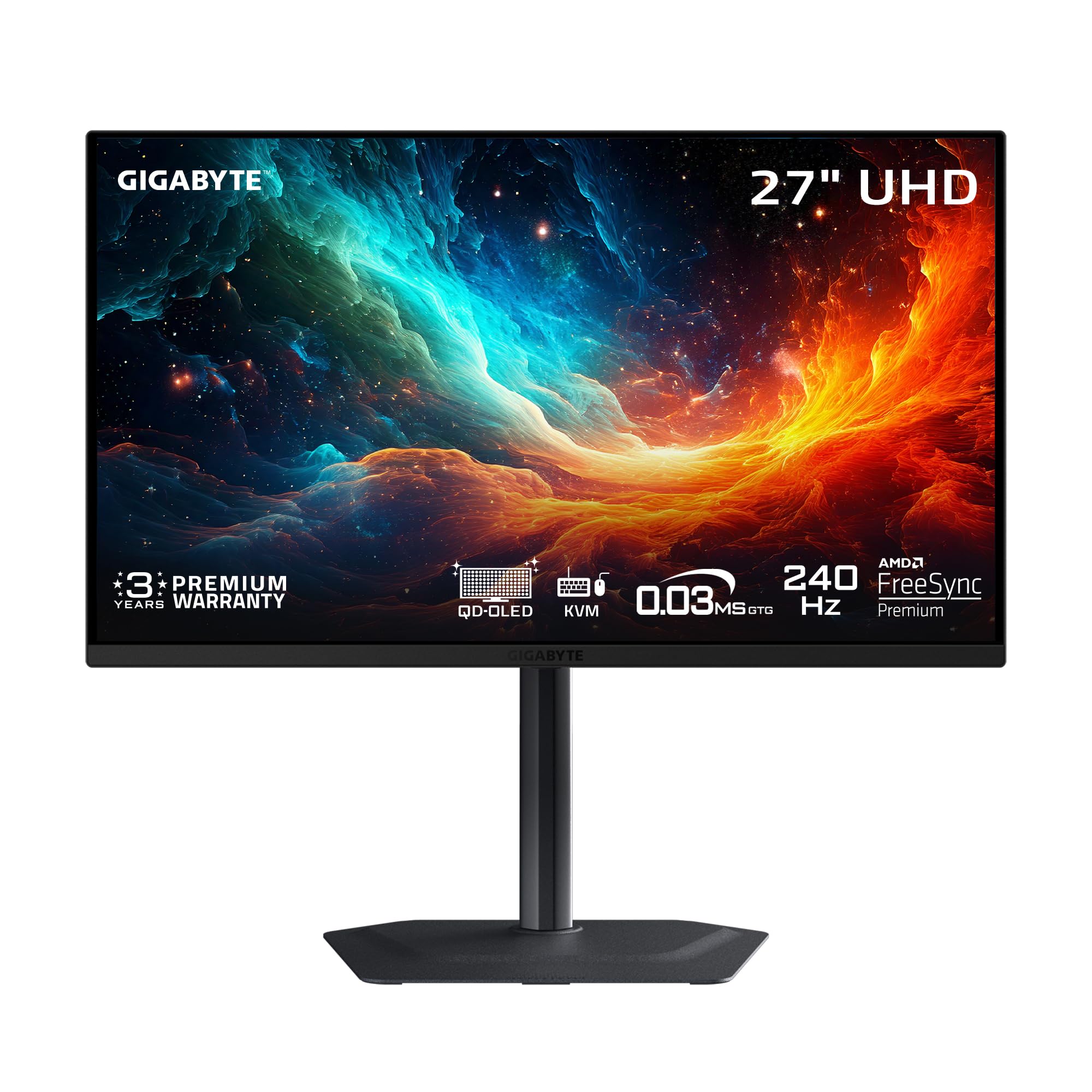
The GIGABYTE MO27U2 pushes the resolution ceiling with a 27-inch 4K UHD QD-OLED panel running at 240Hz — essentially a 1440p monitor for those who also want the option to render at native 4K. The 166 PPI pixel density makes text and fine details razor-sharp, eliminating the text fringing concerns common on 1440p OLEDs. The graphene thermal film combined with four-sided ventilation enables fanless heat dissipation.
GIGABYTE’s AI-based OLED Care algorithm runs in the background, adjusting pixel refresh intervals based on usage patterns. The Type-C KVM feature lets you control two devices with a single keyboard and mouse, a rare convenience in gaming monitors. Color accuracy hits 99% DCI-P3 with 1.5M:1 contrast ratio, and the FreeSync Premium Pro certification ensures smooth VRR across both AMD and NVIDIA GPUs.
The MO27U2 is slightly more expensive than pure 1440p models, but the 4K flexibility makes it a future-proof investment. It lacks DP 2.1, but HDMI 2.1 handles 4K 240Hz without issue. For users who game at 1440p but also work with high-DPI content, this dual-role monitor is unmatched.
Why it’s great
- 166 PPI eliminates text fringing for mixed work/gaming use
- Graphene film for fanless, advanced thermal management
- Type-C KVM for dual-device control
Good to know
- Lacks DP 2.1 for future bandwidth needs
- Premium pricing reflects 4K panel cost
- AI burn-in care requires trust in background algorithm
5. ASUS ROG Strix XG27AQDMG

The XG27AQDMG upgrades the WOLED experience with a third-generation panel that provides brighter full white windows and improved motion clarity. The custom heatsink allows fanless operation, and ASUS’s OLED Anti-flicker technology reduces visible flicker during refresh-rate fluctuations — a known issue on many VRR OLED monitors. The uniform brightness setting ensures consistent luminance levels, eliminating the auto-dimming that annoys some users.
The glossy finish delivers deep blacks with minimal reflection, and the 99% DCI-P3 coverage produces rich, saturated colors. The OSD includes DisplayWidget software for desktop control of monitor settings, a useful feature for switching between presets. Some users report flickering at 240Hz with certain DP cables, which is resolved by switching to a certified DisplayPort cable.
ASUS offers a three-year warranty with burn-in coverage, and the monitor includes two save slots for custom configurations. The lack of built-in speakers is a minor omission but not unexpected for a pure gaming monitor. For users who want the most refined WOLED experience with reliable anti-flicker technology, this is a premium choice.
Why it’s great
- Third-gen WOLED brighter white windows than previous versions
- OLED Anti-flicker eliminates VRR flicker effectively
- Custom heatsink enables silent operation
Good to know
- No built-in speakers
- Some DP cables cause flicker at 240Hz
- Auto-dimming may need manual disabling
6. AOC Agon PRO AG276QZD2

The AOC Agon PRO AG276QZD2 delivers genuine QD-OLED performance at a price that undercuts most rivals by a significant margin. The 101% DCI-P3 color gamut and 1.47 color volume produce vibrant, saturated visuals that make games pop. The 240Hz refresh rate and 0.03ms GtG response time provide buttery-smooth motion with zero ghosting.
The glossy QD-OLED finish offers stunning image quality, but the stand is a weak point — some users find it wobbly during adjustment. The built-in speakers are adequate for casual use but lack bass. The OSD is simple and straightforward, and the AOC G Menu app provides convenient desktop control. Factory calibration reports are included, confirming color accuracy.
AOC has updated the firmware on newer revisions to fix HDR washout issues that plagued early units. The monitor supports both G-Sync Compatible and FreeSync Premium Pro. For buyers who want the QD-OLED experience without the premium markup, this represents exceptional value — just plan for a VESA mount if you dislike instability.
Why it’s great
- Best price-to-performance ratio for QD-OLED
- 101% DCI-P3 color gamut for vibrant HDR gaming
- Factory calibration report included
Good to know
- Stand feels wobbly during height adjustment
- Built-in speakers are underwhelming
- Brightness peaks around 240 nits in SDR
7. Samsung Odyssey OLED G6 G61SH

The Samsung Odyssey G6 G61SH is Pantone Validated, reproducing over 2100 lifelike colors and 110+ skin tone shades accurately. This makes it a rare gaming monitor that also serves as a reliable color reference for image editing and content creation. The QD-OLED panel delivers 99% DCI-P3 coverage with a 1,000,000:1 contrast ratio.
Samsung’s OLED Safeguard technology uses a thermal modulation system to prevent burn-in, and the Glare-Free coating reduces reflections without the haze of matte screens. The ergonomic stand supports height, pivot, tilt, and swivel adjustments. The 240Hz refresh rate and 0.03ms response time with FreeSync Premium provide smooth gameplay, though the maximum brightness at HDR peaks is lower than the LG WOLED at 400 nits.
Some users note that text clarity is slightly worse than IPS, a common QD-OLED trait, but not a significant issue at normal viewing distances. The monitor requires constant power for pixel refresh cycles, so unplugging it can cause window rearrangement. For creative professionals who game, the Pantone validation is a unique selling point.
Why it’s great
- Pantone Validated for accurate color reproduction
- OLED Safeguard thermal system prevents burn-in
- Glare-Free coating reduces reflections effectively
Good to know
- HDR peak brightness is lower than premium competitors
- Text clarity slightly worse than IPS panels
- Unplugging monitor disrupts window arrangement
8. INNOCN 2780s

The INNOCN 2780s brings QD-OLED to a very accessible price point, offering a 280Hz overclocked refresh rate and 0.03ms response time. The white chassis design stands out from the sea of black gaming monitors, and the built-in speakers provide passable audio for casual gaming. HDMI 2.1 connectivity ensures full compatibility with modern consoles.
The image quality is genuinely impressive for the price — deep blacks, vibrant colors, and smooth motion that rivals monitors costing twice as much. The adjustable stand supports height, tilt, and pivot adjustments for ergonomic comfort. However, the speakers are notably weak, and the dark/light picture adjustment options are limited compared to premium models.
INNOCN offers lifetime technical support with a free replacement warranty within 30 days. The monitor lacks advanced OLED care features like custom heatsinks or graphene film, so burn-in management relies on pixel refresh cycles. For budget-conscious buyers who want the QD-OLED experience, this is the entry point.
Why it’s great
- QD-OLED at the most accessible price point
- 280Hz overclocked refresh rate for competitive edge
- HDMI 2.1 supports full console bandwidth
Good to know
- Limited picture adjustment controls
- Weak built-in speakers
- No dedicated heatsink for thermal management
9. Amzfast 49 Inch DQHD

The Amzfast 49 Inch DQHD is a 32:9 ultrawide VA panel with 5120×1440 resolution, effectively replacing two QHD monitors. The 1500R curvature wraps around your vision for immersive gaming in racing sims, flight sims, and FPS titles. The 120Hz refresh rate (up to 200Hz via DP 1.4) and MPRT 1ms response time provide adequate motion handling for casual to mid-tier competitive play.
The 120% sRGB color gamut and 3000:1 contrast ratio deliver good SDR visuals, though HDR performance is limited by the 350 nits peak brightness. The PIP/PBP feature lets you display two separate sources simultaneously, making it a productivity powerhouse. The stand includes height, tilt, and swivel adjustments, and the built-in headphone holder is a nice ergonomic touch.
Some users report reverse ghosting with MPRT enabled, so disabling it is recommended. The VA panel exhibits typical black smearing at high refresh rates, noticeable in dark scenes. For users who prioritize ultrawide screen real estate over OLED blacks and speed, this is a solid mid-range option.
Why it’s great
- Massive 32:9 ultrawide replaces dual monitor setup
- PIP/PBP for multitasking with two devices
- Good 120% sRGB coverage for SDR content
Good to know
- MPRT causes reverse ghosting; best disabled
- VA panel black smearing in dark scenes
- Low peak brightness limits HDR impact
10. CRUA 45 Inch DQHD
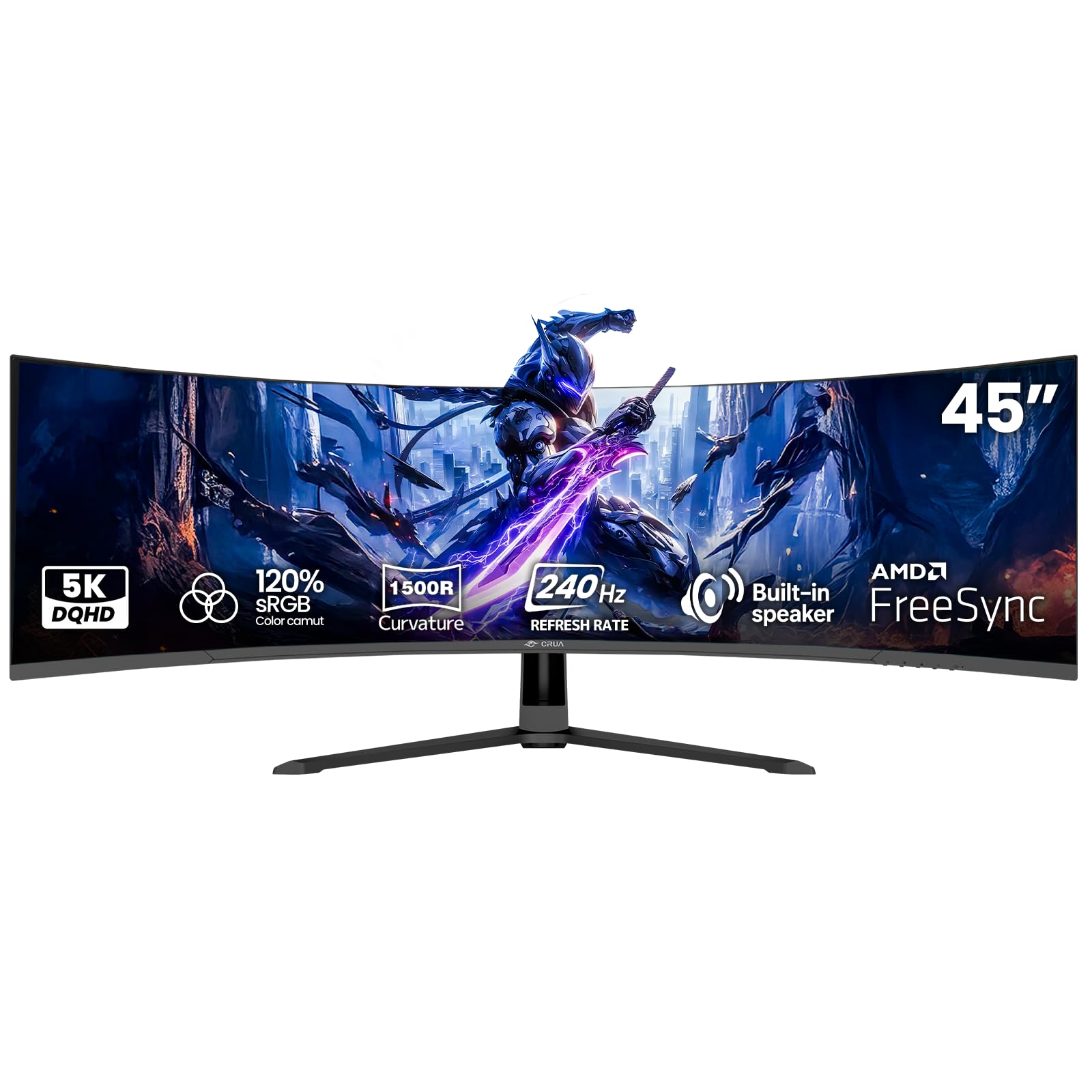
The CRUA 45 Inch DQHD offers a 45-inch 32:9 VA panel with 5120×1440 resolution and a true 240Hz refresh rate — a rare combination at this size and price. The 1500R curvature and 3000:1 contrast ratio provide immersive visuals for racing, flight sims, and cinematic single-player games. The 120% sRGB coverage delivers rich colors for SDR content.
Connectivity includes HDMI 2.1 and DP 1.4, allowing the full 240Hz bandwidth on compatible GPUs. The built-in speakers are functional for casual use, and the blue light filter at its strongest setting significantly reduces eye fatigue. The stand offers limited ergonomics, and the power adapter has been reported to emit a high-pitched whine in some units.
HDMI caps at 144Hz, so DisplayPort is required for the full 240Hz experience. Color accuracy out of the box needs manual calibration, and the anti-glare coating causes some dullness in well-lit rooms. For budget buyers who want a massive ultrawide with high refresh, the CRUA is a gamble that pays off for most but has quality control risks.
Why it’s great
- 45-inch 240Hz ultrawide at a very low price
- HDMI 2.1 for high-refresh console compatibility
- Blue light filter reduces eye fatigue effectively
Good to know
- Potential power adapter whine in some units
- HDMI limited to 144Hz; DP required for 240Hz
- Limited stand adjustability
11. Alienware AW2723DF

The Alienware AW2723DF uses a Fast IPS panel with a native 240Hz refresh rate overclockable to 280Hz, making it one of the fastest IPS monitors available. The 1ms GtG response time ensures minimal ghosting, and the NVIDIA G-Sync Compatible certification guarantees tear-free gameplay. The IPS Nano Color technology delivers 95% DCI-P3 coverage for vibrant colors.
The Legend 2.0 design in Lunar Light is distinctive, with AlienFX lighting, 360-degree ventilation, and an adjustable stand with height, swivel, tilt, and pivot. The monitor includes both DP and HDMI inputs, though HDMI is limited to 144Hz. The 450 nits brightness provides solid HDR 600 performance, though it lacks the deep blacks of OLED panels.
Some backlight bleed is common on IPS panels, and the OSD interface is clunky. The matte coating reduces reflections but also slightly dulls the vibrant colors. For competitive FPS players on a budget who prioritize raw speed and are willing to sacrifice true blacks, the AW2723DF is the best IPS option before stepping up to OLED.
Why it’s great
- 280Hz overclocked refresh rate for competitive edge
- G-Sync Compatible certification for smooth VRR
- Iconic Legend 2.0 design with full ergonomic stand
Good to know
- No HDMI 2.1; limited to 144Hz over HDMI
- IPS backlight bleed is noticeable on dark scenes
- Matte coating slightly desaturates colors
FAQ
Will a 1440p 240Hz monitor work with my RTX 3060 or console?
How noticeable is the text fringing on QD-OLED vs WOLED?
Final Thoughts: The Verdict
For most users, the 1440p 240hz gaming monitor winner is the ASUS ROG Strix XG27AQDMG because it delivers the best balance of third-gen WOLED brightness, active anti-flicker technology, and a robust custom heatsink for burn-in prevention. If you want the absolute best competitive performance with native G-Sync, grab the ASUS ROG Swift PG27AQDM. And for the most vibrant QD-OLED colors at a mid-range price, nothing beats the AOC Agon PRO AG276QZD2.