
Our readers keep the lights on and the weekend projects moving. As an Amazon Associate, I earn from qualifying purchases.
Finding a graphics card that doesn’t gut your budget while still delivering smooth 1080p gaming, stable VR, or efficient workstation tasks is the single hardest part of any PC build. The entry-level and mid-range market is flooded with competing architectures—NVIDIA’s Ampere and Blackwell, AMD’s RDNA 3—each with different VRAM capacities, bus widths, and power profiles that dramatically change real-world performance for nearly identical price tags.
I’m Rikta — the co-founder and writer behind FitlyFast. After analyzing hundreds of hours of benchmark data, customer reviews, and spec sheets for the current affordable graphics card market, I’ve separated the genuine value picks from the overhyped upgrades.
Whether you are upgrading an old office PC for light gaming, building a new budget gaming rig, or just need more GPU power for creative apps, this guide breaks down the best options. Here is my deep-dive into finding the right affordable video card for your specific needs and build.
How To Choose The Best Affordable Video Card
Selecting a budget GPU requires looking past the marketing numbers. Core clock speeds are less important than total shader units, memory bandwidth, and the power delivery your existing system can handle. Here are the three factors that will determine if your new card actually performs in your rig.
VRAM Capacity and Memory Bus
For 1080p gaming in 2024 and beyond, 6GB of VRAM is the absolute floor. Many modern titles will push past 4GB at medium textures, meaning a 6GB card like the RTX 3050 is adequate, while an 8GB card like the RX 7600 or RTX 5060 gives you breathing room for high-resolution texture packs. The memory bus width—96-bit on most 6GB RTX 3050s versus 128-bit on the 8GB RX 7600—directly affects how much data the GPU can move at once, impacting performance at higher resolutions and with anti-aliasing enabled.
Power Requirements and Form Factor
This is the most overlooked spec by first-time buyers. Many affordable cards (especially the RTX 3050 6GB variants) draw under 75 watts and require no external power cable, making them drop-in upgrades for Dell Optiplex or HP office PCs. Other cards, such as the RX 7600, require a single 8-pin PCIe power connector and a recommended 550W power supply. Measure your case clearance—some dual-fan cards are over 11 inches long and won’t fit small form factor chassis.
Architecture Features: DLSS, Ray Tracing, and Drivers
NVIDIA’s RTX line offers DLSS (Deep Learning Super Sampling) which can boost frame rates in supported games by rendering at a lower resolution and upscaling. AMD’s RDNA 3 architecture offers its own upscaling via FSR. Real-time ray tracing on budget cards is still a heavy lift—expect to lower settings significantly if you enable it. Linux users should note that AMD’s open-source drivers (Mesa) offer better out-of-box plug-and-play than NVIDIA’s proprietary driver stack, which is a major factor for workstation builds.
Quick Comparison
On smaller screens, swipe sideways to see the full table.
| Model | Category | Best For | Key Spec | Amazon |
|---|---|---|---|---|
| ASUS RTX 5060 Dual | Premium | 1080p High-Refresh + DLSS 4 | 8GB GDDR7 / 2565 MHz Boost | Amazon |
| GIGABYTE RTX 5060 Gaming OC | Premium | Ray Tracing on a Budget | 8GB GDDR7 / Triple Fan Cooling | Amazon |
| ASRock RX 7600 Challenger | Mid-Range | Linux Gaming / Value 1080p | 8GB GDDR6 / 2695 MHz Boost | Amazon |
| XFX Speedster RX 7600 | Mid-Range | VR Gaming / Silent Builds | 8GB GDDR6 / Dual Fan Silent Cooling | Amazon |
| Yeston RTX 3050 | Entry-Level | Small Form Factor / Office PCs | 6GB GDDR6 / Low Profile 2.68″ | Amazon |
| MAXSUN RTX 3050 LP | Entry-Level | SFF Builds / No External Power | 6GB GDDR6 / 6.65″ Low Profile | Amazon |
| MSI RTX 3050 Ventus 2X | Entry-Level | Drop-in OEM Upgrade | 6GB GDDR6 / No External Power | Amazon |
| GIGABYTE RTX 3050 Windforce | Entry-Level | Quiet 1080p / Media Center | 6GB GDDR6 / Dual Windforce Fans | Amazon |
| MSI RTX 3050 Ventus 6G OC | Entry-Level | Basic ML / Budget Builds | 6GB GDDR6 / 1.49 GHz Clock | Amazon |
In‑Depth Reviews
1. ASUS Dual NVIDIA GeForce RTX 5060 8GB GDDR7 OC Edition

The ASUS Dual RTX 5060 represents the new baseline for what an affordable video card can achieve. Powered by NVIDIA Blackwell architecture and GDDR7 memory across a 128-bit bus, this card delivers rasterization performance that rivals previous-generation xx70-class cards like the RTX 3070. The 8GB frame buffer, while modest, is enough for high-texture 1080p gaming and respectable 1440p at medium settings.
Its 2.5-slot Axial-tech fan design with 0dB technology keeps acoustics low under light loads, and the lack of RGB lighting makes it a stealthy choice for SFF enthusiast builds. The factory OC mode pushes boost clocks to 2565 MHz, and the 150W TDP means it stays efficient even under sustained gaming loads. Reviewers consistently report stable performance with no crashes across a variety of modern titles including Fortnite and Cyberpunk 2077.
This is the most future-proof option among today’s affordable video cards, thanks to DLSS 4 support and PCIe 5.0, but users wanting more than 8GB of VRAM for 4K texture packs will need to step up to a higher-tier model. For pure 1080p high-refresh value, nothing in this price bracket competes.
Why it’s great
- GDDR7 memory offers massive bandwidth boost over GDDR6
- DLSS 4 support for next-gen upscaling and frame gen
- Efficient 150W TDP runs cool and quiet
Good to know
- 8GB VRAM limits ultra texture settings in some AAA titles
- Requires PCIe power connector; not for OEM office PCs
2. GIGABYTE GeForce RTX 5060 Gaming OC 8G
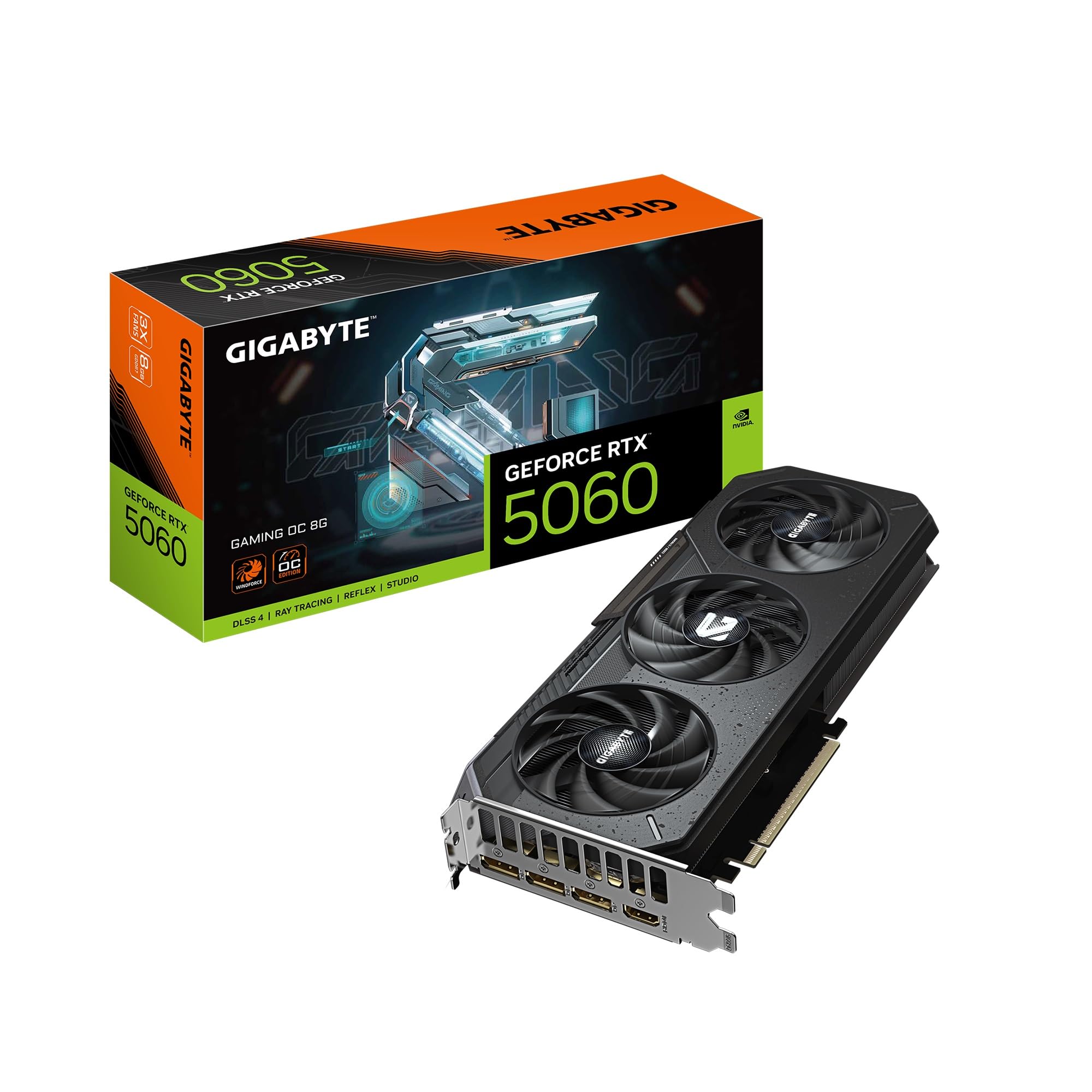
The GIGABYTE RTX 5060 Gaming OC takes the same Blackwell GPU and wraps it in an overbuilt triple-fan Windforce cooling system that keeps temperatures well under 60°C under load. This is the card to pick if you plan on running ray-traced titles like Cyberpunk 2077 at 1080p ultra—real-world benchmarks show stable frame rates with path tracing enabled, something no previous affordable video card in this tier could claim.
The 8GB GDDR7 memory on a 128-bit bus is identical to the ASUS model, but GIGABYTE’s higher boost clock (2595 GHz in specifications, though likely a spec typo for 2595 MHz) and superior cooling headroom make it a better candidate for sustained workloads. The card also supports PCIe 5.0 and DLSS 4, ensuring compatibility with the latest motherboards and upscaling tech. Reviewers note it is compact for a triple-fan card and whisper-quiet during gaming sessions.
One reviewer specifically highlighted handling Cyberpunk 2077 at ultra settings with ray tracing stably, which is remarkable for this price point. However, the same 8GB VRAM limitation applies—users attempting 4K ray tracing will hit a wall. This is the best mid-range option for gamers who want RT effects without jumping to the xx70 tier.
Why it’s great
- Triple-fan Windforce cooler keeps temps under 60°C under load
- Sustained ray tracing performance at 1080p is class-leading
- PCIe 5.0 ready for future motherboard upgrades
Good to know
- 8GB VRAM is insufficient for seamless 4K ray tracing
- Larger 11-inch length may not fit compact cases
3. ASRock Radeon RX 7600 Challenger 8GB OC

The ASRock RX 7600 Challenger is the volume king of affordable video cards right now. With 8GB of GDDR6 on a full 128-bit bus and a factory boost clock of 2695 MHz, it matches or beats the RTX 3050 and 4060 in pure rasterization across most 1080p titles. The RDNA 3 architecture brings hardware ray tracing, though performance here trails NVIDIA’s RT cores significantly.
Where this card truly excels is Linux compatibility. Multiple reviewers confirm plug-and-play operation on Ubuntu and Arch Linux with Mesa drivers—no proprietary driver headaches. The 0dB Silent fan mode stops the fans entirely under low load, making this one of the quietest options in its class for productivity and light desktop use. It requires a single 8-pin power connector and a 550W PSU, but the dual-fan cooler keeps temperatures well in check.
The only real trade-off is ray tracing performance and DLSS—AMD’s FSR is good but not as widely supported. For pure 1080p gaming value without caring about RT effects, this card is a steal. It also handles 1440p on older titles and esports shooters comfortably at 100+ FPS.
Why it’s great
- 8GB VRAM on full 128-bit bus handles modern textures well
- Excellent Linux driver support with Mesa out of the box
- 0dB fan mode provides dead-silent operation at idle
Good to know
- Ray tracing performance trails NVIDIA cards in this bracket
- Requires single 8-pin PCIe power (not slot-powered)
4. XFX Speedster SWFT210 Radeon RX 7600

The XFX Speedster SWFT210 offers the same RX 7600 RDNA 3 core as the ASRock but with a different cooling solution and a slightly lower boost clock of 2655 MHz. It is a hair quieter than the ASRock under load due to a refined dual-fan shroud design, making it a top pick for HTPC or bedroom gaming rigs where fan noise is a dealbreaker.
VR performance is where this card punches above its weight. Verified reviews show it running Half-Life Alyx, Assetto Corsa, and Project Cars 2 at high settings without stuttering. For users switching from NVIDIA on Linux, the XFX model is reported as a seamless replacement—no driver issues, all three display outputs worked instantly. The metal backplate adds structural rigidity and helps with passive cooling.
Like all RX 7600s, this card is not designed for high-refresh 1440p or sustained ray tracing, but it is an excellent upgrade from older GPUs like the GTX 1650 Super or RX 580. The single 8-pin power requirement is manageable for most mid-range PSUs. For budget VR rigs and quiet 1080p gaming, it is a strong contender.
Why it’s great
- Excellent VR compatibility with stable high-setting performance
- Near-silent operation under load for quiet builds
- Linux plug-and-play with full display support
Good to know
- Requires driver update initially to avoid thermal/throttle issues
- Not suitable for high-resolution or high-FPS 1440p gaming
5. Yeston RTX 3050 6GB Low Profile

The Yeston RTX 3050 is the go-to affordable video card for anyone resurrecting a Dell Optiplex, HP EliteDesk, or similar small form factor office PC. At just 6.3 inches long and 2.68 inches wide, it fits into cases that reject standard-length GPUs. It draws all power from the PCIe slot (under 75W), meaning no PSU upgrade is needed for older systems with weak power supplies.
Performance is adequate for 1080p gaming at medium-high settings in titles like Fortnite, Valorant, and CS2, achieving around 60 FPS. The GA107-325 core features 2304 shader units and a core frequency of 1470 MHz boost. Buyers have successfully paired this card with Optiplex 3070 and 3050 SFF models, noting that case ventilation is critical as the card lacks a dedicated exhaust fan.
The major concern is build quality consistency—one reviewer reported a fan failure after two months and pointed out that returning the card to the Chinese seller was expensive. However, for the unique niche of SFF dorm-room PCs and budget office gaming builds, no other card offers this combination of low-profile dimensions and RTX feature set.
Why it’s great
- Fits nearly all SFF office cases including Optiplex 3050/3070
- Slot-powered, no external PCIe cable needed
- Provides RTX 3050 performance in a tiny footprint
Good to know
- Fan reliability reported as inconsistent by some users
- Runs hot (77°C max) under load; needs good case airflow
6. MAXSUN GeForce RTX 3050 6GB Low Profile

The MAXSUN RTX 3050 LP is a direct competitor to the Yeston in the ultra-SFF space, featuring nearly identical dimensions (6.65 inches) and the same Ampere GA107-325 core. It is slightly more expensive but comes from a brand with a slightly better reputation for warranty support (1-year included). It also includes a low-profile bracket adapter in the box.
This card is specifically built for small form factor workstations running 3D design software like SolidWorks. Verified reviews confirm it works with registry tweaks to enable RealView, providing smooth 100% stable control for CAD modeling. For gamers, it pushes 80+ FPS in Fortnite and Warzone at 1080p medium, and a Furmark score over 3000 confirms solid thermal performance within the 77W power envelope.
The trade-off is acoustics—the single fan is audible under gaming loads, and the card can cause the CPU fan to ramp if case airflow is poor. It is not ideal for open-air test benches or silent builds. But for the niche of upgrading compact office PCs into functional gaming or CAD machines, this is a top-tier affordable video card choice.
Why it’s great
- Includes low-profile bracket; fits Optiplex 3060 SFF perfectly
- Works with CAD software (SolidWorks RealView compatible)
- No external power required; runs on slot power only
Good to know
- Loud under gaming load due to small single fan
- Limited to 1080p medium settings for modern games
7. MSI Gaming RTX 3050 Ventus 2X 6G OC

The MSI RTX 3050 Ventus 2X is the standard-bearer for entry-level affordable video cards. Drawing only 70W from the PCIe slot with no external power needed, it is the safest upgrade path for anyone with an OEM prebuilt like an HP Victus or Dell Inspiron. The dual-fan Ventus cooler keeps the card under 62°C under full load, and the fans are near-silent at idle.
Gaming performance is solid for 1080p. Users report Cyberpunk 2077 at 50-60 FPS on high settings and over 100 FPS on medium. Ray tracing is technically supported but not recommended—expect single-digit FPS gains if you enable it. The card includes DLSS upscaling, which helps maintain smooth frame rates in supported titles. It supports up to 8K output via the DP and HDMI 2.1a ports.
The 6GB VRAM on a 96-bit bus is the main limitation—some modern games will stutter if textures are maxed out. Additionally, the MSRP could be lower given the card is two generations old. But for its convenience and compatibility with older systems, it remains a top seller. One reviewer even uses it for Unraid server transcoding, proving its versatility beyond gaming.
Why it’s great
- 70W TDP with no external power is ideal for OEM PC upgrades
- Very quiet under load with dual-fan MSI cooling
- Good 1080p performance with DLSS support
Good to know
- 6GB VRAM and 96-bit bus limit high-texture modern games
- Ray tracing performance is too weak to be usable
8. GIGABYTE GeForce RTX 3050 WINDFORCE OC V2 6G

The GIGABYTE WINDFORCE OC V2 is essentially the same 96-bit 6GB RTX 3050 dressed in GIGABYTE’s dual-fan Windforce cooling shroud. It runs slightly cooler than the MSI Ventus due to larger fan blades, and the factory OC pushes boost speeds to 1477 MHz. It is a direct competitor to the MSI model, with nearly identical dimensions (7.5 inches) and power requirements.
The real selling point here is the noise profile—reviewers consistently call it “best RTX card with no external power connection.” It fits in media center PCs where silence is paramount, and the lack of RGB means no light pollution in living room setups. The HDMI 2.1a output supports 4K 120Hz for HTPC use, though the GPU itself is not powerful enough to game at 4K.
This card is best viewed as a high-end media accelerator or a drop-in upgrade for existing 2GB VRAM office PCs. Several buyers noted massive improvements in desktop smoothness and video playback after upgrading from integrated graphics. Gaming performance is identical to other RTX 3050 6GB cards—good for 1080p medium, not for ray tracing or high-refresh monitors.
Why it’s great
- Very quiet for a slot-powered GPU; ideal for HTPCs
- HDMI 2.1a supports 4K 120Hz output for media use
- Easy plug-and-play upgrade from older 2GB cards
Good to know
- 6GB VRAM and 96-bit bus struggle with modern game textures
- Not suitable for gaming above 1080p medium settings
9. MSI GeForce RTX 3050 Ventus 2X 6G OC (B0CSPNYB42)
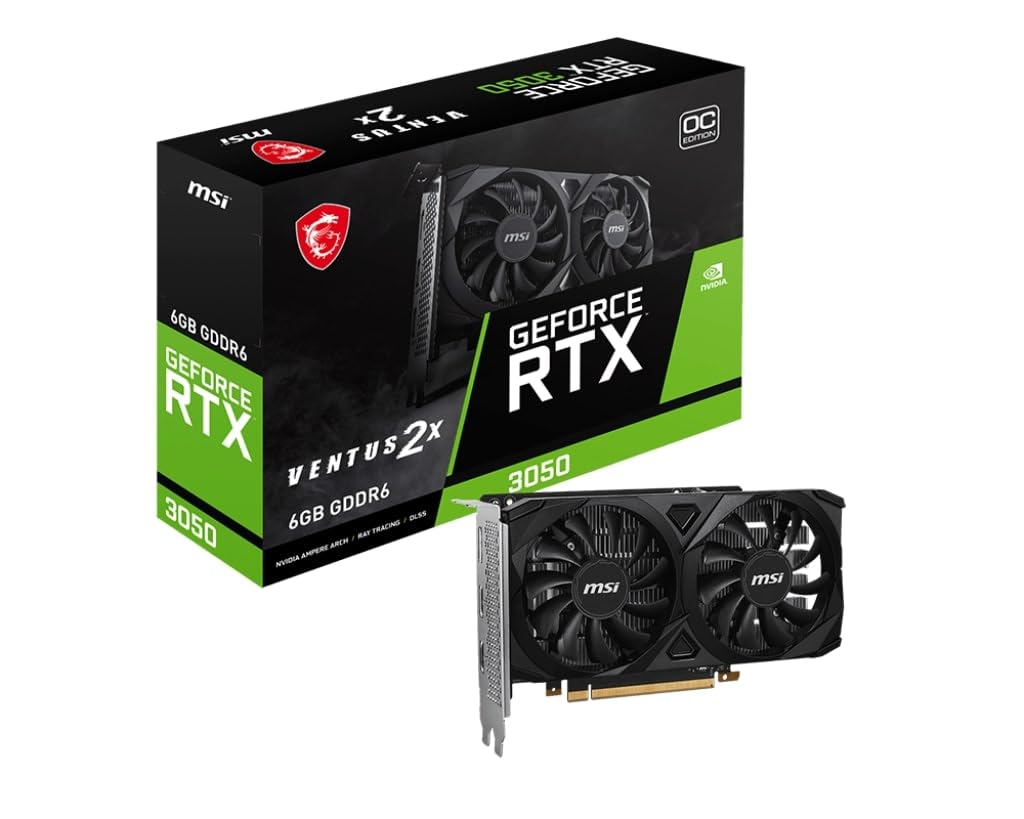
This is a separate SKU of the same MSI Ventus 2X design, listed at a slightly different price point but sharing the same core hardware: 6GB GDDR6, 96-bit bus, and slot-powered operation. The key difference noted by buyers is that this version fits extremely well into HP Pavilion TP-01 cases, where the low-profile design cleared tight PCIe slot clearance and RAM heat spreaders without issue.
Performance feedback highlights its use beyond gaming. One reviewer uses it for basic machine learning tasks within an Immich server, successfully loading smaller models for auto-complete functions in VS Code. This shows the card’s versatility for entry-level AI inference workloads, not just gaming. It is also a popular choice for golf simulator apps like GSPro, where it provides the necessary graphics horsepower for 1080p projection.
Like all RTX 3050 6GB cards, it is not a powerhouse. Users wanting to play modern AAA titles at high settings will be disappointed. But for budget gaming builds, office PC upgrades, and light ML workloads, it is the most cost-effective way to get discrete GPU performance with RTX feature support.
Why it’s great
- Fits tight OEM chassis like HP Pavilion TP-01 with no issues
- Capable of basic machine learning inference tasks
- Slot-powered design works with any existing PSU
Good to know
- 6GB VRAM limits modern gaming to 1080p medium settings
- Not suitable for ray tracing or high-refresh gaming
FAQ
Can I use an affordable video card in a Dell Optiplex without upgrading the power supply?
Is 6GB of VRAM enough for 1080p gaming in 2025?
Which affordable video card is best for Linux compatibility?
Final Thoughts: The Verdict
For most users, the affordable video card winner is the ASUS RTX 5060 Dual because it combines GDDR7 memory, DLSS 4, and excellent 1080p performance at a price that crushes previous-gen competition. If you want the best raw value for gaming without ray tracing, grab the ASRock RX 7600 Challenger for its 8GB VRAM and Linux-friendly drivers. And for upgrading an old office PC into a light gaming machine, nothing beats the slot-powered simplicity of the MSI RTX 3050 Ventus 2X.