
Our readers keep the lights on and the weekend projects moving. As an Amazon Associate, I earn from qualifying purchases.
If your home network feels sluggish even after upgrading your internet plan, the bottleneck likely lives in your switch. Moving from standard Gigabit to a 2.5GB switch instantly multiplies your wired throughput, making file transfers, gaming, and NAS access feel snappier without replacing every cable in your walls. The key is picking the right multi-gig hub that matches your device mix, port count, and tolerance for complexity.
I’m Rikta — the co-founder and writer behind FitlyFast. I’ve spent hundreds of hours analyzing multi-gig networking hardware, comparing real-world switching capacity, thermal performance, and feature sets across the leading brands so you don’t have to guess which switch actually delivers on its promise.
In this guide, I break down the top contenders across port counts, management styles, and silent operation, helping you confidently choose the best 2.5gb switch for your home lab or office upgrade.
How To Choose The Best 2.5GB Switch
Upgrading to a 2.5GB switch is one of the most cost-effective ways to unshackle a modern home network. These switches sit at the sweet spot above Gigabit and below 10-Gigabit, offering five times the bandwidth of standard Ethernet without the heat, noise, or cable requirements of higher speeds. The choices come down to port count, management features, and build quality.
Port Count and Layout
Five-port switches are ideal for small setups—connecting a gaming PC, NAS, and Wi-Fi access point. Eight-port models give you breathing room for future devices and eliminate the need for daisy-chaining. Pay attention to the physical layout of ports: side-by-side rows can make cable changes fiddly, while staggered or front-facing designs keep things accessible in tight media cabinets.
Management: Unmanaged vs. Easy vs. Fully Managed
Unmanaged switches are true plug-and-play—no configuration, no fuss. They are perfect for users who just need more ports. Easy managed switches (like TP-Link’s Omada line) add VLAN support and loop prevention through a simple web interface without requiring a full IT certification. Fully managed switches offer deep control over QoS, IGMP snooping, and link aggregation, but are overkill unless you are segmenting traffic in a homelab or small office.
Build Quality and Thermal Design
Metal housing dissipates heat far more effectively than plastic, which is critical in a fanless design. Look for switches with a rugged metal chassis if you plan to run multiple ports near capacity for extended hours. Heat sinks integrated into the casing help maintain stable throughput without active cooling, keeping your network silent and your gear cool.
Quick Comparison
On smaller screens, swipe sideways to see the full table.
| Model | Category | Best For | Key Spec | Amazon |
|---|---|---|---|---|
| SODOLA 8-Port 2.5G | Unmanaged | High-density 2.5G with SFP+ uplink | 100Gbps switching capacity | Amazon |
| BrosTrend 8-Port 2.5G | Unmanaged w/ Modes | Static link aggregation for NAS | 40Gbps switching capacity | Amazon |
| TRENDnet TEG-S381 | Unmanaged | Clean cable routing, TAA compliance | 40Gbps switching capacity | Amazon |
| D-Link DMS-105 | Unmanaged | Compact gaming & QoS traffic | 25Gbps switching capacity | Amazon |
| NETGEAR MS305 | Unmanaged | Premium 5-port build, silent | 2.5Gbps per port, 5 ports | Amazon |
| TP-Link Omada ES206X-M2 | Easy Managed | VLAN & cloud management | 15Gbps switching capacity | Amazon |
| TP-Link TL-SG108S-M2 | Unmanaged | 8-port budget value, no frills | 40Gbps switching capacity | Amazon |
In‑Depth Reviews
1. SODOLA 8-Port 2.5G Switch

The SODOLA 8-Port 2.5G switch punches well above its class by offering a staggering 100Gbps switching capacity — enough to keep all eight 2.5G ports and the 10G SFP+ uplink running at full line rate simultaneously. The rugged metal chassis and integrated heat sink keep temperatures in check without a single fan, making this a truly silent addition to any media cabinet or desk setup.
Users consistently report flawless compatibility with 2.5G NAS units, Wi-Fi 6 access points, and gaming PCs right out of the box. The dual-row port layout saves space, though cable changes require a bit more finger dexterity because the ports are packed tightly. The single SFP+ slot limits its use as a core switch in larger networks, but for a multi-device satellite switch, it’s nearly ideal.
Setup is as simple as plugging in power and cables — no software, no configuration, just instant multi-gig throughput. The 1-year replacement warranty adds peace of mind for a component that most users will leave running 24/7. If you need eight 2.5G ports and a 10G uplink without spending a premium, this is the switch to beat.
Why it’s great
- Massive 100Gbps switching capacity for full line-rate performance
- Includes 10G SFP+ uplink, rare at this tier
- Fanless metal build stays cool and silent
Good to know
- Dual-row port layout can feel cramped when swapping cables
- Only one SFP+ port, not ideal as a central core switch
2. BrosTrend 8-Port 2.5G Switch

The BrosTrend 8-port 2.5G switch stands out with its three-mode hardware toggle — Standard, Static Link Aggregation, and VLAN. This is a rare feature for an unmanaged switch, letting you bond two ports into a 5Gbps pipe for a dual-Ethernet NAS or server without wading through a management interface. The 40Gbps switching capacity is more than sufficient for eight simultaneous 2.5G connections.
Build quality is impressive for a sub-premium switch with a sturdy metal casing that doubles as a heat sink. The fanless operation remains silent even under sustained load, making it suitable for open-plan offices or living room media centers. Users note that the hardware VLAN mode can occasionally drop IP assignments, so it’s best left to standard or link aggregation modes for reliability.
Link status LEDs show activity but not port speed, which means you cannot visually confirm a 2.5G connection at a glance. That small trade-off is easy to accept given the value of dual-port aggregation on a switch that requires zero software. For homes with a 2.5G NAS and multiple high-speed clients, this delivers genuine multi-gig benefits at a mid-range price.
Why it’s great
- Hardware static link aggregation creates a 5Gbps bonded link
- VLAN mode toggle adds network segmentation without software
- Silent, fanless metal chassis runs cool
Good to know
- Hardware VLAN mode can be buggy with IP assignment
- LEDs do not indicate port speed
3. TRENDnet TEG-S381 8-Port 2.5G Switch
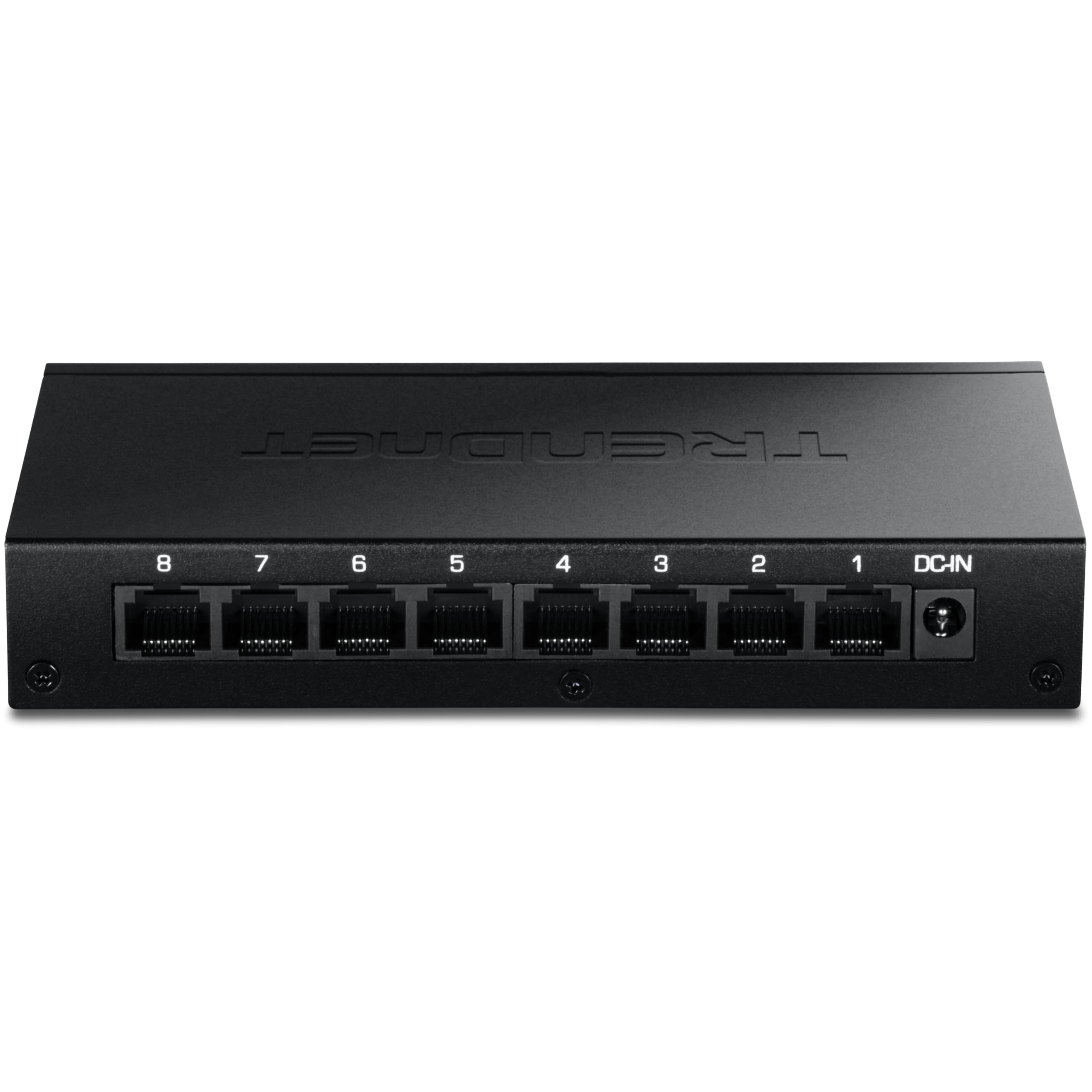
TRENDnet’s TEG-S381 takes a thoughtful approach to physical design by placing all eight RJ45 ports and the power connector on the rear panel while keeping status LEDs on the front. This makes cable management exceptionally clean in a wall-mount or desk-edge scenario, with no messy cables crossing your line of sight. The 40Gbps switching capacity and fanless metal housing deliver the same reliable unmanaged performance expected at this tier.
NDAA and TAA compliance makes this switch a safe choice for government-adjacent installations, but its appeal extends to any user who values tidy wiring. The port-speed LEDs differentiate 2.5G from lower speeds using different colors or blink patterns, though they are notably bright — some users apply dimming stickers to tame the glow in a bedroom or media room setup.
At just 6.85 watts maximum power draw, this is one of the most energy-efficient eight-port 2.5G switches available. The TRENDnet lifetime manufacturer protection adds long-term coverage that few competitors match. If cable aesthetics and low power consumption matter as much as raw throughput, this switch checks both boxes without compromise.
Why it’s great
- Front LEDs, rear ports for clean cable management
- TAA/NDAA compliant for regulated environments
- Extremely low 6.85W power consumption
Good to know
- Port-speed LEDs are very bright, may need dimming
- No SFP+ uplink port
4. D-Link DMS-105 5-Port 2.5G Switch
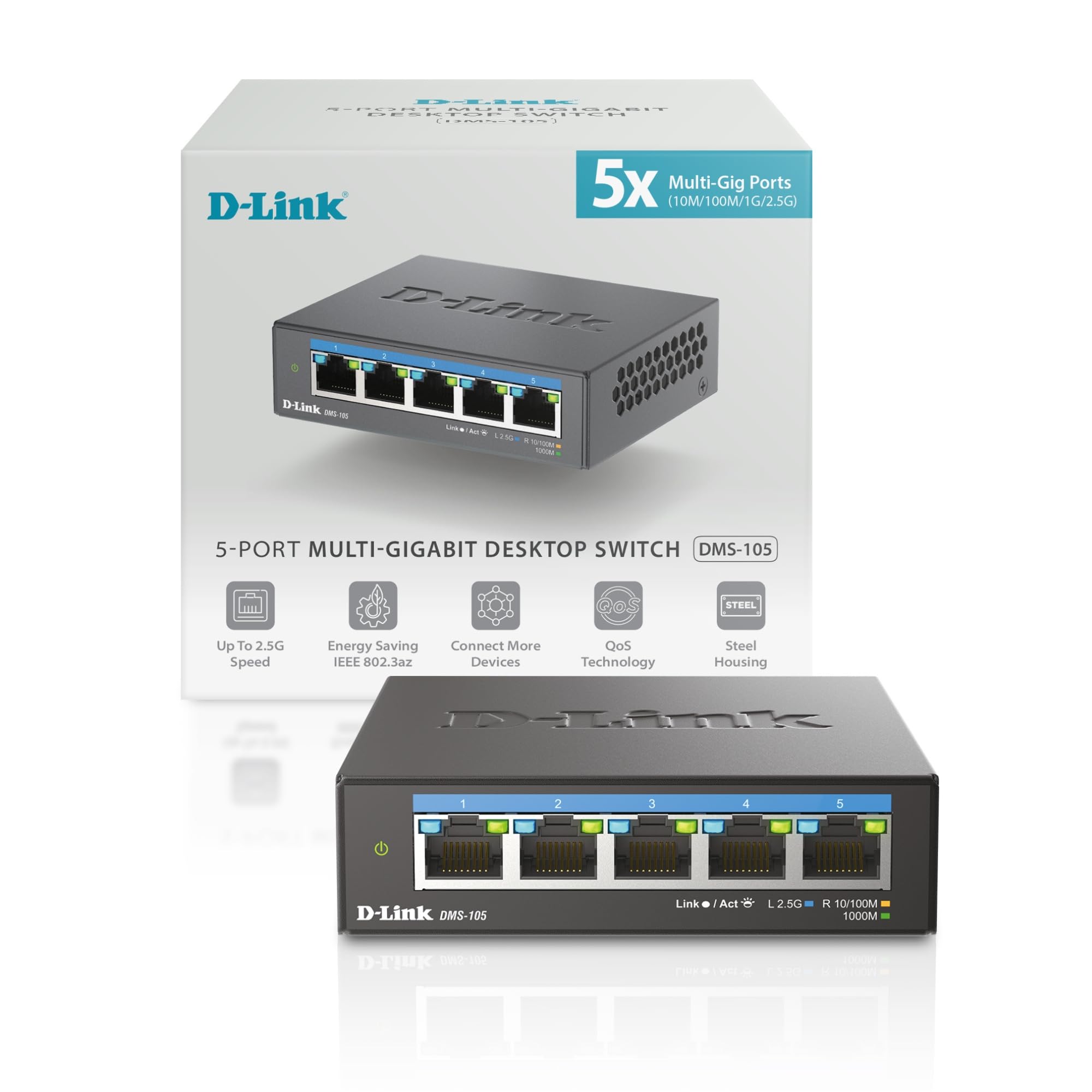
D-Link’s DMS-105 is a compact five-port unmanaged switch that goes beyond simple plug-and-play by including hardware-based QoS with eight priority levels and IGMP snooping for multicast optimization. This makes it especially effective for game consoles, streaming boxes, and IPTV devices that benefit from prioritized traffic, even in an unmanaged form factor. The 25Gbps switching capacity comfortably handles all five ports at 2.5G full duplex.
The metal housing and fanless design keep the switch running silently, with users reporting stable temperatures in the 95-100°F range under load — warm but well within safe limits for a sealed chassis. Auto-negotiation intelligently steps between 100Mb, 1G, and 2.5G, so every device connects at its maximum speed without manual intervention.
Measuring just 3.85 by 3.54 inches, the DMS-105 is one of the most space-efficient multi-gig switches on the market. It is ideal for a desk corner or entertainment center where real estate is tight. D-Link’s BSIMM security development methodology adds an extra layer of engineering rigor that instills confidence in long-term firmware stability.
Why it’s great
- Hardware QoS with eight priority levels for traffic optimization
- IGMP snooping reduces multicast bandwidth waste
- Ultra-compact footprint saves desk space
Good to know
- Only five ports — may need expansion later
- No SFP+ or uplink port for core switch use
5. NETGEAR MS305 5-Port 2.5G Switch

The NETGEAR MS305 delivers exactly what you expect from a premium networking brand — rock-solid build quality, dead-simple setup, and consistent performance. Its five auto-negotiating 2.5G ports work seamlessly with existing Cat5e wiring, making the upgrade from 1Gbps painless. The compact metal chassis and fanless design keep things quiet and cool, ideal for a home office desk or AV cabinet.
IEEE 802.3az Energy Efficient Ethernet dynamically reduces power consumption during low-traffic periods, a nice touch for a switch that may run 24/7. Users report a noticeable latency reduction of roughly 50% compared to a standard Gigabit switch when paired with a 2.5Gbps WAN connection, which translates to snappier web and cloud application response.
Wall-mounting hardware is included, and the rubber feet keep it planted on a desktop. The MS305 does not include an SFP+ port or any management features — it is a pure unmanaged switch built for users who value reliability above all else. If you trust the NETGEAR ecosystem and need a small, premium-feeling bridge to multi-gig, this is an easy choice.
Why it’s great
- Trusted NETGEAR build quality with premium metal finish
- Energy Efficient Ethernet reduces power draw during idle
- Works with Cat5e cables for easy migration
Good to know
- Limited to five ports and no SFP+ uplink
- Premium price for a basic unmanaged feature set
6. TP-Link Omada ES206X-M2 5-Port 2.5G Switch
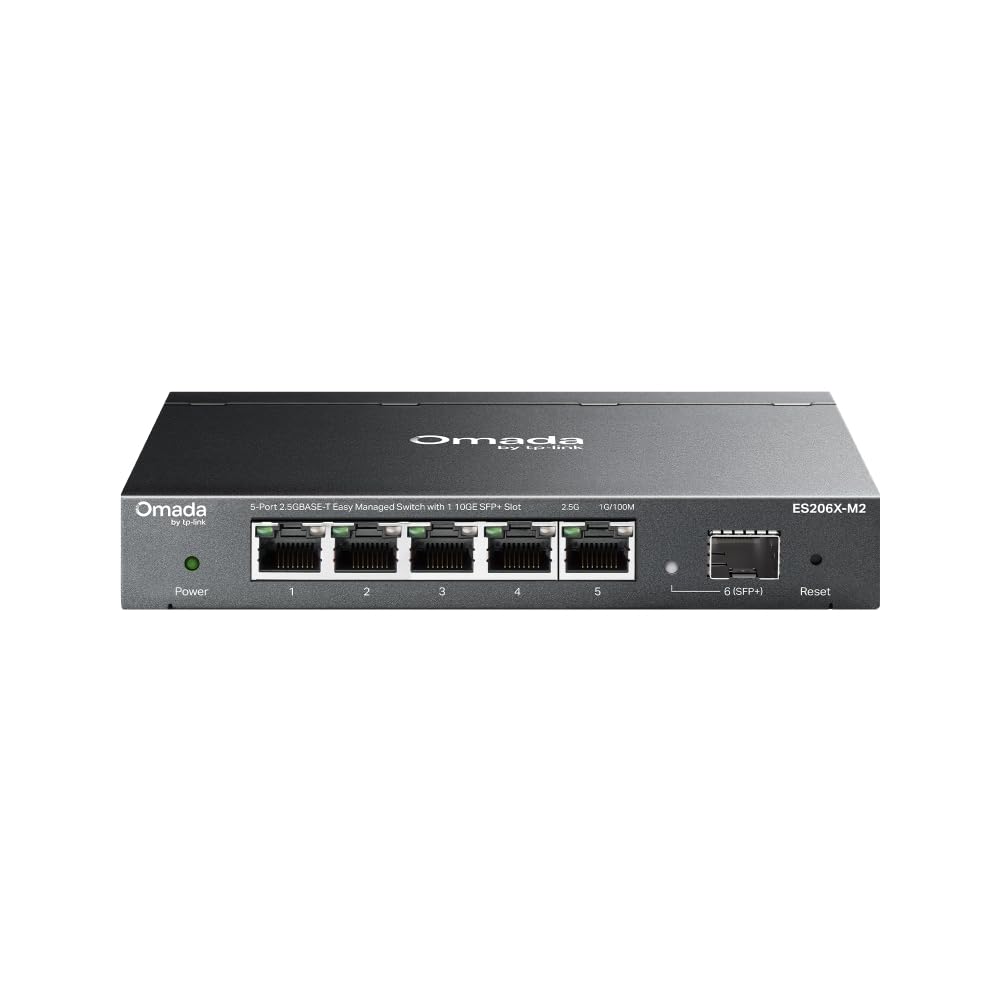
The TP-Link Omada ES206X-M2 bridges the gap between simple unmanaged switches and costly fully managed gear. It offers five 2.5G RJ45 ports plus a 10G SFP+ uplink, all controllable through the Omada cloud platform or local web interface. VLAN tagging, automatic loop prevention, and IGMP snooping are baked in, giving you network segmentation without complex command-line configuration.
Out of the box, it works as a plug-and-play switch — ideal for users who want instant connectivity — but the real value unlocks when you enable the management features through the Omada app or controller. Reviewers consistently praise the intuitive interface and the ability to set up VLANs for isolating IoT traffic or guest networks in minutes. The fanless metal casing keeps operation silent, and the included wall-mount kit offers flexible placement.
The 10G SFP+ port is a forward-looking bonus, allowing you to uplink to a faster core switch or directly to a 10G-capable NAS. For users building a managed multi-gig network on a budget, this is the smartest entry point.
Why it’s great
- 10G SFP+ uplink port for future expansion
- Easy VLAN and loop prevention via Omada cloud or app
- Plug-and-play out of box, managed when needed
Good to know
- Only five 2.5G RJ45 ports, limited for larger setups
- Full management requires Omada controller or cloud account
7. TP-Link TL-SG108S-M2 8-Port 2.5G Switch

The TP-Link TL-SG108S-M2 is the straightforward choice for anyone who wants eight 2.5G ports at a budget-friendly price. It strips away everything unnecessary — no management, no SFP+, no fancy backplane numbers — and simply delivers 8x 2.5Gbps connectivity with 40Gbps switching capacity. The plastic housing keeps costs low while still offering adequate passive cooling for home use.
Setup is the definition of plug-and-play: connect power, plug in your devices, and the switch auto-negotiates each port between 100Mb, 1G, and 2.5G. Users with three-plus years of uptime report flawless performance with no drops or degradation, a testament to TP-Link’s mature firmware and component selection. The fanless design means zero noise, making it a drop-in upgrade for any existing Gigabit switch location.
The white plastic casing may not match the aesthetic of metal-switch setups, and wall-mounting requires care with the integrated mounting cutouts, which some users find finicky. But if you need to connect multiple 2.5G devices without spending a premium, this is the most practical option available. It earns its reputation as a tried-and-true workhorse for home LANs.
Why it’s great
- Eight full 2.5G ports for the lowest cost in class
- Proven long-term reliability with years of user reports
- Silent fanless operation, suitable for any room
Good to know
- Plastic casing feels less durable than metal alternatives
- No SFP+ uplink or management features
FAQ
Do I need a 2.5G switch if my internet plan is under 1Gbps?
Can I use a 2.5G switch with Cat5e cables?
What is the difference between an unmanaged and a managed 2.5G switch?
Final Thoughts: The Verdict
For most users, the best 2.5gb switch is the SODOLA 8-Port 2.5G because it delivers eight full-speed 2.5G ports plus a 10G SFP+ uplink in a fanless metal chassis at a value that is hard to beat. If you need VLAN management and cloud control, grab the TP-Link Omada ES206X-M2 for its easy setup and 10G uplink. And for a silent, space-efficient upgrade with QoS, the D-Link DMS-105 is the compact choice that won’t crowd your desk.