
Our readers keep the lights on and the weekend projects moving. As an Amazon Associate, I earn from qualifying purchases.
Choosing a tablet for yourself is a different game than picking one for a child. You need a display that won’t tire your eyes during long reading sessions, a processor that handles split-screen multitasking between documents and video calls, and battery life that survives a full workday without hunting for an outlet. The wrong pick means fighting with sluggish app launches, cramped storage, or a screen that washes out under office lighting.
I’m Rikta — the co-founder and writer behind FitlyFast. I’ve spent hundreds of hours cross-referencing processor benchmarks, display specs, and real-world battery tests to identify the models that actually deliver for daily adult workflows, creative projects, and media consumption.
This guide walks through nine models that earn their place on a serious buyer’s shortlist, with a focus on display quality, performance headroom, and storage flexibility to help you find the best adult tablet that matches the way you actually work and relax.
How To Choose The Best Adult Tablet
A tablet for adult use needs to handle heavier tasks than a kid’s device: document editing, video conferencing, creative apps, and long-form reading. Focus on these three areas to avoid a frustrating experience.
Display Resolution and Refresh Rate
For reading articles, editing spreadsheets, or watching high-definition content, a Full HD (1920×1200) panel is the baseline. Higher resolutions like 2.5K or 2.4K offer sharper text and finer image detail, which matters for photo editing or viewing sheet music. Refresh rates above 60Hz (90Hz or 120Hz) make scrolling through long documents and web pages feel noticeably smoother and reduce eye strain during extended use.
Processor and RAM for Multitasking
An octa-core processor with at least 6GB of physical RAM is the sweet spot for running multiple apps side-by-side without lag. If you plan to use split-screen mode for research, note-taking, and video calls, aim for 8GB or more. Budget-minded buyers can manage with 4GB for basic browsing and streaming, but the experience degrades quickly when switching between several open tabs or apps.
Battery Capacity and Charging Speed
A 7,000mAh battery is the minimum for a full workday of mixed use. Models with 8,000mAh to 10,000mAh can stretch to two days with moderate usage. Fast charging (18W and above) reduces downtime significantly, while some premium tablets support reverse charging to power a phone or earbuds in a pinch. Always check whether the charger is included in the box, as some high-end models ship only with a cable.
Quick Comparison
On smaller screens, swipe sideways to see the full table.
| Model | Category | Best For | Key Spec | Amazon |
|---|---|---|---|---|
| Samsung Galaxy Tab S11 | Premium | Creative Work | 11″ Dynamic AMOLED 2X | Amazon |
| Samsung Galaxy Tab S10+ | Premium | Productivity | 12.4″ AMOLED 2X, 512GB | Amazon |
| Apple iPad Pro 13-inch (M5) | Flagship | Pro Workflows | 13″ Ultra Retina XDR, M5 | Amazon |
| TCL NXTPAPER 14 | Premium | Reading & Drawing | 14.3″ Paper-Like, 10,000mAh | Amazon |
| Lenovo Idea Tab | Mid-Range | College & Study | 11″ 2.5K IPS, 90Hz | Amazon |
| TECLAST T65 | Mid-Range | Large Screen Media | 13.4″ 120Hz, 8,000mAh | Amazon |
| Amazon Fire HD 10 | Mid-Range | Entertainment | 10.1″ Full HD, 13h Battery | Amazon |
| FEONAL Android 16 Tablet | Budget | Travel Companion | 11″ Incell FHD, 4G LTE | Amazon |
| TUOHAITIME Android 16 Tablet | Budget | Accessory Pack Value | 11″ HD, 8,000mAh | Amazon |
In‑Depth Reviews
1. Samsung Galaxy Tab S11 128GB
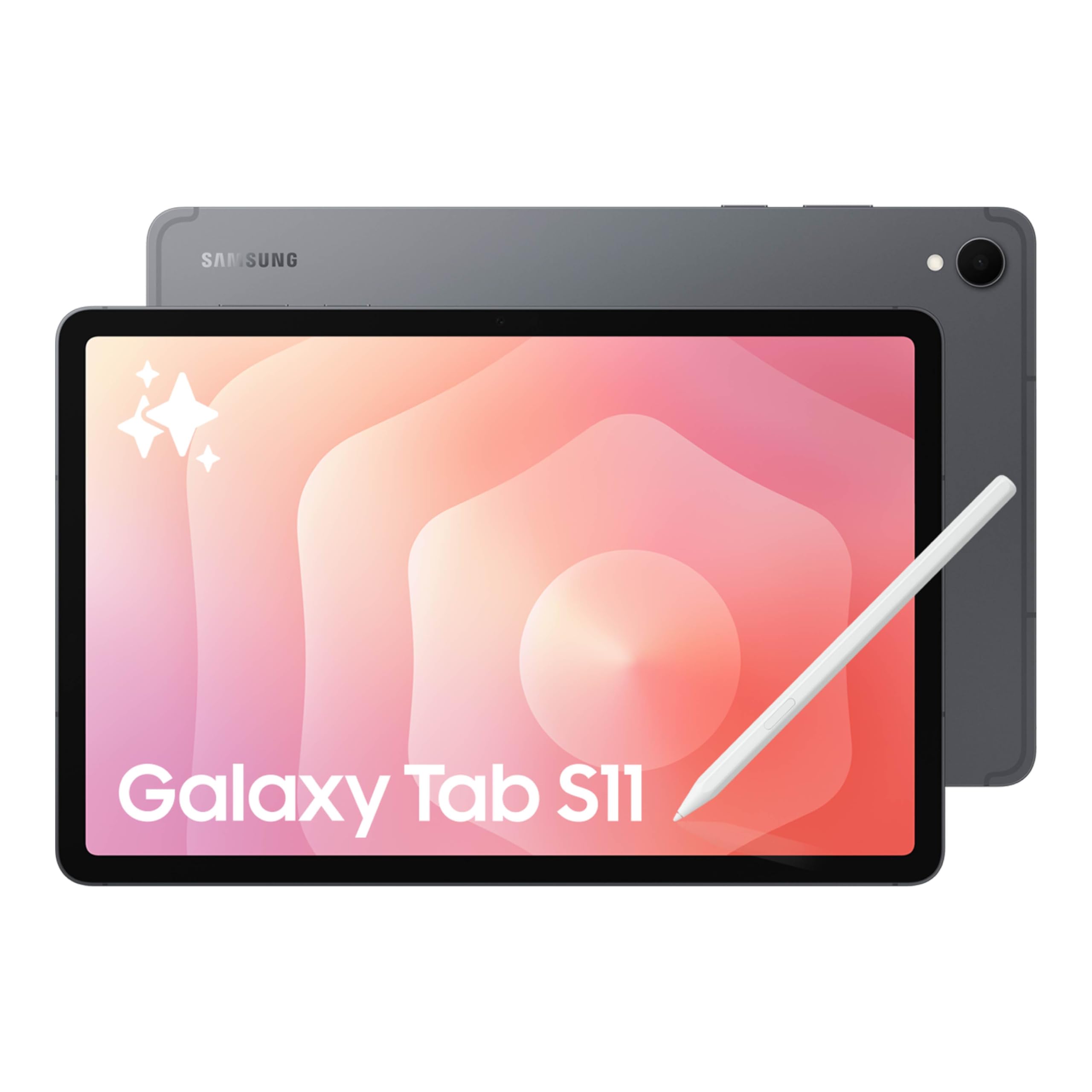
The Galaxy Tab S11 sits at the top of this list because it balances premium display technology with meaningful performance for daily adult use. The 11-inch Dynamic AMOLED 2X panel delivers exceptional contrast and color accuracy, making text sharp enough for hours of reading and video content look vibrant. With 12GB of RAM and the 3nm MediaTek processor, this tablet handles heavy split-screen workflows, note-taking with the included S Pen, and light photo editing without any perceivable lag.
The included S Pen offers pen-on-paper precision that works naturally with Galaxy AI features like Note Assist for summarizing meeting notes and Drawing Assist for turning rough sketches into polished mock-ups. The IP68 water and dust resistance rating adds a layer of durability that few tablets in this class offer, making it safe to use by the pool, in the kitchen, or during a rainy commute. The 8,400mAh battery reliably delivers over a full day of mixed use, and the microSD slot provides flexible storage expansion up to 1TB.
The main trade-off is the 60Hz refresh rate, which feels less fluid for scrolling compared to competitors with 90Hz or 120Hz panels. Samsung’s One UI overlay also includes some pre-installed apps that you may want to disable. For professionals and creatives who want a versatile Android tablet with a spectacular screen and robust AI tools, this is the most well-rounded choice available today.
Why it’s great
- Outstanding AMOLED 2X display with deep blacks and vivid colors
- 12GB RAM delivers effortless multitasking across demanding apps
- Included S Pen and Galaxy AI tools boost productivity
- IP68 rating protects against spills and dust
Good to know
- 60Hz refresh rate feels less smooth than 90Hz or 120Hz rivals
- Pre-installed Samsung apps may require cleanup
2. TCL NXTPAPER 14

The TCL NXTPAPER 14 stands apart with its 14.3-inch paper-like display that dramatically reduces eye strain during long reading, note-taking, or sheet music sessions. The anti-glare coating combined with blue light reduction and DC dimming produces a viewing experience that feels closer to printed paper than a typical glossy tablet screen. The dedicated NXTPAPER Key lets you toggle between Regular Mode for vibrant video, Ink Paper Mode for e-paper texture, and Color Paper Mode for soft tones ideal for comics and digital art.
With a 10,000mAh battery and 33W fast charging (charger not included), this tablet can power through a full day of heavy use and still have enough juice to reverse-charge your phone or earbuds. The included T-PEN stylus with 4,096 levels of pressure sensitivity feels responsive for sketching, handwriting, and navigating digital sheet music. Musicians especially praise the large screen for displaying two pages of sheet music side-by-side, paired with foot pedal compatibility for hands-free page turning.
The main drawbacks are the lack of a microSD card slot, limiting storage to the 256GB internal memory, and the 60Hz refresh rate that shows when scrolling quickly. The tablet is also moderately heavy at 1.67 pounds for handheld use. For professionals, creatives, and musicians who prioritize eye comfort above all else, the NXTPAPER 14 delivers a genuinely unique and valuable experience.
Why it’s great
- Paper-like display with anti-glare coating reduces eye strain significantly
- Huge 10,000mAh battery with fast and reverse charging
- 4096-level stylus included for drawing and note-taking
- Three display modes adapt to different tasks
Good to know
- No microSD expansion slot for additional storage
- Wall charger not included in the box
- 60Hz refresh rate limits scrolling smoothness
3. Samsung Galaxy Tab S10+ 512GB

The Galaxy Tab S10+ expands on the S11’s formula with a larger 12.4-inch AMOLED 2X display and 512GB of internal storage, making it a powerhouse for professionals who work across multiple documents, store large media libraries, or run creative apps. The Galaxy AI tools are more deeply integrated here, with Sketch to Image transforming simple doodles into refined artwork, Note Assist automatically organizing and summarizing lecture or meeting recordings, and Circle to Search providing instant context on anything visible on the screen.
The 5G cellular option ensures you stay connected on the go without relying on Wi-Fi hotspots, and the included S Pen offers the same low-latency input as the S11. Samsung Notes is one of the best note-taking apps on any platform, with real-time playback of recorded audio synced to your handwriting — an indispensable feature for students and professionals attending long sessions. The 10,090mAh battery comfortably lasts 8 to 10 hours under heavy load, and the fingerprint scanner provides fast, secure unlocking.
The premium price positions it as an investment for serious users. The MediaTek Dimensity 9300+ processor is powerful, but some niche creative apps still run better on iPadOS. For Android enthusiasts and Samsung ecosystem users who need a large canvas, deep AI integration, and cellular connectivity, the Tab S10+ justifies its cost with genuine productivity gains.
Why it’s great
- Large 12.4″ AMOLED display with rich colors and deep blacks
- 512GB internal storage eliminates space anxiety
- 5G connectivity for on-the-go workflow
- Galaxy AI tools enhance note-taking and creativity
Good to know
- Premium price puts it out of reach for budget-conscious buyers
- Some pro apps still see better optimization on iPadOS
4. Apple iPad Pro 13-inch (M5)

The iPad Pro with the Apple M5 chip represents the upper limit of what a tablet can do. Its 13-inch Ultra Retina XDR display is the best screen on any portable device, with extreme brightness, perfect contrast, ProMotion 120Hz adaptive refresh rate, and P3 wide color support — making it the reference standard for photo editing, video color grading, 3D modeling, and any color-critical work. The M5 chip’s Neural Accelerators bring serious AI performance to pro apps, and the 512GB of storage in this configuration handles massive project files with ease.
The landscape 12MP Center Stage front camera keeps you framed perfectly during video calls, while the 12MP rear camera with LiDAR scanner enables precise AR applications and document scanning. The four-speaker audio system sounds richer than most laptops, and the design is absurdly thin at 0.2 inches and light at 1.28 pounds. For workflows that demand the most from a tablet, the iPad Pro supports Apple Pencil Pro, Magic Keyboard, and accessories that transform it into a laptop replacement.
The biggest barrier is the price, which is significantly higher than any Android competitor. iPadOS also has file management limitations compared to a traditional desktop OS. If your work requires professional creative software or maximum display performance, the iPad Pro M5 is unrivaled. For general browsing, streaming, and note-taking, the premium is hard to justify over capable alternatives like the Samsung Galaxy Tab S11.
Why it’s great
- Industry-leading Ultra Retina XDR display with 120Hz ProMotion
- M5 chip delivers desktop-class performance for demanding pro apps
- Exceptional build quality, portability, and battery life
- Excellent camera and speaker system for remote work
Good to know
- Very high cost limits accessibility
- iPadOS file management is less flexible than a desktop OS
- Apple Pencil and Magic Keyboard sold separately
5. Lenovo Idea Tab

The Lenovo Idea Tab is purpose-built for students and anyone who spends long hours on academic or professional reading. The 11-inch 2.5K IPS touchscreen with a 90Hz refresh rate delivers sharp text and smooth scrolling through PDFs, articles, and notes. The TÜV Rheinland Low Blue Light certification helps reduce eye fatigue during extended study sessions, and the included Tab Pen works with Lenovo AI Note, Squid, Nebo, and MyScript Calculator for a complete digital note-taking setup right out of the box.
The MediaTek Dimensity 6300 processor paired with 8GB of RAM handles split-screen multitasking between a browser, note-taking app, and video lecture without stuttering. The 256GB of internal storage is generous for a mid-range tablet, and the microSD slot allows expansion up to 1TB. Battery life reaches up to 12 hours, easily covering a full day of classes or office work, and the included folio case protects the tablet in transit. The four Dolby Atmos-tuned speakers provide clear audio for video playback and conference calls.
The included pen and case feel slightly basic compared to premium alternatives, and the 2.5K resolution is not as sharp as the AMOLED panels on higher-end models. For students and budget-conscious professionals who need a reliable, high-resolution screen for reading and note-taking, the Lenovo Idea Tab offers excellent value and thoughtful software integration.
Why it’s great
- Sharp 2.5K IPS display with 90Hz smooth scrolling
- Included pen and folio case add immediate utility
- 8GB RAM handles multitasking efficiently
- Integrated study apps support note-taking workflows
Good to know
- Included accessories feel basic compared to premium bundles
- Display not as vibrant as AMOLED competitors
6. TECLAST Android 16 T65

The TECLAST T65 offers the largest screen in this mid-range tier at 13.4 inches, paired with a 120Hz refresh rate that makes scrolling through social feeds, web articles, and documents feel fluid and responsive. The 1920×1200 IPS display uses TDDI technology to improve brightness and response time, delivering clear visuals for streaming, reading, and browsing. The 8,000mAh battery provides up to 11 hours of mixed use, and the 4G LTE slot means you can insert a SIM card for connectivity away from Wi-Fi.
The octa-core processor clocked at 2.2GHz with 8GB of physical RAM plus 12GB of virtual expansion handles everyday tasks competently. Android 16 with AI optimization features adds practical touches like gesture controls, floating balls, and a sidebar for quick app switching. The built-in parental controls make it a viable option for shared family use, and the headphone jack will appeal to music lovers who prefer wired audio for higher fidelity during long listening sessions.
The main limitation is performance under heavy gaming loads, where benchmarks trail mainstream tablets significantly. The included charger is a standard unit, not a fast charger, and the tablet lacks an official keyboard case for productivity-focused users. For media enthusiasts who want a massive, smooth display and cellular flexibility without paying flagship prices, the TECLAST T65 delivers impressive screen real estate.
Why it’s great
- Large 13.4″ screen with 120Hz fluid refresh rate
- 4G LTE provides connectivity away from Wi-Fi
- Headphone jack for wired audio users
- Good battery life for extended media sessions
Good to know
- Gaming performance lags behind mainstream tablets
- No fast charger included in the box
- Lacks official keyboard accessory for typing-heavy workflows
7. Amazon Fire HD 10 (Newest Model)

The Amazon Fire HD 10 is the most straightforward entertainment-focused tablet on this list. The 10.1-inch Full HD display delivers vibrant colors for streaming video, and the octa-core processor with 3GB of RAM provides smooth navigation through Prime Video, Netflix, and Hulu. The 13-hour battery life supports binge-watching sessions that last through long flights or lazy weekends, and the 64GB of internal storage can be expanded up to 1TB via microSD for offline media libraries.
The Fire OS ecosystem is tightly integrated with Amazon services, offering easy access to Kindle books, Audible audiobooks, and Amazon Music. The device is also 2.7 times more durable than the Samsung Galaxy Tab A8 (2022), making it a practical choice for households with varied use. Amazon Kids provides robust parental controls for shared family use, and the Alexa voice assistant adds smart home control and hands-free functionality throughout the day.
The major caveat is the Fire OS app store, which has a more limited selection than Google Play. Installations of Google Play are possible through workarounds available online, but this requires extra steps and may not appeal to everyone. The lock screen displays ads unless you pay an additional fee to remove them. For buyers primarily invested in Amazon’s ecosystem who want a durable, long-lasting device for streaming and reading, the Fire HD 10 offers undeniable value.
Why it’s great
- Excellent 13-hour battery for uninterrupted media consumption
- Rugged build with strengthened glass for durability
- Access to Kindle, Audible, and Amazon ecosystem
- Expandable storage up to 1TB
Good to know
- App selection limited to Amazon Appstore without workaround
- Lock screen ads unless paid to remove
- Performance lags behind tablets at equivalent price
8. FEONAL Android 16 Tablet

The FEONAL Android 16 Tablet brings reliable cellular connectivity to an budget-friendly price point. The dual SIM card slot with 4G LTE support means you can insert a T-Mobile SIM or other carrier card for data access wherever you travel, bypassing the need to hunt for public Wi-Fi. The 11-inch Incell FHD display offers good clarity and color for streaming and browsing, and the 7,000mAh battery provides up to 480 hours of standby time or a full day of moderate use.
The 20GB of RAM (8GB physical plus 12GB virtual) combined with 128GB of internal storage and microSD expansion up to 1TB ensures you have enough space for apps, offline maps, movies, and documents. The MTK8786 octa-core processor handles basic tasks smoothly, including streaming, email, web browsing, and social media. Users report that Roblox runs without freezing, making it a viable option for light gaming and keeping kids entertained.
The camera quality is basic, the speakers lack richness, and there is no biometric unlocking — you rely on pattern or PIN security. Cellular functionality is data-only on some carriers, so you may not be able to make standard voice calls. For travelers and users who need an affordable tablet with integrated cellular data for navigation, communication, and light entertainment, the FEONAL gets the fundamentals right.
Why it’s great
- Built-in 4G LTE for connectivity without Wi-Fi
- Generous 20GB RAM for smooth multitasking
- Expandable storage up to 1TB via microSD
- Dual SIM slot for flexible carrier options
Good to know
- Basic cameras and speakers
- No face or fingerprint recognition for unlocking
- Cellular service may be data-only depending on carrier
9. TUOHAITIME 2026 Upgraded Android 16 Tablet
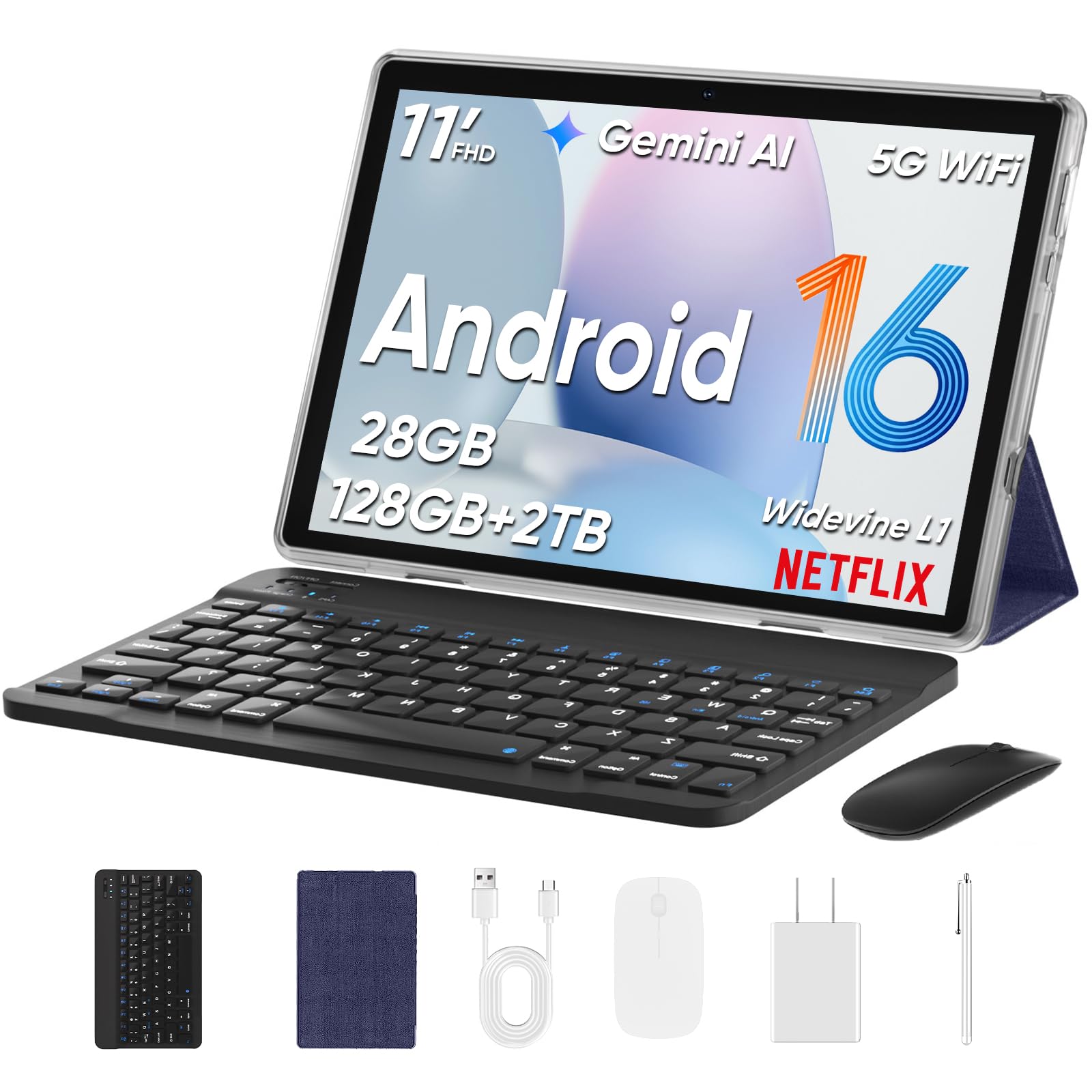
The TUOHAITIME tablet stands out for the sheer volume of accessories included in the package: a Bluetooth keyboard, wireless mouse, stylus, protective case, and screen protector. This makes it an interesting option for someone who wants a complete desktop-like setup without hunting for peripherals separately. The 11-inch HD display is bright and large enough for comfortable viewing, and the 8,000mAh battery delivers adequate runtime for a full day of mixed use.
The octa-core processor handles basic productivity tasks, web browsing, and video streaming with acceptable speed. The dual 5G Wi-Fi 6 module provides fast and stable internet connections, which is a welcome feature at this price tier. Face unlock provides convenient biometric access, and the Widevine L1 certification allows high-definition streaming from services like Amazon Prime Video and Disney+. The included keyboard and mouse pair easily, turning the tablet into a casual laptop replacement for typing emails or documents.
The biggest concern comes from a customer report of pre-installed software behaving like spyware, draining the battery and displaying unsolicited audio. While this appears to be an isolated incident among mostly positive reviews, it is a risk worth noting for any ultra-budget tablet. The virtual RAM expansion (4GB physical + 24GB virtual) is marketing hype rather than a real performance upgrade. For buyers who want a complete accessory kit at an entry-level price and are comfortable with the potential risks, this bundle delivers remarkable hardware for the money.
Why it’s great
- Comprehensive accessory bundle includes keyboard, mouse, and stylus
- Wi-Fi 6 support for fast internet speeds
- Widevine L1 certification for HD streaming
- Face unlock adds convenient security
Good to know
- One user report of problematic pre-installed software
- Virtual RAM expansion is more marketing than real benefit
- Keyboard does not physically attach to the tablet
FAQ
What screen size is best for reading and note-taking?
Can I use a tablet as my primary work device?
Does cellular connectivity matter in a tablet?
How important is stylus support for an adult tablet?
Final Thoughts: The Verdict
For most users, the best adult tablet winner is the Samsung Galaxy Tab S11 because it combines an exceptional AMOLED display with 12GB of RAM and powerful AI tools at a price that makes sense for professionals and creatives alike. If you prioritize eye comfort and a paper-like reading experience, grab the TCL NXTPAPER 14. And for uncompromising pro performance and the best display money can buy, nothing beats the Apple iPad Pro 13-inch (M5).