
Our readers keep the lights on and the weekend projects moving. As an Amazon Associate, I earn from qualifying purchases.
That first tabloid-size color document you print can make or break a client presentation, an architectural blueprint review, or a marketing mock-up. When your office workflow depends on handling 11×17 sheets, you need a machine that combines wide-format capability with reliable color laser output—without turning every print job into a gamble on jams or faded graphics. The right all-in-one unit does more than save desk space; it keeps your team moving.
I’m Rikta — the co-founder and writer behind FitlyFast. I’ve spent countless hours cross-referencing print speeds, paper handling specs, and real-user reliability reports to build this guide for anyone shopping for a wide-format color laser MFP.
Whether you run a small architecture firm or manage a busy home office, finding the right machine means balancing speed, total cost per page, and workflow features that actually get used. This guide to the 11×17 all-in-one color laser printer breaks down the specs and trade-offs that matter most for tabloid-size output.
How To Choose The Best 11×17 All-in-One Color Laser Printer
Selecting a wide-format color laser MFP is different from picking a standard letter-size model. The paper path for 11×17 sheets is more demanding, and the cost of consumables scales faster. Focus on these three factors to narrow your options.
Paper Handling and Tray Configuration
The biggest pain point with 11×17 printers is reliable paper feeding. A single 250-sheet tray running letter-size is fine for light use, but if you regularly print mixed media (letter memos and tabloid presentations), look for a model with at least two input trays or a dedicated bypass that accepts 11×17. A model with a motorized or manual rear output tray for long sheets also prevents curl and jams.
Consumable Cost and Yield
Color laser printers have four toner cartridges, and replacement costs vary wildly between brands. Standard-yield cartridges may cost the same as high-yield but deliver half the pages, making your per-page cost for color documents much higher. Check the published ISO page yields for black and color, then multiply by your monthly print volume. Some premium models include introductory cartridges that last only a few hundred pages, so factor that into your first-year budget.
Connectivity and Workflow Integration
For a shared office printer, wired Ethernet is more reliable than Wi-Fi for handling large tabloid files. Dual-band wireless helps if the printer must sit away from the router. Also consider scan-to-email, scan-to-network folder, and mobile printing support (Apple AirPrint, Mopria) to avoid bottlenecking the whole team at the device.
Quick Comparison
On smaller screens, swipe sideways to see the full table.
| Model | Category | Best For | Key Spec | Amazon |
|---|---|---|---|---|
| Xerox VersaLink C405/DN | Premium | Business workgroup | 36 ppm color, 550-sheet tray | Amazon |
| HP Color LaserJet Pro MFP 4301fdw | Premium | Secure wireless teams | 35 ppm color, Wolf Pro Security | Amazon |
| Epson EcoTank Pro ET-16650 | Supertank | High-volume tabloid | 25 ppm, up to 13″x19″ | Amazon |
| HP Color LaserJet Pro MFP 4301fdn | Premium | Wired office security | 35 ppm color, Ethernet/USB | Amazon |
| Canon imageCLASS MF751Cdw | Mid-Range | Reliable 3-in-1 speed | 35 ppm color, 3-yr warranty | Amazon |
| Canon imageCLASS MF753Cdw II | Mid-Range | Small workgroup | 35 ppm color, 5-inch touch | Amazon |
| Brother MFC-L3780CDW | Mid-Range | Small business value | 31 ppm, single-pass duplex | Amazon |
| HP Color LaserJet Pro MFP 3301fdw | Mid-Range | Compact wireless teams | 26 ppm, TerraJet toner | Amazon |
| Brother MFC-L3720CDW | Value | Home office color | 19 ppm, 3.5″ touchscreen | Amazon |
| HP Color LaserJet Pro MFP M281CDW | Value | Renewed compact print | 22 ppm, Wi-Fi Direct | Amazon |
| Brother MFC9340CDW | Specialty | Duplex scan focus | 23 ppm, LED tech | Amazon |
In‑Depth Reviews
1. Xerox VersaLink C405/DN

The Xerox VersaLink C405/DN is built for office workgroups that need consistent color output at 36 ppm without the subscription headaches. Its 550-sheet main tray handles large runs of letter-size, and the adjustable touchscreen mimics a smartphone interface so complex scan-to-email or copy jobs take fewer taps. Users report that generic toner works reliably, bringing the cost per color page down noticeably compared to proprietary HP cartridges.
Reliability feedback leans positive among teams running 1,500 pages per month, but a minority of units have struggled with intermittent errors like connectivity drops and print-quality defects after the first year. The admin password defaults to the serial number rather than “1111,” which surprises some IT staff but adds a layer of out-of-box security. The machine requires a separate wireless adapter for Wi-Fi, so plan for wired Ethernet deployment.
For companies printing marketing materials, architectural drawings, or any tabloid document that demands consistent color registration, the C405 delivers commercial-grade results. The ConnectKey app platform gives access to translation and workflow tools that reduce time spent at the control panel. It commands a premium upfront price, but the lower ongoing consumable costs make it the strongest long-term value for volume users.
Why it’s great
- Fast 36 ppm color output keeps large jobs moving
- Acceptable third-party toner reduces per-page cost significantly
- Large paper capacity minimizes tray refills during busy periods
Good to know
- No built-in wireless; requires optional adapter
- Some units develop connectivity errors after heavy use
- Admin setup involves non-standard password configuration
2. HP Color LaserJet Pro MFP 4301fdw

HP’s 4301fdw packs 35 ppm color speed, intelligent dual-band Wi-Fi, and HP Wolf Pro Security into one chassis designed for teams of up to ten people. The smart Wi-Fi self-heals connection drops, which is a lifesaver in offices where printer connectivity is a recurring headache. Print quality on tabloid sheets is sharp, with TerraJet toner delivering vivid color in marketing materials and reports alike.
Reliability is a split story. The printer actively blocks non-HP toner through firmware updates, so your consumable path is locked to HP cartridges. Introductory toner yields are modest—1200 black and 1000 CMY pages—so replacement costs hit quickly.
For small offices that prioritize security and wireless flexibility, the 4301fdw is a turnkey solution. The Wolf Pro Security suite lets you customize settings and monitor the device remotely, which is rare at this price tier. Budget for the high-yield cartridges from day one to keep per-page costs manageable.
Why it’s great
- Self-healing Wi-Fi reduces IT intervention
- Wolf Pro Security provides business-grade device protection
- Fast 35 ppm color suits busy small teams
Good to know
- Aggressive firmware locks out third-party toner
- Some units develop false paper jam errors after a year
- Starter cartridges run out quickly; upgrade to high-yield early
3. Epson EcoTank Pro ET-16650
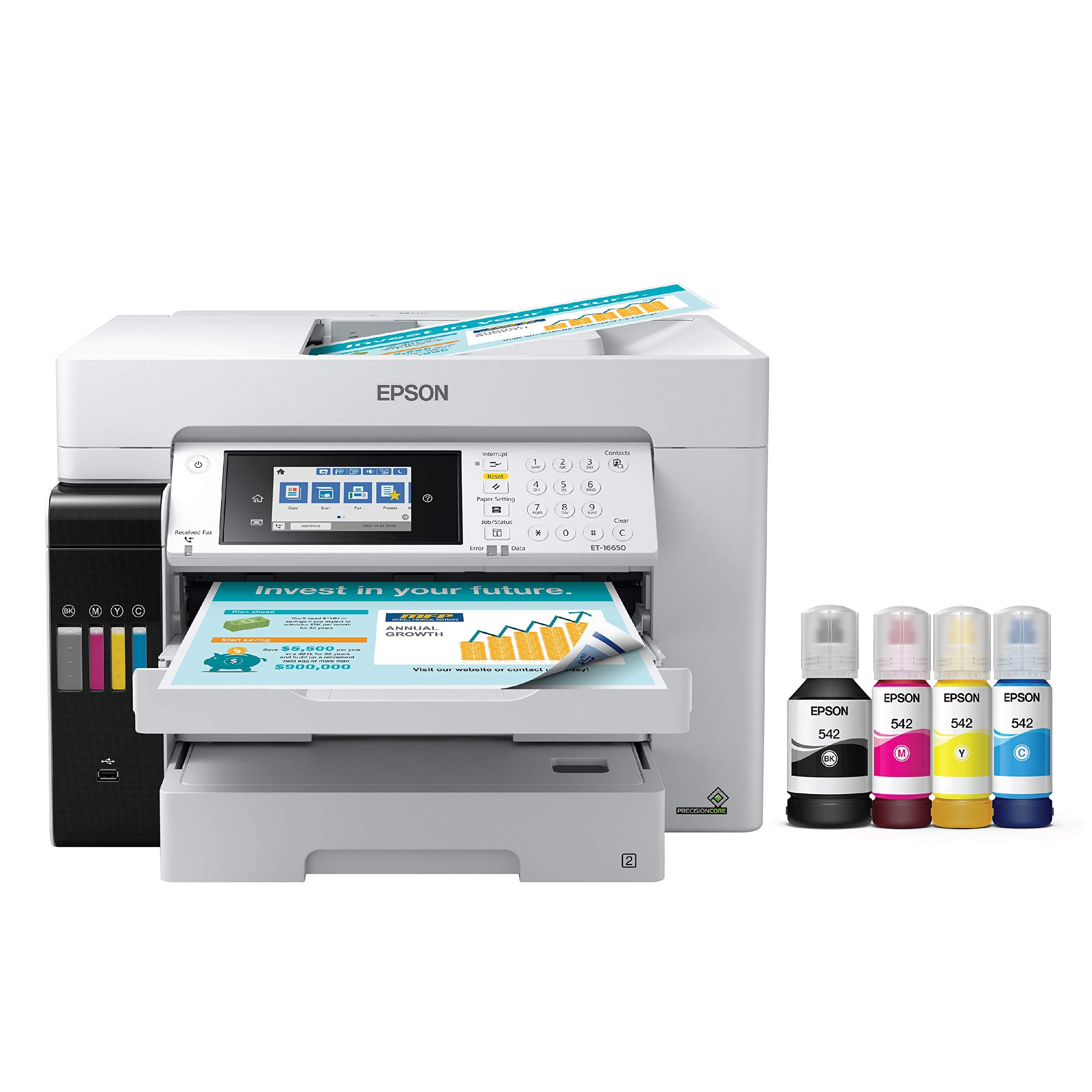
The Epson ET-16650 breaks from the color laser mold by using pigment ink bottles instead of toner cartridges, achieving roughly two cents per color ISO page versus 14 cents for laser. Its wide-format capability extends to 13×19 inches, making it the only model here that prints borderless tabloid-size output. Print speeds are 25 ppm, which is slower than premium laser competitors, but the total cost of ownership over two years can be dramatically lower if you print high volumes.
Build quality draws mixed feedback. The motorized output tray and dual tabloid cassettes feel solid, but the chassis and tray guides have a somewhat fragile reputation. A number of users report printhead failure around the one-year mark, and Epson’s warranty can be difficult to invoke if non-genuine ink is detected. The printer uses DURABrite pigment ink, which is instant-dry on plain paper and resists smudging even on glossy stock.
If your workflow involves tabloid-size CAD drawings, architectural plans, or full-bleed marketing flyers, and you can manage the larger desk footprint, this supertank is a compelling alternative to laser. The free two-year ink promotion (with registration) effectively eliminates consumable costs for the first 24 months. Just keep the printer powered on to prevent ink clogs.
Why it’s great
- Extremely low per-page cost with pigment ink bottles
- Borderless 13×19 prints for full-bleed tabloid output
- Free ink promotion reduces first-year operating costs
Good to know
- Printhead failure risk is higher than laser MFP alternatives
- Very large footprint; needs 24×32 inches of desk space
- Slower 25 ppm compared to 35 ppm laser models
4. HP Color LaserJet Pro MFP 4301fdn
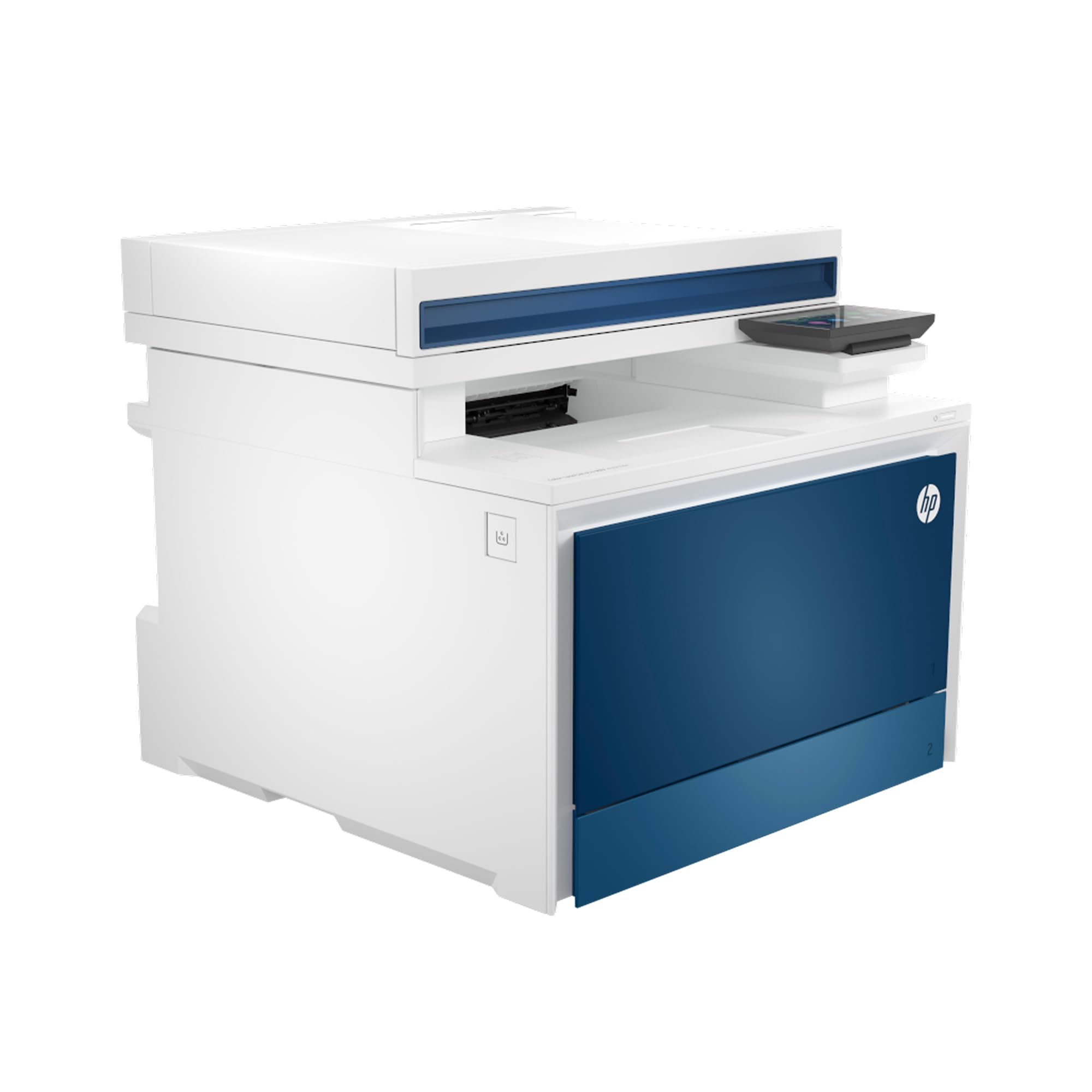
The fdn variant drops wireless to reduce attack surfaces, relying solely on Ethernet and USB for connectivity. It shares the same print engine as the fdw, delivering 35 ppm color output and 9.1-second first-page-out speeds. HP Wolf Pro Security comes pre-installed, allowing IT departments to manage settings and monitor threats without additional software. This makes it a strong choice for government contractors or healthcare offices with strict network policies.
Operationally, the printer is fast and produces vibrant color documents, but the default paper tray configuration frustrates some users. The manual bypass (tray 1) is set as the default source, triggering “out of paper” alerts if not manually changed via the control panel for each job. HP support has been unable to resolve this setting remotely for some customers. Multi-user network performance also receives mixed reviews, with occasional offline errors when multiple computers connect simultaneously.
For wired-only offices where security compliance matters more than mobile printing, the 4301fdn delivers speed and protection at a lower entry cost than the wireless version. Factor in the tray-default workaround if your team prints from multiple workstations—training users to select tray 2 manually may be necessary.
Why it’s great
- Built-in Wolf Pro Security for enterprise-grade protection
- Fast 35 ppm color with rapid first-page output
- Wired-only design reduces network vulnerability
Good to know
- Default tray setting causes frequent out-of-paper errors
- Multi-user network stability can be inconsistent
- HP firmware blocks third-party toner cartridges
5. Canon imageCLASS MF751Cdw

The MF751Cdw offers one of the best speed-to-price ratios in this class, at 35 ppm for both color and monochrome. Canon uses Toner 069 cartridges with high-capacity options that yield up to 10,000 color pages, reducing the frequency of replacements. The 50-page simplex ADF handles bulk scanning efficiently, and the 3-year limited warranty provides peace of mind that most competitors don’t match.
Wireless setup can be finicky on Windows 10, but USB installation goes smoothly. Users report that the starter toner is conservatively sized (1,100 CMY), so budget for the high-capacity cartridges immediately. Print quality is excellent for text and graphics, though the 1200 DPI mode doesn’t deliver photo-level sharpness. Canon allows third-party toner without firmware blocking, which helps control long-term costs.
For a small office that values warranty coverage and doesn’t need fax, the MF751Cdw is a dependable 3-in-1. The expandable paper capacity (up to 850 sheets via optional cassette) supports growing teams without requiring a floor-standing unit. Duplex printing is quiet and nearly jam-free.
Why it’s great
- 35 ppm color speed at a mid-range price point
- 3-year limited warranty exceeds industry standard
- Third-party toner works without firmware restrictions
Good to know
- Starter cartridges run out quickly; upgrade to high-capacity
- Windows 10 wireless setup can be problematic
- 1200 DPI image quality is not photo-grade
6. Canon Color imageCLASS MF753Cdw II

The MF753Cdw II is Canon’s updated 4-in-1 workgroup printer, adding fax to the 35 ppm platform. The 5-inch color touchscreen features the Application Library, letting you create one-tap shortcuts for repetitive scan-to-email or copy jobs. Moblie printing supports AirPrint, Mopria, and the Canon PRINT app, and the 50-sheet duplex ADF processes both sides in a single pass—a significant time saver for double-sided originals.
Hardware setup is praised as nearly plug-and-play over Ethernet, and Windows 11 detects the printer automatically without requiring the bloated Canon software package. Some users have reported issues with Canon’s web services returning 403 errors, but core functions like scan-to-network folder work reliably through the web interface. Toner costs for the 069 cartridges are competitive, and the printer accepts third-party alternatives without firmware pushback.
This model is ideal for small workgroups that need fax capability and want a modern control panel. The ADF is robust for high-volume scanning, and the optional 550-sheet cassette keeps the paper feed running longer. Duplex printing is automatic and quiet, making it a solid upgrade from an aging HP M476 or similar unit.
Why it’s great
- Fast single-pass duplex scanning saves time on double-sided docs
- Customizable touchscreen shortcuts speed up frequent tasks
- Third-party toner compatibility reduces ongoing costs
Good to know
- Canon web services may have intermittent errors
- Starter toner yields are low; plan for high-capacity replacements
- Some units ship with broken ADF drive gears
7. Brother MFC-L3780CDW

Brother’s L3780CDW hits 31 ppm color and black, with a single-pass duplex ADF that scans both sides of a stack of originals in one pass rather than flipping them. The 3.5-inch color touchscreen with 48 customizable shortcuts makes common tasks like two-sided copying or scan-to-Dropbox fast. Toner options span Standard, High Yield, and Super High Yield (TN229 series), giving you flexibility to match your volume.
Setup is straightforward for both wired and wireless networks. AirPrint works instantly without driver hunting. Users report that the printer runs quietly compared to previous Brother models, although the Refresh subscription service has drawn criticism—some units became disabled when a credit card declined and support was unavailable. The mechanical build is solid, with no jams reported in light-to-moderate home office use after several months.
This is a strong mid-range choice for small businesses that want duplex scanning without the premium price of the Xerox. The Super High Yield toner cartridges bring the per-page cost down significantly, making it competitive with Canon’s high-capacity options. Just avoid enrolling in the Refresh program unless you’re confident in your payment methods.
Why it’s great
- Single-pass duplex ADF speeds up multi-page scanning
- Super High Yield toner reduces total cost per page
- 48 customizable shortcuts on the touchscreen
Good to know
- Refresh subscription can lock the printer if payment fails
- Expensive replacement toner compared to third-party options
- No built-in NFC or proximity card reader
8. HP Color LaserJet Pro MFP 3301fdw

The HP 3301fdw uses TerraJet toner to deliver more vivid colors from the same footprint as its predecessors, printing 26 ppm in both black and color. The dual-band Wi-Fi includes a self-reset feature that detects and resolves connection drops without user intervention. Auto-duplex printing and a single-pass duplex ADF are built in, and the 250-sheet input tray fits under a desk shelf better than larger models.
Print quality receives high marks for sharp text and vibrant graphics on plain paper. However, the introductory toner yields are disappointing—some users report needing to replace the CMY cartridges after only 50 pages. Replacement 218A/X toner has been out of stock in some regions, and HP’s firmware actively blocks non-HP cartridges. A small number of users experienced severe color print defects (streaks, missing toner) straight out of the box.
For teams that want a smaller 11×17-capable unit and prioritize wireless stability, the 3301fdw is a decent fit. The TerraJet color boost is noticeable on marketing handouts, but you’ll want to buy a set of high-yield cartridges at the same time as the printer to avoid the low-yield starter trap.
Why it’s great
- TerraJet toner produces more vivid color than previous HP models
- Self-healing Wi-Fi minimizes connection headaches
- Compact footprint fits in tighter desk spaces
Good to know
- Starter toner depletes extremely quickly (as few as 50 pages)
- HP firmware blocks all third-party cartridges
- Replacement toner has experienced stock shortages
9. Brother MFC-L3720CDW

The Brother MFC-L3720CDW is the entry-level wide-format color laser MFP in this guide, printing 19 ppm and offering a 50-sheet ADF, 250-sheet tray, and automatic duplex. The 3.5-inch color touchscreen features 48 customizable shortcuts, and cloud connectivity works with Google Drive, Dropbox, and OneNote. Wireless setup is quick, and users report reliable performance on both Mac and Linux systems without driver issues.
Value-conscious buyers appreciate that the TN229 toner series works with standard, high, and super-high yields, and third-party cartridges are generally recognized by the machine. The main trade-off is print speed—19 ppm is noticeably slower than the 30+ ppm models, so large multi-page documents take longer. A small number of users have encountered the “Replace Waste Toner” error after around 1,000 pages, which can brick the printer if the waste toner box sensor fails.
For a home office or very small team that prints color documents occasionally, the L3720CDW delivers reliable laser output without the premium investment. It’s slower but more affordable to operate than HP equivalents, and the Brother ecosystem is less aggressive about locking out third-party consumables.
Why it’s great
- Low entry price for tabloid-ready color laser printing
- Third-party toner works without firmware restrictions
- Reliable wireless setup across Windows, Mac, and Linux
Good to know
- 19 ppm is slow for high-volume color document runs
- Waste toner error can permanently disable some units
- Starter toner yields are limited; upgrade to XL/XXL
10. HP Color LaserJet Pro MFP M281CDW (Renewed)

The M281CDW is a compact 4-in-1 with 22 ppm color and black speed, plus Wi-Fi Direct for printing without a network. Its 2.7-inch color touchscreen and auto document feeder make it functional for small spaces, and the renewed units often arrive in like-new condition with full toner cartridges included. Setup is rated as “under five minutes” by multiple users, which is unusually fast for a color laser MFP.
However, the M281CDW is an older platform (2018). The newer M283fdw uses chipped cartridges that cost significantly more (around for a full set versus for third-party high-capacity on this model). Some renewed units may have the “supply problem” error that HP’s firmware triggers after 14 months, rendering the printer unusable with any cartridge. The default toner in renewed units is often demo-grade, printing only a few dozen pages before needing replacement.
If you find a well-priced renewed unit and are comfortable with the risk of firmware-related blockages, this is the most compact 11×17 color laser option. Just verify the return policy and be prepared to source genuine HP cartridges or accept the possibility of early failure.
Why it’s great
- Very compact design for a color laser AIO
- Wi-Fi Direct allows printing without an office network
- Renewed units often include full toner at a discount
Good to know
- HP firmware may block printing after 14 months with an error
- Starter toner in renewed units may be demo-grade
- Older platform; newer model uses much more expensive cartridges
11. Brother MFC9340CDW

The MFC9340CDW uses Brother’s digital LED print technology to produce 23 ppm color output with 600 x 2400 dpi resolution. Its standout feature is single-pass duplex scanning—it scans both sides of a stack of originals simultaneously, which is rare at this price tier. The machine also offers scan-to-Evernote, Dropbox, and Google Drive via Web Connect, making it a productivity tool for paper-intensive workflows.
Reliability is solid for light-to-medium use, with one user reporting 7,000 pages over two years before needing a fuser replacement under warranty. However, some units suffer from frequent paper jams when duplex printing or using envelopes, and the glass scanning area tops out at 8.26 x 11.47 inches—slightly smaller than standard letter, which can crop the edges of scans. The black chassis looks professional but the machine is physically large.
For offices that prioritize duplex scanning speed above all else, the MFC9340CDW delivers. It is not a photo printer, but it handles color business documents, flyers, and forms with crisp text. The toner lasts longer than inkjet cartridges, and third-party alternatives are widely available.
Why it’s great
- Single-pass duplex scanning for fast two-sided document digitization
- LED technology delivers consistent 600×2400 dpi output
- Direct cloud scanning to Evernote, Dropbox, Google Drive
Good to know
- Frequent paper jams with duplex and envelope printing
- Scan glass is slightly smaller than 8.5×11
- Older model; replacement parts availability may diminish
FAQ
Does an 11×17 color laser printer fit on a standard desk?
Can I use regular copy paper for 11×17 color laser printing?
What causes paper jams most often in wide-format laser printers?
Final Thoughts: The Verdict
For most users, the 11×17 all-in-one color laser printer winner is the Xerox VersaLink C405/DN because it combines the fastest color speed, the lowest per-page cost with third-party toner, and a 550-sheet tray that handles high-volume workgroup demands. If you want the lowest total cost of ownership and print borderless tabloid-size marketing materials, grab the Epson EcoTank Pro ET-16650 and its pigment ink system. And for a secure, wireless-ready team printer with excellent color output and self-healing Wi-Fi, nothing beats the HP Color LaserJet Pro MFP 4301fdw.