
Our readers keep the lights on and the weekend projects moving. As an Amazon Associate, I earn from qualifying purchases.
Finding a high-performance gaming mouse that doesn’t force your non-dominant hand into an awkward claw grip is a rare victory. Left-handed and ambidextrous players are often left with fewer options, compromised ergonomics, or features stripped away, turning a critical piece of your gaming arsenal into a constant compromise. The right symmetrical design changes everything, from flick-shot accuracy to all-night comfort.
I’m Rikta — the co-founder and writer behind FitlyFast. I’ve spent countless hours analyzing the sensor accuracy, switch durability, and button layouts of dozens of symmetrical mice to cut through the marketing noise and identify the models that genuinely deliver for both hands without sacrificing performance.
Whether you lead with your left or prefer a true neutral shape, this guide breaks down the top contenders for the best ambidextrous gaming mouse based on real-world specs, polling rates, and build quality.
How To Choose The Best Ambidextrous Gaming Mouse
Selecting a symmetrical gaming mouse requires more than just checking the “ambidextrous” box in the product description. Real ambidextrous support means the physical button layout, switch feel, and software customization must all accommodate both hands equally, not just offer a mirrored body with dead buttons on one side.
Swappable Side Buttons: The Hallmark of True Symmetry
The most critical feature is a modular button system that lets you move the two primary side buttons from the left edge to the right edge (or vice versa). Without this, left-handed users are stuck pressing awkwardly placed buttons designed for the right thumb. Look for magnetic or tool-free swap mechanisms that lock securely without wobble.
Sensor Core: DPI, IPS, and Polling Rate
High DPI counts (above 16,000) are common, but raw DPI isn’t the sole indicator of performance. A good sensor must also offer high IPS (inches per second) tracking—650 IPS or better—to prevent skipping during fast flicks. Polling rate matters too: 1000 Hz is the modern baseline, while 4000 Hz and 8000 Hz reduce input latency further, ideal for competitive play. Check that these higher polling rates are available wirelessly, not just when tethered.
Switch Feel and Durability
The switch type directly affects response time and click satisfaction. Optical switches use light beams for actuation with zero debounce delay and are rated for 100 million clicks, but can feel lighter or more hollow than mechanical switches. Mechanical switches offer a more tactile snap but are subject to eventual double-click issues. Some premium mice combine both in a hybrid design.
Weight and Grip Compatibility
Ambidextrous mice typically have a symmetrical shape that suits claw and fingertip grip styles better than palm grip. Weight ranges from featherlight 49 grams to a more balanced 90 grams. Lighter mice reduce fatigue during long sessions and allow faster micro-adjustments, while heavier mice can feel more stable for certain playstyles. For medium to large hands, a mouse between 68 and 80 grams is a versatile sweet spot.
Quick Comparison
On smaller screens, swipe sideways to see the full table.
| Model | Category | Best For | Key Spec | Amazon |
|---|---|---|---|---|
| Razer Viper V4 Pro | Premium Wireless | Competitive Esports | 49g / 8KHz Polling / 50K DPI | Amazon |
| Logitech G PRO 2 Lightspeed | Modular Design | Lefties & Righties | 44K DPI / Swappable Magnetic Buttons | Amazon |
| Glorious Model O 2 Wireless | Superlight Wireless | Speed & Battery Life | 68g / 210hr Bluetooth / BAMF 2.0 | Amazon |
| Alienware AW610M | Ergonomic Wireless | Long Sessions | 16K DPI / 350hr Battery | Amazon |
| Corsair M75 Wireless | Lightweight FPS | FPS & CAD Work | 89g / 26K DPI / Swappable Buttons | Amazon |
| Razer Viper (Wired) | Wired Ultralight | Budget Performer | 71g / Optical Switches / Speedflex Cable | Amazon |
| 8Bitdo Retro R8 | Retro Value | Style & Versatility | PAW 3395 / 8K Wired / Charging Dock | Amazon |
In‑Depth Reviews
1. Razer Viper V4 Pro Wireless Esports Gaming Mouse
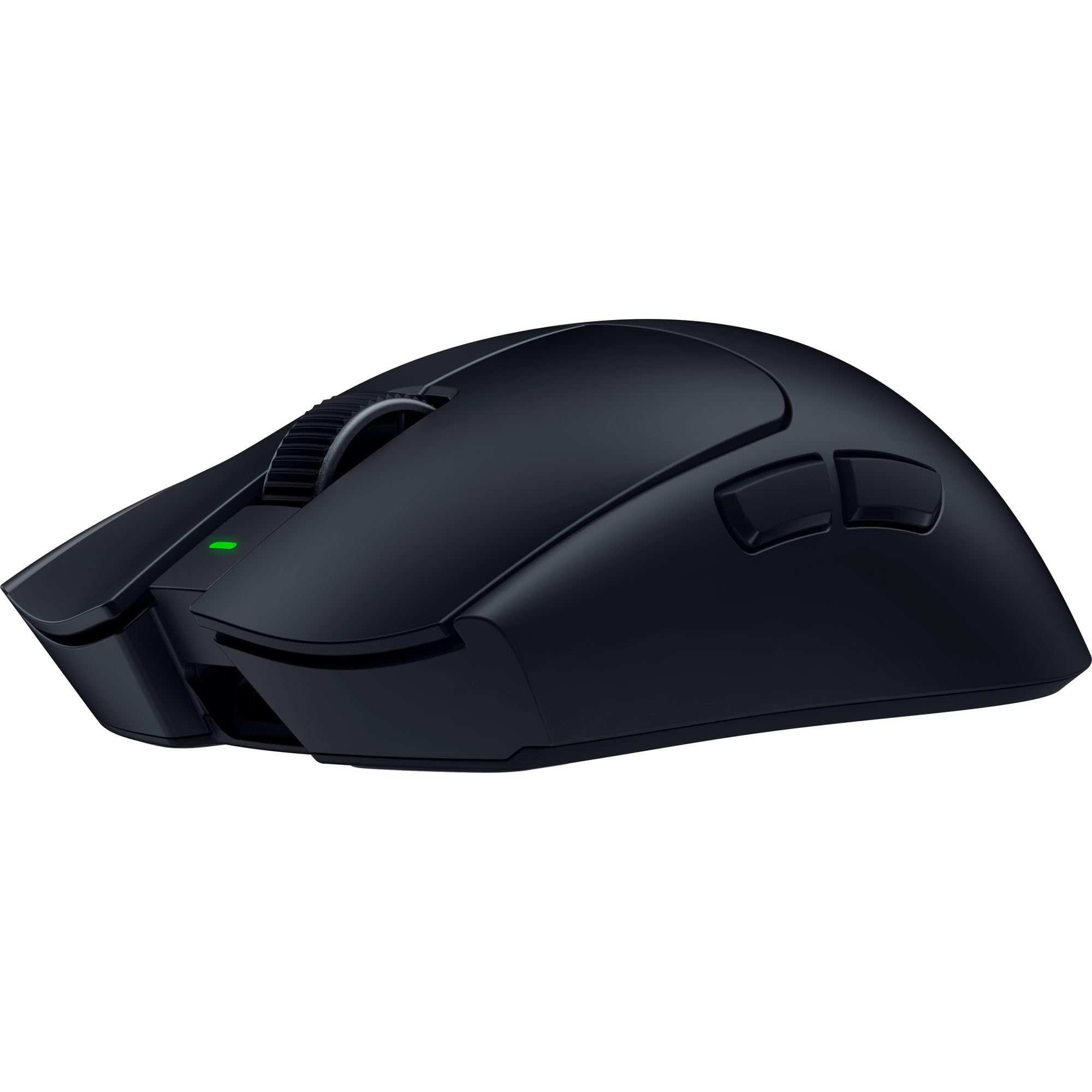
The Viper V4 Pro sets a new benchmark for symmetrical gaming mice, shedding weight to just 49 grams while packing Razer’s most advanced sensor technology to date. The Focus Pro 50K DPI Gen-3 sensor tracks up to 930 IPS with 90G acceleration, and the true 8000 Hz polling rate—available wirelessly via HyperSpeed Gen-2—delivers the lowest possible input latency for split-second decisions. The symmetrical shape is safe for medium to large hands and works best with claw or fingertip grips.
Razer uses Gen-4 optical switches with a crisp tactile feel and a 100-million-click lifespan, paired with an optical scroll wheel that provides consistent, durable actuation. Battery life is excellent for a performance mouse: up to 180 hours at 1000 Hz, dropping to 45 hours at 8000 Hz, but real-world usage at 2000-4000 Hz still delivers weeks of play between charges. The included grip tape, HyperSpeed dongle, and USB-C cable round out a complete package.
The main drawbacks are the high price and the loud left/right click sounds, which may disturb others in the room. Additionally, the black version is prone to showing oil from fingerprints. For competitive players who demand the absolute best sensor and polling performance in a symmetrical esports shell, the V4 Pro is a top-tier investment.
Why it’s great
- Incredibly light 49g symmetrical shell for fast maneuvers
- True 8KHz wireless polling with Gen-2 HyperSpeed
- Optical switches and scroll wheel rated for 100M clicks
- Exceptional battery life at standard 1000 Hz
Good to know
- Premium pricing; not for tight budgets
- Loud click sounds may be off-putting
- Black variant shows fingerprints and oil quickly
2. Logitech G PRO 2 Lightspeed Wireless Gaming Mouse

The Logitech G PRO 2 Lightspeed is the gold standard for a true ambidextrous mouse, offering magnetic swappable side buttons that can be positioned on the left, right, or removed entirely. This modular system ensures left-handed gamers get the same thumb-button access as right-handed users without compromising ergonomics. Its 80-gram weight feels balanced and stable, suitable for palm, claw, and fingertip grips for medium-sized hands.
Equipped with the HERO 2 sensor, the PRO 2 delivers up to 44,000 DPI with tracking up to 88G acceleration, and LIGHTFORCE switches combine optical speed with a mechanical click feel. The 95-hour battery life supports extended gaming sessions, and USB-C charging is convenient. The mouse features 4 programmable side buttons (two per side) via Logitech G HUB, allowing deep customization. The 8 KHz polling is supported with a separate receiver purchase.
The main trade-off is the price, which sits in the premium range. Some users find the side buttons less tactile than expected, and the matte coating can feel smooth without additional grip tape. For any player who needs a truly modular left/right button layout without sensor compromise, the PRO 2 is the definitive pick.
Why it’s great
- True ambidextrous design with magnetic swappable side buttons
- HERO 2 sensor offers pro-grade 44K DPI precision
- LIGHTFORCE hybrid switches for reliable, satisfying clicks
- Lightweight 80g frame with excellent battery life
Good to know
- Premium price bracket
- 8KHz polling requires separate receiver purchase
- Side buttons have a slightly cheap feel
3. Glorious Gaming Model O 2 Wireless Gaming Mouse

The Model O 2 Wireless refines the classic symmetrical honeycomb design by reducing weight to 68 grams, adding a grippier surface texture, and shrinking the shell holes for improved structural rigidity. Its BAMF 2.0 sensor offers 26,000 DPI, 650 IPS tracking, and 50G acceleration with Motion Sync, ensuring precise cursor-to-movement synchronization. The ambidextrous shape comfortably accommodates claw and fingertip grips for medium to large hands.
Battery life is a standout feature: up to 110 hours in 2.4GHz mode and 210 hours via Bluetooth 5.2 LE (both with RGB off). The split-button design and custom Glorious switches rated for 80 million clicks deliver crisp tactility with minimal pre-travel. The Glorious CORE software enables deep RGB customization with 16.8 million colors, though it lacks macro functionality and full profile management. Connectivity is stable, though some users report software inconsistencies with battery percentage accuracy.
The main concerns revolve around durability: some units develop double-click issues or degraded switches within months of use. The PTFE feet glide smoothly out of the box, but the honeycomb design can collect dust over time. For players who prioritize ultra-light weight, wireless freedom, and excellent battery life in a symmetrical shape, the Model O 2 Wireless is a compelling mid-range option.
Why it’s great
- Very lightweight 68g symmetrical wireless design
- Long battery life up to 210 hours on Bluetooth
- BAMF 2.0 sensor with Motion Sync for precise tracking
- Smooth PTFE feet and responsive split-button clicks
Good to know
- Potential double-click issues reported after several months
- Software lacks macro support and has battery percentage bugs
- Honeycomb shell can accumulate dust
4. Alienware Wired/Wireless Gaming Mouse AW610M

The AW610M takes a different approach to the ambidextrous category, prioritizing battery endurance over featherlight weight. Its 350-hour battery life on a single charge means weeks of heavy gaming without reaching for the cable, a significant advantage for gamers who dislike frequent charging sessions. The 16,000 DPI custom Alienware sensor delivers reliable tracking, and the adjustable scroll wheel offers 12 or 24 steps per revolution for user-preferred scroll resistance.
The mouse weighs around 120 grams, noticeably heavier than competition-focused models, which provides stability but may fatigue players who prefer high-speed micro-adjustments. The edge-free ergonomic design and high-grain matte finish offer a comfortable palm grip for larger hands, with a textured surface that resists fingerprints well. The 7 programmable buttons can be configured via Alienware Command Center for full remapping. The wireless dongle stores inside the mouse for portability.
The chief limitations are the lower sensor DPI compared to modern rivals and the heavier weight, which makes it less suitable for fast-paced esports titles. However, its stellar battery life and solid build quality make it an excellent choice for marathon gaming sessions or users who want a single mouse for both work and play. The side buttons require more force to actuate, reducing accidental presses.
Why it’s great
- Exceptional 350-hour battery life—charge once a month
- Comfortable ergonomic shape for palm grip and large hands
- Adjustable scroll wheel for customized scroll feel
- High-grain matte finish resistant to fingerprints
Good to know
- Heavier weight (~120g) not ideal for competitive FPS
- Only 16K DPI sensor in a premium-priced model
- Side buttons stiffer than optimal for quick macros
5. Corsair M75 Wireless RGB Lightweight FPS Gaming Mouse

The M75 Wireless strikes a solid balance between lightweight performance and ambidextrous modularity, weighing 89 grams and offering magnetic swappable side buttons. Its symmetrical shape is designed for FPS precision, and the 26,000 DPI CORSAIR MARKSMAN optical sensor provides accurate tracking up to 650 IPS with 50G acceleration. The CORSAIR QUICKSTRIKE buttons ensure zero pre-travel between the click and the switch, resulting in instant shot registration.
Optical left and right-click switches rated for 100 million clicks eliminate debounce delay, making them ideal for rapid tap firing. Battery life averages 105 hours, and the M75 works wirelessly via 2.4GHz or Bluetooth, with USB-C charging. The DPI button is located on the underside to prevent accidental changes, though this makes on-the-fly adjustments inconvenient. The iCUE software offers detailed customization but has a steep learning curve compared to simpler alternatives.
The main criticisms are the loud click sound from the optical switches and the lack of a dedicated battery indicator in the iCUE interface unless connected via Bluetooth, which limits functionality. Some users find the side buttons positioned for right-handed grip a bit clunky. For FPS players who need a true symmetrical shape with configurable side buttons and instant optical switch response, the M75 is a strong contender.
Why it’s great
- True ambidextrous shape with magnetic swappable side buttons
- Optical switches rated for 100M clicks with zero debounce
- Lightweight 89g frame suitable for fast FPS gameplay
- QUICKSTRIKE buttons ensure instant shot registration
Good to know
- Optical switches produce loud click sounds
- iCUE software is complex and lacks easy battery check
- Side button design feels clunky to some users
6. Razer Viper Ultralight Ambidextrous Wired Gaming Mouse

The wired Razer Viper remains a favorite for budget-conscious gamers who want genuine ambidextrous design without the wireless markup. At 71 grams, it’s one of the lightest symmetrical mice available at its price point, and the Speedflex cable minimizes drag, making it feel almost wireless in use. The 5G optical sensor tracks up to 16,000 DPI with reliable accuracy, and the second-generation Razer optical mouse switches actuate via light beam for instant response without double-click issues.
The Mercury White version features a rougher, more durable plastic finish that resists wear better than earlier iterations. The ambidextrous shape is comfortable for both hands with accessible buttons on both sides, though there are only two side buttons per side. The DPI button is placed on the bottom of the mouse, preventing accidental changes during gameplay but requiring the user to lift the mouse to adjust sensitivity. The braided cable is durable but less flexible than a paracord, which can create drag on very fast swipes.
Some users note that the clicks are overly sensitive, meaning resting a finger lightly on the main button can register an unintended click. The single-color white LED lighting lacks customizable RGB effects, which may disappoint users wanting flashy aesthetics. However, for its price, the Viper delivers excellent sensor performance, optical switch reliability, and a lightweight symmetrical shell that is hard to beat for entry-level and mid-range competitive play.
Why it’s great
- Exceptionally light 71g symmetrical wired design
- Optical switches eliminate double-click failure
- Good 16K DPI sensor for reliable performance
- Excellent value for true ambidextrous gaming
Good to know
- Clicks are very sensitive; easy to actuate accidentally
- Limited to single-color white lighting, no RGB
- Speedflex cable less flexible than premium paracord
7. 8Bitdo Retro R8 Mouse with Charging Dock
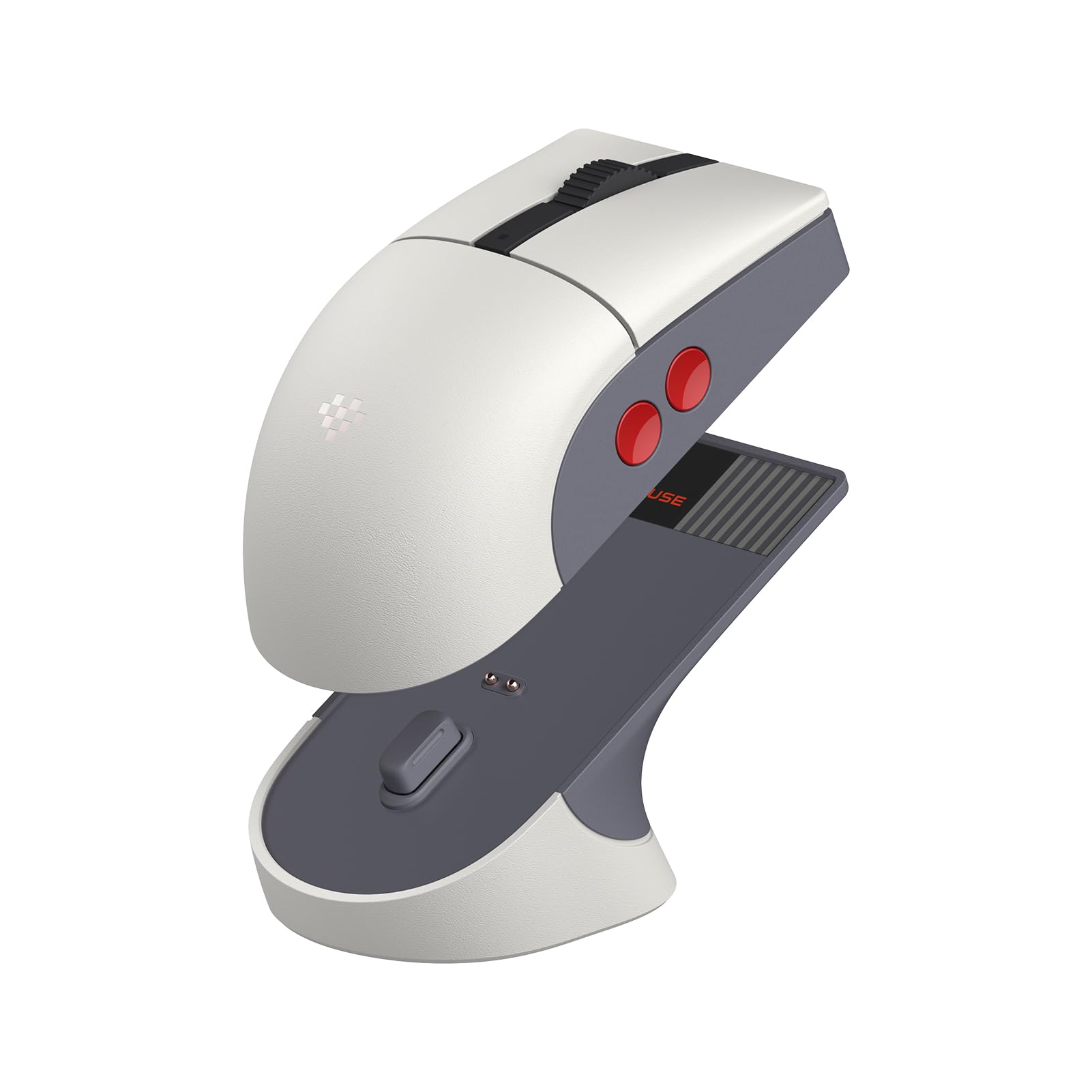
The 8Bitdo Retro R8 brings a nostalgic NES-inspired aesthetic to the symmetrical mouse market while packing a surprisingly modern PAW 3395 optical sensor capable of 26,000 DPI and up to 8000 Hz polling in wired mode. This makes it a standout for retro enthusiasts who refuse to compromise on performance. The mouse features nine programmable buttons including four side buttons (two per side) that can be customized via the 8BitDo Ultimate Software V2, supporting macro assignment for work and gaming.
Connectivity is versatile with Bluetooth, 2.4G wireless, and wired USB-C options. The included multifunctional charging dock not only keeps the mouse powered but also doubles as a storage compartment for the wireless adapter and extends signal range. The Kailh Sword GM X micro switches with a pre-compression system deliver crisp tactile feedback with minimal dead travel. The mouse weighs around 54 grams, making it a very lightweight option that feels nimble for quick flicks.
The main downsides are the software which, while functional, can be buggy—some users report issues with modifier keys not registering correctly in macros and the software occasionally misidentifying the mouse model. The retro shape is slightly smaller, which may not suit users with larger hands who prefer palm grip. For fans of retro design who need a true symmetrical shape with modern sensor specs and a charging dock, the R8 is a unique and capable pick.
Why it’s great
- Powerful PAW 3395 sensor with 26K DPI and 8K polling
- Including charging dock with adapter storage and signal boost
- Unique retro aesthetic for NES fans
- Very lightweight at ~54g for nimble gameplay
Good to know
- Software has macro bugs and model detection issues
- Retro shell shape may be too small for large hands
- Limited to 4 programmable side buttons despite 9 total
FAQ
What makes a mouse truly ambidextrous versus just symmetrical?
Will a higher DPI sensor improve my aim in FPS games?
Why do some ambidextrous mice feel too light for palm grip?
Final Thoughts: The Verdict
For most users, the best ambidextrous gaming mouse winner is the Razer Viper V4 Pro because it combines an ultra-light 49g symmetrical shell with true 8000 Hz wireless polling and the industry’s most advanced optical sensor, leaving no performance stone unturned. If you want true modular side buttons and pro-grade precision for left-handed gaming, grab the Logitech G PRO 2 Lightspeed. And for budget-minded players seeking a lightweight symmetrical performer, nothing beats the value of the Razer Viper Wired.