
Our readers keep the lights on and the weekend projects moving. As an Amazon Associate, I earn from qualifying purchases.
Printing flexible TPU is a different beast. That bouncy, rubber-like material that makes perfect phone cases, custom gaskets, and durable vibration-dampening parts is also the filament most likely to turn your pristine build plate into a tangled, stringy mess. A standard Bowden setup turns TPU into a frustrating noodle-pushing exercise, leaving you with failed prints and wasted filament.
I’m Rikta — the co-founder and writer behind FitlyFast. I’ve spent countless hours digging through filament extrusion dynamics, direct-drive gear ratios, and heated-chamber performance data to find the machines that handle flexible materials without the fight.
For this guide, I focused on the key specs that separate a reliable TPU printer from a frustrating one: the extruder path distance, nozzle temperature ceiling, and print-surface adhesion system. The result is a no-compromise list of the best 3d printer for tpu options currently available.
How To Choose The Best 3D Printer For TPU
Selecting a printer for flexible materials like TPU requires a specific focus on hardware architecture. The most critical factor is the extruder path — a direct-drive system places the motor directly above the hotend, drastically reducing the distance the flexible filament must travel. This short, stiff path prevents the buckling and jamming common with Bowden setups. Beyond the extruder, you need to consider the hotend’s temperature ceiling, the print bed’s adhesion approach, and whether the build surface material will release the flexible part cleanly.
Direct Drive vs. Bowden Extruder
A direct-drive extruder is your best friend for TPU. The motor pushes the filament directly into the hotend with the shortest possible path. This gives you immediate retraction control and prevents the flexible material from bending or kinking inside a long PTFE tube. Bowden extruders can work with stiffer filaments (like PLA or PETG), but they often cause under-extrusion and jams with soft TPU, especially at higher print speeds.
Nozzle Temperature and Heat Creep
TPU typically prints between 220°C and 250°C, but the nozzle must maintain that temperature consistently. A hotend with good thermal break design, often a titanium alloy heatbreak, prevents heat from creeping up to the cold zone. If heat creeps upward, the filament softens too early inside the extruder path, causing a jam. Look for a printer with a nozzle rated to at least 300°C, which gives you the headroom to handle various TPU blends and other high-temp materials.
Print Bed Adhesion and Release
Flexible parts can be challenging to remove from the print bed. A PEI-coated spring steel sheet is the gold standard for TPU. It provides strong adhesion during the print, which keeps the first layer down even with the material’s natural flex, and then allows you to pop the part off by flexing the sheet when it cools. Avoid glass beds for TPU unless you want to pry parts off with a scraper and risk damage to the surface.
Quick Comparison
On smaller screens, swipe sideways to see the full table.
| Model | Category | Best For | Key Spec | Amazon |
|---|---|---|---|---|
| Bambu Lab P1S Combo | Mid-Range | Reliable TPU with multi-color | 500mm/s, 16-color AMS | Amazon |
| Creality K1C | Mid-Range | Carbon-fiber & TPU combo | 600mm/s, 300°C nozzle | Amazon |
| Anycubic Kobra X | Mid-Range | Beginner-friendly multi-color | 600mm/s, 300°C nozzle | Amazon |
| FLASHFORGE AD5X | Mid-Range | Precision & efficient purging | 600mm/s, 300°C direct drive | Amazon |
| ELEGOO Centauri Carbon | Mid-Range | Out-of-box TPU printing | 500mm/s, 320°C nozzle | Amazon |
| Bambu Lab A1 Combo | Mid-Range | Quiet, fast, single-color TPU | 10000mm/s² accel, LED kit | Amazon |
| Creality SPARKX i7 | Mid-Range | AI-assisted TPU prints | AI spaghetti detection | Amazon |
| QIDI PLUS4 | Premium | High-temp engineering TPU | 600mm/s, 370°C direct drive | Amazon |
| Prusa MK4S | Premium | Reliable production-grade parts | 9.84 x 8.3 x 8.6 in | Amazon |
| QIDI Max4 Combo | Premium | Large-format, multi-color TPU | 800mm/s, 65°C chamber | Amazon |
| Prusa XL | Premium | Industrial, multi-material TPU | 14.17 in³, CoreXY, 2-tool | Amazon |
In‑Depth Reviews
1. Bambu Lab P1S Combo

The Bambu Lab P1S Combo is the most balanced machine for TPU I’ve analyzed. Its enclosed CoreXY frame keeps the print environment stable, which directly reduces warping on flexible parts. The direct-drive extruder with a short filament path handles soft TPU without the buckling that plagues Bowden systems, and the 500mm/s print speed means you can produce a TPU phone case in about 40 minutes.
The AMS unit supports up to 16 colors, which is excessive for pure TPU work but useful if you want to combine flexible and rigid materials in one print. The auto bed leveling is genuinely one-touch, and the PEI-coated spring steel sheet provides excellent first-layer adhesion for TPU. Customers consistently report a success rate above 90% on TPU prints, which is a strong signal.
Some users note that the AMS can be finicky with third-party TPU spools, especially if they have a wide or rough edge that doesn’t roll smoothly. Stick to Bambu’s or well-wound spools for the best experience. The P1S is also not recommended for carbon-fiber-reinforced filaments, which may limit some advanced applications.
Why it’s great
- Enclosed chamber prevents TPU warping on large prints
- Direct-drive extruder handles 95A Shore TPU reliably
- Multi-color AMS for mixed rigid/flexible prints
Good to know
- AMS may require respooling certain third-party TPU
- Not recommended for abrasive carbon-fiber filaments
2. Creality K1C

The Creality K1C is built to handle tough materials like carbon-fiber nylon, but its clog-free direct extruder also makes it a strong candidate for TPU. The extruder uses a spring-loaded mechanism that grips the filament tightly without slipping, which is critical when you’re pushing soft material through the hotend at 600mm/s. The 300°C nozzle gives you the temperature range to print both standard TPU and higher-temperature flexible blends.
The auto-calibration suite includes input shaping and vibration compensation, which helps maintain layer consistency even at high speeds. The enclosed build chamber keeps the TPU environment stable, and the auxiliary cooling fan prevents stringing on bridge sections. Early reviews show that the K1C produces clean, non-stringy TPU prints at speeds that would choke a Bowden system.
Setup requires a bit more hands-on attention than some competitors. The boot-up guide is clear, but you’ll want to run the full auto-calibration routine before your first TPU print to dial in the flow rate. Some users also note that the magnetic bed can get chewed up over time, so consider an extra PEI sheet for heavy TPU use.
Why it’s great
- Clog-free direct extruder handles 95A TPU with zero jams
- 300°C nozzle supports high-temp flexible filaments
- Enclosed chamber reduces warping on larger functional parts
Good to know
- Magnetic bed may degrade with frequent TPU removal
- Setup requires more manual tuning than plug-and-play machines
3. Anycubic Kobra X

The Anycubic Kobra X is an excellent entry point for TPU printing, especially if you want to experiment with multi-color flexible parts. Its direct-drive extruder with a hardened steel nozzle and 300°C ceiling handles TPU cleanly, and the 600mm/s print speed is impressive for a machine at this tier. The LeviQ 3.0 auto-leveling system uses 49 points, ensuring the first layer of your flexible print sticks properly across the entire 260mm³ build volume.
What sets the Kobra X apart is its native 4-color capability, expandable to 19 colors with additional ACE units. For TPU, this means you can print a flexible part with multiple shore hardnesses or colors in one run. The purge waste reduction system cuts material use by about half, which makes multicolor TPU prints less wasteful. Users report that the machine handles TPU, PLA, PETG, and PVA without clogging.
The AI camera detects spaghetti failures and foreign objects, which is helpful for unattended TPU prints that take several hours. Some users have reported inconsistent first-layer adhesion with certain textured PEI sheets, so a light application of glue stick may be needed for the most flexible 85A TPU blends.
Why it’s great
- Native 4-color printing with TPU support
- Direct-drive extruder with 300°C max temp
- Low purge waste reduces material cost for multicolor
Good to know
- Textured sheet may need glue for 85A TPU adhesion
- Phone app interface could be more polished
4. FLASHFORGE AD5X

The FLASHFORGE AD5X brings a CoreXY structure and 600mm/s speed to a compact 220mm³ build volume, making it a solid choice for smaller, precision TPU parts. The direct-drive extruder with a 300°C max temperature and 0.4mm pre-installed nozzle is capable of handling flexible filament without jams. The 1-click auto leveling is genuinely one-touch, and the dual-channel cooling fan helps reduce stringing, which is a common issue with TPU at high speeds.
Multi-color printing up to 4 colors is supported, though the purge volume is moderate. The integrated vibration compensation system keeps layers clean even when printing flexible parts with overhangs. Users have reported excellent first-layer quality on the PEI plate, and the automatic filament feeding and retraction simplifies TPU loading, which can be a pain point on other machines.
The software stack is the weak link here. The phone app has a low rating, and the PC slicer uses a fork of OrcaSlicer that doesn’t always handle multi-color files cleanly. Some users found the screen unresponsive on one side. For single-color TPU prints, however, the hardware performs admirably, and the print quality rivals machines costing significantly more.
Why it’s great
- Dual-channel fan minimizes TPU stringing at high speeds
- Direct-drive extruder with 300°C temp ceiling
- 1-click auto leveling delivers consistent first layers
Good to know
- Slicer software has stability issues with multicolor files
- Phone app interface is poorly rated by users
5. ELEGOO Centauri Carbon

The ELEGOO Centauri Carbon arrives fully assembled and pre-calibrated, a major advantage for anyone who wants to print TPU on day one. Its CoreXY structure with a 320°C brass-hardened steel nozzle gives you a wide temperature window for flexible materials, and the enclosed chamber with enhanced cooling keeps the environment stable. The 500mm/s print speed is fast enough for production runs of rubbery parts.
The rigid die-cast aluminum frame minimizes vibration, which is essential for maintaining layer consistency on TPU parts with fine details. The auto bed leveling is excellent, and preset slicer profiles in ELEGOO’s software mean you can load TPU and start printing without manual flow rate tuning. Users report reliable operation for 8-10 hour daily prints with PLA and TPU.
Some early units had USB-C cable failures, and the tech support response time for USA customers was slow, though replacement units have been reliable. The built-in camera is useful for remote monitoring, and the PEI sheet with a PLA-specific surface provides strong first-layer adhesion even at lower bed temperatures.
Why it’s great
- Fully assembled and pre-calibrated for immediate use
- 320°C nozzle handles high-temp flexible filaments
- Die-cast frame minimizes vibration for clean TPU layers
Good to know
- Some early units had USB-C connector reliability issues
- Tech support response time can be lengthy
6. Bambu Lab A1 Combo

The Bambu Lab A1 Combo is the quietest option in this list, operating at under 48dB with active motor noise canceling. This makes it ideal for home or office settings where a loud printer would be disruptive. Its direct-drive extruder with 10,000mm/s² acceleration and 300°C nozzle handles 95A TPU reliably, and the active flow rate compensation algorithm ensures consistent extrusion even with flexible material.
The automatic calibration system covers bed leveling, Z-offset, and input shaping, so you can load TPU and print within minutes. The 1-clip quick-swap nozzle is convenient, and the AMS Lite unit supports up to 4 colors for multicolor flexible prints. The phone app with built-in camera and time-lapse is one of the best in the market, making remote monitoring easy.
The main limitation is that the A1 is not enclosed, which can lead to inconsistent chamber temperature during long TPU prints, especially in drafty rooms. It’s also not recommended for carbon-fiber-reinforced filaments due to potential nozzle wear. The starter filament spool is small, so order extra spools when you buy the printer.
Why it’s great
- Ultra-quiet operation with active noise canceling
- Flow rate compensation ensures consistent TPU extrusion
- Excellent phone app with real-time monitoring
Good to know
- Open design may cause TPU cooling inconsistencies
- Not recommended for abrasive materials
7. Creality SPARKX i7
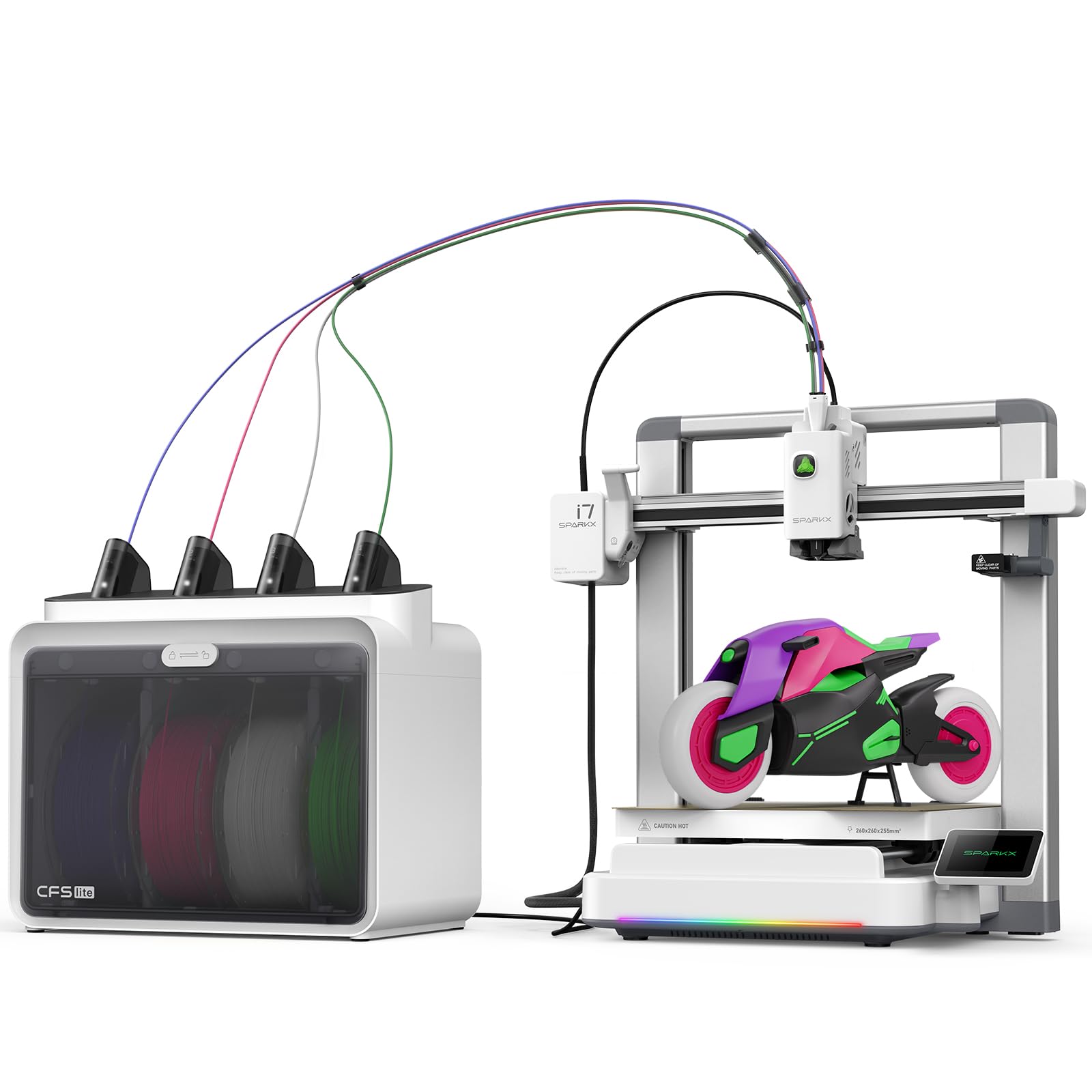
The Creality SPARKX i7 brings AI photo-to-3D technology into the TPU conversation, allowing you to upload a portrait and generate a 3D model in seconds. While this is gimmicky for functional TPU parts, it’s genuinely fun for making custom flexible figurines or personalized rubbery gifts. The direct-drive extruder and enclosed build chamber support TPU, ABS, and nylon, giving you flexibility beyond just the AI feature.
The machine arrives 95% pre-assembled, with unboxing to first print in about 5 minutes. The multi-color CFS Lite system supports up to 4 colors with 50% less waste than traditional systems. The AI camera detects spaghetti failures and filament tangles in real time, which is useful for multi-hour TPU prints that you can’t watch constantly. The 260mm³ build volume is generous for flexible parts.
Some users report that the UI is clunky and the slicer software has bugs, especially when processing complex multi-color files. There are also mentions of fragile plastic gears in the extruder assembly. For TPU printing specifically, stick to simpler single-color prints to avoid software headaches and potential mechanical issues.
Why it’s great
- AI photo-to-3D feature for custom flexible models
- Enclosed chamber supports TPU and engineering filaments
- Fast 5-minute setup time
Good to know
- UI is clunky and slicer has stability issues
- Plastic gears in extruder may wear over time
8. QIDI PLUS4

The QIDI PLUS4 is built for high-temperature engineering filaments, and that capability translates directly to premium TPU printing. The 370°C maximum nozzle temperature gives you the ability to print high-temp flexible blends like PPA-CF, and the 65°C active chamber heating system keeps the entire build environment warm, which dramatically reduces warping on large TPU parts. The 400W heating power and dual-layer insulation ensure consistent temperature distribution.
The independent dual-motor Z-axis and 6mm thick aluminum bed create a rock-solid foundation that prevents layer shifting. The 12 x 12 x 11 inch build volume is generous for functional TPU parts like gaskets, bumpers, and custom seals. The direct-drive extruder with an integrated multi-metal throat nozzle eliminates the gap that causes TPU jams. Users report excellent results with PC-CF, PA6-CF, and standard TPU.
The firmware and software experience has been inconsistent. Some units ship with factory jams or OTA update failures that require manual USB flashing. While QIDI’s support is responsive, the initial setup may require more technical skill than plug-and-play alternatives. The filament runout sensor is also absent, which is a notable omission for a printer in this bracket.
Why it’s great
- 370°C nozzle handles extreme high-temp flexible blends
- 65°C active chamber eliminates TPU warping
- Large 12-inch build volume for production parts
Good to know
- Firmware updates can be buggy; some manual intervention needed
- No filament runout sensor included
9. Original Prusa MK4S

The Original Prusa MK4S is the gold standard for reliability. While it’s not the fastest machine on this list, its direct-drive extruder with input shaping delivers consistently clean TPU prints with zero ringing or vibration artifacts. The open-source architecture means you can tweak every parameter if needed, and the PrusaSlicer profiles for TPU are some of the best pre-tuned settings available.
The self-cleaning print head is a standout feature for TPU. It helps clear any ooze before each print, which reduces the stringing that plagues many direct-drive systems. The PEI-coated print sheet provides excellent adhesion for flexible materials, and the parts pop off cleanly when the sheet cools. Users consistently report that the MK4S produces parts with tight dimensional accuracy.
The build volume of 9.84 x 8.3 x 8.6 inches is adequate but not generous. Larger TPU parts may need to be split and assembled. The printer is also expensive relative to its feature set — you’re paying for reliability and long-term support rather than raw speed or multi-color capabilities.
Why it’s great
- Exceptional layer consistency with input shaping
- Self-cleaning print head reduces TPU stringing
- Fully open source for complete user control
Good to know
- Build volume is smaller than many competitors
- Premium price for reliability over speed features
10. QIDI Max4 Combo

The QIDI Max4 Combo is designed for users who need to print large, flexible parts in one go. Its 390 x 390 x 340mm build volume is more than 50% larger than its predecessor, allowing you to print full-size TPU bumpers, custom mats, or large gaskets without splitting the model. The closed-loop motors on X/Y axes and 800mm/s speed with 30,000mm/s² acceleration make it one of the fastest large-format printers available.
The 65°C active heated chamber is essential for preventing warping on large TPU pieces that would normally curl at the edges. The 40mm³/s high-flow hotend with a hardened steel nozzle can handle TPU at high throughput without under-extrusion. The QIDI BOX system supports up to 16 colors, which is overkill for most TPU jobs but useful for multi-material prints combining flexible and rigid layers.
The printer is heavy at 120 pounds, so plan your workspace accordingly. Some users have reported a warped bed out of the box, though QIDI’s support has been responsive in sending replacement parts. The Polar Cooler is sold separately, which is a notable omission for a machine at this price point.
Why it’s great
- Massive build volume for large flexible parts
- Closed-loop motors ensure precise layer alignment
- 65°C chamber prevents warping on large TPU prints
Good to know
- Very heavy at 120 pounds
- Polar Cooler sold separately
11. Original Prusa XL

The Original Prusa XL is the ultimate tool for professionals who need multi-material TPU prints at scale. Its 2-toolhead CoreXY system allows seamless switching between TPU and a soluble support material like PVA, which unlocks complex geometries that would be impossible with a single extruder. The segmented heated bed system uses intelligent heating zones that reduce power consumption and minimize warping on large flexible parts.
The tool-switching mechanism is optimized for low purge waste, making multi-material TPU prints more economical. The open-source ecosystem gives you full control over the printer, with no forced updates or cloud logins. Users report that the print quality is exceptional, with tight dimensional tolerances that rival injection-molded parts. The build volume of 14.17 inches cubed is generous for professional applications.
The assembly process is misleadingly described as “fully assembled.” The extruder, LCD, and some fragile parts are shipped separately for safe transport and require several hours to install. The software can be buggy, with some users reporting blue screen crashes and a clunky UI. This is a professional tool that demands technical skill, not a beginner-friendly appliance.
Why it’s great
- Dual toolhead enables TPU with soluble supports
- Segmented heated bed reduces warping on large parts
- Fully open source with no vendor lock-in
Good to know
- Significant assembly required despite “assembled” label
- Software has occasional stability issues
FAQ
Can I print TPU with a Bowden extruder?
What Shore hardness should I use for functional TPU parts?
Why does my TPU keep jamming mid-print?
Do I need a heated chamber for TPU?
How do I prevent stringing with TPU?
Final Thoughts: The Verdict
For most users, the 3d printer for tpu winner is the Bambu Lab P1S Combo because its enclosed chamber, direct-drive extruder, and multi-color AMS combine speed and reliability in a single package. If you want the highest temperature flexibility for advanced materials, grab the QIDI PLUS4 with its 370°C nozzle and active chamber heating. And for large-format, multi-color TPU prints, nothing beats the QIDI Max4 Combo.