
Our readers keep the lights on and the weekend projects moving. As an Amazon Associate, I earn from qualifying purchases.
A thermal label printer that handles 4×6 shipping labels is one of the most impactful tools a small business or home-based seller can buy. It eliminates the cost of ink, the hassle of cutting labels from full sheets, and the wasted time of fumbling with a standard paper printer. The right model turns a daily chore into a seamless step in your workflow.
I’m Rikta — the co-founder and writer behind FitlyFast. My analysis of 4×6 label printers focuses on real-world metrics like print resolution, connectivity reliability, and long-term label costs, backed by hundreds of hours of spec comparison and user feedback review.
Whether you ship five packages a day or five hundred, finding the right 4×6 label printer means choosing between speed, resolution, build durability, and the connectivity that fits your workspace.
How To Choose The Best 4×6 Label Printer
Not all thermal printers are built the same. The difference between a frustrating setup and a five-year workhorse often comes down to a few specific specs that beginners overlook. Here’s what to watch for.
Print Resolution: 203 DPI vs 300 DPI
203 DPI is the standard for shipping labels and produces clearly readable text and barcodes. However, if you print small-font labels, dense barcodes, or product labels with logos, 300 DPI delivers noticeably sharper results that scan faster and reduce read errors. Most budget and mid-range models stick to 203 DPI, while premium units often upgrade to 300 DPI.
Connectivity: Wireless vs Wired
Bluetooth 5.0 enables direct printing from a phone or tablet without a network, which is ideal for sellers who work from a phone app like Poshmark or eBay. WiFi connectivity allows multiple computers on the same network to share one printer. USB-only models are more reliable but tether you to a single machine. For small teams, an Ethernet or WiFi-capable printer saves constant cable swapping.
Quick Comparison
On smaller screens, swipe sideways to see the full table.
| Model | Category | Best For | Key Spec | Amazon |
|---|---|---|---|---|
| MUNBYN 941BP | Wireless 300 DPI | High-res shipping labels | 300 DPI / 180 mm/s | Amazon |
| Brother QL-1110NWB | Professional Wide | Multi-user network office | 300 DPI / WiFi + BT | Amazon |
| Brother QL-820NWB | Network Flexible | Standalone & multi-device use | 300 DPI / 110 lpm | Amazon |
| Arkscan 2054K-WF | WiFi + USB | Mixed OS / Chromebook shops | WiFi / 5 ips | Amazon |
| Arkscan 2054A-LAN | Ethernet Network | Wired office network teams | Ethernet / 5 ips | Amazon |
| Rollo USB | Commercial USB | Reliable wired daily driver | 203 DPI / 150 mm/s | Amazon |
| Westinghouse Thermal | Commercial USB | ZPL-compatible workflows | 203 DPI / 6 ips | Amazon |
| HP Direct Thermal | Entry-Level USB | Simple plug-and-play shipping | 203 DPI / 7 ips | Amazon |
| Phomemo PM64D | Touch Screen | First-time buyers / compact desk | 203 DPI / 150 mm/s | Amazon |
In‑Depth Reviews
1. MUNBYN Bluetooth Thermal Label Printer 941BP
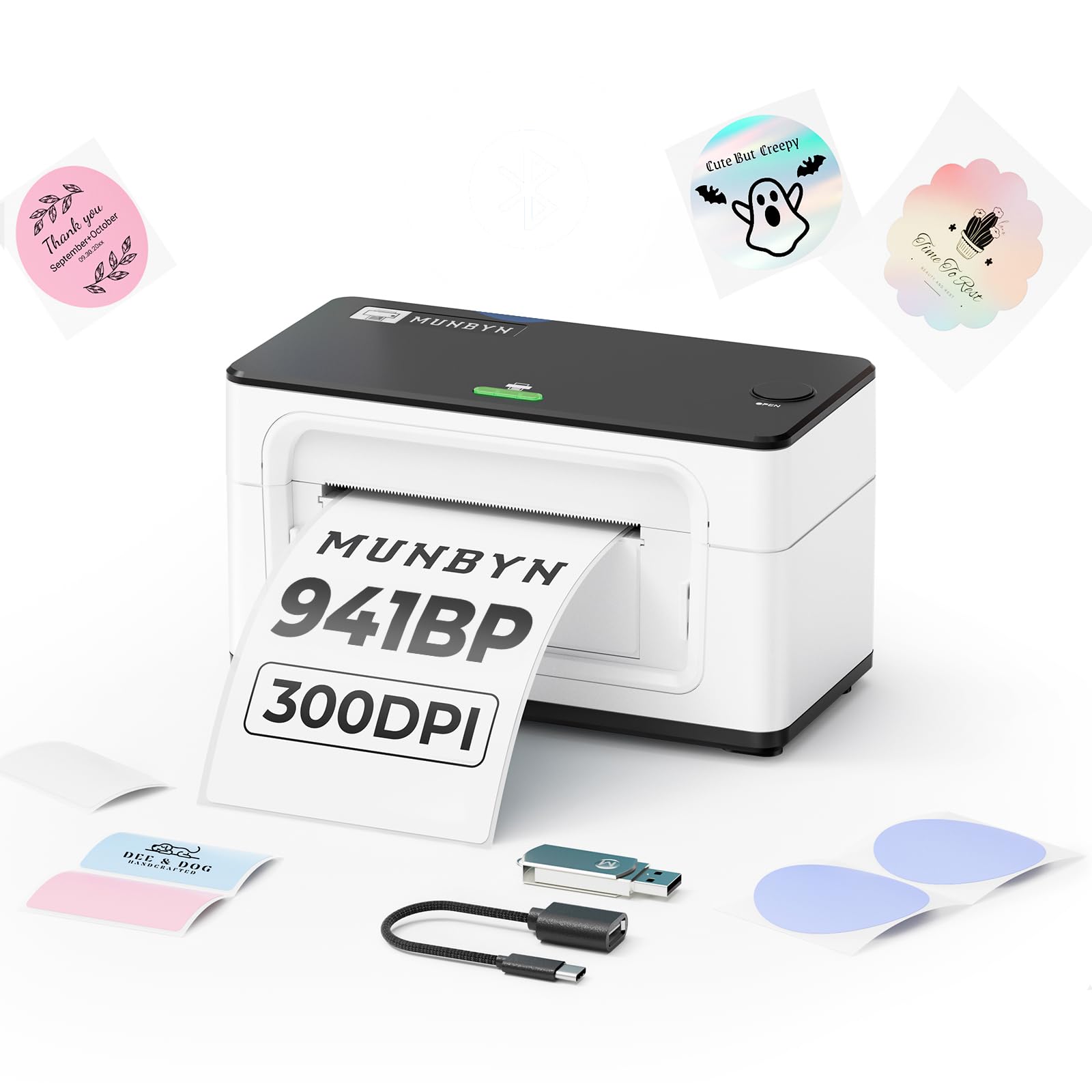
The MUNBYN 941BP is the standout choice for sellers who want crisp print quality without sacrificing wireless freedom. Its 300 DPI resolution is a genuine step up from the standard 203 DPI found in most thermal printers, producing barcodes and fine text that scan immediately with no read errors. The 180 mm/s speed keeps up with high-volume days, and the Bluetooth connectivity works reliably with both iOS and Android devices through the Munbyn Print app.
Setup across Windows, Mac, iPhone, and Android is straightforward, and the package includes a USB flash drive with drivers for users who prefer a wired Type-C connection. The printer handles label widths from 1.57 to 4.3 inches, making it useful for shipping labels, product barcodes, and even decorative multicolor sticker labels from Munbyn’s specialty series. Ubuntu driver support is a rare bonus for Linux-based offices.
The app interface has a learning curve — navigating between “Operate” and “Edit” modes isn’t immediately obvious — and the navigation within print settings could be smoother. But the hardware itself is solid, the 300 DPI output is noticeably sharper than budget alternatives, and the wireless connection rarely drops. For a mid-range investment, this printer delivers the best balance of resolution, speed, and platform support.
Why it’s great
- 300 DPI print head for crisp, scannable labels
- Fast 180 mm/s print speed handles high volume
- Reliable Bluetooth 5.0 wireless connection
- Compatible with Ubuntu and Linux systems
Good to know
- Munbyn Print app navigation can be confusing at first
- Best results with Munbyn or high-quality thermal labels
2. Brother QL-1110NWB Wide Format Label Printer

The Brother QL-1110NWB is built for sellers who want professional-grade output and total connectivity freedom. Its 300 DPI print engine produces sharp text and graphics on labels up to 4 inches wide, and the “Plug & Label” feature lets you create and print labels on Windows without installing full software. The wireless connectivity includes Bluetooth, WiFi, and Ethernet, meaning it fits into any office network without USB tethering.
iPhone users report flawless wireless printing from the Poshmark and eBay apps after downloading the driver from Brother’s support site, making it one of the few printers that handles 4×6 USPS labels reliably from a mobile device. The included DK-1247 die-cut shipping labels and DK-2205 continuous tape roll get you started immediately. The compact footprint and quiet operation suit a desktop environment well.
The biggest drawback is the inkjet-style label cartridge system — Brother’s proprietary DK rolls are convenient but costlier per label than generic fanfold paper. Third-party labels work but sometimes feed less reliably. The initial setup, especially network configuration, can be confusing and may require visiting Brother’s support site for extra drivers. It’s a premium investment that pays off if you value wireless reliability and print consistency over per-label cost.
Why it’s great
- 300 DPI professional print quality
- Triple connectivity: Bluetooth, WiFi, Ethernet
- Wireless printing from iPhone without a computer
- Quiet, compact desktop footprint
Good to know
- Proprietary DK label rolls increase long-term cost
- Network setup requires patience and driver downloads
- Not plug-and-play for Linux users
3. Brother QL-820NWB Professional Label Printer

The Brother QL-820NWB is a highly flexible monochrome label printer designed for office environments where multiple users need to print from different devices. Its 300 DPI output at up to 110 standard address labels per minute makes it one of the fastest thermal printers in its class. The monochrome LCD screen allows standalone operation without a computer, and the USB host port lets you connect a scanner directly for advanced workflows.
Bluetooth wireless technology pairs easily with iPads and smartphones, while WiFi and Ethernet provide network-wide access for Windows and Mac computers. The printer supports black and red printing using DK-2251 tape, which is useful for highlighting important information on labels. The starter rolls included cover both die-cut address labels and continuous-length tape, giving you flexibility out of the box.
The paper loading mechanism can be finicky, and the small LCD screen’s aggressive auto-off timer can be annoying during setup. Bluetooth connectivity may occasionally drop when the laptop lid closes, and the included USB cable is a USB-A-to-A type, which won’t fit modern USB-C ports without an adapter. The P-Touch Editor software feels dated, but the hardware itself is reliable and backed by Brother’s solid reputation for office equipment.
Why it’s great
- Fast 110 labels per minute at 300 DPI
- Bluetooth, WiFi, and Ethernet connectivity
- Standalone operation with LCD screen
- Black and red label printing capability
Good to know
- Paper loading can be finicky
- P-Touch Editor software feels outdated
- USB-A cable included, no USB-C adapter
4. Arkscan 2054K-WF Shipping Label Printer

The Arkscan 2054K-WF is built for sellers who need to print from multiple operating systems — Windows, Mac, Chromebook, and Android/iOS — without being tied to a single cable. Its WiFi connectivity allows wireless printing from iPhones and iPads, while the USB connection supports Chromebook and Android devices. The direct thermal technology eliminates ink and toner costs entirely, and the printer accepts both roll labels loaded internally and fanfold labels fed from the back.
Print quality at 203 DPI is clean enough for standard shipping labels, and the 5 inches per second speed is adequate for moderate daily volumes. The included BarTender UltraLite label design software (Windows only) is useful for custom barcode and product labels. Users who have switched from Dymo printers consistently report fewer jams, faster speeds, and the freedom to use any generic thermal label, dramatically reducing long-term operating costs.
The WiFi setup process can be fussy — especially in environments with mesh networks — and some users report that the printer isn’t truly plug-and-play out of the box. However, Arkscan’s US-based tech support team is responsive via phone, live chat, and remote access, and they help resolve configuration issues quickly. The printer’s build quality feels robust, and it’s designed to handle daily use in a busy shipping station.
Why it’s great
- WiFi and USB connectivity for multi-OS environments
- Works with Chromebooks and Android devices
- Uses any generic thermal label, lowering costs
- Responsive US-based tech support
Good to know
- WiFi setup can be tricky with mesh networks
- Not completely plug-and-play; setup guidance needed
5. Arkscan 2054A-LAN Ethernet Network Label Printer

The Arkscan 2054A-LAN is designed for wired office networks where stability matters more than wireless convenience. Its Ethernet connection allows multiple computers to share the printer without USB swapping, and the 5 inches per second print speed is consistent and reliable. The printer supports label widths from 0.75 to 4.25 inches and lengths up to 90 inches, making it useful for both standard shipping labels and longer barcode labels.
Users who have kept this printer running for two to three years report that it stays cool during long print runs, wakes instantly from standby, and rarely jams with standard fanfold labels. The included BarTender UltraLite software provides full label design capabilities for Windows users. Arkscan’s customer support is a standout feature — several users mention that a phone call or live chat resolved their setup issues in minutes, even on complex mixed-platform networks.
The initial network configuration takes about 20 minutes, requiring the utility software to assign a static IP or DHCP address. This is not a plug-and-play device for users who expect automatic installation. The beige casing is functional but not stylish, and the printer lacks Bluetooth or WiFi, so mobile printing requires a workaround. For a dedicated wired office where uptime is critical, this is a dependable long-term investment.
Why it’s great
- Stable Ethernet connection for shared office use
- Proven reliability over years of daily use
- Excellent US-based tech support team
- Low jams with standard thermal labels
Good to know
- Network setup takes 20 minutes and some technical know-how
- No Bluetooth or WiFi for mobile printing
6. Rollo USB Shipping Label Printer

The Rollo USB is the printer that built Rollo’s reputation among small business owners. It’s a straightforward USB-only device that prioritizes reliability over extra features. The direct thermal print head at 203 DPI delivers clear, scannable labels at a speed of 150 mm/s — roughly one 4×6 label per second. Setup on both Windows and Mac takes under 30 minutes, and the Rollo Ship app gives you access to discounted shipping rates from USPS, UPS, and FedEx.
The printer supports label widths from 1.57 to 4.1 inches, so you can print shipping labels, product labels, barcodes, and even thank-you stickers. Users who have printed thousands of labels through FBA and ShipStation report consistent performance with no jamming, and the compact black and gray design fits neatly on a small desk. The included power adapter and USB cable are all you need to get started — no proprietary label cartridges required.
The lack of wireless connectivity means you must be physically connected to a computer via USB, which can be limiting if you want to print from a phone or tablet. Some users note that the density and speed settings may need adjustment depending on the label brand, and cropping label designs sometimes requires a PDF editor. For a seller who works exclusively from a laptop and values bulletproof reliability over bells and whistles, the Rollo USB is a proven workhorse.
Why it’s great
- Extremely reliable, minimal jams over thousands of prints
- Fast 150 mm/s print speed
- Works with any generic thermal label
- Easy setup on Windows and Mac
Good to know
- USB only — no Bluetooth or WiFi
- May need density adjustments for different label brands
7. Westinghouse Thermal Shipping Label Printer

The Westinghouse Thermal Printer is a commercial-grade option that stands out for its ZPL support and Ethernet connectivity. ZPL compatibility means it integrates with warehouse management systems and custom shipping software that expects Zebra-style commands. The 203 DPI print head at 6 inches per second is fast enough for moderate to high-volume shipping, and the direct thermal design eliminates ink and toner costs.
Setup is straightforward via USB using the included driver on a flash drive, and the printer works with Windows, Mac, and Linux. The adjustable media holder accepts label widths from 0.78 to 4.6 inches, including both fanfold and roll labels with core diameters from 1 to 3 inches. Users consistently praise the print quality as crisp and the label feeding mechanism as jam-free, even with generic thermal labels.
The biggest limitation is the lack of Bluetooth — this is a wired-only printer (USB and Ethernet). The Ethernet cable and USB-C adapter are sold separately, which is an extra expense to factor in. Some users note that the initial driver installation on Windows might conflict with existing HP printer software, requiring a few configuration tweaks. For a seller or warehouse that needs ZPL compatibility and a stable wired connection, this is a solid choice at a competitive price point.
Why it’s great
- ZPL command support for advanced shipping software
- Ethernet wired connectivity for shared office use
- Crisp print quality with minimal jams
- Linux compatible
Good to know
- No Bluetooth — wired USB and Ethernet only
- Ethernet cable and USB-C adapter sold separately
8. HP Shipping Label Printer, 4×6 Direct Thermal

The HP Direct Thermal Label Printer is an entry-level model that focuses on speed and simplicity. With a 7 ips print speed and 203 DPI resolution, it produces clean shipping labels quickly. The USB-only connection and straightforward driver installation make it a good fit for sellers who just want to plug in and start printing without configuring network settings or pairing Bluetooth.
The adjustable media holder accepts label rolls up to 4 inches wide, covering standard 4×6 shipping labels. HP includes a starter roll to get you going. The printer works with major e-commerce platforms including Amazon, UPS, Shopify, and ShipStation. Users who have printed up to 1,000 labels without issues report that it’s fast, quiet, and easy to use for a basic shipping workflow.
The downsides are notable. Some users report that the print quality degrades over time, producing blurry or barely legible labels that barcode scanners reject. Disabling dithering in the print settings can help, but not always. The printer also has known driver conflicts on Windows when HP’s own software suite interferes with the basic driver. A few users received units that stopped printing after a few months, making the ROI questionable for high-volume shippers. For very light use, it works; for consistent daily shipping, look higher in this list.
Why it’s great
- Fast 7 ips print speed
- Plug-and-play USB setup
- Quiet operation
Good to know
- Print quality can degrade over time
- Driver conflicts on Windows with HP software
- Reliability concerns for high-volume daily use
9. Phomemo 4×6 Shipping Label Printer with Touch Screen
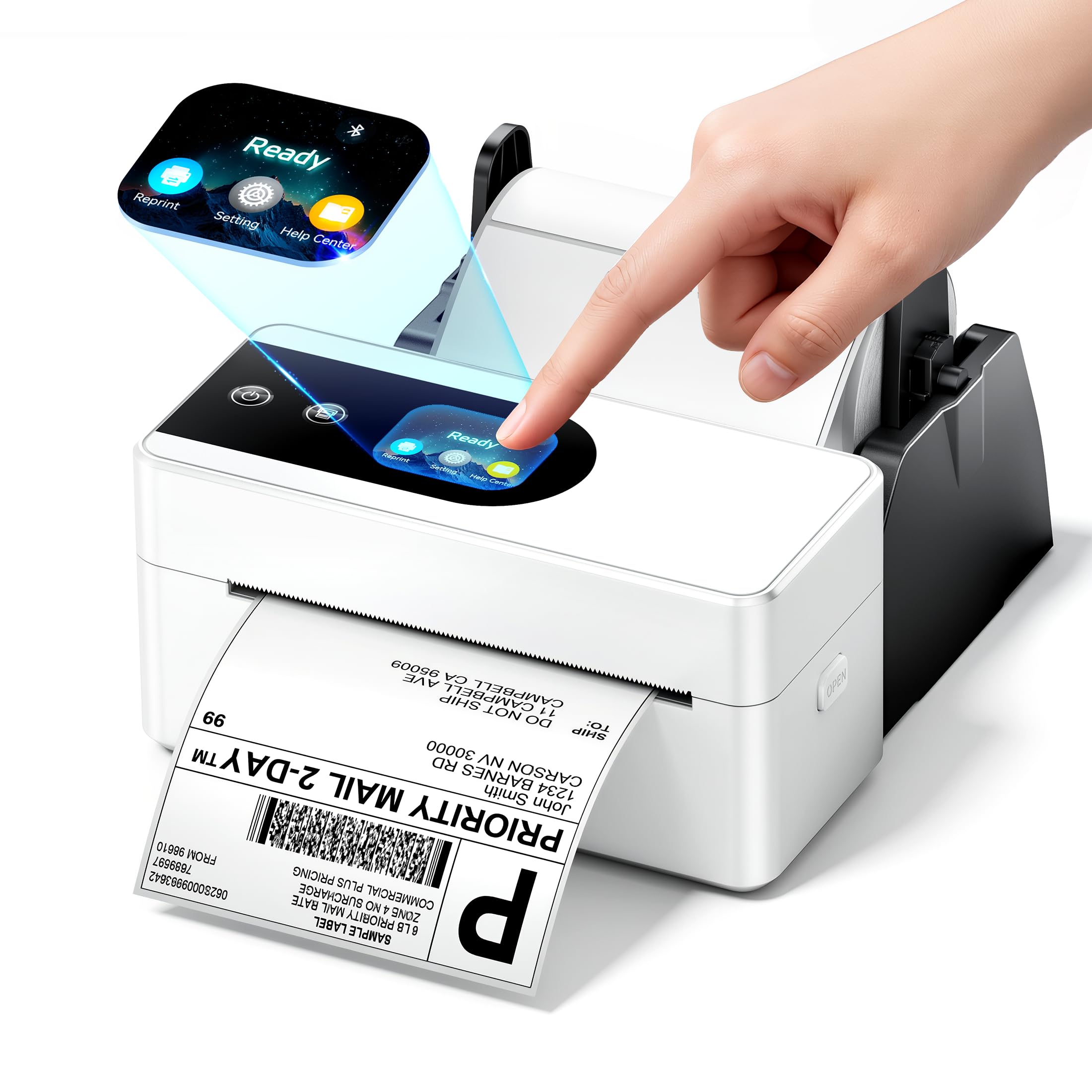
The Phomemo PM64D is a compact, budget-friendly thermal printer that brings a unique touch screen interface to the entry level. The 2.4-inch touch screen lets you check printer status, adjust settings, and perform one-click operations without a computer. The printer measures only 6.63 x 3.25 x 2.94 inches, saving significant desk space compared to bulkier commercial models. Bluetooth 5.0 provides wireless connectivity for both Android/iOS devices and Windows/Mac computers, with USB as a backup option.
Print quality at 203 DPI and 150 mm/s is adequate for standard shipping labels, barcodes, and retail price tags. The printer handles label widths from 0.79 to 4.53 inches. Compatibility with major platforms including Amazon, Shopify, Etsy, eBay, and PayPal is solid. The pink color option is a fun aesthetic choice that stands out in a sea of black and gray office equipment.
Reliability is a real concern here — some users received units that were dead on arrival, which suggests quality control inconsistency. The LabelLife app also pushes a premium subscription that some users find aggressive and unnecessary for basic label printing. While the compact size and touch screen are genuinely innovative for the price point, the risk of early failure makes this printer best suited as a backup unit or for very light shipping volume where downtime is not critical.
Why it’s great
- Innovative touch screen for easy operation
- Ultra-compact footprint saves desk space
- Bluetooth 5.0 for wireless printing
- Available in fun color options
Good to know
- Quality control issues — some units arrive DOA
- LabelLife app has aggressive subscription upsell
- Not recommended for high-volume daily use
FAQ
Do I need 300 DPI or is 203 DPI enough for shipping labels?
Can I use any brand of 4×6 thermal labels with these printers?
Does a Bluetooth label printer work with iPhone and iPad?
How many labels can a thermal printer produce before the print head wears out?
Final Thoughts: The Verdict
For most users, the best 4×6 label printer winner is the MUNBYN 941BP because it combines 300 DPI print quality with reliable Bluetooth 5.0 connectivity and broad platform support at a mid-range price. If you want premium wireless flexibility and a proven office-grade build, grab the Brother QL-1110NWB. And for a dependable wired-only workhorse that handles thousands of labels without a single jam, nothing beats the Rollo USB.