
Our readers keep the lights on and the weekend projects moving. As an Amazon Associate, I earn from qualifying purchases.
The perfect 3D printer doesn’t exist — but the one that gets closest balances raw speed, reliable extrusion, quiet operation, and the ability to handle multiple materials without constant tinkering. After hundreds of hours analyzing build volumes, motion systems, nozzle temperatures, and user-reported failure rates, one thing is clear: the “all-around” title belongs to the machine that prints your first project perfectly and your hundredth project just as well.
I’m Rikta — the co-founder and writer behind FitlyFast. My research for this guide involved cross-referencing thousands of verified buyer experiences, comparing CoreXY versus bedslinger kinematics, and measuring how each machine’s heated chamber, flow compensation, and automatic calibration actually perform during long production runs with engineering-grade filaments.
Whether you’re printing functional prototypes, multi-color cosplay parts, or detailed miniatures, the right choice comes down to material flexibility and build volume. This guide breaks down the nine top contenders to help you find the best all around 3d printer for your workshop or desk.
How To Choose The Best All Around 3D Printer
Every “all-around” 3D printer needs to hit four pillars: fast print speeds without sacrificing detail, reliable auto-leveling that eliminates manual bed-screwing, a high-temperature hotend for engineering filaments, and a build volume large enough for functional parts. The machines below range from entry-level to professional, but each was chosen because it excels across multiple categories instead of being a one-trick pony.
Motion System: CoreXY vs. Bedslinger
CoreXY designs move the print head on a gantry while the bed moves only on the Z-axis. This reduces the mass being shifted, allowing speeds over 500 mm/s with fewer vibration artifacts. Traditional bedslingers move the bed on the Y-axis — simpler and cheaper, but prone to layer shift at high accelerations. For all-around use, CoreXY machines offer a better balance of speed and precision.
Hotend Temperature and Heated Chamber
A maximum nozzle temperature of at least 300°C opens up materials like polycarbonate and nylon. If you want carbon-fiber composites or PPS-CF, you need 350°C or more. A heated chamber (60°C or higher) prevents warping in ABS, ASA, and high-temp filaments by keeping the entire enclosure at a stable temperature. For all-around versatility, an enclosed build volume with active chamber heating is a strong advantage.
Auto-Leveling and Flow Compensation
Automatic bed leveling using inductive or strain-gauge sensors ensures the first layer sticks across the entire build plate without manual tweaking. Active flow rate compensation adjusts extrusion in real-time based on nozzle pressure, reducing over-extrusion and under-extrusion on complex geometries. Systems that combine both features deliver the most reliable print starts.
Quick Comparison
On smaller screens, swipe sideways to see the full table.
| Model | Category | Best For | Key Spec | Amazon |
|---|---|---|---|---|
| Bambu Lab P1S Combo | CoreXY Enclosed | Reliable multi-material work | 500 mm/s, 16-color AMS | Amazon |
| ELEGOO Centauri Carbon | CoreXY Mid-Range | Out-of-box speed and value | 500 mm/s, 320°C nozzle | Amazon |
| Anycubic Kobra X Multicolor | Bed Slinger Multi-Color | Low-cost multicolor printing | 600 mm/s, 19-color ACE | Amazon |
| FLASHFORGE AD5X | CoreXY 4-Color | Small-footprint 4-color work | 600 mm/s, 220 mm³ build | Amazon |
| Bambu Lab A1 Combo | Bed Slinger Beginner | Ease of use and quiet operation | 10,000 mm/s² accel, AMS Lite | Amazon |
| ELEGOO Saturn 4 Ultra 16K | Resin SLA | Ultra-detailed miniatures | 16K LCD, 150 mm/h speed | Amazon |
| QIDI PLUS4 | CoreXY High-Temp | Engineering-grade filaments | 600 mm/s, 370°C nozzle, 65°C chamber | Amazon |
| Original Prusa MK4S | Bed Slinger Pro | Open-source reliability | Input shaping, 9.84 x 8.3 x 8.6 in | Amazon |
| Creality K2 Plus Combo | CoreXY Large Format | Massive builds with multi-color | 350 mm³ build, 600 mm/s, 16-color CFS | Amazon |
In‑Depth Reviews
1. Bambu Lab P1S Combo

The Bambu Lab P1S Combo is the closest thing to a set-it-and-forget-it 3D printer in the mid-range. With a fully enclosed CoreXY frame, auto bed leveling, and a maximum speed of 500 mm/s, it delivers consistent results across PLA, PETG, TPU, and ABS without the user needing to tune retraction or temperature towers. The bundled AMS unit supports up to 16 colors, making multi-material prints possible right out of the box.
User feedback across hundreds of hours confirms a success rate above 95% — most failures trace back to slicer settings or filament quality rather than the machine itself. The active flow rate compensation keeps extrusion stable during high-speed infill passes, and the enclosed design helps maintain chamber temperature for ABS without a separate heater. Experienced users note the noise level is moderate but manageable, and the 15-minute setup time is genuinely accurate.
Where the P1S really earns its “all-around” badge is material versatility. It handles PLA and PETG flawlessly, prints TPU without jams, and runs ABS with minimal warping when the door is closed. Beginners can start with basic PLA and graduate to carbon-fiber nylon without buying a second printer. The color-change purge waste is the only consistent complaint — it’s higher than some competing systems — but the reliability and ecosystem support make it the safest recommendation in this class.
Why it’s great
- True plug-and-play with automatic calibration
- AMS enables 16-color prints without manual filament swapping
- Enclosed design handles ABS and ASA reliably
Good to know
- Color-change purge waste is higher than some competitors
- Moderate noise level at full speed
2. ELEGOO Centauri Carbon

The ELEGOO Centauri Carbon delivers CoreXY speed and a 320°C hotend at a price that undercuts most enclosed printers by a wide margin. Fully pre-assembled with auto bed leveling and a rigid die-cast aluminum frame, it hits 500 mm/s with reliable first-layer adhesion, even on large parts. The built-in camera with dual LED lighting enables remote monitoring and time-lapse capture, a feature usually reserved for more expensive machines.
Users consistently praise the print quality at speed, with most reporting excellent results on PLA and PETG right out of the box. The brass-hardened steel nozzle handles carbon-fiber reinforced materials without wear, and the enclosed chamber with enhanced cooling prevents heat-creep jams during long runs. Some early units experienced hotend communication errors, but replacement units have proven reliable over hundreds of hours of use.
The 256 mm cubic build volume is generous for the price class, and the pre-installed slicer profiles eliminate guesswork for beginners. The vibration compensation system reduces ringing artifacts enough that post-processing is minimal for most functional prints. If you want a CoreXY that works immediately without tweaking and leaves budget for filament, this is the strongest contender in the mid-range.
Why it’s great
- Fully assembled and pre-calibrated out of the box
- Die-cast frame minimizes vibration at speed
- 320°C nozzle supports carbon-fiber filaments
Good to know
- Early units had some hotend communication failures
- Vibration feed may not eliminate all shaking on soft surfaces
3. Anycubic Kobra X Multicolor

The Anycubic Kobra X brings native four-color printing to a bedslinger platform at a price point that makes multicolor accessible to hobbyists. The ACE 2 Pro system reduces filament purge waste by over 80% compared to earlier generations, and the 600 mm/s maximum speed completes a Benchy in 14 minutes. The 260 mm cubic build volume is roomy enough for helmets and large decorative pieces.
Firsthand reports from new users highlight the flawless bed adhesion delivered by the 49-point LeviQ 3.0 auto-leveling system. The hardened steel nozzle and 300°C maximum temperature allow mixed printing of PLA, PETG, TPU, PVA, and ASA. The touchscreen interface and preloaded model library (over 10,000 designs) make it particularly kid-friendly, with multiple accounts noting zero troubleshooting during the first weeks of use.
The main trade-off is the bedslinger design — at high speeds, the moving bed can introduce ringing on tall prints. The spaghetti detection and AI camera help catch failures early, but the phone app still needs refinement. For users who prioritize colorful prints and ease of use over maximum speed precision, the Kobra X offers one of the lowest entry points to multicolor FDM printing.
Why it’s great
- Native multi-color with drastically reduced waste
- Excellent bed adhesion and auto-leveling
- Large model library for beginners
Good to know
- Bedslinger design limits high-speed precision on tall parts
- Phone app has some rough edges
4. FLASHFORGE AD5X
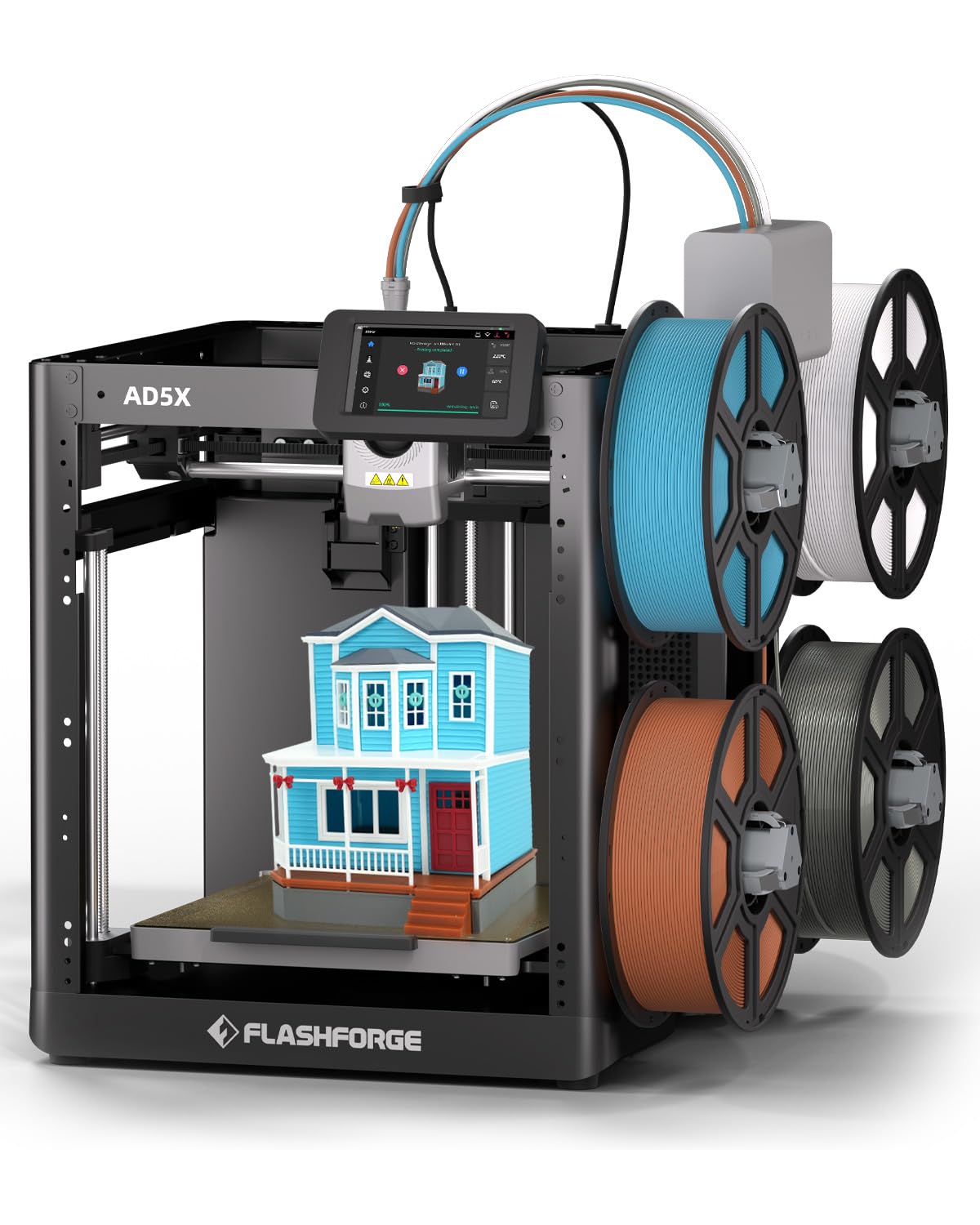
The FLASHFORGE AD5X uses a CoreXY frame and Intelligent Filament System to manage four colors simultaneously without the complex purge towers of some competitors. The 600 mm/s speed and 20,000 mm/s² acceleration make it fast, and the all-metal construction keeps vibrations low. Its 220 mm cubic build volume is smaller than some rivals, but the compact footprint fits well on crowded desks.
User reviews highlight the automatic spool switching for same-color filament — a genuine productivity boost that prevents mid-print failures when a spool runs out. The printer handles PLA and Silk PLA beautifully out of the box, and the optional enclosure kit () unlocks wood-fill and metal-fill filaments. Advanced users report that the 4-color system, while not as polished as Bambu’s AMS, is more intuitive because it uses direct 4-spool feeding rather than a hub.
Reliability concerns surface in a minority of units — some users report heat calibration errors after weeks of use, and warranty service involves shipping replacement parts rather than whole-unit swaps. The slicer (a fork of Orca) is user-friendly, and WiFi connectivity allows remote monitoring. For makers who want multicolor in a small package and don’t mind occasional troubleshooting, the AD5X is a capable choice.
Why it’s great
- Automatic spool switching for same-color filament
- Low cost enclosure kit unlocks advanced materials
- Fast setup with pre-leveled bed
Good to know
- Some units develop heat calibration errors over time
- 220 mm build volume is smaller than most competitors
5. Bambu Lab A1 Combo

The Bambu Lab A1 Combo trades the CoreXY frame of its bigger sibling for a bedslinger design but keeps the full-auto calibration, active flow rate compensation, and AMS Lite system that made Bambu famous. At 10,000 mm/s² acceleration, it’s fast without being the fastest, but the active motor noise canceling keeps it quieter than 48 dB — a real advantage for shared rooms or overnight prints.
New users consistently report that the A1 is the easiest printer they’ve ever used. The touchscreen interface walks through every step, the 1-Clip quick-swap nozzle makes maintenance simple, and the bundled LED lamp kit turns standard prints into functional light fixtures. The AMS Lite supports four colors and works with multiple PLA brands without jamming, though the purge waste is higher than some dedicated color systems.
The bedslinger design means tall prints can show ringing at high speeds, but for most users — especially those printing cosplay parts, toys, and decorative items — the quality is exceptional. The preloaded maker app provides thousands of ready-to-print models. For a beginner who wants the Bambu ecosystem at a lower entry point, the A1 Combo delivers nearly all the software polish with a smaller footprint.
Why it’s great
- Industry-leading ease of use and calibration
- Very quiet operation at 48 dB or less
- Active flow compensation ensures consistent extrusion
Good to know
- Bedslinger design can show vibration artifacts on tall prints
- AMS Lite produces notable purge waste
6. ELEGOO Saturn 4 Ultra 16K

For users who need ultra-fine detail — miniature wargaming figures, jewelry patterns, dental models — the ELEGOO Saturn 4 Ultra 16K is the resin printer to beat. Its 10-inch 16K monochrome LCD delivers pixel dimensions that capture hair textures and fabric weave without visible layer lines. The tilt-release mechanism speeds up print times to 150 mm/h by peeling the cured layer with less force than traditional lift methods.
The smart tank heating system maintains resin at a consistent 30°C, reducing viscosity-related defects like bubbles and layer separation. The built-in AI camera monitors for empty build plates and warped models, though detection reliability varies with resin transparency and lighting conditions. Auto-leveling is genuinely set-and-forget — users report zero manual adjustment needed across dozens of prints.
Resin printing has additional overhead: washing, curing, proper ventilation, and the cost of resin itself. The Saturn 4 Ultra minimizes that overhead with smart residue detection that prevents LCD damage and timely resin shortage alerts. The flip-up lid design makes access convenient, and the 8.33 x 4.66 x 8.66 inch build volume fits most tabletop miniatures and small functional parts. If your all-around needs include high-detail resin work, this is the top choice.
Why it’s great
- 16K resolution captures extreme detail without layer lines
- Heated resin tank improves success rate in cool environments
- Tilt release mechanism enables faster print speeds
Good to know
- AI detection not 100% reliable with all resin types
- Requires post-processing (wash/cure) for finished parts
7. QIDI PLUS4

The QIDI PLUS4 is the only printer in this lineup with a 65°C active chamber heater and a 370°C metal integrated nozzle, making it the go-to machine for engineering-grade filaments like PPS-CF, PPA-CF, and PA6-CF. The 400W chamber heater with air circulation and dual-layer insulation keeps temperature stable, reducing warping on large ABS and nylon parts. The 12 x 12 x 11 inch build volume fits multiple models in one run.
Users who specialize in functional prototypes and end-use parts consistently report excellent results with carbon-fiber nylons and polycarbonate. The independent dual motor-driven Z-axis with 10 mm lead screws provides stable layer stacking even at 600 mm/s. The integrated filament cutter and compatibility with the QIDI BOX (multi-filament feeder, launching later) point toward future multi-color capability.
Quality control has been a mixed bag — some units arrive with jammed hotends or OTA update failures, and Qidi support, while responsive, sometimes sends replacement parts instead of diagnosing remotely. Once running, however, the printer is reliable and fast. The open-source Klipper firmware allows advanced tuning, and the HD camera enables remote monitoring. For users who print primarily with high-temperature materials, the PLUS4 outperforms similarly priced competitors.
Why it’s great
- Active chamber heating up to 65°C for advanced filaments
- 370°C nozzle handles PPS-CF and PPA-CF
- Open-source Klipper for advanced tuning
Good to know
- Quality control can be inconsistent out of the box
- Multi-color BOX system not yet available
8. Original Prusa MK4S

The Original Prusa MK4S represents the gold standard of open-source reliability. The input shaping upgrade reduces ringing at higher speeds, and the 9.84 x 8.3 x 8.6 inch build volume is perfectly sized for most functional prints. The printer ships fully assembled and tested with a 1 kg spool of Prusament PLA, a thoughtful inclusion that lets you start printing immediately.
Prusa’s ecosystem — including firmware updates, hardware upgrade paths, and a vast community — ensures long-term support that no other manufacturer matches. Users consistently report that the MK4S “just works” with a wide range of filaments, from Elegoo PLA to generic PETG, using the default slicer profiles. The kit version takes three days to assemble but teaches you every component — a valuable experience for learning 3D printing mechanics.
The two main drawbacks are the slower speed compared to CoreXY competitors and the higher entry price. At 500 mm/s, it matches the P1S on paper, but the bedslinger design limits usable acceleration on tall models. The open-source nature means some features (camera integration, cloud monitoring) require third-party solutions. For users who value repairability, community support, and long-term upgradeability over raw speed, the MK4S is unmatched.
Why it’s great
- Open-source with guaranteed long-term support and upgrades
- Excellent print quality with default slicer profiles
- Lifetime technical assistance from Prusa Research
Good to know
- Bedslinger limits high-speed performance on tall parts
- Higher price than many competing CoreXY machines
9. Creality K2 Plus Combo

The Creality K2 Plus Combo is built for users who need the largest single-volume build and multicolor capability in one package. The 350 mm cubic build area is massive — enough for full helmets, architectural models, and multi-part assemblies without splitting. The step-servo motor system delivers 30,000 mm/s² acceleration, making this the fastest accelerating printer on this list at 600 mm/s.
The Creality Filament System (CFS) works similarly to Bambu’s AMS, supporting up to four units for 16 colors, but with a key advantage: the CFS actively dries filament while printing, reducing moisture-related popping and stringing. The dual AI cameras monitor for spaghetti failure, foreign objects, and idle states, alerting users through the Creality app. The active heated chamber and high-temp hardened steel nozzle unlock PLA, ABS, PETG, PA-CF, and PPA-CF.
Reliability feedback is mixed. Many users report perfect prints from the first run with zero calibration needed, while a minority experience Y-axis communication errors, reversed extruder stepper motors, or firmware bugs that require advanced troubleshooting. The K2 Plus is heavy (nearly 28 pounds of printer alone, with a massive footprint) and requires two people to unbox safely. For experienced users who want the biggest possible canvas with multicolor capability and are comfortable with occasional technical support, the K2 Plus is unmatched in volume.
Why it’s great
- Enormous 350 mm build volume fits large projects in one piece
- CFS actively dries filament for better print quality
- 30,000 mm/s² acceleration for lightning-fast prints
Good to know
- Quality control inconsistencies reported in some units
- Very heavy, requires two people for unboxing and setup
FAQ
What build volume do I need for an all-around 3D printer?
Is multi-color printing worth the extra waste?
Do I need a resin printer or an FDM printer for all-around use?
What does auto bed leveling actually do?
Can I print carbon-fiber nylon on a standard all-around printer?
Final Thoughts: The Verdict
For most users, the best all around 3d printer winner is the Bambu Lab P1S Combo because it brings together reliable CoreXY speed, 16-color AMS flexibility, a fully enclosed design, and a user experience that requires minimal tinkering. If you want a budget-friendly CoreXY that’s ready to print in minutes, grab the ELEGOO Centauri Carbon. And for high-temperature engineering filaments, nothing beats the QIDI PLUS4 with its 370°C nozzle and 65°C active chamber.