
Our readers keep the lights on and the weekend projects moving. As an Amazon Associate, I earn from qualifying purchases.
A boom arm that sags mid-sentence or creaks with every mouse click turns a professional stream into an amateur mess. The difference between a clean vocal take and a recording ruined by desk vibrations often comes down to a single weak joint or a poorly-damped spring. Choosing the right arm means understanding load capacity, thread compatibility, and the build quality that keeps your mic locked exactly where you left it.
I’m Rikta — the co-founder and writer behind FitlyFast. I have spent countless hours analyzing the tension mechanisms, material grades, and real-world user feedback across dozens of boom arm models to separate the arms that hold steady from those that slowly sink.
This guide breaks down the seven strongest contenders available, focusing on the specific joints, springs, and weight tolerances that define a reliable mic stand. Whether you need a low-profile arm for a crowded desk or a heavy-duty studio solution, these are the best boom arm options I found after deep spec-by-spec analysis.
How To Choose The Best Boom Arm
Not all scissor arms are created equal. The core difference between a frustrating arm and a daily-driver arm comes down to three areas: the weight rating relative to your microphone, the thread adapter set included, and the joint friction that prevents gradual creep. Beginners often over-prioritize aesthetics or RGB lighting and ignore the clamp strength that anchors the whole setup.
Load Capacity and Mic Weight
Every boom arm has a maximum weight recommendation, typically expressed in kilograms or pounds. Underestimating your mic’s weight — especially with a shock mount attached — means the arm will sag no matter how tight you crank the pivot screws. For heavy dynamic mics like the Shure SM7B or Rode PodMic, look for arms rated at 2kg or higher. Lighter condenser mics work well with 1kg-rated arms, but a 3-pound limit gives you breathing room for future upgrades.
Thread Compatibility and Adapters
The standard thread pattern for pro microphones is 5/8″-27, while many desktop mics use 3/8″ or even 1/4″. A quality boom arm ships with at least one adapter to bridge these sizes. Arms that only include a single thread size force you to buy adapters separately, adding cost and frustration during setup. Check the included components list for 3/8″ to 5/8″ converters before buying.
Clamp Reach and Desk Thickness
Desk clamps are not universal. Some clamps only open to 2 inches, which excludes thicker wooden desks or those with metal support beams. Measure your desk’s edge thickness before committing. A clamp with non-slip pads and a wide contact area spreads the load evenly, preventing damage to the desk surface while keeping the arm rigid during aggressive typing or gaming.
Quick Comparison
On smaller screens, swipe sideways to see the full table.
| Model | Category | Best For | Key Spec | Amazon |
|---|---|---|---|---|
| Neewer MS002 | Pneumatic | Heavy studio mics | 2.5kg load / 30.2″ reach | Amazon |
| RØDE PSA1+ | Professional | Broadcast & studio | 1.2kg load / Silent springs | Amazon |
| FIFINE BM66 | All-Metal | Cable management | 2kg load / Hidden channels | Amazon |
| Aokeo AK-58i | Low-Profile | Unobstructed monitor view | 2kg load / 360° rotation | Amazon |
| FIFINE BM63 | Heavy-Duty | Intense gaming setups | 2kg load / No external springs | Amazon |
| TONOR T90 RGB | RGB | Gaming atmosphere | 2kg load / 11 light modes | Amazon |
| TODI Mic Arm | Budget | Lightweight mics | 3lb load / Low profile | Amazon |
In‑Depth Reviews
1. Neewer MS002 Low Profile Mic Arm

The Neewer MS002 separates itself from the scissor-arm crowd with a pneumatic damping system typically found on arms costing twice as much. The adjustable piston lets you fine-tune rebound tension with a hex key, making it possible to balance a light condenser mic or a heavy Shure SM7B without the arm springing up or drooping. The 2.5kg weight capacity is the highest among all seven arms tested here, and the combination of aluminum brackets with stainless steel hardware gives it a dense, wobble-free feel even at full horizontal extension of 30.2 inches.
Its low-profile design sits the mic lower than traditional scissor arms, keeping your eyeline clear of the hardware. The built-in cable channels are more like routed grooves than hidden tunnels, but the included clips do an adequate job of keeping XLR and USB cables away from moving joints. The clamp accommodates desks up to 3.1 inches thick, making it suitable for thicker workbenches and standing desks.
User reviews consistently praise its silent, smooth movement and the absence of creaking springs — a common complaint with cheaper arms. The main tradeoff is that the pivot joints can be adjusted for tension but cannot be fully locked, which means extreme repositioning might require a slight retightening over time. For the price, the Neewer MS002 delivers pneumatic performance that rivals professional studio arms.
Why it’s great
- Pneumatic damping eliminates spring noise and bounce
- 2.5kg load rating handles the heaviest dynamic mics
- 30.2-inch reach covers large desk setups
- Low-profile design keeps monitor view clear
Good to know
- Joints cannot be fully locked, may require occasional retightening
- Cable management uses external clips rather than fully enclosed channels
2. RØDE PSA1+ Professional Studio Arm

The RØDE PSA1+ is the broadcast reference arm for a reason. Its parallelogram spring design distributes the microphone’s weight evenly across the arm, allowing feather-light vertical movement without any sag when you let go. The springs are fully damped, meaning there is zero metallic twang or creak during repositioning — critical for live recording where handling noise can ruin a take. The arm supports microphones between 94g and 1.2kg, which comfortably covers the RØDE PodMic, Procaster, and most dynamic broadcast mics, though it does not reach the 2kg threshold of some competitors.
Cable management is built around integrated clips that run along the arm’s underside, keeping both USB and XLR cables neatly routed without pinching. The included desk clamp opens wide enough for most surfaces, and an optional bolt-through mount is available for permanent installation. The neoprene sleeve covering the spring mechanism protects cables from snagging and gives the arm a clean, finished look on camera.
User reports highlight its durability over years of daily use, and RØDE’s customer support is frequently praised for sending replacement parts even outside the warranty period. The main limitation is the price point — it is the most expensive arm in this list. For streamers and podcasters who value silent, precise mic placement and intend to keep the same arm for years, the PSA1+ is a genuine investment rather than an expense.
Why it’s great
- Silent, damped spring movement with no metallic noise
- Parallelogram design holds any position without drift
- Integrated cable clips route XLR and USB cleanly
- Proven durability and top-tier customer support
Good to know
- 1.2kg max load is lower than pneumatic competitors
- Premium pricing may be overkill for casual gamers
3. FIFINE BM66 Microphone Boom Arm

The FIFINE BM66 addresses the single most common complaint about boom arms: messy cables. Its integrated cable management channels run inside the arm’s structure, hidden under rubber covers that snap into place. This system eliminates loose loops and prevents cables from rubbing against the desk or other gear — a major source of friction noise during recording. The 2kg weight capacity is identical to the FIFINE BM63, but the BM66’s all-metal construction with a powder-coated finish feels noticeably more premium in hand.
Its range of motion is excellent, with 360-degree base rotation and 180-degree vertical arc. The arm extends to 34.25 inches, making it one of the longest options in this lineup. The ball-head comes with 1/4″, 3/8″, and 5/8″ threads included, so you can swap between mics without buying additional adapters. The desk clamp uses a high-grip rubber pad that stays put even on glossy surfaces, and the clamp opens wide enough for most standard desks.
Users report that the BM66 holds heavy microphones like the Shure SM7B without any drift, and that the hidden cable channels make a noticeable difference in desk cleanliness. The main learning curve is tucking the cable into the rubber covers cleanly the first time — it requires some patience but rewards with a professional result. For the price, this arm delivers almost all the functionality of the RØDE PSA1+ at a fraction of the cost, with the cable management being the standout feature.
Why it’s great
- Fully hidden cable channels eliminate desk clutter
- 34.25-inch reach is the longest in this list
- Includes 1/4″, 3/8″, and 5/8″ thread adapters
- Powder-coated metal build feels durable and tight
Good to know
- Rubber cable covers require careful initial installation
- Some users reported minor learning curve with tightening joints
4. Aokeo AK-58i Low Profile Mic Arm
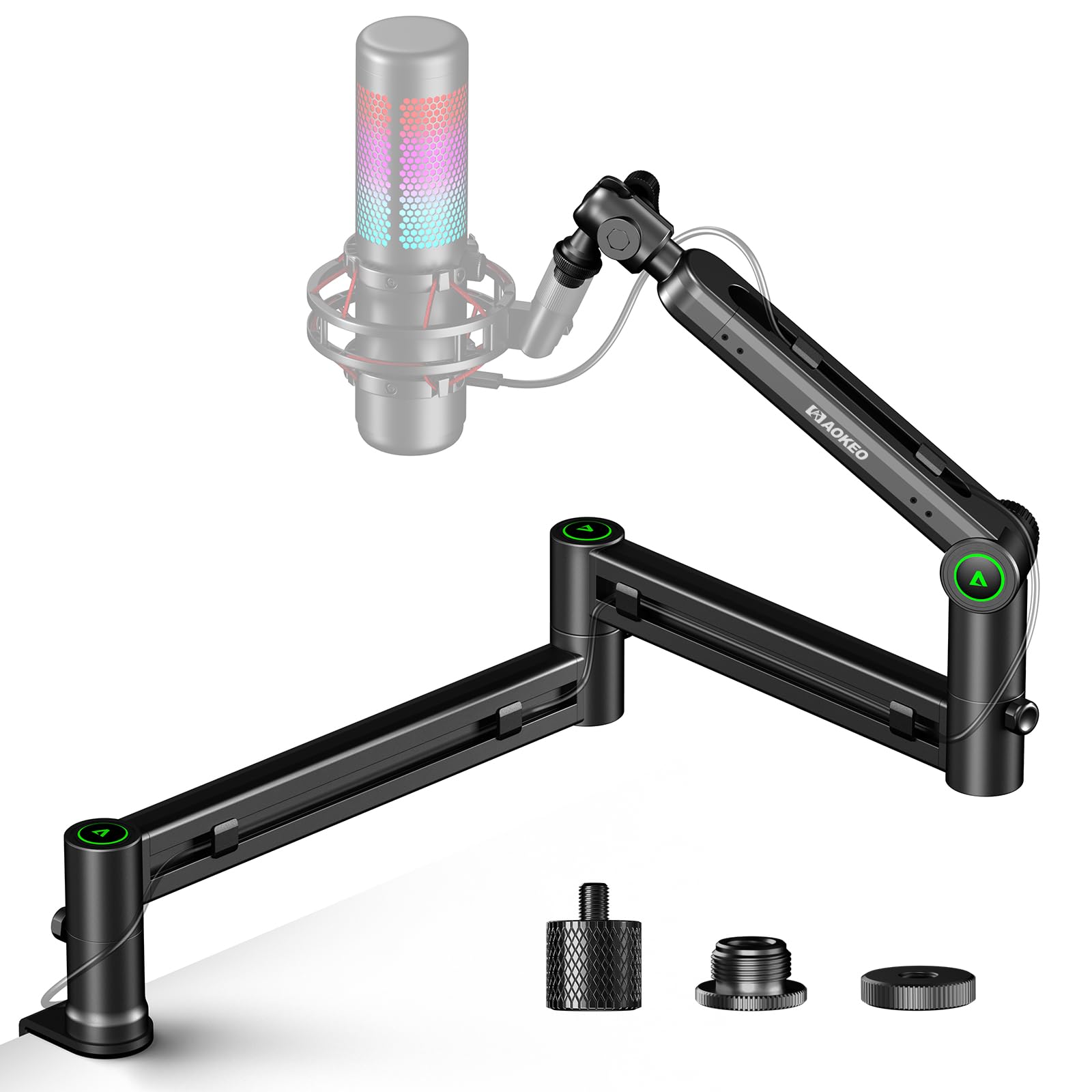
The Aokeo AK-58i prioritizes desk-line visibility above all else. Its low-profile geometry positions the arm so it extends horizontally below the monitor’s bottom bezel, completely clearing the screen. This design is ideal for dual-monitor setups where a traditional scissor arm would block the lower portion of the display. The steel forging construction gives it a rigid feel, and the 2kg load capacity means it can handle popular mics like the Blue Yeti or HyperX QuadCast without sagging.
Both sections of the arm rotate 360 degrees, and the mic attachment point swings 180 degrees up and down. The included adapters cover 3/8″ to 5/8″ and 3/8″ to 1/4″, ensuring broad compatibility. The clamp fits desks up to 7cm thick — roughly 2.75 inches — which covers most standard and thicker wooden tops. The arm folds compactly for transport, a bonus for streamers who attend LAN events or move between locations.
Customer feedback consistently notes the arm’s solid construction and excellent extension range, though a few users mentioned that the joints cannot be fully locked into position. Heavy mics may introduce a slight sag over extended periods, though this is more common with mics exceeding 1.5kg. The clean aesthetic and unobtrusive profile make it a strong choice for content creators who want their mic arm to disappear visually while providing reliable support.
Why it’s great
- Low-profile design stays completely below monitor line
- Steel forging provides rigid, wobble-free support
- Folds compactly for transport between setups
- Includes 3/8″ to 5/8″ and 3/8″ to 1/4″ adapters
Good to know
- Rotating joints lack locking mechanism, may sag with >1.5kg mics
- Cannot be mounted upside down for alternative setups
5. FIFINE BM63 Heavy Duty Boom Arm

The FIFINE BM63 is a no-nonsense scissor arm that focuses on brute stability. Its wide, thick metal tubing and multi-reinforced joints give it a weight capacity of 2kg with minimal wobble, even during aggressive gaming or desk bumps. The complete absence of exposed springs is a deliberate design choice — external springs can snag long hair, catch cables, or lose tension over time. The BM63’s enclosed pivot design also reduces the risk of pinched fingers when adjusting the arm.
Adjustment angles are generous: the arm stretches 180° vertically and 135° horizontally, giving you plenty of range to find the optimal mic position. The desk clamp works with surfaces up to 2 inches thick, which covers most standard desks but may be too shallow for thicker worktops. The package includes three velcro cable ties for basic cable management, though there are no built-in channels or clips — you will need to route cables manually along the arm’s exterior.
User reviews highlight the firm grip and the fact that the arm does not drift over time, even with heavier mics like the FIFINE K688 or AM8. The initial joint adjustment is stiff straight out of the box, but loosens up naturally over the first two weeks of use. The lack of hidden cable management is the main aesthetic compromise, but for buyers who prioritize raw stability over visual clutter, the BM63 delivers a rock-solid platform at a very accessible price point.
Why it’s great
- No exposed springs — safer for long hair and reduces snagging
- Reinforced metal joints minimize wobble during intense use
- Straightforward setup with universal 5/8″ thread
- 2kg capacity handles most dynamic and condenser mics
Good to know
- No built-in cable channels; relies on included velcro ties
- Clamp maxes out at 2-inch desk thickness
6. TONOR T90 RGB Boom Arm
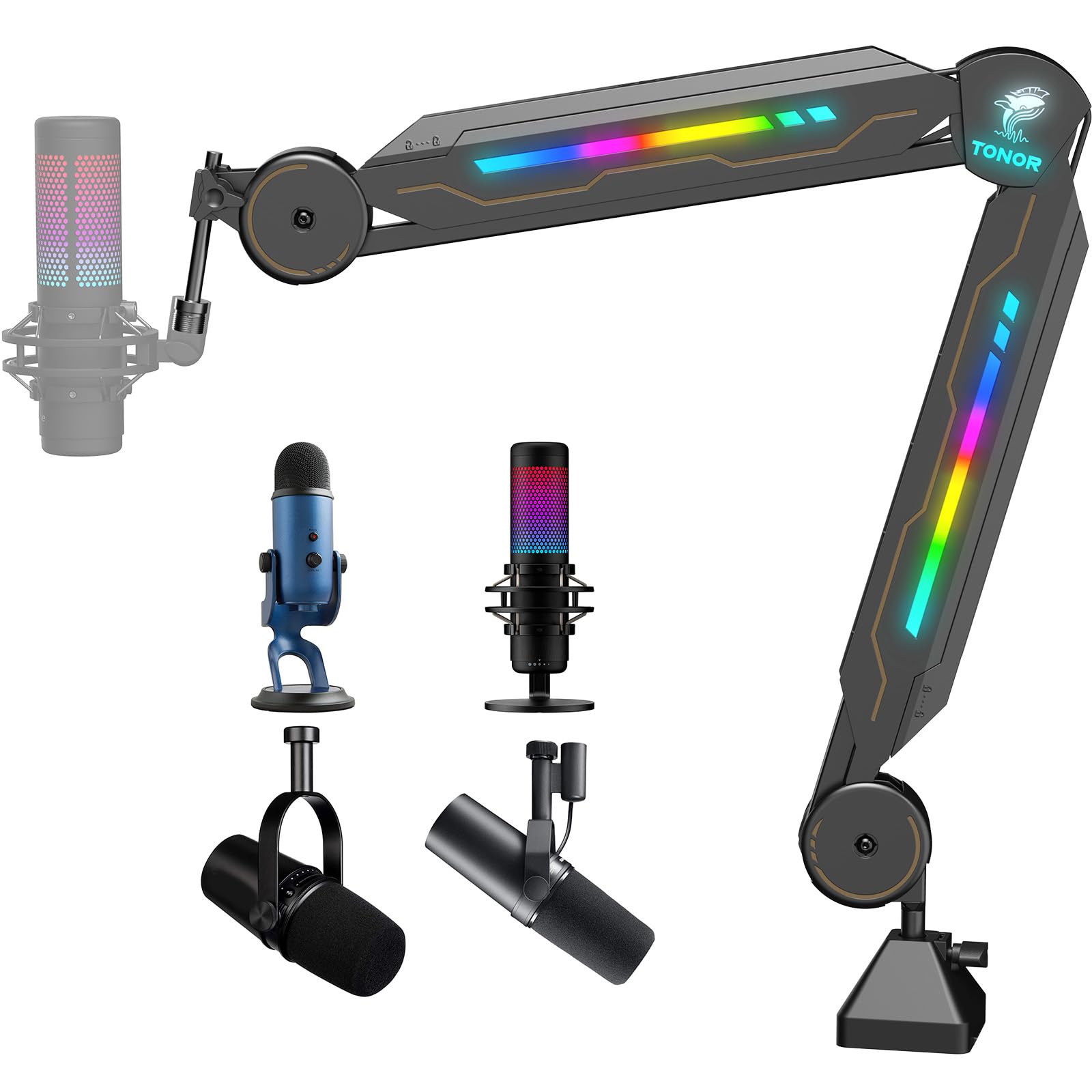
The TONOR T90 proves that a boom arm can serve double duty as both a functional tool and a visual centerpiece. The RGB lighting strip runs along the top arm, offering 11 different light modes controlled by a touch sensor on the base. Unlike some RGB peripherals that require software to configure, the T90’s lighting is hardware-controlled — tap to cycle modes, hold for three seconds to turn off. This simplicity is a welcome feature for streamers who want ambiance without extra background software.
Under the lights, the T90 is a competent scissor arm built from alloy steel with a glossy finish. Its 2kg load capacity is on par with the FIFINE BM63, and the clamp uses a wide contact plate to distribute pressure evenly. The cable management slot hides wires along the arm’s underside, keeping the desk tidy. Setup is genuinely fast — most users report being up and running within 30 seconds. The touch sensor is responsive but not overly sensitive, meaning accidental bumps during gameplay are unlikely to trigger mode changes.
Reviews are mostly positive, with users praising the striking visual effect and sturdy build. A small number of units experienced RGB failure within days, but TONOR’s customer support appears to handle replacements promptly. The main functional caveat is that the arm is stiff out of the box — the pivot screws can be loosened with the included hex wrench, but the bottom arm offers limited range of movement compared to more flexible designs. For streamers who prioritize visual flair and a clean cable route, the T90 delivers without sacrificing core stability.
Why it’s great
- Hardware-controlled RGB with 11 light modes, no software needed
- 30-second setup time with clear cable management slot
- Alloy steel construction with wide clamp for stability
- Touch sensor is responsive but not prone to accidental triggers
Good to know
- No dedicated on/off switch — must unplug USB to disable lights
- Some units reported RGB failure shortly after purchase
- Bottom arm has limited range of motion compared to competitors
7. TODI Mic Arm for Lightweight Mics

The TODI Mic Arm is designed specifically for lightweight microphones — its 3-pound (1.36kg) maximum load rating means it is best suited for smaller condenser mics, headsets, or USB microphones like the Blue Yeti Nano or Rode NT-USB Mini. Heavier pro-grade dynamics like the Shure SM7B will push this arm past its comfortable limit, leading to sag. For its intended use case, though, the TODI offers a compact, low-profile form factor that extends 29 inches horizontally while staying low enough to sit behind a monitor.
All-metal construction with reinforced screws gives the arm a solid feel despite its lighter duty rating. The hex wrench adjustment points allow fine-tuning of joint tension, and the 360-degree base hinge provides full rotation. The cable management is rudimentary — a simple routing channel — but adequate for keeping a single USB cable tidy. The clamp is compact and fits most desks, though the lack of a wider pad means it may mark softer surfaces over time without a protective layer.
User reviews are surprisingly strong for the price point, with several owners reporting that the arm handles mics heavier than its rated limit without immediate failure — though this is not recommended. The main limitation is the thread compatibility: the TODI does not fit Blue Yeti Oribi, Yeti X, Shure MV7i, or Shure Beta58A models, so verify your mic’s thread pattern before buying. For budget-conscious streamers with lightweight mics who want a low-profile arm, the TODI delivers reliable performance at a very accessible entry point.
Why it’s great
- Compact low-profile design ideal for lightweight USB mics
- All-metal build with reinforced screws at pivot points
- 29-inch reach covers standard desk setups well
- Hex wrench allows fine-tuning of joint tension
Good to know
- 3lb max load limits compatibility with heavy studio mics
- Does not fit certain mic models (Yeti Oribi, MV7i, Beta58A)
FAQ
Will a boom arm fit my desk if it has a thick metal support beam?
Can I use a boom arm with a Blue Yeti microphone?
How do I stop my boom arm from drifting down during long recording sessions?
Do RGB lights on a boom arm affect microphone audio quality?
Final Thoughts: The Verdict
For most users, the best boom arm winner is the Neewer MS002 because its pneumatic damping system handles the widest range of microphone weights with silent, smooth movement and the longest reach in its class. If you want hidden cable channels that eliminate desk clutter entirely, grab the FIFINE BM66. And for a premium broadcast-grade arm with proven long-term durability, nothing beats the RØDE PSA1+.