
Our readers keep the lights on and the weekend projects moving. As an Amazon Associate, I earn from qualifying purchases.
That initial low sticker price on a color laser printer can feel like a steal—until the starter toner runs out after only a few hundred pages and you discover a replacement set costs nearly as much as the printer itself. The real cost of a cheap color laser printer isn’t the purchase price; it’s the long-term cost per page, toner availability, and whether the machine can handle your actual daily workload without constant paper jams or spotty connectivity.
I’m Rikta — the co-founder and writer behind FitlyFast. I’ve spent countless hours combing through technical specifications, user reliability reports, and toner yield data across dozens of models to separate the true value printers from the expensive traps that waste your money and patience.
Whether you run a home office, a small business, or a household that’s done with clogged inkjets, this guide cuts through the marketing noise and delivers a clear, spec-focused ranking of the best cheap color laser printer options that actually deliver on print quality, durability, and reasonable running costs.
How To Choose The Best Cheap Color Laser Printer
A low upfront cost on a color laser printer can hide a lifetime of expensive consumables. To make a smart decision, you need to look past the sales page and focus on three critical factors: toner economics, connectivity robustness, and the printer’s physical build quality for your expected page volume. A truly budget-friendly model balances a reasonable purchase price with affordable replacement toners and reliable daily operation.
Understand the True Cost of Toner
The cheapest printer on the shelf often comes with “starter” toner cartridges that contain only a fraction of the yield of standard or high-yield replacements. A printer that costs under can demand or more for a full set of replacement cartridges after just a few hundred prints. Before buying, look up the price and page yield of the standard and high-capacity toner cartridges for that specific model. Models from Brother and Canon tend to offer more affordable high-yield options than some competitors where proprietary chips lock out third-party supplies.
Connectivity and Setup Ease
A printer that is difficult to set up or frequently drops its wireless connection becomes a constant frustration. Look for models with dual-band Wi-Fi (2.4 GHz and 5 GHz) for better network stability, plus Ethernet as a wired fallback. Mobile printing support through Apple AirPrint, Mopria, or a dedicated app removes the need for a computer to be on all the time. Avoid printers that rely solely on a single-band wireless connection, especially if your home or office network is crowded.
Print Speed and Duplex Capability
Speed matters if you print more than a few pages at a time. A color laser that prints 24 to 27 pages per minute (ppm) in both color and black-and-white will handle small team workloads efficiently. Automatic duplex printing (two-sided) saves paper and is a feature you should not skip—it pays for itself in saved paper costs within months. Manual duplex printing, where you have to flip pages yourself, is a deal-breaker for any serious office use.
Single-Function vs. Multi-Function
A print-only color laser printer is often more reliable and faster than an all-in-one unit at the same price. If you already have a document scanner or a separate multi-function inkjet, a dedicated color laser printer can be a smarter purchase. However, if desk space is limited and you need occasional scanning and copying, a compact MFP that still uses laser toner can be worth the slight premium.
Quick Comparison
On smaller screens, swipe sideways to see the full table.
| Model | Category | Best For | Key Spec | Amazon |
|---|---|---|---|---|
| Brother HL-L3280CDW | Color Laser | Home Offices | 27 ppm color, 2.7″ touchscreen | Amazon |
| Canon LBP646Cdw | Color Laser | Apple Users | 26 ppm, 5-line LCD | Amazon |
| Brother HL-L3300CDW | Color MFP | Scan & Copy | 19 ppm, flatbed scan glass | Amazon |
| HP LaserJet M234sdw | B&W MFP | Small Teams | 30 ppm, dual-band Wi-Fi | Amazon |
| Xerox C230dni | Color Laser | Compact Desk | 24 ppm, auto duplex | Amazon |
| Lexmark CS331dw | Color Laser | Security Focus | 26 ppm, 512 MB memory | Amazon |
| HP Color LaserJet Pro 3201dw | Color Laser | Office Work | 26 ppm, TerraJet toner | Amazon |
| Canon GX2020 MegaTank | Ink Tank | High Volume | 3,000 page yield per set | Amazon |
| HP CP2025n (Refurbished) | Color Laser | Budget Entry | 21 ppm, manual duplex | Amazon |
In‑Depth Reviews
1. Brother HL-L3280CDW

The Brother HL-L3280CDW strikes the ideal balance between purchase price and long-term value, printing color documents at a brisk 27 pages per minute. Its 2.7-inch color touchscreen gives you direct access to cloud-based apps like Google Drive and Dropbox, removing the need for a computer to start a print job. Automatic duplex printing and a 250-sheet paper tray keep high-volume days moving without constant refills.
This print-only unit uses the extensive TN229 series of toner cartridges, which include standard, high-yield, and extra-high-yield black options. That flexibility lets you choose a cost per page that fits your actual usage rather than being locked into one expensive option. The dual-band wireless and Gigabit Ethernet provide rock-solid connectivity even in busy network environments, and Wi-Fi Direct allows peer-to-peer printing without a network at all.
Brother’s Mobile Connect app handles remote printing, toner monitoring, and supply ordering from your phone. While some users reported occasional connectivity quirks with specific modems, the overwhelming consensus points to fast setup, vibrant print output, and a build quality that inspires confidence for years of daily use. If you need one printer that covers all the bases without hidden costs, this is it.
Why it’s great
- Fast 27 ppm color and mono printing speed
- Easy-to-use color touchscreen with cloud app support
- Multiple high-yield toner cartridge options for low cost per page
Good to know
- Print-only unit—no scanner or copier built in
- Occasional wireless connectivity issues reported with some routers
2. Canon imageCLASS LBP646Cdw

The Canon imageCLASS LBP646Cdw offers a compelling mix of speed and simplicity, churning out 26 pages per minute in both color and monochrome. Its 5-line LCD screen is not a touch display, but it makes navigation through menus and settings straightforward without the complexity of a full touch interface. The printer uses Canon Genuine Toner 075 cartridges, with standard and high-capacity options available to lower the long-term operating cost.
Wireless setup is quick through the Canon PRINT app, and the printer supports Apple AirPrint and Mopria Print Service out of the box. For a print-only device, it includes a 250-sheet cassette plus a one-sheet multipurpose tray for envelopes or cardstock. The automatic duplex function works reliably, and the first page out time of roughly 10.3 seconds means you are not waiting around for single-page jobs.
A key advantage here is the printer’s compatibility with Chromebooks and its ENERGY STAR and EPEAT Silver certifications. Users consistently praise the easy setup process and the clear print quality for both text and color graphics. The main trade-off is the lack of any scanning or copying functionality, making this best suited for those who already have a separate scanner or need a dedicated high-speed print engine.
Why it’s great
- Fast 26 ppm print speed with quick first-page-out time
- Reliable wireless setup with AirPrint and Mopria support
- High-capacity toner options reduce per-page cost
Good to know
- Single-function printer—no scanning or copying
- Starter toner cartridges have limited page yield
3. Brother HL-L3300CDW
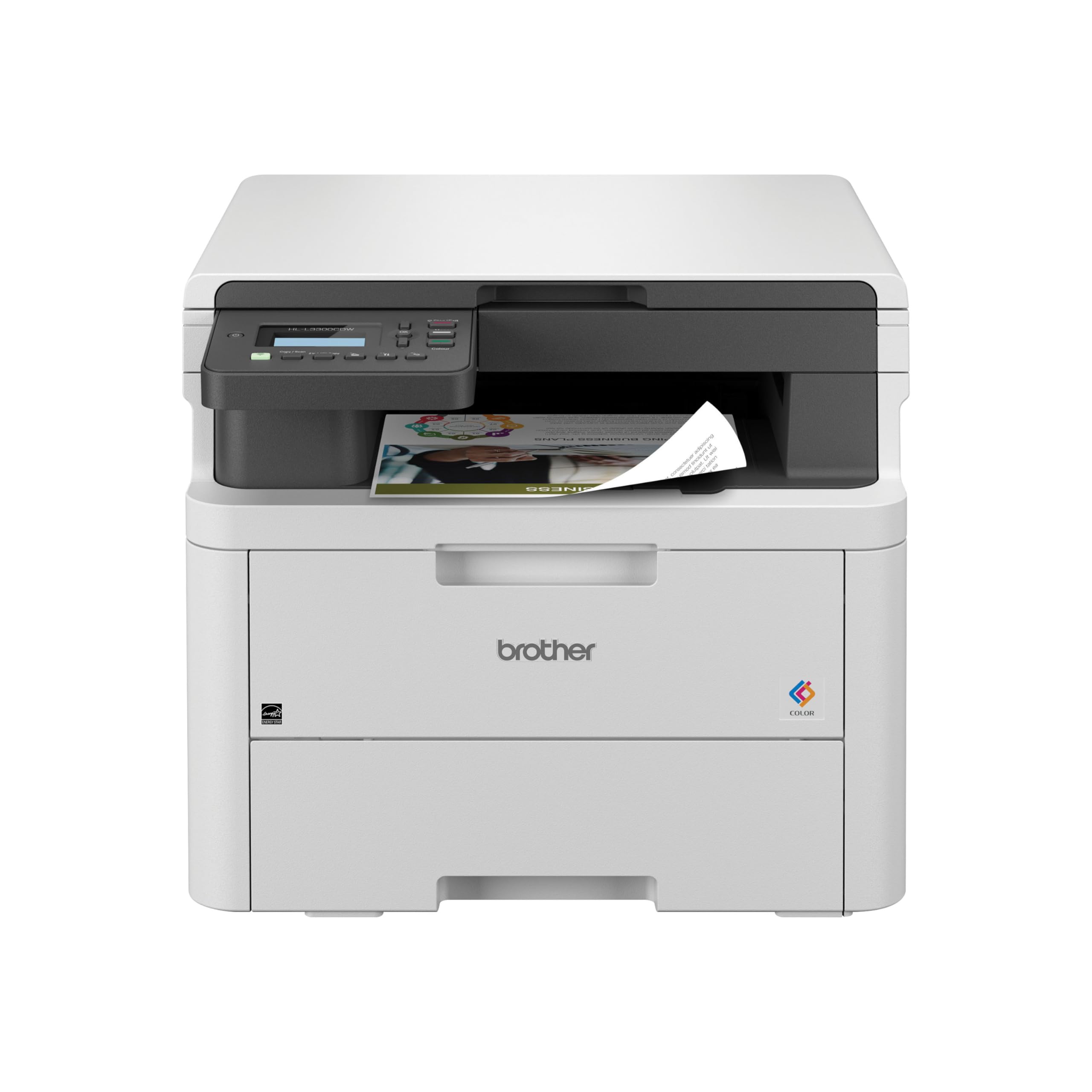
The Brother HL-L3300CDW packs printing, scanning, and copying into a compact chassis that fits comfortably on a small desk without sacrificing build quality. It prints at 19 pages per minute—slower than some print-only rivals—but the inclusion of a flatbed scan glass and copy functionality makes it a true all-in-one solution for home offices that need occasional digitizing of documents or photos.
This model uses the same TN229 toner series as the faster Brother L3280CDW, which means the replacement cartridge ecosystem is mature, widely available, and includes affordable high-yield options. The duplex printing is automatic, saving paper on multi-page jobs. Dual-band wireless and Wi-Fi Direct give you flexibility, and the Brother Mobile Connect app works well for scanning directly to your phone.
The trade-off in speed is real—19 ppm feels sluggish compared to 27 ppm units—but for most small teams and home-based workers who print in bursts rather than continuous reams, the difference is minor. User reports highlight excellent print quality for text and graphics, reliable wireless connectivity, and straightforward setup. The flatbed scanner does not include an auto document feeder, so scanning multi-page stacks requires manual page placement.
Why it’s great
- Print, scan, and copy in one compact unit
- Uses the affordable and flexible TN229 toner series
- Reliable dual-band Wi-Fi and Wi-Fi Direct connectivity
Good to know
- Slower print speed at 19 ppm compared to print-only models
- Flatbed scanner lacks an auto document feeder
4. HP LaserJet MFP M234sdw

The HP LaserJet MFP M234sdw is a monochrome laser multifunction printer that excels at high-volume black-and-white document printing. It prints up to 30 pages per minute, has an automatic document feeder for hands-free copying and scanning, and automatically detects and resolves wireless connectivity issues through its dual-band Wi-Fi with self-reset technology. For small teams that primarily print black text documents, this is an efficient workhorse.
Setup is handled through the HP Smart App, which guides you through wireless configuration from a smartphone—no computer required. The printer is compatible with HP Instant Ink, a subscription service that can significantly lower the per-page cost if you print regularly. The 250-sheet input tray and automatic duplex printing keep workflow moving without constant intervention.
The major limitation is that this is a monochrome-only printer—it will not produce any color output. If your work involves color charts, presentations, or marketing materials, this unit will not meet those needs. Additionally, the control panel is mounted on the paper tray, which can feel slightly wobbly when the tray is pulled out. For pure black-and-white office printing with fast speeds and robust mobile support, however, this model delivers exceptional value.
Why it’s great
- Fast 30 ppm black-and-white printing speed
- Auto document feeder for efficient scanning and copying
- HP Smart App and Instant Ink subscription options available
Good to know
- Monochrome only—no color printing capability
- Control panel on the paper tray can feel unstable when extended
5. Xerox C230dni

The Xerox C230dni is a compact, print-only color laser printer designed for tight desks where space is at a premium. It prints at 24 pages per minute in both color and black-and-white and includes automatic duplex as a standard feature. With a recommended monthly volume of up to 1,500 pages, it is built for light to moderate use in small offices or home offices.
Wireless connectivity is handled through built-in Wi-Fi with support for Apple AirPrint and Mopria, and the Xerox Easy Assist App simplifies smartphone setup. Users report that the print quality is crisp and vibrant for both text and graphics, making it a solid choice for presentations and client-facing materials. The energy-efficient design is ENERGY STAR certified.
The main concern with the C230dni is the cost of replacement toner. The starter cartridges are low-yield, and the standard black toner cartridge can be expensive. Some users also noted that the printer’s memory can struggle with large, high-resolution images—an 8×10-inch color photo may fail to print, though smaller sizes work fine. If most of your printing is text-heavy documents with occasional small color graphics, this printer performs admirably for its price point.
Why it’s great
- Compact footprint ideal for small desks
- Fast 24 ppm color and mono print speed
- Reliable auto duplex printing
Good to know
- Starter toner cartridges have short page yields
- Limited memory for large, high-resolution photo prints
6. Lexmark CS331dw

The Lexmark CS331dw brings enterprise-grade security features to a compact color laser printer chassis, making it an interesting option for offices where data protection is a priority. It prints at 26 pages per minute in color and monochrome, powered by a 1 GHz dual-core processor and 512 MB of memory. The 250-sheet paper tray and single-sheet feeder handle a range of media types.
Connectivity options include standard Wi-Fi, USB, and Ethernet, with mobile support through the Lexmark Mobile Print App, Mopria, and Apple AirPrint. The printer is EPEAT Silver certified and ENERGY STAR rated, and Lexmark offers a toner cartridge recycling program. The built-in security architecture protects documents on the device, over the network, and at every point in between.
Users consistently praise the print quality and the reliable duplexer, which produces clean double-sided prints without jams. Additionally, the printer does not support 5 GHz Wi-Fi, which can cause connectivity issues on modern dual-band routers unless you connect via Ethernet or USB.
Why it’s great
- Full-spectrum security architecture for data protection
- Strong 26 ppm print speed with 512 MB memory
- EPEAT Silver and ENERGY STAR certified with recycling program
Good to know
- Replacement toner cartridges are very expensive
- Does not support 5 GHz Wi-Fi networks
7. HP Color LaserJet Pro 3201dw

The HP Color LaserJet Pro 3201dw is a print-only color laser aimed at small teams that need professional-quality color documents at a fast pace. It outputs 26 pages per minute in both color and black-and-white, using HP’s TerraJet toner technology for more vivid colors. Automatic duplex printing and a 250-sheet input tray keep the workflow efficient.
Wireless connectivity is handled by dual-band Wi-Fi with a self-reset feature that automatically detects and resolves connection issues. The printer supports the HP Smart App for mobile printing and management. HP advertises award-winning reliability, and many users confirm that the unit produces clean text and solid color output suitable for business use.
However, this printer has two significant recurring complaints. First, the replacement toner is extremely expensive—users report that a full set of four color cartridges can cost nearly as much as the printer itself, and third-party cartridges are often blocked by HP’s dynamic security firmware updates. Second, some units have failed within months, with HP offering refurbished replacements rather than new units, leading to customer service frustrations. If you are willing to use HP’s own high-yield toner and accept the ongoing cost, the print quality is excellent. For cost-conscious buyers, the toner economics are a major red flag.
Why it’s great
- Fast 26 ppm color printing with vivid TerraJet toner
- Dual-band Wi-Fi with self-reset for reliable connectivity
- Compact size with professional-quality output
Good to know
- Proprietary toner chips block third-party cartridges
- Replacement toner sets are very expensive
8. Canon MegaTank MAXIFY GX2020

The Canon MegaTank MAXIFY GX2020 is not a laser printer—it uses a refillable ink tank system—but it is a worthy alternative for buyers who want extremely low cost per page without the high toner replacement costs of budget color lasers. It prints up to 3,000 black pages and 3,000 color pages per set of ink bottles, dramatically reducing the per-page cost compared to any cartridge-based printer.
This all-in-one unit prints, copies, scans, and faxes, with a 35-sheet auto document feeder and a 2.7-inch color touchscreen. Automatic duplex printing is standard. The pigment-based GI-25 ink bottles produce water-resistant prints that are suitable for business documents. Setup is straightforward, and the printer supports Wi-Fi, AirPrint, and the Canon PRINT app.
The trade-off is print speed—15 ppm black and 10 ppm color—which is notably slower than most laser printers in this guide. Additionally, printing on cardstock can produce pronounced paper curl, and the color reproduction, while good for business graphics, is not photo-quality. For high-volume offices where speed is less critical than ink costs, the GX2020 is a compelling option. If you need fast color printing with laser toner, stick with one of the laser units above.
Why it’s great
- Extremely low cost per page with refillable ink tanks
- All-in-one functionality with auto document feeder
- Pigment-based ink is water-resistant and suitable for documents
Good to know
- Slower print speeds than color laser printers
- Cardstock can show pronounced curl after printing
9. HP Color LaserJet CP2025n (Renewed)

The HP Color LaserJet CP2025n is a certified refurbished color laser printer that offers an entry-level price point for buyers willing to accept a manually operated duplex function. It prints at 20 pages per minute for black-and-white and 21 pages per minute for color, using four separate toner cartridges (black, cyan, magenta, yellow). The unit is print-only with USB connectivity and a manual duplex that requires you to flip pages yourself.
Because this is a refurbished product from a third-party seller, condition and included accessories can vary. Amazon’s certification process includes functionality testing and basic cleaning, and a minimum 90-day warranty is provided. Users who received a fully functional unit report that print quality is fantastic, with crisp text and vibrant colors that rival much newer models. Some have printed thousands of double-sided pages with only minor paper jams.
The risks here are higher than with new printers. Some users received units with mechanical issues like a failed paper tray solenoid, and the manual duplex is a significant productivity drain for high-volume work. Replacement toner for the CP2025n can also be expensive and harder to find than for current models. This option is best for budget-constrained buyers who print infrequently and are comfortable troubleshooting an older, refurbished machine.
Why it’s great
- Very low initial purchase price as a refurbished unit
- Excellent print quality when fully operational
- Four separate toner cartridges allow individual color replacement
Good to know
- Manual duplex printing—must flip pages manually
- Refurbished condition means varied quality and limited warranty
- Toner cartridges may be harder to find and expensive
FAQ
Why do cheap color laser printers often have expensive toner?
How many pages can I expect from a starter toner cartridge?
Is a color laser printer more economical than an inkjet for low-volume use?
Can I use third-party toner cartridges in a cheap color laser printer?
What size paper can a home office color laser printer handle?
Final Thoughts: The Verdict
For most users, the best cheap color laser printer winner is the Brother HL-L3280CDW because it delivers professional 27 ppm color printing, a responsive touchscreen, and access to affordable high-yield toner cartridges that keep running costs manageable. If you need scanning and copying in a compact footprint, grab the Brother HL-L3300CDW. And for pure black-and-white speed with robust multi-function features, nothing beats the HP LaserJet MFP M234sdw.