
Our readers keep the lights on and the weekend projects moving. As an Amazon Associate, I earn from qualifying purchases.
Taking handwritten notes on a tablet should feel like pen meeting paper — not like wrestling with a glass slab that fights every stroke. The reality for many Android users is a landscape filled with sluggish styluses, distracting glare, and apps that don’t talk to each other. Whether you’re a student organizing lecture notes, a professional sketching ideas in a meeting, or a creative mapping out your next project, the right hardware transforms the entire process from a chore into a fluid extension of your thinking.
I’m Rikta — the co-founder and writer behind FitlyFast. I’ve spent countless hours digging into the latest display technologies, stylus protocols, and note-taking app ecosystems to separate the devices that deliver a true paper-like experience from those that just come with a pen in the box.
This buying guide breaks down the crucial specs — stylus pressure sensitivity, display refresh rate, screen texture, and battery life — that determine whether your digital notebook will actually replace your paper ones. The goal is to help you find the absolute best android tablet for note taking that matches both your workflow and your budget.
How To Choose The Best Android Tablet for Note Taking
Not all tablets handle ink the same way. The screen’s surface texture, the stylus’s pressure sensitivity, and the operating system’s native note-taking support all feed into one seamless experience — or a frustrating one. Focus on these four factors to avoid buyer’s remorse.
Stylus Technology: Pressure Levels, Latency, and Battery Life
The stylus is your primary tool. Look for a minimum of 4096 pressure levels for natural stroke variation, though 8192 and 16384 deliver finer nuance for shading and line weight. Equally important is latency — the delay between the pen touching the screen and the ink appearing. Aim for under 26ms latency for a paper-like feel. Battery-free pens (EMR tech) eliminate the need to charge your stylus, while active capacitive pens require Bluetooth pairing and periodic charging.
Display: The Feel of the Surface
A smooth glass screen creates slippery writing and glare under lights. Tablets with an etched or matte finish — often labeled “paper-like” — add friction that mimics real paper. Anti-glare coatings reduce reflections so you can take notes outdoors or under harsh office lighting. Resolution matters less for notes than you think; a 2K or 3K display is plenty. Refresh rate above 60Hz (90Hz or 120Hz) makes inking and scrolling noticeably smoother.
Note-Taking Software and OS Features
Android offers flexibility. Look for tablets that include or support apps like Squid, Nebo, Noteshelf, or Samsung Notes. Features like handwriting-to-text conversion, PDF annotation, and automatic cloud sync (Google Drive, OneDrive, OneNote) are essential for workflow. Some manufacturers bake in native apps with AI features — like straightening messy handwriting or solving equations from a photo of your notes. These integrations matter more than raw benchmark scores.
Battery Life and Charging Convenience
Note-taking drains the battery more slowly than video streaming, but you still want all-day endurance. Aim for at least 8,000mAh capacity. Fast charging (20W and above) is a welcome convenience for busy days. Some tablets offer reverse charging to top off your phone or earbuds — a useful bonus for students on campus or professionals on the go.
Quick Comparison
On smaller screens, swipe sideways to see the full table.
| Model | Category | Best For | Key Spec | Amazon |
|---|---|---|---|---|
| Samsung Galaxy Tab S9 | Premium Android | Power users & artists | 11″ Dynamic AMOLED 2X, 120Hz | Amazon |
| Samsung Galaxy Tab S10 FE | Mid-Range Samsung | Students & professionals | 90Hz, S Pen included | Amazon |
| Lenovo Idea Tab Pro | Value Flagship | Gaming & note-taking hybrid | 12.7″ 3K LCD, Dimensity 8300 | Amazon |
| XPPen Magic Note Pad | Dedicated Note-Taker | Dedicated note-taking & reading | 16384 pressure levels, TCL NXTPAPER | Amazon |
| TCL NXTPAPER 11 Plus | Eye-Care Tablet | Long reading sessions | 11.5″ 2.2K, 120Hz, 4096 stylus | Amazon |
| Lenovo Idea Tab Plus | Budget Powerhouse | Budget-conscious students | 12.1″ 2.5K, 90Hz, pen & case included | Amazon |
| Wacom MovinkPad Pro 14 | Professional Art Tablet | Digital artists & illustrators | 14″ OLED, 8192 pressure, 12GB RAM | Amazon |
| reMarkable Essentials Bundle | Distraction-Free | Minimalist note-takers | 10.3″ monochrome, EMR pen | Amazon |
| Amazon Kindle Scribe Colorsoft | Color E-Paper | Book readers & reviewers | 11″ Colorsoft display, 64GB | Amazon |
In‑Depth Reviews
1. Samsung Galaxy Tab S9 11”

The Tab S9 sets a high bar for note-taking on an Android tablet. Its 11-inch Dynamic AMOLED 2X display with 120Hz refresh rate delivers deep blacks and fluid inking with virtually zero latency. The included S Pen uses EMR technology, so it never needs charging, and Samsung Notes is one of the most polished native note-taking apps available — complete with handwriting-to-text, PDF annotation, and voice recording sync.
Under the hood, the Snapdragon 8 Gen 2 processor chews through multitasking without a hitch. You can run a browser, a PDF reader, and a note-taking app side-by-side without stutter. The IP68 water and dust resistance adds a layer of security for students carrying it in a backpack, and the 15-hour video playback battery translates to a solid full day of note-taking.
The AMOLED screen is stunning, but its glossy finish means you might experience reflections under direct light — a paper-like screen protector solves this. The Tab S9 is also the priciest entry in this list, but for anyone who wants the best performance, display, and stylus experience in one package, it earns its place.
Why it’s great
- Stunning AMOLED 2X display with 120Hz for fluid writing
- Battery-free S Pen with excellent pressure sensitivity
- IP68 water/dust resistance for daily durability
Good to know
- Premium price point
- Glossy screen may need a matte protector for outdoor use
- No 3.5mm headphone jack
2. Samsung Galaxy Tab S10 FE

The Galaxy Tab S10 FE brings the core Samsung note-taking experience to a more accessible price point. The 90Hz display isn’t flagship-grade, but it’s smooth enough for inking and scrolling through lecture PDFs. The included S Pen offers the same EMR convenience as the Tab S9 — no charging, low latency, and a comfortable grip. Samsung’s Handwriting Assist and Math Solver features are genuinely useful for cleaning up messy equations and straightening aligned text.
The Exynos 1580 processor handles everyday note-taking, web browsing, and streaming without drama. The IP68 rating carries over from the flagship line, so accidental spills won’t be a disaster. With up to 20 hours of battery life for video playback, you can realistically go two full days of class notes on a single charge. The expandable microSD slot up to 1TB is a generous safety net for storing notebooks and PDFs.
The LCD panel lacks the deep blacks of an AMOLED, and its outdoor visibility is just OK — not terrible, but not class-leading. The S Pen tip can feel slightly loose after extended use, though replacement tips are readily available. For students who need a reliable, durable note-taking tablet with Samsung’s excellent software ecosystem, the S10 FE is a top contender.
Why it’s great
- Battery-free S Pen with low latency for natural writing
- IP68 water resistance and expandable storage
- Samsung Notes with AI features like Math Solver
Good to know
- LCD screen, not AMOLED
- S Pen tip may loosen over time
- Outdoor readability is average
3. Lenovo Idea Tab Pro

The Idea Tab Pro punches well above its weight class. Its 12.7-inch 3K LCD display with 90Hz refresh rate is crisp and bright — 800 nits peak brightness makes it usable near a window or under fluorescent office lights. The included Lenovo Tab Pen Plus supports 4096 pressure levels and attaches magnetically, though it uses an AAAA battery rather than a rechargeable cell, which is an unconventional choice.
Performance is surprisingly strong thanks to the MediaTek Dimensity 8300 chip, which handles multitasking, gaming, and split-screen note-taking without lag. Lenovo bundles Nebo, Squid, and MyScript Calculator — three excellent note-taking and handwriting apps that normally cost extra. The 11-hour battery for video streaming translates to a solid day of note-taking, and the 45W fast charging refills the 10200mAh pack quickly.
The biggest practical drawback is that the included 45W charger is sold separately, so you’ll need to buy one or rely on a slower third-party brick. The tablet is also heavy for its size, making two-handed note-taking more comfortable than one-handed use. For anyone wanting a large-screen note-taking device with premium specs at a friendly price, this is a steal.
Why it’s great
- Large 12.7″ 3K display with high brightness
- Four premium note-taking apps included
- Fast Dimensity 8300 processor handles multitasking smoothly
Good to know
- 45W charger not included; requires separate purchase
- Heavy for portrait use
- Pen uses AAAA battery, not rechargeable
4. XPPen Magic Note Pad

The XPPen Magic Note Pad is built from the ground up for handwriting and sketching. Its 10.95-inch AG nano-etched LCD screen uses TCL NXTPAPER 3.0 technology to reduce up to 95% of ambient light reflections, delivering a matte, paper-like surface that’s drastically different from a standard glossy tablet. The X3 Pro Pencil 2 offers a staggering 16384 pressure levels — overkill for basic notes but glorious for shading and line variation in drawings.
The native XPPen Notes app is purpose-built, offering handwriting-to-text conversion, audio recording during notes, PDF import and editing, and an AI assistant. The three color modes — Monochrome LCD, Light Color, and Nature Color — let you switch between an e-paper-like reading mode and full-color display. Android 14 gives you access to the Google Play Store for additional apps, and the 8000mAh battery keeps going through a long study session.
The tablet’s etched glass creates a narrow optimal viewing angle — veer off-center and the image washes out. This is a deliberate trade-off for the anti-glare paper feel, but it means you shouldn’t treat it like a normal tablet for sharing a screen with someone next to you. The processor is modest, so heavy multitasking isn’t its strong suit. If your primary use is notes, reading, and light drawing, this is a focused tool that excels at those tasks.
Why it’s great
- Exceptional paper-like matte screen with minimal glare
- 16384 pressure levels for nuanced writing and drawing
- Three color modes for reading, notes, and full color
Good to know
- Narrow viewing angle due to etched glass
- Processor is not for heavy multitasking
- Interface can feel sluggish with multiple apps open
5. TCL NXTPAPER 11 Plus

The NXTPAPER 11 Plus solves a problem other tablets ignore: eye strain. Its NXTPAPER 4.0 display uses TÜV-certified low blue light, DC dimming, and an anti-glare coating to produce a screen that genuinely looks like matte paper rather than a shiny window. The 120Hz refresh rate keeps scrolling and inking smooth, and the included T-Pen stylus offers 4096 pressure levels with decent latency — good enough for notes and sketching without feeling floaty.
Beyond the display, this tablet is a solid all-rounder. The MediaTek Helio G100 processor paired with 8GB RAM plus 8GB virtual RAM expansion handles split-screen note-taking and web browsing comfortably. The three VersaView modes are a neat trick: Regular Mode for vibrancy, Ink Paper Mode for an e-reader feel, and Color Paper Mode for muted tones. The 8000mAh battery lasts through a full day, and reverse charging can top off your phone.
The T-Pen nibs are hard to find separately, and the flip case lacks a strong magnet to keep the cover secure when folded back. The USB-C port is 2.0 speed, so transferring large PDFs is slower than you’d expect. For anyone who reads for hours and wants to take notes in the same session without eye fatigue, the NXTPAPER 11 Plus is a standout.
Why it’s great
- Exceptional eye-friendly display with paper-like matte finish
- 120Hz refresh for smooth inking and scrolling
- Three display modes for different reading/note-taking scenarios
Good to know
- Pen nibs are not widely available
- Flip case magnet is weak
- USB-C 2.0 data speed is slow for file transfers
6. Lenovo Idea Tab Plus

The Idea Tab Plus packs an enormous amount of value into a slim chassis. Its 12.1-inch 2.5K IPS display with 90Hz refresh rate is sharp and bright enough for comfortable note-taking in most indoor environments. The included Lenovo Tab Pen attaches magnetically and offers 4096 pressure levels — it’s an active capacitive pen that requires no battery, so you never have to pause to charge a stylus.
The MediaTek Dimensity 6400 processor is a solid mid-range chip that handles note-taking apps, web browsing, and media streaming without complaint. Lenovo bundles Squid, Nebo, and MyScript Calculator — premium note-taking apps that turn handwritten equations into clean digital text and solve them on the spot. The 13-hour battery for video streaming translates to a dependable day of note-taking, and the quick charge feature gets you back to a usable level fast.
The stylus’s magnetic holder on the tablet is strong enough to keep it secure in a bag, but the pen tip wears down faster than pricier alternatives. The display’s anti-glare coating is good but not as effective as the etched glass on dedicated note-taking tablets. For students or professionals on a strict budget who still want a modern, responsive note-taking experience with a large screen and a bundled pen, the Idea Tab Plus is unbeatable.
Why it’s great
- Large 12.1″ 2.5K display at a low price point
- Battery-free pen with magnetic attachment
- Premium note-taking apps included (Squid, Nebo, MyScript)
Good to know
- Pen tip wears faster than premium models
- Anti-glare coating is decent but not paper-like
- Processor comfortably handles notes but not heavy gaming
7. Wacom MovinkPad Pro 14

The Wacom MovinkPad Pro is an all-in-one digital art studio. Its 14-inch OLED display with 3K resolution (2880×1800) and 100% sRGB and DCI-P3 color gamut delivers deep blacks and vivid colors that are critical for professional artwork. The Premium Texture etched glass provides a satisfying amount of drag — it feels genuinely close to drawing on fine paper. The battery-free Pro Pen 3 Slim offers 8192 pressure levels, and the latency is imperceptible.
Powered by a Snapdragon 8s Gen 3 processor and 12GB of RAM, the MovinkPad runs Clip Studio Paint and Infinite Painter without stutter. Android 15 gives you full Google Play access alongside Wacom’s native apps. The 256GB storage is expandable via microSD, so you won’t run out of room for high-resolution project files. The tablet also doubles as a pen display for Windows and Mac when connected via USB-C.
The MovinkPad is expensive — no way around it. It also doesn’t include a protective case, so you’ll need to buy one separately. The speaker quality is adequate but not excellent, and there’s no headphone jack. For a professional illustrator or designer who wants a portable Android tablet that doesn’t compromise on pen precision or color accuracy, this is the best tool available.
Why it’s great
- Stunning 14″ OLED with full DCI-P3 color gamut
- Battery-free 8192-level pressure pen with paper-like texture
- Can be used as a pen display for PC/Mac
Good to know
- Premium price point
- No protective case included
- No headphone jack
8. reMarkable Essentials Bundle

reMarkable 2 is a specialized device that prioritizes writing focus over everything else. Its 10.3-inch monochrome display uses E Ink technology — it’s not backlit, has no color, and no apps. What it does have is a surface texture that feels uncannily like real paper. The included Marker Plus pen with eraser uses EMR, so it needs no battery, and the instant response makes handwriting feel natural rather than digital.
The lack of an app store is a feature, not a bug. You cannot install social media, games, or a browser. You can write, read PDFs, and organize notes into folders with tags. The handwriting-to-text conversion works well, and the ability to export to cloud services (via the Connect subscription) keeps your notes accessible. Battery life stretches to two weeks because there’s no backlight draining power constantly.
This is not a tablet you can use for email, streaming, or web browsing. The monochrome screen and lack of a front light mean you need enough ambient light to read by. The Connect subscription is required for cloud sync after the 100-day trial. For writers, academics, or professionals who want a pure digital notebook that replaces paper without adding screen distraction, the reMarkable is the gold standard.
Why it’s great
- Best-in-class paper-like writing feel on an E Ink display
- Battery-free EMR pen with eraser
- Two-week battery life with zero distractions
Good to know
- Monochrome display only — no color for notes or diagrams
- No front light; relies on ambient light
- Cloud sync requires a paid Connect subscription after trial
9. Amazon Kindle Scribe Colorsoft
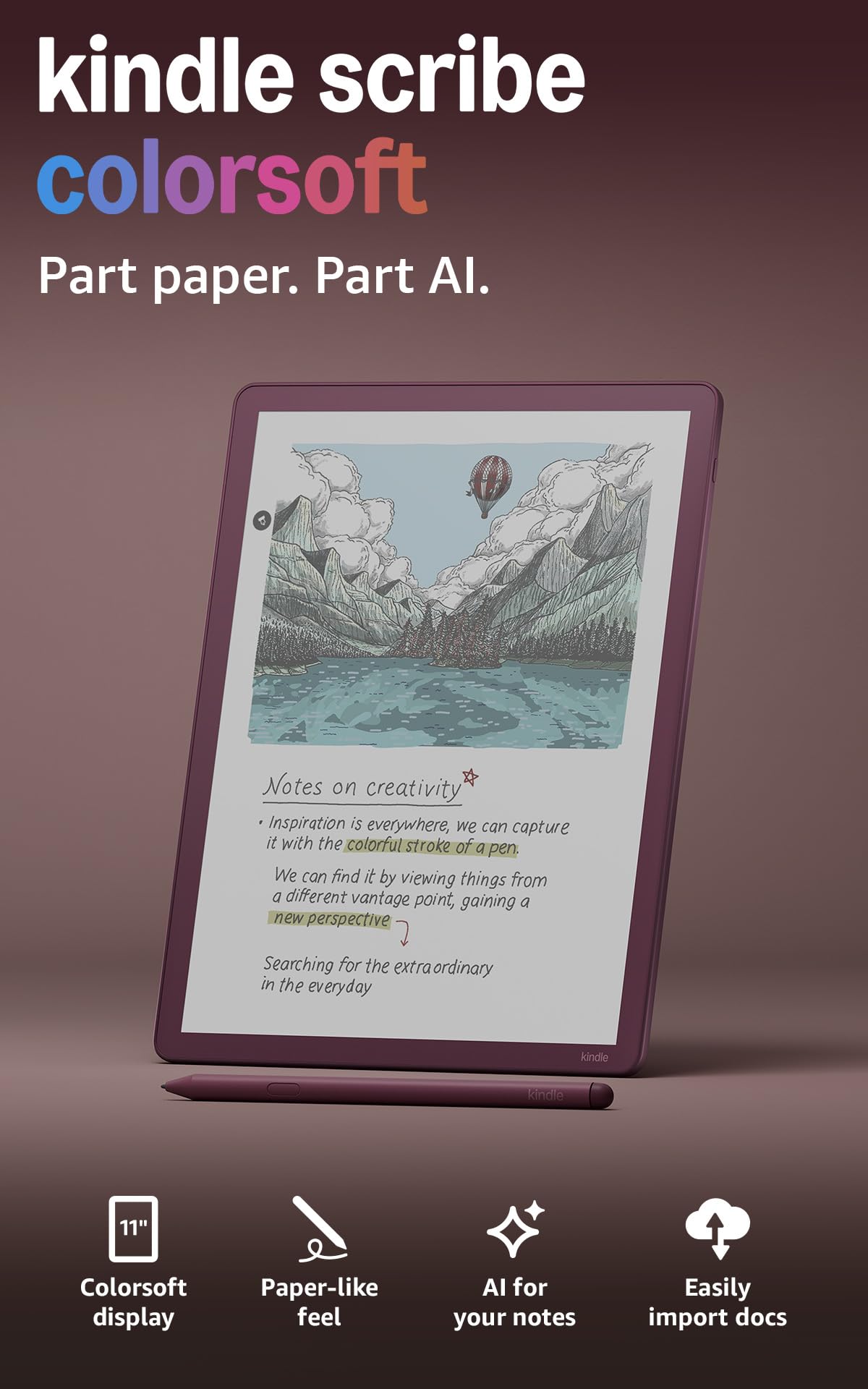
The Kindle Scribe Colorsoft marries the Kindle e-reader ecosystem with a note-taking pad that finally adds color. Its 11-inch Colorsoft display uses an oxide-based panel that delivers soft, natural-looking color without the harsh flashing typical of other color e-paper screens. The textured surface and ultra-fast responsiveness make writing feel close to pen on paper, and the included Premium Pen is battery-free with a satisfying eraser on the end.
Amazon has built an impressive note-taking system here. The Active Canvas feature creates space for notes inside book margins without overlapping text. The new AI tools generate summaries of your handwritten scribbles, convert them to typed text, and even let you ask questions about your notes to retrieve information. The 64GB storage is generous for notebooks and books, and the battery lasts for weeks of reading and writing.
The Colorsoft screen is noticeably darker than a standard Kindle — you’ll need to keep the front light on at a higher level. It also cannot run Android apps; it is strictly an Amazon ecosystem device for Kindle books, PDFs, and its built-in notebook. For voracious readers who annotate their books and want color to make highlights and sketches pop, this is a fantastic dual-use device. For pure note-taking without the Kindle store, other options offer more flexibility.
Why it’s great
- Color e-paper display for vibrant highlights and sketches
- Battery-free Premium Pen with excellent writing feel
- Deep integration with Kindle library and AI note tools
Good to know
- Screen is darker than standard Kindle; needs front light
- Locked into Amazon ecosystem; no Android apps
- Limited to note-taking and reading; no video or browser
FAQ
Can I use any stylus with an Android tablet for note-taking?
What is the difference between a paper-like screen protector and an etched glass display?
Does the refresh rate of the tablet affect note-taking quality?
Final Thoughts: The Verdict
For most users, the android tablet for note taking winner is the Samsung Galaxy Tab S10 FE because it balances excellent S Pen performance, a smooth 90Hz display, and Samsung’s best-in-class note-taking software at a mid-range price that doesn’t hurt. If you want a stunning AMOLED display and flagship performance for art and multitasking, grab the Samsung Galaxy Tab S9. And for a pure, distraction-free writing experience that feels closest to real paper, nothing beats the reMarkable Essentials Bundle.