
Our readers keep the lights on and the weekend projects moving. As an Amazon Associate, I earn from qualifying purchases.
Manually feeding stacks of paper into a flatbed scanner is a workflow bottleneck that silently steals hours from your week. An ADF document scanner eliminates that friction by automatically pulling a pile of pages through its sensor, duplexing both sides in a single pass, and outputting clean, searchable PDFs without you touching the glass. The difference between a 20-sheet feeder and a 100-sheet feeder isn’t just capacity — it’s whether you can load a full contract and walk away or stand there reloading every few minutes.
I’m Rikta — the co-founder and writer behind FitlyFast. I’ve spent countless hours researching scanner hardware specifications, analyzing real-world user experiences across dozens of models, and comparing the subtle differences in feeder mechanisms, optical sensors, and software ecosystems that separate a reliable daily driver from a frustrating paper-eating machine.
This guide breaks down the nine best options on the market right now, organized by use case and performance tier, to help you find the model that matches your actual paper volume. Read on for the definitive best adf document scanner recommendations for home offices, accounting departments, and high-volume professional workflows.
How To Choose The Best ADF Document Scanner
The right ADF document scanner for your office depends on three primary variables: how many sheets you feed daily, whether those sheets are double-sided, and how much configuration you are willing to tolerate. A machine built for scanning a few invoices a week will feel comically slow when you need to digitize a 300-page client file, while a high-volume workgroup model loaded with features will be overkill—and over budget—for occasional personal use.
Sheet Capacity and Daily Volume
The automatic document feeder’s sheet capacity is the single most important spec for throughput. A 20-page feeder means you stop every 20 sheets to reload; a 100-page feeder lets you load an entire ream and walk away. For home offices scanning less than 50 pages per day, a 20-30 sheet feeder is sufficient. For accounting departments, legal offices, or medical records scanning, a 60-100 sheet ADF is non-negotiable. Continuous scanning mode—where you can add pages mid-cycle—can extend effective capacity but never fully replaces a larger tray.
Duplex Scanning Speed
Duplex speed is measured in images per minute (ipm) or pages per minute (ppm). A scanner rated at 30 ppm duplex captures both sides of 15 sheets in one minute, while a 45 ppm model handles 22-23 double-sided sheets in the same time. The difference compounds fast when you are processing hundreds of double-sided pages. Look for “single-pass duplex” in the spec sheet—this means the scanner has two optical sensors reading both sides simultaneously, as opposed to flipping the page mechanically, which is slower and more prone to jams.
Software and Driver Ecosystem
The hardware is only half the equation. A great ADF document scanner is useless if its software cannot talk to your existing tools. TWAIN driver support is the gold standard for professional document management systems, accounting software, and medical record platforms. WIA and ISIS drivers offer broader compatibility but may lack advanced features. Scan-to-email, scan-to-cloud (Dropbox, Google Drive, OneDrive), and scan-to-USB (no computer required) are convenience features that save time for specific workflows. If you plan to run OCR for searchable PDFs, ensure the bundled software supports it natively.
Quick Comparison
On smaller screens, swipe sideways to see the full table.
| Model | Category | Best For | Key Spec | Amazon |
|---|---|---|---|---|
| ScanSnap iX2400 | High-Speed | Volume scanning at 45 ppm | 100-sheet ADF, 600 dpi | Amazon |
| Brother ADS-4700W | Professional | Networked office workflows | 80-sheet ADF, CCD sensor | Amazon |
| Epson ES-580W | Wireless | Scan-to-cloud via touchscreen | 100-sheet ADF, 4.3″ LCD | Amazon |
| Canon R50 | Business | Mixed media batch scanning | 60-sheet ADF, 40 ppm | Amazon |
| Epson RR-620W | Receipt Focus | Receipt/invoice digitization | 100-sheet ADF, AI-ready scans | Amazon |
| Canon DR-C225 II | Reliable | Jam-free mixed paper scanning | 30-sheet ADF, 25 ppm | Amazon |
| ScanSnap iX1300 | Compact | Small desk, wireless scanning | 30 ppm, USB/Wi-Fi | Amazon |
| Doxie Pro | Compact Duplex | Home office, receipts/notes | 20-sheet ADF, USB-C powered | Amazon |
| Brother ADS-1300 | Entry-Level | Budget duplex scanning | 20-sheet ADF, 30 ppm | Amazon |
In‑Depth Reviews
1. ScanSnap iX2400

The ScanSnap iX2400 is the new speed king in the dedicated document scanner category, pushing 45 pages per minute in duplex mode through a massive 100-sheet automatic document feeder. That spec combination means you can load a 200-page double-sided report and walk away for under five minutes—no reloading, no waiting. The one-touch button operation strips away driver configuration entirely; press the button and the scanner handles de-skew, color optimization, and blank page removal automatically.
ScanSnap Home software organizes scans into searchable PDFs with OCR built in, and the Quick Menu lets you drag-and-drop scans directly into your preferred apps. Users consistently report that the iX2400 handles business cards, receipts, photos, and envelopes without jamming, and the stable USB-only connection eliminates the wireless dropouts that plague some competitors. The trade-off is no Wi-Fi, no TWAIN driver, and a slightly larger footprint than the iX1300.
The 40-45 ppm duplex throughput transforms a tedious weekend project into a coffee-break task. The lack of wireless is a small compromise for the reliability and sheer speed on tap.
Why it’s great
- 45 ppm duplex—fastest in class.
- 100-sheet ADF handles large batches without reloading.
- One-touch simplicity requires zero driver setup.
Good to know
- No Wi-Fi or Bluetooth connectivity.
- No TWAIN driver for third-party integration.
- Bundled software can feel clunky for advanced users.
2. Brother ADS-4700W

The Brother ADS-4700W is built for professional workgroups that demand network integration and security. Its CCD optical sensor delivers superior image quality for documents with fine text or light shading—a meaningful advantage over CIS sensors for legal and medical records. The 80-sheet ADF, combined with continuous scanning mode, effectively removes capacity limits for any single batch, and the 4.3-inch color touchscreen supports up to 56 customizable one-touch shortcuts.
Triple Layer Security features and wide driver support (TWAIN, WIA, ISIS, SANE) make this scanner easy to integrate into existing document management systems without sacrificing data protection. Users praise the scan-to-network folder and scan-to-email functionality, especially for setup with NAS devices like Synology. The scanner handles mixed paper sizes reliably, auto-skips blank pages, and processes both sides in a single pass at up to 40 ppm.
Setup can be finicky—some users report that cloud service configuration requires patience, and the bundled PDF software is frankly not great. Occasional false jam errors with sticky or multi-page stapled documents have been noted. For a dedicated office scanner that lives on a network and serves multiple users, however, the ADS-4700W delivers where it counts.
Why it’s great
- CCD sensor provides sharper image quality than CIS.
- TWAIN/ISIS/SANE drivers for professional integration.
- Triple Layer Security for sensitive documents.
Good to know
- Cloud setup can be frustrating.
- Sticky or stapled pages can trigger false jams.
- Bundled PDF software is not useful.
3. Epson Workforce ES-580W

The Epson ES-580W combines a 100-sheet ADF with a 4.3-inch color touchscreen and full wireless connectivity, enabling computer-free scanning directly to email, cloud storage, or USB drive. The 35 ppm duplex speed is slightly slower than the iX2400, but the convenience of the large display and network versatility makes it a strong contender for offices where multiple users need access. The CCD sensor produces crisp scans, and the included Epson ScanSmart software handles OCR and file management well.
Users frequently highlight the ES-580W’s ability to scan directly into cloud services like Dropbox and Google Drive without a computer, which eliminates a step for many workflows. The scanner handles a variety of media types—receipts, business cards, long documents—with reliable feeding and jam-free operation. Staple detection and easy jam clearance are well-implemented, and the machine is compact enough for a shared desk.
The ES-580W lacks an Ethernet port, which is a strange omission for a device at this price point. Some users note that the touchscreen interface, while attractive, can feel slow for frequent shortcut switching. If scan-to-USB and scan-to-cloud are central to your workflow, however, the ES-580W’s standalone capabilities are hard to beat in its tier.
Why it’s great
- Computer-free scanning to cloud and USB via touchscreen.
- 100-sheet ADF handles high-volume batches.
- CCD sensor for excellent image quality.
Good to know
- No Ethernet port for wired networking.
- Touchscreen interface can feel sluggish.
- Lower duplex speed than top competitors.
4. Canon imageFORMULA R50
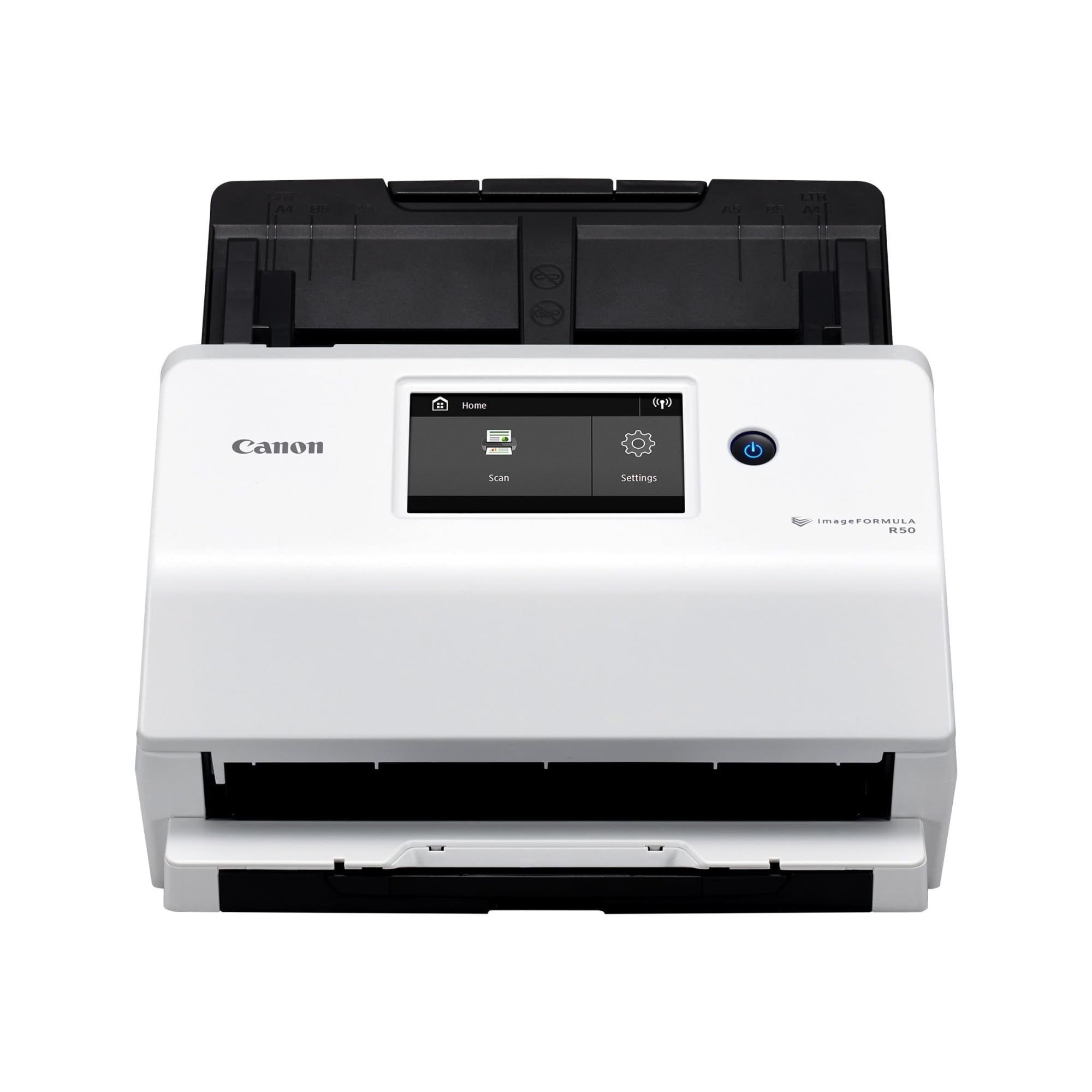
The Canon imageFORMULA R50 brings a large color touchscreen and dual connectivity (USB and Wi-Fi) to the mid-range space, packing a 60-sheet ADF that handles mixed batches of documents, cards, and photos without hiccups. The 40 ppm duplex speed is competitive, and the slide-out output tray keeps scanned pages organized. Canon’s image processing automatically adjusts resolution to balance quality and file size, which is particularly useful for mixed batch scanning where you might combine high-quality photos with text-heavy invoices.
Users consistently report that the R50 handles mixed media sizes reliably when documents are centered in the feeder—a key detail for anyone scanning receipts alongside letter-sized pages. The touchscreen interface lets you set scan destinations and adjust settings without touching a computer. The TWAIN driver ensures compatibility with professional software suites, and the one-year warranty includes US-based technical support that earns praise for its responsiveness.
The ultrasonic double-feed sensor cannot be disabled, which means documents with attached Post-Its or tape-on overlays will trigger errors. The output tray is a bit flimsy by some accounts. For a business scanning a steady diet of standard mixed documents, however, the R50’s speed, capacity, and connectivity deliver strong value.
Why it’s great
- 60-sheet ADF with 40 ppm fast duplex scanning.
- Large color touchscreen for easy settings.
- USB and Wi-Fi connectivity options.
Good to know
- Double-feed sensor cannot be disabled for sticky media.
- Output tray feels somewhat fragile.
- Setup instructions could be more detailed.
5. Epson RapidReceipt RR-620W

The Epson RapidReceipt RR-620W is purpose-built for receipt and invoice digitization, featuring Epson ScanSmart AI PRO technology that extracts and categorizes data for direct export to QuickBooks, TurboTax, and Excel. The 45 ppm duplex speed and 100-sheet ADF make it fast enough to plow through a month’s worth of receipts in minutes, and the large 4.3-inch touchscreen supports computer-free scanning to email, cloud, or USB. The AI processing saves roughly 80% of manual data entry time according to user reports.
Beyond receipt handling, the RR-620W scans standard documents with the same speed and reliability. The included third-party PDF software (Power PDF) has a broken download link that frustrates some users, but the Epson ScanSmart software works flawlessly and is the interface you will actually use. Users praise the wireless setup and the scanner’s ability to push scans directly to a NAS without a computer.
The AI extraction is the differentiator here—if your workflow revolves around expense tracking, invoicing, and accounting integration, the RR-620W justifies its position through time savings alone. The overall build quality is solid, though the scanner is slightly heavy at 8.2 pounds. The lack of a TWAIN driver limits integration with some enterprise document management systems.
Why it’s great
- AI extraction categorizes receipts for accounting software.
- 45 ppm duplex with 100-sheet ADF.
- Computer-free scan to email, cloud, and USB.
Good to know
- Bundled Power PDF software has broken download link.
- No TWAIN driver for enterprise integration.
- Heavier than comparable models at 8.2 pounds.
6. Canon imageFORMULA DR-C225 II

The Canon imageFORMULA DR-C225 II is the scanner you buy when reliability matters more than raw speed. One user reported zero jams over nine years on the previous model (DR-C125), and the general consensus across verified reviews is that this upright, top-feed scanner handles mixed documents—Post-Its, receipts, photos, plastic cards, embossed cards—without eating paper. The 30-sheet ADF and 25 ppm duplex speed are modest, but the machine never seems to choke on tricky media.
The upright design saves desk space, and the built-in cable management keeps things tidy. Canon’s bundled software includes business card organizer and eCopy PDF Pro Office for document management. The TWAIN driver ensures long-term compatibility as operating systems evolve—a critical point for businesses that cannot afford scanner obsolescence. Three-year warranty and US-based technical support add peace of mind.
The double-feed detection sensor cannot be disabled, which means scanning documents with Post-It notes attached will trigger errors. Setup requires downloading software online rather than using included media, which can be a minor hurdle. For anyone whose primary concern is a scanner that will not jam on the thousandth page, the DR-C225 II is the most trusted pick in its class.
Why it’s great
- Exceptionally reliable feeding across mixed media types.
- Upright space-saving design with cable management.
- Three-year warranty with US-based support.
Good to know
- Double-feed sensor cannot be disabled for Post-Its.
- Modest 25 ppm duplex speed.
- 30-sheet ADF requires frequent reloading for larger batches.
7. ScanSnap iX1300

The ScanSnap iX1300 is the space-saving champion of this list, with a footprint that folds away into a desk drawer when not in use. Despite the compact size, it delivers 30 ppm duplex scanning with USB and Wi-Fi connectivity, and the exclusive Quick Menu lets you drag and drop scans directly into your favorite applications. The scanner handles documents, photos, business cards, and plastic cards with a single touch, and automatic de-skew, color optimization, and blank page removal produce clean results without manual intervention.
Users who have scanned thousands of pages through the iX1300 report beautiful PDF output and reliable wireless performance after the initial setup. One user scanned over 9,000 photos after another brand’s machine failed at 2,000. The ScanSnap Home software provides solid organization and editing tools. Setup is simple: unpack, install software, connect to Wi-Fi, and start scanning.
The iX1300 can be finicky with paper feeding—some users report jams every few pages as the feeder pulls paper at an angle, wrinkling or ripping delicate sheets. The auto-sizing feature occasionally cuts off the edges of documents. For standard office paper in good condition, the iX1300 is a fantastic compact option; for fragile receipts or uneven stacks, it can be frustrating.
Why it’s great
- Ultra-compact design folds away into a drawer.
- Wireless connectivity for flexible placement.
- Excellent software with drag-and-drop workflow.
Good to know
- Feeder can jam on fragile or uneven paper.
- Auto-sizing may cut off document edges.
- Not ideal for high-volume daily use.
8. Doxie Pro

The Doxie Pro is a compact duplex scanner that punches above its weight for home and home-office use. Its 20-sheet ADF feeds documents, receipts, invoices, and even thick or delicate paper through the direct feed slot. The software—Doxie’s own—handles text recognition, automatic cropping, rotation, and contrast boost with minimal fuss, and scans can be sent directly to Dropbox, Evernote, OneNote, and iCloud. Setup takes roughly three minutes, and the compact wired footprint (folding to 3 pounds) tucks away easily.
Users consistently praise the Doxie Pro’s ability to scan wrinkled pages and glossy maps without issue—the real-time contrast and gamma adjustments in the software fix blotchy whites that would trip up less intelligent scanners. The auto-rotate and auto-crop features work reliably, and batch scanning lets you load a stack and organize later. The scanner is fast at 300 dpi, and the sturdy plastic build feels durable.
The Doxie Pro has no SD card slot and no external battery, so it requires a USB connection to a computer at all times. There is no Chromebook app or Linux support, and the 20-sheet ADF means you will reload frequently for larger jobs. At full retail price, it feels slightly expensive for its feature set. For the home user who needs a clean, fast duplex scanner for occasional batches, however, the Doxie Pro delivers a polished experience.
Why it’s great
- Handles wrinkled and glossy paper with software correction.
- Compact, lightweight, and folds for storage.
- Quick setup with intuitive software and cloud integration.
Good to know
- 20-sheet ADF requires frequent reloading.
- No SD card slot or battery for standalone use.
- No Chromebook or Linux support.
9. Brother ADS-1300

The Brother ADS-1300 is a renewed (refurbished) compact duplex scanner that offers a low barrier to entry for anyone wanting to jump into ADF scanning without a large upfront investment. It scans up to 30 pages per minute in duplex mode through a 20-sheet ADF, and the ultra-portable frame (3 pounds) makes it genuinely travel-friendly. The card slot handles business cards and ID badges, and the scanner supports long documents up to 197 inches. The bundled software provides file creation, OCR, and basic editing tools.
Users report that the ADS-1300 is lightweight, durable, and easy to set up, with scanning speed that feels snappy for a budget model. The duplex scanning works reliably, and the scanner supports color scanning with the ability to selectively keep or delete pages during a batch. The 600 dpi resolution is standard for this tier and produces clean text and images for most documents.
The ADS-1300 does not include a power cord—it is listed as an optional accessory and must be purchased separately unless you have a compatible USB-powered workflow. Some users have been extremely upset by this omission, which feels like a corner cut in packaging. The 20-sheet ADF limits batch sizes, and the renewed condition means unit quality can vary. For the price-conscious buyer who understands the power cord limitation, the ADS-1300 is a functional entry point.
Why it’s great
- Low entry point for duplex ADF scanning.
- Ultra-portable at 3 pounds.
- Fast 30 ppm duplex in a compact package.
Good to know
- Power cord not included—must be purchased separately.
- 20-sheet ADF limits batch size.
- Renewed condition may have variable quality.
FAQ
Can I scan double-sided documents with a single-pass ADF scanner?
What is the difference between 600 dpi and 300 dpi scanning for documents?
Do I need TWAIN driver support for my scanner?
Final Thoughts: The Verdict
For most users, the best adf document scanner winner is the ScanSnap iX2400 because its 45 ppm duplex speed and 100-sheet ADF deliver unmatched throughput for any home office or small business workflow, all with one-button simplicity. If you need TWAIN integration and CCD image quality for a networked office, grab the Brother ADS-4700W. And for receipt digitization with AI extraction that saves hours of data entry, nothing beats the Epson RapidReceipt RR-620W.