
Our readers keep the lights on and the weekend projects moving. As an Amazon Associate, I earn from qualifying purchases.
Stuck choosing between a paper-like reading experience and access to the full app ecosystem? Dedicated e-readers lock you into one store, while standard tablets burn your eyes. An Android-based E Ink device solves this by combining the superior readability of electronic paper with the flexibility of Google Play, letting you read from Kindle, Kobo, Libby, and Pocket all on one comfortable screen.
I’m Rikta — the co-founder and writer behind FitlyFast. For this guide, I’ve spent countless hours cross-referencing display contrast specs, battery reports, and processor speed data across nine models to separate the true daily drivers from the flawed prototypes.
Whether you prioritize a compact pocket-friendly reader, a large note-taking canvas, or vibrant color comics, this analysis will help you confidently choose the right android ereader for your habits.
How To Choose The Best Android Ereader
Choosing the right device comes down to balancing three things: display quality, software openness, and physical portability. An Android Ereader lives in a middle ground — it must be as gentle on the eyes as a Kindle but as capable as a tablet. The following factors will steer your decision.
Display Tech: Carta vs Kaleido
The screen is the heart of any E Ink device. Monochrome Carta 1300 panels (300 PPI) deliver dark, razor-sharp text with minimal ghosting and are ideal for pure reading. Color Kaleido 3 screens, while adding vibrancy for covers, comics, and notes, are inherently darker and lower in resolution (150 PPI in color) — they require the front light to be on more often, reducing battery life.
Android Version & App Support
Android 11 or 12 might still run Kindle and Libby, but newer versions (13, 14, 15) provide better security, more efficient multi-tasking, and wider app compatibility. Higher RAM (4GB or more) is essential if you want to juggle between a reading app and a note-taking app without a refresh delay. Some devices offer a de-Googled experience via F-Droid, while others ship with full Google Play Services.
Portability vs. Productivity
A 6-inch reader easily slips into a jacket pocket and can be held one-handed for hours. A 7.8- or 10.3-inch screen is better for PDFs, sheet music, and note-taking with a stylus, but it’s heavier and less comfortable for bedtime reading. Decide whether your primary use case is on-the-go fiction or desk-based annotation.
Quick Comparison
On smaller screens, swipe sideways to see the full table.
| Model | Category | Best For | Key Spec | Amazon |
|---|---|---|---|---|
| BOOX Go Color 7 Gen II | Color E Ink | Multi-app reading & page-turn buttons | 7″ Kaleido 3, 4GB RAM, Android 13 | Amazon |
| BOOX Note Air 5 C | Color E Ink | Color note-taking & large-format reading | 10.3″ Kaleido 3, 6GB RAM, Android 15 | Amazon |
| VIWOODS AiPaper Reader | Monochrome E Ink | Pocket-friendly reading with AI | 6.13″ Carta 1300, 300 PPI, 128GB | Amazon |
| Bigme B6 Color | Color E Ink | Compact entry-level color reader | 6″ Color E Ink, 2GB RAM, Android 14 | Amazon |
| TCL NXTPAPER 11 Gen 2 | Paper-Like LCD | Budget eye-friendly all-in-one tablet | 11″ 2K NXTPAPER, 8GB RAM, Android 15 | Amazon |
| TCL NXTPAPER 14 | Paper-Like LCD | Large-screen sheet music & drawing | 14.3″ NXTPAPER 3.0, 8GB RAM, 256GB | Amazon |
| Kobo Libra Colour | Color E Ink | Dedicated Kobo ecosystem with OverDrive | 7″ Kaleido 3, 32GB, IPX8 waterproof | Amazon |
| Geniatech Kloudnote Slim | Monochrome E Ink | Budget 10.3″ note-taking & reading | 10.3″ E Ink, 227 PPI, 64GB, stylus included | Amazon |
| Samsung Galaxy Tab S11 | AMOLED Tablet | High-performance creative work & media | 11″ Dynamic AMOLED 2X, 12GB RAM, S Pen | Amazon |
In‑Depth Reviews
1. BOOX Go Color 7 Gen II

The Boox Go Color 7 Gen II strikes the best balance between color versatility, performance, and size. Its 7-inch Kaleido 3 display delivers 300 PPI monochrome text and 150 PPI color, which is bright enough for magazine layouts and graphic novels when you dial in the warm front light. The octa-core processor paired with 4GB of RAM keeps third-party apps like Kindle and Libby responsive, and the physical page-turn buttons make extended reading sessions comfortable.
Android 13 gives you full access to Google Play, so you are not locked into any single bookstore. The device weighs only 195 grams, making it lighter than many phones, and the microSD slot allows expansion beyond the 64GB internal storage. However, the native reader app requires some initial configuration to reduce ghosting, and the default screen is noticeably darker than a monochrome Carta panel — the front light will be your constant companion.
Battery life spans one to three weeks depending on front-light usage and Wi-Fi activity, which is solid for an Android E Ink device but not class-leading. The lack of an included stylus also means note-taking is limited unless you buy the optional pen. For most readers who want color covers, multi-store access, and solid build quality, this is the strongest all-rounder on the market today.
Why it’s great
- Excellent 300 PPI text clarity in B&W mode
- Physical page-turn buttons improve one-handed use
- microSD expansion for storage flexibility
Good to know
- Kaleido 3 screen needs front light indoors
- No stylus included
- Setup involves tweaking refresh settings per app
2. BOOX Note Air 5 C

For those who need a large canvas for both reading and color annotation, the Note Air 5 C is a top-tier contender. The 10.3-inch Kaleido 3 panel runs at 300 PPI in black-and-white and 150 PPI in color, offering enough resolution for comfortable two-column PDF reading and detailed margin notes. With 6GB of RAM and Android 15, multitasking between a research paper, a note app, and a translation tool feels fluid by E Ink standards.
The included Boox stylus provides 4,096 levels of pressure sensitivity, and the writing experience mimics a fine pen on slightly rough paper — the tactile feedback is deliberate and satisfying. The note app supports handwriting-to-text conversion, layers, and templates, making it a legitimate tool for students and professionals. The device also features dual speakers and a microphone for audiobook playback and voice recording, though audio quality is merely acceptable.
Its major drawback is battery life: the 3,700mAh battery struggles to last a full day of heavy use, especially with the front light active. The fingerprint reader is also finicky when a case is attached. At 430 grams, it is not a device you hold one-handed for hours. This is a premium productivity companion, not a casual bedtime reader, and it commands a premium price accordingly.
Why it’s great
- 300 PPI B&W resolution for dense PDFs
- Included stylus with low-latency handwriting
- Android 15 with full Google Play access
Good to know
- Battery life is average for an E Ink device
- Heavy for one-handed reading
- Case magnet can interfere with stylus
3. VIWOODS AiPaper Reader
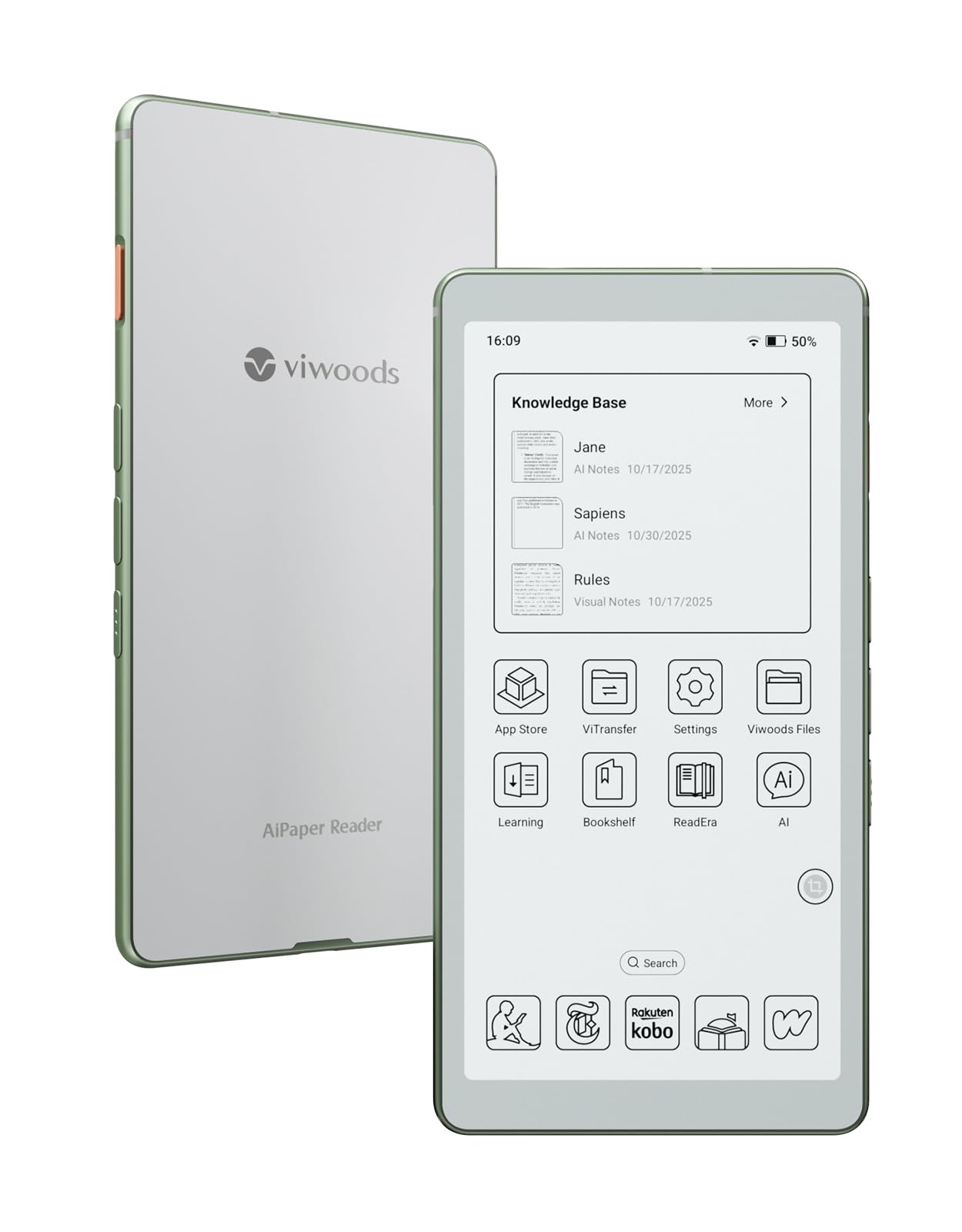
The Viwoods AiPaper Reader is a unique pocket-size device that marries a Carta 1300 panel with an AI assistant. The 6.13-inch screen delivers the best black-and-white contrast on this list — 300 PPI on a panel that is noticeably crisper than older Carta modules. The body is astonishingly thin at 6.7mm and weighs only 138 grams, making it the most portable option here. It fits easily into a jeans pocket and can be used one-handed without fatigue.
Its standout feature is the dedicated AI button: a long press triggers voice input for summaries or definitions, while a short press opens text-based Q&A from any screenshot. This creates a personal knowledge library that saves your interactions. On the software side, the Android environment is de-Googled, so you must install apps via F-Droid or sideload APKs — it requires some technical comfort but keeps the system lean. The 128GB of internal storage is generous for a device this small.
However, the battery life is a notable weak point, with idle drain faster than a Kindle and heavy use lasting only three to four days. The backlight also lacks a warm temperature adjustment, so the cool blue tone may bother some readers in dark rooms. Additionally, cellular connectivity is locked to T-Mobile, which limits its usefulness as an always-connected device. It is a fantastic pure reader for the minimalist who loves AI tools but is not for heavy notetakers.
Why it’s great
- Best-in-class Carta 1300 contrast and sharpness
- Ultra-light 138g design for true portability
- AI assistance for instant lookups and summaries
Good to know
- Battery life is shorter than competing E Ink readers
- No warm light adjustment
- 4G only works on T-Mobile network
4. Bigme B6 Color
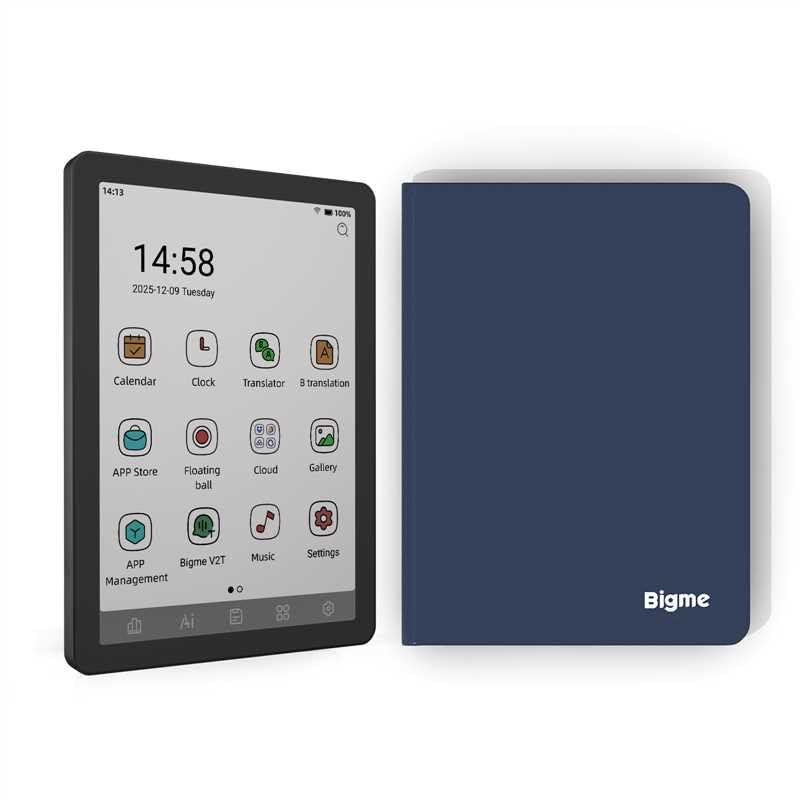
The Bigme B6 Color offers one of the most affordable gateways into color Android E Ink reading. Its 6-inch color E-paper display, while not as sharp as Kaleido 3 panels from Boox, provides a pleasing experience for book covers, children’s books, and simple comics. The device runs Android 14, which opens the door to the full Google Play ecosystem, and the 2GB RAM / 32GB configuration is sufficient for single-app reading sessions without noticeable lag.
Users report that colors look washed out with the front light on but improve significantly under direct external light. The physical buttons at the bottom are permanent but can be reprogrammed, and the footprint is small enough for a jacket pocket. It also works well with Bluetooth page-turners, making it a viable option for hands-free reading. The battery lasts roughly two to three weeks with daily use of one to two hours.
Where it falls short is the moderate black-and-white contrast compared to dedicated Carta readers, and the ghosting, while present on most color E Ink, is a bit more noticeable here. A small number of units have also been reported to freeze on book pages, requiring occasional restarts. If you prioritize budget and color access over absolute display quality, this is a solid starting point.
Why it’s great
- Affordable entry to color Android E Ink
- Supports multiple reading apps and formats
- Compact form factor with physical buttons
Good to know
- Color quality is muted compared to Kaleido 3
- 2GB RAM limits heavy multitasking
- Occasional software freezes reported
5. TCL NXTPAPER 11 Gen 2

The TCL NXTPAPER 11 Gen 2 is not an E Ink device but uses advanced LCD technology with a matte, anti-reflective finish to simulate paper. The NXTPAPER 4.0 display reduces blue light and flicker, making it significantly easier on the eyes than a standard tablet for extended reading sessions. It offers three display modes — Regular, Ink Paper (grayscale), and Color Paper — that let you tailor the experience to your current task.
This 11-inch tablet comes with a T-PEN stylus with 4,096 pressure levels and a protective flip case, all at a competitive price point. The MediaTek Helio G80 processor paired with 8GB of physical RAM plus 8GB of virtual RAM handles multitasking, note-taking, and media streaming without stutter. The 8,000mAh battery delivers about eight hours of mixed use, and reverse charging is a handy extra.
The device is heavier and larger than any E Ink reader, making it less suitable for one-handed bedtime reading. The touchscreen also has known quirks when the tablet is charging. While it does not replicate the zero-glare, zero-battery-drain magic of E Ink, it is the best large-format option for those who want a single device for reading, sketching, and general tablet tasks without eye fatigue.
Why it’s great
- Paper-like matte display reduces eye strain
- Stylus and case included in the box
- Expandable storage up to 1TB
Good to know
- Not true E Ink; still uses backlit LCD
- Heavy for one-handed reading
- Touchscreen issues reported during charging
6. TCL NXTPAPER 14

Musicians and architects will appreciate the TCL NXTPAPER 14 for its massive 14.3-inch display that displays a full sheet of music or a large-format drawing without scrolling. The NXTPAPER 3.0 technology keeps the screen anti-glare and gentle on the eyes during the hours-long rehearsals or reading sessions. The device ships with a 4,096-level T-PEN stylus and a versatile flip case that doubles as a stand.
Performance is driven by a MediaTek Helio G99 chip with 8GB of RAM plus 8GB of virtual expansion, and the 10,000mAh battery comfortably lasts through a full day of heavy use. The quad-speaker system with Smart PA delivers impressive volume, making it a capable media consumption device. The dedicated NXTPAPER Key lets you toggle between Regular, Ink Paper, and Color Paper modes instantly.
Its cavernous size and weight of 1.67 lbs make it unsuitable for portable reading away from a desk. It also lacks expandable storage — you are limited to the internal 256GB. Some users have reported a boot-loop issue if the device is turned off while charging. Still, for professional sheet music management, note-taking on large documents, or digital art, this is a focused and affordable powerhouse.
Why it’s great
- 14.3-inch display ideal for sheet music and CAD
- Excellent battery life from 10,000mAh cell
- Quad speakers with room-filling sound
Good to know
- Very large and heavy; not truly portable
- No microSD card slot
- Occasional boot-loop issues when charging
7. Kobo Libra Colour

The Kobo Libra Colour is the best choice for readers deeply embedded in the Kobo and OverDrive ecosystem. The 7-inch Kaleido 3 display offers clean text at 300 PPI and decent color for covers and illustrated books. The ergonomic design with physical page-turn buttons and left/right screen rotation makes it comfortable for long reading sessions. It is IPX8 waterproof, meaning it can survive a dip in the bath or a splash at the pool.
Integration with OverDrive allows you to borrow library books directly from the device without needing a computer or phone — a seamless experience. The 32GB storage is enough for thousands of eBooks, and the battery is rated for up to four weeks of typical use. The Kobo Stylus 2 (sold separately) enables color annotation and note-taking, though the device is primarily a reader.
The primary trade-off is that this is not a full Android tablet. While it runs on a Linux-based OS, it does not support Google Play, meaning you cannot install Kindle, Libby (separate from OverDrive), or other third-party apps natively. The color, like all Kaleido 3 screens, can look washed out compared to an LCD tablet. If you are happy staying within Kobo’s walled garden, this is an excellent device; if you need multi-store access, look elsewhere.
Why it’s great
- Excellent OverDrive library integration
- IPX8 waterproof rating
- Ergonomic page-turn buttons
Good to know
- Not a full Android device; no Google Play
- Color is muted compared to LCD
- Stylus sold separately
8. Geniatech Kloudnote Slim

The Geniatech Kloudnote Slim is an intriguing budget-friendly entry into the large-format E Ink notebook category. At 10.3 inches and only 390 grams, it is lightweight and thin, making it easy to slide into a bag. The included stylus provides a surprisingly smooth writing experience with good pressure sensitivity, and the 39 note templates cover most use cases from daily planners to meeting notes. The battery is rated for up to 40 hours of use.
It runs a custom Linux-based OS rather than full Android, but it does feature its own app store where you can download a limited selection of applications. You can also sideload APKs to expand functionality, though compatibility with standard Android tablet apps is inconsistent. The 227 PPI resolution is adequate for text but noticeably less sharp than 300 PPI panels — fine for notes but not ideal for dense PDFs.
Reliability is a concern: some users report that after a year the device becomes glitchy, with PDFs failing to open, handwriting lag, and a lack of software updates from the manufacturer. The absence of a backlight also means you are dependent on external light for reading. It is a decent value for someone on a tight budget who needs a large digital notebook, but the long-term durability is questionable.
Why it’s great
- Large 10.3-inch screen at a low price point
- Stylus included with good pressure sensitivity
- Lightweight and slim design
Good to know
- 227 PPI is less sharp than competitors
- Software reliability issues after extended use
- No front light for reading in the dark
9. Samsung Galaxy Tab S11

The Samsung Galaxy Tab S11 represents a completely different philosophy — it is a premium Android tablet first and a reading device second. The 11-inch Dynamic AMOLED 2X display delivers spectacular color, deep blacks, and a 120Hz refresh rate that makes every interaction buttery smooth. The included Galaxy Tab S Pen with Note Assist and Drawing Assist AI turns this into a serious creative tool for sketching, document annotation, and note-taking.
Powered by a 3nm MediaTek processor and 12GB of RAM, the Tab S11 handles everything from 4K video streaming to heavy multitasking without any slowdown. The 8,400mAh battery provides up to 18 hours of video playback, and the IP68 rating means it can survive dust and water exposure. The device also features expandable storage via microSD, which is a rare and welcome inclusion in the premium tablet space.
The major drawback for reading enthusiasts is eye strain. An AMOLED screen, no matter how good, relies on PWM dimming and emits blue light that can cause fatigue after hours of reading. If you need a single device that excels at everything — from creative work to entertainment — the Tab S11 is unmatched, but for serious readers, an E Ink companion is still recommended.
Why it’s great
- Stunning Dynamic AMOLED 2X display
- 12GB RAM for flawless multitasking
- IP68 water and dust resistance
Good to know
- Causes eye strain during long reading sessions
- Heavier and less ergonomic than E Ink readers
- Premium price reflects premium hardware
FAQ
Why would I choose an Android Ereader over a Kindle?
How long does the battery last on a typical Android E Ink device?
Can I install any Android app on an E Ink reader?
Final Thoughts: The Verdict
For most users, the android ereader winner is the BOOX Go Color 7 Gen II because it delivers vibrant Kaleido 3 color, a sharp 300 PPI display, and 4GB of RAM in a light, portable body with physical page-turn buttons. If you want the best pure black-and-white reading experience with AI features, grab the VIWOODS AiPaper Reader. And for color note-taking on a large canvas, nothing beats the BOOX Note Air 5 C.