
Our readers keep the lights on and the weekend projects moving. As an Amazon Associate, I earn from qualifying purchases.
If you have been looking for a monitor that makes games, movies, and photos look almost three-dimensional — with blacks so deep the screen seems to disappear and colors that pop without looking fake — you have landed on the right category. A 27-inch 4K OLED monitor delivers exactly that, but picking the right one means knowing which extra features actually matter for your setup and which ones are just marketing hype.
I’m Rikta — the co-founder and writer behind FitlyFast. This guide is built by comparing the manufacturers’ published specifications and the patterns across verified customer reviews, so you get each pick’s real strengths and trade-offs instead of marketing spin.
We have sorted through the latest models to bring you the five best options for a 27 inch 4k oled monitor, each chosen for real-world picture quality, gaming performance, and long-term reliability.
How To Choose The Best 27 Inch 4K OLED Monitor
Buying a 27-inch 4K OLED is a big decision because this is usually a long-term investment in your daily computing experience. Here are the key points to consider before you click buy.
Panel Type: W-OLED vs QD-OLED
Most premium 27-inch 4K OLEDs today use QD-OLED technology, which layers quantum dots over a blue OLED emitter to produce a wider color range and higher peak brightness than older W-OLED (white OLED) panels. QD-OLED delivers richer colors in a bright room and deeper blacks in the dark.
Burn-In Protection and OLED Care
Burn-in happens when static elements — like a taskbar or a game HUD — leave a permanent ghost on the screen over thousands of hours. Modern monitors tackle this with several methods: pixel shifting (moving the image slightly every few minutes), logo detection (dimming static logos), and automatic pixel refresh cycles that run when the monitor goes to sleep. If you use the monitor for 8-hour workdays with fixed UI elements, look for strong OLED Care software and a manufacturer warranty that covers burn-in. For example, ASUS offers a 3-year warranty with burn-in coverage on the ROG Swift PG27UCDM.
Connectivity: DP 2.1a vs HDMI 2.1
To run 4K at 240Hz without compression, you need either DisplayPort 2.1a (which offers up to 80 Gbps bandwidth) or two HDMI 2.1 ports. HDMI 2.1 can do 4K at 240Hz with Display Stream Compression (DSC), which is visually lossless but requires your graphics card to support it. If you have the latest GPUs like an RTX 4090 or 5090, DP 2.1a is the cleaner option. If you only have HDMI 2.0, you will be limited to 4K at 60Hz.
HDR Performance and Brightness
HDR (High Dynamic Range) makes bright highlights look truly bright while keeping shadows dark. Look for the VESA DisplayHDR True Black 400 certification — it guarantees the monitor can produce rich, deep blacks without light bleed and hit at least 400 nits of sustained brightness for highlights. Some monitors also offer an HDR 1000 mode for an extra boost in peak brightness during bright scenes.
Quick Comparison
On smaller screens, swipe sideways to see the full table.
| Model | Category | Best For | Key Spec | Amazon |
|---|---|---|---|---|
| GIGABYTE MO27U2 | Best Overall | Work and gaming balance | 1,500,000:1 contrast ratio | Amazon |
| INNOCN GA27W1Q | Best Value | Budget-conscious 4K OLED | 1,500,000:1 contrast ratio | Amazon |
| SAMSUNG Odyssey G8 G81SF | Premium Pick | Anti-glare and rich HDR | 1,000,000:1 contrast ratio | Amazon |
| MSI MPG 272URX | Top Performer | Future-proof connectivity | DisplayPort 2.1a / 98W USB-C | Amazon |
| ASUS ROG Swift PG27UCDM | Premium Pick | Best burn-in protection | 3-year burn-in warranty | Amazon |
In‑Depth Reviews
1. GIGABYTE MO27U2
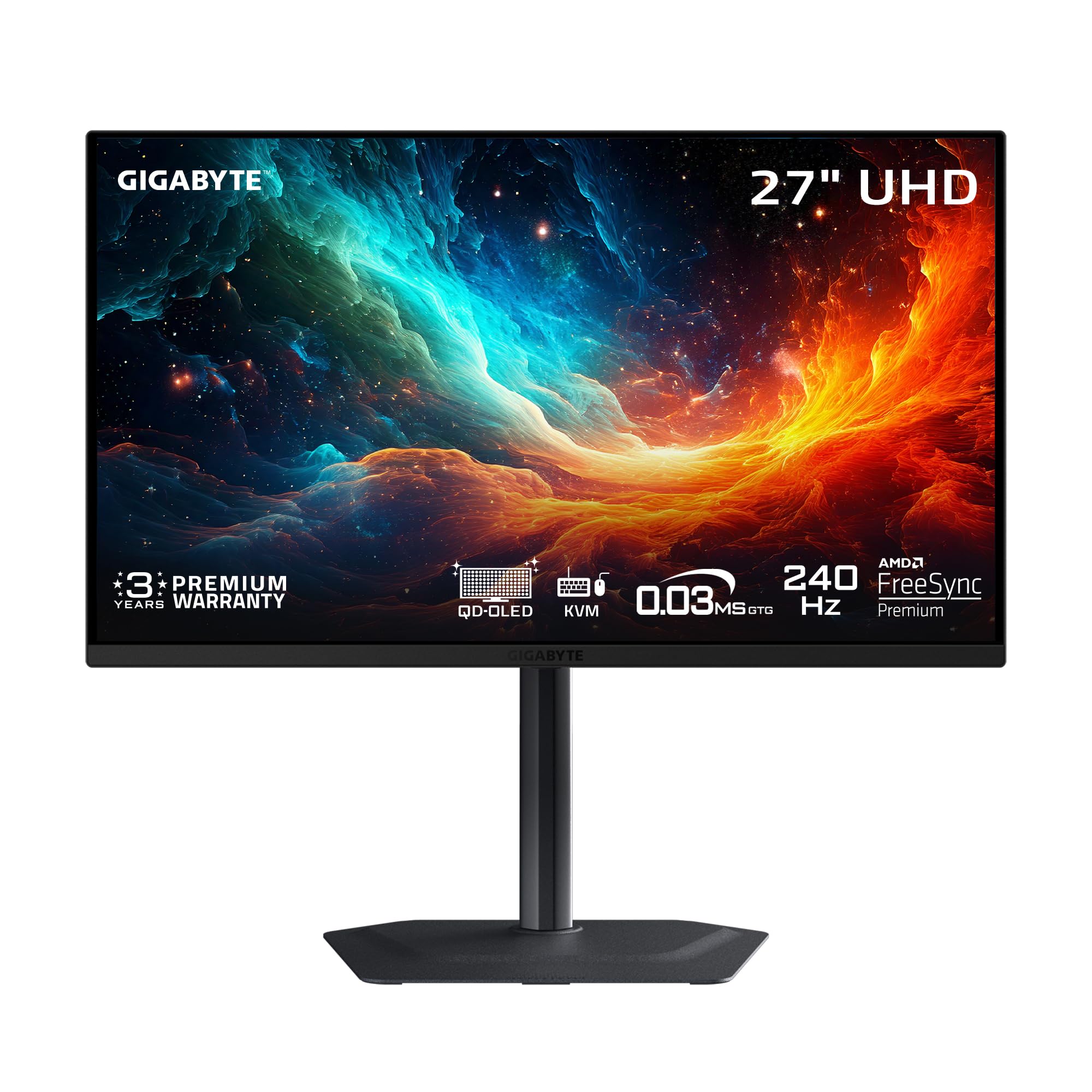
The 1,500,000:1 contrast ratio makes the GIGABYTE MO27U2 the top pick for anyone who wants the deepest blacks in this guide without sacrificing burn-in protection. Its 240Hz refresh rate, 0.03ms GtG response time, and 166 PPI deliver sharp motion and crisp text, while the AI-based OLED Care automatically reduces burn-in risk during work sessions.
The graphene thermal film and fanless four-sided heatsink keep the monitor cool silently — no fan noise during quiet scenes. On the catch, it lacks DisplayPort 2.1a and includes only two HDMI 2.1 ports, but HDMI 2.1 supports 4K at 240Hz with DSC (Display Stream Compression, which looks identical to the naked eye). This monitor suits anyone who wants top-tier OLED quality without paying extra for an uncompressed connection. skip it if you absolutely need a DisplayPort 2.1a for a full uncompressed signal — the MSI MPG 272URX offers that instead.
For the best balance of picture quality and burn-in protection, the GIGABYTE MO27U2 is the clear winner.
Why it’s great
- AI-based OLED Care minimizes burn-in risks with minimal interference
- 1,500,000:1 contrast ratio delivers deeper blacks than most competitors
- Fanless design with graphene heatsink for silent operation
Good to know
- No DisplayPort 2.1a — limited to HDMI 2.1 for 4K 240Hz
- Built-in speakers are weak, external speakers recommended
2. INNOCN GA27W1Q

Compared to the top-pick GIGABYTE MO27U2, the INNOCN GA27W1Q delivers the same 1,500,000:1 contrast ratio from its QD-OLED panel but at a lower price, saving you money without cutting the core OLED experience. One reviewer who upgraded from a 1080p display said the jump in quality is absurd, and another noted that ASUS would have set them back more for similar specs. MAC users get a dedicated MAC-View Mode that adjusts the OSD to match Mac color profiles, making this a strong option for creative professionals with a mixed PC-and-Mac setup. The stand offers height, tilt, and swivel adjustments, plus VESA 100mm mount support for custom setups, and it supports G-Sync and FreeSync for tear-free gaming.
Where you feel the savings is in build quality. Some buyers report that the materials feel flimsy despite the premium panel, and the external power brick has short cables. The built-in speakers are poor, so plan on using separate ones. That trade-off is worth it if your priority is the core OLED picture — the same stunning 1,500,000:1 contrast and 240Hz smoothness as the top pick — at a lower price.
This is for the budget-conscious buyer who values screen quality over chassis feel. Choose this over the top pick if you want the same QD-OLED contrast and 240Hz performance for less money and are willing to accept a less premium build and poor built-in speakers.
Where it shines
- Same 1,500,000:1 QD-OLED panel as premium models at a lower cost
- MAC-View Mode optimizes colors for Apple displays
- Full ergonomic stand with height, tilt, and swivel adjustments
Worth noting
- Build quality feels cheaper than ASUS or Samsung equivalents
- External power brick with short cables can be inconvenient
3. SAMSUNG Odyssey G8 G81SF

You are a gamer who plays in a sunlit living room, and the SAMSUNG Odyssey G8 G81SF is your pick because its Glare Free technology reduces reflections by 54% compared to standard anti-reflection coatings. One reviewer praised its excellent anti-glare properties, though a few found the matte finish a touch too aggressive for their taste. Samsung also packs it with a Dynamic Cooling System that uses a Pulsating Heat Pipe — a first for a monitor — to diffuse heat five times faster than a graphite sheet, directly reducing core temperature and helping prevent burn-in. A Thermal Modulation System further protects the panel by automatically controlling brightness when overheating is detected. The 240Hz refresh rate and 0.03ms response time match the competition, and the 166 PPI ensures text stays sharp.
The downside is the contrast ratio of 1,000,000:1, which is lower than the GIGABYTE MO27U2’s 1,500,000:1, so blacks are not quite as deep in dim scenes. Some buyers have reported dead pixel clusters appearing after just two months, so quality control can be inconsistent. The ergonomic stand is sturdy and well-built, and when it works, the picture quality is gorgeous with VESA DisplayHDR True Black 400 certification for deep blacks and rich contrast. This monitor is for you if you game in a bright room and want the best anti-glare screen. pass on it if you prioritize the deepest blacks for dark-room viewing or want the most consistent build.
And it is the only monitor here with a Pulsating Heat Pipe that diffuses heat five times faster than a graphite sheet.
What stands out
- Glare Free technology makes it 54% less reflective for bright rooms
- Pulsating Heat Pipe cooling system for superior heat dissipation
- VESA DisplayHDR True Black 400 for deep blacks and rich contrast
The trade-offs
- 1,000,000:1 contrast ratio is lower than the GIGABYTE MO27U2’s 1,500,000:1
- Some reports of dead pixel clusters appearing in the first few months
4. MSI MPG 272URX

The single number that matters most in this category is 80 Gbps, and the MSI MPG 272URX scores a full DisplayPort 2.1a with that bandwidth, enabling 4K at 240Hz without any visual compression — a small but meaningful advantage over the HDMI-based GIGABYTE MO27U2. It also includes a USB-C port with 98W Power Delivery, which charges a laptop at near-full speed while carrying video for a clean single-cable desk setup. The 5-layer tandem QD-OLED panel with EL Gen 3 technology improves efficiency by up to 30% compared to previous generations, helping with both brightness and longevity.
You get a 1,500,000:1 contrast ratio, VESA DisplayHDR True Black 400 certification, and up to 1000 nits peak brightness, so highlights in HDR content genuinely pop without washing out shadows. The fanless graphene heatsink keeps the monitor running silently, and the MSI GI software gives you OLED Care 2.0 with burn-in prevention tools plus AI-powered features like Smart Crosshair for competitive gaming. One reviewer noted that the monitor works perfectly with Mac Studio via USB-C and Linux via DisplayPort 2.1, making it versatile for multi-platform users.
However, a small number of reports mention bubbles developing under the screen, and MSI’s RMA process required the customer to pay for return shipping. At its premium price, you pay for the advanced connectivity and the Gen 3 panel efficiency, but the build quality inconsistency is worth noting — this is for the buyer who wants the most future-proof connection and charges a laptop through the monitor, but it’s not for you if you are on a tight budget or want a simpler cable setup, as the price-to-value read is mixed given the potential durability concerns.
The upsides
- DisplayPort 2.1a enables uncompressed 4K 240Hz signal
- USB-C port delivers 98W Power Delivery to charge a laptop
- EL Gen 3 QD-OLED panel with 30% improved efficiency
Keep in mind
- Some reports of bubbles forming under the screen over time
- RMA process may require the customer to pay return shipping
5. ASUS ROG Swift PG27UCDM

At this lower price, you get the ASUS ROG Swift PG27UCDM with a 3-year warranty that explicitly covers burn-in — the best protection in this lineup. The Neo Proximity Sensor detects when you step away from your desk and automatically switches the screen to black, reducing burn-in risk without you having to remember anything. This 4th-gen QD-OLED panel delivers a 1,500,000:1 contrast ratio, 99% DCI-P3 color coverage, and true 10-bit color depth with Delta E < 2, meaning colors are both vibrant and accurate enough for photo and video editing.
The OLED Anti-Flicker 2.0 technology reduces flicker by 20% compared to previous panels, making long sessions more comfortable on your eyes. It also supports Dolby Vision for enhanced HDR content, and the DisplayPort 2.1a UHBR20 gives you the full 80 Gbps bandwidth for an uncompressed 4K signal at 240Hz. One buyer mentioned that the HDR 400 True Black mode makes games look simply amazing. On the flip side, this monitor does not include built-in speakers. You will need external ones, and the ports face downward, which can make plugging and unplugging cables a bit fiddly if the monitor is close to the wall. The triangular QD-OLED subpixel layout can cause minor fringing on Windows text in some fonts, though this is generally not noticeable in games or media.
This is for the buyer who wants the absolute safest long-term investment and keeps a monitor for 5+ years — the exact budget buyer it is perfect for.
Why we’d pick it
- 3-year warranty with burn-in coverage offers long-term confidence
- Neo Proximity Sensor auto-dims when you leave to save the panel
- DisplayPort 2.1a UHBR20 for uncompressed 4K 240Hz signal
A few caveats
- No built-in speakers — requires separate audio solution
- Ports face downward, which can be awkward for cable management
Understanding the Specs
Refresh Rate (Hz) and Response Time (ms)
Refresh rate measures how many times per second the monitor redraws the entire image. A 240Hz refresh rate means it refreshes 240 times every second, which makes fast motion — like a character spinning in an FPS game or a car racing across the screen — look smooth and fluid rather than choppy or blurry. Response time (measured in milliseconds, ms) measures how quickly a pixel can change from one color to another. A 0.03ms GtG (Gray-to-Gray) response time is incredibly fast, meaning you will not see ghosting or trails behind moving objects. Together, 240Hz and 0.03ms give you a competitive edge in fast-paced games and make everyday scrolling feel instant.
Contrast Ratio and HDR Certification
Contrast ratio tells you the difference between the brightest white and the darkest black the monitor can display. OLED panels achieve virtually infinite contrast because each pixel produces its own light and can turn completely off to show pure black. A 1,500,000:1 ratio is excellent, giving you deep, inky blacks that make colors appear to float on the screen. VESA DisplayHDR True Black 400 certification ensures the monitor can produce these deep blacks while also reaching at least 400 nits of sustained brightness for highlights. This certification matters because it guarantees that HDR (High Dynamic Range) content — like Dolby Vision movies or HDR games — will show both bright highlights and dark shadows without crushing details in either area.
FAQ
Will a 27-inch 4K OLED monitor look too small for text and productivity work?
How worried should I be about burn-in on a QD-OLED monitor?
Can I use a 27-inch 4K OLED monitor with a PS5 or Xbox Series X?
Will a 240Hz OLED monitor make a difference if I mostly play single-player RPGs rather than competitive shooters?
What graphics card do I need to run a 4K 240Hz OLED monitor properly?
Final Thoughts: The Verdict
For most people, the best 27 inch 4k oled monitor is the GIGABYTE MO27U2 because it delivers outstanding 1,500,000:1 contrast, AI-based burn-in protection, and a fanless design at a price that undercuts the competition on features. If you want the most future-proof connectivity with uncompressed DisplayPort 2.1a and USB-C charging, grab the MSI MPG 272URX. And for the buyer who refuses to compromise on burn-in protection and wants a 3-year warranty that covers it, the ASUS ROG Swift PG27UCDM is the safest long-term choice.