
Our readers keep the lights on and the weekend projects moving. As an Amazon Associate, I earn from qualifying purchases.
You join a video call and the camera ignores you — your face is cut off, the room sounds like a wind tunnel, and you look like a ghost. An AI webcam fixes that automatically: it frames your face, kills keyboard clatter, and adjusts the light so you look sharp on the morning meeting. This guide breaks down the real specs and trade-offs so you pick the one that actually fits your setup.
I’m Rikta — the co-founder and writer behind FitlyFast. This guide is built by comparing the manufacturers’ published specifications and the patterns across verified customer reviews, so you get each pick’s real strengths and trade-offs instead of marketing spin.
The ai webcam category now has options that deliver real head-tracking, autofocus, and noise suppression for streaming, teaching, or team meetings — this guide breaks down exactly which one fits your setup best.
How To Choose The Best AI Webcam
Not every “AI webcam” works the same way. Some use a physical motor to rotate and follow you (called PTZ — pan, tilt, zoom), while others crop the image digitally, which cuts quality. If you pace during a presentation or teach from a whiteboard, a physical PTZ gimbal is a huge upgrade. If you mostly sit still, software-based auto-framing works fine and saves you money.
Resolution, Framerates, and Real-World Clarity
4K is the headline number, but for most video calls, 1080p (Full HD) looks excellent and uses less processing power — some computers struggle to keep a 4K stream smooth. An AI webcam with a larger sensor (like a 1/2.8-inch or 1/1.3-inch sensor) will produce a sharper, less grainy image in dim light than a tiny sensor, even if both claim 4K. If you often work in a home office with mixed lighting (a window behind you, for example), look for HDR (High Dynamic Range), which balances bright and dark areas so you are never blown out by the sun.
AI Tracking: Digital vs. Physical
A “digital” AI tracking camera zooms and pans by cropping the image — it is software-based and degrades quality when you zoom in. A “physical” AI tracking camera uses a motorized gimbal that moves the lens to follow you, keeping the full sensor resolution at all times. Most budget and mid-range options use digital tracking; premium models like the OBSBOT Tiny and Insta360 Link use a physical gimbal. For live streamers and teachers who move around a lot, the physical gimbal is worth the extra cost. For seated meetings, digital tracking is perfectly adequate.
Microphones: Your Audio Matters as Much as Your Video
AI noise cancellation is not a gimmick — it makes the difference between you sounding like you are on a factory floor versus a quiet studio. Look for dual or triple microphone arrays with beamforming (the mics listen in one direction toward you) and noise cancellation that filters out background hums and sudden sounds like a closing door. The EMEET PIXY and Angetube models include modes tuned for different environments (live streaming, podcasting, or just a standard meeting). A webcam with good mics can often replace a separate USB microphone for most users.
Remote Control and Software Features
If your webcam sits on top of a large monitor or you present in a conference room, an included remote control (like the Angetube’s 18-key RF remote) is a standout — you can zoom, mute, and toggle AI tracking from across the room. On the software side, some cameras (like the Lumina and Insta360 models) offer a dedicated app that lets you adjust exposure, white balance, background blur (bokeh), and even create programmable presets. A camera with no app is simpler but gives you much less control over your final look.
Quick Comparison
On smaller screens, swipe sideways to see the full table.
| Model | Category | Best For | Key Spec | Amazon |
|---|---|---|---|---|
| Insta360 Link 2 Pro | Premium PTZ | Studio-grade streaming & meetings | 1/1.3″ sensor, 4K, dual beamforming mics | Amazon |
| Angetube 913AI (4K + AI Tracking) | Mid-Range | All-in-one with remote control | 4K@30fps, 10X zoom, Sony sensor | Amazon |
| OBSBOT Tiny SE | Value PTZ | Smooth 1080p @100fps tracking | 1/2.8″ sensor, 1080p@100fps, gesture control | Amazon |
| Angetube 4K (Dual Mics) | Budget-Friendly | Meetings on a budget with clear audio | 4K, dual AI noise-cancelling mics, USB 3.0 | Amazon |
| OBSBOT Tiny (4K PTZ) | Premium PTZ | Physical gimbal tracking with HDR | 4K, Sony 1/2.8″, 2-axis gimbal, gesture control | Amazon |
| EMEET PIXY | Dual-Camera | Fast autofocus & studio versatility | Dual-camera, 0.2s PDAF, 3-mic array | Amazon |
| Lumina 4K | Style-Focused | AI-powered appearance polish | 4K, 95° FOV, dual mics, AI Studio app | Amazon |
In‑Depth Reviews
1. Insta360 Link 2 Pro

The 1/1.3-inch sensor is the largest on this list, making the Insta360 Link 2 Pro the top pick for anyone who wants the cleanest video and strongest low-light performance from an AI webcam. Buyers report it was an “inexpensive upgrade” from a Logitech Brio, with better tracking and setup taking under five minutes.
In use, the physical PTZ gimbal (a motorized mount that rotates and tilts the lens) follows you around so the full 4K resolution stays intact when you zoom in 4X — unlike the digital crop on the Angetube 913AI, which loses sharpness at zoom. The dual microphones use beamforming (they listen in one direction toward your voice) to cut background noise, and the free Link Controller software lets you enable natural bokeh (a DSLR-style blurred background) and set presets for different scenes. It also integrates directly with an Elgato Stream Deck, so you switch camera angles with one button.
One honest limit: it costs more than most competitors, and it is not compatible with ARM-based Windows systems or Windows Hello face recognition. If you want the best image quality, physical tracking, and pro audio in one unit, this is the one to choose over the OBSBOT Tiny SE.
Why it’s great
- Largest sensor (1/1.3”) for superior low-light video
- Physical PTZ gimbal keeps full 4K resolution when zooming
- Beamforming mics with directional noise cancellation
- Elgato Stream Deck integration for live production
Good to know
- Premium price point
- No ARM-based Windows or Windows Hello support
2. Angetube 913AI King (4K + AI Tracking)
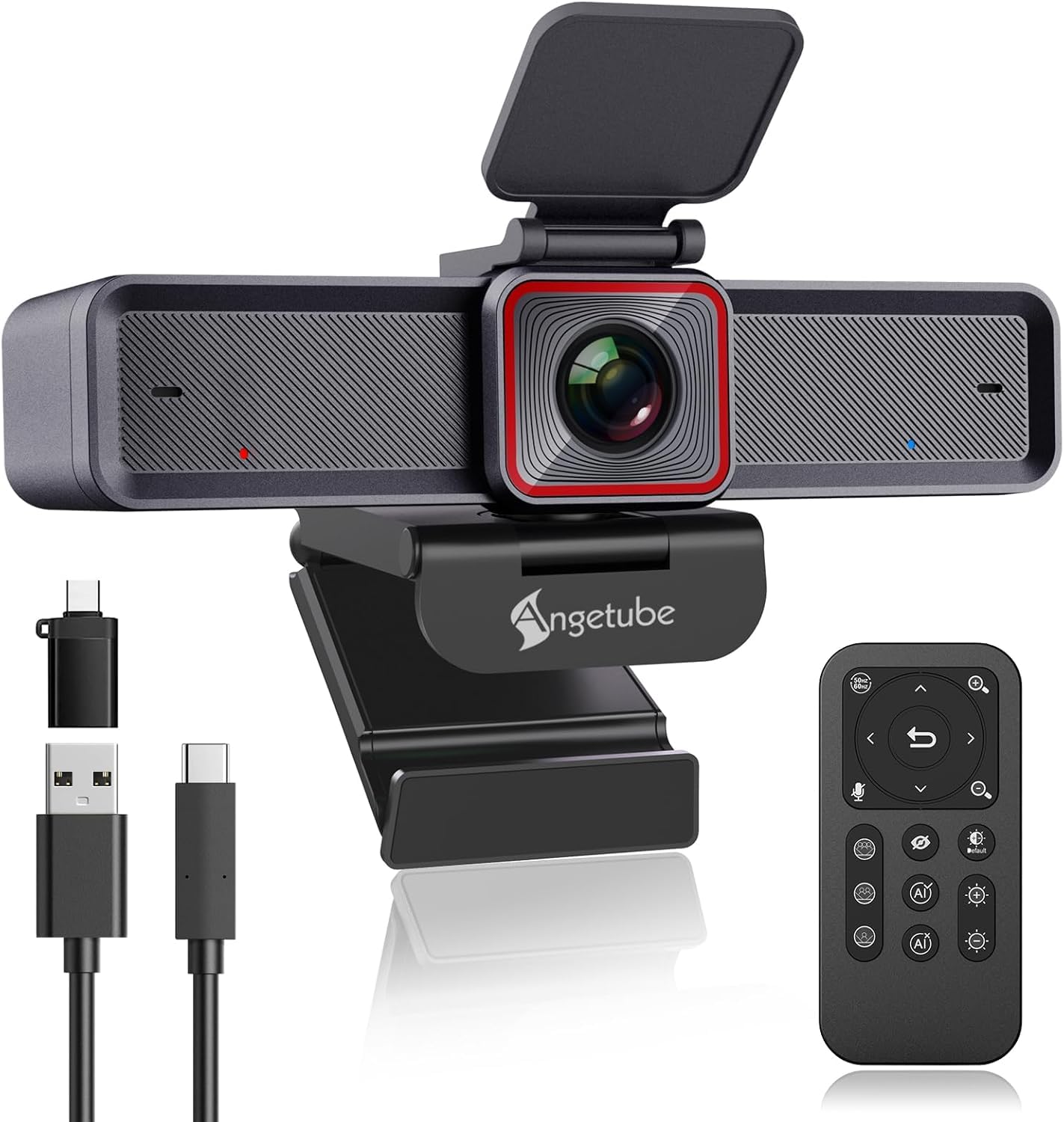
The Angetube 913AI King beats the Insta360 Link 2 Pro on one practical feature: it includes an 18-key RF remote control that works from across the room, so you zoom, mute, or toggle AI tracking without touching your computer. It also matches the top pick on resolution (4K at 30fps, 1080p at 60fps) and digital zoom (10X vs. 4X on the Insta360). However, its zoom is digital — it crops the sensor — while the Insta360 uses physical gimbal movement, so the top pick preserves more detail when you zoom in tight.
In real meetings, the AI tracking keeps you centered whether you sit alone or have three people at the table, and the auto framing adjusts the view automatically as people join or leave frame. Owners mention that the “excellent 4K/30fps video” and “accurate white balance” make it a bargain compared to more expensive Logitech models. The HDR mode (High Dynamic Range) also saves you when a window is behind you — it balances the bright background so your face stays visible.
If you present to groups, use a large monitor, or want to control everything without reaching for your mouse, choose this over the Insta360 — the remote alone makes it worth it for conference rooms. skip it if you need physical gimbal tracking for moving around; the digital crop is less sharp at zoom.
Where it shines
- Included 18-key RF remote for full camera control
- 4K@30fps and 1080p@60fps with HDR
- AI auto-framing adjusts for group meetings
- 10X digital zoom and 100° wide field of view
Worth noting
- Digital zoom degrades sharpness at max zoom
- No physical gimbal — tracking is software-based
3. OBSBOT Tiny SE

You’re a streamer who wants butter-smooth 1080p without spending 4K money—the OBSBOT Tiny SE delivers 1080p at 100 frames per second (fps), while most webcams at this price stop at 30 or 60fps, so fast hand movements, gestures, and gameplay look fluid rather than choppy. The 1/2.8-inch stacked CMOS sensor and Dual Native ISO (a technology that uses two light-sensitivity levels to reduce grain) make it perform well in dim lighting without the extra expense of a 4K sensor.
The AI tracking here is more advanced than most at this price: you set zone tracking (tell the camera only to follow you in a specific area), body-part tracking (upper body or hand), and even control the camera with a hand gesture — a simple open palm locks tracking, and a finger point zooms in or out. Buyers call it a “major upgrade” from the Logitech C920 at a similar price, with smooth AI tracking and a reliable gimbal that rarely stutters.
The 1080p@100fps beats every other camera here for smoothness at 1080p resolution. Skip this if you need 4K; the effective still resolution is 2MP (2 megapixels), not 8MP for 4K. It is the clear choice for streamers and teachers who need fluid video on a budget—and no other webcam in this guide matches that frame rate at this resolution.
What stands out
- 1080p@100fps for buttery-smooth motion
- Zone and body-part AI tracking modes
- Gesture control (open palm / finger point)
- Excellent low-light performance with stacked CMOS
The trade-offs
- Effective still resolution is 2MP — no 4K capture
- Digital zoom is limited to 4X
4. Angetube 4K (Dual Mics + AI Tracking)

The deciding spec on this budget AI webcam is the 8-megapixel Sony CMOS sensor — the same imaging chip you find in cameras costing double, and it captures 4K at 30fps or 1080p at 60fps with vivid color and sharp detail. The catch is that the AI tracking is software-based (digital crop), not physical, so when you zoom in 10X you lose some sharpness — but for seated meetings, you will rarely need the full zoom.
At this lower price you get a USB 3.0 connection (5Gbps transfer speed — over 10X faster than USB 2.0) that delivers the video signal uncompressed, and dual AI noise-canceling microphones that pick up your voice clearly from up to 16 feet away. It also works straight out of the box on Mac and PC without any driver installation.
If you want 4K, reliable autofocus, and clear audio without spending a premium on a physical gimbal, this is the best price-to-performance option. pass on it if you move around a lot — the digital tracking is less sharp than the physical gimbal on the OBSBOT Tiny.
The upsides
- 4K UHD @30fps from an 8MP Sony sensor
- Dual AI noise-canceling mics with 16ft pickup range
- USB 3.0 for uncompressed video signal
- Plug-and-play — no drivers required
Keep in mind
- Digital zoom degrades image at 10X
- No physical gimbal — tracking is software-based
5. OBSBOT Tiny (4K PTZ)

You get a true 2-axis physical gimbal — a motorized mount that physically pans and tilts to follow you, keeping every pixel of that 4K Sony 1/2.8-inch sensor intact. Unlike the digital crop on the Angetube 913AI, this means no quality loss when you move. For presenters who shift between a desk and a whiteboard, this makes a tangible difference: you stay centered and sharp the entire time.
At this price you get 4K at 60fps, HDR (High Dynamic Range) that automatically corrects for backlit windows or dim corners, and gesture control — just hold up a ✋ hand to toggle tracking or 👆 to zoom. Customers note the “auto tracking, HDR, and picture quality” make it excellent for a home office, and the built-in carry bag is a thoughtful touch for mobile presenters. The AI background blur (bokeh) runs on your computer’s processor, not on the camera itself.
This is the value decision: if you want physical PTZ tracking and 4K at 60fps but cannot justify the cost of the Insta360 Link 2 Pro, the OBSBOT Tiny gives you the core gimbal experience for less. it’s not for you if you need the larger 1/1.3-inch sensor for extreme low light — it is perfect for the budget buyer who prioritizes motorized tracking over sensor size.
Why we’d pick it
- True 2-axis physical gimbal for lossless tracking
- 4K @60fps with HDR automatic light correction
- Gesture control (hand signals for zoom and track)
- Includes a carry bag for transport
A few caveats
- Background blur is CPU-based and can be glitchy
- Firmware updates have occasionally broken gesture recognition
6. EMEET PIXY

The EMEET PIXY is the world’s first dual-camera AI-powered PTZ camera — one main camera shoots 4K with a 1/2.55-inch Sony sensor, while a second auxiliary camera detects your face position so the autofocus locks on in 0.2 seconds. This is for the creator who switches between teaching, streaming, and product demos and needs blazing-fast focus without the slow in-and-out wobble of cheaper cameras.
That 0.2-second PDAF (Phase Detection Auto-Focus) serves you in real scenarios: if you hold up a product for a close-up during a stream, the PIXY snaps into focus immediately. It also features a triple-microphone array with three sound modes — Live Mode filters steady noise like a fan, Noise Canceling Mode blocks sudden sounds like a door slam, and Original Mode captures full ambient audio for music. The included EMEET STUDIO software has a “Whiteboard Mode” that auto-detects a whiteboard in frame and optimizes exposure so the writing is legible.
One caution: some reviewers point out that the AI tracking can be slow in bad lighting and that the software installation has broken links — check for the latest driver on the manufacturer’s site, not the QR code in the box. For the price, it offers versatility that the Angetube 4K does not, but it needs good light to shine.
Strong points
- World’s first dual-camera design for 0.2s PDAF autofocus
- Three-mic array with three distinct sound modes
- Gesture control, whiteboard mode, and PTZ tracking
- 310° pan and 180° tilt range
Before you buy
- AI tracking requires good lighting for optimal performance
- Software setup has occasional broken download links
7. Lumina 4K

The Lumina 4K sits at a premium price point in this guide, offering a different kind of value than the gimbal-tracking models — it prioritizes AI-powered appearance control over physical movement. For the cost, you get 4K at 30fps, a wide 95-degree field of view (wider than most competitors, so you fit in two or three people easily), dual microphones with noise cancellation, and a premium aerospace-grade aluminum shell.
Reviewers praise the “excellent image clarity and vibrant colors even in low light” and note that automatic settings produce a beautiful picture without any tweaking. The included magnetic privacy cover is a practical touch. Its “Cameraman” feature uses digital auto-framing rather than a physical PTZ motor, and the free Lumina Studio app gives you over 30 manual adjustments for exposure, white balance, saturation, background blur, and field of view.
The one clear reason to choose this over the competition is the Lumina Studio app: it is more polished and provides deeper controls than what you get with the Angetube or budget models. But note that AI processing runs on your computer, and one reviewer noted up to 60% CPU usage at 720p — so make sure your laptop has processing headroom. look elsewhere if you need physical tracking; this is purely for appearance polish.
What we like
- AI-powered Studio app with 30+ manual controls
- 95° wide field of view (among the widest)
- Aerospace-grade aluminum build
- Included magnetic privacy cover
The downsides
- High CPU usage when AI processing is active
- No physical PTZ gimbal — digital auto-framing only
Understanding the Specs
Sensor Size and Effective Still Resolution
The sensor is the light-collecting chip inside the camera — a larger physical sensor (like 1/1.3″ or 1/2.55″) captures more light, which directly translates to a cleaner, less grainy image in dim conditions. Effective still resolution, measured in megapixels (MP), tells you the maximum detail the sensor can capture. 8MP is standard for 4K webcams (you need roughly 8.3 million pixels for true 3840×2160 resolution). Bigger is usually better here, but a large sensor with low resolution beats a tiny sensor with high resolution every time in low light.
AI Tracking: Physical Gimbal vs. Digital Crop
AI tracking sounds like one feature, but it works in two completely different ways. Physical PTZ (pan-tilt-zoom) uses a motorized gimbal that physically moves the lens to follow you — every pixel of the sensor is used, so image quality never drops. Digital crop tracking uses software to zoom into the center of the sensor and moves the crop area around; it is cheaper but cuts resolution when you zoom in. If you move around a lot or need to zoom in close (like during a product demo), a physical gimbal is worth the extra money.
Frame Rate (fps) and Why It Matters
Frame rate (frames per second, or fps) controls how smooth your movement looks on video. 30fps is standard and fine for meetings and talking-head streams. 60fps looks noticeably smoother for hand gestures and quick movements. The OBSBOT Tiny SE offers 100fps at 1080p — this makes fast action like gaming or dancing appear incredibly fluid, but it also requires more computer power to process. For most users, 30 or 60fps is plenty; 100fps is for specialized use like gaming or professional live production.
HDR: Why You Need It
HDR stands for High Dynamic Range. It is a feature that merges the brightest and darkest parts of your image so that neither is lost. If you sit with a window behind you, a non-HDR webcam will either wash you out or turn the window into a white blob. HDR captures both correctly, so your face stays visible and the window looks like a window. Most AI webcams in this guide offer HDR at 30fps (it is often disabled at 60fps because it requires too much data). If you have challenging lighting, make HDR a must-have on your list.
FAQ
What does the “AI” in an AI webcam actually do?
Do I need a 4K webcam or is 1080p enough?
Is a physical PTZ gimbal worth the higher price?
Can I use an AI webcam with a Mac or Chromebook?
Why do some webcams have higher CPU usage than others?
Final Thoughts: The Verdict
Across the board, the best ai webcam is the Insta360 Link 2 Pro because its large 1/1.3-inch sensor, physical PTZ gimbal, and beamforming microphones deliver the most professional mix of image quality, tracking, and audio in one package. If you want the same physical tracking at a lower price, grab the OBSBOT Tiny (4K PTZ) — it matches the gimbal experience with 4K HDR for significantly less. And for a budget-friendly entry that still gives you true AI auto-framing and noise-canceling mics, the Angetube 4K is the smartest value in the lineup.