
Our readers keep the lights on and the weekend projects moving. As an Amazon Associate, I earn from qualifying purchases.
Specs are compiled from manufacturer listings and verified buyer reviews and can change over time — please confirm the key details on the product page before buying.
Slow load screens and stutter mid-game are the quickest way to lose immersion — and a cramped 1TB drive means you are constantly uninstalling titles to fit the next day-one patch. A 4TB SSD takes that pain off the table entirely, giving you room for a full library and speeds that keep pace with modern consoles and PC builds.
I’m Rikta — the founder and writer behind FitlyFast. This guide is built by comparing the manufacturers’ published specifications and the patterns across verified customer reviews, so you get each pick’s real strengths and trade-offs instead of marketing spin.
No matter if you are on a PS5, a PCIe 4.0 desktop, or a bleeding-edge Gen5 rig, here is the breakdown of the 4tb ssd for gaming that actually matches how you play, store, and create.
Quick Picks
- WD_Black SN8100 4TB NVMe SSD — Best Overall
- Samsung 990 PRO 4TB — Premium Pick
- Bestoss 4TB PCIe 4.0 NVMe SSD with Heatsink — Best for PS5 & Cooling
- Crucial P310 4TB — Best Value Gen4
- fanxiang S880E 4TB NVMe SSD — Budget Champion
- Fikwot FX660 4TB M.2 SSD — Entry-Level Gen4
How To Choose The Best 4TB SSD For Gaming
Picking the right 4TB drive is about matching the speed your system can actually use, the cooling it needs, and the endurance for years of re-writes. Here are the three specs to focus on.
PCIe Generation and Your Motherboard
If you plug a PCIe 5.0 drive (the latest, fastest connection standard) into an older slot, it will only run at PCIe 4.0 speeds (the previous generation). Check your motherboard manual — Gen5 drives (like the WD_Black SN8100) work in older slots, but you pay extra for speeds you can only unlock on a Gen5 board. For most current PS5 and PC gamers, PCIe 4.0 gives you the best balance of speed and cost.
Heatsink Design for Sustained Loads
During long game sessions or large file transfers, a drive without proper cooling can throttle down to avoid overheating, killing your read speeds. Some drives come with a graphene sticker, others pack a full metal heatsink. If your motherboard has its own built-in heatsink cover, a bare drive works fine — but in a PS5 or a tight laptop bay, a pre-installed thermal solution matters more.
Endurance Rating (TBW)
TBW (Terabytes Written) tells you how much data you can write over the drive’s lifespan. A higher TBW means the drive will handle years of game installs, updates, and re-writes without failure. Most 4TB gaming SSDs offer between 1,200 and 4,800 TBW — the higher number is a clear sign of longer-lasting NAND.
Quick Comparison
| Model | Best For | Read Speed | Write Speed | PCIe Gen | Amazon |
|---|---|---|---|---|---|
| WD_Black SN8100 4TB | Gen5 Early Adopters, AI, 8K Video | 14,900 MB/s | 11,000 MB/s | PCIe 5.0 | Amazon |
| Samsung 990 PRO 4TB | Premium PCIe 4.0, Reliability | 7,450 MB/s | 6,900 MB/s | PCIe 4.0 | Amazon |
| Bestoss 4TB with Heatsink | PS5 Expansion, High-Speed Cooling | 7,350 MB/s | 6,600 MB/s | PCIe 4.0 | Amazon |
| Crucial P310 4TB | Handheld Gaming, Budget Gen4 Builds | 7,100 MB/s | 6,000 MB/s | PCIe 4.0 | Amazon |
| fanxiang S880E 4TB | High-Speed Budget, NAS Use | 7,000 MB/s | 6,000 MB/s | PCIe 4.0 | Amazon |
| Fikwot FX660 4TB | Entry-Level Gen4, PS5 Compatible | 5,000 MB/s | 4,500 MB/s | PCIe 4.0 | Amazon |
In‑Depth Reviews
1. WD_Black SN8100 4TB NVMe SSD

The drive that future-proofs your build with Gen5 speeds that rewrite what “fast” feels like.
If you have a modern motherboard with a PCIe 5.0 slot, this is the drive that changes your expectations. The WD_Black SN8100 delivers a sequential read speed of 14,900 MB/s and a write speed of 11,000 MB/s — versus PCIe 4.0 drives on this list at up to 7,450 MB/s read and 6,900 MB/s write. One reviewer using CrystalDiskMark reported over 14,000 MB/s read and write, noting it eliminated microstutters and drastically improved load smoothness in games. In practice, that means your system boots in about 3 seconds, and massive open-world games load without any hitching.
What makes this more than just a speed demon is the power efficiency. Western Digital claims over 100% more power efficiency than their Gen4 drive at an average operating power of 7.5W or under, so you get that blistering pace without extra heat or battery drain on a laptop. One reviewer noted the drive ran at around 82°F under load during benchmarks — impressively cool for a Gen5 unit. The 4TB model is built with TLC 3D CBA NAND and offers up to 4,800 TBW endurance (on the 8TB model), signaling long-term reliability.
The catch is price — this sits firmly in the premium tier, and you only unlock its full potential on a Gen5 motherboard. On a Gen4 board, it runs at Gen4 speeds, which means you pay extra for a future upgrade you might not use for years. It also needs a compatible heatsink; the drive comes bare, so factor that into your build plan. It comes with a SANDISK Dashboard (Windows only) and Acronis True Image for migration.
The Gen5 Payoff
- Blazing 14,900 MB/s read speed versus Gen4 drives here at up to 7,450 MB/s
- Runs cool at ~82°F under load, with excellent power efficiency under 7.5W
- High endurance for heavy re-writes and AI workloads
The Real-World Catch
- Requires a Gen5 motherboard for full speed; in a Gen4 slot it is capped to Gen4 speeds
- Premium price — significantly more than Gen4 peers
- No built-in heatsink; you need to buy one separately
Go Gen5 or wait: This is the obvious pick if you have a Gen5 board and need the absolute highest bandwidth for 8K video editing or high-end gaming — it dwarfs every Gen4 drive here.
The honest limit: If your motherboard is PCIe 4.0, you are paying a large premium for potential you cannot fully use today; a top Gen4 like the Samsung 990 PRO is smarter.
2. Samsung 990 PRO 4TB

The Gen4 king that refuses to compromise on speed or reliability for serious gaming and content creation.
The Samsung 990 PRO holds its ground as the gold standard for PCIe 4.0. It pushes sequential reads to 7,450 MB/s and writes to 6,900 MB/s — faster than the Crucial P310 and fanxiang S880E on both fronts. This is the drive for someone who wants to max out a PS5’s bandwidth or build a PC that loads AAA titles in seconds without spending the extra cash on a Gen5 platform. The 4TB model uses a compact M.2 2280 form factor and includes a Heat Spreader plus Dynamic Thermal Guard to keep temperatures in check during extended gaming marathons.
The included Samsung Magician software gives you simple tools to monitor drive health, update firmware, and optimize performance — a feature most budget drives on this list lack. With a sequential write speed (how fast it saves data in a continuous stream) of 6,900 MB/s versus the Bestoss at 6,600 MB/s and the Crucial P310 at 6,000 MB/s, the 990 PRO leads the Gen4 group in sustained write performance. That matters when you move large game installs or render 4K video.
The trade-off is the price. The 990 PRO costs more than any other Gen4 drive here, so you pay extra for Samsung’s software and reliability record — not for a spec that crushes every other Gen4 competitor. It is also a bare drive (no heatsink included), so you need to buy a separate heatsink if your motherboard does not have one built in.
Why It Still Leads Gen4
- Class-leading read/write speeds for PCIe 4.0: 7,450 / 6,900 MB/s
- Samsung Magician software makes drive management easy
- Built-in thermal protection keeps performance steady under load
What Holds It Back
- Premium price — more expensive than comparable Gen4 drives
- No pre-installed heatsink; you may need to buy one
- Gen5 drives now exist for those who want future-proofing
The Gen4 benchmark: If you want the fastest possible drive for a current-gen PC or PS5 and have no interest in upgrading to Gen5, this is the one to beat — the combination of speed (7,450 MB/s read, 6,900 MB/s write), software, and thermal performance is class-leading at this tier.
When to look elsewhere: If you are building a budget-friendly rig or plan to move to Gen5 within a year, you will get better value from a mid-range Gen4 drive or the SN8100.
3. Bestoss 4TB PCIe 4.0 NVMe SSD with Heatsink
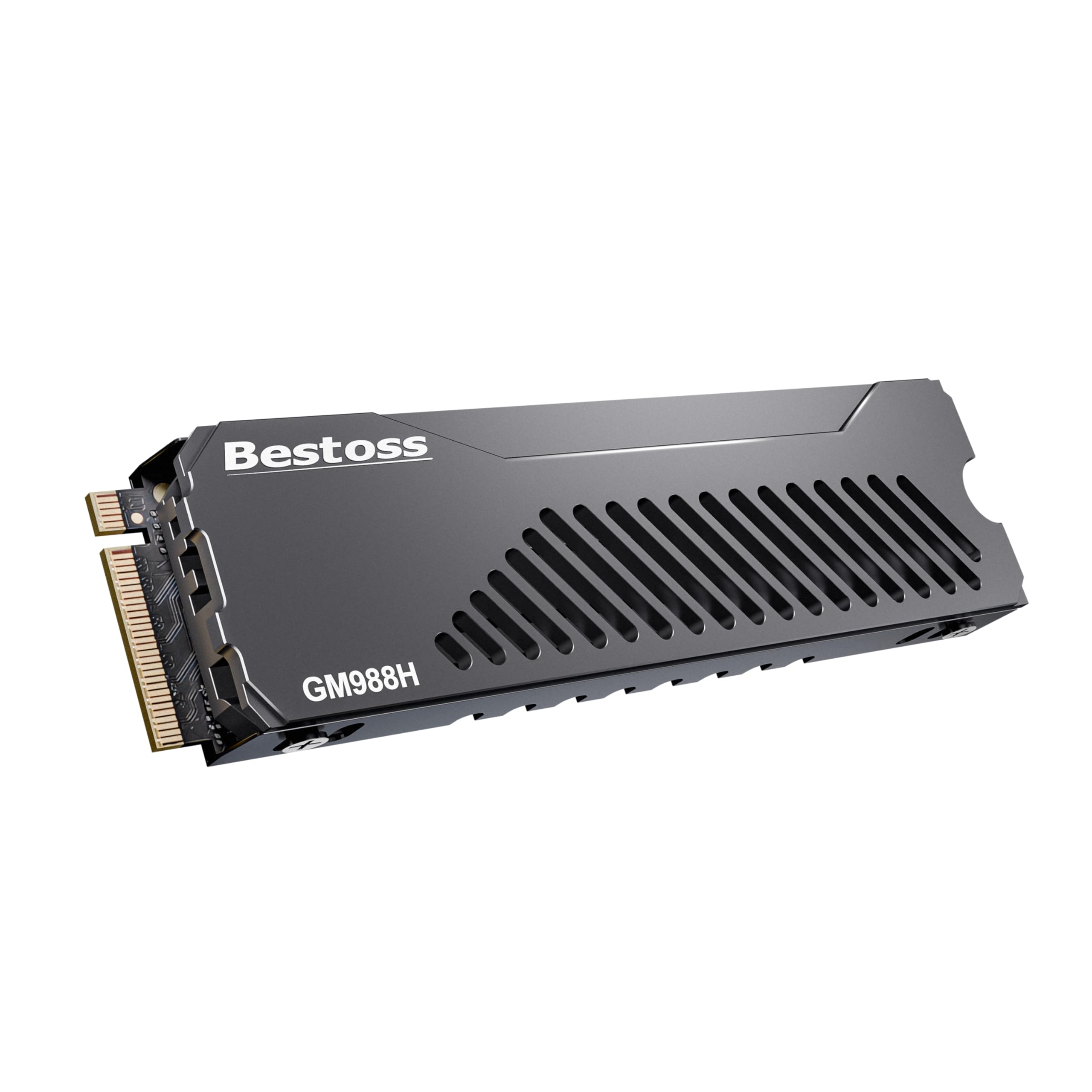
A plug-and-play PS5 upgrade that keeps its cool with a clever multi-layer heatsink design.
This drive is tailor-made for PlayStation 5 owners who want to drop in a 4TB expansion without worrying about thermal throttling (slowing down due to heat). The Bestoss hits a read speed of 7,350 MB/s and a write speed of 6,600 MB/s, while the Samsung 990 PRO is rated at 7,450 MB/s read and 6,900 MB/s write. What separates it is the built-in dual-surface heatsink with a multi-layer internal structure that the maker says increases the heat dissipation area compared to standard single-layer designs. That means sustained performance during long sessions on a PS5 or a Gen4 PC without needing to buy a separate cooler.
It also uses HMB (Host Memory Buffer) plus dynamic SLC cache to boost burst performance, so short transfers and game loads feel snappy. The package includes a screwdriver kit, which is a small but thoughtful touch for a first-time installer. With a 3-year warranty and lifetime technical support, the coverage is shorter than the 5-year offerings from Fikwot or fanxiang, but the integrated heatsink arguably adds long-term reliability value.
The main downside is the brand recognition — Bestoss is less established than Samsung or WD, so long-term consistency is harder to verify from the data. Buyers should also confirm PS5 compatibility themselves, though the specs say it fits Sony PlayStation 5.
The Built-In Thermal Edge
- Multi-layer heatsink is pre-installed — no extra purchase needed for PS5
- Fast Gen4 speeds at 7,350 MB/s read, close to top-tier drives
- Includes screwdriver kit for easy installation
The Brand Caveat
- Less established brand compared to Samsung or WD
- 3-year warranty is shorter than some competitors’ 5-year coverage
- Premium price for a less-renowned name
Best for the PS5 builder: If you want a drop-in 4TB expansion with a heatsink that is designed for the PS5 bay and runs close to peak Gen4 speeds, this is an excellent convenience pick.
The practical trade-off: If brand trust and a longer warranty matter more than a bundled heatsink, the fanxiang S880E or Fikwot FX660 offer similar specs for less money, though you will need to manage cooling separately.
4. Crucial P310 4TB

A solid Gen4 performer that stretches your dollar further by targeting handheld gaming consoles and everyday builds.
The Crucial P310 sits at a smart intersection of price and performance. It delivers 7,100 MB/s reads and 6,000 MB/s writes — not the fastest Gen4 numbers, but close enough to the high-end picks for a big savings. What makes it stand out is its explicit compatibility with handheld gaming consoles like the ROG Ally X, Lenovo Legion Go, and AYANEO Kun, alongside standard laptops and desktops. For someone building a portable gaming PC that needs a 4TB library, this is one of the few drives that the maker specifically lists as compatible with those small-form-factor devices.
It is built with advanced G8 NAND from Micron, so the underlying memory technology is the same quality you find in higher-priced drives. Crucial also includes a 1-month Adobe Creative Cloud All-Apps trial and the Crucial Storage Executive software for monitoring. The drive is backward compatible with PCIe Gen3, making it a flexible upgrade for older systems. Reviewers consistently note that it works flawlessly for boot drives and game storage with no compatibility hiccups.
The trade-off is that it trails the Samsung 990 PRO on write speeds at 6,000 MB/s versus 6,900 MB/s, and the Bestoss on read speeds at 7,100 MB/s versus 7,350 MB/s. It also does not come with a heatsink, so you will need to factor that into a PS5 build. The 4TB capacity is generous, but for heavy content creators who write large files constantly, the slightly lower write speed could be noticeable.
The Smart Buy
- Excellent value for 4TB Gen4 performance — lower cost than premium picks
- Explicitly compatible with handheld gaming consoles like ROG Ally X
- Built with Micron’s advanced G8 NAND for dependable quality
Where It Compromises
- Write speed (6,000 MB/s) lags behind Samsung and Bestoss
- No built-in heatsink — add one for PS5 or heavy loads
- Casual gamers may never need 7,100 MB/s; a slower drive might be enough
Best for value-conscious builders: If you want a 4TB Gen4 drive that performs well for gaming and everyday use without overspending, this is the most balanced choice — especially if you are building a handheld or budget desktop.
Skip if you need top write speeds: If you regularly move 50GB+ video projects or want the absolute fastest writes in Gen4, the Samsung 990 PRO or Bestoss are worth the extra cost.
5. fanxiang S880E 4TB NVMe SSD

A speed-for-the-price winner that punches well above its budget standing with real-world NAS performance.
The fanxiang S880E delivers the Gen4 speeds you actually need — 7,000 MB/s reads and 6,000 MB/s writes — at a price that undercuts the Crucial P310, making it a true budget champion. It uses a graphite-coated copper foil and aluminum foil thermal sticker to keep temperatures under control during long game sessions, and it is specifically listed as compatible with the PS5 for storage expansion. For the money, you get performance rated at 7,000 MB/s read and 6,000 MB/s write, while the Samsung 990 PRO is rated at 7,450 MB/s read and 6,900 MB/s write, yet you pay significantly less.
Real buyers report impressive results beyond gaming. One verified reviewer noted installing two of these drives in a Ugreen NAS (network-attached storage box), where they maxed out the NAS transfer rate and copied 100GB via rsync 5x faster than 3-year-old SATA SSDs. Another buyer called it “incredibly fast, easy to install.” The drive supports NVMe 2.0 (the latest storage protocol standard) and includes a 5-year after-sales service with lifetime technical support. It also comes with hardware encryption support, a feature not always present at this price level.
The catch is brand history. Some buyers on the internet have discounted fanxiang drives due to being a Chinese brand, but multiple verified reviews on the S880E specifically report zero issues across several units. It is also important to note the drive is not compatible with Mac OS, so Apple users should skip this one. The included thermal sticker may not be sufficient for sustained heavy writes without additional cooling in a warm case.
The Budget Speed Star
- Fast Gen4 performance at 7,000 MB/s read — close to premium drives
- Verified NAS users report faster transfers than old SATA drives
- 5-year service and lifetime technical support add value
The Honest Caveats
- Not compatible with Mac OS
- Brand reputation still gaining trust among some buyers
- Thermal sticker may not be enough for intensive sustained writes
The wallet-friendly winner: If you are stocking up a gaming rig on a budget or expanding a NAS without emptying your wallet, this drive gives you genuine Gen4 speed for less — verified by real buyers in real builds.
Consider carefully if: Brand trust is a dealbreaker for you, or you plan to use this drive in a Mac system — neither scenario fits this pick.
6. Fikwot FX660 4TB M.2 SSD

The lowest-cost entry into 4TB Gen4, slowest on this list but still a solid upgrade from SATA drives.
The Fikwot FX660 is the most affordable 4TB Gen4 drive here, and that price comes with a clear performance trade-off. It reads at 5,000 MB/s and writes at 4,500 MB/s — the slowest Gen4 speeds in this roundup, versus the WD_Black SN8100 at 14,900 MB/s. For a gamer moving up from an old SATA SSD, this still feels fast, and it will handle game loads noticeably quicker than a 500 MB/s SATA drive. But compared to the fanxiang S880E at 7,000 MB/s read, heavy AAA game load times will be slightly longer.
It uses a graphene heat dissipation sticker (a thin, lightweight material that spreads heat) to manage temperatures without adding bulk, and it includes intelligent management systems — Auto-Adaptive Temperature Regulation and Power Efficiency Management — which the maker says help control power draw and extend laptop battery life. The drive is compatible with PS5, desktops, and laptops, and it ships with a screwdriver and screws for installation. The 5-year product registration warranty matches the fanxiang’s coverage, giving long-term confidence at the entry-level price.
Reviewers have not submitted feedback for this particular model in the data, but the brand offers a straightforward warranty process. The main limitation is that the fanxiang S880E is rated at 7,000 MB/s read while the Fikwot is rated at 5,000 MB/s read, making the Fikwot hard to recommend unless the absolute lowest entry cost for a 4TB Gen4 drive is your only concern. The slower speeds also mean it is less suitable for fast-loading competitive shooters or DirectStorage games (games that use the GPU to load data directly from the SSD for faster performance).
The Budget Base
- Lowest price of any 4TB Gen4 drive in this guide
- Includes graphene thermal sticker, screws, and screwdriver
- 5-year warranty for long-term coverage
The Speed Gap
- Read speed of 5,000 MB/s is well behind the competition, which ranges up to 14,900 MB/s in this guide
- Write speed of 4,500 MB/s may be noticeable during large file transfers
- Not ideal for direct storage or competitive gaming where every millisecond counts
Reach for this if: Your budget is tight and you need a 4TB capacity over everything else — it will still beat an old hard drive or SATA SSD for game loads, and the 5-year warranty backs it up.
Better to skip if: You can stretch a little more cash; the fanxiang S880E is rated at 7,000 MB/s read versus the Fikwot at 5,000 MB/s, making the Fikwot a compromise on performance.
Understanding the Specs
Sequential Read / Write Speeds
These numbers tell you how fast large, continuous chunks of data (like a game install file or a 4K video) can be read from or written to the drive. A higher read speed means your games load faster when you launch them. A higher write speed means you spend less time waiting for a game update or a file transfer to finish. All drives on this list are measured in MB/s (megabytes per second) — the WD_Black SN8100 is rated at 14,900 MB/s, while the Fikwot FX660 is rated at 5,000 MB/s.
PCIe Gen4 vs Gen5
PCIe (Peripheral Component Interconnect Express) is the connection standard that links your SSD to the motherboard. Gen4 offers a theoretical max of about 8,000 MB/s, while Gen5 doubles that to around 16,000 MB/s. Your system’s motherboard must support the same generation to unlock the drive’s full speed — putting a Gen5 drive in a Gen4 slot caps it at Gen4 speeds. For most current PS5 and PC gamers, Gen4 is still plenty fast; Gen5 is for cutting-edge builds and professionals working with massive files.
NAND Flash and TBW Endurance
NAND is the physical memory chips inside the SSD that store your data. TLC (Triple-Level Cell) NAND stores 3 bits per cell, balancing speed, cost, and durability. TBW (Terabytes Written) is the manufacturer’s estimate of how much total data you can write to the drive before it may start failing. A 4TB gaming drive with 1,200 TBW can handle years of frequent game installs and updates; the SN8100’s higher endurance numbers (up to 4,800 TBW on the 8TB model) signal even longer life for heavy workloads.
Heatsink and Thermal Throttling
When an SSD gets too hot during sustained reading or writing, its controller automatically slows down to protect itself — that is thermal throttling, and it kills your load speeds. A heatsink (a metal or graphene layer that dissipates heat) prevents this. Drives like the Bestoss come with a built-in multi-layer heatsink, while others rely on a graphene sticker or expect your motherboard to provide one. For a PS5 or a compact laptop bay, a pre-installed heatsink is a major advantage.
FAQ
Will a 4TB SSD work in my PS5?
Do I need a PCIe 5.0 drive for gaming?
Can I use a 4TB SSD in a laptop?
What is the difference between NVMe and SATA SSDs for gaming?
How many games can I store on a 4TB SSD?
What does TBW mean and why does it matter?
Is it worth paying extra for a Samsung 990 PRO over a Crucial P310?
Will a 4TB SSD make my games stutter less?
What is HMB and Dynamic SLC Cache?
Do I need a separate heatsink for a 4TB SSD?
Final Thoughts: The Verdict
If you want one dependable pick, the 4tb ssd for gaming winner is the WD_Black SN8100 because it delivers class-leading Gen5 speed for future-ready builds and eliminates stutters in demanding games. If you want top-tier PCIe 4.0 performance at a more moderate price, grab the Samsung 990 PRO. And for the best value that still runs circles around last-gen storage, the standout is the Crucial P310 — especially if you are building a handheld gaming PC or a budget desktop.
How We Picked
We do not accept paid placement. Every pick is matched to a real buyer and a real use-case; we do not hands-on test units.
Sources & Methodology
Specifications: manufacturer listings and product documentation. Review insights: verified customer reviews, as of July 2026. Pricing: not shown on this page (it changes often); check the current price via the retailer link.
As an Amazon Associate, FitlyFast earns from qualifying purchases. This does not affect which products we feature.