
Our readers keep the lights on and the weekend projects moving. As an Amazon Associate, I earn from qualifying purchases.
Specs are compiled from manufacturer listings and verified buyer reviews and can change over time — please confirm the key details on the product page before buying.
The real question when you search for an adjustable monitor stand isn’t whether it will hold your screen—it’s whether it will hold your screen without drooping an hour later, and whether you can move it with one hand without the whole thing tilting forward. An adjustable monitor stand lifts your screen to eye level, clears your desk for actual work, and should let you switch from standing to sitting without wrestling a stiff arm.
I’m Rikta — the founder and writer behind FitlyFast. This guide is built by comparing the manufacturers’ published specifications and the patterns across verified customer reviews, so you get each pick’s real strengths and trade-offs instead of marketing spin.
Whether you are gaming on a 49-inch ultrawide or stacking dual 27-inch screens for productivity, the right adjustable monitor stand makes the difference between a cramped neck and a comfortable, clutter-free workstation that actually works with your body.
Quick Picks
- NB Extra Height Gaming Monitor Arm for 32 to 60 Inches Screen — Best Overall
- MSI MAG MT201 – Premium Heavy Duty Single Monitor Stand Arm — Premium Pick
- HUANUO FlowLift™ Dual Monitor Stand, Fully Adjustable for 13–32″ Screens — Best Value Dual
- VIVO Premium Single 17 to 32 inch VESA Monitor Stand STAND-V001R — Freestanding Pick
How To Choose The Best Adjustable Monitor Stand
Picking a monitor stand is more than matching the size of your screen. You need to match the weight, the VESA pattern on the back of your monitor, and your desk’s thickness and material. Here is what matters most.
Weight Capacity Is the Hard Limit
A stand rated for 22 pounds will struggle with a heavy 32-inch gaming monitor that weighs 19 pounds plus its own arm weight. Always check the per-arm weight limit in pounds or kilograms, not just the screen size range. If the stand says 4.4 to 19.8 lbs per arm, a 15-inch screen that weighs less than 4.4 lbs may not sit tight enough.
VESA Pattern Compatibility
Almost all adjustable monitor stands use VESA 75x75mm or 100x100mm mounting holes, but some larger or older monitors use VESA 200x200mm. Check the back of your screen before buying, or you will end up with a stand that physically cannot attach.
Desk Mount Type: C-Clamp vs Grommet
Most stands include a C-clamp that grips the edge of your desk. This works on wooden desks but not on glass or thin plastic tops. A grommet mount goes through a hole in the desk, which is better if your desk has a thick lip. Both options typically support desk thicknesses between 0.5 and 3.5 inches.
Quick Comparison
| Model | Best For | Max Screen Size | Weight Capacity | Tilt Range | Amazon |
|---|---|---|---|---|---|
| NB Extra Height Gaming Monitor Arm | Large 32–60″ screens at standing height | 60 Inches | 20 kg (44 lbs) | +50° / -50° | Amazon |
| MSI MAG MT201 | Heavy 49″ ultrawide monitors | 49 Inches | 4.4 to 44 lbs | +50° / -20° | Amazon |
| HUANUO FlowLift Dual | Dual 27–32″ monitors on a tight budget | 32 Inches | 4.4 to 19.8 lbs per arm | +85° / -50° | Amazon |
| VIVO Premium Single STAND-V001R | Freestanding non-clamp setups | 32 Inches | 4.4 to 22 lbs | +90° / -90° | Amazon |
In‑Depth Reviews
1. NB Extra Height Gaming Monitor Arm for 32 to 60 Inches Screen
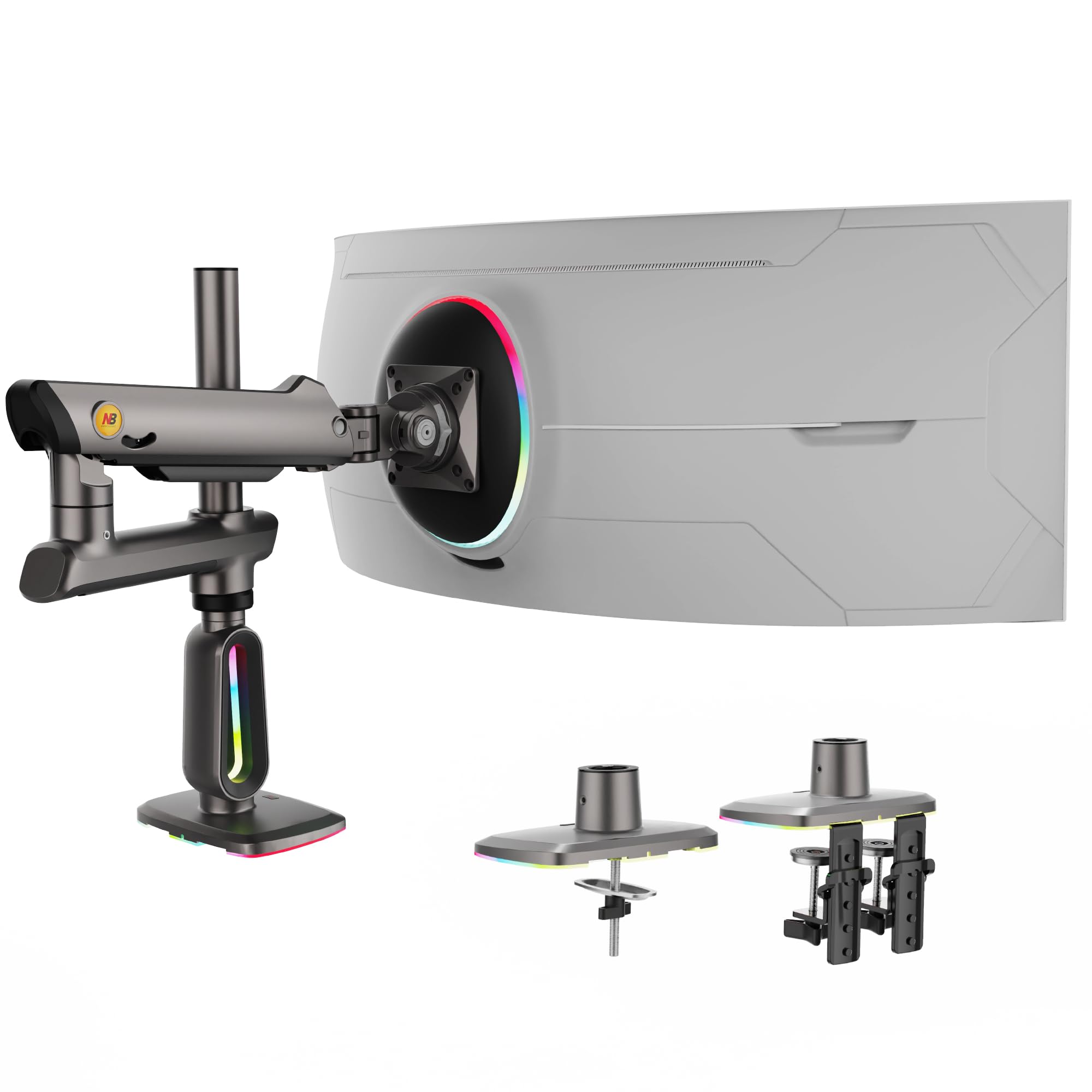
A towering heavy-duty arm that lifts 60-inch screens to standing height with zero sag.
Your screen sits high and stable, with this stand rising up to 27 inches above the desk — enough to pair a standing desk with an upper display or simply keep a massive 60-inch curved monitor at true eye level. The maximum-supported screen size is 60 Inches, and it handles up to 20 kg (44 lbs) of weight, so an ultrawide or a heavy 49-inch gaming panel feels secure. Buyers report it is sturdy enough for an Apple Studio Display and that the build quality rivals premium brands like Ergotron, especially at the discounted price point.
Movement is smooth across 360° rotation and +50° to -50° tilt, and the built-in RGB lighting adds a dynamic glow with one-click color switching. The premium aluminum construction and a mechanical ProSpring system make tension adjustments easier than typical gas-spring arms. Unlike the HUANUO below which bottoms out at 32 Inches, this NB arm handles screens nearly double that size.
Built for Big Screens
- Rises to 27 inches above the desk for standing desk or stacked dual setups
- Supports up to 60-inch screens and 44 lbs (20 kg), the highest weight rating here
- Built-in RGB lighting with one-click color modes
- Premium aluminum construction with a 2-year warranty
Setup Considerations
- Requires a 30-minute careful setup, according to buyer reviews
- Ratcheting tilt mechanism feels odd when tilting upward; not smooth like a gas spring
- Cable management channel may break if forced
Reach for it if: you need a monitor stand that can handle a 49–60 inch monitor and reach standing height without wobbling.
Look elsewhere if: your screen is smaller than 32 inches — this stand’s minimum screen size is 32 Inches, and it will not fit smaller displays.
2. MSI MAG MT201 – Premium Heavy Duty Single Monitor Stand Arm

A tank-like single arm built to hold heavy 34–49 inch ultrawides steady forever.
If you have a heavy monitor and want to be sure it never drifts, this MSI arm supports screen sizes from 17 to 49 inches and holds up to 44 lbs (2 to 20 kg).
The quick-release VESA plate makes mounting and dismounting your monitor fast, and the metal construction with a twin-screw clamp keeps everything locked tight. Unlike the NB Extra Height stand that goes up to 60 inches, this MSI has a smaller maximum screen size of 49 Inches — but it still matches the NB on weight capacity at 44 lbs. The swivel reaches +90°/-90° and you can rotate your screen +180°/-180° for portrait mode.
Steady as a Rock
- Holds up to 44 lbs (20 kg) — strong enough for heavy 49-inch ultrawides
- Quick-release VESA plate for easy monitor installation and removal
- Metal construction with twin-screw clamp, no wobble during typing or gaming
- Great height range for sit/stand desks, per buyer feedback
Trade-offs
- Maximum tilt is 50 Degrees up and only 20 Degrees down — less flexible than some competitors
- Spring tension requires trial and error to set correctly
- Thick cables may cause the cover to pop off
Who it fits: anyone with a 34–49 inch ultrawide who wants a single arm that stays put under heavy weight and never sags.
Who should skip: users who need a very wide tilt range or a dual-monitor setup — this is a single-arm design with only 50 degrees of tilt.
3. HUANUO FlowLift™ Dual Monitor Stand, Fully Adjustable for 13–32″ Screens

A sturdy dual-arm stand that lifts two 32-inch screens off the desk without breaking your budget.
For a dual-monitor setup on a budget, this HUANUO stand supports screens from 13 to 32 inches and holds 4.4 to 19.8 lbs per arm. Owners mention it holds two 27-inch curved monitors without sagging and that the steel construction feels “heavy-duty” and “surprisingly high quality.” The maximum tilt angle is 85 Degrees, wider than the MSI’s 50 degrees, so you can lean your screen back quite a bit. The dual C-clamp base with a larger platform keeps everything steady during typing, unlike the VIVO below which is freestanding and can be knocked over.
One real-world limitation: customers note that it holds a 32-inch monitor well but struggles with a very light 15-inch screen below the 4.4 lb weight minimum. The minimum-supported screen size is 13 Inches, which is much smaller than the NB’s 32-inch minimum. It also requires a wooden desk (no glass or plastic) with a thickness of 0.59 to 3.54 inches.
Desk-Saving Dual Setup
- Dual C-clamp base prevents wobble on wooden desks
- Supports 13 to 32 inch screens with 85° tilt and 15.75″ height adjustment
- Steel construction feels much more solid than its price suggests
- Built-in cable management keeps cords hidden along the arms
Watch Out For
- Very lightweight monitors (under 4.4 lbs) may not sit tight enough to stay level
- Included M4x30 screws may be too long for some monitors — you may need M4x25 replacements
- Only works on wooden desks; glass or plastic desk tops are not compatible
Get this if: you want a dual-arm stand for two 27-inch monitors and want to keep your total cost well under the premium MSI or NB options.
Pass on it if: you have an extra-light screen under 4.4 lbs or a desk made of glass or plastic — the clamp will not hold safely.
4. VIVO Premium Single 17 to 32 inch VESA Monitor Stand STAND-V001R

A freestanding arm that clamps to nothing, ideal for desks where C-clamps won’t fit.
This VIVO stand is different from the others: it stands on your desk rather than clamping to the edge, so it works on glass tops, plastic desks, or any surface where a C-clamp is not an option. It supports 17 to 32 inch screens and holds 4.4 to 22 lbs. Reviewers point out it is “very sturdy for a 27-inch touchscreen” in low, flat, tilted positions. The maximum tilt angle is 90 Degrees — the widest tilt range in this lineup, offering a full +90° to -90° range compared to the MSI’s 50-degree limit.
The pneumatic spring arm gives a height range of 3 to 12 inches and a maximum extension of 11.7 inches. The base rotates 85° for sharing your screen with a coworker or client. At 10.3 pounds, it is slightly lighter than the HUANUO’s 11 pounds, but still feels heavy and well-built — one buyer described it as “a tank.” A catch: it cannot rotate to true portrait mode (90° rotation) without choosing landscape or portrait orientation in advance, unlike the MSI which does 180° rotation freely.
No-Clamp Freedom
- Freestanding base works on glass, plastic, and irregular desk edges where C-clamps fail
- Tilt range of +90° to -90° — the widest tilt available in this list
- Rotating base allows 85° of arm swing for sharing screens or collaboration
- Very sturdy for touchscreen use at low angles, per buyer reviews
Limitations
- Cannot freely rotate to portrait mode — must set orientation before assembly
- Maximum height is only 12 inches, much less than the NB’s 27-inch rise
- Limited to 22 lbs and 32-inch screens; no room for ultrawide expansion
Best for: desks that cannot take a C-clamp — glass tabletops, plastic surfaces, or desks with thick lips — where a freestanding base is the only option.
skip it if: you need true portrait mode rotation, a tall rise for standing desks, or plan to mount a screen larger than 32 inches.
Understanding the Specs
VESA Pattern
The VESA pattern (pronounced vee-sah) is the square of four screw holes on the back of your monitor. The most common sizes are 75x75mm and 100x100mm, measured from the center of one hole to the center of the opposite hole. If your monitor has a 200x200mm pattern, you need a specific adapter or a stand that explicitly supports it. Always check the back of your screen before buying a stand, because no stand works without the right pattern match.
Gas Spring vs Mechanical Spring
A gas-spring arm uses pressurized gas inside a cylinder to counterbalance your monitor’s weight — you set the tension with a screwdriver and the arm stays exactly where you push it. A mechanical spring (or ProSpring) uses a coiled metal spring instead, which is more durable over many years but often trickier to adjust initially. The NB uses a mechanical ProSpring system, while the VIVO uses a gas spring. Both work, but gas springs are easier to fine-tune for lighter monitors.
FAQ
Will an adjustable monitor stand work on any desk?
How do I know what VESA pattern my monitor has?
Can I use a monitor arm with a curved or ultrawide screen?
What does tilt, swivel, and rotation mean on a monitor stand?
How much weight can a typical adjustable monitor stand hold?
Is a single arm better than a dual arm for two monitors?
Will my monitor arm support a standing desk when it is raised?
Can I install a monitor stand by myself?
Why does my monitor sag after I set the tension?
What is the difference between a C-clamp and grommet mount?
Final Thoughts: The Verdict
If you want one dependable pick, the adjustable monitor stand winner is the NB Extra Height Gaming Monitor Arm because it handles the widest range of large screens (32 to 60 inches) with a massive 27-inch rise and 44 lb capacity. If you want a sturdy dual-arm solution for two 27-inch monitors at a budget-friendly price, grab the HUANUO FlowLift Dual. And for a heavy single 49-inch ultrawide that needs rock-solid stability, the standout is the MSI MAG MT201.
How We Picked
We do not accept paid placement. Every pick is matched to a real buyer and a real use-case; we do not hands-on test units.
Sources & Methodology
Specifications: manufacturer listings and product documentation. Review insights: verified customer reviews, as of July 2026. Pricing: not shown on this page (it changes often); check the current price via the retailer link.
As an Amazon Associate, FitlyFast earns from qualifying purchases. This does not affect which products we feature.