
Our readers keep the lights on and the weekend projects moving. As an Amazon Associate, I earn from qualifying purchases.
Specs are compiled from manufacturer listings and verified buyer reviews and can change over time — please confirm the key details on the product page before buying.
Picking an affordable wireless keyboard and mouse combo used to mean accepting lag, cheap plastic, or batteries that die in a matter of weeks. The good news is that the budget tier has matured — a few models now deliver the same quiet keystrokes, reliable 2.4 GHz connections, and month-long battery life you would have paid double for a few years ago. This guide breaks down the seven best options right now and tells you exactly which trade-off each one makes.
I’m Rikta — the founder and writer behind FitlyFast. This guide is built by comparing the manufacturers’ published specifications and the patterns across verified customer reviews, so you get each pick’s real strengths and trade-offs instead of marketing spin.
Whether you are outfitting a home office desk or replacing a worn-out set for daily schoolwork, the affordable wireless keyboard and mouse options here cover every priority from ergonomic wave designs to colorful retro keycaps and rechargeable backlighting.
Quick Picks
- Logitech MK270 — Best Overall
- COVEVA Retro Wireless Combo — Stylist’s Pick
- MEETION Wave Keys Combo — Best Ergonomic
- EDJO MK228 Pro — Best Backlit
- SABLUTE MA41 Ergonomic Wave Combo — Silent Office Champ
- Logitech MK370 Combo for Business — Top Performer
- SABLUTE Ergonomic 4000mAh Backlit Combo — Premium Ergonomic
How To Choose The Best Affordable Wireless Keyboard And Mouse
The right combo for you depends on three main things: how many hours you type per day, if you need to see the keys in dim light, and how much you care about the click noise in a shared room. Here is what to look for.
Connection Type: 2.4 GHz vs. Bluetooth
Almost every budget-friendly combo uses a tiny USB-A dongle that gives you a 2.4 GHz connection. That setup is plug-and-play — you insert the receiver and it works instantly with zero pairing menus. The range is around 33 feet (10 meters), so you can walk across the room without dropouts. Bluetooth adds flexibility to switch between a laptop and a tablet, but it drains the mouse battery faster and introduces a slight delay on some systems. For a pure desktop combo, stick with 2.4 GHz unless you absolutely need multi-device switching.
Battery Life: Rechargeable vs. Replaceable Cells
You will see two battery philosophies here. Some combos run on standard AAA and AA cells — when they die you swap in fresh ones in 30 seconds. Others pack a built-in rechargeable battery (often 4000mAh) that you top up via a USB-C cable every few weeks. Rechargeable saves you money on disposables over a few years, but the keyboard stops working during that 2-3 hour charge if you forget to plug it in overnight. If you are the type who never reads the low-battery warning, replaceable cells are the safer call.
Keyboard Layout and Key Feel
Full-size layouts with a number pad help anyone who punches in spreadsheets or data-entry forms. The wave-shaped or ergonomic keyboards curve the key rows to follow your fingers’ natural resting position — that reduces the reach for the top row and can delay wrist soreness over an eight-hour day. On the sound front, membrane switches (the standard on these budget sets) run from a soft “thock” to a louder typewriter-style click. If you share a desk or take calls from your home office, look for a model that specifically advertises 30dB quiet operation or “silent” keys.
Quick Comparison
| Model | Best For | Battery Type | Keyboard Feature | Mouse DPI | Amazon |
|---|---|---|---|---|---|
| Logitech MK270 | Reliable daily driver | Replaceable (AAA/AA) | Spill-resistant, 8 media keys | — | Amazon |
| COVEVA Retro | Style and clicky feel | Replaceable | Round keycaps, 12 hotkeys | — | Amazon |
| MEETION Wave Keys | Carpal-tunnel prevention | Replaceable (AAA/AA) | Wave keys, hard plastic wrist rest | 4-level adjustable | Amazon |
| EDJO MK228 Pro | Low-light typists | Rechargeable (4000mAh) | 9 backlit effects, wrist rest | 1000 / 1600 / 2400 | Amazon |
| SABLUTE MA41 | Ultra-quiet shared offices | Replaceable (AAA/AA) | Wave keys, leather wrist rest | — | Amazon |
| Logitech MK370 | IT-managed security | Replaceable (AAA/AA) | Spill-resistant, Logi Bolt encrypted | — | Amazon |
| SABLUTE Ergonomic 4000mAh | Premium ergonomics + backlight | Rechargeable (4000mAh) | Wave keys, faux lambskin palm rest | 800 / 1200 / 1600 | Amazon |
In‑Depth Reviews
1. Logitech MK270

The workhorse that keeps going long after the others give up.
You get a full-size keyboard with a proper number pad, 8 multimedia shortcut keys (internet, email, play/pause, volume), and a spill-resistant design that shrugs off coffee drips at the desk. The compact mouse is ambidextrous and tracks smoothly on most surfaces, while the 2.4 GHz USB receiver delivers a stable connection up to 33 feet — no drivers, no pairing menus.
The standout number here is the 36-month keyboard and 12-month mouse battery life on standard AAA and AA cells. That means you replace the mouse batteries once a year and forget the keyboard batteries exist entirely. Buyers report that the setup is “cost-effective” with an “easy USB-A dongle setup” and a “stable, lag-free 2.4 GHz connection” that is “reliable for office/school/home.” Unlike some cheaper combos that skip the on/off switches, the MK270 includes them so the batteries actually last as advertised. The only trade-off versus the pricier Logitech MK370 is that this one lacks Bluetooth and the encrypted Logi Bolt receiver, so it is limited to one device at a time.
Two-year confidence: The 36-month keyboard battery claim is rare at this price.
One missing feature: The keys do not light up, so if you type in a dark room you will want the backlit EDJO or SABLUTE combos instead.
Best for: Anyone who wants a no-surprises daily driver that lasts years on the same set of batteries.
Not for: Night owls who need backlit keys or users who need to switch between a laptop and a tablet without unplugging the dongle.
2. COVEVA Retro Wireless Combo
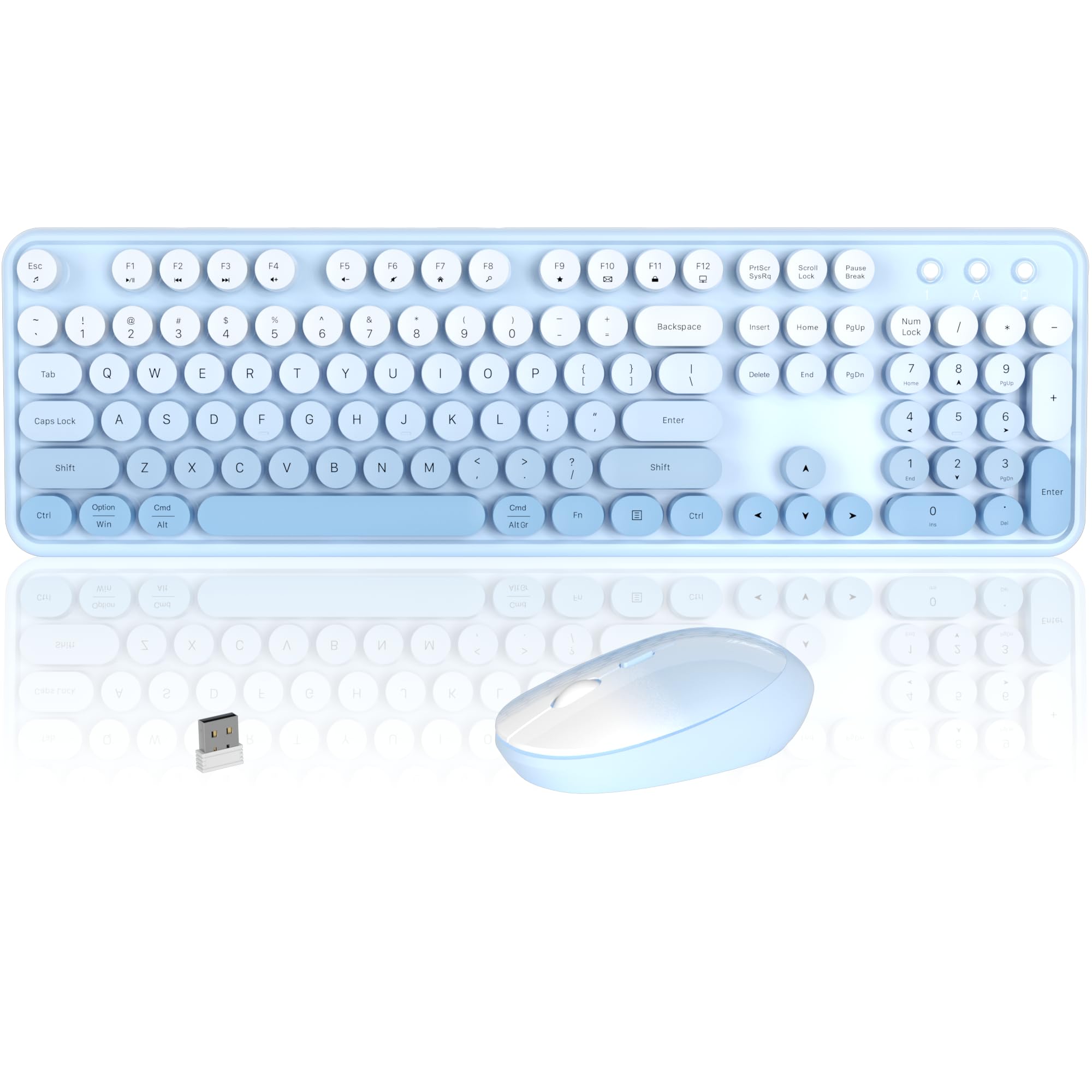
A typewriter-inspired look that actually clicks as satisfyingly as it appears.
The round keycaps on this COVEVA set are the first thing you will notice — they are modeled after old-school typewriter keys and they deliver that crisp, tactile click on each press. The blue-gradient color scheme is a genuine conversation starter on any desk, and the 104-key full-size layout includes a number pad and 12 multimedia hotkeys for quick volume and media control.
Owners mention that this is a “durable, colorful keyboard lasting ~1 year” with a “stable connection” and a “heavy keyboard with nice sound.” The single USB receiver serves both the keyboard and mouse, saving a USB port on your laptop. The catch, as customers note, is that the mouse “has no bottom scroll wheel (scrapes desk without pad)” and can introduce a 20-second delay after login until you toggle the switch. Compared to the Logitech MK270, this set leans harder into style and the clicky sound at the expense of the mouse ergonomics — you may want to pair the keyboard with a different mouse if you scroll heavily.
Fun factor: The gradient colors and typewriter-style click make this the most personality-driven set in the list.
One real issue: The mouse lacks a bottom scroll wheel and takes a short delay to wake up, so heavy mouse users should budget for a separate pointer.
Reach for this if: Your workspace doubles as a style statement and you miss the physical feedback of old mechanical keyboards.
Look elsewhere if: You need a silent mouse for a shared desk or you scroll through long documents all day.
3. MEETION Wave Keys Combo
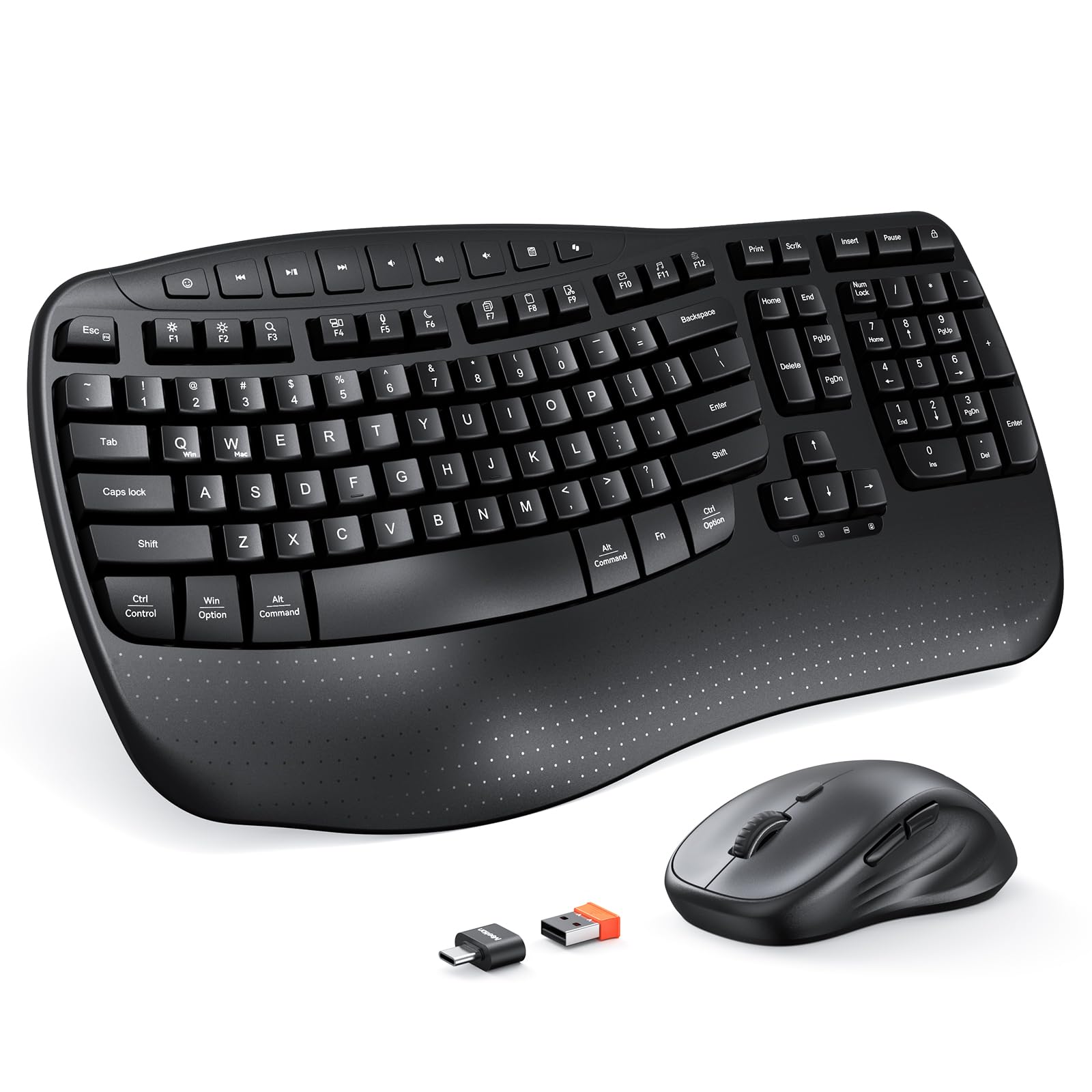
The wave-shaped key layout that fits your fingers’ natural curve.
This MEETION combo takes the ergonomic wave design seriously. The key rows are not flat — they curve up in the middle to match the natural resting arc of your fingers, which reduces the forward reach and stretch that causes finger fatigue after hours of typing. It comes with a hard plastic wrist rest that is sturdy and does not sag over time, unlike the foam rests on some cheaper sets.
The mouse has four adjustable DPI levels (you toggle them with a button on top) for switching between slow precision work and faster cursor movement. Buyers call it a “perfect replacement for Logitech K350” and note it is “1.5 inches shorter” — saving valuable desk space. The keyboard uses two AAA batteries and the mouse one AA (not included), and the 2.4 GHz receiver range is up to 33 feet. One reviewer noted that the keyboard can occasionally feel oversensitive or unresponsive on first use, requiring a quick toggle of the on/off switch, but after that it runs smoothly. Compared to the EDJO MK228 Pro below, this set sacrifices backlighting entirely in favor of ergonomic shaping.
For long typists: The wave shape and wrist rest are specifically designed to reduce the wrist and finger strain of 8-hour sessions.
One catch: The mouse scroll wheel has a “sandy sound” that fades with use according to buyers, and the keyboard does not support Windows 8.1 or macOS below 10.12.
Best for: Writers, programmers, or anyone who spends more than 4 consecutive hours typing and does not want carpal tunnel to creep in.
Not for: Users who need illuminated keys or those running older operating systems that are not listed in the compatibility table.
4. EDJO MK228 Pro
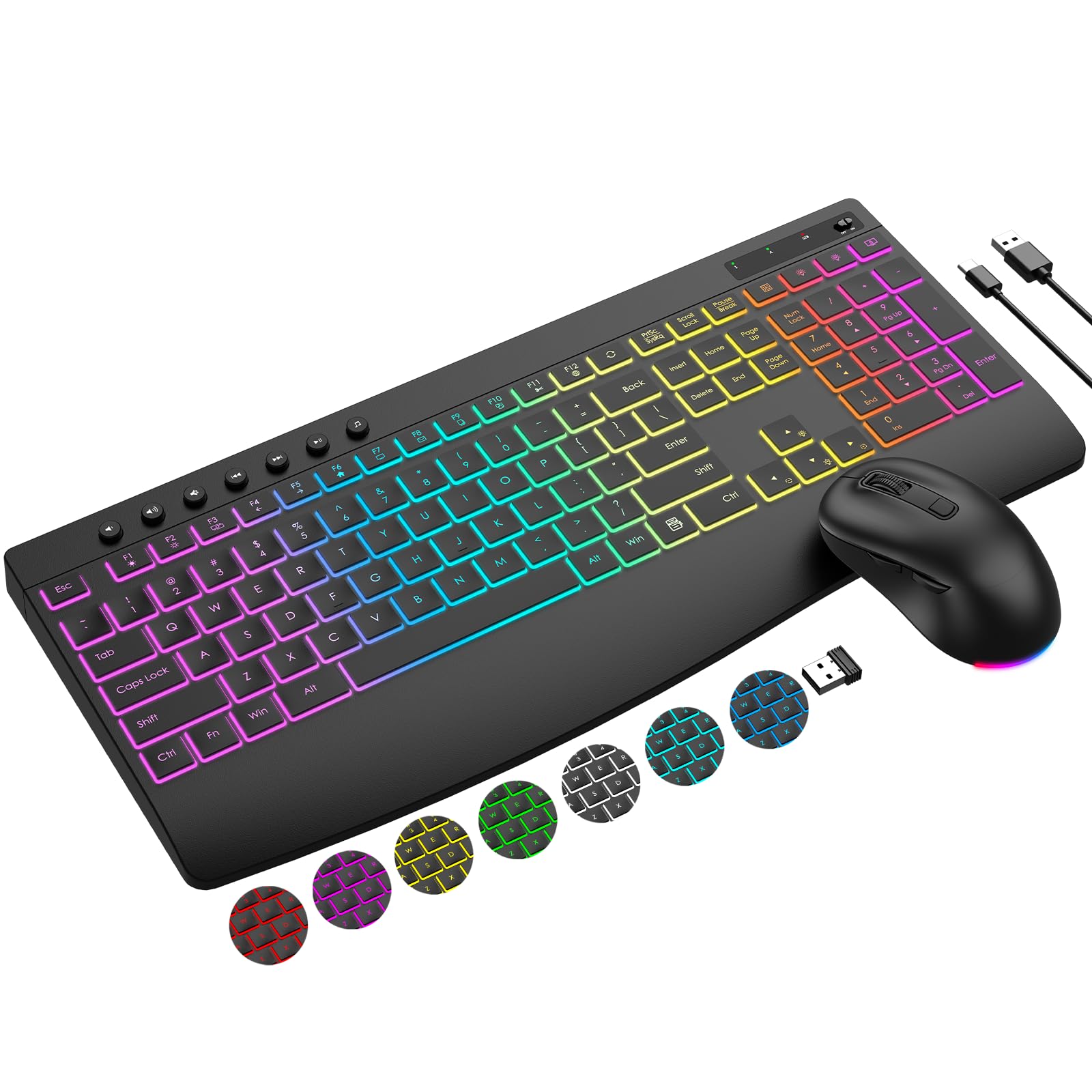
A backlit keyboard that stays lit for weeks without hunting for fresh batteries.
If you type in a dim room or after the sun goes down, the EDJO MK228 Pro solves that problem with 3 lighting modes, 7 switchable backlight colors, and 5 brightness levels. The keyboard packs a built-in 4000mAh battery — that is about twice the capacity of standard backlit keyboards, according to the maker — and the mouse has an 800mAh battery. Both charge over a single USB-C cable, so you never buy another disposable cell.
The mouse has 3 DPI levels (1000, 1600, 2400) and forward/backward navigation buttons, plus an RGB light that cycles automatically. Reviewers point out the keyboard is “quiet, responsive” and the backlight is “fine” for low-light work. One buyer mentioned the mouse can be “occasionally unresponsive or skips,” though the keyboard itself maintains solid performance. Sharing a single USB receiver, this combo eliminates the cable clutter of older sets. Compared to the Logitech MK270, the EDJO adds backlighting and a rechargeable battery but loses the spill-resistant protection and the 36-month battery claim — you are trading extreme battery span for per-charge convenience and visibility.
Backlight on demand: The 5-level brightness means you can dim it to barely-there or crank it bright enough to see every key in a dark room.
One quirk: Buyers mention the user guide is thin on details (recharge time is about 4-5 hours, battery-check procedure is not obvious).
Reach for this if: You work late in a dim room or you want to skip the recurring cost of alkaline batteries.
Look elsewhere if: You need an ergonomic wave key layout or you prefer pop-in replaceable batteries over a fixed rechargeable cell.
5. SABLUTE MA41 Ergonomic Wave Combo
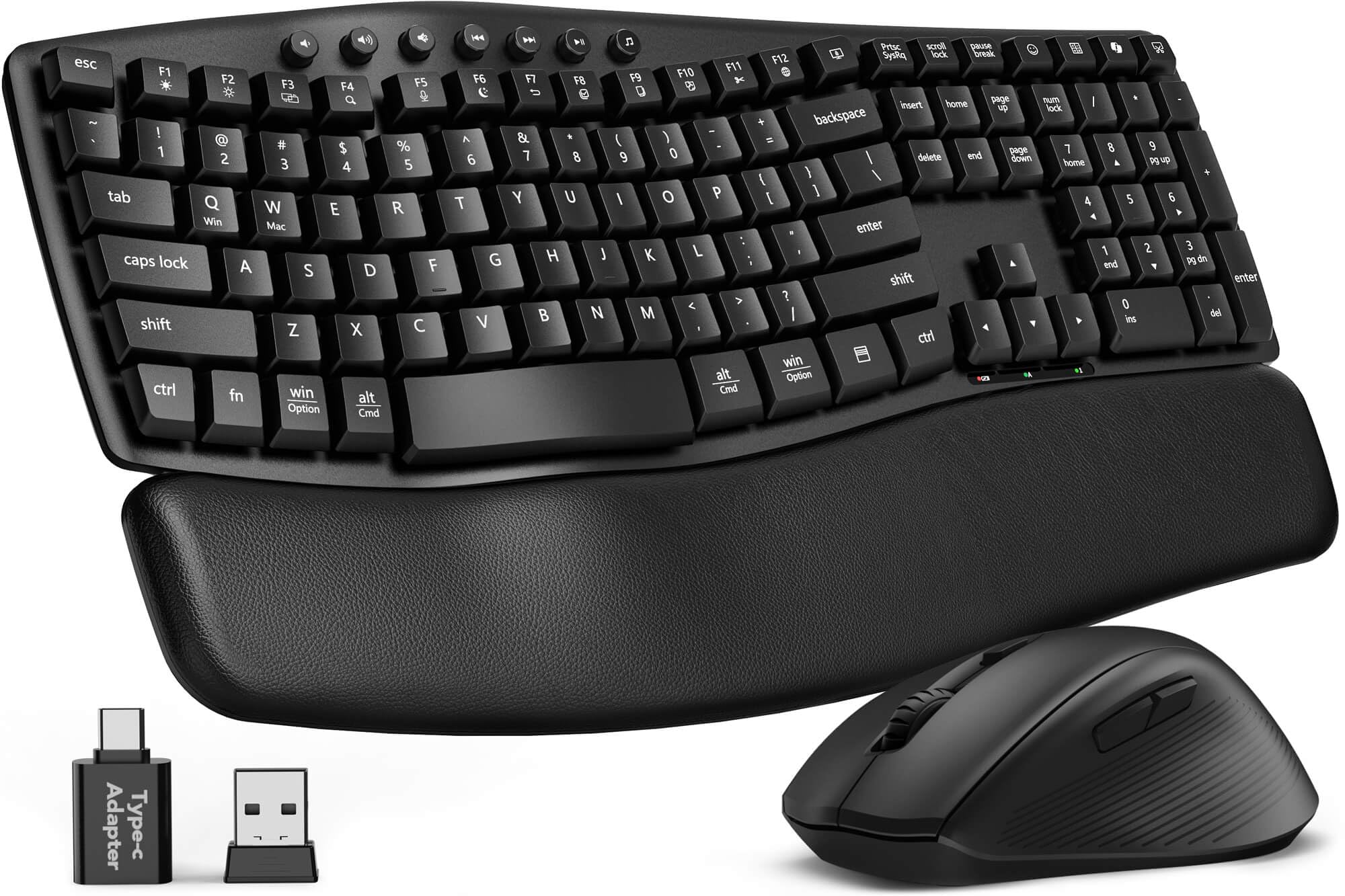
The quietest set in this lineup, designed for shared desks and late-night sessions.
This SABLUTE combo focuses on two things that matter in a quiet office: noise reduction and wrist comfort. The keyboard and mouse are rated at about 30dB — which buyers describe as a “silent” typing experience compared to standard membrane keyboards. The wave-shaped key layout guides your fingers into a natural curve, and instead of a hard plastic rest, it uses a cushioned leather palm rest that stays cool and does not collect dust the way fabric does.
You get 12 productivity shortcut keys (screenshots, media controls, calculator, screen lock), a spill-resistant frame, and a single 2.4 GHz receiver that supports Windows, macOS, ChromeOS, Linux, and Android. Battery life is rated at 6-12 months on two AAA batteries for the keyboard and one AA for the mouse. Buyers call it a “quiet keyboard with leather wrist pad, comfortable and high-quality feel,” and one reviewer specifically noted it “replaced Logitech due to price increase.” Unlike the MEETION Wave Keys, the MA41 adds the leather palm rest and quieter switches, but it gives up the 4-level DPI mouse — this mouse is fixed sensitivity.
Truly quiet: At 30dB, the keystrokes and clicks are barely audible on a phone call — a huge advantage over the clicky COVEVA set.
One limitation: The keyboard keys are slightly closer together, which buyers with smaller hands appreciate but users with larger fingers may find crowded.
Best for: Home offices with thin walls, open-plan desks, or anyone who takes Zoom calls while typing notes.
Not for: Gamers or heavy mouse users who need adjustable DPI on the pointer.
6. Logitech MK370 Combo for Business

Enterprise-grade encryption in a quiet, full-size set that IT can deploy at scale.
This is the only combo here that pairs a 2.4 GHz USB receiver with Bluetooth, so you can use it with a PC and a tablet without swapping dongles. The Logi Bolt receiver uses fully encrypted wireless — a feature designed for corporate IT departments that need “Secured Connections Only” mode. The full-size keyboard is spill-resistant and the mouse uses Silent Touch technology, which the maker claims reduces click noise by 90%.
Buyers confirm it is a “great value, includes charged batteries, easy Bluetooth pairing, no lag,” and matches the familiar Logitech K120 feel. The mouse is smaller than the one on the MK270, which buyers with small hands appreciate. Battery life is strong — one reviewer using it 4-5 hours a day reported “1 month” on the first set of batteries. The MK370 is heavier (498 grams) than the MK270 due to the extra electronics and spill barrier. Unlike the EDJO MK228 Pro, it does not have backlighting or a rechargeable battery, but it compensates with dual connectivity and the most secure wireless link in this list.
Secure by design: The Logi Bolt encryption makes this the pick for anyone who handles sensitive data and cannot risk a wireless interception.
One trade-off: The mouse has slight lag reported on some systems — buyers suspect driver issues that a firmware update usually fixes.
Reach for this if: You want dual-device switching (Bluetooth + dongle) or your IT department mandates encrypted wireless peripherals.
Look elsewhere if: You need backlit keys or you prefer a heavier, full-sized mouse over the compact one included here.
7. SABLUTE Ergonomic 4000mAh Backlit Combo

A luxurious palm rest and rechargeable backlighting in one premium wave-shaped package.
This SABLUTE set combines the two most requested features from this category — a wave-shaped ergonomic keyboard and a bright backlight — into a single rechargeable package. The palm rest is not plastic or fabric; it is a soft faux lambskin leather that is sweat-proof and easy to wipe clean. The keyboard has a built-in 4000mAh battery (the same capacity as the EDJO MK228 Pro), and the mouse has a 700mAh battery, both recharging via USB-C.
You get 7 backlight colors plus an RGB mouse with 3 DPI levels (800, 1200, 1600) and 5 cycle modes. The wave keys are nearly identical in shape to the classic Logitech K350, according to buyers, and the keyboard adds 9 one-touch shortcut keys. One buyer calls it the “best keyboard and mouse I’ve ever used,” praising the “unique front feet to tilt keyboard down, reducing wrist strain.” The adjustable front and back stands let you tilt the keyboard forward or backward — a feature unique among these seven combos. At 2.7 pounds, it is the heaviest set here, which keeps it planted on the desk during aggressive typing.
What stands out
- 4000mAh rechargeable battery lasts weeks per charge, with auto-sleep to conserve power
- Faux lambskin palm rest is more comfortable and easier to clean than the MEETION’s hard plastic rest
- Adjustable front and back tilt stands support both sitting and standing desk positions
What to watch for
- The left palm rest area is slightly too small for larger hands, shoppers say
- The lock key protrudes and can be accidentally hit during typing
- The mouse is described as “slightly slippery” under the palm
Best for: Users who want both ergonomic wave shaping and backlit keys in a single, rechargeable, premium-feeling combo that can tilt both forward and back.
Not for: Budget shoppers who want to stay under — this is the highest-priced set here, though it bundles the most features.
Understanding the Specs
Battery Capacity: mAh vs. Replaceable Cells
A rechargeable battery measured in mAh (milliampere-hours — a unit that tells you how much electric charge the battery holds) determines how long the keyboard lasts between charges. A 4000mAh battery like the ones in the EDJO and SABLUTE combos typically powers the keyboard for weeks of daily use, even with the backlight on. Replaceable AAA and AA cells, on the other hand, can last months (the Logitech MK270 claims 36 months on the keyboard) because you are swapping fresh alkalines in. The trade-off is recurring battery cost versus the inconvenience of a 2-3 hour charge cycle.
DPI: Mouse Sensitivity
DPI stands for dots per inch — it measures how many pixels the cursor moves across the screen for every inch you physically move the mouse. A higher DPI (like 2400 on the EDJO) means the cursor zips across the screen with a tiny wrist flick, ideal for large monitors. A lower DPI (like 800 on the SABLUTE mouse) is better for precise work like photo editing or clicking tiny spreadsheet cells. Adjustable DPI lets you toggle between speeds without digging into your computer’s settings.
FAQ
Will an affordable wireless keyboard and mouse work with a Mac?
How long do the batteries actually last on a typical wireless keyboard and mouse combo?
What is the real difference between 2.4 GHz and Bluetooth for a keyboard and mouse?
Can I use the mouse from one combo with the keyboard from another?
Is a wave-shaped keyboard really better for carpal tunnel?
What does “spill-resistant” mean on a budget keyboard?
How do I know if a wireless keyboard and mouse combo will work with my operating system?
Why does the mouse sometimes stop working for a few seconds after the computer wakes up?
What does “membrane keyboard” mean in the product specs?
Can I use these combos with a tablet or a smartphone?
Final Thoughts: The Verdict
For most buyers, the affordable wireless keyboard and mouse winner is the Logitech MK270 because it delivers the longest battery span, spill-resistant protection, and proven Logitech reliability at a price that is tough to top. If you want backlit keys for late-night typing and prefer a rechargeable battery, grab the EDJO MK228 Pro. And for an ergonomic wave-shaped keyboard that reduces wrist fatigue while being whisper-quiet in a shared space, the SABLUTE MA41 is the clear choice.
How We Picked
We do not accept paid placement. Every pick is matched to a real buyer and a real use-case; we do not hands-on test units.
Sources & Methodology
Specifications: manufacturer listings and product documentation. Review insights: verified customer reviews, as of July 2026. Pricing: not shown on this page (it changes often); check the current price via the retailer link.
As an Amazon Associate, FitlyFast earns from qualifying purchases. This does not affect which products we feature.