
Our readers keep the lights on and the weekend projects moving. As an Amazon Associate, I earn from qualifying purchases.
Specs are compiled from manufacturer listings and verified buyer reviews and can change over time — please confirm the key details on the product page before buying.
Finding the right $100 mechanical keyboard is about matching your feel—if you want silent office-friendly keystrokes or crisp, responsive feedback for gaming sessions. The best options near this price deliver factory-lubed switches, solid aluminum builds, and hot-swappable customization (switches you can swap without soldering) that used to cost twice as much just a few years ago.
I’m Rikta — the founder and writer behind FitlyFast. This guide is built by comparing the manufacturers’ published specifications and the patterns across verified customer reviews, so you get each pick’s real strengths and trade-offs instead of marketing spin.
Below I’ve broken down seven mechanical keyboards that hit the balance near the $100 mechanical keyboard price tier, focusing on what each does best for typing, gaming, or everyday productivity.
Quick Picks
- RK ROYAL KLUDGE R98 Pro — Best Overall
- Keychron K3 Version 2 — Ultra-Slim Stunner
- ASUS ROG Strix Scope II X — Gamer’s Choice
- Logitech G515 Wireless TKL — Sleek & Silent
- Cherry MX 3.0S — Purpose-Built
- CORSAIR K70 CORE RGB — Feature-Filled
- Razer BlackWidow V4 X — Macro Master
How To Choose The Best $100 Mechanical Keyboard
Mechanical keyboards feel different from the cheap membrane boards you may have used before. Instead of rubber domes, each key has its own spring-loaded switch (called a mechanical switch). That means every press is crisp, consistent, and lasts for tens of millions of keystrokes. The main choices you face are switch type, keycap material, and connectivity—all of which affect your daily typing or gaming experience.
Linear vs. Tactile Switches
Linear switches (often called “red” or “silent”) move straight down without a bump—smooth, quiet, and great for fast double-taps in games. Tactile switches (often called “brown”) have a noticeable bump in the middle of the press, giving you feedback that you’ve hit the key. This helps avoid typos during long typing sessions. Some keyboards include clicky options (like “blue”) that make a loud click—fun to some, annoying in shared spaces. Choose linear for gaming, tactile for typing, clicky if you are alone.
Keycap Quality: PBT vs. ABS
Keycaps wear over time. ABS plastic (common on entry-level boards) develops a shiny, greasy look after months of use. PBT plastic is tougher and stays matte—your “W” key won’t look polished after a year of gaming. Double-shot PBT means the legends (the letters) are molded through the plastic, so they never fade. For the money, PBT is a clear upgrade.
Full-Size vs. Compact Layouts
Full-size (100%) boards include a number pad, which helps for data entry but takes up more desk space. Tenkeyless (TKL) boards drop the numpad for a smaller footprint. Compact 75% or 96% layouts shrink the keyboard further while keeping arrow keys and function rows. If you game with low mouse sensitivity or travel often, a smaller board keeps your mouse arm free from bumping the keyboard edge.
Quick Comparison
| Model | Best For | Switches | Layout | Keycaps | Amazon |
|---|---|---|---|---|---|
| RK ROYAL KLUDGE R98 Pro | Best Overall Value | Pre-lubed Linear Cream | 96% (98 keys) | MDA Profile PBT | Amazon |
| Keychron K3 Version 2 | Ultra-Slim Travel | Low-Profile Brown | 75% (84 keys) | ABS | Amazon |
| ASUS ROG Strix Scope II X | Gaming Build Quality | Pre-lubed NX Snow V2 Linear | 100% (Full-size) | PBT Doubleshot | Amazon |
| Logitech G515 TKL | Low-Profile Gaming | Tactile Brown | TKL (Tenkeyless) | Doubleshot PBT | Amazon |
| Cherry MX 3.0S | Build Purity & Durability | MX2A Silent RED Linear | Full-size (109 keys) | ABS | Amazon |
| CORSAIR K70 CORE RGB | Premium Features | Pre-Lubed MLX Red Linear | Full-size | ABS Doubleshot | Amazon |
| Razer BlackWidow V4 X | Macro & Media Control | Yellow Linear Silent | Full-size (104 keys) | Doubleshot ABS | Amazon |
In‑Depth Reviews
1. RK ROYAL KLUDGE R98 Pro

A creamy-smooth, gasket-mounted 96% workhorse that punches well above its pay grade.
The RK ROYAL KLUDGE R98 Pro stands out by packing a gasket mount setup—a construction method using flexible pads between the plate and the case (normally reserved for custom enthusiast boards that cost more)—inside a compact 98-key layout. That means the keys feel bouncy and the board produces a deep, thocky sound instead of a hollow plastic clatter. Five layers of sound-absorbing foam help achieve that creamy noise buyers consistently rave about. “RK R98 Pro: solid build, gasket mount, pre-lubed linear switches; smooth, quiet, creamy feel,” one owner reports, summing up the appeal in one sentence.
The pre-lubed linear cream switches are smooth right from the start, and since the board is hot-swappable (accepts 3 or 5-pin switches), you can swap to a different feel later without soldering. The MDA profile PBT keycaps have a scooped surface that gives your fingers a gentle wrap-around feel, which helps reduce fatigue on long typing days. With a detachable aluminum volume knob, bright RGB with over 20 modes, and full macro support via an online driver, this board covers both work and gaming—and it weighs 0.8 kilograms, giving it a dense, premium heft that defies its position near the entry-level end of the price spectrum. The only input quirk: the USB-C port sits on the left side, which may cause cable drag for some desk arrangements—but for pure value, this board is hard to overlook.
Why You’ll Love It
- Gasket mount with five-layer foam for a creamy, quiet typing sound
- Hot-swappable sockets accept most 3/5-pin switches for future customization
- MDA profile PBT keycaps feel noticeably nicer than standard OEM shapes
- Pre-lubed linear cream switches deliver buttery-smooth keystrokes from day one
A Couple Trade-Offs
- USB-C port placed on the left side can create cable interference on some desks
- Keycap legends lack backlighting; you rely on under-key RGB glow instead
Your pick if: you want a creamy, quiet typing experience and enthusiast-grade build (gasket mount, PBT keycaps) without leaving the mid-range budget.
The limitation: The left-side USB-C port and unlit keycap legends bother layout-conscious users—check your desk cable routing.
2. Keychron K3 Version 2

A wafer-thin wireless mechanical that slides into a bag and pairs with three devices.
The Keychron K3 Version 2 is dramatically slimmer and lighter than any other board on this list—just 0.87 inches tall and weighing so little that “no wrist rest needed” is a common sentiment among reviewers. One reviewer noted, “Low-profile K3 feels great with good tactility and quiet brown switches; no wrist rest needed.” That slim profile comes from the proprietary low-profile Keychron mechanical brown switches, which are 40% slimmer than a conventional mechanical switch but still deliver a tactile bump (a small bump in the middle of the press that tells you the key activated). The result is a keyboard that feels like a mechanical in a laptop-keyboard footprint.
Connectivity is where this board punches above its size: the Broadcom Bluetooth 5.1 chipset lets you pair up to three devices (laptop, tablet, phone) and switch between them with a key press. The reinforced aluminum body (with a plastic bottom frame) keeps it rigid on your desk while the white LED backlight—not flashy RGB—gives a clean, professional look. The trade-off is a smaller 84-key (75%) layout that takes some adjustment if you rely on a number pad, and the battery life is not as long as some high-capacity boards. Still, for frequent travelers or anyone who swaps between a Mac, PC, and iPad during the day, the K3’s portability is class-leading in this price zone. The full 98-key RK R98 Pro versus the K3’s 84-key layout shows just how much down-sizing Keychron did to achieve that svelte footprint.
Traveler’s Edge
- Ultra-slim 0.87″ profile slides easily into laptop bags
- Bluetooth 5.1 pairs with three devices for smooth desk hopping
- Mac layout with included Windows keycaps covers both ecosystems
- Low-profile brown switches offer tactile feedback without wrist fatigue
Living With It
- Battery life is shorter than typical wireless boards; expect to charge weekly
- No software support for macros or per-key lighting customization
Ideal for: remote workers and hybrid commuters who need a low-profile mechanical that fits in a slim bag and pairs quickly with multiple devices.
Heads-up: You lose macro support and longer battery life—this is a sleek productivity tool, not a feature-packed gaming board.
3. ASUS ROG Strix Scope II X

A full-size battlestation with factory-lubed NX Snow V2 switches and a detachable wrist rest.
The ASUS ROG Strix Scope II X is built for the dedicated gamer who still wants a number pad and a rock-solid typing feel. At 17.2 inches long and 2.1 pounds, it is 43% bigger in its dimensions than the Keychron K3—a full-size board that anchors your desk with an aluminum top plate and doubleshot PBT keycaps that resist shine. The pre-lubed ROG NX Snow V2 linear switches produce a quiet, thocky keystroke that owners describe as a “soft mechanical click” combined with responsive feedback—perfect for late-night gaming without waking the house. “High-quality build, soft mechanical click, responsive keys, customizable RGB,” one reviewer reports, noting the overall fit and finish.
ASUS added integrated sound-dampening foam and switch-dampening pads inside the chassis, so pinging echoes are absorbed before they reach your ears. The detachable wrist rest clicks on magnetically and positions your hands at one of three tilt angles, making long sessions comfortable. A multi-function wheel on the top edge handles volume and media quickly, and the F1-F5 keys give one-touch access to Xbox Game Bar and recording tools. The catch is that the Strix Scope II X is a wired USB 2.0 (Type-C) board only—no Bluetooth option—and the ASUS software (Armoury Crate) is needed for advanced lighting customization, which some buyers find heavy. But if you want a no-compromise, full-size wired board with hot-swappable sockets and PBT caps, this is the one.
Built for Gaming
- Pre-lubed NX Snow V2 linear switches deliver smooth, quiet gaming keystrokes
- Doubleshot PBT keycaps resist oil and letter fading for years
- Three tilt angles plus a detachable wrist rest suit long sessions
- Integrated sound-dampening foam minimizes pinging and echo
The Setup
- Wired-only connectivity; no Bluetooth or wireless mode
- Advanced RGB control requires ASUS software (Armoury Crate)
Go with this if: you want a premium, full-size wired board with excellent factory-lubed switches and a solid aluminum build for gaming and desk work.
Skip it for: a wireless or travel-friendly setup—this is a desk anchor at 2.1 lbs and requires a cable.
4. Logitech G515 Wireless TKL
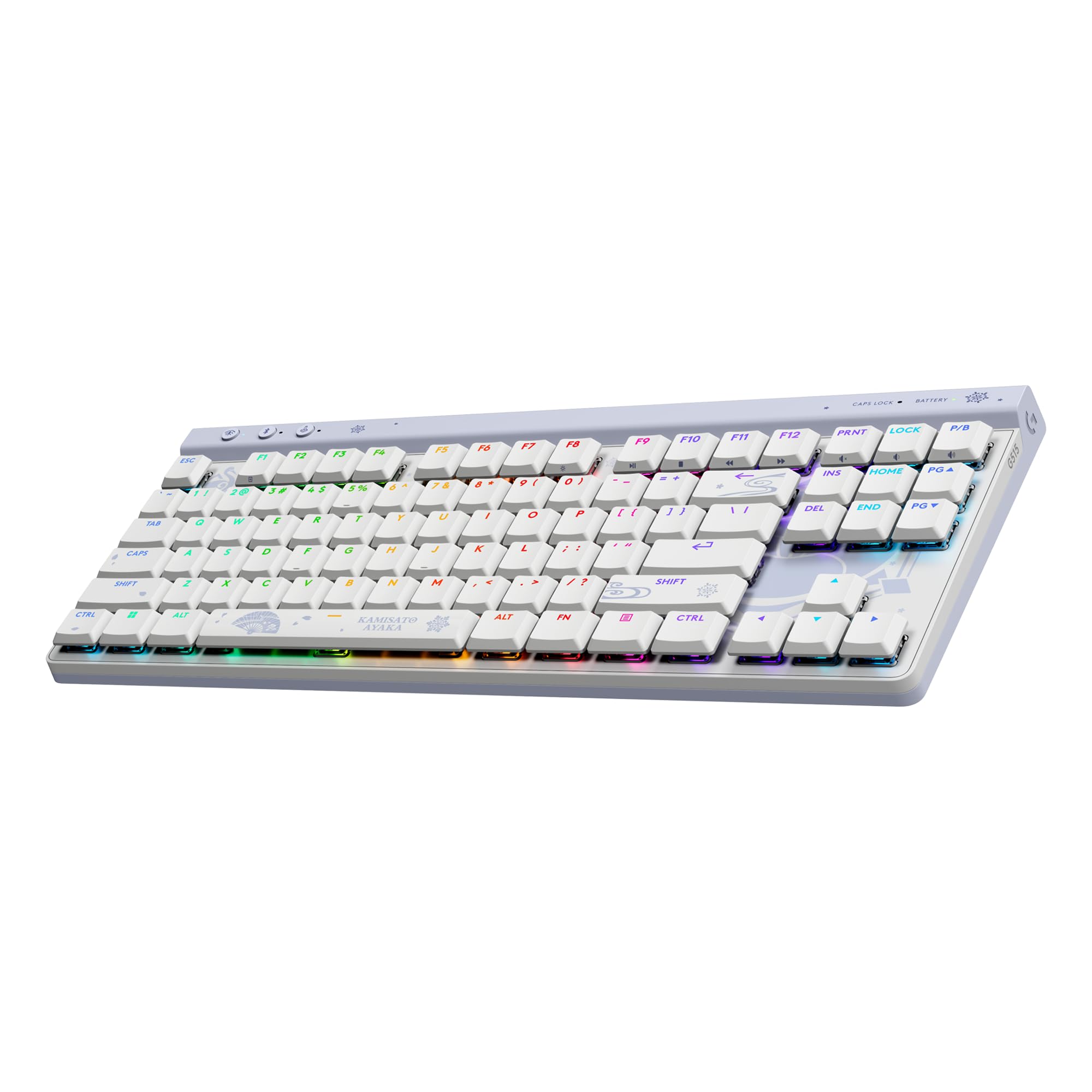
An ultra-slim wireless contender that finally fixes the keycap issues of earlier Logitech G boards.
The Logitech G515 TKL is a low-profile tenkeyless keyboard (no number pad, saving desk space) that brings premium doubleshot PBT keycaps—a material upgrade over the ABS caps that wore down on the older G915 series. At just 0.86 inches tall and weighing 880 grams, it is nearly as svelte as the Keychron K3 but adds tri-mode connectivity (LIGHTSPEED wireless, Bluetooth, wired) through a single USB receiver that can also pair a compatible mouse. Buyers are enthusiastic: one owner calls it “the first fully recommendable Logitech board in years,” noting the “thocky and quiet” factory-lubed tactile switches and the fact that the PBT caps are thick, oil-resistant, and replaceable.
The factory-lubed low-profile brown switches give a tactile bump without the loud click, making the G515 a strong choice for office gamers—people who need a quiet board for meetings but want mechanical precision for evening play. The LIGHTSYNC RGB with 16.8 million colors syncs across Logitech G gear via the G HUB software, and the Kamisato Ayaka special edition adds a custom theme from Genshin Impact. The main omission: there is no dedicated volume roller or media keys (those are handled through function layers), a step down from the G915’s dedicated controls. Some buyers also mention the all-plastic chassis feels less premium than a metal plate—though others prefer it for not being cold to the touch. The G515 is the quietest wireless low-profile option here for those who value both portability and replaceable keycaps.
Why It Stands Out
- Doubleshot PBT keycaps resist wear and are user-replaceable
- Tri-mode connectivity (LIGHTSPEED/Bluetooth/wired) via one USB receiver
- Ultra-slim 22 mm profile and tenkeyless layout save desk space
- Factory-lubed switches produce a quiet, thocky sound for shared spaces
The Compromise
- No dedicated volume roller or media keys; uses function-layer shortcuts
- All-plastic body lacks the metal feel of some competition
Your board if: you want a low-profile wireless keyboard with oil-resistant PBT caps and multiple connection modes for a mix of office and gaming.
Not for: those who rely on a physical volume knob or prefer the cold, dense feel of an aluminum frame.
5. Cherry MX 3.0S
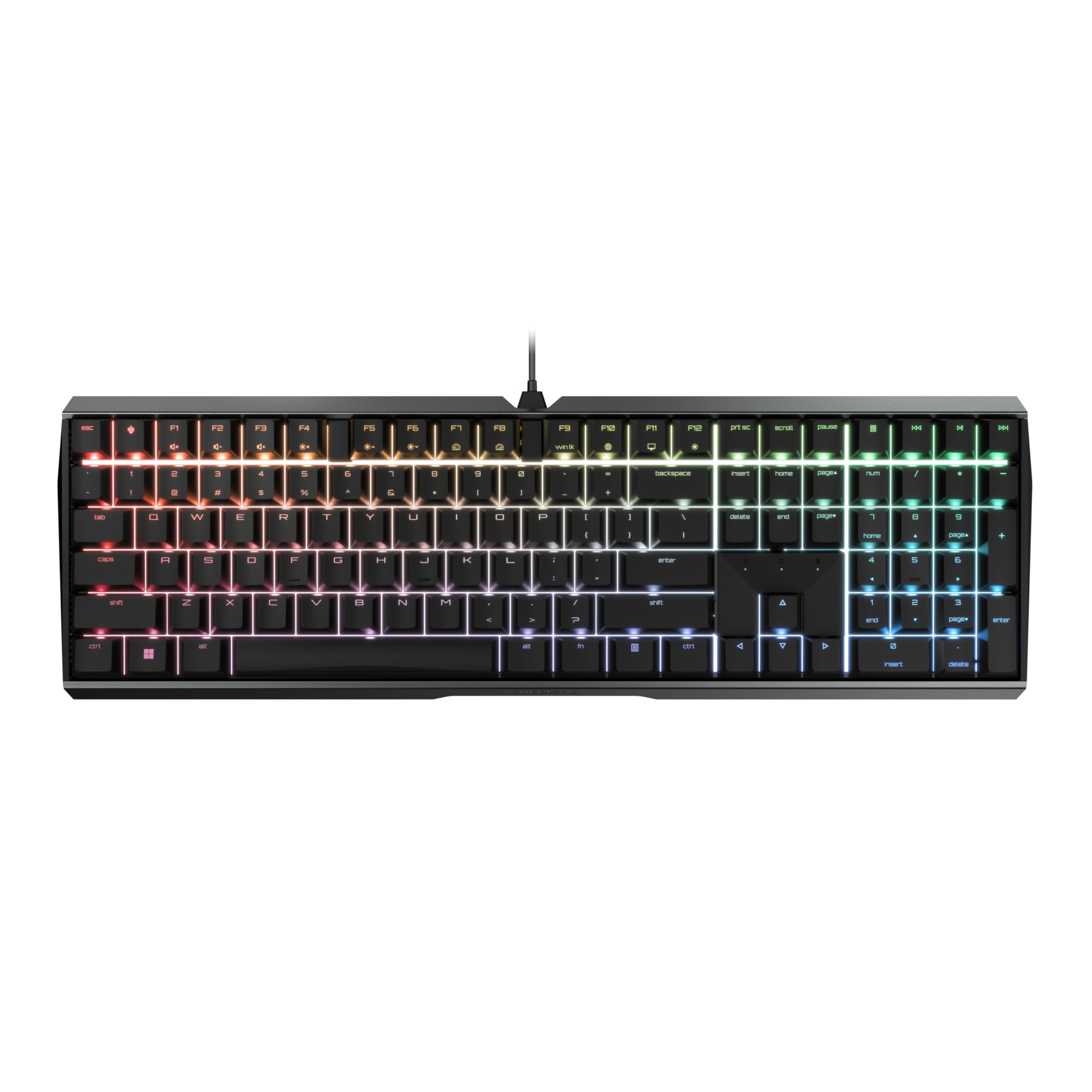
An extruded-aluminum body with genuine Cherry MX Silent switches for purists who value feel above flash.
The Cherry MX 3.0S is the no-frills choice for someone who cares more about switch feel and build integrity than RGB or wireless convenience. The entire chassis is formed from extruded aluminum with a screw-free design—smooth, smooth, and heavy enough (1.42 inches tall, 16.93 inches wide) that it does not budge during frantic gaming. The MX2A Silent RED switches are linear and quiet, with a dampened bottom-out that owners compare favorably to membrane keyboards in noise level but with the precision of a true mechanical switch. One reviewer calls it “the most luxurious keyboard I’ve ever owned,” citing the heavy, non-slip rubber feet and the fast typing feel.
You get 109 keys—including a full number pad and dedicated media shortcuts—and full N-key rollover (every key registers simultaneously even during rapid presses), meaning you can press multiple keys at once in games without missing an input. Anti-ghosting prevents false inputs, and the WIN key locks for gaming mode. The CHERRY UTILITY software is straightforward and unobtrusive for customizing RGB (16.8 million colors) and setting up individual lighting effects. The trade-offs are typical of a purist design: the ABS keycaps (not PBT) will develop a shine over time, the micro-USB cable instead of USB-C feels outdated, and the futuristic NASA-style font on the keycaps is small and hard to read at a glance. If you want a tank-like, silent keyboard from the company that invented the mechanical switch and you are fine with wired-only, this one delivers incredible feel at a reasonable premium.
The Highlights
- Extruded aluminum housing with screw-free construction feels like a tank
- MX2A Silent RED switches are among the quietest mechanical options available
- Full N-key rollover and anti-ghosting ensure every press registers in games
- Non-slip rubber feet and heavy chassis stay planted under fast action
Worth Noting
- ABS keycaps and micro-USB cable feel behind the curve at this price
- Small, futuristic keycap font is hard to read in low light
Pick this for: the exceptional build quality and genuine Cherry MX Silent switches—perfect for quiet night use or if you revere the brand’s switch heritage.
Consider something else if: you want replaceable PBT keycaps, USB-C, or hot-swappable sockets.
6. CORSAIR K70 CORE RGB
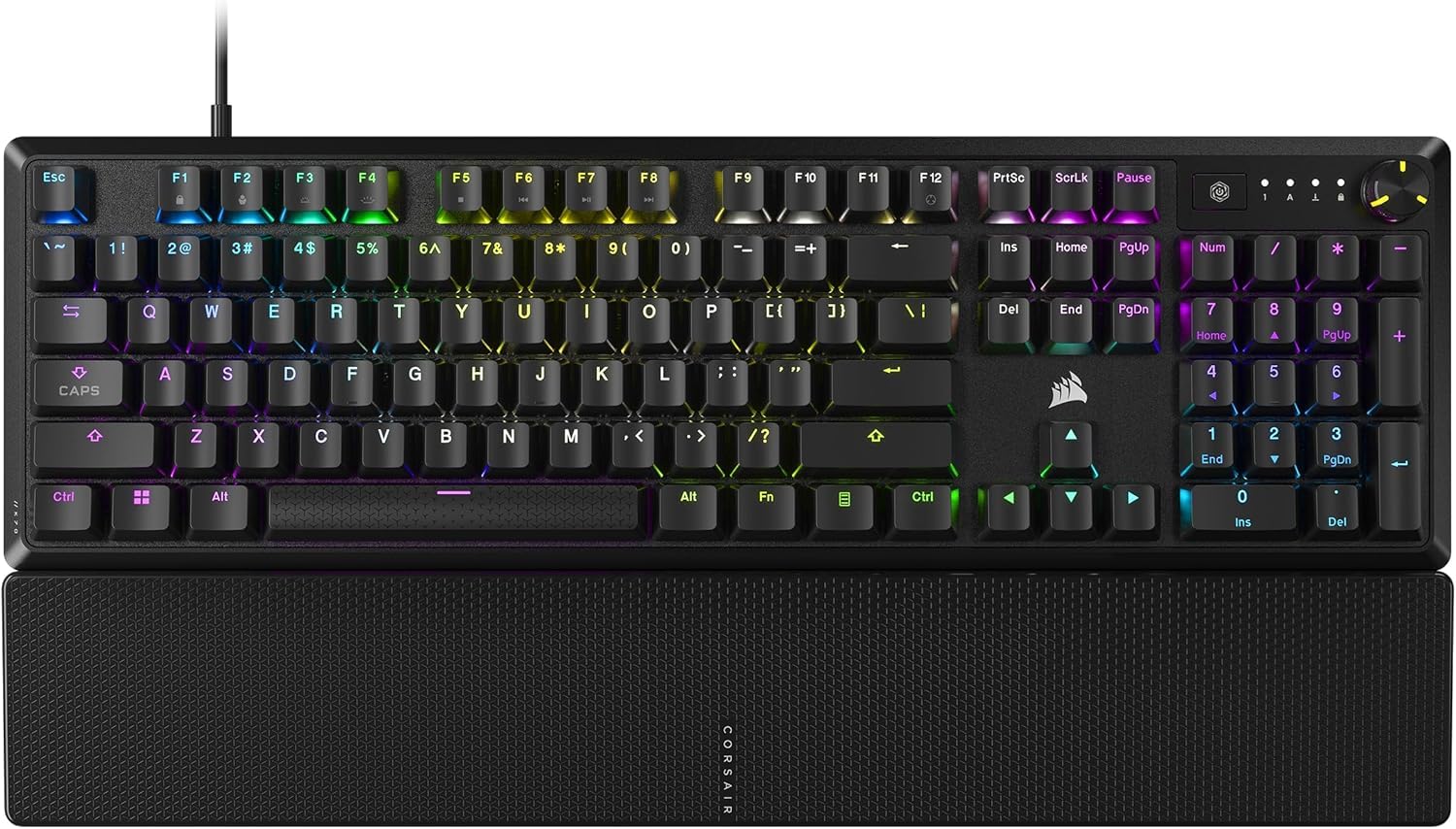
A full-size board with a dial, a magnetic palm rest, and two layers of sound dampening.
The CORSAIR K70 CORE RGB takes the well-known K70 formula and pares it down to a price that rivals the competition while keeping the hallmarks: a durable aluminum top plate, a multi-function rotary dial for volume and media, and a magnetic detachable soft-touch palm rest that snaps on securely. The pre-lubed MLX Red linear switches are smooth and responsive, and two layers of sound-dampening foam inside the chassis keep the keystroke noise low enough for shared rooms. One experienced buyer noted it is “95% as good as the top-end ones” for half the price, highlighting the sturdy doubleshot ABS keycaps—tough against cracks but not as wear-resistant as PBT.
The iCUE software offers deep customization for RGB lighting, macros, and the media dial’s functions, though some users report the software occasionally fails to recognize the keyboard after a system sleep, requiring a re-plug. The keyboard itself is wide at 17.64 inches and weighs enough (1.39 inches tall) that it stays planted, and the K70 CORE’s 5-button count in the spec sheet seems incomplete (the board has all standard keys); likely a data artifact. The hard plastic wrist rest, while magnetic and comfortable, is less plush than foam alternatives. For gamers who want immediate media control and a polished gaming aesthetic without paying flagship prices, the K70 CORE is a solid pick—just be prepared for occasional iCUE quirks.
Why You’ll Like It
- Multi-function rotary dial offers quick volume and media control without hunting for keys
- Magnetic soft-touch palm rest attaches and detaches easily
- Sound-dampening foam makes the MLX Red switches quiet enough for office use
- Aluminum top plate adds stability and a premium look
The Downsides
- iCUE software can lose keyboard recognition after sleep; occasional unplug needed
- ABS keycaps will develop shine over time compared to PBT alternatives
Best for: gamers who want a full-size board with a physical volume dial and magnetic palm rest, backed by a recognized brand.
The catch: iCUE reliability issues and ABS keycaps mean you trade some long-term polish for immediate feature density.
7. Razer BlackWidow V4 X

A wired command center with six macro keys, a chrome roller, and silent linear switches.
The Razer BlackWidow V4 X is purpose-built for gamers who want dedicated macro controls and a silent linear switch that resets instantly. The Razer Yellow switches have zero distance between actuation and reset at 1.2mm—meaning the keyboard is ready to register your next press as soon as the key lifts slightly—and require only 45g of force. This makes rapid-fire inputs in shooters or MMOs feel easy. The six dedicated macro keys on the left side (adding to the 104-key total) are programmable via Razer Synapse for complex command sequences, giving it an edge for MMO players that the competition does not match.
The multi-function roller and secondary media keys handle volume, playback, and brightness without digging into layers. A layer of sound-dampening foam under the circuit board plus lubricated stabilizers keeps the noise low—what one buyer describes as a “soft, bubbly key sound, not clicky.” the Chroma RGB per-key lighting (16.8 million colors) shines brightly through the doubleshot ABS keycaps and integrates with hundreds of games that trigger in-game lighting effects. The main compromises: the ABS keycaps will wear faster than PBT, and the 2.51-pound weight (the heaviest on this list) plus a 20.5-inch length (the longest here) means it demands serious desk real estate. If you live in MMOs or complex strategy games and need every action at your fingertips, the V4 X’s macro row is the decisive feature.
Macro Power
- Six dedicated macro keys for complex in-game commands
- Razer Yellow switches have 1.2mm actuation for instant fire
- Multi-function roller and media keys for quick volume/playback control
- Sound-dampening foam and lubricated stabilizers keep it quiet
Desk Considerations
- Heavy at 2.51 lbs and 20.5″ long; dominates desk space
- ABS keycaps wear faster than PBT; thicker doubleshot helps but not a permanent fix
Reach for this if: you play MMOs or strategy games and need dedicated macro keys with a fast, silent linear switch.
Look elsewhere if: you prefer PBT keycaps, a compact layout, or need wireless connectivity—this board is big, heavy, and wired.
Understanding the Specs
Switch Type
The switch is the mechanism under each keycap that registers a press. Linear switches (red or yellow) move straight down with no bump—smooth and quiet, ideal for gaming where you press keys quickly and lightly. Tactile switches (brown) have a small bump in the middle of the press that lets you feel exactly when the key activates, which helps reduce typos during typing. Clicky switches (blue) add an audible click with the bump—fun but loud. Your choice determines the feel and sound of every keystroke.
Keycap Material & Profile
Keycaps come in two main plastics. ABS is the most common; it is smooth and cheaper but eventually develops a shiny, greasy patch from finger oils. PBT is harder and stays matte, so your most-used keys (WASD, spacebar) look and feel like new much longer. Doubleshot means the letter is molded through the plastic, so it never wears off. Keycap profile (OEM, Cherry, MDA) changes the shape of the top surface—MDA profile, for instance, has a scooped dish that cradles your fingertips.
FAQ
What is the difference between linear and tactile mechanical switches?
Does hot-swappable mean I can change switches without soldering?
Will Keychron K3 work with Mac and Windows from the start?
How many devices can I pair with a wireless mechanical keyboard?
What does N-key rollover do for gaming?
Which keyboard is quietest for an open office or shared room?
Are PBT keycaps worth the extra cost over ABS?
What is a gasket mount and why does it matter?
Can I reprogram the keys on these mechanical keyboards?
Which keyboard is best for first-time mechanical keyboard buyers?
Final Thoughts: The Verdict
For most people, the $100 mechanical keyboard winner is the RK ROYAL KLUDGE R98 Pro because it combines a gasket mount, pre-lubed cream switches, hot-swappable sockets, and PBT keycaps at a price that beats the competition on pure typing feel—especially since its closest rival for build, the Cherry MX 3.0S, lacks removable keycaps and uses an older micro-USB port. If you want an ultra-slim wireless option for traveling between devices, grab the Keychron K3 Version 2. And for a full-size wired gaming board with hot-swappable switches and a premium aluminum build, nothing in this range beats the ASUS ROG Strix Scope II X.
How We Picked
We do not accept paid placement. Every pick is matched to a real buyer and a real use-case; we do not hands-on test units.
Sources & Methodology
Specifications: manufacturer listings and product documentation. Review insights: verified customer reviews, as of July 2026. Pricing: not shown on this page (it changes often); check the current price via the retailer link.
As an Amazon Associate, FitlyFast earns from qualifying purchases. This does not affect which products we feature.