
Our readers keep the lights on and the weekend projects moving. As an Amazon Associate, I earn from qualifying purchases.
Specs are compiled from manufacturer listings and verified buyer reviews and can change over time — please confirm the key details on the product page before buying.
Buying your first 3D printer should feel like opening a door to a new hobby, not signing up for a part-time job in calibration and troubleshooting. The best machine for you is the one that gets out of your way so you can focus on making things that actually work, from a replacement drawer knob to a articulated dragon toy.
I’m Rikta — the founder and writer behind FitlyFast. This guide is built by comparing the manufacturers’ published specifications and the patterns across verified customer reviews, so you get each pick’s real strengths and trade-offs instead of marketing spin.
Whether you are a total newbie buying for a curious kid or a hobbyist ready to move past the tinkering phase, this breakdown of the best 3d printer for beginners will help you find the model that matches your actual skill level and goals with zero guesswork.
Quick Picks
- Bambu Lab P1S 3D Printer — Best Overall
- ELEGOO Centauri Carbon 3D Printer — Enclosed Value
- Creality K1C 3D Printer — Speed Demon
- FLASHFORGE AD5M Pro 3D Printer — Versatile Upgrade
- Anycubic Kobra X Multicolor 3D Printer — Multicolor Master
- Creality Ender-3 V3 KE 3D Printer — Solid Mid-Ranger
- FLASHFORGE Adventurer 5M 3D Printer — Entry Level Speed
- Entina Tina2C 3D Printer — Kid & Classroom
How To Choose The Best 3D Printer For Beginners
Every beginner wants the same thing: a printer that works the first time and keeps working. The specs that matter most for that goal are different from what an experienced maker would chase. Here are the three deciding factors for a new buyer.
Auto Leveling Is Non-Negotiable
Manual bed leveling is the single biggest frustration for new users. It involves turning screws under the print bed while sliding a piece of paper back and forth to get the nozzle distance just right. A printer with auto bed leveling measures the bed surface electronically and adjusts the nozzle height automatically, so your first layer sticks perfectly every time without you touching a single tool. Every machine on this list has it, and yours should too.
Build Volume vs. Print Speed
Bigger build volume means you can print larger objects in one piece, but it usually comes with a bigger footprint and higher price. For a beginner, a build volume around 220mm cubed is plenty for phone stands, miniatures, toys, and small household parts. Print speed, measured in mm per second, determines how long you wait — a 500mm/s machine can finish a small model in under an hour where a slower 150mm/s machine takes all afternoon.
Enclosed vs. Open Frame
An enclosed printer has walls and a door around the print area, which keeps heat stable for materials like ABS and reduces noise and fumes. An open-frame printer is cheaper and easier to see your prints in action, but it struggles with certain materials and is less safe around kids or pets. For a beginner printing mostly PLA (the easiest filament), an open frame works fine — but an enclosed machine opens the door to stronger materials later.
Quick Comparison
| Model | Best For | Print Speed | Build Volume | Weight | Amazon |
|---|---|---|---|---|---|
| Bambu Lab P1S | Premium speed & quality | 500 mm/s | 256 x 256 x 256 mm | 38.9 lbs | Amazon |
| ELEGOO Centauri Carbon | Enclosed value power | 500 mm/s | 256 x 256 x 256 mm | 38.5 lbs | Amazon |
| Creality K1C | Fast enclosed performance | 600 mm/s | 220 x 220 x 250 mm | 27.3 lbs | Amazon |
| FLASHFORGE AD5M Pro | Quick-swap versatility | 600 mm/s | 220 x 220 x 220 mm | 32.2 lbs | Amazon |
| Anycubic Kobra X | Multicolor on a budget | 600 mm/s | 260 x 260 x 260 mm | 20.9 lbs | Amazon |
| Creality Ender-3 V3 KE | Solid mid-range reliability | 500 mm/s | 220 x 220 x 250 mm | 21.7 lbs | Amazon |
| FLASHFORGE Adventurer 5M | Entry-level speed | 600 mm/s | 220 x 220 x 220 mm | 29 lbs | Amazon |
| Entina Tina2C | Kid & classroom starter | — | 100 x 100 x 100 mm | 8.16 lbs | Amazon |
In‑Depth Reviews
1. Bambu Lab P1S 3D Printer

It auto-levels the bed before every single print without you clicking a button — that alone makes it the one to beat for newcomers.
The Bambu Lab P1S eliminates the biggest entry-level headache right out of the gate. The fully enclosed body (it measures 18.72 x 20.67 x 18.72 inches and weighs 38.9 pounds) keeps temperature stable for advanced filaments like ABS (acrylonitrile butadiene styrene, a tougher plastic) and ASA (acrylonitrile styrene acrylate, a weather-resistant plastic), so you are not limited to PLA (polylactic acid, the easiest material) forever. It prints at 500 mm/s with 20000 mm/s2 acceleration, which buyers report is significantly faster and more consistent than the older Ender 3 they upgraded from — one reviewer noted it does in five hours what used to take 24.
The setup takes under 30 minutes, and the Bambu Studio software (plus the MakerWorld library) makes finding and printing models nearly automatic. You can expand to up to 16 colors by adding the Bambu Lab AMS units (automated material system, sold separately), though the printer works fine with just one spool. The 260mm3 build volume gives you room for large helmets or functional parts, and the filament runout pause means you never waste a print if a spool runs dry.
The only real limitation is the price — it sits on the higher end for a beginner — and one buyer mentioned that TPU (thermoplastic polyurethane, a flexible material) can be a bit tricky to dial in. If you want a printer that just works for years without upgrades, this is it.
Reason This Printer Stands Out
- Auto-levels before every print for a guaranteed first layer.
- Enclosed design supports PLA, PETG, TPU, ABS, ASA, PA, and PC filaments.
- Expands to 16-color printing with optional AMS units.
The One Trade-Off to Know
- Higher upfront cost compared to open-frame competitors.
- TPU printing takes some practice according to user reports.
The confident verdict: Buy this if you want a plug-and-play machine that stays relevant for years. skip it if your budget forces you below the mid-range tier.
One real limitation: The enclosure requires leaving the lid or door cracked for PLA prints to avoid heat buildup.
2. ELEGOO Centauri Carbon 3D Printer

A pre-calibrated enclosed machine that chops print time by five hours on big models compared to older open-frame printers.
The Centauri Carbon arrives fully assembled and pre-calibrated right from the start — no building frame brackets, no wiring up the mainboard. Its CoreXY structure (a fast belt system that moves the print head on both X and Y axes) hits 500 mm/s with 20000 mm/s2 acceleration, and owners mention that it finished a benchy (a standard test boat model) in 18 minutes flat. The 320°C brass-hardened steel nozzle paired with the enclosed chamber means you can print carbon-fiber-reinforced filament and other advanced materials without upgrading a single part.
It weighs 38.5 pounds with a solid die-cast aluminum frame that keeps vibrations low even at high speeds. The built-in camera and dual LED lights let you monitor prints remotely and capture time-lapse videos. The dual-sided build plate has a specific PLA surface on one side that provides excellent adhesion and minimal warping at lower bed temperatures. One reviewer who came from an Ender 3 said a 24-hour print on their old machine took just 5 hours here with better surface quality.
A few buyers noted that the ElegooSlicer software crashed on complex STL files (a common 3D model file format) when using an older laptop, and one reported a hotend communication error after six days (though the replacement unit worked perfectly for 300+ hours). For the price, this enclosed machine is tough to top.
Key Strengths
- Fully assembled and pre-calibrated — ready in minutes.
- 320°C nozzle handles advanced materials like carbon fiber filament.
- Built-in camera with time-lapse recording and remote monitoring.
Potential Hiccups
- Software can struggle with complex models on low-spec computers.
- A minority of units arrived with hotend issues (warranty covered).
Best suited for: Anyone who wants an enclosed printer for advanced materials on a mid-range budget. Look elsewhere if: you need a proven track record with zero setup headaches from day one.
3. Creality K1C 3D Printer

An enclosed 600 mm/s speedster with an AI camera that spots failures before you do — and it is 11.6 pounds lighter than the P1S.
Creality’s K1C hits 600 mm/s with 20000 mm/s2 acceleration and the company claims it is 12 times faster than normal printers. It comes fully assembled and tested before shipment — you unbox, power on, and run the auto-calibration which handles the Z offset (the gap between nozzle and bed), leveling, and input shaping (a technique to reduce vibrations) all by itself. The clog-free direct extruder uses a bolster spring and ball plunger to grip filament tightly, and the integrated titanium alloy heatbreak prevents heat creep so you do not get jams mid-print.
The built-in AI camera recognizes spaghetti failures (where the print turns into a tangled mess) and foreign object debris, plus it supports real-time monitoring and time-lapse filming. The three-fan cooling system includes a hotend fan to avoid premature melting, a part cooling fan for instant hardening, and a side auxiliary fan to reduce stringing on overhangs and bridges. The 220 x 220 x 250 mm print volume (8.66 x 8.66 x 9.84 inches) is enough for most functional prints, and the 300°C nozzle means you can run carbon fiber filament from the start.
The weight of 27.3 pounds makes it lighter than the P1S and Centauri Carbon, which helps if you need to move it around. One thing to keep in mind: the base model does not support multi-color printing without an add-on unit, and the proprietary slicer takes a bit of getting used to.
What Makes It Shine
- 600 mm/s speed plus auto-calibration means fast, low-maintenance starts.
- Clog-free extruder and titanium heatbreak prevent common beginner issues.
- AI camera detects print failures and records time-lapse video.
Where It Falls Short
- Limited to single-color printing without extra hardware.
- Software UI has a learning curve for total beginners.
Reach for this if: you want a fully-enclosed printer with AI failure detection and the fastest print speed in its class. Look elsewhere if: multi-color printing is a priority or you prefer a more established slicer ecosystem.
4. FLASHFORGE AD5M Pro 3D Printer

Swaps nozzle sizes in three seconds so you adapt to any material without tools — the only printer here with tool-less nozzle change.
The AD5M Pro uses a CoreXY motion system that runs up to 600 mm/s with built-in vibration compensation to keep layers smooth at high speed. The fully enclosed chamber with dual-layer filtration blocks dust and smoke, making it classroom-friendly, and the 220 x 220 x 220 mm build volume handles projects for engineers, educators, and hobbyists alike. The 10-minute quick start and one-click auto leveling eliminate the setup frustration that kills new users’ motivation.
The standout feature is the quick-detach nozzle system — you swap from a 0.4 mm to a 0.6 mm nozzle in about 3 seconds without any tools, so you can switch between high-detail and high-speed printing instantly. It ships with a 0.4 mm and 0.6 mm nozzle plus the 280°C print head. The direct-drive extruder handles flexible TPU smoothly and supports PLA, ABS, PETG (a strong, clear material), ASA, and carbon-fiber filaments. The built-in camera feeds the Maker app and Orca slicer for remote monitoring, and the printer auto-shuts down when the print finishes.
Buyers on the Adventurer 5M (the non-Pro version) commented that the fully automatic leveling and nozzle swap made maintenance a non-issue. The Pro model adds the enclosure and filtration the standard 5M lacks. At 32.2 pounds, it is solid but not immovable.
The Big Advantages
- Tool-less nozzle swap in 3 seconds — 0.4 and 0.6 mm included.
- Fully enclosed with dual-layer filtration for safer operation.
- Auto-shutdown, power-loss recovery, and filament runout detection.
Consider This
- Build volume (220mm cubed) is smaller than some competitors.
- No multi-color support without an external add-on unit.
Built for: users who want the flexibility to switch between precision and speed without stopping the workflow. Not ideal for: anyone who needs a large build volume or multi-color printing right away.
5. Anycubic Kobra X Multicolor 3D Printer

Four colors from the start make this the budget-friendly gateway to multicolor printing — and its 260mm built volume is the largest here.
The Kobra X comes with built-in 4-color printing using the ACE 2 Pro system (an automatic color changer) — you can expand to 19 colors by adding more ACE units (sold separately). The company claims the filament and travel path is reduced by 81.25%, so purging waste is cut in half and total print time is 2 times faster compared to competing multicolor systems. The hardened steel nozzle handles a max temperature of 300°C, and the vibration compensation keeps layers smooth at a maximum speed of 600 mm/s — it completes a Benchy in 14 minutes. The printer measures 23 x 13 x 22 inches and weighs 20.9 pounds.
The LeviQ 3.0 auto bed leveling system uses 49-point calibration to ensure the bed is perfectly flat, and the setup is ready to print in about 15 minutes. The built-in AI camera detects spaghetti failures and foreign objects, and the Anycubic app lets you control everything remotely. The 260mm cubed build volume is the largest on this list, so you can print bigger single-piece objects. One owner reported over 265 hours of use with roughly one failure that was user error, noting zero adhesion or clogging issues with PLA, PETG, and TPU.
A few reviews mentioned that the software and slicer integration can have glitches, and the Wi-Fi setup was finicky for some users. If multicolor is your goal and you are willing to work through some software rough edges, the value here is enormous compared to the P1S’s AMS add-on cost.
Standout Features
- Native 4-color printing with expandability up to 19 colors.
- Largest build volume at 260mm x 260mm x 260mm.
- 600 mm/s speed with 49-point auto leveling.
Heads-Up
- Software and Wi-Fi connectivity had some user-reported issues.
- ACE 2 Pro units are not compatible with older ACE Pro versions.
Great for: beginners who want to experiment with multicolor prints without spending premium-tier money. pass on it if: you want a completely smooth software experience from day one.
6. Creality Ender-3 V3 KE 3D Printer

An upgraded Ender-3 that keeps the reliability but adds speed and auto-leveling — and costs significantly less than the enclosed picks above.
The Ender-3 V3 KE prints at up to 500 mm/s with 8000 mm/s2 acceleration, a huge leap from the original Ender-3’s 180 mm/s. The Sprite Direct Extruder with a 60W ceramic heater, bi-metal heatbreak, and copper nozzle enables 300°C printing and smooth feeding of PLA, PETG, ABS, TPU (95A), and ASA filaments. The CR Touch sensor auto-levels by detecting multiple points across the platform, so you never reach for a piece of paper again. The printer dimensions are 17.04 x 14.41 x 19.29 inches and it weighs 21.7 pounds.
The machine comes with filament detection and power outage recovery as standard, so a power blip does not ruin an 8-hour print. It installs in about 10 minutes thanks to the all-in-one design, and the touch UI screen with real-time model preview makes navigation straightforward. Buyers coming from older Creality models noted that the V3 KE is significantly more reliable — one called it a “perfect 3D printer gift for homes, beginners, and kids.”
Unlike the K1C, this is an open-frame printer, so you lose the enclosure for ABS and ASA printing. The 220 x 220 x 250 mm build volume is standard but not generous, and the lack of a built-in camera means you need an external setup for remote monitoring.
Why It Works
- Sprite Direct Extruder handles TPU and high-temp filaments without jamming.
- CR Touch auto-leveling eliminates the manual bed adjustment frustration.
- Filament runout detection and power-loss recovery save long prints.
What You Give Up
- Open-frame design limits material options to mostly PLA and PETG.
- No built-in camera for remote print monitoring.
Choose this if: you want the proven Ender family reliability with modern speed and auto-leveling. Pass on it if: you need an enclosed machine for ABS or carbon fiber printing.
7. FLASHFORGE Adventurer 5M 3D Printer

A fast open-frame printer with a 3-second nozzle swap for the ultimate beginner convenience — but the 280°C limit means no carbon fiber.
The Adventurer 5M uses CoreXY all-metal motion structure to reach 600 mm/s while keeping noise low. The one-click auto leveling measures the nozzle-to-bed distance and sets the Z offset without any manual tools. The quick-detachable nozzle swaps in about 3 seconds and comes in 0.25, 0.4, 0.6, and 0.8 mm options so you can switch between high-detail minis and fast functional prints. The nozzle reaches 280°C, which is enough for PLA, PETG, and basic ABS but falls short of the 300°C+ found on the K1C or Centauri Carbon — a 7% gap to the Anycubic Kobra X’s 300°C.
It weighs 29 pounds and has a 14.29 x 15.83 x 19.21 inch footprint. The flexible double-sided PEI (polyetherimide) steel plate makes removal easy — just bend it and the model pops off. The Orca-Flashforge slicer supports one-click group file sending and multi-printer network monitoring, and the Flash Maker app lets you adjust parameters remotely. The power-loss recovery saves the ongoing layer and resumes from that point when power returns.
This is the standard (non-enclosed) version — unlike the AD5M Pro reviewed above, there is no chamber filtration, so it is better suited for ventilated areas. Beginners should note that the 280°C ceiling means you cannot run carbon fiber filament or high-temperature nylons without an upgrade.
Pros
- 600 mm/s CoreXY speed with low-noise operation.
- Tool-less nozzle swap in 3 seconds (four nozzle sizes available).
- One-click auto leveling and power-loss recovery.
Cons
- 280°C max nozzle temperature limits advanced material options.
- Open-frame design — no enclosure for ABS or fume-sensitive spaces.
Best for: a first-time buyer who wants CoreXY speed without the premium price tag. Not your machine if: you plan to print carbon fiber, nylon, or other high-temp materials.
8. Entina Tina2C 3D Printer
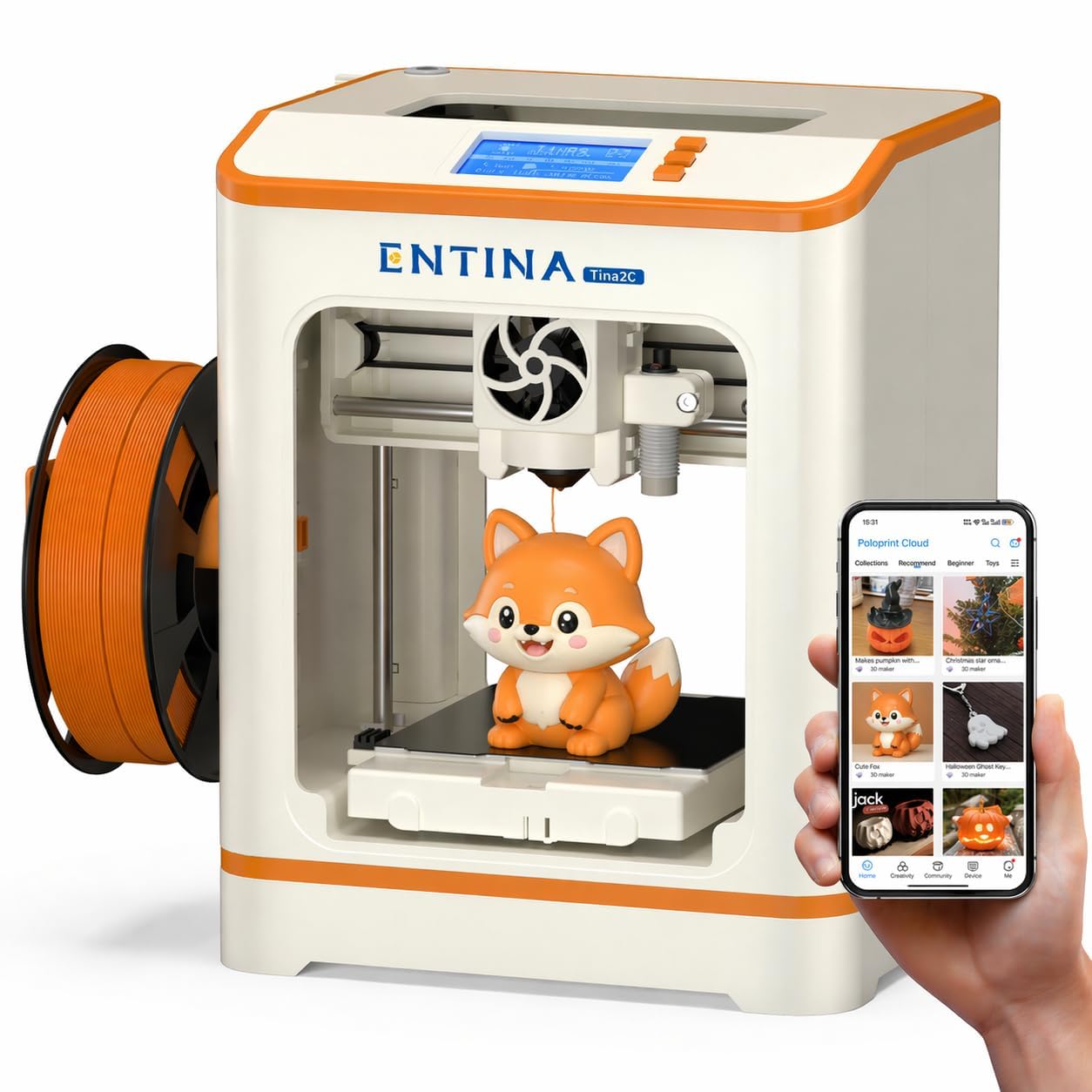
A tiny 8-pound printer that starts its first print eight minutes after you open the box — and at 8.16 pounds, it is a 3.6x lighter than the Adventurer 5M.
The Tina2C is designed specifically for kids and first-time users — the guided setup through the Poloprint Cloud app leads you from unboxing to first print in about 8 minutes. At 8.16 pounds, it is the lightest machine here by a wide margin (the Adventurer 5M is 29 pounds, a 3.6x difference), and the 8 x 6.5 x 10 inch dimensions sit easily on a desk. The 3.9 x 3.9 x 3.9 inch print volume is tiny by comparison — the Kobra X’s build volume is a 2.9x larger box — but it is perfectly sized for STEM projects, small toys, and educational models.
The features are beginner-focused: auto leveling eliminates the manual bed-adjustment nightmare, power-loss recovery saves interrupted prints, and the self-cleaning nozzle with quick-swap printhead structure makes maintenance simple. The flexible magnetic build plate lets you remove models with a simple bend. It supports both 2.4G WiFi printing and TF card (trans-flash memory card) offline mode, and works with Cura and Simplify3D slicers. The low-noise operation and rounded edges make it safe for a bedroom or classroom, and the integrated LED lighting helps you see print progress without glare.
The trade-off is obvious: the tiny build volume limits you to small objects, and the maximum nozzle temperature is not listed, so stick to PLA for best results. This is not the printer for functional household parts or large sculptures — it is the printer for a 10-year-old learning what 3D printing can do.
What It Does Best
- Guided 8-minute setup via the Poloprint Cloud app.
- Ultra-light 8.16 pounds and small footprint for desks and classrooms.
- AI photo-to-print feature and 20+ creative STEM modules.
The Limit
- 3.9-inch cubed build volume restricts you to tiny models.
- Not suitable for advanced filaments or large functional parts.
Buy this for: a young beginner or classroom where safety, ease, and small prints are the goal. Get something bigger if: you are an adult who wants to print useful household items or full-size models.
Understanding the Specs
Nozzle Temperature (°C)
This spec tells you the maximum heat the nozzle can reach, measured in degrees Celsius. A higher nozzle temperature means you can print stronger, more durable materials — basic PLA works at around 200°C, but carbon fiber filaments and advanced nylons need 300°C or more. If you are starting with PLA and maybe PETG, a 280°C nozzle is enough. If you ever want to print carbon-fiber-reinforced parts or high-temperature nylons, look for 300°C or 320°C.
CoreXY vs. Cartesian Motion
This refers to how the print head moves. CoreXY uses a belt system that moves the print head in both X and Y axes simultaneously using two motors, which allows much faster speeds (500-600 mm/s) with better stability. Cartesian printers move the bed forward and backward (Y-axis) while the head moves side to side (X-axis) — this is cheaper but slower and can wobble at high speeds. CoreXY is the standard for modern fast printers.
Build Volume (mm)
The three dimensions of the space your printer can fill, measured in millimeters. A 220 x 220 x 220 mm volume is enough for a phone stand, a small vase, or a chess piece. A 260 mm cubed volume fits a full-size helmet or larger functional brackets. Smaller machines like the Tina2C top out at 100mm cubed — fine for keychains and miniatures but useless for anything functional. Measure your desk space and think about what you want to print before picking a size.
Print Speed (mm/s)
Measured in millimeters per second, this tells you how fast the print head moves while extruding plastic. A 500 mm/s printer can finish a small Benchy boat in about 18 minutes; a 150mm/s printer takes over an hour. Faster is not always better — extremely high speeds can introduce vibration artifacts on complex models — but for a beginner, a speed of 500-600 mm/s plus vibration compensation is a safe bet for quick results.
FAQ
What is the difference between FDM and resin 3D printers?
Is PLA the only filament a beginner should use?
How long does a typical beginner printer last?
Do I need an enclosed printer to start?
What size build volume do I actually need as a beginner?
Can I print multicolor objects with a single-nozzle printer?
Does a 3D printer need WiFi or can I use an SD card?
Is a CoreXY printer better than a Cartesian one for beginners?
What maintenance does a beginner printer need?
How loud is a 3D printer during operation?
Final Thoughts: The Verdict
For most buyers, the best 3d printer for beginners is the Bambu Lab P1S because it combines auto-leveling, enclosed design, and 500mm/s speed in a package that just works from the start. If you want multicolor printing at a lower entry point, grab the Anycubic Kobra X for its native 4-color system and huge 260mm build volume. And for a young kid or classroom where safety and tiny size matter, the standout is the Entina Tina2C for getting a first print going in under ten minutes.
How We Picked
We do not accept paid placement. Every pick is matched to a real buyer and a real use-case; we do not hands-on test units.
Sources & Methodology
Specifications: manufacturer listings and product documentation. Review insights: verified customer reviews, as of July 2026. Pricing: not shown on this page (it changes often); check the current price via the retailer link.
As an Amazon Associate, FitlyFast earns from qualifying purchases. This does not affect which products we feature.