
Our readers keep the lights on and the weekend projects moving. As an Amazon Associate, I earn from qualifying purchases.
Specs are compiled from manufacturer listings and verified buyer reviews and can change over time — please confirm the key details on the product page before buying.
You can buy an affordable wireless mouse for the price of a burrito, but the wrong one will give you a wandering cursor, a dead battery at the worst moment, or a click loud enough to clear a coffee shop. The real trade-off is what you value most: a battery that lasts through two tax seasons, a shape that supports your hand all day, or the ability to switch between devices without unplugging a dongle. This guide uses the published specs and patterns from verified owners to separate the daily drivers from the desk-drawer junk.
I’m Rikta — the founder and writer behind FitlyFast. This guide is built by comparing the manufacturers’ published specifications and the patterns across verified customer reviews, so you get each pick’s real strengths and trade-offs instead of marketing spin.
Every mouse here gives you solid tracking and quiet clicks, but the right choice depends on your hand size, how often you recharge, and whether Bluetooth or a USB dongle fits your setup best.
Quick Picks
- Logitech M240 Silent Bluetooth Mouse — Best Overall
- AOC Ergonomic Vertical Mouse — Vertical Comfort
- TECKNET BT5.0/3.0 & 2.4G Rechargeable (6-Button) — Dual-Connect Budget Pick
- XBG B15pro Tri-Mode Wireless Bluetooth Mouse — Gadget-Lover’s Choice
- Logitech M325S Wireless Mouse — Precision Travel Pick
- TECKNET Bluetooth 5.2/3.0 & 2.4G Ultra-Thin Mouse — Ultra-Slim Traveler
How To Choose The Best Affordable Wireless Mouse
The real trick is knowing which spec to trust and which is marketing noise. Here are the three dials to turn before you buy.
Battery Life vs. Rechargeable
A mouse that claims “18 months” on a single AA battery gives you freedom from cables, but you must remember to keep spares around. Rechargeable mice save you from buying batteries, though many need a top-up every few weeks. The Logitech M240, for example, runs up to 18 months on one AAA, while a rechargeable model like the TECKNET 2.4G lasts about 3 months per charge (based on buyer reports, about 1 month with heavy use). If you hate hunting for a USB cable in a power outage, a long-life battery mouse wins. If you want to reduce waste and always have a charger nearby, pick a rechargeable.
Connectivity — Bluetooth vs. 2.4GHz
Bluetooth lets you pair with a laptop, tablet, or phone without any dongle, but can sometimes introduce a tiny lag (a barely noticeable delay). A 2.4GHz USB receiver gives you a more stable connection for the same price — the trade-off is you lose a USB port. Many affordable wireless mice now offer both, letting you switch with a button. If you swap between a work laptop and a personal tablet, look for Bluetooth pairing memory (the ability to remember previously paired devices); if you game or do precise design work, lean on the 2.4GHz dongle.
Size, Shape, and Silent Clicks
A mouse that is too small will cramp your hand after an hour; one that is too large makes precise clicks feel clumsy. The TECKNET BT5.0/3.0 & 2.4G model is noted as “better suited for small to medium hands” in the data, while the Logitech M325S fits large hands comfortably. Silent-click models (often rated at 90% noise reduction, meaning the switch uses dampening material to muffle the sound) are critical for shared spaces. Check reviews on click feel — sometimes “silent” means a mushy press, sometimes it is crisp but quiet.
Quick Comparison
| Model | Best For | Battery Life | Connectivity | Max DPI | Amazon |
|---|---|---|---|---|---|
| Logitech M240 Silent Bluetooth | Battery endurance champs | 18 months (AAA) | Bluetooth | — | Amazon |
| AOC Ergonomic Vertical Mouse | Comfort and customization | 200 hours (rechargeable) | Triple (BT 5.4 / 2.4G / Wired) | 4800 | Amazon |
| TECKNET BT5.0/3.0 & 2.4G | Budget dual connectivity | 3 months (rechargeable) | Bluetooth / 2.4G | 4800 | Amazon |
| XBG B15pro Tri-Mode | Feature-packed gadget lovers | 1 month (rechargeable) | Triple (BT 5.0 / BT 4.0 / 2.4G) | 2400 | Amazon |
| Logitech M325S | Precision scrolling on the go | — (batteries included) | 2.4G Wireless | — | Amazon |
| TECKNET Slim BT 5.2/3.0 & 2.4G | Travel-friendly multi-device switching | 60 days (rechargeable) | Bluetooth / 2.4G | 4800 | Amazon |
In‑Depth Reviews
1. Logitech M240 Silent Bluetooth Mouse

The set-and-forget mouse that runs for 18 months on one triple-A battery — you never hunt for a charger.
If you are tired of mice that die mid-presentation or need a battery swap every two weeks, the M240 solves that permanently. It uses a single AAA battery that Logitech says lasts up to 18 months thanks to an auto-sleep feature that kicks in when you walk away. That is six times longer than the 3-month battery of the TECKNET 2.4G rechargeable — you replace the battery roughly once a year instead of recharging every three months. It is also Bluetooth-only, so you never hunt for a dongle; just pair it in seconds with your Windows, macOS, or ChromeOS laptop. Buyers report it works instantly with a Lenovo Windows laptop but note it does not work with a Chromebook, so check your device’s Bluetooth compatibility first.
At about 2.3 x 4.0 inches, it is compact and ambidextrous (usable by both right- and left-handed people), meaning both righties and lefties get a comfortable grip, though the 3-button layout (no side buttons) keeps it simple. The silent clicks (rated at 90% reduced noise, meaning a dampened mechanism for quiet operation) mean you can click through spreadsheets in a library without a dirty look. Unlike the TECKNET models that rely on recharging, the M240 gives you freedom from cables entirely — just drop in a battery and forget it.
One reviewer noted the mouse is “truly silent and non-clicky,” which is exactly what you want for a shared workspace. The trade-off is the lack of a USB dongle option and no adjustable DPI (Dots Per Inch, cursor speed), but for everyday browsing, document work, and light creative tasks, you will not notice.
Why It Wins for Battery Life
- Up to 18 months on a single AAA — the longest of any mouse here.
- Bluetooth pairing is fast and dongle-free for laptops.
- 90% reduced click noise; comfortable for left- or right-handed use.
The Limitations You Should Know
- Only 3 buttons — no side buttons for back/forward.
- No adjustable DPI (Dots Per Inch, cursor speed) settings; fixed tracking speed.
- Some Chromebook users report it does not connect.
Ignore It If: you need thumb buttons for browser navigation or program shortcuts.
Reach For It If: battery life is your top priority and you want a dead-simple wireless mouse you set up once and forget for a year.
2. AOC Ergonomic Vertical Mouse
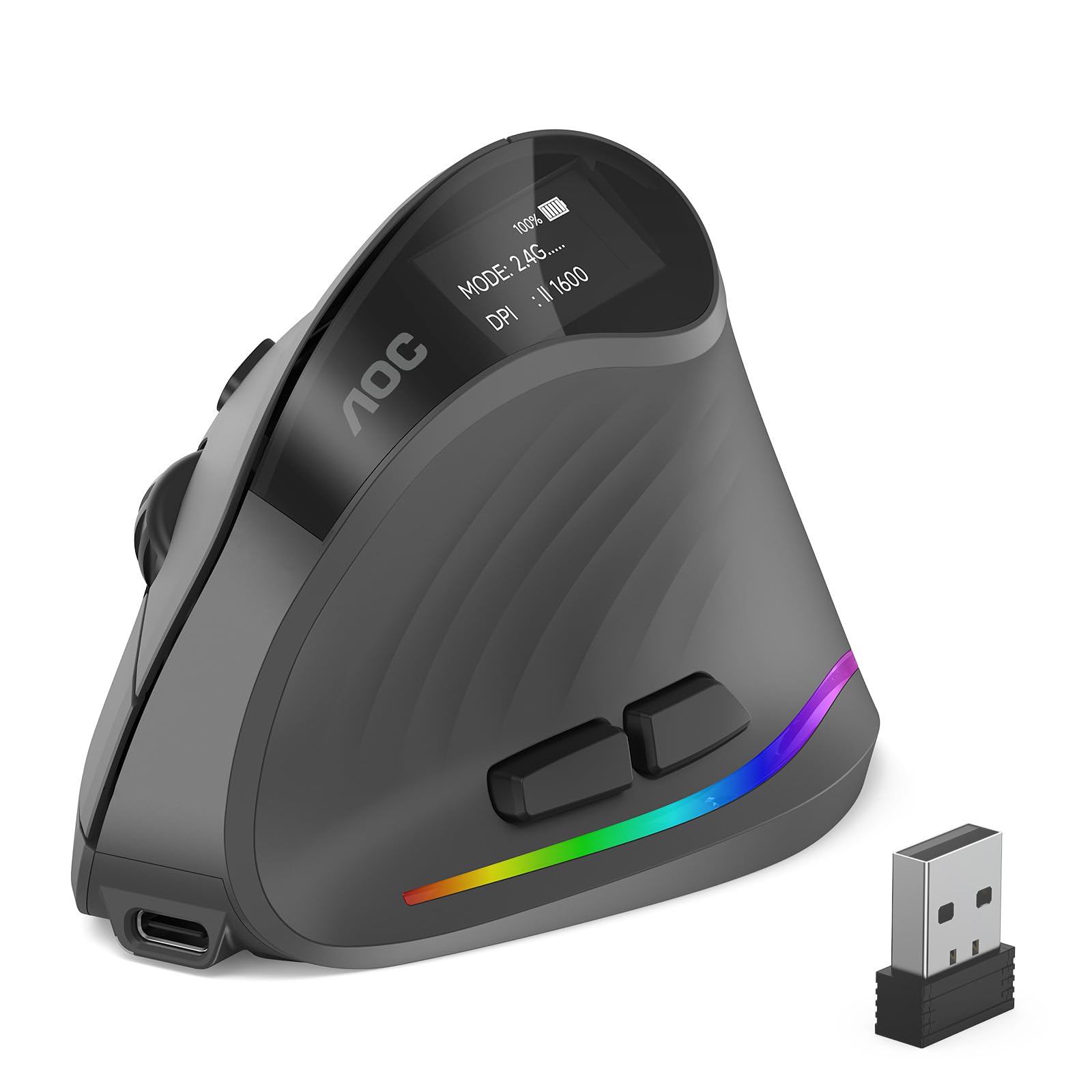
A vertical grip that keeps your wrist straight while you work through your day — its 52-degree angle relieves forearm tension better than the flat Logitech M240.
Standard flat mice force your forearm to twist, which can lead to wrist pain over long sessions. The AOC tilts your hand into a natural 52-degree “handshake” position, reducing forearm tension. It packs an 800mAh (milliamp-hour, a measure of battery capacity) rechargeable battery that runs up to 200 hours with RGB (colored lights) off and over 40 hours with the lighting on — a rare transparency in battery marketing. The 7 programmable buttons and an LED screen that shows battery percentage mean you do not guess when to charge. One buyer mentioned it is “super comfortable and versatile,” especially for reducing wrist strain during long hours.
Connectivity is triple-mode: Bluetooth 5.4 (the latest low-energy version), a 2.4GHz receiver, or even wired USB-A. You can pair up to three devices and switch between them freely, which is handy if you split your day between a desktop and a laptop. The 5-level DPI (up to 4800) lets you go from a slow 1000 DPI for precision work to a fast 4800 DPI for gaming-level cursor speed. Unlike the Logitech M240’s fixed tracking, this gives you total control over sensitivity.
The catch: it is a right-hand-only design, and the data says it is “not recommended for large hands.” The 52-degree angle takes a short adjustment period — some owners mention a day or two to get used to the vertical motion. Also, only the left and right clicks are silent; the other buttons make normal clicking sounds, so it is not fully quiet.
Ergonomic Edge
- 52-degree vertical angle reduces wrist twisting compared to a flat mouse.
- 200 hours of battery life (without RGB) is excellent for a rechargeable.
- Triple connectivity (BT 5.4, 2.4G, USB wired) with multi-device switching.
Know Before You Buy
- Right hand only — not for lefties.
- Only left/right buttons are silent; other clicks are audible.
- Optimized for small to medium hands, not large hands.
Pick This If: you feel wrist strain from a standard mouse and want a programmable vertical grip with excellent battery life.
Look Elsewhere If: you are left-handed or have large hands that need more palm space.
3. TECKNET BT5.0/3.0 & 2.4G Rechargeable (6-Button)

Two connectivity modes and six buttons — an honest value for mixed-device users that beats the Logitech M240’s 3-button limit.
You do not often see a mouse that gives you Bluetooth and 2.4GHz in one package at this price, plus six buttons and 4800 DPI (Dots Per Inch, cursor speed) adjustability. The TECKNET lets you pair with two devices simultaneously and switch with a slide — so your work PC on the receiver and your tablet on Bluetooth sit one button apart. The 6 DPI levels (800 to 4800) give you a lot of room to dial in the cursor speed that matches your screen size or task, unlike the 3-button Logitech M240 that has a single fixed speed. The 6-button count is double that of the M240’s 3, giving you forward/back navigation via thumb buttons.
Real-world battery is weaker than the marketing: it claims 3 months, but customers note it lasts about 1 month with heavy daily use. One review noted “battery lasts ~1 month (not 6+), no energy-saving feature, confusing battery indicator (only shows connection status).” Charging takes 1.5 to 2 hours via USB-A to C. It also has a note about “wiggle mode” — one buyer says the cursor sometimes moves on its own even when the mouse is off, which may be useful for presentations but cannot be turned off. Side buttons are not compatible with macOS (Apple’s operating system).
Where It Compares Well
- Six buttons with thumb forward/back for browsing.
- 6 adjustable DPI levels from 800 to 4800.
- Dual connection (Bluetooth and 2.4G receiver) for two devices.
The Real Trade-Off
- Battery lasts about 1 month in real use, not the claimed 3 months.
- Battery indicator only shows connection status, not charge level.
- “Wiggle mode” can cause unwanted cursor movement in some units.
Best For: budget shoppers who need side buttons and multi-device switching without spending much.
skip it if: you need accurate battery feedback or a completely reliable cursor in a quiet office.
4. XBG B15pro Tri-Mode Wireless Bluetooth Mouse

A built-in LED display shows your battery and DPI at a glance — no more fumbling with software like on the TECKNET.
This mouse is packed with tech you rarely see at this price: a small LED screen on the side displays the exact battery percentage, the DPI level (800/1000/1200/1600/2400), and which connection mode you are in. That alone saves you the constant stabbing at the battery icon everyone does. The XBG connects via Bluetooth 5.0, Bluetooth 4.0, or a 2.4GHz dongle, switching between devices in 0.8 seconds — useful if you split time between a personal laptop and a work desktop. The 6-button layout includes a contoured thumb rest and arched palm support, reducing wrist strain during long work sessions.
The 500 mAh (milliamp-hour, battery capacity) battery lasts about one month per charge per the data, with a 5-minute auto-sleep timer that kicks in to save power. However, one owner reported that you cannot remap the buttons or adjust the sleep timing. The silent clicks are quiet enough for libraries, though reviewers mention the clicks retain a satisfying feel rather than feeling mushy. Another buyer said the mouse works “flawlessly” with both Bluetooth and the 2.4GHz dongle, and that 1600 DPI handles three monitors without issue.
The Unique Advantage
- LED screen shows battery percentage and DPI in real time.
- Tri-mode connectivity with fast 0.8s device switching.
- Contoured thumb rest and arched palm support for comfort.
Reality Check
- About 1 month of battery per charge, which is shorter than the Logitech M240.
- Buttons cannot be remapped; sleep mode timing is not adjustable.
- Instructions are unhelpful for customization features.
Choose This If: you want to see your battery level without opening software and need fast multi-device pairing.
Not For You If: you need a mouse that lasts months without charging or require customizable button mapping.
5. Logitech M325S Wireless Mouse

A tiny, dependable mouse with a tilt wheel for faster scrolling through dense pages — a feature the Logitech M240 lacks entirely.
The Logitech M325S is built around its wheel: a micro-precise scroll wheel with a tilt function that lets you scroll sideways through wide spreadsheets or long web pages without grabbing the scroll bar. That single control puts it ahead of the standard wheel on the TECKNET or Logitech M240 for anyone who works with tables, timelines, or code. The contoured shape fits the natural curve of your hand, and the matte finish resists fingerprints. Reviewers point out it is “small, durable, portable,” and works for years without ever turning off — one owner noted the battery lasted “years without replacement.” It uses a 2.4GHz USB receiver (included), so you get a stable connection free of the occasional Bluetooth lag that can pop up on the XBG or TECKNET Bluetooth models.
The catch is the on/off switch: one reviewer called it “unmarked (black-on-black text),” requiring a white marker to read which position is on. Also, it is powered by AA batteries (included), which is less environmentally convenient than the rechargeable TECKNET options. The small shape may cause cramping for larger hands during extended use, though one large-handed reviewer said it fits them well.
Scrolling Advantage
- Tilt wheel for horizontal scrolling — rare at this price.
- Stable 2.4GHz connection with zero pairing.
- Contoured matte finish is comfortable and portable.
Physical Quirks
- On/off switch text is nearly invisible on the black model.
- Small size may cause hand cramping for larger hands over long sessions.
- Uses AA battery, not rechargeable.
Take It With You If: you need precise horizontal scrolling for spreadsheets, timelines, or editing and want a dependable USB dongle.
Leave It If: you need a rechargeable battery or Bluetooth pairing for a tablet.
6. TECKNET Bluetooth 5.2/3.0 & 2.4G Ultra-Thin Mouse
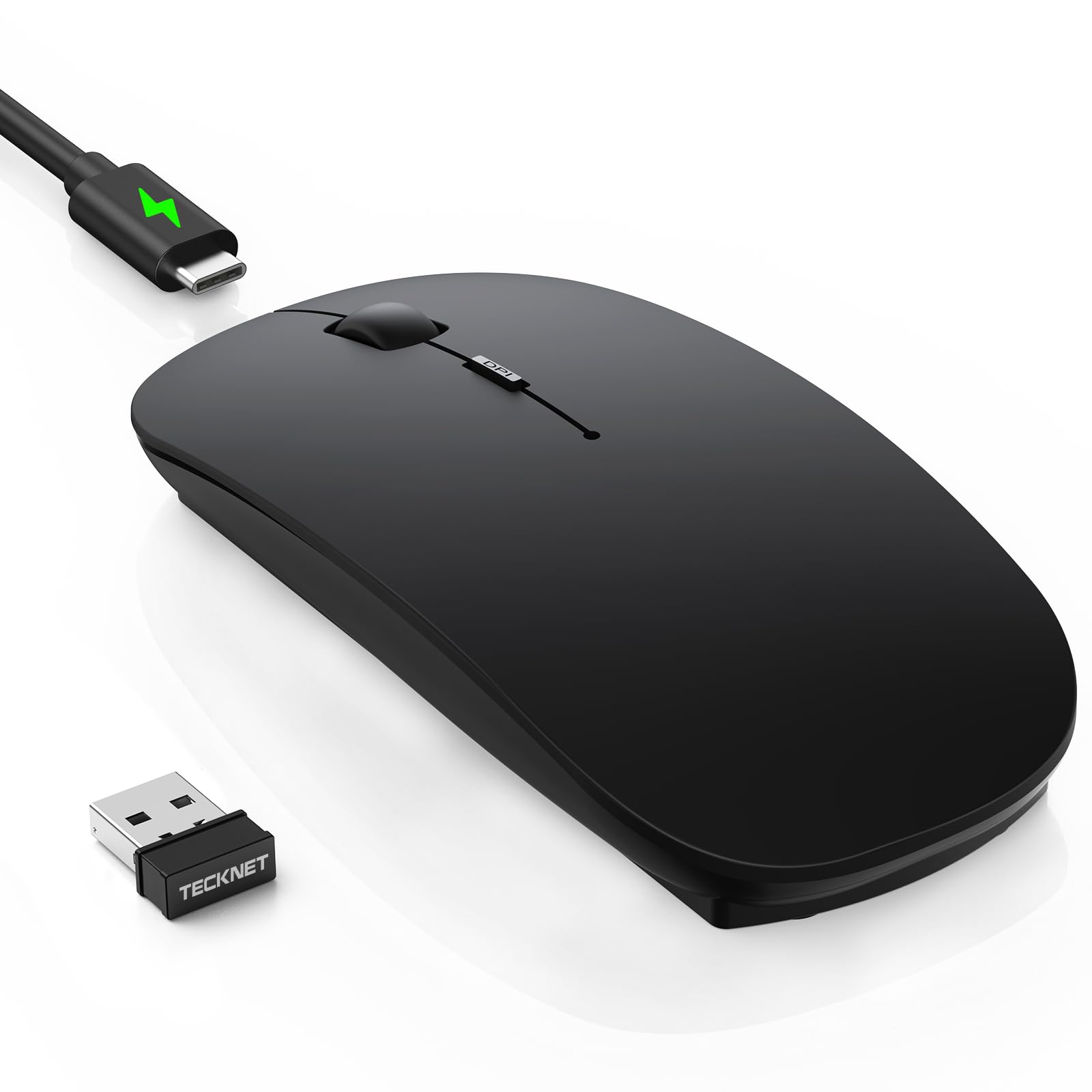
A pocket-friendly, ultra-slim body that connects to three devices at once — thinner than the Logitech M240 by half.
At just 0.93 inches thick, this TECKNET is the slimmest in the lineup — it slides into a laptop bag pocket or even a large jacket pocket without a bulge. It connects to three devices (via Bluetooth 5.2, Bluetooth 3.0, or a 2.4GHz USB dongle) and switches with a single click, making it the best option here for someone who juggles a work PC, a personal laptop, and a tablet. The 5-button layout is ambidextrous (usable by both hands), so lefties can use it too, unlike the right-hand-only AOC vertical mouse. It has a 60-day battery life (claimed) based on 2 hours of daily use, with a 30-minute auto-sleep and 12-month standby. One customer observed it “holds a charge for a long time” and is great for switching between work and personal machines.
The quirk: the first 1-2 days some units exhibit laggy or ghost tracking (erratic cursor movement), which then resolves on its own per one reviewer’s report. The cable included is charging-only, not a wired data connection. The black version has a matte finish that may pick up sweat marks after extended use. The 4800 DPI maximum and 6-level adjustability are on par with the other TECKNET, but the slim profile means less palm support than the more sculpted Logitech M325S or the AOC vertical mouse.
Pocket-Ready Design
- Ultra-thin at 0.93 inches — easily portable.
- Connects to 3 devices and switches with a click.
- Ambidextrous shape works for left- and right-handed users.
Drawbacks to Know
- Some units have ghost tracking for the first 1-2 days of use.
- Matte black finish can get dirty with sweaty hands.
- Only 5 buttons compared to the 6-button TECKNET and does not store the dongle internally like some others.
Perfect For: travelers who need a super-slim mouse that pairs with three devices and disappears into a bag.
Not Ideal If: you want a palm-filling ergonomic shape or a dongle-free setup.
Understanding the Specs
DPI — Dots Per Inch
DPI (Dots Per Inch) tells you how many pixels the cursor moves for every inch you slide the mouse. A lower DPI (800) moves the cursor slowly for fine work like photo editing; a higher DPI (4800) zips it across large monitors fast. Most affordable wireless mice offer adjustable DPI, so you can dial in the speed that feels natural to you. If you use a single 1080p laptop screen, 1200 to 2400 DPI is plenty. For a multi-monitor setup, you might prefer 3200 or 4800 to reduce arm travel. If a mouse does not list adjustable DPI (like the Logitech M240), it runs at a fixed speed — fine for basic browsing but restrictive for gamers or designers.
Connectivity — Bluetooth vs. 2.4GHz vs. Wired
Bluetooth connects without a dongle, saving your USB port, but it introduces a tiny amount of latency (a barely noticeable delay) that is imperceptible for office work but noticeable in fast-paced gaming. 2.4GHz uses a small USB receiver that gives you a near-instant, lag-free connection. Some mice offer both, plus a wired mode via USB-C, giving you the ultimate flexibility. If you switch between a work laptop that blocks USB devices and a personal desktop, a dual-mode or tri-mode mouse is worth the extra few dollars. Wired mode is a bonus for charging and data at the same time, but adds a cable to your desk.
FAQ
Will an affordable wireless mouse work with my Chromebook or iPad?
How long does an affordable wireless mouse actually last on one charge?
Is a 4800 DPI mouse worth it for everyday office work?
Can I use a 2.4GHz wireless mouse without its USB dongle?
What does “silent click” mean and does it affect the feel?
Which affordable wireless mouse is best for someone with small hands?
How important is an auto-sleep feature?
Can I recharge an affordable wireless mouse while using it?
Why does my wireless cursor sometimes stutter or jump?
Are budget wireless mice good for light gaming?
Final Thoughts: The Verdict
For most people, the affordable wireless mouse winner is the Logitech M240 Silent Bluetooth Mouse because its 18-month battery means you set it, forget it, and never hunt for a charging cable. If you want a vertical design to prevent wrist strain, grab the AOC Ergonomic Vertical Mouse. And for a pocket-friendly, tri-device switcher that disappears into a bag, the standout is the TECKNET Bluetooth 5.2/3.0 & 2.4G Ultra-Thin Mouse.
How We Picked
We do not accept paid placement. Every pick is matched to a real buyer and a real use-case; we do not hands-on test units.
Sources & Methodology
Specifications: manufacturer listings and product documentation. Review insights: verified customer reviews, as of July 2026. Pricing: not shown on this page (it changes often); check the current price via the retailer link.
As an Amazon Associate, FitlyFast earns from qualifying purchases. This does not affect which products we feature.