
Our readers keep the lights on and the weekend projects moving. As an Amazon Associate, I earn from qualifying purchases.
Specs are compiled from manufacturer listings and verified buyer reviews and can change over time — please confirm the key details on the product page before buying.
Thick walls and thin budgets make apartment WiFi a real pain. You need a router that pushes signal through concrete and drywall without costing a fortune, and this guide picks the models that actually handle that job.
I’m Rikta — the founder and writer behind FitlyFast. This guide is built by comparing the manufacturers’ published specifications and the patterns across verified customer reviews, so you get each pick’s real strengths and trade-offs instead of marketing spin.
Whether your apartment is a compact studio or a 1,500-square-foot layout, the right apartment wifi router cuts lag during video calls and stops buffering mid-stream. These four picks deliver on that promise.
Quick Picks
- Tenda WiFi 6 Router, AX3000 Dual Band Gigabit Wireless Router (RX12Pro) — Best Overall
- TP-Link AX1800 WiFi 6 Router (Archer AX21 V5) — Best Value
- Linksys Mesh Wifi 6 Router, Dual-Band, 1,700 Sq. ft Coverage, 25+ Devices – MR7350 — Best Coverage
- NETGEAR WiFi 6 Router 4-Stream (R6700AX) — Compact Pick
How To Choose The Best Apartment WiFi Router
Picking a router for an apartment means balancing speed against interference from your neighbors’ networks, while keeping the price sensible. These three specs matter most in this specific setting.
WiFi Generation: Why WiFi 6 Already Matters In An Apartment
WiFi 6 (the 802.11ax standard) talks to multiple devices at once using OFDMA — think of it as a delivery truck that carries many packages in one trip instead of making separate runs. In an apartment with phones, laptops, TVs, and smart bulbs all connected, that means fewer slowdowns during peak hours. All four routers in this guide are WiFi 6, so you skip the backlog that older WiFi 5 routers suffer when too many gadgets pile on.
Band Management: Dual-Band and the 2.4 GHz vs 5 GHz Split
A dual-band router broadcasts two separate networks: the 2.4 GHz band (slower speed but better at pushing through walls) and the 5 GHz band (faster speed but shorter range). In a dense apartment building, the 2.4 GHz band gets crowded by neighbor routers, so you want a router that lets you split the bands or steer devices efficiently. Buyers praise the TP-Link Archer AX21 specifically for letting them separate the two bands in the settings, which fixed multi-room audio glitches.
Coverage and Antenna Design for Dense Living
Look at the stated coverage area — most apartment routers handle 1,500 to 1,700 square feet — but also check antenna type. External high-gain antennas (like the 6dBi antennas on the Tenda RX12Pro) physically push signal farther than internal antennas. If your router sits in a corner behind a TV, external antennas give you more flexibility to angle the signal toward the rooms you actually use.
Quick Comparison
| Model | Best For | Data Speed | WiFi Standard | Coverage | Amazon |
|---|---|---|---|---|---|
| Tenda RX12Pro | Raw speed and multi-device handling | 2976 Mbps | AX3000 | Whole-home | Amazon |
| TP-Link Archer AX21 V5 | Balanced performance with easy setup | 1200 Mbps | AX1800 | Wide and reliable | Amazon |
| Linksys MR7350 | Mesh expandability and coverage | 1.8 Gbps | AX1800 | 1,700 sq ft | Amazon |
| NETGEAR R6700AX | Compact design for smaller spaces | 1.8 Gbps | AX1800 | 1,500 sq ft | Amazon |
In‑Depth Reviews
1. Tenda WiFi 6 Router, AX3000 Dual Band Gigabit Wireless Router (RX12Pro)
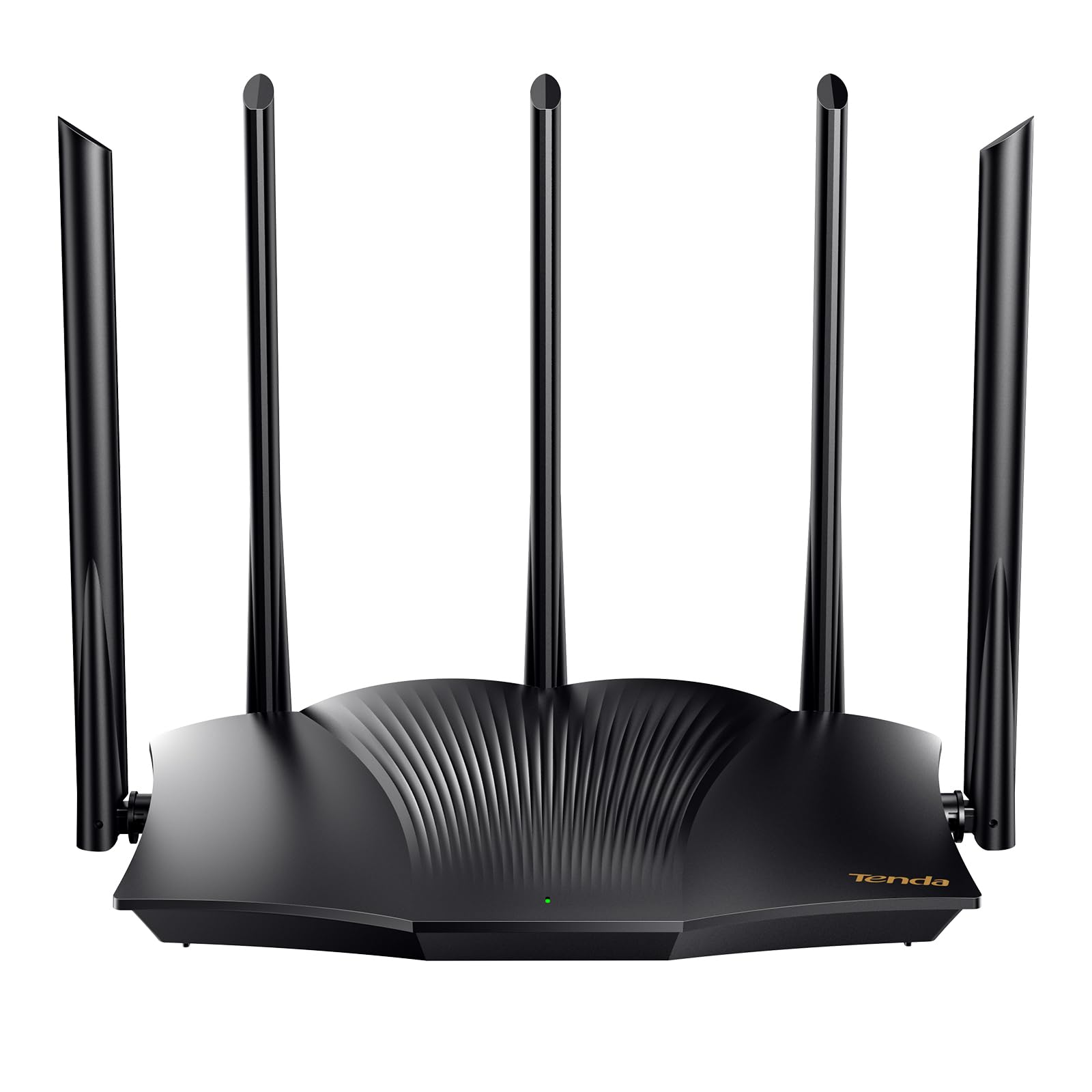
The raw-speed beast that leaves the TP-Link Archer AX21 in the dust on data rate.
The Tenda RX12Pro has a data transfer rate of 2976 Megabits Per Second (Mbps) — more than double the 1200 Mbps of the TP-Link Archer AX21 — so you can run 4K streams, big downloads, and video calls all at once without a hiccup. It uses an AX3000 dual-band engine (the “AX3000” means its combined 2.4 GHz and 5 GHz speeds total around 3000 Mbps), giving you up to 2402 Mbps on the 5 GHz band and 574 Mbps on the 2.4 GHz band. That headroom keeps things smooth even when everyone in the apartment is online.
Buyers report easy setup even in a steel-sided shop via a booster, with a fast and stable connection for phone, computer, and TV running simultaneously with no issues. The five external 6dBi antennas (6dBi is a measure of how much the antenna boosts the signal) push through apartment walls more aggressively than the internal antennas on the NETGEAR R6700AX. And if you need secure remote access to your home network, the OpenVPN and WireGuard support (available via the latest firmware update) gives you flexibility that mid-range routers skip.
One honest trade-off: the coverage is described as “whole-home” without a specific square-foot number, and a few buyers mention range can fall short in larger layouts. One reviewer called it “horrible” for lag. Still, for a typical apartment under 1,200 square feet, the raw speed and antenna power make this the pick that outperforms the TP-Link on pure data rate.
Why It Leads The List
- 2976 Mbps data transfer rate — fastest in this roundup
- Five external 6dBi high-gain antennas for better wall penetration
- One-click intelligent diagnosis to fix network freezes
What To Watch
- Coverage is whole-home but not precisely quantified
- A minority of reviewers report range or lag issues
Speed-first pick: This router suits anyone who prioritizes fast data transfer for streaming and downloading in a compact apartment.
Potential dealbreaker: If your apartment spans more than 1,500 square feet or has particularly thick concrete, you may need a mesh system instead.
2. TP-Link AX1800 WiFi 6 Router (Archer AX21 V5)

The crowd-pleaser that balances speed, range, and price for everyday apartment living.
While the Tenda leads in raw data speed, the Archer AX21 wins on ease and consistency. It delivers 1200 Megabits Per Second versus the Tenda’s 2976 Mbps, but for streaming Netflix and hopping on Zoom, that speed is enough. The real strength here is Beamforming (a feature that focuses the WiFi signal directly at your devices) paired with four high-gain antennas and an advanced front-end module (FEM) chipset, which concentrates the signal instead of spraying it everywhere.
Owners mention a concrete real-world win: one spectrum internet customer saw speed improve from 310/9 to 360/13 Mbps after switching, with a stronger signal than their ISP router. Another reviewer noted the router handles 32 connected devices easily, including guest accounts. The dual-band setup shines because you can separate the 2.4 GHz and 5 GHz bands in settings — a trick that resolved Echo Dot multi-room audio glitches for one user. The TP-Link is also a Certified for Humans device, meaning the setup is simpler than typical networking gear, and the Tether app (or web interface) gets you online in minutes. But several reviewers advise avoiding the phone app — use the web interface at 192.168.1.1 instead, as the app can cause password lockouts.
Unlike the Tenda, this router does not include WiFi+ mesh networking, so you cannot daisy-chain multiple units later. But for a standard apartment, the Archer AX21 gives you exactly what you need without paying for speed you won’t use.
Why It Works For Apartments
- Beamforming focuses signal to your devices through walls
- Handles 32 connected devices without slowdowns
- Guest network and parental controls built in
Where It Comes Up Short
- 1200 Mbps data rate versus the Tenda’s 2976 Mbps
- Tether phone app is unreliable — stick to the web interface
Budget-savvy choice: This is for the apartment dweller who wants reliable WiFi 6 without overpaying for raw speed they will not tap.
One real limitation: The lack of mesh expandability means this is a single-router solution — no adding nodes later for a larger home.
3. Linksys Mesh Wifi 6 Router, Dual-Band, 1,700 Sq. ft Coverage, 25+ Devices – MR7350

The apartment router that grows with you thanks to Intelligent Mesh technology.
Unlike the Tenda and TP-Link, which are standalone units, the Linksys MR7350 is built around Intelligent Mesh technology. That means you start with this single router covering 1,700 square feet — the largest stated coverage in this lineup — and if your apartment has awkward corners or you move to a bigger place, you add extra nodes to expand the network without losing speed. The dual-band WiFi 6 router uses a Qualcomm chipset to keep latency (the delay before data starts to transfer) low, and it supports 25+ devices simultaneously, useful for a busy apartment with smart bulbs, laptops, and streaming boxes.
Customers note that setup via the phone app took under five minutes after avoiding a fake app in the app store (tip: use the legitimate Linksys app, not a lookalike). One reviewer, upgrading from a 12-year-old Linksys router, saw faster performance on smart TVs and a PC immediately. The router features retractable antennas rather than fixed ones, giving you a cleaner look if you want to tuck it into a media console. However, this is an entry-level WiFi 6 router — it lacks 160 MHz channels (a wider channel that allows faster data transfer), so you will not get the absolute peak WiFi 6 speeds that more expensive models offer.
The trade-off compared to the Tenda and TP-Link is data rate: the MR7350 runs at 1.8 Gbps total bandwidth (AX1800), which is slower than the Tenda’s 2976 Mbps but comparable to the TP-Link’s 1200 Mbps. Yet the mesh expandability beats both for someone who wants future-proofing. Just note that the app-based management is mandatory for initial setup — the web interface is accessible at 192.168.1.1 but disabling remote management also blocks local web access, as some reviewers discovered.
Why It Stands Out
- Intelligent Mesh lets you add nodes later for bigger spaces
- 1,700 square feet coverage — biggest single-router claim here
- Qualcomm chipset for stable low-latency connections
Where It Falls Behind
- Entry-level WiFi 6 — no 160 MHz channel support
- App-based management is mandatory and some users dislike it
Future-friendly pick: Choose this if you want a router that can expand into a mesh network as your apartment or device count grows.
One honest drawback: The lack of 160 MHz channels means you leave some peak WiFi 6 speed on the table — fine for streaming, less ideal for heavy local file transfers.
4. NETGEAR WiFi 6 Router 4-Stream (R6700AX)

A tidy, modern router that hides away cleanly and still delivers strong signal.
While the Tenda and TP-Link use external antennas that stick out, the NETGEAR R6700AX uses internal antennas for a compact body that blends into a bookshelf or media cabinet. The AX1800 speed (up to 1.8 Gbps total) matches the Linksys on paper, and the four Gigabit Ethernet LAN ports (ports that connect wired devices at up to 1,000 Mbps each) give you wired connections for a gaming console or desktop PC right from the start.
Reviewers point out that setup via the Nighthawk app is straightforward — one reviewer had it online in 10 minutes, another noted the app’s QR code scanning and precise troubleshooting made the process simple. A Spectrum customer saw 934.74 Mbps download speeds on a 1 Gbps plan, and the router covered a 1,300-square-foot home with smooth streaming and no dead zones. However, the setup process has been described as frustrating by some, requiring roughly 30 steps in the app before you are online. Also, a small number of reviewers warn that customer support requires a paid subscription after the initial period, a notable difference from the free expert support offered with the TP-Link Archer AX21.
Compared to the Tenda, this router has a lower data transfer rate and fewer antennas, and compared to the Linksys, it lacks mesh expandability. But if you want a WiFi 6 router that disappears into your apartment’s decor and still delivers enough speed for daily use, the R6700AX is the most visually discreet option here.
Why You Might Pick It
- Internal antennas give a clean, compact look
- Four Gigabit Ethernet LAN ports for wired devices
- Nighthawk app setup with QR code scanning
What Holds It Back
- Setup can be tedious — up to 30 steps in the app
- Customer support requires a paid subscription after initial period
Aesthetics-first pick: Choose this if you hate the look of external antennas and want a router that blends into your living room.
Trade-off to note: The internal antennas mean slightly less flexibility in directing signal, and the setup process can be more involved than the TP-Link’s web-based approach.
Understanding the Specs
Data Transfer Rate (Mbps)
This is the raw speed a router can push across its network, measured in Megabits Per Second (Mbps). A higher number means faster downloads, smoother streaming, and less waiting. In an apartment, you do not always need the highest number — 1200 Mbps is plenty for most households — but if you have a fast internet plan (gigabit speeds, meaning 1,000 Mbps or more) or frequently transfer large files within your network, a router like the Tenda RX12Pro at 2976 Mbps gives you room to breathe without the router becoming the bottleneck.
WiFi Standard (AX number)
The “AX” followed by a number (like AX1800 or AX3000) tells you the total theoretical bandwidth of the router by summing the speeds of both the 2.4 GHz and 5 GHz bands. AX1800 means roughly 1800 Mbps total; AX3000 means roughly 3000 Mbps total. A higher AX number generally means a faster and more capable router, but the real-world difference between AX1800 and AX3000 only shows when you have a fast internet plan and many devices running at the same time. For a typical apartment with 10–20 devices, AX1800 is a solid starting point.
FAQ
Will a WiFi 6 router work with my older devices like a laptop from 2015?
Do I need a separate modem to use these routers?
How many devices can these routers actually handle without slowing down?
Is the Linksys MR7350 really a mesh system or just a regular router?
Will a router with external antennas give me better signal through concrete walls?
What is the difference between the 2.4 GHz and 5 GHz bands on these dual-band routers?
How important is WPA3 security for an apartment router?
Can I use a VPN with these apartment routers?
What is the best placement for a router in a small apartment?
Why do some shoppers say to avoid the phone app for setup on these routers?
Final Thoughts: The Verdict
If you want one dependable pick, the apartment wifi router winner is the Tenda RX12Pro because its 2976 Mbps data transfer rate and five external 6dBi antennas give you a higher data rate than the TP-Link option at 1200 Mbps, while keeping the price reasonable. If you want a router with easy band splitting and a proven track record for stable connections, grab the TP-Link Archer AX21 V5. And for future-proofing with mesh expandability, the Linksys MR7350 is the one that covers a larger space and grows with you.
How We Picked
We do not accept paid placement. Every pick is matched to a real buyer and a real use-case; we do not hands-on test units.
Sources & Methodology
Specifications: manufacturer listings and product documentation. Review insights: verified customer reviews, as of July 2026. Pricing: not shown on this page (it changes often); check the current price via the retailer link.
As an Amazon Associate, FitlyFast earns from qualifying purchases. This does not affect which products we feature.