
Our readers keep the lights on and the weekend projects moving. As an Amazon Associate, I earn from qualifying purchases.
Specs are compiled from manufacturer listings and verified buyer reviews and can change over time — please confirm the key details on the product page before buying.
If you are still buying color ink cartridges for a home office printer that mainly prints black text documents, you are paying for a feature you barely use and dealing with dried-out nozzles every time you need a page. A dedicated monochrome laser printer skips the color cost, prints faster, and handles your daily forms, contracts, and reports without the usual headaches. The challenge is picking the right one that balances print speed, paper handling, and long-term running costs without overpaying.
I’m Rikta — the founder and writer behind FitlyFast. This guide is built by comparing the manufacturers’ published specifications and the patterns across verified customer reviews, so you get each pick’s real strengths and trade-offs instead of marketing spin.
Whether you run a small team or work from a home desk, your next workhorse machine is among these top-rated models — this breakdown of the all in one black and white laser printer market sorts out exactly which one suits your workload and budget.
Quick Picks
- Brother Professional Laser Printer with Scanner, High-Speed 36 ppm Monochrome All-in-One (MFC-L2900DW) — Best Overall
- Brother HL-L2480DW Wireless Compact Monochrome Multi-Function Laser Printer — Speed Champion
- Canon imageCLASS MF287dw Monochrome All-in-One Laser Printer — Reliable Workhorse
- HP LaserJet Pro MFP 3101fdw Wireless Black & White All-in-One Laser Printer — Office Security Pick
- Brother MFC-L2820DW Wireless Compact Monochrome All-in-One Laser Printer — Compact Fax Hub
- HP LaserJet MFP M234sdw Wireless Printer, Print, Scan, Copy — Budget Champion
How To Choose The Best All In One Black And White Laser Printer
A monochrome laser all-in-one handles print, scan, and copy (some also fax) using black toner only. The main factors to weigh are print speed, paper capacity, duplex (two-sided printing) support, and whether the machine includes an auto document feeder for multi-page scans and copies. Running costs matter too — the price of replacement toner cartridges varies a lot between brands and models.
Print speed and first page out time
Speed is measured in pages per minute (ppm) for black-and-white documents. Faster models push 35-36 ppm, which matters if you are batch-printing 30-page reports or serving a small team. The first-page-out time (how quickly the first printed sheet emerges) is also important — a machine that starts printing in under 5-6 seconds feels much snappier at the desk.
Paper handling and duplexing
An auto document feeder (ADF) lets you load a stack of original pages to copy or scan without standing at the glass. Look for at least a 50-sheet ADF. Auto duplex printing prints on both sides of the page automatically, cutting your paper consumption roughly in half. For high-volume users, a larger paper input tray (250 sheets or more) means fewer refills during the day.
Quick Comparison
| Model | Best For | Print Speed | Paper Tray Capacity | Auto Document Feeder | Amazon |
|---|---|---|---|---|---|
| Brother MFC-L2900DW | Small business power | 36 ppm | 250 sheets | 50 pages (single-pass duplex scan) | Amazon |
| Brother HL-L2480DW | Compact value with speed | 36 ppm | 250 sheets | None (flatbed only) | Amazon |
| Canon imageCLASS MF287dw | Reliable all-rounder | 35 ppm | — | — | Amazon |
| HP LaserJet Pro MFP 3101fdw | Office security & uptime | 35 ppm | — | Auto document feeder | Amazon |
| Brother MFC-L2820DW | Full fax & scan in compact size | 36 ppm | — | 50 pages | Amazon |
| HP LaserJet MFP M234sdw | Budget-friendly small team | 30 ppm | — | Auto document feeder | Amazon |
In‑Depth Reviews
1. Brother Professional Laser Printer with Scanner, High-Speed 36 ppm Monochrome All-in-One (MFC-L2900DW)

The small-business workhorse with a big touchscreen and single-pass duplex scanning.
This Brother machine prints at a brisk 36 ppm (pages per minute) — matching the fastest pick on this list — so a 50-page contract is done in under a minute and a half. The real efficiency booster is the 50-page auto document feeder with single-pass two-sided scanning: it reads both sides of a page in one pass, cutting multi-page digital filing time roughly in half. The large 3.5-inch touchscreen display makes standalone scan-to-email and scan-to-PDF simple, which buyers report is a “dream” to navigate compared to older button-only panels. Reviewers also note the wireless setup via AirPrint is “flawless and easy”, with no mandatory toner subscription required. One owner says it is the “best printer I’ve owned” and highlights the crisp laser text and fast, quiet operation.
Unlike the Brother HL-L2480DW below, this model includes fax and the ADF, making it a more complete office hub. The included starter toner yields about 700 pages, but you can swap in a high-capacity TN830XL cartridge later to lower your per-page cost dramatically. One catch mentioned: after about six months one unit threw a “look at paper bin” error that Brother support could not resolve, so the ADF mechanism might be the one part that occasionally acts up.
Why it leads the pack
- Speedy 36 ppm output handles daily team volume
- Single-pass duplex scanning saves serious time
- Responsive 3.5-inch touchscreen for standalone jobs
One thing to watch
- Rare paper-bin error reported after months of heavy use
Your office’s next core machine: Reach for this if you regularly scan two-sided multi-page documents and want a premium interface that just works.
Skip if you don’t need fax or an ADF: The simpler Brother HL-L2480DW costs less and still delivers the same print speed.
2. Brother HL-L2480DW Wireless Compact Monochrome Multi-Function Laser Printer
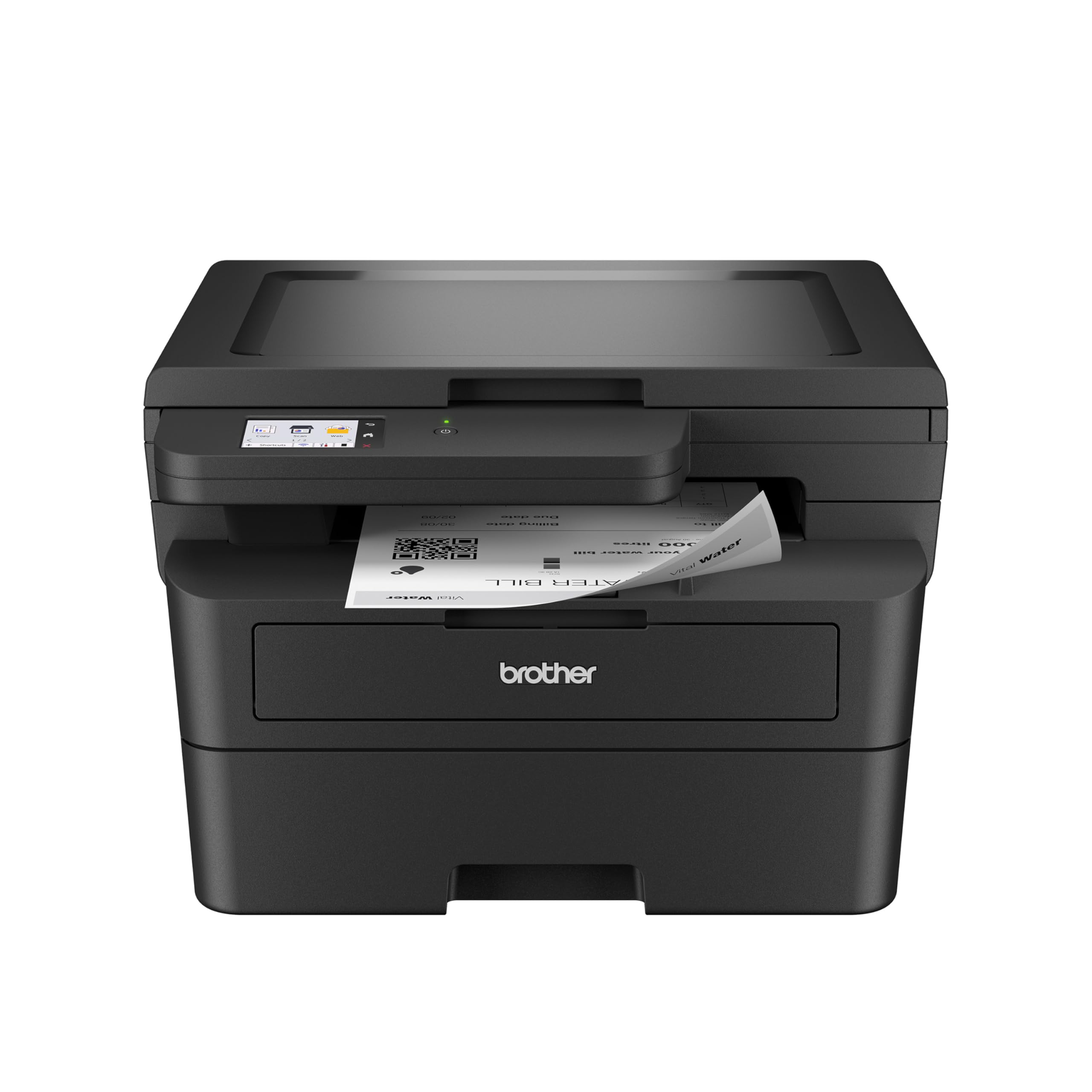
The speedster that leaves old inkjets in the dust — with a friendly touchscreen.
At 36 ppm this Brother model matches the top speed on the list, and it prints at 36 ppm versus the HP LaserJet MFP M234sdw at 30 ppm. That difference adds up when you print a 300-page bid package. Owners mention it was “finished printing in almost no time without all the noise and drama of the old ink jet printer.” The 2.7-inch touchscreen offers cloud printing and scanning to Google Drive, Dropbox, and Evernote right from the panel — a trick the cheaper HP M234sdw lacks. Automatic duplex printing is built in, so you halve your paper use on two-sided documents without flipping pages manually.
Unlike the similarly fast Brother MFC-L2900DW, this model has only a flatbed scanner — no auto document feeder — so copying or scanning a multi-page stack means lifting the lid for each sheet. If your workflow is mainly single-page scans and prints, that trade-off saves you money. The paper tray holds 250 sheets, and the unit itself is compact at 15.7″ deep by 16.1″ wide. One reviewer sums it up: “Glad I made this purchase. Why didn’t I do this sooner.”
Why it wins on speed
- Class-leading 36 ppm makes quick work of big documents
- Intuitive 2.7-inch touchscreen with cloud app access
- Quiet and drama-free compared to inkjet alternatives
What it gives up
- Flatbed only — no auto document feeder for stacks
- Manual feed slot is fine but the tray is moderate at 250 sheets
Best value for speed-hungry users: Grab this if you want the fastest print speed available and mostly handle single-page originals.
Look at the MFC-L2900DW instead if: you regularly copy or scan multi-page documents and need an auto feeder.
3. Canon imageCLASS MF287dw Monochrome All-in-One Laser Printer

A near-instant first page out and a three-month track record with zero jams.
The Canon prints at 35 ppm — just a hair behind the 36 ppm Brother models — but its standout spec is a first-print-out time under 4.9 seconds, meaning the first page lands on the tray almost as fast as you hit print. That makes it feel especially responsive for the first job of the day. Customers note “no paper jams in 3 months of use,” which points to solid paper-path engineering. The machine supports high-capacity toner cartridges, so you can keep printing longer between swaps, and duplex printing is automatic. Wireless connectivity works with the Canon Print app, Apple AirPrint, and Mopria Print Service, covering all the common mobile printing routes.
One limitation: the hardware interface is USB 2.0, so if you need an Ethernet port for wired networking you are out of luck. A few reviewers mention the included power cord is a bit short, and at least one buyer struggled with error messages that required a restart. Still, the majority of owners call it “easy to set up” and “plug and play,” making it a strong mid-range choice.
Strengths
- Under 5-second first page out feels instant
- High-yield toner keeps running costs in check
- Reported zero jams over months of regular use
Weaknesses
- No Ethernet port — USB-only wired connection
- Occasional error messages requiring a restart
Perfect if you hate waiting for the first page: The near-5-second first print out is noticeably faster than most competitors.
Not for you if you need wired networking: The lack of Ethernet means you rely entirely on Wi-Fi or a direct USB link.
4. HP LaserJet Pro MFP 3101fdw Wireless Black & White All-in-One Laser Printer

A secure, fast printer built for teams that need data protection and minimal downtime.
At 35 ppm single-sided, the HP LaserJet Pro 3101fdw keeps pace with the Canon and falls just one page per minute behind the 36 ppm Brother units — a difference you will barely notice on a typical day. What sets this HP apart is the included Wolf Pro Security, which adds customizable security settings to protect your documents and network from unauthorized access. Intelligent Wi-Fi actively looks for the strongest connection to stay online, so you avoid the “printer offline” trap at critical moments. One reviewer ran over 20,000 pages in nine months without a single jam, using Economode to double cartridge life (10,000 pages per cartridge instead of 5,000). The auto document feeder handles multi-page copy and scan jobs, and the machine includes fax for legacy office needs.
Unlike the Brother MFC-L2900DW, this HP does not offer single-pass duplex scanning — you flip the stack manually for two-sided scans. A few reviewers point out fuzzy or faded print quality, and one unit stopped working after three weeks. That said, the majority of reviews praise the 5-minute setup and reliable duplex printing.
Pros
- Wolf Pro Security keeps your sensitive data safe
- Economode doubles yield to 10,000 pages per cartridge
- Intelligent Wi-Fi maintains connection stability
Cons
- Occasional reports of faded print quality
- No single-pass duplex scanning
Best for security-conscious offices: If you handle sensitive documents and need sturdy data protection, this HP is the one.
Consider the Brother MFC-L2900DW if: single-pass duplex scanning is a bigger priority than the security features.
5. Brother MFC-L2820DW Wireless Compact Monochrome All-in-One Laser Printer

A full fax, scan, and copy machine that packs 36 ppm speed into a small footprint.
The Brother MFC-L2820DW prints at the same 36 ppm as the HL-L2480DW, but it adds a 50-page auto document feeder and fax capability, making it a proper office-in-a-box. Scan speeds reach up to 23.6/7.9 ipm (images per minute) for black-and-white/color respectively. The 2.7-inch touchscreen gives you the same cloud access to Google Drive and Dropbox as the larger Brother models. Buyers describe it as “a good solid machine” that processes commands fast with no hang-ups. The compact footprint is ideal for a small desk space, and Brother’s Refresh subscription trial (included) can save up to 50% on genuine toner if you sign up.
Compared to the MFC-L2900DW, this model lacks the single-pass duplex scanning and the larger 3.5-inch screen, but it is noticeably cheaper. Some users found the initial setup instructions sparse and confusing, though once configured it runs “flawlessly.” If you fax documents or need an auto feeder but balk at the price of the top-tier Brother, this is the middle ground.
Why it earns its spot
- 36 ppm speed plus 50-page ADF at a mid-range price
- Compact size fits tight workspaces
- Cloud app access from the touchscreen
Setup headaches
- Sparse instructions make first-time setup frustrating
- No single-pass duplex scanning (requires manual flip)
Grab this if you fax and need an ADF on a budget: It gives you the speed and feeder of a premium model without the premium price.
skip it if you hate confusing setup guides: The MFC-L2900DW is simpler to get running from the start.
6. HP LaserJet MFP M234sdw Wireless Printer, Print, Scan, Copy

The entry-level laser that still offers fast two-sided printing and easy mobile setup.
At 30 ppm, this HP is the slowest pick on the list — the Brother models here print at 36 ppm — but it still prints faster than any inkjet and handles a 300-page job without smudges, as shoppers say. The standout is fastest two-sided printing in its class: up to 19 images per minute double-sided, so you save paper on duplex jobs without a major speed hit. Setup via the HP Smart app takes under 20 minutes, and the dual-band Wi-Fi with self-reset automatically detects and fixes connectivity hiccups. The machine includes an auto document feeder for copying and scanning stacks, and it is eligible for HP Instant Ink (subscription toner delivery). One reviewer called it “the best home/office printer I’ve ever owned.”
The main compromise is the control panel mounted on the paper tray — it wobbles and is awkward to use if the tray is partly extended. You also give up the faster print speed of the Brother models and the touchscreen navigation. Still, for a budget-friendly all-in-one with solid duplex and an ADF, this is a strong choice.
Strengths
- Fastest duplex (two-sided) printing in its price class
- Auto-reset Wi-Fi prevents “printer offline” frustration
- Quick mobile setup via HP Smart app
Weaknesses
- Control panel on wobbly paper tray is a design flaw
- 30 ppm is slower than the 36 ppm competition
Best entry-level pick for home offices: If duplex speed matters and you want a simple mobile-first setup, this HP delivers.
Step up to a Brother model if: print speed is critical or you want a sturdier front-panel experience.
Understanding the Specs
Pages Per Minute (ppm)
This is the number of black-and-white pages the printer can produce in one minute of continuous printing. Higher numbers (35-36 ppm) matter when you batch-print long reports or work in a small team. A printer rated at 30 ppm will finish later than one rated at 36 ppm on the same long job.
Auto Document Feeder (ADF)
An ADF holds a stack of original pages and feeds them through the scanner automatically. Without it, you place each page on the flatbed glass one by one — fine for odd sheets but painful for multi-page contracts. A 50-sheet ADF is the standard for serious office use.
FAQ
How do I make sure my computer is compatible with the printer?
Is a black and white laser printer good for scanning color documents?
How long does a toner cartridge last in a mono laser printer?
Will a wireless printer work without an internet connection?
What is the difference between duplex printing and manual two-sided printing?
Can I use a laser printer for labels or envelopes?
Why does my printer keep saying “paper jam” when there is none?
Is a renewed (refurbished) laser printer a good buy?
Final Thoughts: The Verdict
For the majority of shoppers, the all in one black and white laser printer winner is the Brother MFC-L2900DW because it combines the fastest print speed (36 ppm), a large 3.5-inch touchscreen, and single-pass duplex scanning for a price that undercuts many competitors. If you want the same speed without the ADF, grab the Brother HL-L2480DW. And for a budget-friendly entry with strong duplex printing, the standout is the HP LaserJet MFP M234sdw.
How We Picked
We do not accept paid placement. Every pick is matched to a real buyer and a real use-case; we do not hands-on test units.
Sources & Methodology
Specifications: manufacturer listings and product documentation. Review insights: verified customer reviews, as of July 2026. Pricing: not shown on this page (it changes often); check the current price via the retailer link.
As an Amazon Associate, FitlyFast earns from qualifying purchases. This does not affect which products we feature.