
Our readers keep the lights on and the weekend projects moving. As an Amazon Associate, I earn from qualifying purchases.
Specs are compiled from manufacturer listings and verified buyer reviews and can change over time — please confirm the key details on the product page before buying.
Streaming in 4K is about more than just resolution — it’s about whether the camera can keep you in sharp, natural-looking focus while you move, talk, and present, without overheating or forcing you into bad lighting. The best 4K camera for streaming gets out of your way, so your audience sees a clean picture and hears your voice clearly, not a blurry silhouette or a fan spinning up mid-sentence. This guide walks through nine models spanning simple plug-and-play webcams to full interchangeable-lens mirrorless cameras, matching each to the type of streaming you actually do.
I’m Rikta — the founder and writer behind FitlyFast. This guide is built by comparing the manufacturers’ published specifications and the patterns across verified customer reviews, so you get each pick’s real strengths and trade-offs instead of marketing spin.
Whether you host weekly meetings, live on Twitch, film church services, or produce YouTube content, this breakdown helps you find the right 4k camera for streaming without overpaying for features you do not need or under-buying on image quality you will regret.
Quick Picks
- FoMaKo K600N 4K 60fps NDI PTZ Camera — Best Overall
- Insta360 Link 2 Pro – 4K PTZ Webcam — Top Performer
- Elgato Facecam 4K, 4K60 Studio Webcam — Best Value
- TONGVEO 4K AI Auto Tracking PTZ Conference Camera System — Best Combo System
- Tenveo 4K NDI PTZ Camera AI Humanoid & Face — NDI Specialst
- OBSBOT Tail Air NDI Streaming Camera 4K — Mobile Creator
- Canon EOS R50 Content Creator Kit — Vlogger Hybrid
- Sony Alpha 6700 – APS-C Interchangeable Lens Camera — Hybrid Powerhouse
- Sony Alpha 7 IV Full-frame Mirrorless Camera — Full-Frame Reference
How To Choose The Best 4K Camera For Streaming
Picking the right camera starts with how much you want to tinker. A plug-and-play webcam works from the start without extra software or cables, while a mirrorless body demands a capture card, lens, and setting adjustments. Your choice also depends on if you need your camera to follow you around a room or sit still on a desk — AI tracking and optical zoom are the features that decide that.
Sensor size and low-light performance
A larger sensor physically collects more light. For streaming, that means your face stays visible and noise-free when your ring light is not at full blast. Webcam-size sensors (often around 1/2.8-inch) work fine in bright setups, but a 1-inch or APS-C sensor makes a huge difference if you stream in a dimmer room.
Auto-focus and AI tracking
Good auto-focus keeps you in the frame without the hunting blur that looks amateur on stream. AI tracking — either via a gimbal that physically pans and tilts or a digital crop — lets you move freely without touching the camera. Physical pan/tilt tracking delivers a smoother result than digital zooming, which can reduce the actual resolution.
Connectivity: UVC, HDMI, NDI, and latency
UVC (USB Video Class) cameras work as a simple webcam with zero setup — plug in and your streaming software recognizes it. HDMI gives you a raw signal you can send to a capture card or switcher. NDI lets you send video over a regular network cable without long HDMI runs, which is useful for multi-camera church or event setups. The trade-off is latency: NDI can add a small delay, while USB and HDMI are near-instant.
Quick Comparison
| Model | Best For | Sensor / Resolution | Optical Zoom | AI Tracking | Amazon |
|---|---|---|---|---|---|
| FoMaKo K600N | Church & live production | 4K 60fps (UHD) | 20x | Gen 3 auto-tracking | Amazon |
| Insta360 Link 2 Pro | Versatile desk streaming | 8 MP (1/1.3″) | — | Physical PTZ | Amazon |
| Elgato Facecam 4K | Plug-and-play desktop use | 4K 60fps (STARVIS 2) | — | No | Amazon |
| TONGVEO PTZ System | Conference rooms & church | 8.29 MP (UHD) | 20x | AI auto tracking | Amazon |
| Tenveo 4K NDI | IP-based multi-camera | 8.29 MP (Sony 1/2.8″) | 20x | Humanoid + face tracking | Amazon |
| OBSBOT Tail Air | Mobile content creators | 50 MP effective still | — | Up to 3 target types | Amazon |
| Canon EOS R50 Kit | Hybrid vlogging & streaming | 24.2 MP (APS-C) | Lens-dependent | Subject detection (people/animals) | Amazon |
| Sony Alpha 6700 | Premium hybrid content | 26 MP (APS-C) | Lens-dependent | AI-based real-time recognition | Amazon |
| Sony Alpha 7 IV | Pro-level full-frame streaming | 33 MP (full-frame) | Lens-dependent | Real-time Eye AF | Amazon |
In‑Depth Reviews
1. FoMaKo K600N 4K 60fps NDI PTZ Camera
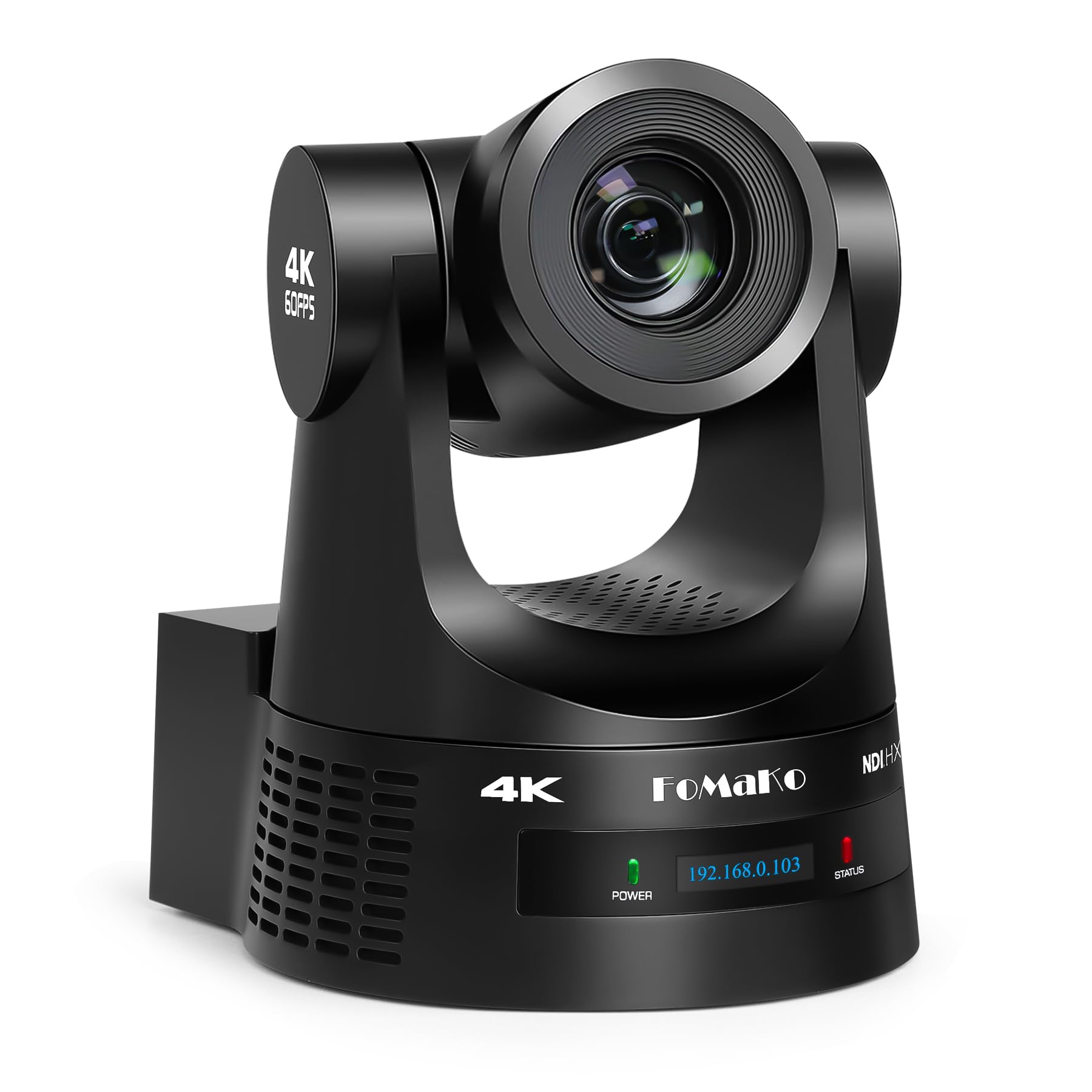
The PTZ powerhouse that tracks and zooms while staying affordable.
If you stream live services, events, or large presentations, the FoMaKo K600N gives you four simultaneous video outputs — HDMI at 4K 60fps, NDI at 4K 60fps, 3G-SDI at 1080P 60fps, and USB at 4K 30fps — so you can feed a switcher, a recording device, and a live stream all at once. The third-generation AI tracking lets you adjust tracking sensitivity, figure size, and what happens when the camera loses the subject, which buyers report makes it easy to keep a speaker framed without someone manning the controls. Unlike the TONGVEO system above, the FoMaKo includes the NDI license in the box, so you do not pay extra for network-based streaming.
The 20x optical zoom keeps the image sharp even when you are far from the stage, and the auto-focus is fast enough to avoid that blurry hesitation when someone walks across the frame. On the downside, one reviewer noted that the remote control angle can be awkward when the camera is mounted from the back of a room, and the initial network setup is easier if you connect via HDMI first to configure the DHCP settings. It is heavier and more complex than a simple webcam, so this is not the pick for a solo desktop streamer.
What stands out
- Four simultaneous video outputs including NDI and 3G-SDI
- Gen 3 AI tracking with adjustable sensitivity and lost-target behavior
- 20x optical zoom maintains clarity at distance
What to watch for
- Network setup can be tricky before first use
- Remote control angle is limited when ceiling mounted
- Heavier and more complex than a plug-and-play webcam
Studio-ready: This camera suits anyone running a worship service, classroom, or small production where you need multiple outputs and reliable auto-tracking without spending pro-level money.
Not your pick if: You stream from a desk with no movement — a simpler webcam gives you the same quality with far less cabling and setup time.
2. Insta360 Link 2 Pro – 4K PTZ Webcam

A desktop webcam that actually moves with you, not just a digital crop.
Most webcams “track” by digitally zooming and cropping the image, which drops the effective resolution below 4K. The Insta360 Link 2 Pro uses a physical gimbal that pans and tilts to keep you centered, so the full 8-megapixel sensor stays in use. Its 1/1.3-inch sensor delivers a natural bokeh effect straight from the software, and the dual-mic system with beamforming directional pickup isolates your voice from background noise — useful if you stream in a busy room. Owners mention it takes less than five minutes to set up and works flawlessly with apps like Zoom, Teams, and Twitch, especially when integrated with an Elgato Stream Deck for switching modes on the fly.
Compared to the Elgato Facecam 4K below, the Insta360 offers a larger sensor and the active tracking that the Elgato lacks. However, the 4x digital zoom reduces quality if you push it, and the Link 2 Pro currently does not support ARM-based Windows systems or Windows Hello facial recognition. The 8 MP sensor is slightly smaller in raw resolution than the TONGVEO’s 8.29 MP effective still resolution, but the physically moving gimbal makes the tracking feel much more natural on a desk.
Stands apart on
- Physical pan/tilt gimbal keeps full 4K resolution while tracking
- Large 1/1.3-inch sensor for better low-light and bokeh
- Dual-mic beamforming reduces background noise
Watch for
- Not compatible with ARM-based Windows or Windows Hello
- Digital zoom past 4x drops image quality noticeably
- Requires good lighting for best tracking performance
Desk-session star: Perfect for streamers, YouTubers, and remote professionals who move around their desk and want a professional tracking effect without a multi-camera setup.
Heads up: If you work on an ARM Windows device or need face recognition for login, this camera will not support those features — check your system before buying.
3. Elgato Facecam 4K, 4K60 Studio Webcam

A premium webcam that skips the frills and nails the basics.
This is the cleanest plug-and-play 4K experience on the list — you plug in the USB-C cable and your streaming software immediately sees uncompressed video at 4K 60fps, no capture card or driver fiddling needed. The Sony STARVIS 2 sensor gives noticeably better low-light performance than the older Brio-class webcams, and the 49mm lens thread means you can screw on a polarizing filter to cut glare from glasses or windows, just like on a DSLR. Customers note the quality is “high quality, better than Logitech 4K webcam” and appreciate that the camera saves settings to its own internal flash memory, so your custom exposure stays put even when you plug it into a different PC.
The catch is that it does not include a microphone — you need a separate USB mic or your headset for audio. The 20mm lens is quite wide for a webcam, so digital zoom is required to frame a close-up, and that loses the 4K advantage. Unlike the Insta360 Link 2 Pro above, there is no AI tracking, so if you pace around your room, the camera stays fixed on one spot. For a fixed desk with good lighting and a dedicated microphone, though, this is a very strong mid-range pick.
Why it works
- Uncompressed 4K 60fps video over a single USB-C cable
- STARVIS 2 sensor performs well in low-light conditions
- 49mm filter thread for polarizers or diffusion filters
Missing pieces
- No built-in microphone — you must supply your own audio
- Very wide lens forces digital zoom that drops resolution
- No auto-tracking — fixed frame only
Clean-slate win: If you already own a good microphone and do not move around on stream, this delivers the most straightforward high-quality 4K video at a fair price.
Skip it for: All-in-one convenience or motion tracking — you will be happier with the Insta360 or a PTZ camera if you need either of those.
4. TONGVEO 4K AI Auto Tracking PTZ Conference Camera System
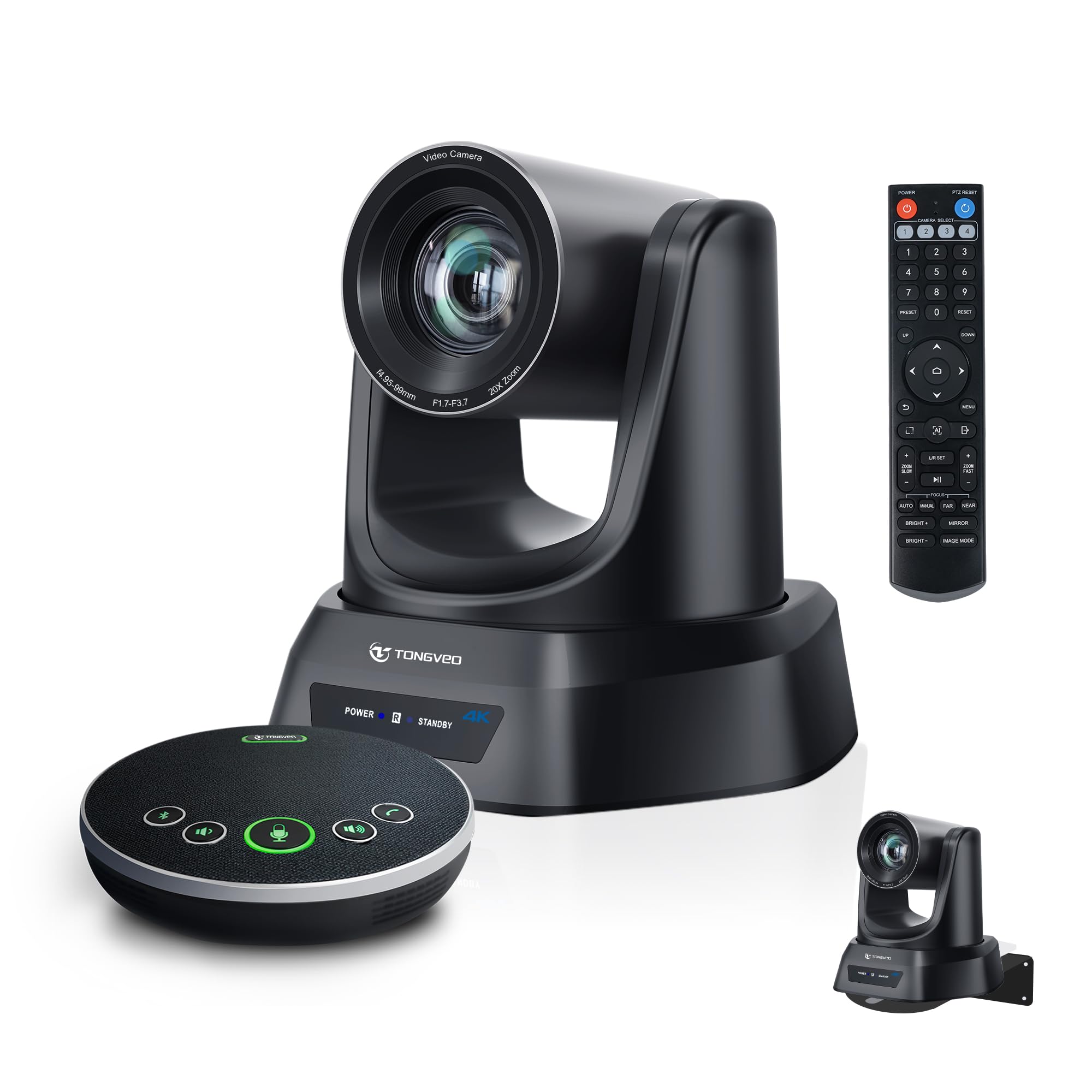
The all-in-one PTZ kit that includes the camera, mic, and speaker in one box.
Most PTZ cameras assume you already own a microphone and speaker system. The TONGVEO bundle skips that assumption by including a Bluetooth wireless conference speakerphone with four ultra-sensitive microphones, a 16.4-foot voice pickup range, and a built-in battery that lasts 6 to 8 hours. The 4K PTZ camera itself has 20x optical zoom and AI auto-tracking that follows the speaker automatically — reviewers point out it provides “outstanding video quality, making it perfect for our training room setup” and covers a 20-by-30-foot room easily when positioned above a TV. The camera connects via USB 3.0 or HDMI and works plug-and-play with Zoom, Teams, OBS, and YouTube Live without compatibility headaches.
Compared to the Tenveo NDI camera below, the TONGVEO lacks NDI network streaming — you are limited to HDMI and USB routing. The speakerphone battery and Bluetooth connectivity are a huge plus for mobile setups, but some reviewers experienced charging issues with the speakerphone unit (though support quickly sent replacements). For a church training room, medium conference space, or a hybrid classroom, this system removes the guesswork of matching separate components.
Integrated wins
- Includes Bluetooth speakerphone with 6–8 hour battery and 16.4-ft pickup
- 20x optical zoom delivers clear close-ups from the back of a room
- AI auto tracking follows speakers without manual intervention
Limits to know
- No NDI or PoE support — limited to HDMI/USB connections
- Speakerphone charging reliability has been inconsistent for some buyers
- Ceiling mount brackets and screws are included, but concrete anchors are not
One-box solution: Best for small to medium conference rooms and church settings where you want a single SKU that covers video, audio, and tracking.
Not for: Advanced multi-camera IP workflows — you will need the Tenveo NDI or FoMaKo for network-based production setups.
5. Tenveo 4K NDI PTZ Camera AI Humanoid & Face Auto-Tracking
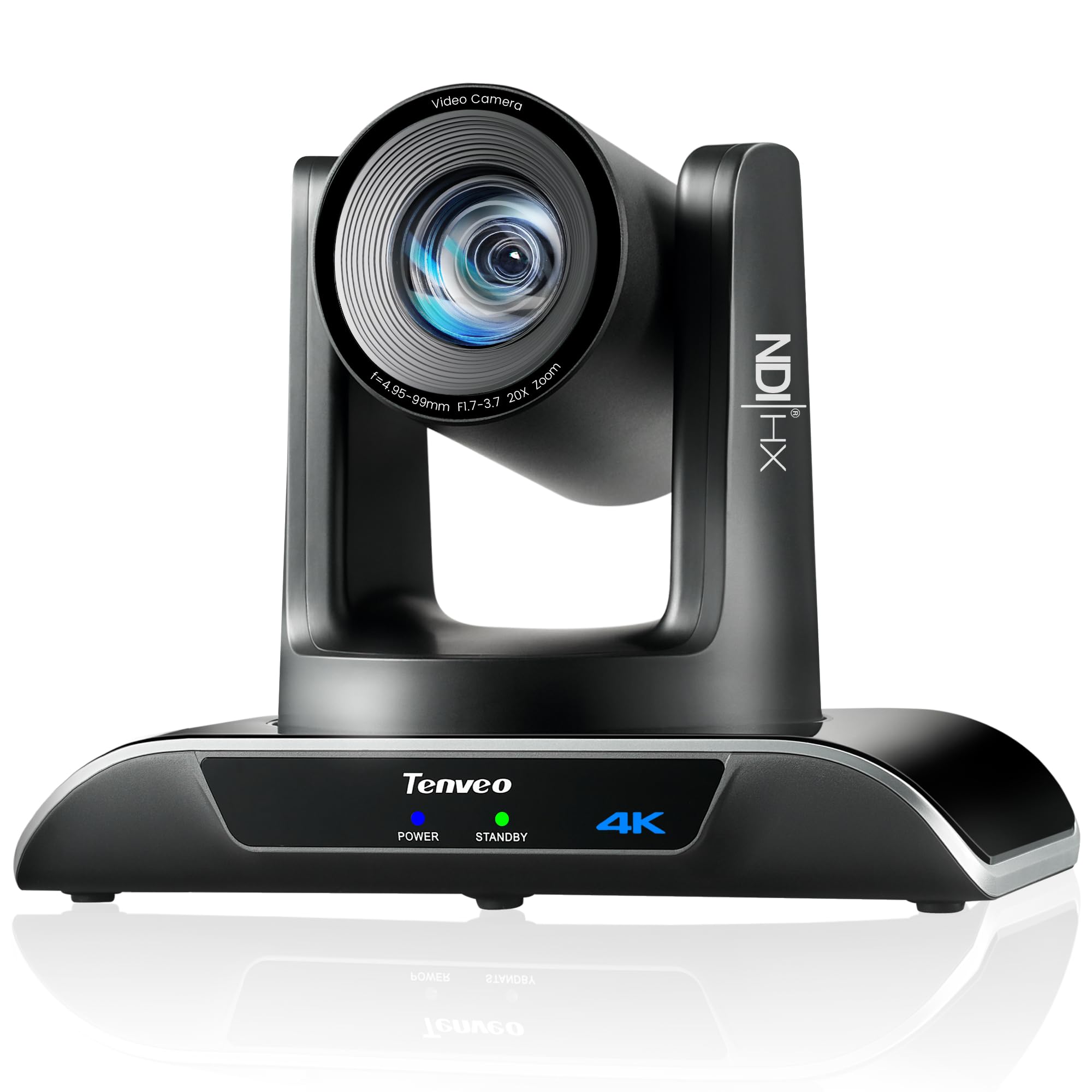
An affordable NDI gateway for multi-camera production without long cable runs.
NDI (Network Device Interface) lets you send high-quality, low-latency video over a standard Ethernet network, which is a lifesaver when your cameras are 100 feet away from your streaming PC and you do not want to pull HDMI cables. The Tenveo offers HDMI at 4K, USB 3.0 at 4K, and NDI streaming at 1080P, plus PoE (Power over Ethernet) so a single Ethernet cable carries power, video, and control. Its Sony 1/2.8-inch CMOS sensor with 8.29 effective megapixels and 20x optical zoom delivers clear, crisp video — one buyer mentioned that at 75 feet from the pulpit, the image had zero blur compared to a previous DSLR setup. The camera also supports preset positions for quick shot changes, and the remote control includes a function to flip the image for inverted ceiling mounts.
The downside is that the NDI output tops out at 1080P (HDMI and USB carry the 4K signal), and some shoppers say occasional network lag or sluggish response, especially without a dedicated PTZ joystick controller. Unlike the TONGVEO system above, there is no built-in microphone — you need to supply external audio. For churches and live production groups building a multi-camera workflow, this is the most affordable entry point into NDI streaming.
Key strengths
- NDI + PoE support reduces cabling to one Ethernet line per camera
- 20x optical zoom stays clear at long distances (75+ feet)
- Multiple outputs: HDMI 4K, USB 4K, NDI 1080P
Good to know
- NDI stream is limited to 1080P, not 4K
- No built-in microphone required
- Network response can feel laggy without a joystick controller
Network-native pick: Ideal for churches, auditoriums, and event spaces where long HDMI runs are impractical and you need clean PoE deployment.
Reconsider if: You need NDI at 4K resolution or want an all-in-one camera plus audio solution — those use cases point toward the FoMaKo or the TONGVEO system respectively.
6. OBSBOT Tail Air NDI Streaming Camera 4K

A cola-can-sized PTZ camera that tracks people, animals, and even objects.
The OBSBOT Tail Air is the only camera on this list that you can genuinely fit in a jacket pocket (it weighs 344.5 grams and is smaller than a cola can) while still offering a 320-degree horizontal and 180-degree vertical rotation. Its AI tracking is unique here because it can lock onto three types of targets — humans, animals, and objects — which opens up creative streaming possibilities like following a pet or tracking a product during a demonstration. You can also control the camera via hand gestures, the included remote, a smartphone app, or a Stream Deck, so there is always a way to adjust the shot without walking over to the tripod.
The Tail Air connects through Micro HDMI, USB-C, Ethernet, or Wi-Fi, and supports NDI (with an additional license purchase) and RTMP for direct streaming. A critical flaw reported by multiple long-term users: the camera relies on its internal battery to operate even when plugged into power, and one owner reported the battery failed after 13 months, rendering the camera unusable because there is no bypass mode. This is a real durability concern for anyone planning a permanent streaming setup. For mobile creators who need an ultra-portable tracking camera, it is brilliant — but fixed-installation buyers should look at the FoMaKo or TONGVEO instead.
Unique advantages
- Ultra-compact size (344 g) for travel and mobile streaming
- AI tracks humans, animals, and objects
- Multiple control methods: gestures, remote, app, Stream Deck
Durability warning
- Battery-dependent design — failure bricks the camera (reported at 13 months)
- NDI license costs extra — not included
- Firmware update requires a U3 Micro SD card
Go-anywhere tracker: Perfect for content creators who move between locations and need a portable camera that automatically tracks them or their subjects.
Hold off if: This camera will stay in one place for months at a time — the battery-reliant design introduces a failure point that fixed-install cameras like the Tenveo or FoMaKo avoid entirely.
7. Canon EOS R50 Content Creator Kit

A mirrorless camera that doubles as a studio webcam for under a thousand.
The Canon EOS R50 is the only interchangeable-lens camera in the sub-thousand range on this list, packing a 24.2 megapixel APS-C sensor and the DIGIC X processor that runs Canon’s high-end R-series. For streaming, the key feature is the 4K uncropped movie mode oversampled from 6K — meaning the camera uses more sensor data than the final 4K output, which results in sharper, cleaner video with less noise than a standard 4K crop. The Content Creator Kit bundles the RF-S18-45mm f/4.5-6.3 IS STM lens, a tripod grip, an external microphone, and a wireless remote control, so you have everything to start vlogging or streaming right away. The Close-up Demo Mode automatically switches focus from your face to an object held near the lens, which is useful for product reviews or unboxing streams.
The trade-off is that this is not a dedicated streaming camera — you need to use Canon’s software or a capture card to feed the HDMI output into your computer, and there is no PTZ or AI auto-tracking like the Insta360 or PTZ cameras above. The kit lens has a variable aperture (f/4.5-6.3) that requires good lighting. Compared to the Sony Alpha 7 IV further down, the R50 is smaller, lighter, and far cheaper, but its APS-C sensor and kit lens cannot match the full-frame low-light performance and color science of the A7IV. For a beginner who wants one camera for YouTube videos, live streams, and photography, the R50 kit is a smart starting point.
What makes it shine
- 4K uncropped video oversampled from 6K for superior sharpness
- Close-up Demo Mode auto-focuses on objects for product streams
- Kit includes lens, tripod grip, and microphone — ready out of box
What it is not
- No PTZ or AI tracking — fixed camera position
- Capture card required for use as a streaming webcam
- Kit lens aperture (f/4.5-6.3) needs strong lighting
Creator starter kit: Great for vloggers and live streamers who want a single device that takes excellent photos and streams in 4K with professional depth-of-field control.
Not for: Hands-free tracking setups or multi-camera productions — you would be better served by a PTZ camera for those scenarios.
8. Sony Alpha 6700 – APS-C Interchangeable Lens Camera

A compact APS-C body with the video chops of a full-frame camera.
The Sony Alpha 6700 is what you get when you take the autofocus and processing power of Sony’s full-frame lineup and shrink it into an APS-C body. The 26-megapixel Exmor R back-illuminated sensor combined with the BIONZ XR processor delivers 4K video at 60fps with 6K oversampling (same oversampling principle as the Canon R50 above, but on a newer sensor), and a high frame rate mode that shoots 4K at 120fps for smooth slow-motion streams. The dedicated AI processor enables real-time recognition tracking for people, animals, and fast-moving subjects — buyers describe the Eye AF as “fast, accurate, and reliable” and note it locks onto subjects in tricky lighting conditions where older cameras would hunt around. For log shooting, the camera supports 4:2:2 10-bit recording with Long GOP or All Intra formats, giving you serious color-grading flexibility in post-production.
The biggest practical issue for streaming is that the in-body stabilization, while decent for photography, is not smooth enough for handheld video without a gimbal — buyers report it is “insufficient for smooth handheld video without gimbal.” You will want a tripod or a rig for stationary streaming. The menu system is Sony’s notoriously dense layout, which takes time to learn. Compared to the Canon EOS R50 above, the Alpha 6700 has a significantly better autofocus system (759 phase-detection points vs. the Canon’s Dual Pixel CMOS AF II), plus 4K 120p that the Canon does not offer. It does not include a lens in the box, so factor in the cost of a Sony E-mount lens for streaming.
Top features
- 4K 120fps high frame rate recording for smooth slow-motion
- 6K oversampled 4K 60fps with 10-bit 4:2:2 color
- AI-based Real-time Recognition with 759 AF points
Considerations
- In-body stabilization not sufficient for handheld streaming without gimbal
- Complex menu system requires time to learn
- No lens included — separate purchase required
Hybrid creator’s upgrade: Choose this if you already own Sony E-mount lenses and need a compact body that delivers professional-grade 4K video with exceptional autofocus and slow-motion capability.
Better options exist for: A simple plug-and-play streaming setup — the Alpha 6700 is overkill if you do not need interchangeable lenses and log profiles.
9. Sony Alpha 7 IV Full-frame Mirrorless Camera

The reference standard for streamers who demand full-frame depth and color science.
The Sony Alpha 7 IV sits at the top of the streaming food chain because its 33-megapixel full-frame Exmor R sensor delivers the shallow depth of field, dynamic range, and low-light performance that no webcam or APS-C camera can match. When streaming, the 7K oversampling on the full-frame sensor produces 4K 30p video with no pixel binning — meaning every pixel of the 4K output comes from a unique, oversampled pixel on the sensor, for remarkably clean and detailed video. The S-Cinetone color profile gives you that cinematic, organic color look straight out of the camera, which is the same color science used in Sony’s professional cinema cameras. Owners mention that the autofocus with Real-time Eye AF is “remarkably accurate and fast” and that the build quality feels worth the premium, with weather sealing and a comfortable grip for long streams.
Here is the honest trade-off: a full-frame camera for streaming is overkill for 90% of users. You need the right lens (the A7IV body does not include one), a capture card to get the HDMI output into your computer, and a sturdy lighting setup to actually see the benefits of the larger sensor. The 4K 60p mode has a Super 35mm crop (the camera uses a smaller portion of the sensor), which changes your framing compared to the full-frame 4K 30p mode. If you are a professional streamer, cinematographer, or hybrid shooter who also takes high-end photos, the A7IV justifies its price. For a standard Twitch stream or Zoom meetings, cameras like the Elgato Facecam or the Insta360 Link 2 Pro give you excellent 4K at a fraction of the cost and complexity.
what separates it
- Full-frame 33MP sensor with 7K oversampling for pristine 4K
- S-Cinetone color profile for professional-grade color
- 693-point phase-detection AF with real-time Eye tracking
The real cost
- Requires separate lens, capture card, and strong lighting
- 4K 60p uses a Super 35mm crop, changing your field of view
- Massive step up in price and setup complexity from any webcam
For the cinephile streamer: This is the camera to buy if you are producing high-end content that requires full-frame shallow depth of field, professional color, and the flexibility to shoot both stills and broadcast-quality video.
Skip it entirely if: Your streaming setup is a single person at a desk — the FoMaKo or Insta360 will give you equal broadcast quality with far less gear.
Understanding the Specs
Optical Zoom vs. Digital Zoom
Optical zoom uses the camera lens to physically magnify the image — you keep all of your 4K resolution because the sensor is capturing a genuine magnified scene. Digital zoom simply crops and enlarges a portion of the image, which means you are actually using fewer pixels: a 4x digital zoom on a 4K camera often produces an image closer to 1080P or worse. For streaming, optical zoom is always the better choice, especially in large rooms where you are far from your subject. The FoMaKo, TONGVEO, and Tenveo all offer 20x optical zoom, while the Insta360 and OBSBOT rely on digital zoom.
NDI and PoE for Streaming Workflows
NDI (Network Device Interface) sends video, audio, and camera control signals over a standard Ethernet network instead of dedicated HDMI or SDI cables. This lets you run a single cable to each camera for power, data, and control — a huge wiring simplification in churches, auditoriums, or multi-camera studio setups. PoE (Power over Ethernet) provides power through that same Ethernet cable, so you do not need a separate power outlet near each camera. The catch is that NDI adds a small amount of latency (usually under a frame) compared to direct HDMI, and you need a sturdy network switch. The Tenveo and FoMaKo support both NDI and PoE; the TONGVEO and OBSBOT do not include NDI by default.
FAQ
Can I use a mirrorless camera like the Sony A7IV as a webcam without a capture card?
What does PTZ mean and do I need it for streaming?
Which 4K streaming camera works best in low light without extra lighting?
Is a 4K 60fps camera worth it compared to 4K 30fps for streaming?
What is the difference between the 8 MP sensor in the Insta360 and the 8.29 MP sensor in the TONGVEO?
Will my streaming PC handle a 4K PTZ camera in OBS or vMix?
How important is a remote control for a PTZ streaming camera?
Can I use the TONGVEO or Tenveo camera without a separate microphone?
How does the Canon R50 compare to a dedicated PTZ camera for church streaming?
Which camera on this list has the longest reliable battery life for streaming without wall power?
Final Thoughts: The Verdict
For the majority of shoppers, the 4k camera for streaming winner is the FoMaKo K600N because it delivers professional-grade features — 4K 60fps across HDMI and NDI, Gen 3 AI tracking, 20x optical zoom, and PoE support — at a price well below traditional pro PTZ cameras. If you want a desktop-friendly tracking webcam that is ready in minutes, grab the Insta360 Link 2 Pro. And for a complete all-in-one system with audio included for a church or conference room, the standout is the TONGVEO PTZ System.
How We Picked
We do not accept paid placement. Every pick is matched to a real buyer and a real use-case; we do not hands-on test units.
Sources & Methodology
Specifications: manufacturer listings and product documentation. Review insights: verified customer reviews, as of July 2026. Pricing: not shown on this page (it changes often); check the current price via the retailer link.
As an Amazon Associate, FitlyFast earns from qualifying purchases. This does not affect which products we feature.