
Our readers keep the lights on and the weekend projects moving. As an Amazon Associate, I earn from qualifying purchases.
Specs are compiled from manufacturer listings and verified buyer reviews and can change over time — please confirm the key details on the product page before buying.
A 2 channel audio interface sits at the center of your desktop studio — it turns your microphone and guitar signals into digital audio your computer can record, then sends the sound back to your headphones and speakers. The difference between a unit you will enjoy for years and one you will outgrow in months depends on preamp quality, real-world latency, and the software you get with it.
I’m Rikta — the founder and writer behind FitlyFast. This guide is built by comparing the manufacturers’ published specifications and the patterns across verified customer reviews, so you get each pick’s real strengths and trade-offs instead of marketing spin.
If you are a musician tracking vocals, a podcaster getting your show started, or a streamer upgrading from a basic headset, finding the best 2 channel audio interface means matching your needs to the right preamps, converters, and connectivity.
Quick Picks
- Universal Audio Volt 2 USB Audio Interface — Best Overall
- Focusrite Scarlett 2i2 4th Gen USB Audio — Top Performer
- Tascam US-2x2HR 2 Mic 2IN/2OUT USB Audio — Solid Value
- Motu M2 2×2 USB-C Audio Interface — Best Specs
- Roland Rubix22 2-In/2-Out USB Audio Interface — Road Worthy
- Solid State Logic SSL 2 MKII — Professional Grade
How To Choose The Best 2 Channel Audio Interface
A 2 channel audio interface is your entry point to clean, professional-sounding recordings. Here is what separates a great pick from a frustrating one.
Preamps: The Quiet Heroes
The mic preamp is the first electronic stage your signal hits, and its quality defines your noise floor. A preamp with an EIN (Equivalent Input Noise, measured in dBu—a lower or more negative number is better) of -129 dBu or better means you will not hear a hiss behind quiet vocals or acoustic guitar. Cheaper preamps often introduce noise you will fight in the mix.
Converters and Sample Rate
Most interfaces now support 24-bit / 192 kHz audio (capturing 192,000 snapshots per second), which lets you record more dynamic range and detail than standard CD-quality 16-bit / 44.1 kHz. While you might not need 192 kHz every day, it is a solid indicator of overall converter quality and future-proofing.
Connectivity and Build
A secure USB-C connection is now the standard. Look for one with a snug, well-reinforced port if you plan to unplug and pack the unit often. Metal construction and an included tilt base can make a big difference in desk stability and daily use.
Quick Comparison
| Model | Best For | Sample Rate | Weight | Converter Detail | Amazon |
|---|---|---|---|---|---|
| Universal Audio Volt 2 | Vintage-inspired tone | 192 kHz | 1.43 lbs | 24-bit / 192 kHz | Amazon |
| Focusrite Scarlett 2i2 4th Gen | Reliable, all-around workhorse | 192 kHz | 1.73 lbs | 120 dB dynamic range | Amazon |
| Tascam US-2x2HR | Sturdy build, secure USB-C | 192 kHz | 1 lb | 24-bit / 192 kHz | Amazon |
| Motu M2 2×2 | Best converter quality | 192 kHz | 1.46 kg (bundle) | ESS Sabre32 Ultra DAC, 120 dB | Amazon |
| Roland Rubix22 | Road-ready with MIDI I/O | 192 kHz | 2.2 lbs | 24-bit / 192 kHz | Amazon |
| Solid State Logic SSL 2 MKII | Professional-grade preamps | 192 kHz | 2.57 lbs | 32-bit / 192 kHz AD/DA | Amazon |
In‑Depth Reviews
1. Universal Audio Volt 2 USB Audio Interface

A studio-quality preamp you can actually carry to the coffee shop.
A feature borrowed from UA’s classic 610 console preamp lives inside this compact box. Flick the Vintage mode on and you get a richer, fuller tube-emulated sound that gives vocals and DI guitar a polished feel right at the source. Beneath that, the converters run at 24-bit / 192 kHz (capturing 2^24 levels of dynamic range and 192,000 samples per second), so every subtle breath and string resonance stays intact while you record. Buyers report it is easy to use with low latency and well-built.
Compared to the Focusrite Scarlett 2i2 4th Gen, which ships with a dense manual, the Volt’s hands-on controls and bundled LUNA DAW software (a digital audio workstation for recording and mixing) make it friendlier for first-time owners. Its frequency response reaches 192 KHz compared to the Scarlett’s 20 KHz, so you get a much wider capture of high-frequency detail. The trade-off is a slightly softer preamp gain for certain microphones — one reviewer noted it felt “a little soft for my Mic’s” — so it pairs best with dynamic mics or active ribbons.
The Vintage advantage
- Vintage preamp mode adds analog color without external gear
- 192 kHz converters capture ultra-high frequencies
- Comes with full LUNA DAW and UAD plugins
- Solid, portable build at 650 grams (1.43 lbs)
Know before you plug in
- Needs external power with iPad or iPhone
- Preamp gain can feel soft for some mics
Grab it for: the classic UA preamp sound in a portable, budget-friendly package that includes professional software.
Pass if: you need the highest possible preamp gain for a very quiet ribbon mic.
2. Focusrite Scarlett 2i2 4th Gen USB Audio Interface
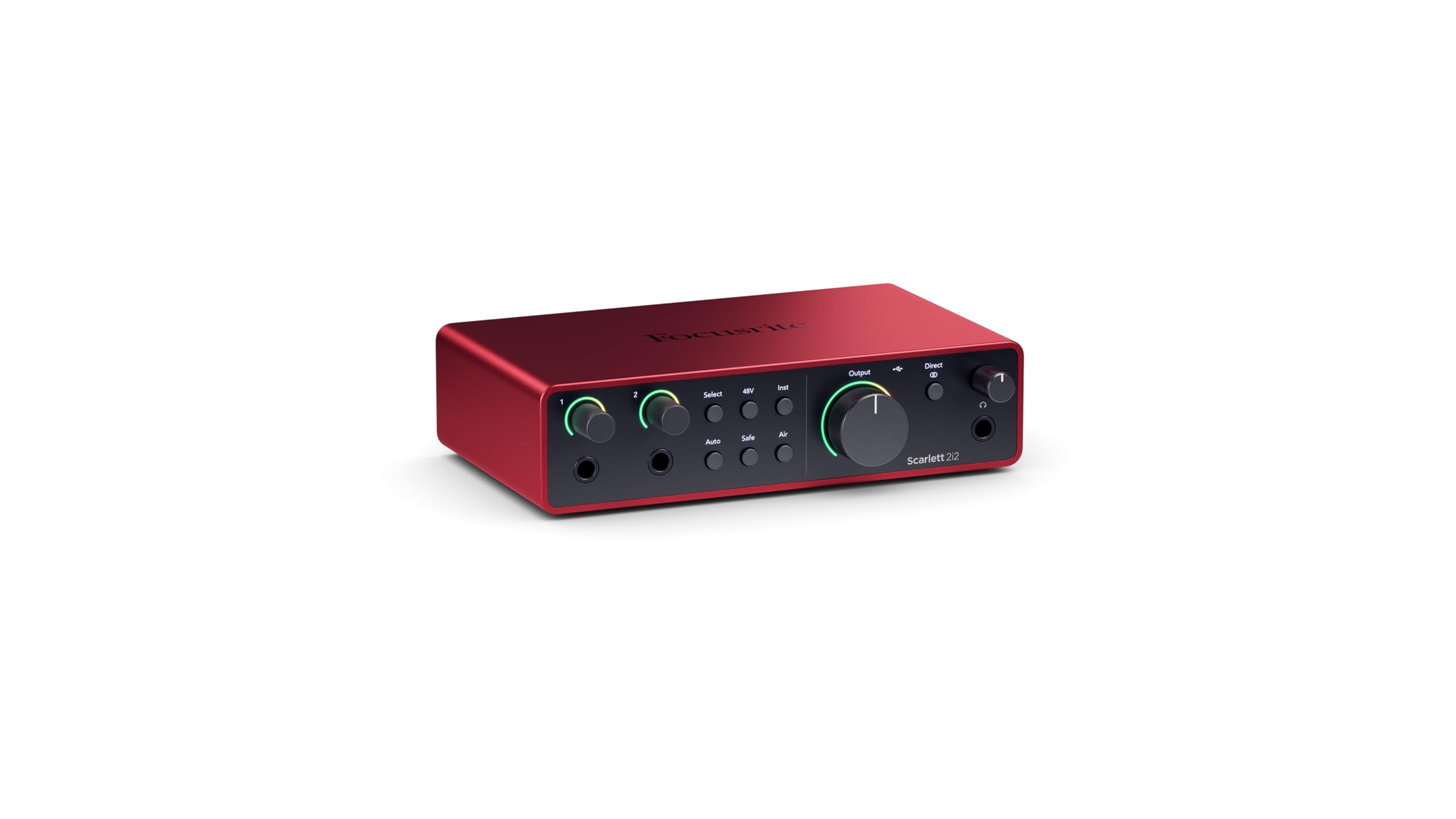
The workhorse that survives a song-a-day habit and asks for more.
This fourth generation of the most popular audio interface on the planet earns its reputation with a 120 dB dynamic range (the gap between the quietest and loudest signal it can capture without distortion) that matches the converters Focusrite puts in its flagship studio consoles. That lets you hear the quiet parts and the loud parts without distortion in one take. New features like Auto Gain, which sets your recording level automatically, and Clip Safe, which catches sudden peaks before they distort (redline), keep you from ruining a take by setting levels wrong.
Owners mention the 4th Gen feels “well built” and “plain, low noise, low distortion.” One owner said, “I’ve been abusing this thing over the past year…I record a song a day most weeks,” which tells you the construction holds up. The downside compared to the Tascam US-2x2HR below is weight — it is 1.73 pounds, nearly 73% heavier than the Tascam’s 1 lb, making the Scarlett feel more substantial on the desk but less mobile in a bag. It also lacks the Tascam’s built-in tilt base.
Studio reliability
- 120 dB dynamic range for clean, wide headroom
- Auto Gain and Clip Safe protect your takes
- Air mode adds presence to vocals and guitars
- Bundled with Pro Tools Intro, Ableton Live Lite, and Hitmaker Expansion
What to watch for
- Minimal shock protection in the shipping box per some buyers
- Output level stays high with less headroom than ideal
Choose this if: you need a reliable, feature-rich interface with smart level controls and a proven track record of lasting years.
skip it if: you want a lighter unit to travel with and prefer a built-in desk tilt.
3. Tascam US-2x2HR 2 Mic 2IN/2OUT USB Audio Interface

A rugged metal tank that tilts toward you and stays put.
The US-2x2HR stands out as the lightest unit here at just 1 pound — significantly easier to toss in a backpack than the 1.73-pound Focusrite Scarlett 2i2. Yet despite the low weight, buyers rave about its “heavy metal construction” and “sturdy switches.” Its Ultra-HDDA mic preamps (High Definition Discrete Architecture, designed for clean low-noise gain) deliver clean sound for both XLR and 1/4-inch inputs, and it supports up to 24-bit / 192 kHz just like the pricier options.
A small but meaningful design decision separates it: the +48V phantom power switch (which sends 48 volts through the XLR cable to power condenser microphones) is on the front panel, so you can turn it on without reaching behind the desk. The built-in tilt base angles the unit toward you for easier knob access. One reviewer confirmed it “works perfectly with M1 MacBook Pro,” so Apple Silicon (Apple’s own processor chip) users are covered. The trade-off is that the bundled Cubase LE license disappointed a few buyers who expected a more modern version.
Clever build details
- Lightest at 1 lb with sturdy metal chassis
- Front-panel phantom power switch
- Built-in tilt base for easy desk access
- Secure USB-C port — better than Focusrite 2i2 per reviews
Consider this
- Bundled Cubase version not what some expected
- A lower-profile brand than Focusrite or UA
Reach for this when: you prioritize a portable, road-ready unit with secure connections and smart desk ergonomics.
Look elsewhere if: you need a packed software bundle with a modern DAW.
4. Motu M2 2×2 USB-C Audio Interface

The same ESS Sabre32 converter tech inside high-end studio gear.
This interface is for buyers who care about the numbers behind the sound. The Motu M2 uses an ESS Sabre32 Ultra DAC (Digital-to-Analog Converter, a chip that turns digital audio into analog signals), the same conversion chip found in premium gear, which gives it a measured 120 dB dynamic range on outputs and -129 dBu EIN on mic inputs (an extremely low noise floor). That means your recordings come out with minimal hiss and maximum detail, even with quiet sources like fingerpicked acoustic guitar. It also drives high-impedance headphones like the 250-ohm DT990 Pro without an external headphone amp, a rare feat for a 2-channel interface.
Buyers praise its “easy install” and say it “makes my PreSonus gear sound like a live concert.” However, the M2 is sensitive to your computer’s power supply; some users report hum noise from their PC’s PSU (Power Supply Unit), and others note pops and crackles at low sample rates on weaker computers. Running at 48 kHz or higher often solves that. The unit ships as a bundle with an XLR cable, though the weight is listed at 1.46 kilograms for the bundle, making it the heaviest option here.
Converter king
- ESS Sabre32 Ultra DAC delivers top-tier analog sound
- 120 dB dynamic range on outputs
- Drives 250-ohm headphones directly
- Lowest noise floor on mic inputs at -129 dBu EIN
System requirements
- Needs a clean USB-C cable and sufficient PC RAM/CPU
- Can produce pops and crackles at low sample rates on weak systems
Pick the M2 for: the best converter specs in this price bracket and the ability to drive high-impedance headphones. The converter quality surpasses the Universal Audio Volt 2’s 24-bit / 192 kHz stage, though the Volt wins on bundled software value.
Skip if: your computer is older or you cannot troubleshoot sample-rate pop issues.
5. Roland Rubix22 2-In/2-Out USB Audio Interface

A bulletproof metal box with MIDI ports and ground lifts for noisy rooms.
Roland designed the Rubix22 with live and mobile use in mind. It has a “sturdy and compact metal construction” that feels tough in the hand, and it includes features almost no other 2-channel interface at this price offers: MIDI In/Out ports on 5-pin DIN jacks (a standard connector for musical instrument digital interface, letting you connect keyboards and drum machines) and ground lifts that stop hum when you are running on questionable venue power. You get two low-noise mic preamps with XLR combo jacks, a Hi-Z input for guitar, and 192 kHz maximum sample rate.
Owners love the pro look and plug-and-play operation — one buyer mentioned it was “super reliable” and a “massive upgrade from Line 6 UX2 and Focusrite.” However, a few reviews flag a weak USB port that can fail if the device is bumped, and one owner reported the headphone jack feels fragile. At 2.2 pounds, it is heavier than most competitors, and it lacks an input/DAW mix knob, so you manage monitoring through your software.
Built for the road
- MIDI In/Out for connecting keyboards and drum machines
- Ground lifts eliminate hum in different venues
- Extensively shielded low-noise design
- Class-compliant on Mac, no driver needed
One weak spot
- USB port can fail if bumped; some units replaced under warranty
- Headphone jack can break from desk slams
- No input/DAW mix knob
Best for: musicians who need MIDI connectivity and a rugged chassis for gigging or mobile recording. For pure desk use with a mix knob, the Focusrite Scarlett 2i2 4th Gen is a better fit.
Not for: anyone who wants a mix knob for zero-latency hardware monitoring, or who tends to be hard on USB ports.
6. Solid State Logic SSL 2 MKII – 2×2 USB Audio Interface

Console-grade preamps and a built-in high-pass filter that saves your vocals.
Solid State Logic built the mixing consoles that defined pop and rock records for decades, and the SSL 2 MKII brings that heritage into a desktop box. It uses 32-bit / 192 kHz AD/DA converters (Analog-to-Digital and Digital-to-Analog converters, offering 2^32 levels of dynamic range for extra headroom) — the highest resolution in this lineup — and includes the Legacy 4K analog enhancement circuit, which adds presence and harmonic drive to make recordings sound more finished. The headphone amp is “superb, clear, open, with no noise floor,” according to buyers.
A standout feature for voice artists and podcasters is the built-in high-pass filter (HPF, which cuts low-frequency rumble below a set point). One reviewer who struggled with low-end rumble on another interface said the HPF “eliminated rumble, voice sounds crisper, mouth noises lessened.” At 2.57 pounds and with a stainless steel build, it is the heaviest interface here, and its dimensions (10.63 x 7.87 x 4.33 inches) require more desk space than the compact Volt or Tascam. It is bus-powered (draws power from the USB connection), so you need no wall wart, and it includes MIDI I/O.
SSL signature
- 32-bit / 192 kHz AD/DA converters for maximum resolution
- Legacy 4K button adds analog presence and harmonic richness
- High-pass filter cleans up rumble and mouth noise
- MIDI I/O and powerful headphone amp included
Space and weight
- Largest and heaviest unit here at 2.57 pounds
- Requires more desk footprint than competitors
Buy this if: you want professional SSL preamp sound and build quality, plus a high-pass filter for cleaner vocal takes. It edges out the Universal Audio Volt 2 for maximum converter resolution, but the Volt wins on portability.
Avoid if: desk space is tight or you need the lightest possible travel companion.
Understanding the Specs
Dynamic Range
This number, measured in dB (decibels), tells you the gap between the quietest and loudest signal your interface can capture without distortion. A range of 120 dB, like the Focusrite Scarlett 2i2 4th Gen and the Motu M2 offer, means you can record a soft whisper and a loud guitar chord in the same take without the quiet parts getting lost in noise or the loud parts distorting (clipping).
EIN (Equivalent Input Noise)
Measured in dBu (decibels relative to 0.775 volts), EIN tells you how much hiss the preamp itself adds to a signal. A lower (more negative) number is better. The Motu M2’s -129 dBu EIN means the preamp is extremely quiet, which matters when you record quiet sources like fingerpicked acoustic guitar or spoken word, where any background hiss would be audible.
Sample Rate and Bit Depth
Sample rate (measured in kHz, or kilohertz) is how many times per second the interface captures a snapshot of your audio. 192 kHz is twice as fast as the standard 96 kHz and captures higher frequencies. Bit depth (24-bit or 32-bit) defines the dynamic range. 24-bit / 192 kHz is the common high-resolution standard; 32-bit offers even more headroom before clipping (distortion from signal overload).
Zero-Latency Monitoring
A feature that sends your microphone or instrument signal directly to your headphones without routing it through your computer first. This avoids the slight delay (latency) that happens when audio goes out to your DAW (Digital Audio Workstation, the software you record in) and back. Every interface on this list has a version of it, but some implement it with a hardware mix knob while others require a software control panel.
FAQ
What is the difference between 24-bit and 32-bit converters on a 2-channel interface?
Can I use a 2-channel audio interface with an iPad or iPhone?
What does phantom power (48V) do and when do I turn it on?
Do I need an interface with MIDI ports for recording keyboards?
Will a 2-channel interface work for two-person podcasts?
What is loopback and do I need it for streaming or podcasting?
How do I reduce latency when recording through my DAW?
Can a 2-channel interface drive high-impedance headphones without a separate amp?
Is there a noticeable difference between 44.1 kHz and 192 kHz for recording?
Which 2-channel audio interface is best for a beginner home studio?
Final Thoughts: The Verdict
For most people, the best 2 channel audio interface winner is the Universal Audio Volt 2 because it delivers professional preamp character and high-resolution converters in a portable, well-built package with a full DAW and plugin suite. If you want the most advanced level-protection features and the largest software bundle, grab the Focusrite Scarlett 2i2 4th Gen. And for the best converter specs and support for high-impedance headphones, the standout is the Motu M2.
How We Picked
We do not accept paid placement. Every pick is matched to a real buyer and a real use-case; we do not hands-on test units.
Sources & Methodology
Specifications: manufacturer listings and product documentation. Review insights: verified customer reviews, as of July 2026. Pricing: not shown on this page (it changes often); check the current price via the retailer link.
As an Amazon Associate, FitlyFast earns from qualifying purchases. This does not affect which products we feature.