
Our readers keep the lights on and the weekend projects moving. As an Amazon Associate, I earn from qualifying purchases.
Specs are compiled from manufacturer listings and verified buyer reviews and can change over time — please confirm the key details on the product page before buying.
You walk into the ACT test center with a calculator on your list, and the single question that matters is this: will it let you work fast, keep you from fumbling, and cost only what you actually need? Every calculator reviewed here is officially approved for the ACT, so that worry is gone. The real choice depends on how clearly the screen shows your work, if you want to write little programs on it, and if you prefer plugging it in to charge or just swapping out AA batteries.
I am Rikta, the writer behind FitlyFast. This guide compares each manufacturer’s published specs and patterns from verified buyer reviews, so you see the real strengths and honest trade-offs — not marketing claims.
The three models below cover the range you should expect from a calculator for act: a budget-friendly workhorse that does everything the expensive ones do, a premium color-screen model built for visual math, and the classroom-standard rechargeable that every US teacher knows.
Quick Picks
- Casio fx-9750GIII Graphing Calculator — Best Value
- Casio fx-CG100 ClassWiz Color Graphing — Top Performer
- Texas Instruments TI-84 Plus CE Radical Red — Top Pick
How To Choose The Best Calculator For ACT
Picking the right ACT calculator depends on three things: test approval, screen clarity under pressure, and battery life that will not die during a four-section exam. Every model here is ACT-approved, so the first box is checked. The rest is about matching the calculator to your math level and your budget.
ACT Approval is the Only Rule
If a calculator is not on the ACT’s permitted list, you cannot bring it into the test room. All three picks here are explicitly approved for AP (Advanced Placement), SAT (Scholastic Assessment Test), PSAT (Preliminary SAT), and ACT exams, so you can walk in without a second thought. Do not buy any model that lacks this approval — it is the single disqualifying spec.
Screen Type and Visibility
The ACT math and science sections involve reading complex expressions quickly. A Natural Textbook Display (a screen technology that shows fractions, integrals, and exponents exactly like your textbook) is a significant advantage. Color displays also help by letting you tell apart multiple graph lines at a glance, but they cost more and use more battery power.
Battery Life and Power Source
You do not want to be hunting for a charging cable 30 minutes before the test. Rechargeable models like the TI-84 Plus CE are convenient, but you must remember to charge them the night before. AAA-powered models like the Casio options are a safe fallback — you can buy replacements at any store. One buyer of the Casio FX-9750GIII noted they used it for five months of daily use without changing the included batteries, which is a strong sign of efficiency.
Quick Comparison
| Model | Best For | Display | Weight | Programming | Amazon |
|---|---|---|---|---|---|
| Casio fx-9750GIII | Budget-friendly all-rounder | Natural Textbook Display (monochrome) | 7.5 oz | MicroPython | Amazon |
| Casio fx-CG100 | Color 3D graphing and advanced math | 3.7-inch color LCD (65,000-plus colors) | 8 oz | MicroPython | Amazon |
| TI-84 Plus CE | Standard classroom adoption and rechargeable battery | 2.8-inch color LCD (320 x 240 px) | 4.96 oz | Preloaded apps (MathPrint, Cabri Jr.) | Amazon |
In-Depth Reviews
1. Casio fx-9750GIII Graphing Calculator

A 7.5-ounce calculator that shows fractions and integrals exactly as your textbook does, for a fraction of the cost of the TI-84 Plus CE.
The Casio fx-9750GIII earns its spot because its Natural Textbook Display (a screen that shows fractions, integrals, and exponents exactly as they appear in your study book) lets you read problems faster than a cramped single-line LCD — a real advantage on the timed ACT. At 7.5 ounces and measuring 6.6 inches long by 3.25 inches wide, it is noticeably more pocket-friendly than the Casio fx-CG100, which is 8 ounces and 8.86 inches long — that is a 34-percent longer body, so this model slides into a bag more easily between test sections.
Buyers report the battery is a standout. One reviewer noted using it for five months nearly every day without needing to change the included AAA batteries. That reliability matters when you are packing for an exam day. It lacks a color display, but the monochrome LCD is crisp and has brightness and zoom settings. It also supports MicroPython (a simplified version of the Python programming language for beginners), which is useful if you want to learn coding on the side, though some users note the vector calculations are limited for deep physics work. If you were considering the TI-84 Plus CE for its preloaded apps, this Casio delivers comparable ACT-approved graphing for far less money — reviewers point out it holds up well against drops, describing it as durable enough for daily backpack carry.
Why it wins
- ACT, SAT, AP, and IB approved — no question at the test center door
- Natural Textbook Display makes reading complex problems easier
- Exceptional battery life; one user went five months without a change
The trade-offs
- Monochrome screen — no color line differentiation on graphs
- Limited vector calculations compared to pricier models
Best for cost-conscious students: Get this if you want every essential ACT-permitted feature without the premium price tag.
Not ideal for color-lovers: If you need color-coded graphs or a larger display, you will want the fx-CG100 above it.
2. Casio fx-CG100 ClassWiz Color Graphing Calculator
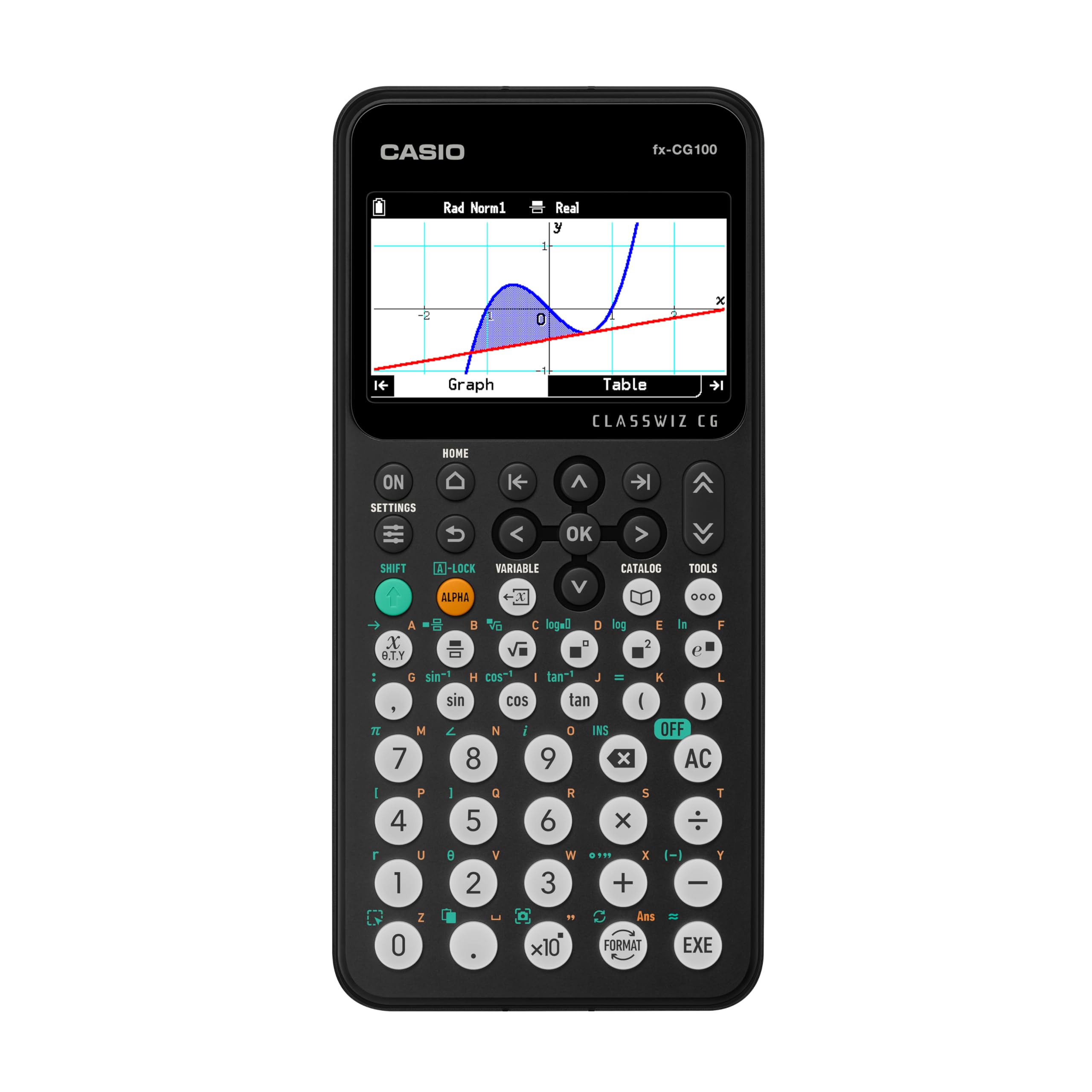
The largest screen of the three — 3.7 inches — lets you see 3D shapes like spheres and cylinders in over 65,000 colors.
This is the calculator you choose when you regularly handle graphs with multiple functions and need to tell them apart at a glance. The 3.7-inch backlit color display supports over 65,000 colors and renders 3D graphs like spheres, cylinders, and planes — a real advantage for visual learners tackling advanced math or science. Its 8.86-inch by 3.62-inch footprint is the largest of the three and notably bigger than the Casio fx-9750GIII (6.6 inches by 3.25 inches), so it is less portable but easier to read during a timed exam. The color display also helps differentiate graph lines instantly, unlike the monochrome screen on the Casio fx-9750GIII.
The fx-CG100 runs on four AAA batteries, keeping you out of the rechargeable-battery management loop. It features a built-in Exam Mode (a setting that disables memory and programs during the test) and is approved for AP, SAT, PSAT, and ACT. The tab-based menu system and glyph key labels make navigation faster once you get used to the layout. Like the 9750GIII, it supports MicroPython, so you can code directly on the device. Several buyers mentioned it arrived quickly and works perfectly for school requirements, and one reviewer described it as a very complete device merging a scientific calculator and a graphing model in one unit.
Why it leads
- Large 3.7-inch color display with 3D graphing capability
- Exam Mode and ACT approval for test-day security
- MicroPython programming support for learning coding
The trade-offs
- Heavier and larger than the other two picks — less pocket-friendly
- No rechargeable battery; you need fresh AAAs on test day
Perfect for visual math students: Pick this if color-coded graph differentiation and 3D visualizations help you learn faster.
Skip it for portability: If you want the lightest carry option, the TI-84 Plus CE, at 4.96 ounces, is 0.76 ounces lighter.
3. Texas Instruments TI-84 Plus CE Radical Red Graphing Calculator

The lightest pick at 4.96 ounces, with a rechargeable battery that saves you from buying disposable cells.
This is the calculator most US classrooms teach with, so your muscle memory will already match it. The 2.8-inch color LCD with a 320 x 240 pixel resolution gives clear graphs, and the rechargeable lithium-ion battery means you never buy disposable cells. At 4.96 ounces, it is lighter than the Casio fx-CG100 (8 ounces) and lighter than the Casio fx-9750GIII (7.5 ounces), making it the most portable option for carrying between test rooms. One buyer mentioned they had owned several TI products over the decades and said this one is “as good as they get,” which reflects the consistent build quality. However, the monochrome Casio fx-9750GIII costs far less while still being ACT-approved — a critical comparison if budget is your priority.
The TI-84 Plus CE comes preloaded with applications like MathPrint (a feature that displays math expressions in textbook form), Cabri Jr. (a geometry sketch tool), and CellSheet (a spreadsheet app), so you do not need to hunt for downloads. It handles up to ten graphing functions simultaneously and stores up to ten 50 x 50 matrices. It is approved for PSAT, SAT, ACT, and AP exams. The downside is the price — it is the most expensive of the three. Also, the rechargeable battery is convenient but means you must plan ahead: charge the night before the test. The slide-on protective case is impact-resistant, which helps when it rattles around in your backpack.
Why it stands out
- Rechargeable lithium-ion battery — no replacing cells
- Lightest of the three picks at 4.96 ounces
- Deep preloaded app selection (MathPrint, Cabri Jr., EasyData)
The trade-offs
- Most expensive model in this comparison
- Must remember to charge before test day — no quick AAA swap
Best for classroom familiarity: Reach for this if your school curriculum uses TI calculators and you want the least friction on test day.
Consider the budget option: If cost is your main concern, the Casio fx-9750GIII delivers similar ACT-approved performance for less than half the price.
Understanding the Specs
Natural Textbook Display
This is a screen technology that shows fractions, integrals, exponents, and other complex math symbols exactly as they appear in your textbook. Instead of seeing a cramped line like “1/(x+2)” you see a proper fraction with a horizontal line and the numerator above the denominator. It is a major advantage during the ACT because you process the problem faster and reduce reading errors.
ACT Approval
The ACT publishes a strict list of permitted calculators. Any model not on that list will be confiscated at the door, no exceptions. All three calculators above are explicitly approved for the ACT, as well as for AP, SAT, PSAT, and IB (International Baccalaureate) exams. This is not a bonus feature — it is the price of admission. Never assume a calculator is allowed; check the official list or look for “ACT approved” on the product page.
FAQ
Can I use a graphing calculator on the ACT?
Will the Casio fx-9750GIII break during the ACT?
Does the TI-84 Plus CE come with a charger?
Is Casio or Texas Instruments better for the ACT?
How long does the battery last in the Casio fx-9750GIII?
Can I program the TI-84 Plus CE for the ACT?
What is the difference between the Casio fx-9750GIII and the Casio fx-CG100?
Does the Casio fx-CG100 work for college-level math?
Final Thoughts: The Verdict
For most students, the calculator for act winner is the Casio fx-9750GIII because it delivers every essential ACT-permitted feature at a fraction of the cost of the competition, with exceptional battery life that one buyer tested over five months of daily use. If you want color 3D graphing and a larger screen for visual learning, grab the Casio fx-CG100. And for the lightest carry (4.96 ounces) with a rechargeable battery and deep classroom support, the standout is the Texas Instruments TI-84 Plus CE.
How We Picked
We do not accept paid placement. Every pick is matched to a real buyer and a real use-case; we do not hands-on test units.
Sources & Methodology
Specifications: manufacturer listings and product documentation. Review insights: verified customer reviews, as of July 2026. Pricing: not shown on this page (it changes often); check the current price via the retailer link.
As an Amazon Associate, FitlyFast earns from qualifying purchases. This does not affect which products we feature.