
Our readers keep the lights on and the weekend projects moving. As an Amazon Associate, I earn from qualifying purchases.
Specs are compiled from manufacturer listings and verified buyer reviews and can change over time — please confirm the key details on the product page before buying.
You want to spend less than a restaurant dinner on a printer, but you are worried about getting stuck with expensive ink, slow page speeds, or a machine that only sort-of connects to your Wi-Fi. The real hang-up with a budget wireless printer is this: the cheap price tag often hides high running costs, and not every cheap model is a good deal. This guide lines up seven models by their real page speeds, their ink systems (the standard two-cartridge vs. individual tanks), and how they actually behave on a home network, so you can pick one that saves you both money and frustration.
I’m Rikta — the founder and writer behind FitlyFast. This guide is built by comparing the manufacturers’ published specifications and the patterns across verified customer reviews, so you get each pick’s real strengths and trade-offs instead of marketing spin.
After breaking down seven different models on speed, ink value, and wireless ease, the clearest path to a smart buy is to focus on what really separates one budget wireless printer from another — your own mix of page volume, if you need color, and how patient you are with setup quirks.
Quick Picks
- Brother HL-L2405W Wireless Compact Monochrome — Speed Demon
- Canon PIXMA TS4320 Wireless Color Inkjet Printer — Auto-Duplex Star
- HP Envy Inspire 7955e All-in-One Wireless — Renewed Workhorse
- HP Envy 6155 Wireless All-in-One Color Inkjet — Smart Office Mate
- Epson Expression Home XP-4200 Wireless Color — Photo-Centric Pick
- HP DeskJet 4255e Wireless All-in-One Color — Entry-Level Compact
- Canon PIXMA TR160 Wireless Portable Compact — Travel Companion
How To Choose The Best Budget Wireless Printer
The right choice depends on one question: how much do you print, and do you need color? If you print a few pages a week and want photos, a color inkjet makes sense. If you print mostly black-and-white documents and hate dealing with dried-out cartridges, a monochrome laser is often cheaper per page and more reliable. Always check the ongoing ink cost — a cheap printer can cost you double in cartridges over a year.
Print Speed — Pages Per Minute (ppm)
Speed is listed in pages per minute for both black-and-white and color. A 10 ppm black printer is fine for a few homework sheets, but if you regularly print multi-page documents, look for something closer to 15 ppm or higher. Color speed is almost always slower — 5 to 10 ppm is typical in this price range.
Ink Systems and Running Costs
Two-cartridge systems (one black, one tri-color) are cheaper up front but waste ink — when any color runs out, you replace the whole tri-color cartridge. Printers with individual ink tanks are more economical per page. Some models lock out third-party ink with firmware updates, so check reviews if you plan to use cheaper refills.
Wireless Reliability and Setup
Most budget printers connect over 2.4GHz Wi-Fi. That works fine for most homes, but if you have a dual-band mesh network, a printer that is “only 2.4GHz capable” can be tricky to connect. Look for dual-band support (2.4GHz/5GHz) if your network is crowded.
Quick Comparison
| Model | Best For | B&W Speed | Color Speed | Duplex | Amazon |
|---|---|---|---|---|---|
| Brother HL-L2405W | High-volume monochrome | 30 ppm | — | Manual | Amazon |
| Canon PIXMA TS4320 | Versatile home printing | 14 ppm | 9 ppm | Automatic | Amazon |
| HP Envy Inspire 7955e | Fast all-in-one tasks | 15 ppm | 10 ppm | Automatic | Amazon |
| HP Envy 6155 | Reliable wireless office | 10 ppm | 7 ppm | Automatic | Amazon |
| Epson XP-4200 | Borderless photo prints | 10 ppm | 5 ppm | Automatic | Amazon |
| HP DeskJet 4255e | Basic document printing | 8.5 ppm | 5.5 ppm | Manual | Amazon |
| Canon PIXMA TR160 | Travel and portability | 9 ppm | 5.5 ppm | Manual | Amazon |
In‑Depth Reviews
1. Brother HL-L2405W Wireless Compact Monochrome Laser Printer

The monochrome laser that outruns every inkjet in this lineup without the ink-drying headache.
If you print mostly black-and-white documents — school forms, work reports, shipping labels — this Brother is a breath of fresh air. It rips through one-sided pages at 30 ppm, which is twice as fast as any color printer here, and it uses toner (a dry powder) instead of liquid ink, so there is nothing to dry out if you leave it sitting for a month. The 250-sheet paper tray means you load it once and forget it, unlike the smaller 60- or 100-sheet trays on many inkjets.
The wireless setup works over dual-band Wi-Fi (2.4GHz/5GHz), so it plays nice with modern mesh networks. Buyers report it is compact, quiet, and produces “sharp, professional print quality” right away. The catch is that it only prints monochrome — no color documents or photos — and duplex printing is manual, meaning you flip pages yourself for two-sided jobs.
Brother backs it with a 1-year limited warranty and free lifetime phone support, which is a safety net you rarely see at this level. If color is not a need, the running cost per page with a TN830 toner cartridge is far kinder to your wallet than any inkjet subscription.
What wins
- Blazing 30 ppm black-and-white speed
- 250-sheet paper tray; load it and go
- Dual-band wireless (2.4GHz/5GHz)
The trade-offs
- No color printing at all
- Manual duplex (flip pages yourself)
- Setup can be fussy on older Macs per some owners
Who it serves: Anyone who prints mostly black-and-white documents at home or in a home office and wants the lowest cost per page and the fastest speed in this bracket.
Who should look elsewhere: If you need color prints or photos, or you want automatic two-sided printing on every job, this laser is not the right fit.
2. Canon PIXMA TS4320 Wireless Color Inkjet Printer

An affordable all-rounder that prints both sides automatically — a rare find at this price.
The TS4320 is the balance for the mixed-use home: homework in color, the occasional photo, and a stack of forms. It prints black at 14 ppm and color at 9 ppm, and it handles automatic two-sided printing (duplex) so you cut paper waste without standing by the tray. Owners mention it “exceeded low expectations” with crisp prints at 1200×1200 dpi (dots per inch, a measure of print detail) and low noise during operation. It also has a compact footprint at 15″ x 14″ x 6.7″, which slides onto a small shelf.
Setup leans on the Canon PRINT app, AirPrint, or Mopria, and customers note it connects quickly from both phones and computers. The 2-cartridge hybrid ink system (one black, one tri-color) keeps the initial cost low, but several owners note that replacement XL cartridges are expensive — roughly for a full set. That is the typical trade-off of budget inkjets: cheap up front, pricier on refills. The printer also carries EPEAT Silver and ENERGY STAR certifications, so it is a greener choice if that matters to you.
Why it works
- Automatic duplex printing saves paper
- Solid 14 ppm black, 9 ppm color speeds
- Compact, quiet, and easy to set up via app
The catch
- Expensive XL ink cartridges (~ for a set)
- Tri-color cartridge wastes unused ink when one color runs out
- No display screen; you rely on app or buttons
Best for: A household that needs color printing, automatic duplex, and does not print heavy volume every week — you get the features without overspending on the machine.
Skip if: You print hundreds of pages a month; the ink cost will pile up fast. Also skip if you need a scanner with an automatic document feeder — this one is a flatbed only.
3. HP Envy Inspire 7955e All-in-One Wireless Printer (Renewed Premium)
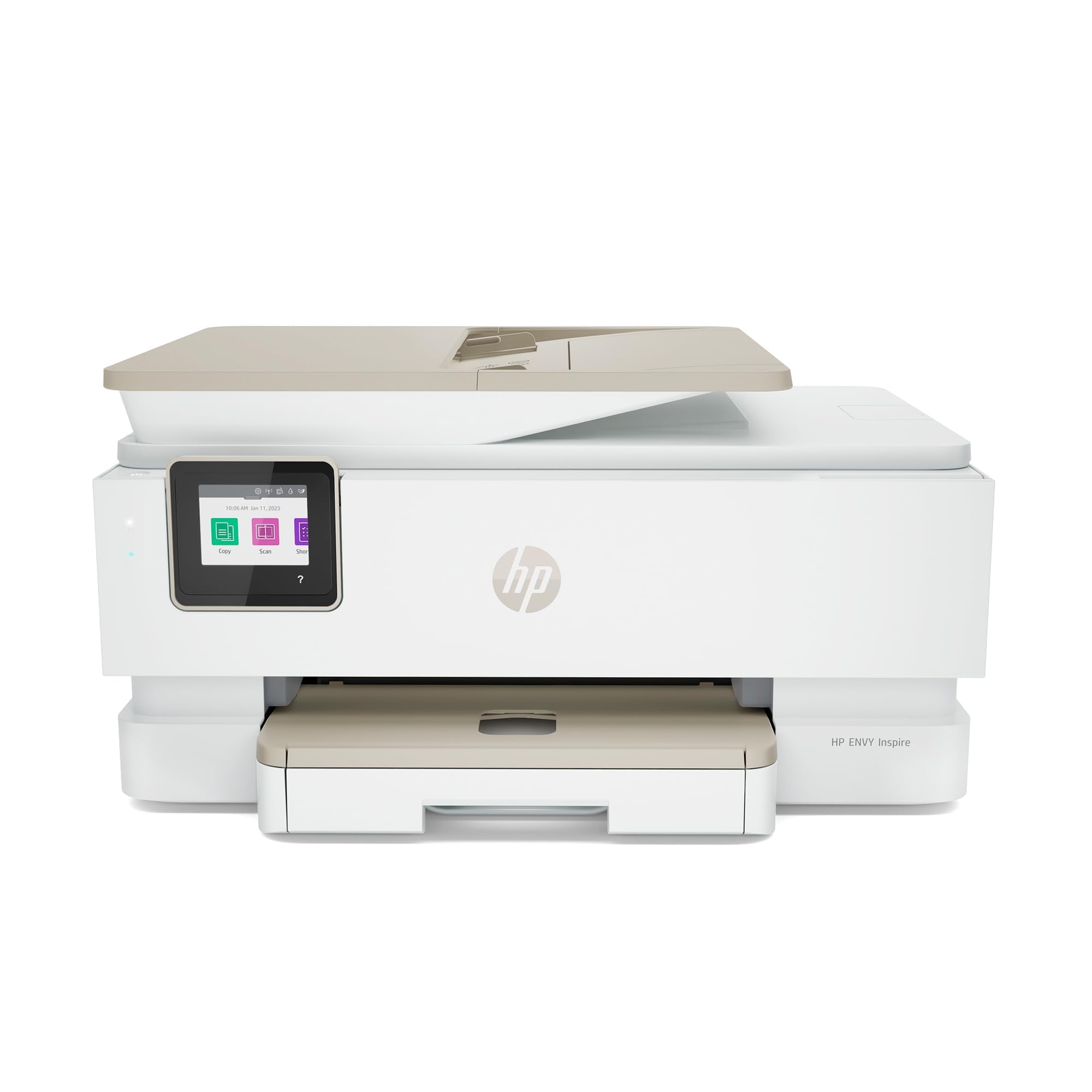
A factory-refurbished speed leader that rivals brand-new models on both black and color output.
This renewed HP hits a balance if you want fast speed without paying full retail. It prints black documents at 15 ppm and color at 10 ppm — compared to the HP Envy 6155’s 10 ppm on black copies. The 2.7-inch color touchscreen makes navigation intuitive, and both the main paper tray and a dedicated photo tray are included, which is unusual in the budget tier. Reviewers point out the unit “arrived like new, well-packed” and that the refurbished quality was indistinguishable from a fresh unit.
It supports automatic two-sided printing and is eligible for HP Instant Ink (a subscription service that sends you ink before you run out), which can cut ongoing ink costs if you subscribe. On the down side, one reviewer received a defective black cartridge with the printer. The renewed listing is not a brand-new unit, so the warranty and return window are set by Amazon Renewed Premium standards rather than HP’s standard guarantee.
Strengths
- Fastest color speed in this list at 10 ppm
- 2.7-inch color touchscreen for easy navigation
- Auto duplex plus a separate photo tray
Watch out
- Renewed unit — some have reported defective starter cartridges
- Instant Ink subscription is needed to keep costs low
- Firmware may block third-party ink over time
Pick this if: You want the fastest color speeds in the budget range and are comfortable buying renewed to get a higher-tier printer for less.
Pass on it: If you need a brand-new unit with a full factory warranty, or if you refuse to use proprietary ink cartridges.
4. HP Envy 6155 Wireless All-in-One Color Inkjet Printer

The trusted replacement for aging Envy owners who value easy Wi-Fi and no-fuss daily printing.
Jumping from a decade-old HP unit to the 6155 is a smooth move: shoppers say it “reconnects instantly” on the same network and delivers quick scans and prints every time. It runs at 10 ppm black and 7 ppm color with automatic duplex, plus a 2.4-inch touchscreen that is simple enough for a 91-year-old user to navigate, according to one satisfied reviewer. The dual-band Wi-Fi (2.4GHz/5GHz) is reliable and handles connection drops on its own.
The 6155 ships with a 3-month trial of Instant Ink (the HP ink subscription service), and HP’s P3 screen-to-print technology (designed to match screen colors on paper) helps photos come out vibrant. On the downside, the plastic body feels a bit flimsy, and some owners had trouble connecting during initial setup. The power button is on the back, which makes it a stretch to reach if the printer is tucked into a cubby. Still, for a household doing standard homework and photo prints, this is a balanced, no-drama choice.
What clicks
- Very reliable dual-band Wi-Fi that reconnects after a drop
- Clear 2.4-inch touchscreen that any age can use
- Auto duplex and decent photo quality with P3 tech
Hiccups
- Build feels flimsy; some users struggled with initial Wi-Fi pairing
- Power switch is on the back, awkward to reach
- Setup cartridges have low page yield (~120 black, ~75 color)
Best for: Anyone upgrading from an old HP Envy who wants a fast, reliable wireless connection and does not need high-speed burst printing.
Not for: Those who print heavy-volume color jobs or want a rugged, all-metal build — the plastic chassis is light-duty.
5. Epson Expression Home XP-4200 Wireless Color All-in-One Printer

A photo-friendly inkjet with individual cartridges so you replace only the empty color, not the whole set.
The XP-4200 stands out because it uses four separate Claria ink cartridges (cyan, magenta, yellow, black). When yellow runs out, you replace just yellow — no wasted ink. It prints borderless photos up to full 8.5″ x 11″ and does automatic two-sided copying. The 2.4-inch color LCD display helps navigate settings without needing a phone. Its color speed, however, is just 5 ppm, compared to the HP Envy Inspire 7955e’s 10 ppm.
Buyers are split on wireless reliability: some call it “great” and easy to set up, while others report the “wireless connectivity unreliable; frequent reconnection needed,” especially after a firmware update that also blocks third-party ink. If you stick with Epson genuine cartridges and have a stable network, the print quality for photos is excellent. The scanner uses 48-bit input (captures a wide range of color data) and 24-bit output for richer color capture than most competitors.
Highlights
- Individual ink cartridges, replace only the empty color
- Large 2.4-inch LCD screen for easy menu navigation
- Borderless photo printing with rich color
Downsides
- Slow 5 ppm color — the slowest in this lineup
- Firmware update may block third-party ink
- Wireless dropouts reported after firmware changes
Grab it for: Frequent photo printing where individual ink cartridges actually save you money, and you are okay with slower color speeds.
Skip it for: Heavy document printing or if you are on a network that struggles with device reconnections — the wireless can be finicky.
6. HP DeskJet 4255e Wireless All-in-One Color Inkjet Printer

A bare-basics all-in-one that keeps the price low but forces you into manual duplex and a 2.4GHz-only network.
The DeskJet 4255e is for the lightest of light users: print a to-do list, a recipe, a letter. It manages 8.5 ppm black and 5.5 ppm color, with a manual document feeder on top for multi-page scans. The Achilles heel is that Wi-Fi is 2.4GHz only — no 5GHz band — which can cause connection headaches on modern mesh routers that push devices to the 5GHz band. Buyers report setup is easy on Windows 11, and the automatic document feeder is handy for its class.
There is no automatic duplex, so you flip pages manually for two-sided prints. The single tri-color cartridge wastes ink when one color empties first. Several reviewers highlight the “Dynamic Security” chip that blocks non-HP ink cartridges, making ongoing costs higher than the cheap entry price suggests. If your use is truly occasional and you are willing to subscribe to Instant Ink after the free trial, the compact design (made with at least 60% recycled plastic) fits a small desk nicely.
Pros
- Automatic document feeder for multi-page scans
- Very compact; fits tight desk spaces
- AI-powered print formatting removes web page clutter
Cons
- 2.4GHz-only Wi-Fi, no 5GHz support
- Manual duplex printing only
- Single color cartridge wastes ink; firmware blocks refills
Suits: Occasional printing (a few pages a week) where the lowest upfront cost matters most and you are willing to use HP cartridges.
Falls short for: Anyone who prints frequently, needs auto two-sided printing, or has a dual-band mesh network that fights with 2.4GHz devices.
7. Canon PIXMA TR160 Wireless Portable Compact Printer

The lightest unit here at 4.5 pounds — slides into a backpack and prints documents or photos on the road.
At just 12.7″ x 7.3″ x 2.6″ and weighing 4.5 pounds, the TR160 is clearly built for a travel bag, an RV, or a cramped dorm desk. It uses a 5-color hybrid ink system for sharp text and vibrant photos, printing black at 9 ppm and color at 5.5 ppm. The 1.44-inch monochrome OLED display lets you check ink levels quickly, and Wireless Direct mode means you can connect your phone to the printer even without a Wi-Fi router.
Buyers love the portability: one reviewer calls it a “pint-sized portable printer” that is “the size of a paper ream.” It connects via Bluetooth or USB-C, so modern laptops are covered. The trade-offs are significant — it prints only (no scanner, no copier), there is no duplex option, and the 50-sheet paper tray is small. The battery pack is sold separately, so true cordless use requires an extra purchase.
What stands out
- Extremely portable at 4.5 lbs; backpack-ready
- Wireless Direct mode — no router needed
- USB-C connection for modern laptops
Limitations
- Print only — no scanner or copier
- No automatic duplex; simplex only
- Battery sold separately; small 50-sheet tray
Ideal for: Travelers, RV owners, and students who need to print documents or photos from a phone or laptop while away from a desk.
Not for: Home offices that need scanning, copying, or any moderate-to-heavy daily printing volume.
Understanding the Specs
Pages per Minute (ppm)
This is the number of pages the printer can produce in one minute measured on standard text documents. Black-and-white speed is always higher than color speed because color printing lays down multiple layers of ink. A 10 ppm black printer is fine for a home printing a few pages a day; if you regularly print 20-page reports, aim for 15 ppm or higher. In this list, the Brother HL-L2405W leads at 30 ppm black, while the Epson XP-4200 trails at just 5 ppm color.
Duplex (Automatic vs. Manual)
Duplex means the printer can print on both sides of a sheet. Automatic duplex does it without you touching the paper — you select “two-sided” in the software and it flips the page internally. Manual duplex means the printer spits out one side, then prompts you to reinsert the paper the other way. If you print multi-page school assignments or reports, automatic duplex saves time and paper; if your printing is mostly single-sided, manual duplex is less critical.
FAQ
Will a budget wireless printer work with my iPhone or Android phone?
What does 2.4GHz only Wi-Fi mean for my home network?
How long do ink cartridges last in an infrequently used printer?
Is it cheaper to use third-party ink cartridges?
What is the difference between a two-cartridge system and individual ink tanks?
Can I print photos on a budget wireless inkjet?
What does Instant Ink or a toner subscription cost per month?
What size paper can these printers handle?
Final Thoughts: The Verdict
Across the board, the budget wireless printer winner is the Canon PIXMA TS4320 because it balances 14 ppm black speed, automatic duplex, and decent color output at a low upfront price, all wrapped in a compact, quiet design. If you print mostly black-and-white and want the lowest per-page cost with zero ink-drying headaches, grab the Brother HL-L2405W. And if you need a printer that fits in a backpack for travel or a cramped dorm, the standout is the Canon PIXMA TR160 for sheer portability at 4.5 pounds.
How We Picked
We do not accept paid placement. Every pick is matched to a real buyer and a real use-case; we do not hands-on test units.
Sources & Methodology
Specifications: manufacturer listings and product documentation. Review insights: verified customer reviews, as of July 2026. Pricing: not shown on this page (it changes often); check the current price via the retailer link.
As an Amazon Associate, FitlyFast earns from qualifying purchases. This does not affect which products we feature.