
Our readers keep the lights on and the weekend projects moving. As an Amazon Associate, I earn from qualifying purchases.
Specs are compiled from manufacturer listings and verified buyer reviews and can change over time — please confirm the key details on the product page before buying.
Finding a webcam that makes you look good on stream without hurting your wallet is tougher than it sounds. You need clear video, decent audio, and features that actually work for live broadcasting — not just a generic laptop lens. This guide cuts through the noise to show you which affordable cameras deliver real streaming performance.
I’m Rikta — the founder and writer behind FitlyFast. This guide is built by comparing the manufacturers’ published specifications and the patterns across verified customer reviews, so you get each pick’s real strengths and trade-offs instead of marketing spin.
Whether you are starting your first channel or upgrading from built-in laptop junk, you will find a solid budget webcam for streaming that fits your setup while staying affordable.
Quick Picks
- Angetube 967Pro Webcam with Ring Light — Best Overall
- Logitech HD Pro Webcam C920 — Reliable Workhorse
- j5create USB Streaming Webcam (JVCU100) — Sleek & Versatile
- RUWBY Pro HD 1080p/30fps Webcam with Tripod — Tripod Included
- NexiGo N60 1080P Webcam with Microphone — Budget Champion
- Acer 1080p Webcam with Noise Cancellation — Wide-Angle Value
How To Choose The Best Budget Webcam For Streaming
Picking the right streaming webcam at a low price means ignoring marketing fluff and focusing on the specs that actually affect your live picture and sound. Here is what to look for.
Resolution and Frame Rate (1080p vs 720p, 30fps vs 60fps)
For streaming, 1080p (Full HD) is the standard you want. 720p can look blurry on a big stream layout, especially if you add overlays or a green screen. Most budget webcams cap at 1080p at 30fps, which is perfectly fine for talking-head streams, reviews, and casual gaming. The 60fps option is useful if you record fast hand-cam footage or high-motion content — but it typically costs more and many viewers can’t tell the difference on standard platforms.
Field of View (FOV)
The field of view determines how much of your room appears on screen. A narrow FOV (around 65-75 degrees) works best if you sit close to the camera and want the background minimized. A wide FOV (around 90-100 degrees) captures more of your environment — good for showing props, guests, or a full desk setup — but can make you look smaller in the frame.
Audio and Microphone Quality
Your stream’s audio is just as important as the video. Built-in microphones on budget webcams vary a lot — some have dual noise-cancelling mics that pick up your voice clearly; others sound thin or echo-y. If you plan to stream seriously, consider using a dedicated USB microphone or headset alongside your webcam for the clearest sound.
Quick Comparison
| Model | Best For | Resolution | Max FPS | Field of View | Amazon |
|---|---|---|---|---|---|
| Angetube 967Pro | Feature-packed streaming | 1080p | 60fps | Adjustable, 5X digital zoom | Amazon |
| Logitech C920 | Reliable, proven quality | 1080p | 30fps | 78° | Amazon |
| j5create JVCU100 | Wide compatibility | 1080p | 30fps | Wide angle | Amazon |
| RUWBY Pro HD | Flexible mounting + tripod | 1080p | 30fps | Wide angle | Amazon |
| NexiGo N60 | Simple plug-and-play | 1080p | 30fps | 75° | Amazon |
| Acer 1080p Webcam | Best value pick | 1080p | 30fps | 100° | Amazon |
In‑Depth Reviews
1. Angetube 967Pro Webcam with Ring Light

A streaming-focused webcam that loads features without the premium price tag.
The standout here is the dual-mode video: you can switch between HDR at 1080p@30fps or smooth 1080p@60fps, giving you control over color or motion depending on your content. That is a rare option at this price level — most budget picks top out at 30fps. The built-in three-level adjustable ring light is another streaming-friendly touch, letting you brighten your face in dim conditions without extra desk lamps. Buyers report that on the lowest setting, the light still falls on the “blue light” spectrum, so if you have light-sensitive eyes, that is something to consider before buying.
The 5X digital zoom lets you crop the frame without moving the camera, and H.264 compression keeps your video stream smooth without hogging your internet upload speed. The autofocus can also be turned off if you prefer a fixed focal point — a nice level of control that cheap fixed-focus webcams lack.
Streamer-friendly features
- 1080p at 60fps for smooth motion handling
- Built-in adjustable ring light for instant face lighting
- 5X digital zoom and adjustable FOV for framing control
Watch for
- Ring light only offers cool-toned light, which can be harsh on sensitive eyes
- Privacy shutter does not fit the device perfectly, per some buyers
- Included software is reportedly limited in use
Ideal for: Streamers who want 60fps video and a built-in light in one affordable package.
One trade-off: The cool-toned ring light may not suit everyone, but the video performance is the best in this budget class.
2. Logitech HD Pro Webcam C920

The reference standard for webcam quality that still holds up years later.
The C920 is a legend for a reason. It delivers sharp 1080p video at 30fps with H.264 hardware compression, which means your computer does not have to work as hard to keep the stream running — a real plus for lower-powered gaming rigs. Owners mention the built-in stereo microphones pick up sound well, but they also note the mics can add a slight reverb, so a dedicated mic is a better choice for serious streaming.
Where the C920 falls short against newer budget options is the lack of a ring light or digital zoom. You get a solid 78-degree field of view, which frames a single person nicely but does not capture as much of your desk or background as the wider-angle Acer below. It also lacks 60fps support, so fast hand movements can appear less fluid. Still, it beats many cheaper webcams on sheer color accuracy and low-light correction — customers note the RightLight technology adjusts exposure well, though the auto white balance can lean a bit blue.
Why it endures
- 1080p with H.264 hardware compression reduces CPU load
- Autofocus keeps you sharp even when you move closer
- Stereo microphones offer decent pickup before adding a separate mic
Budget trade-offs
- No 60fps mode — capped at 30fps
- Field of view is narrower than some budget competitors (78°)
- Side-to-side rotation is limited; you may need a tripod for angles
Grab it if: You want a proven, durable webcam with excellent image quality and hardware compression for smoother streaming.
skip it if: You need wide-angle shots, 60fps motion, or a built-in light — newer options offer more for less.
3. j5create USB Streaming Webcam (JVCU100)

A plug-and-play webcam that wins points for wide OS and app compatibility.
The j5create JVCU100 earns its spot for Linux streamers who need a plug-and-play webcam that works without extra setup. It captures 1080p video through a wide-angle lens with an F/2.4 aperture (a lens opening that lets in more light), so your face stays visible even in a dim room. It supports H.264 and MJPEG image formats (two common video compression standards) and works immediately with Windows, macOS, and Chrome OS — no drivers required. Reviewers specifically praise it for running smoothly on Linux systems like Arch and Manjaro, which is rare at this price. The built-in microphone records audio clearly, though one reviewer noted it is not available for Discord on Chromebook.
Unlike the Angetube 967Pro, the j5create lacks a ring light and cannot shoot at 60fps (frames per second), so it is not ideal for fast hand-cam streams or very dark rooms. Its 360-degree rotation lets you adjust your angle on the fly, and the wide-angle lens captures a decent share of your background. A long-term reviewer who used it for three years noted that after the second year, the microphone started sounding echo-y and the camera occasionally needed unplugging and re-plugging to connect — a real durability concern if you want a webcam that lasts beyond two years.
Cross-platform strength
- Plug-and-play on Windows, macOS, Chrome OS, and even Linux
- F/2.4 aperture lens for improved low-light performance
- 360-degree rotation for flexible positioning
Longevity concerns
- No extra streaming features like ring light or 60fps
- Some reviewers point out audio quality dropping after extended use
- Not compatible with PS5
Best for: Linux users or anyone who needs a simple, wide-compatibility webcam for streaming and calls.
One catch: The microphone and connection may degrade over a few years, so it is less of a long-term investment than the Logitech C920.
4. RUWBY Pro HD 1080p/30fps Webcam with Tripod

A versatile kit that comes with a sturdy tripod, so you get the perfect eye level every time.
This RUWBY webcam stands out because it ships with an aluminum tripod with a 1/4-inch universal screw, meaning you can place it on your desk at the exact height you need rather than clipping it to your monitor. The camera itself captures smooth 1080p video at 30fps with fast autofocus and a wide-angle lens — shoppers say the natural colors and wide field of view make it feel like you are sitting across from someone. The dual noise-cancelling microphones pick up your voice clearly up to 10 feet away, filtering out background hum.
Unlike the Angetube 967Pro, this RUWBY model does not offer 60fps or a built-in ring light. If you stream in a dim room, the automatic low-light correction helps, but it is not as powerful as having a separate light source. Some buyers report that the autofocus cannot be turned off, which is a minor annoyance if you prefer to manually set the focus. Compared to the Logitech C920, the RUWBY lacks that proven long-term reputation, but the included tripod gives it a real advantage for desk setups where a monitor clip is awkward.
Kit value
- Includes a sturdy aluminum tripod for flexible desk placement
- Dual noise-cancelling mics pick up audio up to 10 feet away
- Fast autofocus and wide-angle lens for a natural-looking frame
Missing features
- No way to disable autofocus for fixed-focal streams
- No 60fps mode or built-in ring light
- Brand is less established than Logitech for long-term durability
Reach for this if: You need a simple, ready-to-stream kit and prefer a desk tripod over a monitor clip.
Look elsewhere if: You want advanced streaming features like 60fps or an integrated ring light — this is a clean, basic setup.
5. NexiGo N60 1080P Webcam with Microphone

A straightforward performer that delivers sharp video and simple operation at a very low price.
The NexiGo N60 features a 1080p FHD two-MP CMOS sensor paired with a 3.6mm glass lens that delivers crisp video at resolutions up to 1920 x 1080 at 30fps. The lens is tune for distances between 19.6 inches and 13 feet, which covers typical desk setups well. Owners mention it is “truly plug-and-play” and the built-in noise-cancelling microphone picks up voice clearly, though one buyer mentioned the sound can be a bit tinny at top volume compared to a dedicated mic. A 4X digital zoom is available, letting you crop the frame without physically moving the camera.
Compared to the Acer 1080p webcam below, the NexiGo has a narrower field of view (around 75 degrees), so you get less background in the shot, which some streamers prefer. Its resolution and 30fps match the Acer exactly, but the N60’s glass lens and 4X zoom give it a slight edge in image crispness at fixed distances. The privacy cover is a simple slide, and it works with USB 2.0/3.0 without any driver fuss.
Clean and simple
- Sharp 1080p video up to 30fps with a glass lens for better clarity
- 4X digital zoom gives you framing control
- Plug-and-play setup works instantly on most devices
Narrower focus
- Field of view is narrower than many budget competitors
- Built-in mic can sound tinny or quiet at max volume per some buyers
- No 60fps or extra streaming features
A solid starting point: Perfect for streamers who just want reliable 1080p video without extra bells and whistles.
The catch: If you want a wider background shot or louder audio, you may prefer the Acer below or a separate microphone.
6. Acer 1080p Webcam with Noise Cancellation Microphones
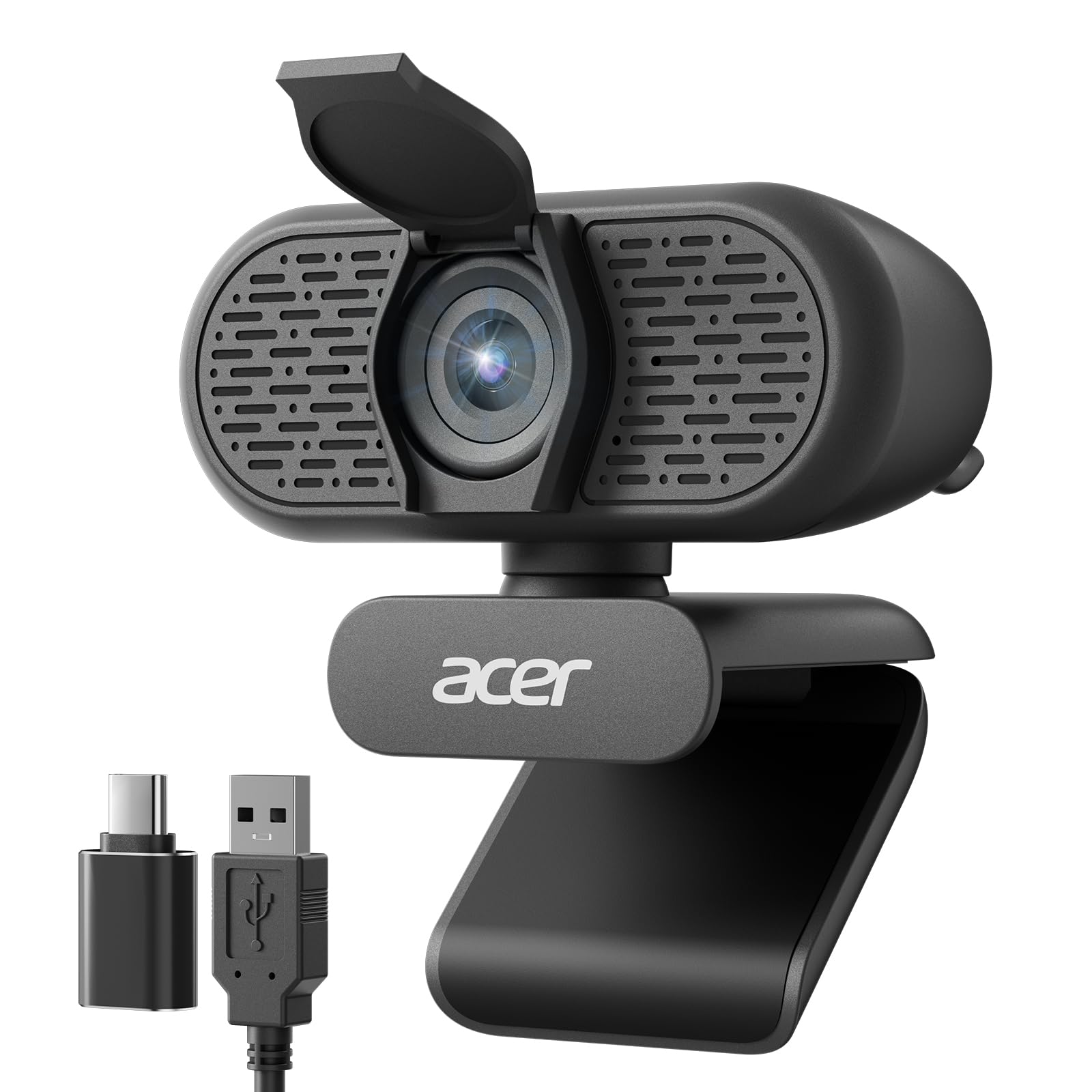
A wide-angle lens that captures your whole setup, paired with dual noise-cancelling mics.
The Acer webcam offers the widest field of view in this budget lineup at 100 degrees, making it ideal for showing off your full desk, streaming with a guest, or keeping the frame loose. It is powered by a new CMOS sensor that delivers clear 1080p video at 30fps, and the automatic low-light correction keeps you visible even if your room lighting is less than ideal. The built-in dual noise-reduction microphones do a solid job of picking up your voice — customers note the audio comes through “loud and clear” on platforms like Zoom and Google Meet.
Along with the NexiGo N60, the Acer is among the most affordable 1080p webcams here, but it adds a wider field of view (FOV — how much of the room the camera sees) and a 360-degree rotation for easier angle adjustment. Unlike the Angetube 967Pro, it lacks 60fps and a ring light, so if you stream in very dark conditions or need smooth motion for fast hand-cam footage, you will want the Angetube instead. The included A-to-C USB adapter makes it compatible with modern laptops, and the privacy cover blocks the lens when you are not streaming.
Spacious capture
- 100° field of view shows more background than any other budget pick here
- Dual noise-cancelling mics deliver clear voice audio
- Automatic low-light correction works well in dim rooms
Streaming limits
- No 60fps mode or ring light for advanced streamers
- No digital zoom for reframing without physical movement
- Resolution is standard 1080p — no HDR option
Best for: Streamers who want the widest possible background shot at the lowest price.
pass on it if: You need 60fps, digital zoom, or a built-in light — the Angetube is a better fit for those needs.
Understanding the Specs
Frame Rate (30fps vs 60fps)
Frame rate is how many still images your webcam captures every second. At 30fps (frames per second), motion looks normal for talking-head streams, typical chats, and gameplay commentary. At 60fps, every movement is noticeably smoother — this matters most if you record fast-paced hand-cam content, like unboxing, crafts, or speedruns. Most budget webcams are stuck at 30fps, but the Angetube 967Pro in this guide lets you switch to 60fps for that extra fluidity.
Field of View (FOV)
The field of view is measured in degrees and tells you how wide the camera sees. Typical webcam FOV ranges from about 65 degrees (a tight head-and-shoulders shot) to 100 degrees (wide enough to show your desk and some background). A wider FOV is useful for streaming with a co-host or showing off props, but if you sit very close to the camera, a wide lens can make the background look cluttered. The Acer in this list has the widest FOV at 100 degrees among the budget picks.
FAQ
Will a budget webcam work for live streaming on Twitch?
Do I need 60fps for streaming or is 30fps enough?
What is the ideal field of view for a streaming webcam?
Does the built-in microphone on a budget webcam sound good enough for streaming?
What is the difference between a webcam with autofocus and a fixed-focus webcam?
Can I use a budget webcam with OBS Studio?
What does a privacy cover do and why is it useful for streaming?
Will a budget webcam work with Xbox or PlayStation consoles for streaming?
How do I mount a budget webcam if my monitor is too thin or thick for the clip?
What is low-light correction and why is it important for streaming?
Final Thoughts: The Verdict
For most streamers, the budget webcam for streaming winner is the Angetube 967Pro because it packs 1080p@60fps, an adjustable ring light, and 5X digital zoom at a price that undercuts traditional top-tier webcams. If you want a proven, rock-solid performer built to last for years, grab the Logitech C920. And for the absolute lowest price with a very wide 100-degree field of view, the Acer 1080p Webcam is a bargain that still delivers solid video and audio for beginner streams.
How We Picked
We do not accept paid placement. Every pick is matched to a real buyer and a real use-case; we do not hands-on test units.
Sources & Methodology
Specifications: manufacturer listings and product documentation. Review insights: verified customer reviews, as of July 2026. Pricing: not shown on this page (it changes often); check the current price via the retailer link.
As an Amazon Associate, FitlyFast earns from qualifying purchases. This does not affect which products we feature.