
Our readers keep the lights on and the weekend projects moving. As an Amazon Associate, I earn from qualifying purchases.
Specs are compiled from manufacturer listings and verified buyer reviews and can change over time — please confirm the key details on the product page before buying.
You want a keyboard and mouse that do not squeak, feel flimsy, or die after a few months — but you do not want to spend a lot. The right budget combo saves you from a frustrating desk setup and feels comfortable to use every day, as long as you know which specs actually matter and which are just marketing.
I’m Rikta — the founder and writer behind FitlyFast. This guide is built by comparing the manufacturers’ published specifications and the patterns across verified customer reviews, so you get each pick’s real strengths and trade-offs instead of marketing spin.
This roundup of the budget keyboard and mouse options focuses on quiet keys, reliable connections, and components that actually hold up past the first few months. Whether you are outfitting a home office, a shared workspace, or a first gaming setup, the winner below will save you money and headaches.
Our Picks at a Glance


How To Choose The Best Budget Keyboard And Mouse
The right budget combo balances quiet operation, a responsive mouse, and a keyboard that won’t fail after a year. Here are the three things to check before you buy.
Wired vs Wireless: The Real Trade-Off
Wired combos give you instant plug-and-play with zero lag, no batteries to replace, and a lower price. Wireless options like the Logitech MK270 offer a cleaner desk and a 33-foot range, but you trade that freedom for eventual battery swaps and potential USB receiver loss. For a desk that never moves, wired is the more reliable value play.
Keyboard Feel: Membrane vs Mechanical
Nearly every budget combo uses a membrane switch — a rubber dome beneath each key that is quieter and cheaper than mechanical switches. Some combos, like the SABLUTE, simulate a mechanical tactile feel to give a crisper feedback without the click. If quiet typing matters in a shared room, membrane is your friend.
Mouse DPI and Build Quality: The Hidden Weakness
Many budget combos cut corners on the mouse. A low DPI (dots per inch) makes the cursor feel sluggish on high-resolution monitors. Look for at least 1600 DPI for comfortable everyday use. Also scan reviews for “squeaks on click” or “high-pitched noise” — a common sign of a cheap sensor you want to avoid.
Quick Comparison
| Model | Best For | Connection | Keyboard Keys | Mouse DPI | Amazon |
|---|---|---|---|---|---|
| EDJO Wired Combo★ Best Overall | Keyboard-first buyers | Wired USB | 104-key | Optical, fixed | Amazon |
| Logitech MK270Also Great | Long-lasting wireless | 2.4 GHz Wireless | 104-key full-size | 1000 | Amazon |
| SABLUTE Gaming Combo | Budget gaming feel | Wired USB | Membrane with tactile feel | 800/1600/2400/3200 | Amazon |
| Logitech MK235 | Eco-conscious wireless | 2.4 GHz Wireless | Full-size with 15 FN keys | 1000 | Amazon |
| HeengYanson Large Print | Low-vision users | Wired USB | 104-key, backlit | Optical, fixed | Amazon |
| Macally Wired Combo | Mac users on a budget | Wired USB | 78-key scissor-switch | 800/1200/1600/2400 | Amazon |
| X9 Retro Wired Combo | Aesthetic desk setups | Wired USB | 109-key, round keycaps | Adjustable | Amazon |
In‑Depth Reviews
1. EDJO Wired Keyboard and Mouse Combo
The keyboard earns its keep, but the mouse is the weak link.
This full-sized wired combo delivers a comfortable typing experience thanks to an ergonomic design with a built-in palm rest and foldable stand that angles the keyboard. The keys are quiet and responsive — reviewers call them “soft but not mushy” and accurate for everyday typing. It also includes 12 multimedia shortcut combinations for instant access to music, volume, and email, which improves work efficiency if you frequently switch between apps. The wired USB connection provides a more stable signal than any wireless option in this price range, so you never experience dropouts.
The main catch is the mouse. Shoppers say it “squeaks on click” and emits a “high-pitched noise (laser?), unusable” — a clear signal the optical sensor has build quality issues. Multiple reviews recommend the keyboard alone, calling it a great value replacement, while advising against relying on the mouse. It works on smooth surfaces even without a mouse pad, but the noise is a dealbreaker for quiet offices. Compared to the SABLUTE’s 3200 DPI mouse, the EDJO’s optical mouse has a fixed sensitivity with no DPI switching, so it feels less flexible for different screen sizes or tasks.
Why the Keyboard Shines
- 12 multimedia shortcuts boost daily productivity
- Integrated wrist rest and foldable stand add ergonomic value
- Quiet, accurate keys with a full-size layout
Why the Mouse Fails
- Mouse squeaks loudly on click according to multiple reviews
- Fixed DPI — no sensitivity adjustment for different tasks
Best for: Someone who needs a comfortable keyboard first and can tolerate or replace the mouse.
Pass on this if: A quiet, reliable mouse is non-negotiable — the squeak is a known issue.
2. Logitech MK270 Wireless Keyboard and Mouse Combo
The wireless veteran that outlasts most other combos at its price.
You get a full-size keyboard with low-profile, quiet keys and a standard layout that includes a number pad and arrow keys. The USB receiver provides a stable connection up to 33 feet away, so you can keep typing even if you step back from your desk. Buyers report excellent durability — one reviewer shared they replaced the same model after 5 years due to a space bar failure, calling the durability “excellent.”
The real standout is battery life: the keyboard runs for up to 36 months on two AAA batteries, and the mouse lasts up to 12 months on a single AA battery, with both having on/off switches to save power. The mouse is ambidextrous and compact, though some owners mention it feels “cheap and lightweight” compared to the keyboard. It also features 8 multimedia hotkeys for instant access to internet, email, play/pause, and volume. Unlike the Logitech MK235, the MK270 does not have a spill-resistant design, but it compensates with a higher rating (4.5 out of 5 across over 109,000 ratings) and a wider wireless range.
If you want a clean wireless desktop without worrying about battery swaps, this is the one. One missing feature: the keys do not light up, so you will need a desk lamp in a dark room.
What Makes It the One
- 36-month keyboard battery life means years without changing batteries
- 8 multimedia hotkeys for quick access to media controls
- Proven durability with over 109,000 ratings at 4.5 stars
The Trade-Offs
- Mouse feels lightweight and cheaper than the keyboard
- No backlit keys — not usable in the dark
Your daily driver: This is for anyone who wants a set-and-forget wireless combo with exceptional battery life and proven reliability.
Look elsewhere if: You need backlit keys or a larger, heavier mouse — the MK270’s mouse is compact and light.
3. SABLUTE Gaming Keyboard and Mouse

Mechanical-like feedback without the mechanical price tag.
This wired combo uses a membrane switch but simulates a tactile feel, giving you a crisp rebound that is much quieter than a true mechanical keyboard — perfect for shared bedrooms or late-night use. The dynamic RGB backlighting reacts to keystrokes and creates an rich look, and a detachable PU-leather wrist rest helps reduce fatigue during long sessions. Customers note that after 3 months, typing speed improved by 3-5 wpm (words per minute), and the fast adaptation time was around 2-5 hours.
The mouse delivers a step up from basic optical mice with four DPI (dots per inch) levels you can switch between on the fly: 800, 1600, 2400, and 3200 DPI. That 3200 DPI max is noticeably higher than the fixed 1000 DPI on the Logitech MK270, giving you faster cursor movement on larger screens. The keyboard supports 19-key anti-ghosting (a feature that ensures multiple simultaneous key presses are all registered accurately), which matters for gaming and fast typing. The keyboard’s RGB brightness and modes are controlled by a knob, though reviewers point out the knob does not control volume — it only cycles lighting options, a point of confusion for some.
top-tier Features
- 19-key anti-ghosting ensures every keystroke registers in fast games
- Four DPI levels up to 3200 beat most budget mice
- Detachable wrist rest and quiet keys suit shared spaces
The Catch
- Volume knob only controls RGB, not audio volume
- Keyboard slightly small — some buyers misclick the Enter key
Ideal for: A gamer or typist who wants a responsive, colorful setup without the noise of a mechanical keyboard.
Consider skipping if: You need a full-size layout with dedicated Print Screen and volume controls.
4. Logitech MK235 Wireless Keyboard and Mouse Combo

An eco-friendly wireless combo with a spill-resistant keyboard.
The MK235 gives you a full-size keyboard with 15 FN (function) shortcut keys for one-touch access to media and applications, plus a compact ambidextrous mouse. It connects via a USB receiver up to 33 feet away with no pairing or software required — just plug and play. Battery life is nearly as good as the MK270: up to 3 years for the keyboard and 1 year for the mouse. The keyboard also features a spill-resistant design and anti-fading treatment on the keycaps, which adds durability for a desk that sees coffee or snacks.
This combo uses certified post-consumer recycled plastic — 75% for the mouse and 51% for the keyboard — so it is the most eco-conscious pick here. However, buyers mention the keyboard lacks a power switch and Caps/Num lock indicator lights, which can be inconvenient if you often toggle caps lock. The mouse has a power switch, which the keyboard does not. It is good for light gaming and daily use, but not for heavy gaming. The MK235 also has a lower 4.3 out of 5 rating across 12,127 reviews compared to the MK270’s 4.5, and buyers report the compact layout may feel cramped for large hands.
what separates it
- Spill-resistant keyboard with durable, anti-fading keycaps
- High recycled plastic content (75% mouse, 51% keyboard)
- 3-year keyboard battery life with included Duracell batteries
The Downsides
- No Caps/Num Lock indicator lights on the keyboard
- Non-universal USB receiver — losing it means replacing the whole set
Reach for this if: You want a reliable wireless combo with a spill-resistant keyboard and eco-friendly materials.
Look elsewhere if: You need backlit keys or a full-size mouse with a more substantial feel.
5. HeengYanson Large Print Light Up Keyboard and Mouse
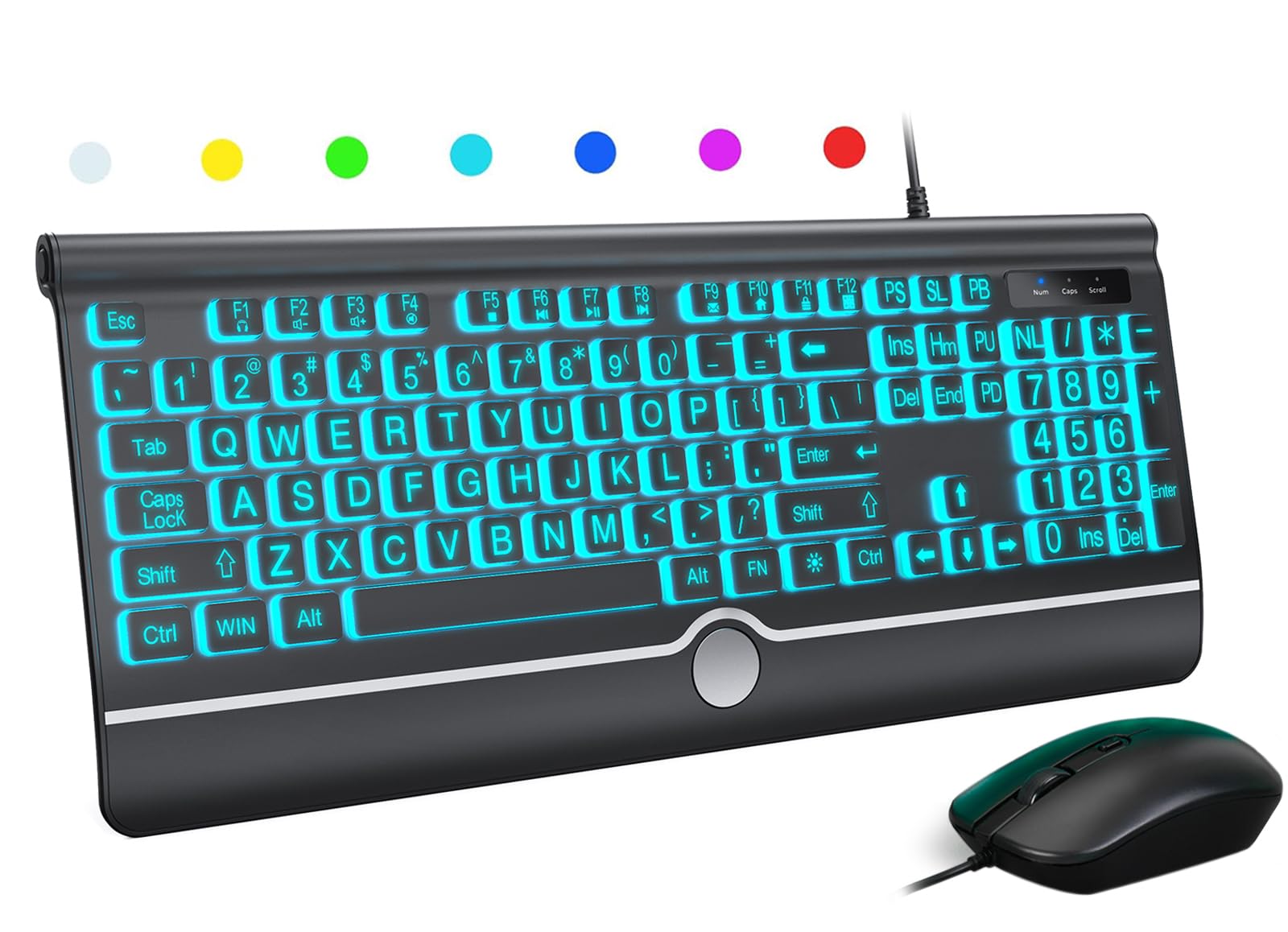
Big, bold, backlit keys that actually help you see what you are typing.
The defining feature here is the large print keycaps — letter characters are noticeably larger than standard keys, and command keys use a bolder font with high contrast. This makes a real difference for elderly users, the visually impaired, or anyone who works in low-light environments. The wired keyboard offers 7 adjustable backlight colors (blue, green, red, cyan, purple, yellow, and white) with 3 brightness levels, so you can set the perfect lighting for your eyes. Owners mention the backlight automatically turns off after a period of inactivity, saving power and reducing distraction.
This is a full QWERTY English (US) 104-key layout with a numeric keypad, an ergonomic wrist rest, and foldable feet to reduce hand fatigue during long sessions. The mouse is a standard optical wired mouse that works on most surfaces, though one reviewer noted the mouse clicking is normal volume — not silent like the keyboard keys. It is compatible with Windows 2000 through Windows 10, including Raspberry Pi 3/4, and Mac OS (though multimedia keys may not fully work on Mac). Unlike the Macally combo, this keyboard prioritizes large visibility over compact design, so it takes up more desk space.
Key Highlights
- Large print keys with bold command text help low-vision users type accurately
- 7-color backlight with 3 brightness levels works in dark rooms
- 104-key full layout with numeric keypad and wrist rest
Limitations
- Mouse clicks are normal volume, not quiet
- Multimedia keys not fully compatible with Mac OS
Best suited for: Seniors, low-vision users, or anyone who needs large, bright keys to type comfortably.
Consider another if: You need a silent mouse or a compact footprint for a small desk.
6. Macally USB Wired Keyboard and Mouse Combo

The closest wired alternative to an Apple keyboard at a fraction of the price.
This wired combo is designed specifically for Mac users, with a compact 78-key layout using scissor-switch keys for low-profile, smooth typing that feels very similar to an original Apple keyboard. It includes 13 shortcut keys for one-touch commands and LED indicators for caps lock and number lock. The optical mouse features silent click technology that is 90% quieter than standard mice, plus a DPI switch with four settings (800, 1200, 1600, and 2400 DPI) for precise control on different surfaces. Buyers confirm it works flawlessly with older Macs — one reviewer tested it on a 2011 iMac — and it is also compatible with Windows PCs via a standard USB-A port.
At 430 grams, the keyboard is light enough to move around your desk easily. Reviewers praise the “virtually silent mouse” and note the keyboard “looks and works like the real deal” at a fraction of the cost of Apple’s official peripherals. However, the keys make a slightly more audible click than the true Apple keyboard, so audio purists may notice the difference. Unlike the Logitech MK270, this combo is wired — you get zero wireless lag but also zero cable-free desk space. The scissor-switch mechanism (a type of key mechanism that uses a “scissor” hinge for a stable, low-travel press) is quieter than membrane but not silent like the SABLUTE’s quiet membrane.
Mac-Ready Perks
- Scissor-switch keys feel very close to Apple’s original keyboard
- Silent mouse is 90% quieter than standard mice, perfect for quiet offices
- Four DPI levels give flexible cursor speed for different screens
The Fine Print
- Keys click slightly louder than genuine Apple keyboards
- Compact 78-key layout lacks a full number pad
Reach for this if: You use a Mac and want an affordable, near-silent wired combo that feels Apple-native.
Pass if: You need a full number pad or prefer the larger key spacing of a full-size keyboard.
7. X9 Wired Keyboard and Mouse Combo with Phone/Tablet Holder
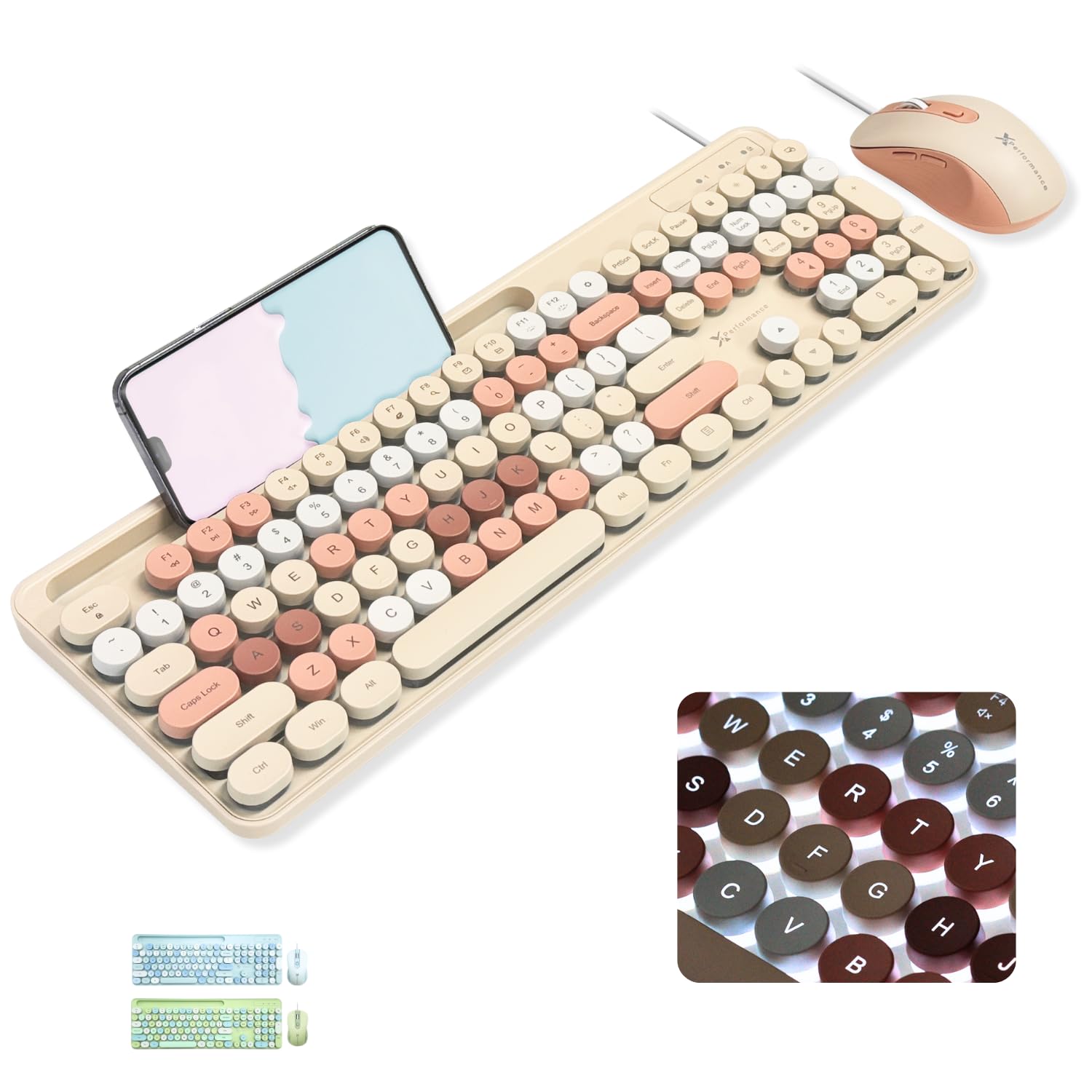
A retro typewriter look that actually types quietly.
This wired combo stands out for its vintage aesthetic: round keys in a brown retro style with soft pastel tones that make your workspace cozy. But it is not just looks — the keyboard features 109 keys (one of the largest layouts here) with a built-in phone or tablet holder, so you can keep your device propped up while you work. The round keycaps use a membrane switch and are described by buyers as “creamy” and “thocky” (a deep, muted sound profile keyboard enthusiasts like), producing quiet keystrokes suitable for shared spaces. It also has three levels of soft white backlighting for working in low light.
The ergonomic mouse offers adjustable DPI (dots per inch) settings for smooth control on various surfaces. However, customers note a durability concern: after 5 months, the S, M, and L keys showed scratching despite light use. A few also mention the spacebar and backspace keys felt stuck initially and that the backlight brightness cannot be adjusted — only the on/off is controlled. At 0.89 kilograms, it is the heaviest combo here, so it stays planted on your desk. Compared to the EDJO combo, the X9 trades the dedicated multimedia shortcuts for visual personality and the phone holder.
What Makes It Unique
- Built-in phone/tablet holder keeps your device visible while typing
- Round retro keycaps with quiet “thocky” sound appeal to style-conscious users
- 109-key layout includes dedicated keys many compact boards omit
Honest Pitfalls
- S, M, L key scratching reported after a few months
- Backlight brightness is not adjustable, only on/off
Ideal for: Anyone who wants a conversation-starting desk setup with a vintage look and a handy phone stand.
Look elsewhere if: You need long-term keycap durability or adjustable backlight brightness.
Understanding the Specs
Anti-Ghosting
Anti-ghosting means the keyboard can register multiple key presses at the same time without missing one. For a gamer, that means pressing W, A, Shift, and Space simultaneously in a game actually works — every command registers. For a typist, it means fast bursts like “the” or “and” never drop a letter. The SABLUTE offers 19-key anti-ghosting, while most budget combos offer none.
DPI (Dots Per Inch)
DPI measures how far the cursor moves on screen per inch of mouse movement. At 800 DPI, the cursor moves slowly — good for precise work like photo editing. At 3200 DPI, the cursor flies across the screen with a tiny wrist flick, ideal for large high-resolution monitors or fast-paced gaming. A mouse with adjustable DPI, like the SABLUTE or Macally combos, lets you switch between slow and fast modes on the fly.
FAQ
Is wired or wireless better for a budget keyboard and mouse combo?
What is the difference between membrane and mechanical keyboards in budget combos?
Will a budget keyboard and mouse work with a Mac?
What does anti-ghosting mean and do I need it?
How long do budget wireless keyboard batteries last?
What is scissor-switch technology and why does it matter?
Can I use a budget gaming mouse for productivity?
What should I check in reviews before buying a budget combo?
Is a backlit keyboard worth it on a budget combo?
Can I use a wired keyboard and mouse combo on a laptop?
Final Thoughts: The Verdict
If you want one dependable pick, the budget keyboard and mouse winner is the Logitech MK270 because its 36-month keyboard battery life, proven durability across over 109,000 ratings, and reliable 33-foot wireless range make it the set-and-forget solution for any desk. If you want a gaming-feel wired combo with anti-ghosting and adjustable DPI, grab the SABLUTE Gaming Combo. And for a quiet, compact, Mac-compatible setup that looks native on an iMac, the Macally Wired Combo gives you a 90% quieter mouse and scissor-switch keys at a fraction of Apple’s prices.
How We Picked
We do not accept paid placement. Every pick is matched to a real buyer and a real use-case; we do not hands-on test units.
Sources & Methodology
Specifications: manufacturer listings and product documentation. Review insights: verified customer reviews, as of July 2026. Pricing: not shown on this page (it changes often); check the current price via the retailer link.
As an Amazon Associate, FitlyFast earns from qualifying purchases. This does not affect which products we feature.