
Our readers keep the lights on and the weekend projects moving. As an Amazon Associate, I earn from qualifying purchases.
Specs are compiled from manufacturer listings and verified buyer reviews and can change over time — please confirm the key details on the product page before buying.
Upgrading your old hard drive to a budget SSD is the single biggest speed boost you can give a slow computer — but not all budget SSDs are the same. This guide breaks down the six best options by the numbers that actually matter: read speed, write speed, and real-world boot times straight from buyers who installed them.
I’m Rikta — the founder and writer behind FitlyFast. This guide is built by comparing the manufacturers’ published specifications and the patterns across verified customer reviews, so you get each pick’s real strengths and trade-offs instead of marketing spin.
Here is your straight-to-the-point look at the best budget ssd options worth installing right now.
Our Picks at a Glance


How To Choose The Best Budget SSD
A budget SSD is a huge upgrade from any old spinning hard drive, but prices and specs vary enough that the cheapest option isn’t always the best deal. Here is what to check before you click buy.
Read Speed vs. Write Speed
Read speed — how fast the drive delivers data back to your system — is what makes your OS boot in seconds and apps launch instantly. Write speed matters when you copy large files onto the drive. Most SATA III budget SSDs land around 500-550MB/s read, but write speeds can be much lower, especially on entry-level drives. If you mostly read (loading games, opening documents), prioritize read speed. If you move big video or photo files around, watch the write number.
Capacity vs. Price per Gigabyte
240-256GB drives cost the least upfront and are perfect for a boot drive plus a few programs. 480-512GB drives cost more but still run well under a hundred dollars. Paying a little more for double the storage usually gives you much better value per gigabyte — a 500GB drive often costs only a few dollars more than a 240GB one.
TLC vs. QLC NAND Flash
Triple-Level Cell (TLC) NAND stores three bits per cell and generally writes faster and lasts longer than Quad-Level Cell (QLC) NAND, which stores four bits per cell. QLC drives are cheaper but can slow down noticeably during large continuous writes. For a primary boot drive, TLC is usually the safer bet.
DRAM vs. DRAM-less
Some budget SSDs skip the DRAM cache to cut costs. A DRAM-less drive uses your computer’s RAM as a temporary buffer, which can cause slower performance during heavy multitasking. For a casual-use laptop or a secondary storage drive, DRAM-less is fine. For a daily-driver desktop where you run several apps at once, a drive with a DRAM cache gives smoother performance.
Quick Comparison
| Model | Best For | Capacity | Read Speed | Write Speed | Amazon |
|---|---|---|---|---|---|
| PNY CS900 250GB★ Best Overall | Reliability & Compatibility | 250 GB | 535 MB/s | 500 MB/s | Amazon |
| Timetec 512GBAlso Great | Overall Performance | 512 GB | 550 MB/s | 500 MB/s | Amazon |
| Kingston A400 240GB | Brand Trust & Reviews | 240 GB | 500 MB/s | 350 MB/s | Amazon |
| Crucial BX500 240GB | Energy Efficiency | 240 GB | 540 MB/s | — | Amazon |
| Fanxiang S101 500GB | Price-to-Capacity Ratio | 500 GB | 500 MB/s | — | Amazon |
| Colorful 480GB | Budget High Capacity | 480 GB | 500 MB/s | 450 MB/s | Amazon |
In-Depth Reviews
1. PNY CS900 250GB 3D NAND SATA III
The PNY runs on low power and gets along with finicky gadgets that other SSDs refuse to recognize.
One of the sharpest details in the reviews for this drive is its compatibility with the Eufy HomeBase 3 security camera hub. A buyer pointed out that the PNY draws just 5V at 1.0 amps — perfectly within the Eufy’s strict power limits — while a Crucial SSD they tried pulled 2.0 amps and was never detected. That kind of power efficiency also makes it a smart choice for older laptops with weak power delivery over the SATA port.
Performance is strong for a 250GB class drive: up to 535 MB/s sequential read and 500 MB/s sequential write. That means your operating system boots faster and apps load quicker — buyers report boot times dropped to under 15 seconds. It is also backwards compatible with SATA II, so it works in older machines without losing compatibility.
The capacity (250GB) is about half of the Timetec 512GB, but that keeps the upfront cost lower and still leaves room for Windows, a few big programs, and some files. For a secondary or dedicated-use drive, this reliability record is tough to top.
Strong suits
- Verified to work with power-sensitive devices like security camera hubs
- Fast 535 MB/s read speed for a 250GB drive
- Backwards compatible with SATA II ports
Consider this
- 250GB fills fast if you install several modern games
Perfect pick for: Anyone upgrading a secondary machine, a home security hub, or a laptop with a tight power budget.
skip it if: You need more than 250GB of storage for a primary desktop — the Timetec or Colorful offers twice the space.
2. Timetec 512GB SSD 3D NAND SATA III
The Timetec matches the speed of pricier brands while giving you twice the space for about the same cash.
This drive leads the pack on read speed at 550 MB/s and write speed at 500 MB/s, so your operating system and most-used programs load at the ceiling of what a SATA III connection allows. One buyer described a real-world test: copying a 55GB MP3 collection took 10 minutes on this SSD versus 1 hour 15 minutes on a traditional hard drive. That kind of time savings is what makes the jump to an SSD feel like a new computer.
The 512GB capacity is a balance — it offers 512GB, compared to some 240GB drives you’d pay nearly the same price for. Compared to the Colorful 480GB, the Timetec reads at 550 MB/s versus 500 MB/s and writes at 500 MB/s versus 450 MB/s, making it the stronger performer in the mid-size class. The maker claims an industry-leading 1,000,000 hours mean time before failure (MTBF) — that is a reliability rating you usually see on drives costing more.
For most people looking for a single-drive upgrade, this delivers the best balance of capacity, speed, and price without chasing a flashy brand name.
Why it wins
- Fastest sequential read speed in this roundup at 550 MB/s
- Generous 512GB capacity — rare at this price point
- Buyers confirm massive time savings on big file transfers
A real limitation
- No mounting screws or cables included in the box
- Less established brand than Kingston or Crucial
The one to beat: If you want the fastest read speeds in this budget group and enough room for your OS, apps, and a game or two, this is the drive to start with.
The honest trade-off: Its write speed (500 MB/s) is excellent for SATA, but large continuous writes over many gigabytes can slow a bit since it relies on SLC caching — not an issue for daily use.
3. Kingston 240GB A400 SATA 3 2.5″ Internal SSD

With over 200,000 ratings averaging 4.8 stars, the Kingston A400 is the crowd favorite that just works.
Kingston’s A400 is the entry-level SSD that has been tested by more buyers than any other drive in this roundup — 205,187 ratings and counting. The read speed of 500 MB/s is solid for SATA III, but the listing says the write speed is 350 MB/s — the real-world buyer experience tells a clearer story. Users consistently report that it revived old laptops (one reviewer noted a 2013 HP) with easy installation and noticeably faster boot times. The stainless steel enclosure adds a bit of durability compared to the plastic shells on some budget rivals.
The A400 is DRAM-less, which means it uses your computer’s system memory instead of a dedicated cache. That keeps the cost down but can result in slower performance during heavy multitasking or large file transfers. For a secondary system or a media center PC, most buyers find this trade-off acceptable — especially when the drive costs very little upfront.
Unlike some newer brands, Kingston backs this with the confidence of a globally recognized name. If your priority is a safe, proven, and widely-used drive, this is the one.
What stands out
- Extraordinary 4.8-star average from over 200,000 ratings
- Stainless steel casing for better durability
- Compatible with Xbox One and PS4 consoles
The know-before-you-buy
- DRAM-less design can feel sluggish with heavy writes
- Write speed is lower than TLC-based competitors
The safe bet: If you want the most-bought, most-reviewed budget SSD on the market with a brand that has decades of reputation, the A400 is the textbook choice.
Look elsewhere if: You regularly copy large files onto the drive — the Timetec or PNY will feel snappier for write-heavy tasks.
4. Crucial BX500 240GB 3D NAND SATA 2.5-Inch Internal SSD

A Crucial drive that the maker claims is 45 times more energy efficient than a hard drive, so your laptop battery lasts noticeably longer.
The BX500 delivers read speeds up to 540 MB/s and is built with Micron 3D NAND — a solid pedigree since Crucial is Micron’s consumer brand. One buyer described the boot time improvement perfectly: “My boot times went from ‘time to go make a coffee’ to ‘wait, it’s already on?’ in under 15 seconds.” That is the SATA III experience you are buying here. The maker also claims it is 300% faster than a typical hard drive and 45 times more energy efficient, which is a meaningful advantage for laptops where every bit of battery life counts.
At 240GB, this is a boot-drive-size SSD. It is enough for Windows and your core programs, but you will need a second storage drive for large media libraries or modern game installations. Some buyers have successfully used it as a dedicated media drive where the read speeds shine and the write loads are light.
One area where the BX500 falls short of the Timetec is storage capacity — the Crucial’s 240GB is 240GB compared to the Timetec’s 512GB. But for a simple OS-and-apps upgrade, it hits a price that is hard to argue with.
Why choose it
- 540 MB/s read speed — among the fastest in this budget class
- Claimed 45x better energy efficiency than a hard drive (per the maker)
- Trusted brand with a 3-year limited warranty
One weak spot
- Write speeds are not published and likely slower than the Timetec or PNY
- 240GB fills up quickly if you install large games
A great match for: Laptop owners who care about battery life and want a quick, easy boot drive upgrade from a reputable memory brand.
Not ideal for: Power users who write large files regularly — the missing write-speed spec is a red flag for heavy write workloads.
5. fanxiang S101 500GB SSD SATA III

The fanxiang undercuts most 500GB rivals while using TLC NAND for better endurance than cheaper QLC drives.
The S101 offers 500GB of capacity with a read speed of 500 MB/s, putting it in roughly the same performance tier as the Colorful and Kingston drives but with half a terabyte of space. One buyer mentioned plugging it into a camera hub where it was recognized immediately and worked perfectly with loop recording — a good sign for compatibility. The drive uses 3D NAND TLC chips, which the maker says offer a longer lifespan in writes compared to QLC, so it should hold up better if you are constantly moving files on and off the drive.
Buyers have mixed experiences on longevity — one owner reported the drive lasted a couple of months before becoming corrupted on an old laptop, while others call it excellent and fast over longer periods. That split is common among lesser-known brands, so your own luck may vary depending on the quality of your system’s SATA port and power supply.
The fanxiang comes with a 3-year quality assurance, which gives some confidence. If you want a large budget SSD and are willing to try a less famous name, this gives you the most gigabytes per dollar in the group.
Why it earns a spot
- 500GB capacity at a very competitive price point
- Uses TLC NAND for better write endurance than budget QLC drives
- Buyers confirm easy plug-and-play with security camera hubs
Potential downside
- Some user reports of failure after a few months
- Write speed not specified in the specs — uncertain for heavy use
Best for buyers who: Want the most storage space for the least money and use the drive for reading files (media, games) rather than constant writing.
Be cautious if: This will be your only drive in a primary work machine — the reliability reports are more mixed than the Kingston or Timetec.
6. Colorful 480GB SSD SATA III
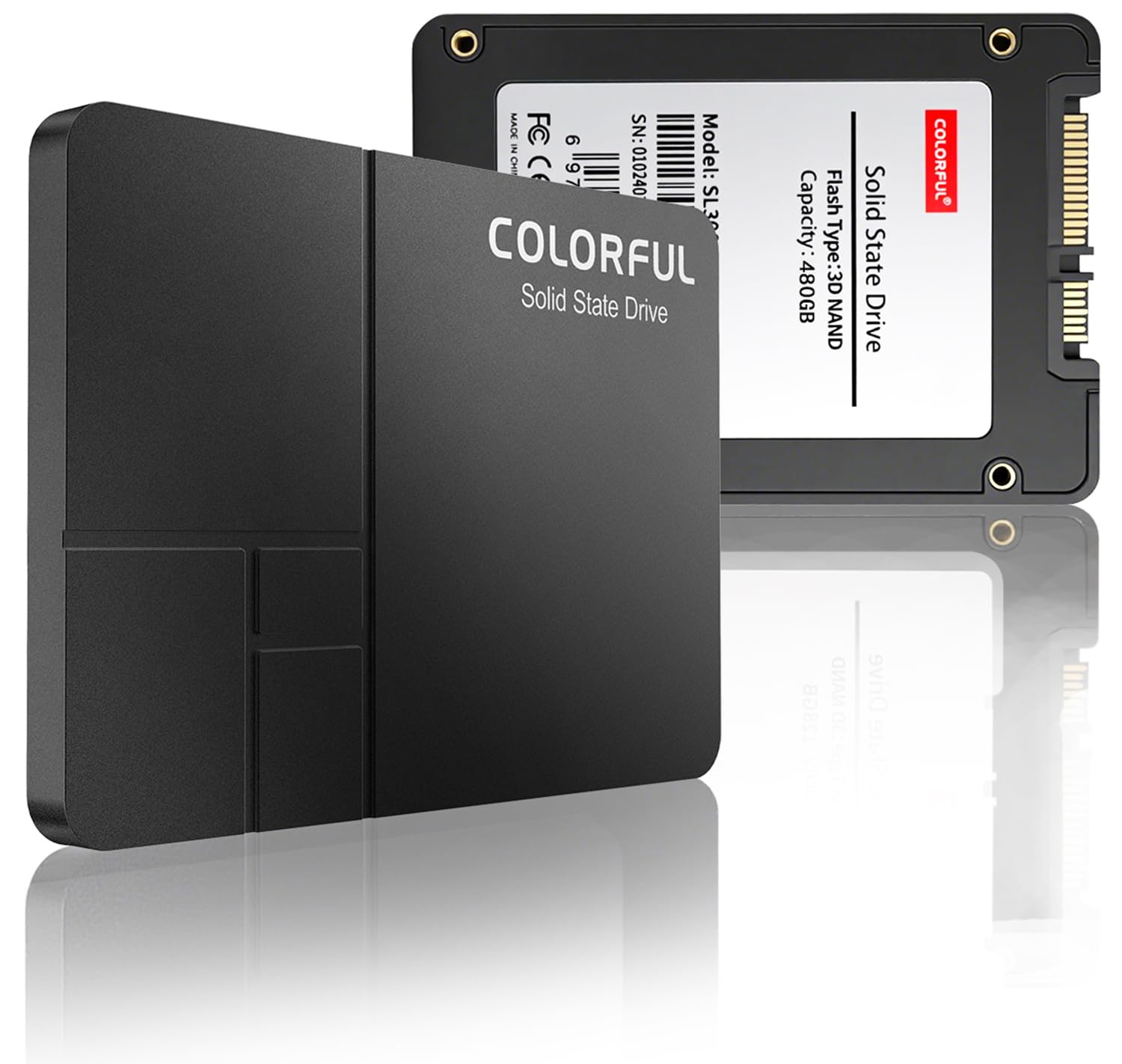
This 480GB drive brings a buyer-reported boot-time nutcracker: from 15-plus minutes on a hard drive to under 45 seconds.
The Colorful SSD reads at 500 MB/s and writes at 450 MB/s, giving it a write speed that is competitive with drives costing more — compared to the Timetec’s 500 MB/s write, for instance. It uses original 3D TLC NAND flash, which is the more durable NAND type and a plus over QLC drives at similar price points. One buyer described installing it in a 2014 Acer desktop: “I cloned Windows onto it and my boot time went from 15 mins + to less than 45 seconds.” That is the kind of dramatic improvement that justifies the upgrade all by itself.
The build quality includes a gold-plated PCB that the maker says reduces oxidation and improves long-term stability, plus an ABS+metal enclosure. It runs at 0dB noise since there are no moving parts, and power consumption is significantly lower than a mechanical hard drive. A 3-year manufacturer’s warranty backs the purchase.
The main trade-off is brand recognition — Colorful is better known in the graphics card space than SSDs, and the review count (83) is tiny compared to the Kingston or Crucial. But the specs and buyer experiences so far suggest a solid performer if you are comfortable going with a less familiar name.
What works
- Generous 480GB capacity with a strong 450 MB/s write speed
- Gold-plated PCB for stable electrical conductivity
- Buyers saw massive boot-time reductions in old systems
The hesitation
- Very few customer reviews compared to market leaders
- Less known brand — less long-term track record data available
Reach for this if: You need a high-capacity budget SSD with decent write speeds and are fine buying from a lesser-known but well-specced brand.
Think twice if: Brand reputation and a long track record of reviews matter more to you than squeezing out an extra 200GB.
Understanding the Specs
Sequential Read Speed
This is the number that determines how fast your computer feels when you turn it on, open a program, or load a level in a game. Measured in MB/s (megabytes per second), a SATA III SSD typically ranges from about 500 MB/s to 550 MB/s. Higher is better, but any drive in that range will make an old hard drive feel ancient. The Timetec leads this category at 550 MB/s, while most others sit at 500-540 MB/s.
Sequential Write Speed
Write speed matters when you save a file, copy a movie onto the drive, or install a game. This number is often lower than read speed on budget SSDs — sometimes much lower, like 350 MB/s on the Kingston A400 compared to 500 MB/s on the Timetec. If you regularly move large video or photo files, prioritize a drive with a higher write speed (450-500 MB/s). If you mostly read from the drive, write speed is less critical.
FAQ
Will any of these SSDs fit my laptop?
Do these SSDs work with a SATA II port?
How do I transfer my operating system to a new SSD?
Is a DRAM-less SSD bad for gaming?
Which NAND type lasts longer: TLC or QLC?
Can I use a 2.5-inch SATA SSD in a desktop PC?
How much faster is a SATA SSD than a 7200 RPM hard drive?
How do I check the health of my new SSD over time?
Final Thoughts: The Verdict
For most people, the best budget ssd winner is the Timetec 512GB because it combines the fastest read speed (550 MB/s) in the group with generous 512GB storage at a price that undercuts the competition. If you want a drive with an enormous buyer-tested reputation, grab the Kingston A400 240GB. And for a high-capacity budget pick that still uses durable TLC NAND, the Colorful 480GB delivers the most space for the money with a competitive 450 MB/s write speed.
How We Picked
We do not accept paid placement. Every pick is matched to a real buyer and a real use-case; we do not hands-on test units.
Sources & Methodology
Specifications: manufacturer listings and product documentation. Review insights: verified customer reviews, as of July 2026. Pricing: not shown on this page (it changes often); check the current price via the retailer link.
As an Amazon Associate, FitlyFast earns from qualifying purchases. This does not affect which products we feature.