
Our readers keep the lights on and the weekend projects moving. As an Amazon Associate, I earn from qualifying purchases.
Specs are compiled from manufacturer listings and verified buyer reviews and can change over time — please confirm the key details on the product page before buying.
Picking a budget gaming motherboard means you have to balance features with future-proofing, and it is easy to overspend on extras your CPU does not actually need. The real trick here is finding the right socket and chipset so your processor gets enough power without paying for things like an extra M.2 slot you will never fill.
I’m Rikta — the founder and writer behind FitlyFast. This guide is built by comparing the manufacturers’ published specifications and the patterns across verified customer reviews, so you get each pick’s real strengths and trade-offs instead of marketing spin.
The models below cover Intel LGA 1700 boards, AMD AM4 boards, and even a compact Mini-ITX option, so you can match your CPU without guesswork. For a solid starting point, this is exactly what you need from a best budget gaming motherboard.
Our Picks at a Glance


How To Choose The Best Budget Gaming Motherboard
Your first checkpoint is the CPU socket — it must physically match your processor. Once that is set, you shift focus to the VRM (the voltage regulator module that delivers stable power to the CPU), memory slots, and storage connectors.
Socket and Chipset Match
The socket (like LGA 1700 for newer Intel CPUs or AM4 for many AMD Ryzen chips) locks you into a processor generation. The chipset (like B760 for Intel or B550 for AMD) determines what extra features you get — faster USB ports, more PCIe lanes for graphics cards, and support for overclocking.
VRM Quality and Power Phases
A board with a digital power design and sufficient power phases keeps the CPU fed under load, preventing stutters in demanding games. Look for terms like “direct power phase” or “digital PWM” in the specs — it means cleaner voltage delivery.
DDR4 vs. DDR5
DDR5 memory runs at faster clock speeds from the start, which can improve frame rates in CPU-heavy titles. But DDR4 boards are cheaper, and the difference is often small at a budget price point. Check which memory type your chosen board supports before buying sticks.
Quick Comparison
| Model | Best For | Socket | Memory Slots | Max Memory | Amazon |
|---|---|---|---|---|---|
| MSI PRO B760-VC WiFi★ Best Overall | Budget DDR5 entry | LGA 1700 | 4 | 64 GB | Amazon |
| MSI B760 Gaming Plus WiFiAlso Great | DDR5 & Wi-Fi 6E | LGA 1700 | 4 | 128 GB | Amazon |
| ASUS B760M-AYW WiFi D4 IITop Performer | Compact mATX DDR4 | LGA 1700 | 2 | 96 GB | Amazon |
| GIGABYTE B550 Eagle WIFI6 | Ryzen with Wi-Fi 6 | AM4 | 4 | 128 GB | Amazon |
| GIGABYTE B550M AORUS Elite AX | mATX Ryzen & Wi-Fi 6E | AM4 | 4 | 128 GB | Amazon |
| ASRock B550 Phantom Gaming 4 | Budget Ryzen ATX | AM4 | 4 | 128 GB | Amazon |
| Gigabyte A520I AC | Mini-ITX compact build | AM4 | 2 | 64 GB | Amazon |
In‑Depth Reviews
1. MSI PRO B760-VC WiFi
The most affordable DDR5 ATX board on this list, certified renewed for a lower price.
This renewed MSI board supports Intel 12th and 13th Gen processors on the LGA 1700 socket. It has four memory slots with a max capacity of 64 GB — the MSI PRO B760M-P DDR4 has 128 GB max, which is an important trade-off if you plan on upgrading later. It includes DDR5 support, PCIe 4.0, a 2.5Gbps LAN port, and Wi-Fi 5.
Buyers report the renewed condition is often indistinguishable from new, with all original accessories included. The board features an extended heatsink design for good thermal management. The lower 64 GB memory cap means this board is best for a pure gaming build rather than heavy multitasking or content creation, but the DDR5 speed helps keep frame rates competitive.
Pros
- Renewed price — lowest DDR5 option here
- Four memory slots for expandability
- 2.5Gbps LAN and Wi-Fi 5 included
Cons
- 64 GB memory max — competing boards like the MSI PRO B760M-P DDR4 offer 128 GB
- Only Wi-Fi 5, not Wi-Fi 6
Ideal for: Budget-conscious gamers who want to try DDR5 without spending a lot and do not need more than 64 GB of RAM.
Consider other options if: You want a full 128 GB capacity or the faster Wi-Fi 6 standard.
2. MSI B760 Gaming Plus WiFi
The full-size ATX board that brings DDR5 speeds to a budget without cutting corners on connectivity.
This MSI board gives you four memory slots supporting up to 128 GB of DDR5 RAM, which means you can upgrade later without tossing out your sticks. The memory clock speed reaches 6800 MHz (overclocked), giving you a noticeable speed bump over DDR4 in games that are CPU-bound. It also includes Wi-Fi 6E and Bluetooth 5.3, so you get the latest wireless standards without buying a separate card.
Buyers report that the extended heatsink and MOSFET thermal pads rated for 7W/mK keep the board cool during long gaming sessions. It supports 12th, 13th, and 14th Gen Intel processors, making it a solid future-proof pick if you ever upgrade the CPU. The catch is the price sits at the top of the budget range — you pay more upfront for that DDR5 support and Wi-Fi 6E.
Why it stands out
- DDR5 support with 6800 MHz OC potential
- Four memory slots — 128 GB max capacity
- Built-in Wi-Fi 6E and Bluetooth 5.3
Trade-offs
- Higher price within the budget range
- No PCIe 5.0 support — uses PCIe 4.0
Best for: Gamers building an Intel LGA 1700 system who want DDR5 speeds and modern Wi-Fi built right in.
Consider alternatives if: You are on a tight budget and would rather save money by sticking with DDR4 memory.
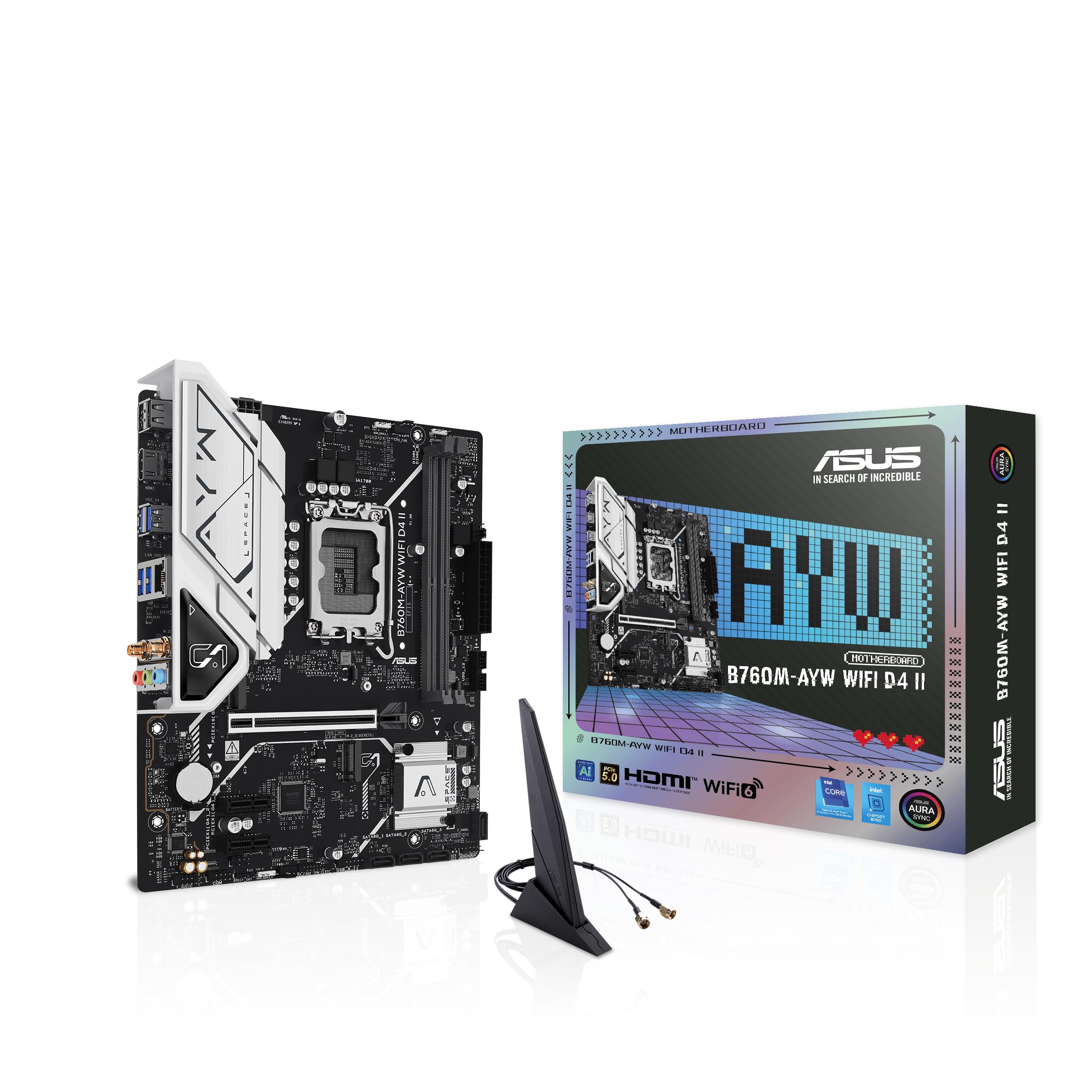
3. ASUS B760M-AYW WiFi D4 II
A compact mATX board that squeezes PCIe 5.0 support into a DDR4-friendly setup.
This ASUS board is the only one in this list to include a PCIe 5.0 x16 slot, giving you a ready path for the next generation of graphics cards. Despite its small mATX size (9.6″L x 8.3″W x 1.4″H), it packs a memory clock speed of 8000 MHz, versus the ASRock B550 Phantom Gaming 4’s 2400 MHz. It uses DDR4 memory, so you can reuse older, cheaper RAM sticks.
The trade-off is that it only has two memory slots, compared to the four you find on the MSI B760 Gaming Plus WiFi. That limits your max capacity to 96 GB, which is still plenty for gaming, but you cannot upgrade in small increments later. Owners mention the Aura Sync RGB software is easy to set up, making it a good pick if you want customizable lighting without the headache.
What makes it special
- PCIe 5.0 x16 slot for future GPUs
- DDR4 memory keeps costs low
- 8,000 MHz memory clock speed (OC)
Limitations
- Only two memory slots
- mATX form factor — fewer PCIe slots than ATX
Reach for this if: You want a future-ready PCIe 5.0 slot but need to stick with budget-friendly DDR4 memory.
skip it if: You plan on using four RAM sticks now or want to expand capacity in small steps.
4. GIGABYTE B550 Eagle WIFI6

You get stable power delivery for gaming and everyday tasks thanks to a 10+3 power phase design (the system that regulates electricity to the processor), plus built-in Wi-Fi 6 (the latest wireless standard for faster, more reliable connections) so you can skip an extra adapter. This full ATX board works with AMD Ryzen processors.
This GIGABYTE board is built for AMD AM4 Ryzen 5000, 4000, and 3000 series processors, with a digital twin 10 plus 3 phases VRM for steady power delivery under gaming loads. It measures 12″L x 9.61″W x 1″H (25% larger than the ASUS B760M-AYW WiFi D4 II’s 9.6″ x 8.3″ footprint), giving you more room for expansion cards and easier cable routing. You also get four memory slots and support for PCIe 4.0.
Buyers like the pre-installed I/O armor and enlarged VRM heatsinks, which make assembly faster and keep temperatures in check. The Wi-Fi 6 and 1GbE LAN give you flexible connectivity options. The standard memory clock speed is 3200 MHz, which matches most affordable DDR4 kits — no overclocking needed to hit your RAM’s rated speed.
What you get
- ATX size — easier expansion and airflow
- Enlarged VRM heatsinks with 5 W/mk pads
- Built-in Wi-Fi 6 and 1GbE LAN
Keep in mind
- AM4 socket — no upgrade to newer Ryzen CPUs
- DDR4 only, no DDR5 support
Ideal for: AMD AM4 users who want an ATX board with solid VRMs and built-in Wi-Fi without spending a lot.
Not for: Anyone planning a small-form-factor build — this is a full-size board that needs a mid-tower case.
5. GIGABYTE B550M AORUS Elite AX

A mATX Ryzen board that steps up to Wi-Fi 6E and Bluetooth 5.3 while keeping the compact footprint.
This GIGABYTE board runs on the AMD B550 chipset and supports Ryzen 5000, 4000, and 3000 series processors. It features a pure digital 5+3 power phase design and enlarged MOSFET heatsinks for stable power delivery without overheating. The memory clock speed reaches 4733 MHz (overclocked), and it supports four DIMMs with Extreme Memory Profile (XMP) for easy tuning.
The Wi-Fi 6E uses the 6 GHz frequency band to reduce interference from other networks, and Bluetooth 5.3 is built in. Buyers mention the Q-Flash Plus feature is a lifesaver — you can update the BIOS without installing a CPU, RAM, or GPU. The mATX size (4 memory slots, 128 GB max) keeps the board small enough for most cases while still offering two M.2 slots (one PCIe 4.0, one PCIe 3.0).
Standout traits
- Wi-Fi 6E and Bluetooth 5.3 built in
- Q-Flash Plus for BIOS updates without CPU
- Compact mATX with four memory slots
Potential drawbacks
- Only 5+3 power phases — less headroom for heavy overclocking
- No PCIe 5.0 support
Go for this if: You want a small, modern mATX board for your Ryzen build with the fastest Wi-Fi 6E standard.
Look elsewhere if: You plan aggressive overclocking on a high-core-count Ryzen 9 processor.
6. ASRock B550 Phantom Gaming 4

An affordable ATX motherboard for Ryzen that focuses on core gaming features without extra frills.
This ASRock board supports AMD Ryzen 3000, 4000 G-Series, 5000, and 5000 G-Series processors on the AM4 socket. It has four memory slots with a clock speed of 2400 MHz (the lowest among the DDR4 boards here, though it supports overclocking up to 4733 MHz). The 8 power phase design keeps the CPU stable during gaming, and it includes a PCIe 4.0 x16 slot for your graphics card.
The board is full ATX size (10.5″L x 2.5″W x 13.5″H), giving you plenty of expansion options. It is not compatible with AMD Athlon processors, so double-check your CPU before buying. Reviewers point out the BIOS interface is straightforward and the board posts without issues on first boot.
Highlights
- Full ATX form factor for expansion
- 8 power phase design for stable gaming
- PCIe 4.0 x16 slot for modern GPUs
Trade-offs
- No built-in Wi-Fi
- Default memory speed of 2400 MHz is low
Best for: Gamers who want a basic ATX board for a Ryzen build and are comfortable with wired Ethernet.
Consider alternatives if: You need integrated Wi-Fi or want a higher default memory clock speed.
7. Gigabyte A520I AC

The tiny Mini-ITX board for compact Ryzen builds that still includes Wi-Fi and Bluetooth.
This Gigabyte board measures just 7.44″L x 3.07″W x 8.74″H (a 3.7x smaller footprint than the MSI B760 Gaming Plus WiFi’s 2.01″ x 10.01″ x 13.06″ dimensions), making it perfect for small cases. It uses the AMD A520 chipset and supports 3rd Gen AMD Ryzen processors with a direct 6 phases digital PWM design that includes 55A DrMOS for efficient power delivery. You get two memory slots with dual-channel DDR4 support.
The board includes Intel Dual Band AC Wi-Fi and Bluetooth, along with a rear DisplayPort and two HDMI ports — great for a compact media or gaming rig. Shoppers say the Q-Flash Plus feature is convenient for updating the BIOS without a CPU. The downsides are the limited two memory slots and the PCIe 3.0 x16 slot, which does not support PCIe 4.0 speeds.
Why buy it
- Ultra-compact Mini-ITX size
- Built-in Wi-Fi and Bluetooth
- Q-Flash Plus for easy BIOS updates
Limitations
- Only two memory slots and 64 GB max
- PCIe 3.0 — slower than newer-gen GPUs
Perfect for: Small-form-factor PC builders who need a compact board with built-in Wi-Fi and multiple display outputs.
pass on it if: You want PCIe 4.0 support or plan to use more than two RAM sticks.
Understanding the Specs
Memory Slots & Capacity
The number of memory slots (DIMMs) determines how many RAM sticks you can install. Four slots let you start with two sticks now and add two more later, while two-slot boards require you to replace existing sticks to upgrade. Max capacity tells you the absolute ceiling — 128 GB is common on budget boards, but some cap at 64 GB or 96 GB.
VRM & Power Phases
The VRM (voltage regulator module) converts power from your PSU into clean voltage for the CPU. More power phases (like 10+3 or 8) usually mean smoother, cooler power delivery, which helps prevent throttling under gaming loads. Look for digital PWM designs and DrMOS components for better efficiency.
FAQ
Can I use a budget B760 motherboard with a 14th Gen Intel CPU?
Does the Gigabyte A520I AC support PCIe 4.0?
How many memory slots do I need for gaming?
What is the difference between DDR4 and DDR5 on budget boards?
Will the ASRock B550 Phantom Gaming 4 work with Ryzen 5000 CPUs?
What does “renewed” mean for the MSI PRO B760-VC WiFi?
Can I overclock memory on the GIGABYTE B550 Eagle WIFI6?
Which budget motherboard supports the fastest memory speed?
Final Thoughts: The Verdict
For most buyers, the best budget gaming motherboard winner is the MSI B760 Gaming Plus WiFi because it delivers DDR5 support, Wi-Fi 6E, and four memory slots at a price that makes sense for a performance build. If you want a compact mATX board with a future-ready PCIe 5.0 slot, grab the ASUS B760M-AYW WiFi D4 II. And for an affordable DDR5 entry point that works with Intel 12th and 13th Gen CPUs, the MSI PRO B760-VC WiFi is a smart pick.
How We Picked
We do not accept paid placement. Every pick is matched to a real buyer and a real use-case; we do not hands-on test units.
Sources & Methodology
Specifications: manufacturer listings and product documentation. Review insights: verified customer reviews, as of July 2026. Pricing: not shown on this page (it changes often); check the current price via the retailer link.
As an Amazon Associate, FitlyFast earns from qualifying purchases. This does not affect which products we feature.