
Our readers keep the lights on and the weekend projects moving. As an Amazon Associate, I earn from qualifying purchases.
Specs are compiled from manufacturer listings and verified buyer reviews and can change over time — please confirm the key details on the product page before buying.
The biggest mistake people make shopping for an M.2 drive on a tight budget is picking based only on the sticker price. The real cost shows up later when a slow controller drags down your boot times and game loads. This guide skips the noise and focuses on the exact mix of read speed, capacity, and reliability that actually matters at this price point.
I’m Rikta — the founder and writer behind FitlyFast. This guide is built by comparing the manufacturers’ published specifications and the patterns across verified customer reviews, so you get each pick’s real strengths and trade-offs instead of marketing spin.
If you want a fast, reliable storage upgrade without breaking your budget, you need to look beyond just the lowest price tag. This breakdown of the best budget m.2 ssd options focuses on the data transfer rates, capacities, and build quality that separate a smart buy from a regret.
Our Picks at a Glance

How To Choose The Best Budget M.2 SSD
Finding a good M.2 SSD on a budget isn’t about grabbing the first 256GB drive you see. You need to check a few key specs to ensure you get real-world speed improvements, not just a cheap component. Here are the two most important factors to consider.
Interface: PCIe Gen3 x4 is the balance for Budget Builds
Most budget M.2 SSDs use the PCIe Gen3 x4 interface. This gives you a maximum data transfer rate of around 3,000 MB/s, which is more than enough for fast boot times and quick game loading for the average user. Gen4 drives are faster but cost significantly more, so sticking with Gen3 is the smart move for a budget-focused upgrade. Make sure your motherboard has an M.2 slot that supports NVMe, not just SATA.
Capacity vs. TBW: Balancing Space and Longevity
Capacity is a big part of value, but so is how long the drive will last. The Terabytes Written (TBW) rating tells you how much data you can write to the drive before it risks failure. A drive with a 160TBW rating is perfectly fine for a general-use PC and light gaming. For a primary boot drive, aim for at least 256GB to avoid constantly managing space, and check the TBW number to ensure the drive matches your usage intensity.
Quick Comparison
| Model | Best For | Capacity | Read Speed | Write Speed | Amazon |
|---|---|---|---|---|---|
| Ediloca EN605★ Best Overall | Basic Boot Drive | 128 GB | 1130 MB/s | 400 MB/s | Amazon |
| fanxiang S501QAlso Great | Best Overall Budget Value | 512 GB | 3000 MB/s | 1300 MB/s | Amazon |
| Western Digital Green SN350 | Reliable Brand Name | 500 GB | 2400 MB/s | — | Amazon |
| Patriot Memory P320 | Balanced Read/Write | 256 GB | 2200 MB/s | 1200 MB/s | Amazon |
| Fikwot FN501 Pro | Cooling & Consistency | 256 GB | 3000 MB/s | 900 MB/s | Amazon |
| fanxiang S500 Pro | Entry-Level Performance | 256 GB | 3000 MB/s | — | Amazon |
In‑Depth Reviews
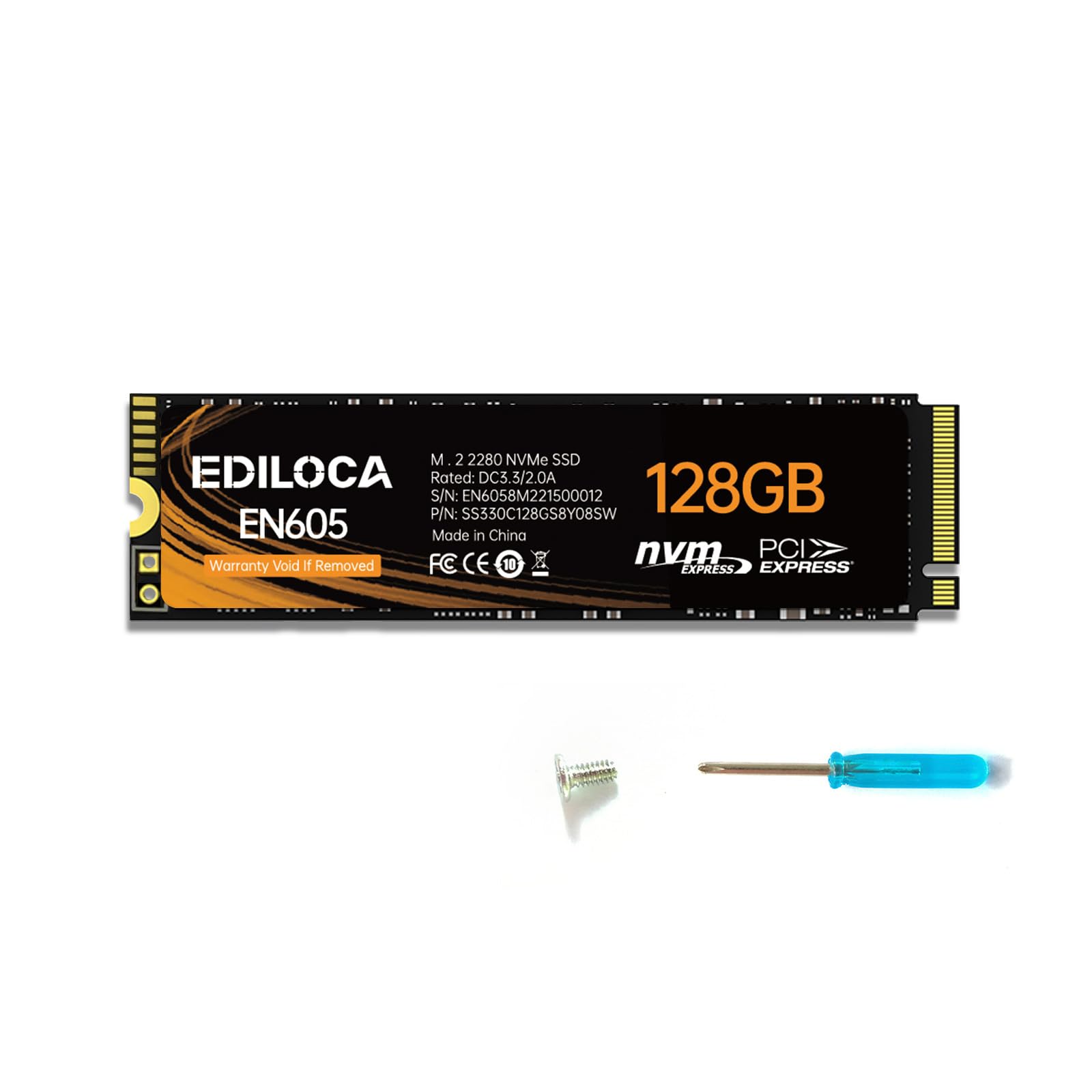
1. Ediloca EN605 128GB
The cheapest ticket into NVMe territory, ideal for a cache or very basic boot.
Sometimes you just need to replace a dying old drive or add a small cache for a video project. The Ediloca EN605 fits that exact role with a 128GB capacity and a read speed of 1130 MB/s. That is significantly lower than the 3000MB/s of the fanxiang drives — at 1130 MB/s versus the fanxiang drives’ 3000 MB/s — but it is still much faster than a SATA SSD. Its write speed is 400 MB/s.
It uses the PCIe Gen3 x4 interface and supports the NVMe 1.3 protocol. It has a lightweight M.2 2280 design and is compatible with Windows 10, 8, and 7. Built-in LDPC error correction helps maintain data integrity over time. The 3-year limited service provides a basic safety net.
Reviewers point out it works fine as a secondary or caching drive. The low 128GB capacity means you cannot use it as a modern game library drive or a main OS drive without constantly fighting with space.
Ultra cheap
- Very low entry price point to try NVMe speeds
- LDPC error correction for reliable data handling
- Simple plug-and-play upgrade for old hardware
Tiny storage
- 128GB capacity too small for a primary modern OS drive
- Read speed far below other budget options listed here
Emergency use: A scratch drive, a dedicated OS for a very lightweight setup, or a quick upgrade for a secondary computer.
Primary drive: You need a primary drive for gaming or daily multitasking — move up to a 256GB or 512GB option.
2. fanxiang S501Q SSD 512GB
The 512GB workhorse that nails the best value-per-gigabyte.
You get a big jump in space without leaving the budget zone. The fanxiang S501Q holds a 512GB capacity, versus the Ediloca EN605’s 128 GB. This means you can install your operating system, a few heavy games, and your main programs without constantly shuffling files around. It uses intelligent SLC cache technology to hit a read speed of 3000 MB/s, so boot times feel snappy.
The write speed is a practical 1300 MB/s, which is faster than the Patriot P320’s 1200 MB/s and the Fikwot’s 900 MB/s for moving large game installs. It also includes a graphene heat dissipation sticker to keep temperatures under control during long use, which is a smart feature for an internal NVMe drive. Buyers report it works well as a primary drive in laptops and desktops, noting the included screwdriver and screws make installation straightforward.
The main trade-off is that it uses QLC NAND (a type of flash memory that stores four bits per cell, making it cheaper but slower for sustained writes) instead of the pricier TLC (three bits per cell). Still, the 160TBW rating (terabytes written — how much data you can write before the drive wears out) is solid for this price tier. The 3-year warranty adds confidence without raising the cost.
High capacity value
- Generous 512GB capacity at a budget-friendly price
- Fast 3000MB/s read speed for quick booting
- Graphene sticker included for thermal control
Slower write speeds
- Write speed trails premium TLC drives
- Not compatible with all older motherboards
Budget pick: Anyone wanting a spacious, fast boot drive without spending premium cash.
Speed seekers: Workloads involving constant massive file writes where a higher TBW rating is required.
3. Western Digital 500GB WD Green SN350

A well-known brand bringing solid performance and software support.
Speed matters, but so does knowing you have a reliable warranty and app support. The Western Digital Green SN350 gives you a familiar brand with a large market presence. It offers a 500GB capacity, almost matching the fanxiang S501Q, but its read speed tops out at 2400 MB/s. That is still fast enough for your computer to feel responsive, though not as quick for loading huge files as the 3000 MB/s drives.
What sets this drive apart is the downloadable Western Digital SSD Dashboard — free software that lets you monitor your drive’s health and usage, a feature rare in this budget segment. It comes with a 3-year limited warranty, reinforcing the trust factor. The slim M.2 2280 form factor (the standard 22mm-wide, 80mm-long stick shape) fits a laptop upgrade or a secondary slot in a desktop. Buyers often mention its easy setup and the confidence that comes with a big brand’s support.
The catch is that its peak write speed is not directly listed, and for heavy file transfers, the 3000 MB/s read drives feel snappier.
Reliable brand
- Brand reputation with a 3-year limited warranty
- Useful WD Dashboard software for drive monitoring
- Good 500GB capacity for everyday use
Low endurance
- Slower 2400MB/s read than top contenders
- No included heat sink sticker like some rivals
Daily driver: Users who value warranty, brand support, and built-in software over the absolute highest speed.
Heavy writers: You need the fastest possible file transfer speeds and thermal management from the start.
4. Patriot Memory P320 256GB

Places strong emphasis on write speed for a balanced performance feel.
Not all budget drives handle writing data equally well. The Patriot P320 hits a sequential write speed of 1200 MB/s, which is better than the Fikwot’s 900 MB/s. This makes a real difference when you are installing a game or copying a video file. Its read speed is 2200 MB/s, which is slower than the 3000 MB/s leaders but still enough for quick boot times and snappy software launches.
This drive uses a PCIe Gen3 controller to deliver this balance. It is a good middle-ground pick for a desktop build where you are on a strict budget but still want decent all-around numbers. The M.2 2280 form factor fits standard slots. With a capacity of 256GB, it is best used as a dedicated boot drive for your operating system and primary applications.
Owners mention that the drive performs as expected for the price, though it does not include a heat sink sticker.
Compact size
- Strong write speed of 1200 MB/s for faster file saves
- Snappy 2200MB/s read for daily tasks
- Good price-to-performance ratio for entry-level builds
Limited capacity
- Read speed is not as high as top-tier budget options
- No included thermal pad or sticker for heat management
Laptop upgrade: A PC builder on a tight budget who prioritizes a balanced read/write performance.
Storage hoarders: The 256GB capacity fills up fast for primary use, and the slower read means it is not top for heavy gaming load screens.
5. Fikwot FN501 Pro 256GB

A snappy-read drive with thermal management for sustained performance.
Fast speeds are useless if the drive throttles down from heat. The Fikwot FN501 Pro tackles this by including a graphene heat dissipation sticker right on the drive. This helps regulate internal temperatures, which is particularly important in compact laptops or high-performance builds with less airflow. It uses Dynamic SLC cache technology to reach a maximum read speed of 3000 MB/s.
The write speed is capped at 900 MB/s, which is lower than the 1200 MB/s of the Patriot P320, but it uses 3D NAND technology and TLC particles for better long-term stability. The drive supports the NVMe1.3 protocol and is designed in the M.2 2280 form factor, fitting standard slots. The 200TBW durability rating is higher than the fanxiang S501Q’s 160TBW.
Customers note that the graphene sticker is already applied, so installation is a simple slide-and-screw job. It is not compatible with PS5, which is an important detail for console builders.
Fast boot times
- Very fast 3000MB/s read speed for quick booting
- Graphene cooling sticker included to fight throttling
- Higher 200TBW durability rating than some rivals
No DRAM cache
- Write speed of 900 MB/s below competitors
- Not compatible with PS5 consoles
OS drive: Users keeping a drive in a hot-running system who need max read speed for boot time.
File transfers: If you write large files often, the slower write speed becomes noticeable.
6. fanxiang S500 Pro 256GB

A solid entry point with a high read speed and included hardware.
This drive punches at the same read speed as the S501Q but with a smaller capacity. The fanxiang S500 Pro delivers a read speed of 3000 MB/s through intelligent SLC cache technology, which makes your system feel very fast for the money. It uses 3D NAND technology and high-quality TLC particles, which are generally considered more durable for write cycles than QLC.
It comes with a graphite heat dissipation sticker (a thin pad that pulls heat away from the drive) and the packaging includes mounting screws and a screwdriver — a low-maintenance installation for first-time builders. The 160TBW rating matches the larger S501Q and is fine for a general-use boot drive. It works with Windows 7, 8, 10, and 11, and Mac OS10.9.
Buyers mention the 3000 MB/s speed makes a noticeable difference from a SATA SSD. The 3-year quality assurance provides a safety net.
Affordable entry
- Excellent 3000MB/s read speed for a budget drive
- Uses TLC NAND for better endurance
- Includes screws and screwdriver for drop-in installation
Moderate speeds
- 256GB capacity limited for modern games
- Write speed not specified in product data
First SSD: Budget PC builds needing a fast, reliable OS drive with easy installation.
Power users: Users with large game libraries who need more than 256GB without paying for a second drive.
Understanding the Specs
Sequential Read / Write Speeds
This is how fast the drive can read or write large chunks of data, like when you boot your operating system or copy a movie file. The “read” speed (e.g., 3000 MB/s) matters more for opening programs and loading times. The “write” speed (e.g., 1300 MB/s) affects how quickly you can save large files. You want a high read speed for a snappy feel.
SLC Cache Technology
This is a trick the drive uses to act fast. It sets aside a small part of the memory to operate as a single-level cell (SLC), which is very quick. When you write data, it goes to this fast cache first, making short bursts of writing feel very fast. Once the cache fills up, the speed drops to the drive’s raw NAND speed. More SLC cache means better performance in everyday use.
FAQ
What is the difference between PCIe Gen3 and Gen4 for a budget M.2 SSD?
Can I use any M.2 2280 SSD in my laptop or desktop?
Why do some budget SSDs include a graphene sticker?
How much storage capacity do I really need for a budget build?
What does TBW mean and why does it matter?
Is a budget M.2 SSD good for gaming?
Do I need to format a new M.2 SSD before using it?
Can a budget M.2 SSD fail early?
Final Thoughts: The Verdict
For most people, the best budget m.2 ssd is the fanxiang S501Q 512GB because it delivers a fast 3000MB/s read speed and a generous 512GB capacity at a price that undercuts the Western Digital SN350 while offering a free graphene sticker. If you prefer a brand name and software support, grab the Western Digital Green SN350. And for a tiny cache drive or a bare-minimum boot drive on the cheapest possible build, the Ediloca EN605 128GB costs the least.
How We Picked
We do not accept paid placement. Every pick is matched to a real buyer and a real use-case; we do not hands-on test units.
Sources & Methodology
Specifications: manufacturer listings and product documentation. Review insights: verified customer reviews, as of July 2026. Pricing: not shown on this page (it changes often); check the current price via the retailer link.
As an Amazon Associate, FitlyFast earns from qualifying purchases. This does not affect which products we feature.