
Our readers keep the lights on and the weekend projects moving. As an Amazon Associate, I earn from qualifying purchases.
Specs are compiled from manufacturer listings and verified buyer reviews and can change over time — please confirm the key details on the product page before buying.
Your office phone system should get calls through clearly, work reliably every day, and deliver the features you actually need — like blocking spam calls or connecting your cell phone to your desk phone. This shortlist covers the most reliable options for every type of office, from a one-person home workspace to a busy multi-line front desk.
I’m Rikta — the founder and writer behind FitlyFast. This guide is built by comparing the manufacturers’ published specifications and the patterns across verified customer reviews, so you get each pick’s real strengths and trade-offs instead of marketing spin.
None of this helps if you pick the wrong line count or forget to check whether your phone provider supports the hardware. That is why this breakdown of the best business phone choices walks through the real-world pros and cons of each top contender.
Our Picks at a Glance


How To Choose The Best Business Phone
Picking a phone for your office depends on matching the hardware to how your team actually communicates. A VoIP desk phone with too few line keys frustrates an executive who juggles calls, while a feature-packed system with an auto attendant is overkill for a solo operation. Here are the three specs that matter most.
Line Capacity and SIP Accounts
This is the biggest fork in the road. A “line” is a path for a single call, and a SIP account is what your VoIP provider uses to connect that line. A phone supporting 2 SIP accounts handles one or two active calls at a time. A model with 16 SIP accounts turns into a mini switchboard where every team member can have their own extension. Count your concurrent call needs first, then pick the tier.
Power Source: PoE vs. Wall Adapter
Power over Ethernet (PoE) delivers both data and electricity through a single network cable — a clean setup if your switch is PoE-capable. Many of these phones ship without a power adapter, so check the product data carefully. If you order a PoE-only phone and your network lacks PoE, it simply will not turn on until you buy a separate injector or wall wart.
Call Blocking and Auto Attendant
Spam calls don’t discriminate between a home landline and a business line. Some systems include a dedicated call block button and pre-loaded blacklists that stop robocalls before they ring. For a multi-person office, an auto attendant (a digital receptionist that routes callers by menu) saves hours each week. These two features often make or break day-to-day satisfaction.
Quick Comparison
| Model | Best For | Lines / SIP Accounts | Display | Weight | Amazon |
|---|---|---|---|---|---|
| Yealink T57W★ Best Overall | High-volume executive desks | 16 SIP accounts | 7-inch color touch | 1 Kilogram | Amazon |
| Grandstream GXP2170Top Performer | Call-center style monitoring | 12 lines, 6 SIP accounts | 4.3-inch color | 1.43 Kilograms | Amazon |
| Panasonic KX-TGF882B | Home office / robocall defense | Single line + Link2Cell | 3.4-inch tiltable LCD | — | Amazon |
| AT&T TL86103 | Large home / small office coverage | 2 landlines + 2 cells | Large backlit display | 16 ounces | Amazon |
| Yealink T54W | Budget VoIP desk phone | 16 VoIP accounts | 4.3-inch color | 1.26 Kilograms | Amazon |
| VTech AM18447 | Growing 4-line office | 4 analog lines | Extra-large dot matrix | 2 Pounds | Amazon |
| Grandstream GXP1625 | Budget 2-line setup | 2 lines, 2 SIP accounts | 2.9-inch LCD | 0.73 Kilograms | Amazon |
In‑Depth Reviews
1. Yealink T57W IP Phone
Our pick — 4.5★ from 100+ verified ratings; the strongest balance of quality and price.
The one that makes a busy executive feel like the phone is reading their mind.
This is the phone you pick when every minute of the day involves juggling calls, extensions, and a conference or three. The 7-inch color touchscreen — fully adjustable — puts your entire directory, call history, and line keys at a glance, and the 16 SIP accounts mean you can park a half-dozen team extensions on a single physical device. Buyers report it “works perfectly with Zoom Phone” and that call quality holds up across a 7300-square-foot space, which is a strong endorsement for a phone that relies heavily on Wi-Fi (802.11ac) and wired Gigabit Ethernet. The HD Voice with Yealink Acoustic Shield cuts background noise so the person at the other end hears your voice, not the office printer.
What wins owners over is the sheer functionality — 12 owners single it out, and 8 more call the call quality outstanding. The big screen lets you display a company logo as a screensaver, and the interface is intuitive enough that owners compare it to an iPhone. The catch? Yealink does not include a power adapter, and the response to that omission is consistent enough that owners mention it as a frustration. The aggressive tilt angle can also pop the handset off if you are not gentle. Those are minor trade-offs for a phone that customers note saved them as much as per unit compared to buying through a reseller.
Who this click is for: The high-volume manager or executive who needs every feature — 3-way conferencing, USB headset support, Wi-Fi, and a gorgeous display — and is fine supplying their own power adapter.
Grab it if: you manage multiple call flows and want the clearest audio in this roundup.
Look elsewhere if: you want a box-ready product with a power cord in the box.
2. Grandstream GXP2170 IP Phone
The command center that keeps every line and every colleague visible at a glance.
With 12 lines, 6 SIP accounts, and 48 on-screen BLF (busy lamp field) keys, this is the desk phone for someone who needs to monitor the status of half the office without lifting the handset. The 4.3-inch color LCD (480×272 pixels) shows everything in crisp color, and you can snap on up to four GXP2200EXT expansion modules to bring the total speed-dial and BLF monitoring to 160 contacts. The hardware weighs 1.43 Kilograms — noticeably heavier than the 0.73-Kilogram GXP1625 — which gives it a solid, command-center feel on the desk. Both Ethernet ports are Gigabit, with integrated PoE so one cable handles power and data.
What wins people over is the build quality and functionality — 43 owners highlight the quality, 41 more praise the feature set. The sound quality is “outstanding” according to buyers, and the speakerphone handles full-duplex calls without that hollow echo. The trade-off is latency: reviewers point out the GXP2170 adds 60-80ms of delay compared to the fastest phones on the market. That is barely noticeable on a normal call but becomes a factor in time-sensitive conversations. A few owners also hit early bugs with programmable keys that needed a firmware update to resolve — after that, the phone ran clean.
Perfect for: The manager who needs to see who is on the phone across 12 lines without clicking through menus. The honest limit: The added latency makes it a poor choice for live audio production or latency-sensitive work, but for everyday business calls it is superb.
Reach for this if: you need the deepest lineup of BLF keys and expansion support in this price tier.
skip it if: you require the lowest possible call latency for real-time communications.
3. Yealink T54W IP Phone

The reliable mid-tier desk phone that outperforms pricier rivals.
If you manage a moderate call load and need a phone that IT teams can set up quickly, the Yealink T54W handles 16 VoIP accounts at once, shows caller info on a 4.3-inch color display, and connects wirelessly via built-in Bluetooth 4.2 and 802.11ac dual-band Wi-Fi — all in a 1.26-Kilogram chassis. For 3CX or FreePBX users, the MAC address is printed on the box for pre-configuration, and shoppers say it is “easy to provision” straight from the start. The dual-port Gigabit Ethernet and 802.3af PoE (Power over Ethernet, which sends power and data through one cable) mean you only need one cable to your switch, though like the T57W, a power adapter is not included.
What wins people over is the reliability — 14 owners cite it as a durable choice, and several report the same unit running strong for five-plus years of heavy daily use. The HD audio quality gets strong marks, and the integrated Wi-Fi works as a solid fallback if you cannot hardwire. The downside that surfaces most in reviews is the missing power adapter, which frustrates enough owners that it is the top-mentioned aspect. A few also note that entering Wi-Fi credentials through the phone’s interface is tedious compared to a direct Ethernet drop.
What owners stand behind
- Extremely durable — multiple reports of 5+ years of daily use
- HD audio and intuitive interface match more expensive Yealink models
- Wi-Fi + Ethernet gives flexible placement options
What holds it back
- No power adapter included — a consistent surprise for first-time buyers
- Wi-Fi credential entry is slow and clunky when setting up
Best for: An IT-managed office that needs a dependable, high-value VoIP desk phone with plenty of line capacity and a long service life. Not ideal for: Someone who wants a truly plug-and-play box with every accessory in the carton.
4. Panasonic Link2Cell KX-TGF882B

The spam-zapping landline that finally makes the corded desk phone relevant again.
If robocalls are a daily nuisance in your home office or small business, the Panasonic KX-TGF882B stops them with three-tier call blocking: an automated pre-block list for known robocalls, a telemarketing call block that screens announced callers, and a one-touch call block button on the handset that instantly blacklists up to 1,000 numbers. The Link2Cell feature pairs up to two smartphones via Bluetooth, letting you take mobile calls on the corded base or the cordless handsets — so your desk phone becomes the hub for both your landline and your cell. The base unit includes a tiltable 3.4-inch LCD display and large one-touch dial buttons for frequently called numbers.
Owners rave about the call blocking — it is the single most appreciated feature. As one buyer put it, “it has stopped all those spam calls I used to get.” The 2-way call recording is another smart addition: press a button and the conversation saves to the answering system, which is useful for confirming orders or logging client instructions. The trade-off is that this is a single-line system, so it is not suited for a multi-person office that needs separate extensions. The Digital answering system works well, but the limited review pool means long-term reliability is less documented than the VoIP options.
Who it serves: The sole proprietor or home-based business owner drowning in spam calls who wants a simple landline system that also bridges their cell phone. Its limitation: Only one phone line — do not buy it expecting to run multiple office extensions.
Pick this if: your biggest office headache is nuisance calls and you want to record important business conversations.
Look past it if: you need multiple lines or a full VoIP system with extensions.
5. AT&T TL86103 2-Line Corded/Cordless System

The corded-cordless hybrid that reaches every corner of a sprawling workspace.
If your office spans multiple rooms or levels, the AT&T TL86103 covers up to 1,000 feet of range from the base to the cordless handsets, and it connects two landlines plus two cell phones simultaneously via Bluetooth. That means you can have a landline ringing on the corded base while a personal mobile call comes through on a cordless handset across the building, all managed from the same system. The base has a large backlit display and a big-button keypad that is easy to use in low light, and the 2 built-in USB ports on the base let you charge two cell phones while you work.
The digital answering system splits messages into 2 separate mailboxes — one for business, one for personal — each holding up to 22 minutes of recording time. Buyers appreciate that the system works with landline, Magic Jack, and cell via Bluetooth, making it flexible for different carriers. The mixed feedback centers on handset signal strength: some owners in older or larger homes report garbled voices on the cordless handsets, while the base unit itself is always reliable. The system also lacks a built-in call blocker, though it does have a quiet mode for silencing after hours.
Why it stands out
- Bluetooth pairs with cell phones and even hearing aids for accessible calling
- Two separate answering mailboxes keep business and personal messages organized
- Line-power mode keeps the corded base working during a power outage
Where it stumbles
- Cordless handsets can lose signal in buildings with thick walls or long distances
- No dedicated call blocker — you rely on quiet mode instead
Best for: A small office or home office that needs wide cordless coverage and the ability to merge two landlines and two cell lines into one system. Think twice if: your workspace is constructed with heavy masonry or steel that will block DECT signals.
6. VTech AM18447 4-Line Small Business Phone System
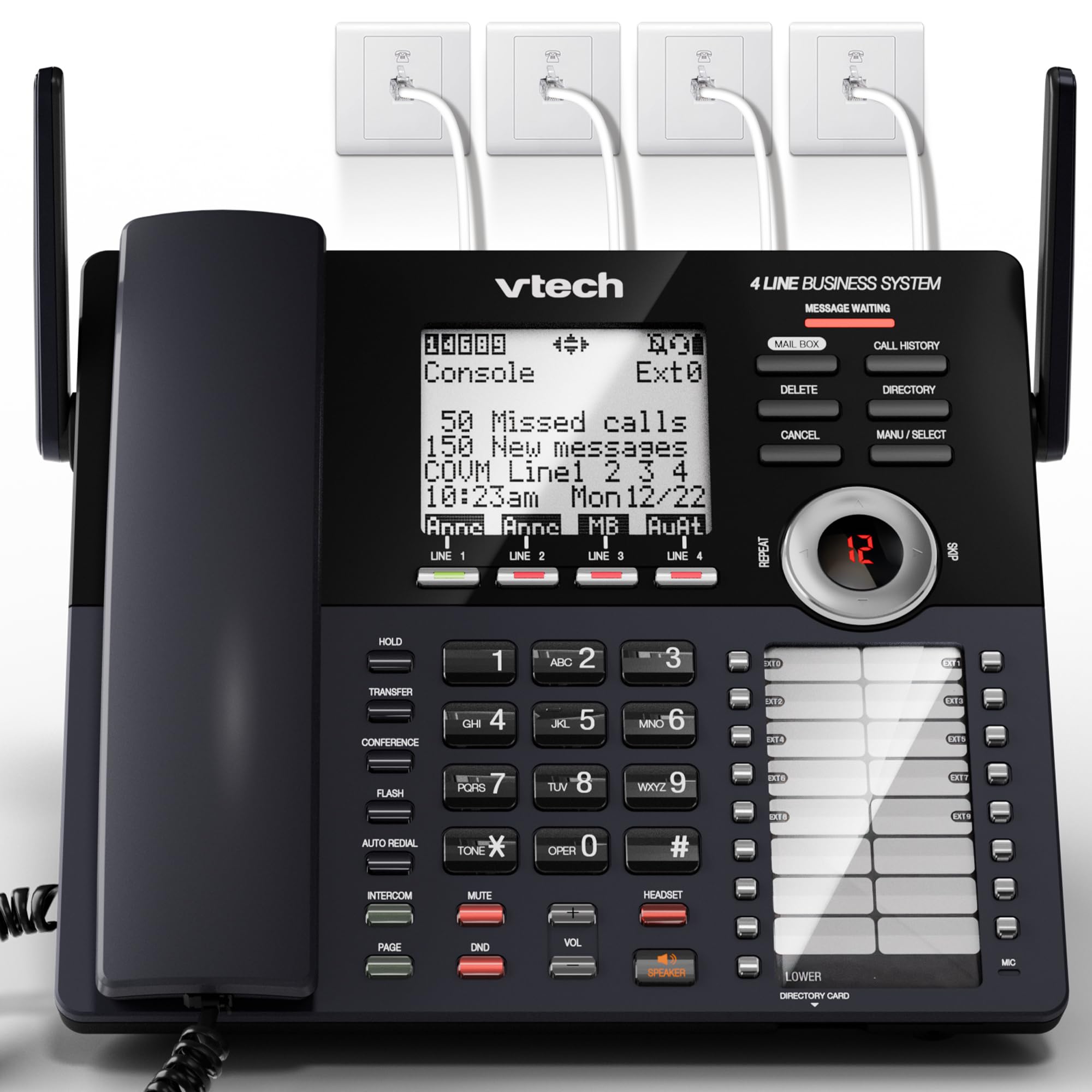
The analog PBX replacement that mimics a full office phone system at a fraction of the cost.
If you run a small office that needs professional call handling without monthly VoIP fees, the VTech AM18447 connects directly to 4 analog landlines via standard RJ11 jacks, and you can expand it wirelessly to up to 10 stations (9 cordless handsets or desksets plus the main base) using DECT 6.0 technology — no wiring is needed. The standout feature is the auto attendant, which operates per line: it automatically answers incoming calls, offers directory access, routes callers to extensions by number, and captures voicemail. That is a capability normally reserved for expensive PBX hardware.
The digital answering system records up to 180 shared minutes across all lines, and the system supports call waiting, caller ID, a 100-name phonebook, and 32 speed-dial entries. Owners who replaced aging PBX gear say the setup is straightforward and the range actually improves on standard DECT 6.0 — even through concrete and steel. The mixed reviews center on sound variability: some call the clarity excellent, while others find the audio quality inconsistent. There is also a reported issue with the headset port: it works for hearing the caller, but the person on the other end cannot hear you through that port unless you use a VTech wireless headset (which requires a manual call transfer).
Who this clicks for: A small business with 3-4 analog lines that wants an auto attendant, expandable handsets, and a big answering system without switching to VoIP. The catch: The sound quality is not universally praised, and the headset port has a specific limitation that owners find frustrating.
Reach for this if: you need a multi-line analog system with auto attendant and do not want to pay for a new PBX. pass on it if: you prioritize consistent audio quality above all else or rely on a standard wired headset.
7. Grandstream GXP1625 IP Phone
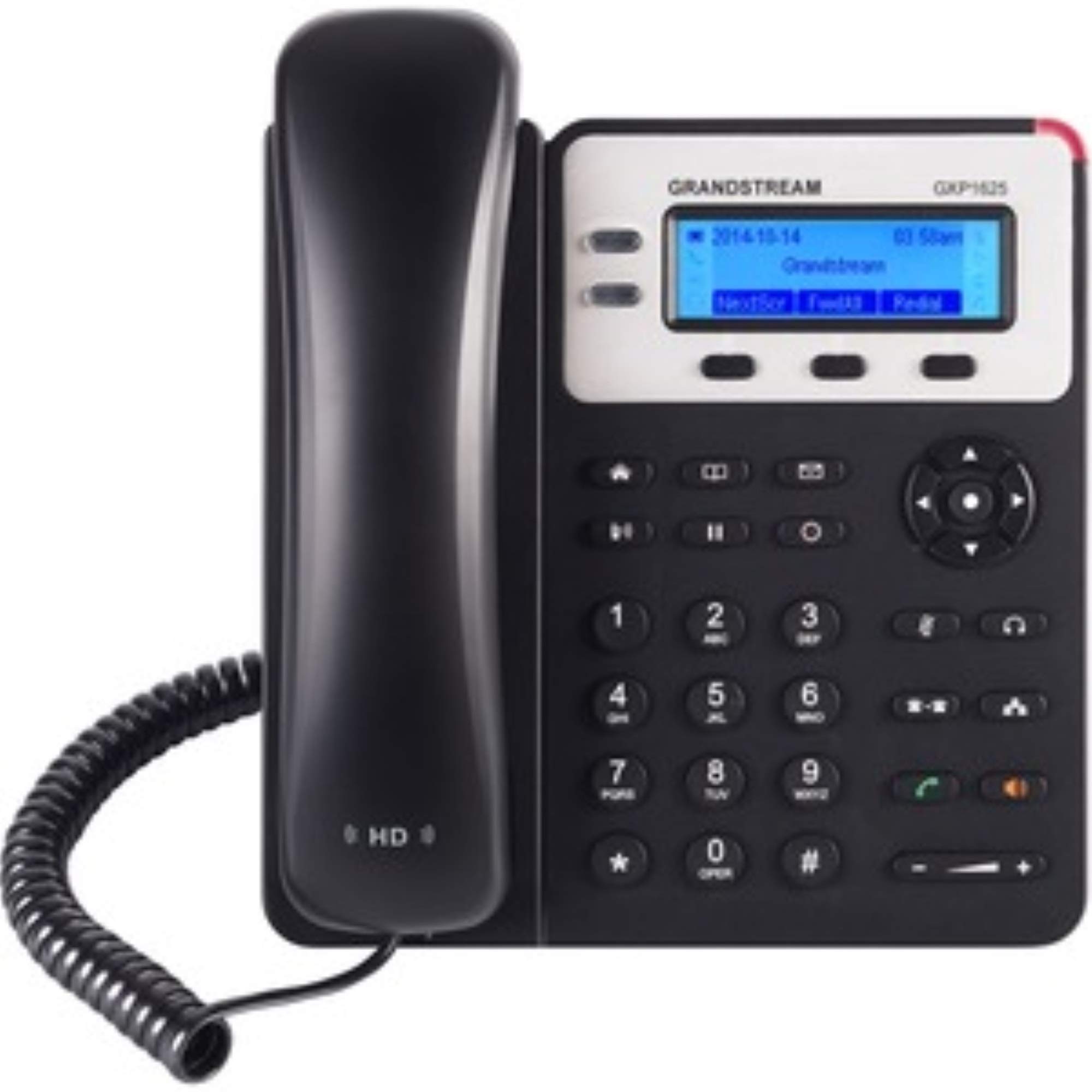
The no-frills VoIP phone that delivers near-perfect audio for the lowest price in the roundup.
At 0.73 Kilograms, the GXP1625 is the lightest phone in this lineup — a 2.0x weight difference compared to the 1.43-Kilogram GXP2170 — and that physical lightness reflects its mission: a basic, affordable 2-line VoIP desk phone that does its job without fuss. It supports 2 SIP accounts and 2 call appearances, with a 2.9-inch backlit graphical LCD (13248 pixels) and dual-port 10/100 Ethernet with integrated PoE. The phonebook holds up to 500 contacts, and the call history stores 200 records. For a budget entry point, that is a generous contact capacity.
What wins people over is the overall quality and value — 35 owners praise the build quality, 30 call it great value for the cost, and 29 highlight the functionality. Buyers report it is “excellent for AREDN mesh phone” and that the audio is “near-perfect,” which matches the HD wideband audio specs. The setup is straightforward for anyone comfortable with a SIP provider interface, though the documentation is thin. The reliability scores are split: many have been running the phone for years without issue, while a minority report units that never worked properly. Given the low cost, this is a low-risk first phone for a new VoIP user, but it is not the choice for a mission-critical line where zero downtime is essential.
What you get
- 500-contact phonebook — generous for a 2-line workhorse
- HD wideband audio with full-duplex speakerphone that sounds clear
- Integrated PoE means one cable for power and data
Where it cuts corners
- Reliability is a mixed bag — some units arrive with setup or performance issues
- 10/100 Ethernet only (no Gigabit ports) — fine for voice, not for data passthrough
Grab it if: you are setting up a home office or small business and want a low-cost entry into VoIP that still sounds professional. Think twice if: you need the phone to be bulletproof for a high-traffic front desk where even a single day of downtime is unacceptable.
Understanding the Specs
SIP Accounts vs. Lines
A SIP account is your unique address on a VoIP phone system — think of it like a phone number. A “line” is the number of simultaneous calls that device can handle. A phone with 6 SIP accounts can have six different people assigned to it, but if it only has 2 lines, only two people can talk at once. Match this number to your actual call volume: a single user needs 1-2 lines; a receptionist monitoring a whole floor needs 6 or more.
Power over Ethernet (PoE)
PoE sends both electricity and data through the same network cable, eliminating the need for a wall outlet near your desk phone. If your network switch supports PoE (look for 802.3af or 802.3at on its specs), you can set up a phone anywhere a single Ethernet cable reaches. If your switch does not support PoE, you must either buy a PoE injector or ensure the phone ships with a power adapter — many in this list do not.
Auto Attendant
This is a digital receptionist that answers incoming calls with a pre-recorded menu (“press 1 for sales, press 2 for support”) and routes the caller to the correct extension or voicemail box. It saves a small office from needing a dedicated receptionist. Systems with per-line auto attendant are especially useful if you have multiple business numbers; each line can have its own greeting and routing rules.
Call Blocking & Screening
Advanced call blocking works in layers: a pre-loaded database of known robocaller numbers stops them before they ring, a screening feature announces the caller so you can choose to answer, and a one-touch block button blacklists a number instantly. For any office where spam calls eat into productive time, this feature is worth prioritizing over extra line counts.
FAQ
Can I use a VoIP desk phone with my existing landline?
What is the difference between DECT 6.0 and Wi-Fi for cordless handsets?
How many phones can I add to a multi-handset system?
Do I need a subscription for the call blocking feature?
What does “PoE” mean and why does it matter?
Can I connect my cell phone to a business desk phone?
How long do the batteries last on cordless handsets?
Is a business phone with an auto attendant hard to set up?
Can I record calls with these phones?
Will a 2-line phone work if I only have one phone number?
Final Thoughts: The Verdict
If you want one dependable pick, the business phone winner is the Yealink T57W because its massive 7-inch touchscreen, 16 SIP accounts, and proven Zoom Phone integration make it the single most capable desk phone for a busy executive who wants everything in one device. If your priority is stopping robocalls and bridging your cell phone to a corded handset, grab the Panasonic KX-TGF882B. And for a growing small office that needs an auto attendant without a VoIP contract, the VTech AM18447 4-line system is the one to reach for.
How We Picked
We do not accept paid placement. Every pick is matched to a real buyer and a real use-case; we do not hands-on test units.
Sources & Methodology
Specifications: manufacturer listings and product documentation. Review insights: verified customer reviews, as of July 2026. Pricing: not shown on this page (it changes often); check the current price via the retailer link.
As an Amazon Associate, FitlyFast earns from qualifying purchases. This does not affect which products we feature.