
Our readers keep the lights on and the weekend projects moving. As an Amazon Associate, I earn from qualifying purchases.
Specs are compiled from manufacturer listings and verified buyer reviews and can change over time — please confirm the key details on the product page before buying.
A 27-inch monitor is your daily window into work, movies, and games — but a good one can cost a lot. The cheap 60Hz screens look sluggish, and the premium models blow your budget. This guide finds budget 27-inch monitors that deliver crisp picture, smooth motion, and lasting reliability.
I’m Rikta, the writer behind FitlyFast. This guide compares each monitor’s published specs and what real buyers report in their reviews. You get the honest strengths and trade-offs, not marketing claims.
Whether you are upgrading a home office desk, building a first gaming setup, or just want a bigger, sharper screen for everyday use, this roundup of the budget 27 inch monitor options helps you find the panel that fits your needs and your wallet.
Our Picks at a Glance

How To Choose The Best Budget 27 Inch Monitor
Picking a budget 27-inch monitor depends on a few key specs that affect your daily experience. Here is what to focus on.
Refresh Rate: Smoothness Beyond Gaming
The refresh rate (measured in Hz, or how many times the screen updates per second) tells you how many times the screen updates per second. A standard 60Hz monitor can feel a little jittery when you scroll through a long webpage or move a window around. A 100Hz or 120Hz monitor makes everything feel much smoother and more responsive, even for everyday office work or browsing, not just gaming. Many budget 27-inch monitors now offer 100Hz or 120Hz, which is a huge step up.
Panel Type: IPS for Color and Angles
The panel type determines how good the picture looks from different positions. IPS (In-Plane Switching) panels give you consistent colors and brightness even when you view the screen from the side. This makes a big difference if you share your screen with someone or just move around at your desk. Cheaper TN (Twisted Nematic) or VA (Vertical Alignment) panels can look washed out or change colors as you shift your head.
Connectivity and Ergonomics: The Practical Bits
Check what ports the monitor has — HDMI and DisplayPort are essential for modern computers and consoles. A VGA port can be useful for older machines. Also, look at the stand: height adjustment and tilt are features usually reserved for pricier models, but they make a huge difference in comfort. If the stand is basic, a VESA mount pattern (a standard 100x100mm hole pattern on the back) lets you attach your own arm or bracket.
Quick Comparison
| Model | Best For | Refresh Rate | Panel Type | Stand Adjustability | Amazon |
|---|---|---|---|---|---|
| ViewSonic VA2756A-MHD★ Best Overall | Best Overall Value | 120Hz | IPS | Tilt only | Amazon |
| LG 27GS50F-B UltragearGaming Pick | Entry-Level Gaming | 180Hz | LCD (IPS-like) | Tilt only | Amazon |
| Acer Nitro KG271 | Speed-Focused Gaming | 200Hz | IPS | Tilt only | Amazon |
| Amazon Basics 27 Inch Monitor | Office & Home Productivity | 100Hz | IPS | Tilt only | Amazon |
| Dell P2725H | Professional Ergonomics | 60Hz | IPS | Full (tilt, swivel, pivot, height) | Amazon |
In‑Depth Reviews
1. ViewSonic VA2756A-MHD 27 Inch Monitor
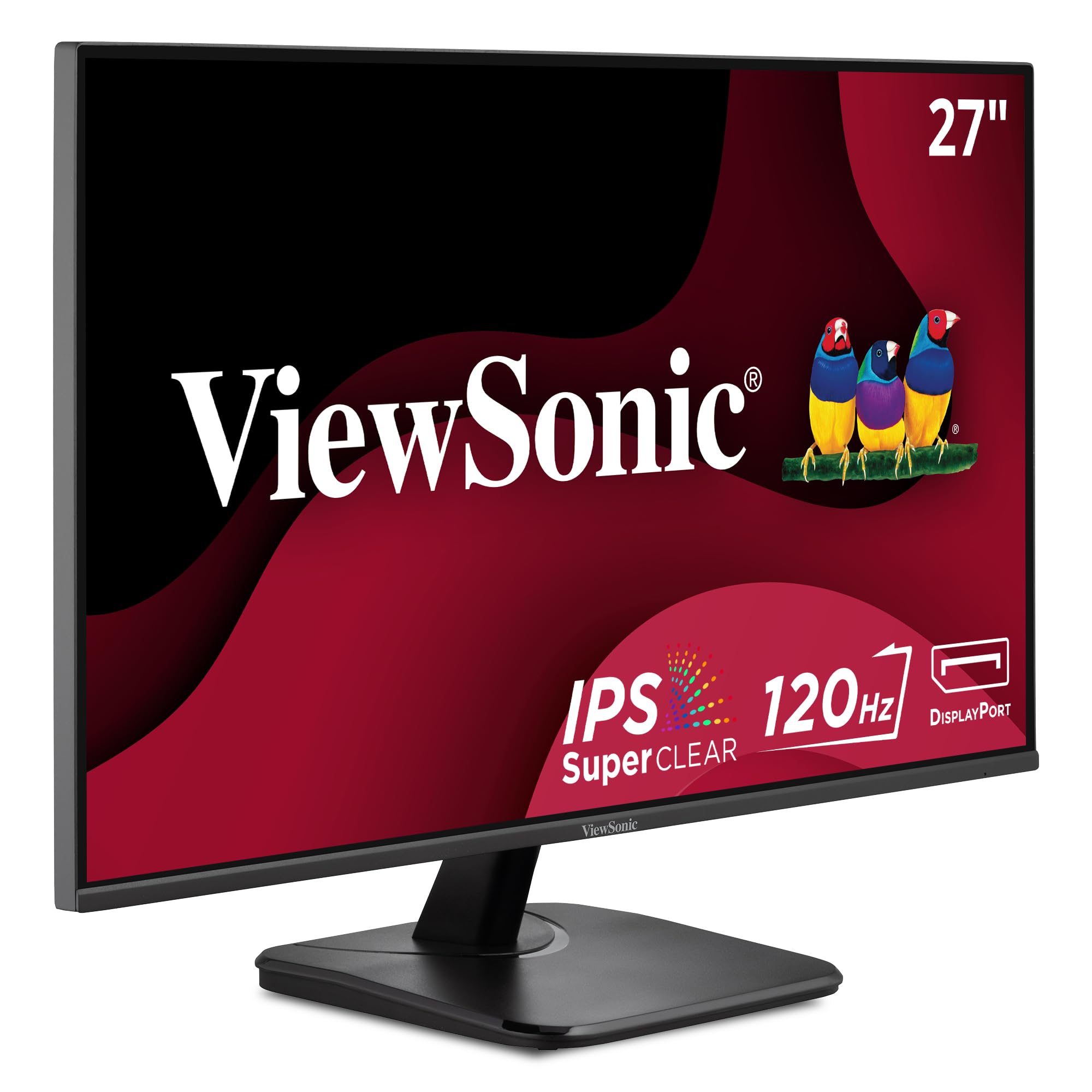
The ViewSonic VA2756A-MHD nails the perfect blend of speed, clarity, and price for almost any user.
This monitor gives you a 120Hz refresh rate (the screen updates 120 times per second), which is a massive leap from the standard 60Hz you find on many budget screens. That extra smoothness makes everyday tasks like scrolling through documents or dragging windows around feel easily fluid, and it breathes new life into gaming on a console or PC. The SuperClear IPS panel delivers accurate and vivid colors with consistent levels of brightness from almost any angle, so the picture stays strong whether you are sitting dead-center or off to the side. With a contrast ratio of 1500:1 (the difference between the brightest white and darkest black), blacks look deeper and text pops more than on cheaper alternatives.
The monitor also includes five tune view presets (Game, Movie, Web, Text, and Mono) so you can switch modes depending on what you are doing. On the downside, the stand lacks height adjustment and the brightness sits at 250 nits (a measure of screen brightness), which is fine for indoor use but not for very bright rooms. One practical note: as owners mention, “After 6 months, they are still working great,” a sentiment that echoes the long-term reliability owners consistently highlight. The ViewSonic beats the Dell P2725H decisively on smoothness, offering a 120Hz refresh rate compared to 60Hz — double the update speed for a much lower price.
The big wins
- 120Hz refresh rate makes everything feel smooth, from scrolling to gaming
- SuperClear IPS panel keeps colors consistent from wide viewing angles
- Includes VGA input for connecting older computers or server equipment
- Adaptive Sync (FreeSync) reduces screen tearing during gameplay
The trade-offs
- Stand offers tilt only, no height or swivel adjustment
- 250 nits brightness means it won’t shine in a sunlit room
- Menu rocker switch takes a little practice to master
Your best everyday buy: If you want a monitor that feels modern, smooth, and reliable for work, web use, and occasional gaming without spending a penny more than necessary.
Not for you if: You need a fully adjustable stand or a very high brightness to combat strong ambient light in your office.
2. LG 27GS50F-B 27-inch Ultragear Gaming Monitor
The LG Ultragear brings a competitive 180Hz refresh rate into the budget zone for gaming.
This monitor is all about speed and responsiveness. The 180Hz refresh rate, paired with a 1ms MBR (Motion Blur Reduction, which makes fast motion look sharper), means fast-moving action stays sharp and clear — a real edge in first-person shooters or racing games. AMD FreeSync (a technology that syncs the monitor’s refresh rate with your graphics card) virtually eliminates screen tearing, so your gaming experience stays fluid and stutter-free. The HDR10 support (a high-dynamic-range format for richer colors and contrast) adds a bit of punch to colors and contrast in supported content, making games and movies look more vibrant. Unlike the ViewSonic, which uses an IPS panel, the LG uses an LCD display, but it still delivers a satisfying image for the price.
The three-side virtually borderless design looks sleek on a desk and works well in a dual-monitor setup. On the other side of the coin, color quality and reliability get mixed marks in the feedback. Some owners mention that blacks can look too deep in certain scenes, and a few note an occasional random shutdown. The stand is tilt-only, so you may want to budget for a VESA arm if you need height adjustment. The LG’s 180Hz refresh rate is 60Hz higher than the ViewSonic’s 120Hz, giving it a tangible edge for competitive gaming at a very similar cost.
What it does best
- 180Hz refresh rate and 1ms MBR deliver exceptionally smooth, blur-free motion
- AMD FreeSync provides tear-free gameplay while staying affordable
- Thin bezel design looks clean and saves desk space
- Built-in gaming GUI with FPS counter and crosshair modes
What to know
- Tilt-only stand; no height or swivel adjustment from the start
- A few customers note random shutdowns or overly dark blacks
- Color quality receives mixed feedback compared to pure IPS panels
Best for the competitive player: If your priority is a fast, fluid gaming experience on a tight budget, this monitor delivers the speed where it counts.
Consider another if: You want richer, more accurate colors for photo editing or creative work, where a dedicated IPS monitor like the ViewSonic or Acer is the better fit.
3. Acer Nitro KG271 27 Inch Gaming Monitor

The Acer Nitro KG271 cranks the refresh rate up to 200Hz, making it the fastest screen in this roundup.
If smoothness is your absolute top priority, this monitor provides a 200Hz refresh rate that beats the LG by 20Hz and the ViewSonic by a staggering 80Hz — a 67% more gap in refresh rate alone. That translates to incredibly fluid motion where fast-paced action feels almost telepathic. The 0.5ms GTG (Gray to Gray, the time it takes a pixel to change from one shade of gray to another) response time further eliminates ghosting and smearing, so every frame is razor-sharp during intense gameplay. It also supports AMD FreeSync Premium for tear-free performance. The ZeroFrame design means the screen goes almost edge-to-edge, giving you more visible area in a compact footprint.
The IPS panel covers 99% of the sRGB color gamut (the standard color space for web and general use), which is excellent for color-critical work like photo editing or graphic design, matching the color accuracy of the ViewSonic’s 99% rating and easily surpassing the LG’s 72% gamut. The contrast ratio is a typical 1000:1 for IPS, which is less dramatic than the LG’s 3000:1 VA-style contrast but still delivers a clean, crisp image. Owners note the image quality is flawless and the monitor runs well at 180Hz from the start. The main trade-offs are the tilt-only stand and that some units shipped without the expected headphone jack, which matters if you need to plug audio directly into the monitor.
Standout strengths
- 200Hz refresh rate is the highest in this budget class for maximum smoothness
- 0.5ms GTG response time virtually eliminates motion blur
- 99% sRGB color gamut makes it viable for color-sensitive creative work
- AMD FreeSync Premium provides certified tear-free gaming
Watchpoints
- Stand only tilts; no height or swivel adjustment included
- Some units may lack the advertised headphone jack — check the listing details
- Contrast ratio of 1000:1 is typical for IPS but not as deep as VA or high-contrast panels
Reach for this if: You are a competitive gamer who plays fast-paced titles and wants the highest possible refresh rate without moving into premium price territory.
Look elsewhere if: You need a fully adjustable ergonomic stand or rely on a headphone jack on the monitor itself.
4. Amazon Basics 27 Inch Monitor, FHD 1080P

The Amazon Basics monitor is the no-frills productivity champion, packing built-in speakers and a handy USB hub into an already low price.
This monitor is designed for the office, the home desk, and the student workspace. The 100Hz refresh rate is noticeably smoother than a 60Hz panel, making document scrolling and web browsing feel much more fluid. The IPS display provides a crisp 1080p picture with solid color quality, and the matte screen finish cuts down on glare from overhead lights or windows — a real comfort during long work hours. A standout feature at this budget tier is the built-in speakers, which deliver clean, clear audio for video calls and YouTube without needing external speakers. The 4 USB ports on the monitor let you plug in a keyboard, mouse, or flash drive directly, reducing cable clutter on your desk.
Buyers are particularly impressed with the overall quality and value for money, calling it a solid, budget-friendly option with clear resolution. It is easy to set up and works right from the start, a big plus for non-techy users. The biggest caveat is the stand: it only tilts forward and backward, and a few owners mention it leans forward slightly on the desk, requiring a small shim to correct the angle. This stand has less adjustability than the Dell P2725H. Another note: the power adapter is not included in the box for some configurations, so double-check the package contents before ordering.
Productivity perks
- Built-in speakers save desk space and eliminate the need for external audio
- 100Hz refresh rate makes office work feel noticeably smoother than 60Hz
- Integrated 4-port USB hub for connecting keyboard, mouse, and accessories
- VESA compatible for mounting on an arm or bracket
Minor quibbles
- Stand tilts only and may lean forward slightly on the desk
- Power adapter may not be included in some packages — verify contents
- Not ideal for gaming due to 100Hz max and lack of Adaptive Sync
Grab it for: A clean, productive home or office setup where built-in speakers and USB ports are more useful than gaming speed.
skip it if: You need a fully ergonomic stand from the start, or you plan to do any serious gaming that benefits from a high refresh rate and Adaptive Sync.
5. Dell P2725H 27 Inch Monitor

The Dell P2725H is the professional’s choice, prioritizing a fully adjustable ergonomic stand over a high refresh rate.
This monitor is unique in this roundup because its standout feature is the stand. You can tilt, swivel, pivot into portrait mode (vertical orientation), and adjust the height, giving you complete control over your viewing posture. That kind of adjustability is a huge win for long workdays, reducing neck and eye strain. The IPS panel delivers good colors and a sharp 1080p picture with a brightness of 300 nits, which is noticeably brighter than the ViewSonic’s 250 nits, making it better for rooms with more ambient light. The anti-glare coating and built-in ComfortView Plus technology (a feature designed to reduce potentially harmful blue light emissions) reduce potentially harmful blue light emissions while keeping color accuracy intact — a feature that graphic designers and illustrators who use it professionally praise.
Connectivity is extensive, with DisplayPort, HDMI, VGA, and 4x SuperSpeed USB 5Gbps ports, making it a true hub for a multi-device desk. The trade-off is clear: the 60Hz refresh rate feels dated compared to the 120Hz or 200Hz of the other picks. Scrolling and window animations look less smooth, and it is not meant for gaming. It also comes with a mouse pad, a small but appreciated extra. With fewer reviews available, the feedback is very positive from those who own it, particularly for professional work. A single complaint about an early failure suggests occasional quality control issues, but the overall sentiment is strong.
Why it stands out
- Full ergonomic stand with tilt, swivel, pivot, and height adjustment
- 300 nits brightness is the highest in this budget group for better visibility
- 4x SuperSpeed USB ports on the back act as a convenient hub
- ComfortView Plus reduces blue light without washing out colors
The compromise
- 60Hz refresh rate feels noticeably less smooth than the 100-200Hz competition
- Not suitable for gaming due to low refresh rate and lack of Adaptive Sync
- Highest price in the roundup with the fewest reviews online
Perfect for the ergonomics-first buyer: If you spend 8+ hours at a desk and need a monitor that adjusts precisely to your ideal viewing height and angle, this is the one.
Not your monitor if: You want a smooth, gaming-capable experience or a screen that feels fast during everyday use — the 60Hz refresh will feel like a step backward.
Understanding the Specs
Refresh Rate (Hz)
The refresh rate, measured in Hertz (Hz), tells you how many times the screen redraws the image every second. A standard 60Hz screen updates 60 times per second, which can look a little jittery when you scroll or move a mouse quickly. A 100Hz or 120Hz screen updates twice as often, making everything from cursor movement to video playback look much smoother. For gaming, a higher refresh rate like 180Hz or 200Hz gives you a real competitive edge, as you see motion more clearly and react faster.
Panel Technology (IPS, VA, LCD)
The panel technology dictates how the screen handles color and viewing angles. IPS (In-Plane Switching) panels are widely preferred because they show consistent, accurate colors even when you view the screen from the side. VA (Vertical Alignment) panels offer deeper black levels and higher contrast ratios, but colors can shift when viewed off-center. Some budget monitors use LCD panels that are not true IPS but still offer decent quality. For most buyers, an IPS panel provides the best all-around clarity and color for both work and entertainment.
Color Gamut (sRGB %)
Color gamut describes the range of colors a monitor can display. sRGB (standard Red Green Blue) is the standard color space for web and general use. A monitor covering 99% of the sRGB gamut, like the Acer Nitro KG271, can display nearly all the colors your operating system and browser expect, which is important for accurate photo editing and graphic design. A lower gamut, like 72%, may look slightly less vibrant or accurate in color-critical tasks, but it is perfectly fine for gaming, office work, and watching videos.
Stand Adjustability (Tilt, Swivel, Pivot, Height)
An adjustable stand lets you change the position of the monitor for better comfort and posture. Tilt lets you angle the screen up or down. Height adjustment raises or lowers the entire monitor. Swivel rotates the screen left and right. Pivot lets you turn the screen into a vertical (portrait) orientation, which is great for coding or reading long documents. On budget monitors, you usually only get tilt. If ergonomics matter, look for a model with a full stand or plan to buy a separate VESA-compatible monitor arm.
FAQ
Is 1080p resolution good enough on a 27 inch monitor?
What is the best refresh rate for a budget 27 inch monitor?
What is the difference between IPS, VA, and TN panels?
Do I need a monitor with built-in speakers?
What does VESA compatible mean?
Is a 60Hz monitor a bad choice for office work?
How much should I spend on a budget 27 inch monitor?
Can I use a budget 27 inch monitor for console gaming?
Final Thoughts: The Verdict
For most people, the best budget 27 inch monitor is the ViewSonic VA2756A-MHD because it offers the most complete package at a low cost — a 120Hz refresh rate, an IPS panel with a superb 1500:1 contrast ratio, and a proven track record for reliability that spans years. If you are a gamer who wants maximum smoothness, go for the Acer Nitro KG271 with its class-leading 200Hz refresh rate and ultra-fast 0.5ms response time. And if long hours of comfort at your desk are your top priority, the Dell P2725H is the only monitor in this category that gives you a fully adjustable stand to dial in your perfect view.
How We Picked
We do not accept paid placement. Every pick is matched to a real buyer and a real use-case; we do not hands-on test units.
Sources & Methodology
Specifications: manufacturer listings and product documentation. Review insights: verified customer reviews, as of July 2026. Pricing: not shown on this page (it changes often); check the current price via the retailer link.
As an Amazon Associate, FitlyFast earns from qualifying purchases. This does not affect which products we feature.