
Our readers keep the lights on and the weekend projects moving. As an Amazon Associate, I earn from qualifying purchases.
Specs are compiled from manufacturer listings and verified buyer reviews and can change over time — please confirm the key details on the product page before buying.
Getting a good screen for your desk without spending more than you have to is the real trick. You want crisp text for spreadsheets, smooth motion for casual gaming, and a build that does not feel flimsy — all for a price that makes sense. This guide uses the published specs and real buyer feedback to show you which monitors actually deliver on that promise.
I’m Rikta — the founder and writer behind FitlyFast. This guide is built by comparing the manufacturers’ published specifications and the patterns across verified customer reviews, so you get each pick’s real strengths and trade-offs instead of marketing spin.
After digging into the specs, contrast ratios (the difference between the brightest white and darkest black on screen), and real owner experiences of five strong contenders, you will know exactly which budget monitor fits your desk — if you need fast gaming refresh rates or a sharp, comfortable screen for all-day productivity.
Our Picks at a Glance

How To Choose The Best Budget Monitor
Picking the right budget monitor depends on a few key specs that directly affect how the screen looks and feels during your daily tasks. You do not need to be a tech wizard — just focus on the panel type, how fast the screen refreshes (the refresh rate in Hertz), and what connections (ports like HDMI, DisplayPort) it offers.
Panel Technology: IPS vs LED vs LCD
The panel type governs viewing angles and color consistency. IPS (In-Plane Switching) panels, like those found in the LG and Samsung options here, keep colors accurate and bright even when you are not sitting dead-center in front of the screen. This makes them great for sharing your screen or working from different angles. Standard LED-backlit LCD panels (a common combination where light-emitting diodes light up the liquid crystal display), like the Sceptre and ViewSonic, still look good but colors will shift if you view them from the side.
Refresh Rate and Smooth Motion
The refresh rate, measured in Hertz (Hz), tells you how many times the image updates each second. Standard office monitors sit at 60Hz (60 updates per second), but the models here start at 100Hz and go up to 165Hz. A higher rate makes everything feel snappier — your mouse cursor glides smoothly and scrolling through web pages is much easier on the eyes. For gaming, this is even more important because it reduces motion blur and makes fast-moving scenes look fluid.
Contrast Ratio and Black Levels
Contrast ratio (the difference between the brightest white and the darkest black the monitor can show) describes the difference between the brightest white and the darkest black the monitor can show. A higher ratio, such as the 3000:1 on the ViewSonic, means deeper blacks and better detail in dark scenes, which is excellent for watching movies or working in dim light. A lower ratio, like 1000:1, is perfectly fine for well-lit rooms and office work, but blacks will look more like dark gray.
Connectivity and Ergonomics
Check the ports on the back of the monitor before you buy. HDMI (High-Definition Multimedia Interface) is the standard for modern computers and gaming consoles. DisplayPort (a digital display interface) is common for higher refresh rates, and VGA (an older video connector) is an older connector still found on some office PCs. A VESA mount pattern (75x75mm or 100x100mm — a standard screw-hole spacing for attaching to arms or wall mounts) is a big plus if you plan to use a monitor arm to free up desk space. Also look for tilt adjustment — a monitor that does not tilt can be uncomfortable if your desk height is not perfect.
Quick Comparison
| Model | Best For | Refresh Rate | Contrast Ratio | Panel Type | Amazon |
|---|---|---|---|---|---|
| Sceptre E248B-FW165T★ Best Overall | Budget Gaming & Speed | 165Hz | 2000:1 | LED | Amazon |
| Amazon Basics 24 InchBest Versatile | No-Fuss Office Work | 100Hz | 2000:1 | LCD (IPS-like) | Amazon |
| ViewSonic VS2447M | Deep Blacks & Study Comfort | 100Hz | 3000:1 | LED | Amazon |
| LG 24U411A-B | Color Accuracy & Fluidity | 120Hz | 1500:1 | IPS | Amazon |
| Samsung 27″ S3 (S32GF) | Larger Screen Value | 120Hz | 1000:1 | IPS | Amazon |
In‑Depth Reviews
1. Sceptre 24-inch Prime Gaming Monitor E248B-FW165T
A blistering 165Hz refresh rate (the screen updates 165 times per second) at a price that makes expensive gaming monitors blush.
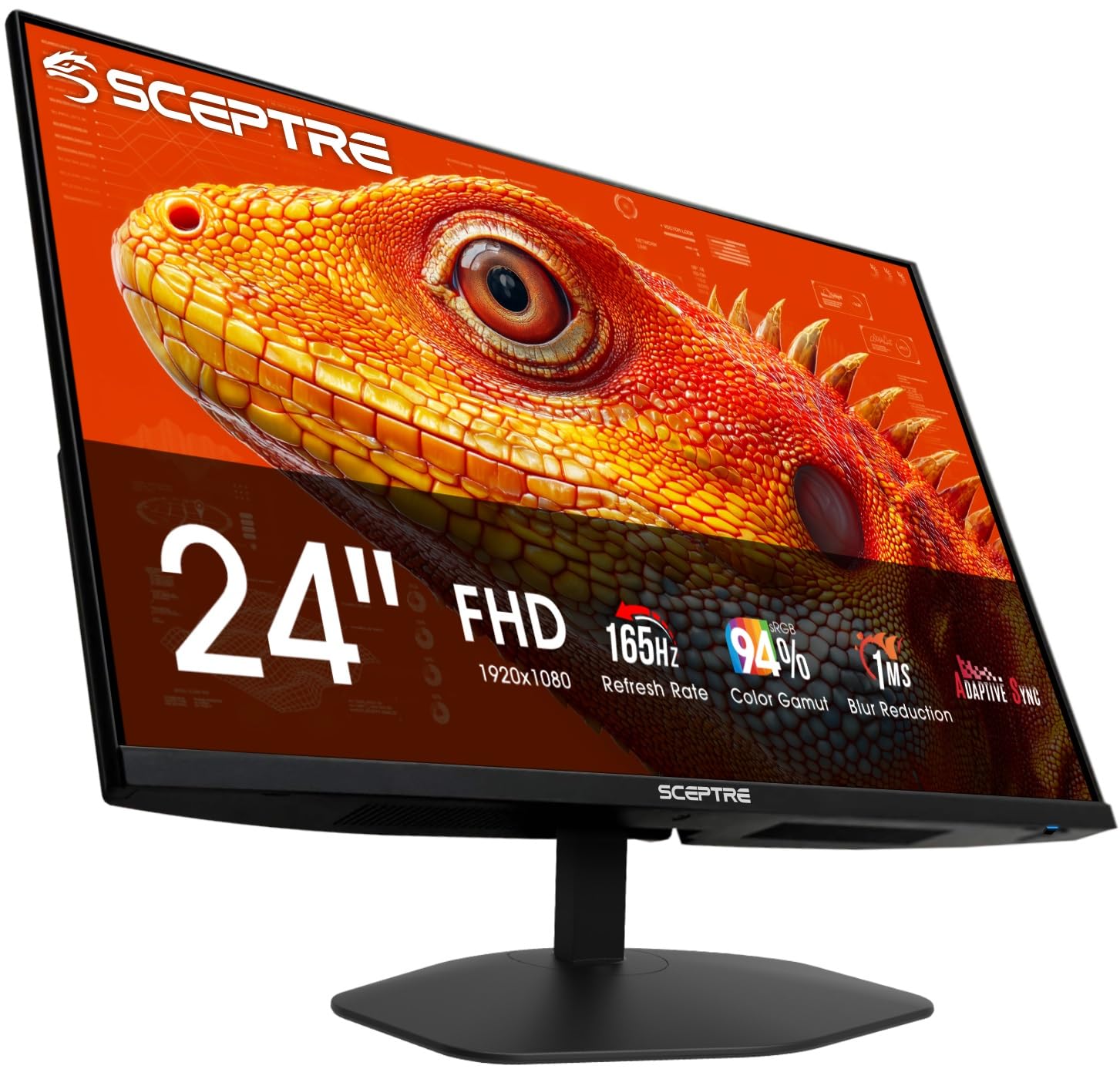
The Sceptre Prime Gaming Monitor is the speed king of the budget aisle. It delivers a 165Hz refresh rate — a 65% jump over the 100Hz standard on the Amazon Basics — which means every mouse swipe and fast-paced game frame feels buttery smooth. You get two HDMI ports and two DisplayPort inputs, giving you plenty of flexibility to hook up a gaming PC and a console without swapping cables. The 94% sRGB color gamut (a measure of how many standard red, green, and blue colors the screen can show) keeps images vibrant, so it pulls double duty for creative work and gaming.
What wins people over is the raw quality for the price — the image is sharp, colors pop, and it supports Adaptive Sync (a technology called FreeSync that matches the monitor’s refresh rate to the graphics card’s output to prevent screen tearing) to eliminate screen tearing during gameplay. The built-in speakers are weak, as buyers report they max out around 40-50dB (decibels, a measure of sound volume), so you will want a separate soundbar or headphones. The stand is durable, and the VESA mount pattern (a 100x100mm screw-hole layout) lets you easily switch to a monitor arm.
The catch is the built-in audio. As owners put it, “the built in speakers are pretty terrible,” but the highlight is the screen. If you need crisp, fast visuals on a tight budget and do not mind buying separate speakers, this is the undisputed champion of the sub- segment.
What Stands Out
- Industry-leading 165Hz refresh rate (screen updates 165 times per second) for smooth gaming and scrolling
- Dual HDMI and dual DisplayPort inputs for versatile setups
- Excellent value with strong color accuracy (94% sRGB)
The Trade-Off
- Built-in speakers are noticeably weak at around 40-50dB max
- Limited ergonomic adjustability (tilt only)
Reach for this if: you want the smoothest desktop and gaming experience possible on a tight budget — the 165Hz speed is class-leading in this price class.
Look elsewhere if: you need good built-in speakers or full ergonomic adjustments like height and swivel straight from the start.
2. Amazon Basics 24 Inch Monitor (23.8 inch viewable), FHD 1080P, 100Hz
A simple, well-crafted office monitor that nails the basics without any fuss.
The Amazon Basics monitor is built for the person who just needs a clear, reliable screen for spreadsheets, emails, and video calls. The 100Hz refresh rate (the screen updates 100 times per second) is a noticeable upgrade over standard 60Hz office monitors — your cursor moves more smoothly and scrolling through long documents feels easy. The 2000:1 contrast ratio (the difference between the brightest white and darkest black) delivers good depth for an LCD panel, making text crisp and easy to read. Owners mention it is “a solid, budget-friendly option with amazing picture quality and clear resolution.”
It comes with built-in speakers that actually get positive feedback from most owners, which is rare at this price. The matte screen finish does a great job cutting down glare, especially helpful if you sit near a window. Connectivity is solid with HDMI, VGA, and DisplayPort inputs, plus VESA compatibility for mounting. Several customers note the setup is plug-and-play — just take off the protective film, connect the cable, and you are working.
A recurring note from owners is that the monitor can lean forward slightly on the included stand, and there is no tilt adjustment to fix it. A small shim or a VESA mount arm resolves this easily. If you want a dependable daily driver that comes ready to work from the start, this is the one.
Smart Pick For: office workers and students who want a crisp, easy-on-the-eyes screen with decent built-in speakers, and do not need high refresh rates for gaming.
Choose this when: picture quality and clear audio matter more than gaming speed — a straightforward workhorse that handles everything an office throws at it.
Hold off if: you want a fully adjustable stand or need a high refresh rate for competitive gaming.
3. ViewSonic VS2447M 24 Inch 1080p Monitor, 100Hz

Exceptional black levels and a sharp, clear picture for focused work and study sessions — with a 3000:1 contrast ratio (three times the range of the Samsung 27″ S3’s 1000:1).
The ViewSonic VS2447M stands out with a 3000:1 contrast ratio (the difference between the brightest white and darkest black) — 50% higher than the Amazon Basics and Sceptre models. This means deeper, richer blacks and greater detail in dark scenes, making it the best choice here for watching movies in a dim room or working on documents late at night. The 100Hz refresh rate keeps the experience fluid, and Variable Refresh Rate (VRR, a technology called FreeSync that stops screen tearing by syncing the monitor’s refresh rate with the output from your graphics card) support ensures smooth video playback without tearing. Reviewers point out “the picture is clear, the colors are nice, and it is more than enough for regular work or studying.”
It comes with Flicker-Free technology (which reduces invisible screen flicker that can cause eye strain) and a Blue Light Filter built right in, which reduces eye strain during long workdays. The thin bezels look clean on a desk, and the modest 24-inch size is a comfortable fit for smaller workstations. The VGA input is handy if you are connecting an older office PC, while HDMI covers modern laptops and consoles. Setup is genuinely easy — as owners put it, “this was very easy to set up and the video quality is amazing.”
The trade-off here is adjustability. The stand offers limited tilt, and there is no height or swivel adjustment. You also get only one HDMI port, which means you may need to manually swap cables between devices. For a dedicated workstation or study desk where the monitor stays put, this is a fantastic value.
Ideal For: students and home-office users who prioritize a sharp, easy-to-read screen with deep contrast for long hours of reading and typing.
Grab it if: you want the best black levels in this price range and a simple, reliable setup for focused work or study.
Pass if: you need multiple HDMI ports or full ergonomic adjustments like height and pivot.
4. LG 24U411A-B 24-inch Full HD IPS Monitor, 120Hz

IPS panel colors and a 120Hz refresh rate that make work and play look equally good — with 99% sRGB coverage (nearly the full standard color range) for vivid hues.
The LG 24U411A-B is the best pick if color accuracy matters to you. The IPS panel (In-Plane Switching, a type of screen that keeps colors consistent from wide viewing angles) delivers up to 99% sRGB coverage, meaning reds, blues, and greens look rich and true-to-life from wide viewing angles. This is a big step up from standard LED monitors, and buyers consistently note the “great colors with extensive adjustments.” It is the only monitor in this list with a 1ms MBR (Motion Blur Reduction, a feature that quickly darkens pixels between frames to reduce ghosting) feature, which keeps fast-moving objects crisp — ideal for tracking enemies in a shooter or reading text while scrolling.
The 120Hz refresh rate (the screen updates 120 times per second) splits the difference perfectly between the 100Hz office models and the 165Hz Sceptre — it is smooth enough for enjoyable gaming and fluid enough for serious productivity. The ultra-slim bezels create a near-borderless look that works beautifully in a dual-monitor setup. It supports HDR10 (a basic high-dynamic-range video standard), though at this price point it is basic, and Dynamic Action Sync (a setting that minimizes input lag for faster reactions) minimizes input lag for better reaction times in games.
The main downsides are the lack of built-in speakers and a flimsy stand that some shoppers say arrives with missing screws. The on-screen menu uses a single knob that can feel finicky. However, the 100x100mm VESA mount makes it easy to replace the stand with a monitor arm. If you want the sharpest, most color-accurate screen at this budget, the LG delivers.
What improve It
- IPS panel with 99% sRGB for vivid, consistent colors at any angle
- 120Hz refresh rate with 1ms MBR for fluid motion
- Near-borderless design perfect for multi-monitor setups
What It Lacks
- No built-in speakers
- Stand has limited stability; some units arrive with missing screws
Buy this for: the best color performance and viewing angles in the group — ideal for photo editing, design work, and casual gaming on a budget.
Think twice if: you need a monitor that works without a separate audio solution or you want a stable, height-adjustable stand included in the box.
5. Samsung 27″ S3 (S32GF) FHD 120Hz IPS Monitor

A larger 27-inch IPS screen with a 120Hz refresh rate (the panel updates 120 times per second) that gives you more room than the 24-inch Sceptre while keeping motion smooth.
The Samsung S3 stands out immediately because of its size — 27 inches at Full HD (1920 x 1080 pixels, also called 1080p) resolution is noticeably more screen real estate than the 24-inch competition. The IPS panel keeps colors bright and consistent, and the 120Hz refresh rate delivers smooth motion whether you are gaming, streaming, or just dragging windows around the desktop. Buyers call it “an amazing monitor at an amazing price” and point out that it is “perfect for a home office or onsite office setting.”
Samsung includes Eye Saver Mode and Flicker-Free technology (a feature that reduces invisible screen flicker to ease eye fatigue), which reduce blue light and screen flicker to make long sessions more comfortable. The ultra-thin bezels give it a modern, clean look. It comes with a long HDMI cable in the box, which is a nice bonus. Owners appreciate that the setup is straightforward and that the monitor works great for gaming, studying, and streaming right from the start.
The biggest compromise is the non-adjustable stand — it has no height or tilt adjustment, so you need to account for this with your desk setup or use a VESA mount. The 1000:1 contrast ratio (the difference between brightest white and darkest black) is the lowest in this group, so blacks will appear more as dark gray compared to the ViewSonic or Sceptre. The menu system requires a hard press on the power button, which a few owners find annoying at first. For the size and panel quality, however, this is an outstanding value.
The Big-Screen Bargain: the extra screen real estate and smooth 120Hz IPS panel make this the top pick if you want a larger display without stretching your budget.
Go for this when: you want a big, color-accurate screen for mixed work and play — the 27-inch size alone separates it from every other pick here.
skip it if: you cannot use a VESA mount and need a fully adjustable stand, or if deep black levels are critical for your work.
Understanding the Specs
Refresh Rate (Hz)
Refresh rate (measured in Hertz) is how many times your monitor redraws the entire image every second. Standard office monitors use 60Hz (60 redraws per second), which is fine for typing emails. The monitors here start at 100Hz and go up to 165Hz. A higher number means smoother motion — your mouse cursor glides instead of stuttering, scrolling through long web pages feels easy, and fast-paced games look fluid without blur. If you play any kind of action game or spend all day in a web browser, a 100Hz+ refresh rate is the single most noticeable upgrade you can make.
Contrast Ratio
Contrast ratio (the difference between brightest white and darkest black) measures the difference between the brightest white and the darkest black a monitor can produce. A higher ratio, like 3000:1, gives you deep, inky blacks and better detail in dark movie scenes or shadowy game areas. A lower ratio, like 1000:1, will look perfectly fine in a bright room, but blacks will appear more like dark gray in a dim environment. For office work and bright rooms, anything 1000:1 or above works great. For media consumption in a darker room, aim for 2000:1 or higher.
IPS Panel vs LED/LCD
The panel type determines how the screen looks when viewed from different angles. IPS (In-Plane Switching) panels keep colors accurate and bright even if you are sitting to the side — ideal for sharing your screen with a coworker or if you move around at your desk. Standard LED (light-emitting diode backlit) and LCD (liquid crystal display) panels look great when you are directly in front but colors can shift or wash out when viewed from an angle. For a single-person desk setup, either type works, but IPS is noticeably better for color-critical work like photo editing.
Adaptive Sync (FreeSync)
Adaptive Sync, often branded as FreeSync, is a technology that matches the monitor’s refresh rate to the frame rate your graphics card is outputting. This eliminates screen tearing (where the image looks split horizontally) and reduces stuttering during gaming and video playback. It is especially beneficial when frame rates vary, giving you a smoother, more consistent visual experience — and all the monitors in this guide that list it support FreeSync.
FAQ
Is a 100Hz monitor a big upgrade over a standard 60Hz monitor?
Do I need a special cable to get 120Hz or 165Hz refresh rate?
Can I use a VESA mount with these budget monitors?
What does the contrast ratio number actually mean for everyday use?
Are the built-in speakers on budget monitors any good?
Will a 24-inch 1080p monitor look sharp or pixelated?
What is the difference between Adaptive Sync and V-Sync?
Can I use these monitors with a MacBook or a gaming console?
Why does my new monitor have a protective film on the screen?
How long do budget monitors typically last?
Final Thoughts: The Verdict
For most people, the budget monitor winner is the Sceptre E248B-FW165T because its 165Hz refresh rate (the screen updates 165 times per second) is simply class-leading at this price, making everything from desktop navigation to gaming feel premium. If you want the best color accuracy and viewing angles for creative work, grab the LG 24U411A-B. And for the biggest screen real estate while staying affordable, the Samsung 27″ S3 is the one to reach for.
How We Picked
We do not accept paid placement. Every pick is matched to a real buyer and a real use-case; we do not hands-on test units.
Sources & Methodology
Specifications: manufacturer listings and product documentation. Review insights: verified customer reviews, as of July 2026. Pricing: not shown on this page (it changes often); check the current price via the retailer link.
As an Amazon Associate, FitlyFast earns from qualifying purchases. This does not affect which products we feature.