
Our readers keep the lights on and the weekend projects moving. As an Amazon Associate, I earn from qualifying purchases.
Specs are compiled from manufacturer listings and verified buyer reviews and can change over time — please confirm the key details on the product page before buying.
Picking a budget micro-ATX case is a tightrope walk. Spend too little and you might end up with sharp edges, bad airflow, and a build that feels like a punishment. Spend just enough and you get a chassis that keeps your components cool, looks the part, and doesn’t fight you during assembly. This guide cuts through the noise to find the cases that actually deliver solid thermals, decent build quality, and real value without the premium price tag.
I’m Rikta — the founder and writer behind FitlyFast. This guide is built by comparing the manufacturers’ published specifications and the patterns across verified customer reviews, so you get each pick’s real strengths and trade-offs instead of marketing spin.
Whether you’re a first-time builder or just looking to downsize while staying affordable, these are the best cases that fit the bill — and we’ve sorted them out for you. Here are the top contenders for the best budget micro-atx case this year, chosen for their real-world performance and owner satisfaction.
Our Picks at a Glance

How To Choose The Best Budget Micro-ATX Case
Choosing a budget case is about knowing which corners you can let the manufacturer cut. You don’t need a chassis, but you do need a case that won’t suffocate your hardware. Here is what separates a smart buy from a frustrating one.
Airflow First, Looks Second
On a tight budget, airflow is king. A solid front panel might look sleek, but it will strangle your fans. Look for a case with a mesh front panel or generous ventilation on the sides. This single decision can drop your CPU and GPU temperatures by several degrees, which directly impacts performance and noise levels.
Pre-Installed Fans Save You Money
A case that comes with fans already mounted is almost always better value than a bare chassis you have to fill yourself. Check how many fans are included and their size — 120mm is the standard, and two or more is a win.
Know Your Component Size Limits
Before you fall in love with a case, check its maximum graphics card length and CPU cooler height. A 360mm GPU limit is generous and fits almost everything. A 320mm limit is still good for most mid-range cards. For CPU coolers, 160mm is a standard that accommodates most tower coolers, but some budget cases dip lower, which can rule out large air coolers.
Quick Comparison
| Model | Best For | Max GPU Length | Pre-Installed Fans | Max CPU Cooler | Amazon |
|---|---|---|---|---|---|
| Cooler Master Q300L★ Best Overall | Versatile budget with great GPU room | 360mm | 1 x 120mm | 159mm | Amazon |
| Okinos Aqua 3Best Looks | Panoramic glass looks with RGB | 320mm | 3 x 120mm ARGB | 164mm | Amazon |
| Montech AIR 100 ARGB | Best value with tons of included fans | — | 4 x 120mm ARGB | — | Amazon |
| NZXT H3 Flow | Premium build quality and airflow | 377mm | 1 x 120mm | — | Amazon |
| Cooler Master N200 | Classic build with tons of drive bays | 355mm | — | 160mm | Amazon |
In‑Depth Reviews
1. Cooler Master MasterBox Q300L
A perforated champion that swallows a full-size GPU while staying affordable.
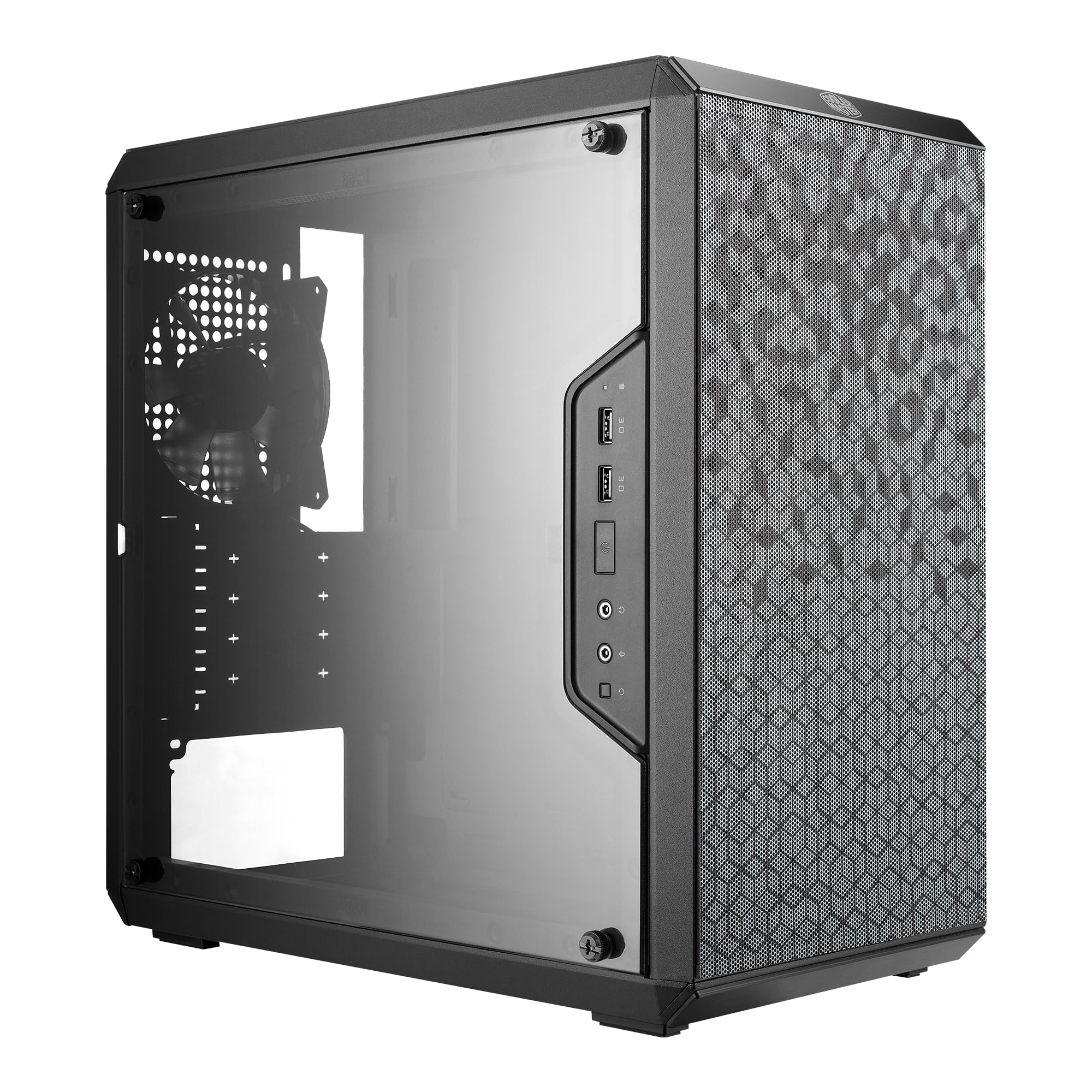
What wins people over about the Q300L is the raw space it gives you for the price. The 360mm maximum GPU length is a class-leading figure, meaning you can drop in almost any modern graphics card without worry. Its perforated edges-on-all-sides design promotes a free flow of air, and buyers report a tangible result: as buyers put it, “Temperatures dropped from 87°C to mid-70s°C.” That is a real-world improvement you can hear in your fan noise and see in your frame rates.
The trade-off here is the build experience. Several owners note the panel edges can be sharp, and the cable routing behind the motherboard tray requires patience. It comes with just one 120mm fan, so you will likely want to add more to take full advantage of its cooling potential. But for the asking price, the sheer clearance and the effective magnetic dust filters are hard to argue with.
Compact airflow design
- Massive 360mm GPU clearance for a budget case
- Perforated panels on all sides promote excellent airflow
- Magnetic dust filters are easy to clean
Tight cable routing
- Sharp edges during assembly are a common complaint
- Only one pre-installed fan means extra investment needed
- Cable management can be fiddly for beginners
Smart pick: This is the case for the builder who has a big GPU and a strict budget — the 360mm clearance is a genuine standout.
Think twice if: You want a simple, immediate build with no extra fan purchases or if you dislike working with tight cable channels.
2. Okinos Aqua 3
A fish-tank style case that brings the RGB show without the premium price tag.
This case breaks the budget mold with a 270-degree panoramic view tempered glass front and side panel, giving you a showroom view of your hardware. It comes packing three pre-installed H12 3-Pin ARGB fans — two on top for a vertical airflow path and one at the rear. The included 4-port ARGB controller lets you manage lighting without a motherboard sync, and the front I/O offers a fast Type-C 3.2 Gen 2 port capable of 10Gbps data transfers.
At just 13.78 x 8.27 x 15.43 inches, it is a compact footprint. It fits GPUs up to 320mm, which is a 12% less clearance than the Q300L above, and a 164mm cooler height (a 3% more generous allowance than the Q300L). The build quality is good for the price, with removable glass panels easing access. The main downsides are thin metal and non-reusable PCIe slot covers, so it is not a case for frequent rebuilders.
Value choice You want a striking glass showpiece with built-in RGB control and a USB-C port without spending a fortune.
Skip if tall card You need to accommodate a GPU longer than 320mm or you plan on reconfiguring your build multiple times, as the PCIe covers are non-reusable.
3. Montech AIR 100 ARGB

Four pre-installed ARGB fans in a clean, minimalist chassis that just works.
The Montech AIR 100 ARGB leads the pack on value by offering four pre-installed 120mm ARGB fans — a 4.0x gap compared to the Q300L’s single fan, saving you a significant purchase right from the start. These fans are connected to a built-in controller, so you can switch lighting modes via the case’s LED button or sync them with your motherboard. The fine mesh front panel acts as a dust filter and is tool-free to remove for cleaning.
The build experience is consistently praised. The side swivel tempered glass door makes internal access easy without the hassle of removing screws. Pre-installed cable management loops and Velcro straps simplify the routing, and the sturdy metal build avoids the cheap feel common at this price. The included fans are quiet and push decent air for mid-range builds, though one owner noted they are not ideal for use with a radiator due to their hole pattern.
Grab it for: An out-of-the-box build with great RGB and airflow — you won’t need to buy a single extra fan or a controller.
skip it if: You are planning a high-end build with a 240mm AIO radiator on the intake, as the stock fans’ design may not be optimal for that setup.
4. NZXT H3 Flow

An engineer’s approach to a micro-ATX case — flawless airflow in a compact, sturdy shell.
If build quality is your top concern, the NZXT H3 Flow is the clear leader. It features an ultra-fine steel mesh on the panels and PSU shroud that balances high airflow with effective dust filtering. It is the only case here that supports full-sized GPUs up to 377mm (without front fans), beating the Q300L’s 360mm limit. It also supports up to seven fans and can fit a 280mm front radiator or a 240mm top radiator, giving it cooling flexibility that rivals larger cases.
Owners describe the chassis as exceptionally well-designed, with one calling it “like an engineer designed it.” The construction is light yet feels very strong, with no sharp edges to contend with. Cable management is generous for its class, and it supports back-connect motherboards. The only design quirk is that the power supply must be installed with the fan facing up, which a few owners find a minor inconvenience.
Choose this for: The highest build quality and most versatile cooling support in a compact mATX chassis — it represents a genuine step up in feel and engineering.
Consider instead if: The PSU orientation bothers you, or if your budget is so tight that every dollar must go toward fan count.
5. Cooler Master N200

The classic workhorse that stores everything short of the kitchen sink.
The Cooler Master N200 has been a staple budget recommendation for years, and its longevity is earned through practicality. It is a traditional mini tower that supports up to three 3.5-inch hard drives and four 2.5-inch SSDs. That kind of storage capacity is almost unheard of in today’s compact budget cases. It also has an optical drive bay, a feature that is vanishing but still essential if you rip CDs or install software from discs.
It fits GPUs up to 355mm and CPU coolers up to 160mm, making it compatible with most mainstream hardware. The fully meshed front panel and removable dust filter under the PSU mount keep things clean. The main recurring complaint is that the motherboard standoffs can unscrew when removing the screws, which is a minor frustration during assembly. The front fan can also vibrate against the grill, but this is easily fixed with a slower fan speed or rubber washers.
Best for: Anyone building a home server, a media PC, or a budget rig that needs a lot of internal storage and an optical drive.
Consider another option if: You want modern glass panels, RGB lighting, or a very sleek appearance — this case is a pragmatic tool, not a showpiece.
Understanding the Specs
Maximum GPU Length
The maximum length of a graphics card that can physically fit inside the case. This is the single most important compatibility check. A 360mm limit fits virtually all modern cards, including high-end RTX 4090s. A 320mm limit is still fine for most mid-range cards like an RTX 4070, but you need to measure your specific card before buying. If your card is too long, you are simply out of luck.
Pre-Installed Fans
This number tells you exactly what cooling setup you are getting without spending another dime. A case with 3 or 4 fans is effectively a complete airflow solution, while a case with 1 fan is a starting point. The more fans included, the better the value, especially since a single decent 120mm fan costs about on its own. Check if they are standard 3-pin or PWM (4-pin) for fan speed control.
FAQ
Will my full-size ATX power supply fit in a micro-ATX case?
Can I use a 240mm liquid cooler in these budget cases?
How many hard drives can I fit in a budget mATX case?
What does “panoramic view” or “fish tank” case mean?
Is a mesh front panel really better for airflow?
What is the difference between a Mini-Tower and a Mid-Tower?
Do I need an RGB controller or does the case handle that?
What is the biggest compromise on a budget micro-ATX case?
Final Thoughts: The Verdict
For most buyers, the budget micro-atx case winner is the Cooler Master Q300L because it offers the most important spec — 360mm GPU clearance — at a price that leaves room in your budget for more fans. If you want a stunning glass showpiece with RGB and a USB-C port, grab the Okinos Aqua 3. And for pure out-of-the-box value where you don’t have to buy a single extra fan, the Montech AIR 100 ARGB is the one to reach for.
How We Picked
We do not accept paid placement. Every pick is matched to a real buyer and a real use-case; we do not hands-on test units.
Sources & Methodology
Specifications: manufacturer listings and product documentation. Review insights: verified customer reviews, as of July 2026. Pricing: not shown on this page (it changes often); check the current price via the retailer link.
As an Amazon Associate, FitlyFast earns from qualifying purchases. This does not affect which products we feature.