
Our readers keep the lights on and the weekend projects moving. As an Amazon Associate, I earn from qualifying purchases.
Specs are compiled from manufacturer listings and verified buyer reviews and can change over time — please confirm the key details on the product page before buying.
The best budget wireless mouse feels invisible — no lag, no battery anxiety, no hand fatigue. But cheap wireless mice raise real worries: will it disconnect mid-sentence? Will the battery die in a month? Can it track on your desk without a mousepad? This guide cuts through the trade-offs so you can pick the right one and stop guessing.
I’m Rikta — the founder and writer behind FitlyFast. This guide is built by comparing the manufacturers’ published specifications and the patterns across verified customer reviews, so you get each pick’s real strengths and trade-offs instead of marketing spin.
After digging through the details, these five stand out as the strongest options for the price. Here are my picks for the best budget wireless mouse that actually deliver on battery life, comfort, and reliable tracking without the stingy price tag.
Our Picks at a Glance

How To Choose The Best Budget Wireless Mouse
A budget wireless mouse is one of the easiest desk upgrades — plug it in and ditch the cord forever. But cheap ones cut corners: jumpy tracking, tinny clicks, or a battery that dies in weeks. Here is what separates a good value pick from a frustrating waste of desk space.
Battery Life and Power Management
Claimed battery life can be wildly optimistic on low-cost mice. The best budget picks manage 18 to 24 months on a single AA or AAA battery, but only if they have a reliable auto-sleep mode that kicks in after a few minutes of inactivity. Without that feature, the mouse drains power even when you are not touching it. Look for a mouse that enters sleep mode after 5 to 8 minutes — and wakes up instantly with a click, not a long reconnection delay.
DPI and Tracking Performance
DPI (dots per inch — how far the cursor moves when you move the mouse one inch) is the core spec for cursor responsiveness. Most budget mice offer multiple adjustable DPI levels, usually between 800 and 4000. A lower DPI (800–1200) gives you slow, precise control for detailed design work. A higher DPI (1600–4000) lets you zip across a large monitor with minimal wrist movement. The key is having at least three levels to switch between without software — a dedicated DPI button saves you from digging through system settings.
Button Count and Layout
You get faster web browsing and document navigation with forward/backward side buttons, not just the bare minimum three (left, right, scroll wheel). For a budget productivity mouse, the balance is six buttons: left, right, scroll wheel click, DPI switcher, and two side buttons. But on Mac computers, side buttons are often not recognized by the system — check this limitation before you buy.
Quick Comparison
| Model | Best For | Buttons | Battery Life | DPI Range | Amazon |
|---|---|---|---|---|---|
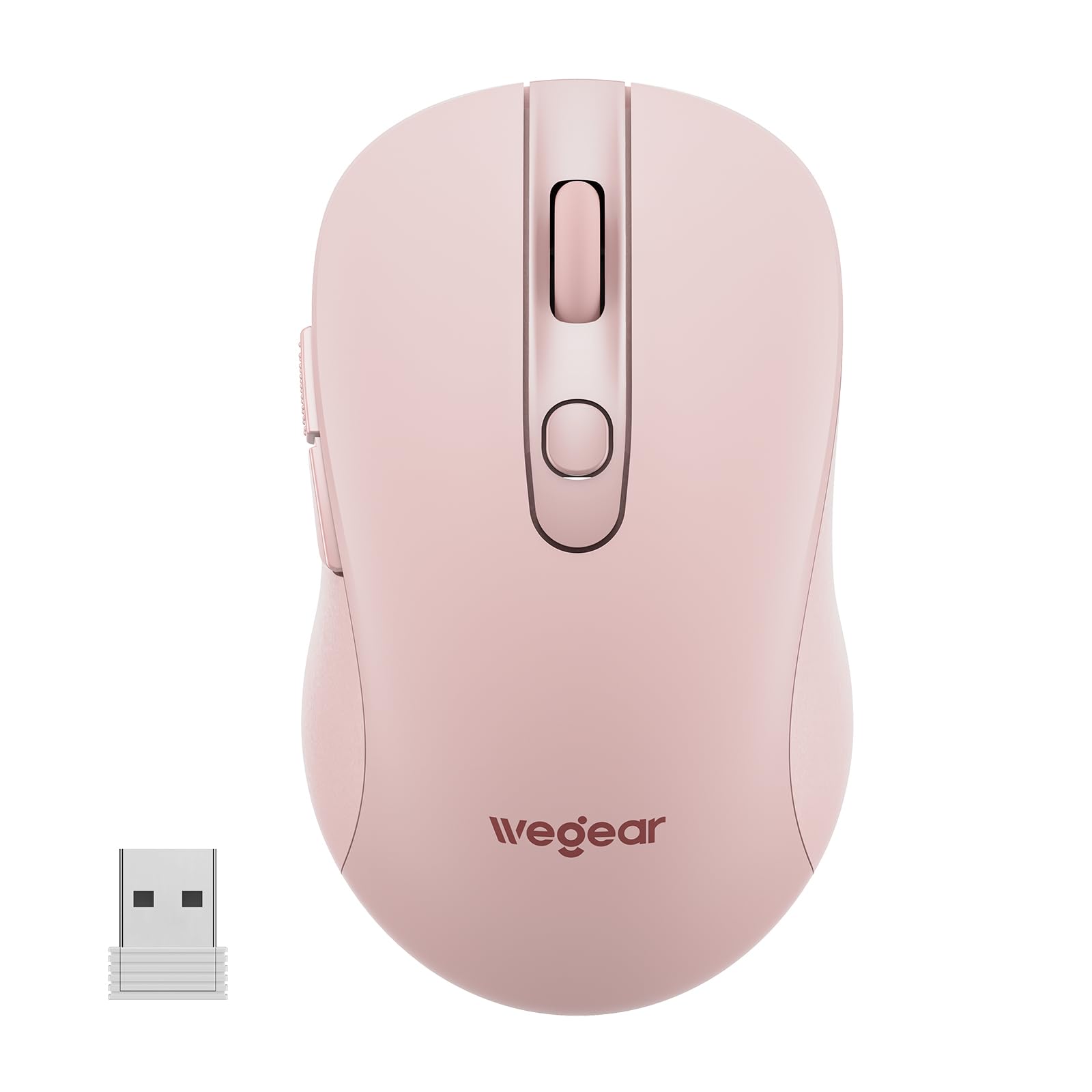
| wegear Wireless Mouse★ Best Overall | Best Overall | 6 | 24 months | 800–4000 | Amazon |
| TECKNET Ergonomic MouseDurable Pick | Long-lasting durability | 6 | 24 months | 800–2600 | Amazon |
| Logitech M340 | Ultra-quiet clicks | 3 | 18 months | Fixed (1000) | Amazon |
| Logitech M240 | Bluetooth simplicity | 3 | 18 months | Fixed (1000) | Amazon |
| XBG B15pro | Tri-mode versatility | 6 | Rechargeable (500 mAh) | 800–2400 | Amazon |
In‑Depth Reviews
1. wegear Wireless Mouse
A six-button powerhouse that outruns its own price tag with a 24-month battery life.
This wegear mouse is the quiet overachiever of the budget bunch. It connects instantly via the tiny USB receiver stored in its base — no driver downloads, no pairing menus. The 2.4GHz wireless link reaches up to 33 feet (10 meters), so you can step away from your desk without losing the signal.
The performance is the thing owners talk about most — by a wide margin. It offers five adjustable DPI levels (800/1200/1600/2400/4000), giving you both pinpoint control for photo editing and fast sweeping across dual monitors. The six-button layout includes forward/backward side buttons that speed up document and browser navigation, though buyers report that on a Mac those side buttons go unrecognized. That is the one notable limitation in an otherwise very capable package.
Battery life is the real standout: the mouse claims 24 months from a single AA battery (not included), helped by an auto-sleep mode that kicks in after 8 minutes of inactivity and wakes with any button click. A red LED alerts you when power gets low, so you are never stranded mid-task. Owners who have used this mouse across Windows laptops for years confirm that the battery life and tracking hold up remarkably well.
Why It Works
- Six buttons, including usable forward/backward side navigation on Windows.
- Five DPI levels from 800 to 4000 cover everything from fine precision to fast cursor movement.
- 24-month battery life with a smart auto-sleep that reactivates on click, not motion.
The Trade-off
- Forward/backward side buttons are not recognized on Mac computers.
- AA battery not included — you will need to supply one.
Your best buy if: you want maximum features — more buttons, higher DPI range, and longer battery — for the lowest entry cost.
Think twice if: you need Mac-compatible side buttons or want a Bluetooth-only model that frees up your USB port.
2. TECKNET Wireless Mouse
A compact travel companion that has proved its durability over years of daily use.
The TECKNET is a direct competitor to the wegear, sharing the same six-button layout and 24-month battery claim, but carving its own niche with a smaller build. At 4.09 x 2.68 x 1.49 inches, this mouse was made to slip into a laptop bag pocket. Rubber side grips on the contoured body provide thumb support that owners say makes a real difference during long work sessions.
Its functionality is the single most-discussed aspect — with thousands of owners weighing in, the overwhelming consensus is that it delivers crisp clicks, a non-mushy scroll wheel, and no random disconnects. One owner noted using this mouse daily from 2018 to 2024 before it finally stopped working, which is an exceptional lifespan for a budget wireless mouse. The only durability concern some have raised is that the battery cover can eventually come off if handled roughly.
The DPI range tops out at 2600 (compared to the wegear’s 4000), spread across five levels. That is plenty for most users, but power users with ultra-wide monitors might prefer the higher ceiling of the wegear. The smaller footprint also means people with larger hands might find it a bit cramped, though owners with average-sized hands say it fits perfectly. At its price point, the TECKNET delivers a remarkably solid feel that stands up travel after travel.
What Owners Love
- Compact travel-friendly dimensions that tuck into any bag pocket.
- Rubber side grips and contoured shape provide genuine all-day comfort.
- Five DPI levels up to 2600 with an optical sensor that tracks on most surfaces.
The Catch
- The battery cover can loosen over time with heavy handling.
- Smaller chassis may feel cramped for users with larger hands.
Reach for this if: you need a compact daily driver that has proven it can survive years of use without giving up.
skip it if: you have large hands and a higher DPI ceiling for large monitors matters more than small size.
3. Logitech M340 Wireless Mouse

Logitech’s silent touch mouse that cuts 90% of click noise without losing feedback.
This is the mouse for shared workspaces, library sessions, or late-night use when a loud click would wake up the house. The M340 uses Logitech’s Silent Touch Technology that removes 90% of click noise while retaining the same tactile feel. Owners confirm it is genuinely quiet — one WFH user who clocks 8 hours a day, 5 days a week reports the clicks are barely audible and the mouse never drops connection.
Logitech is a clear departure from the TECKNET and wegear in two ways. First, it has only three buttons — no forward/backward side buttons. Second, it uses a fixed DPI (around 1000) with no adjustment button. That makes it simpler and more minimalist, but less versatile for multitasking or different screen sizes. It has also been noted to fit small hands particularly well, and the slim, ultra-compact design easily slips into a pocket alongside a laptop.
The flaunted “Floral Leaves” print is not just eye candy — the plastic casing includes a minimum of 42% certified post-consumer recycled plastic. The 2.4GHz receiver reaches up to 10 meters (33 feet). Reliability and design are the two most-praised aspects, though durability receives mixed marks from a few buyers who experienced breakage within a few months.
What Stands Out
- Silent Touch Technology removes 90% of click noise — ideal for quiet spaces.
- Ultra-compact design that slides easily into a laptop pocket or small bag.
- Made with a minimum of 42% post-consumer recycled plastic.
The Limitations
- Only three buttons — no side navigation keys for productivity power users.
- Fixed DPI with no adjustment button, so you are stuck with one cursor speed.
Grab this for: quiet office or library use where every click matters — the silence is genuinely impressive.
Not for you if: you rely on forward/backward navigation buttons or need adjustable DPI for different tasks.
4. Logitech M240 Silent Bluetooth Mouse

Fast Bluetooth pairing that frees up your USB port with 90% quieter clicks.
If you hate having a USB dongle permanently sticking out of your laptop, the M240 is your solution. It pairs via Bluetooth instantly — no dongle, no port required — and connects reliably up to 10 meters (33 feet). The crowd favorite here is connectivity: with hundreds of owners praising how easy it is to pair with Windows, macOS, ChromeOS, and even iPadOS, this mouse is as cross-platform as it gets.
The M240 beats the M340 above on sheer versatility because it works with more operating systems, plus the silent click technology carried over gives the same 90% noise reduction. It is slim, ambidextrous (fits both left and right hands), and light enough to toss in a bag. Battery life is rated at 18 months from the included one AAA battery, with an auto-sleep feature that conserves power when the mouse is idle.
Reliability and build quality are the two most-praised aspects here, with owners describing it as sturdy enough to survive drops without issue. The trade-off is the same as the M340: only three buttons and no adjustable DPI. This is a focused, no-nonsense mouse for someone who wants silent, simple, and broad compatibility — not a feature-packed productivity weapon.
Why It Wins
- Bluetooth pairing is instant and works across Windows, Mac, ChromeOS, and iPadOS.
- Silent clicks with 90% reduced sound — great for shared spaces.
- Ambidextrous design works comfortably for both left and right hands.
The Drawback
- Three-button layout and fixed DPI limit cursor speed customization.
- AAA battery is included, but 18 months is shorter than the 24-month competitors.
Choose this if: you want a truly plug-free, silent Bluetooth mouse that works across nearly every device and operating system you own.
Pass on it if: you need side buttons, DPI switching, or prefer a longer-lasting dongle connection to avoid potential Bluetooth interference.
5. XBG B15pro Wireless Bluetooth Mouse

A tri-mode mouse with a built-in LED screen that shows your battery level and DPI in real time.
This is the most feature-dense mouse on the list. The XBG B15pro connects three ways — Bluetooth 5.0, Bluetooth 4.0, or 2.4GHz wireless — and switches between connected devices in 0.8 seconds. That means you can pair it with your laptop, tablet, and PC all at once, then toggle between them with a single button press. Owners mention flawless pairing and no input delays whether using the Bluetooth dongle or the included 2.4GHz receiver.
You never have to guess your charge or DPI level because the built-in LED screen shows real-time battery percentage, current DPI level (800/1000/1200/1600/2400), and connection mode. It charges via Type-C and uses a 500 mAh rechargeable battery inside, so you skip AA or AAA batteries. The brand rates battery life at 1 month (a full charge lasts about a month of regular use), but customers note it can go for two weeks without needing a charge — manageable for a rechargeable.
Having six buttons with a contoured thumb rest and arched palm support, this mouse is built for 8-hour workdays. The silent buttons retain a satisfying click feel while staying quiet enough for libraries. The only recurring note from owners is that you cannot remap the buttons or adjust the sleep timer — the mouse enters sleep after 5 minutes of inactivity, which is reasonable but not customizable.
The Highlights
- Tri-mode connection (Bluetooth 5.0 / 4.0 / 2.4GHz) lets you switch between three devices instantly.
- LED screen shows battery percentage, DPI level, and connection mode at a glance.
- Rechargeable via Type-C — no disposable batteries needed.
Things to Note
- Cannot remap the buttons or customize the auto-sleep timer.
- Rechargeable battery needs weekly or bi-weekly charging depending on usage.
Pick this for: multi-device workflows — easily the best tri-mode option here for switching between a laptop, tablet, and desktop on the fly.
pass on it if: you prefer the set-and-forget simplicity of a AA-battery mouse that you do not have to think about charging.
Understanding the Specs
DPI (Dots Per Inch)
DPI controls how far your cursor moves when you physically move the mouse one inch. A low DPI (around 800) gives you slow, precise cursor movement — great for photo editing or graphic design where pixel-level accuracy matters. A high DPI (2000 to 4000) lets you zip across large monitors with tiny wrist flicks. Most budget wireless mice offer three to five DPI levels you can toggle with a dedicated button, which is very useful for switching between detailed work and fast browsing.
Auto-Sleep and Battery Life
Auto-sleep is the feature that actually saves the battery on budget wireless mice. Without it, the mouse stays awake and consumes power even when you are not touching it. The best mice enter sleep mode after 5 to 8 minutes of inactivity and wake up instantly with any button click. Some mice reactivate on movement, which can drain power if the mouse shifts in a bag. The claimed 18 or 24-month battery life assumes normal daily use with the auto-sleep feature active — real-world results vary with usage intensity.
FAQ
Do budget wireless mice work with Mac computers?
How long does an AA battery usually last in a budget wireless mouse?
Can I use a budget wireless mouse for gaming?
What is the difference between 2.4GHz and Bluetooth wireless mice?
How do silent click mice work?
What does DPI adjustment actually do for daily use?
Are budget wireless mice compatible with Chromebooks?
How do I choose between a rechargeable and battery-powered wireless mouse?
Will a budget wireless mouse work on a glass desk?
Final Thoughts: The Verdict
For most people, the budget wireless mouse winner is the wegear Wireless Mouse because it delivers six buttons, five-level adjustable DPI up to 4000, and a 24-month battery life at an entry-level price — beating the TECKNET Ergonomic Mouse on features per dollar. If you want the proven durability of a compact mouse that fits in a travel bag, grab the TECKNET Ergonomic Mouse. And for a silent, dongle-free Bluetooth experience that pairs with nearly everything, the Logitech M240 Silent Bluetooth Mouse is the one to reach for.
How We Picked
We do not accept paid placement. Every pick is matched to a real buyer and a real use-case; we do not hands-on test units.
Sources & Methodology
Specifications: manufacturer listings and product documentation. Review insights: verified customer reviews, as of July 2026. Pricing: not shown on this page (it changes often); check the current price via the retailer link.
As an Amazon Associate, FitlyFast earns from qualifying purchases. This does not affect which products we feature.