
Our readers keep the lights on and the weekend projects moving. As an Amazon Associate, I earn from qualifying purchases.
Specs are compiled from manufacturer listings and verified buyer reviews and can change over time — please confirm the key details on the product page before buying.
A flimsy desk that wobbles every time you type is one of the fastest ways to drain your focus — especially when you are trying to be productive without spending a fortune. The good news is that a solid, spacious work surface that actually lasts does not have to cost a week’s pay. This guide cuts through the crowded listings to find the budget desk picks that deliver real stability, smart storage, and the features that make working from home or gaming genuinely better.
I’m Rikta — the founder and writer behind FitlyFast. This guide is built by comparing the manufacturers’ published specifications and the patterns across verified customer reviews, so you get each pick’s real strengths and trade-offs instead of marketing spin.
We looked at desks with solid construction, practical storage, and built-in power — the features that actually matter when you are choosing a budget desk for your home or office.
Our Picks at a Glance
How To Choose The Best Budget Desk
Not all budget desks are built the same. The one that looks great in a listing photo can wobble the second you lean on it. Here are the key specs to focus on so you do not waste your money.
Desktop Thickness & Frame Material
A thin desktop (under half an inch) flexes under pressure and can warp over time. Look for at least a 0.7-inch thick top paired with a metal frame — that combination stops side-to-side wobble and supports dual-monitor setups without sagging. Engineered wood is standard at this price, and that is fine as long as the frame is sturdy.
Built-In Power Outlets
A desk with integrated AC outlets and USB ports saves you from crawling under the desk to find a wall socket. At minimum, you want 2 AC outlets and 2 USB-A ports. Type-C is a bonus for newer phones and laptops. The cord length from the desk to the wall outlet matters too — 6 feet gives you placement flexibility.
Drawer Type and Storage Depth
Fabric drawers on a budget desk save weight and cost, but they sag under heavy binders. Look for reinforced fabric or a metal glide system if you plan to store more than paper. A file drawer that fits A4 folders is a major convenience. Open shelves underneath are great for a printer or a PC tower, but measure the height first — some budget desks cramp tower clearance.
Quick Comparison
| Model | Best For | Desktop Size | Drawers | Power Outlets | Amazon |
|---|---|---|---|---|---|
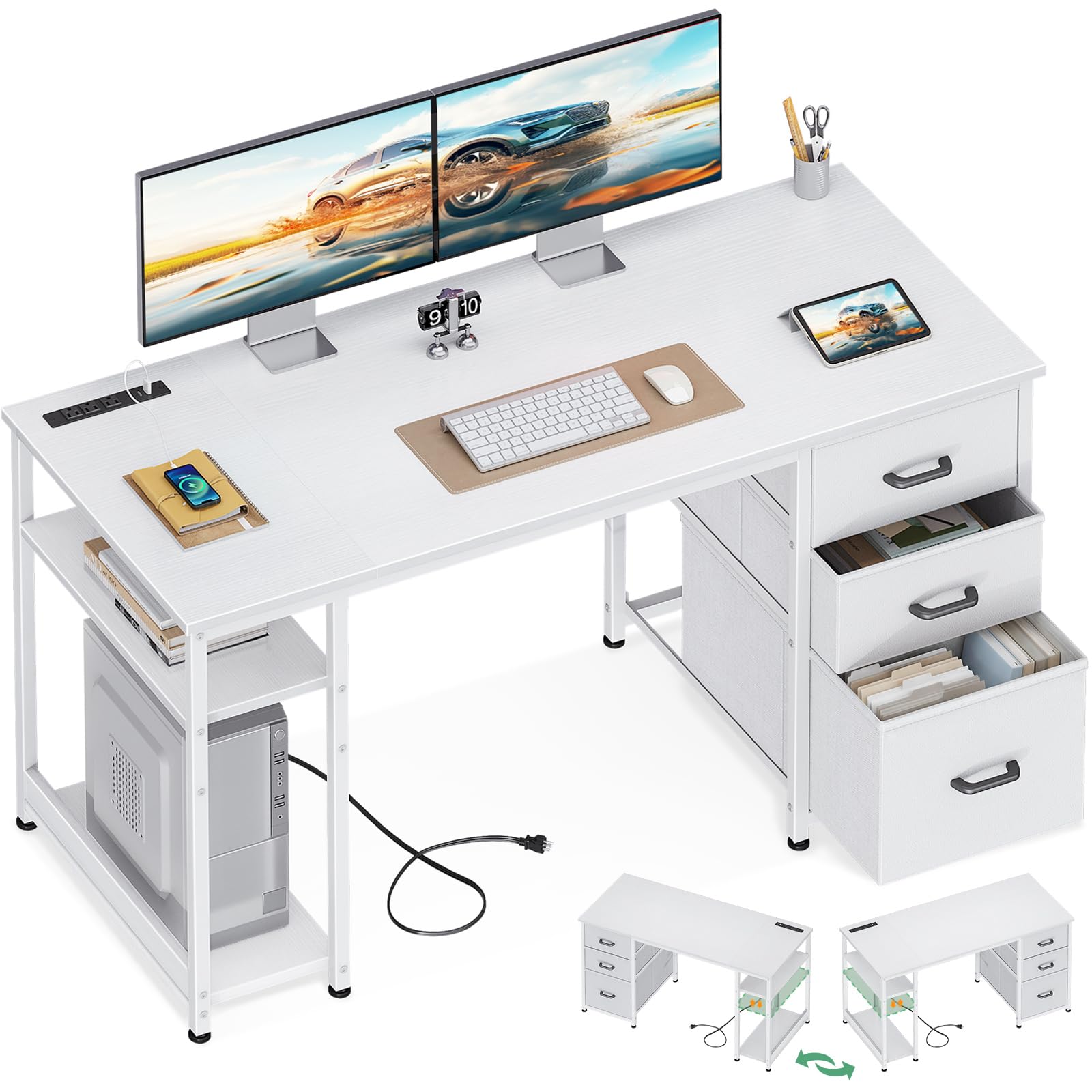
| AODK 51″ DeskBest Compact | Small spaces & easy assembly | 51.2″ x 18.9″ | 2 fabric + 1 deep bottom drawer | 3 AC + 1 USB + 1 Type-C | Amazon |
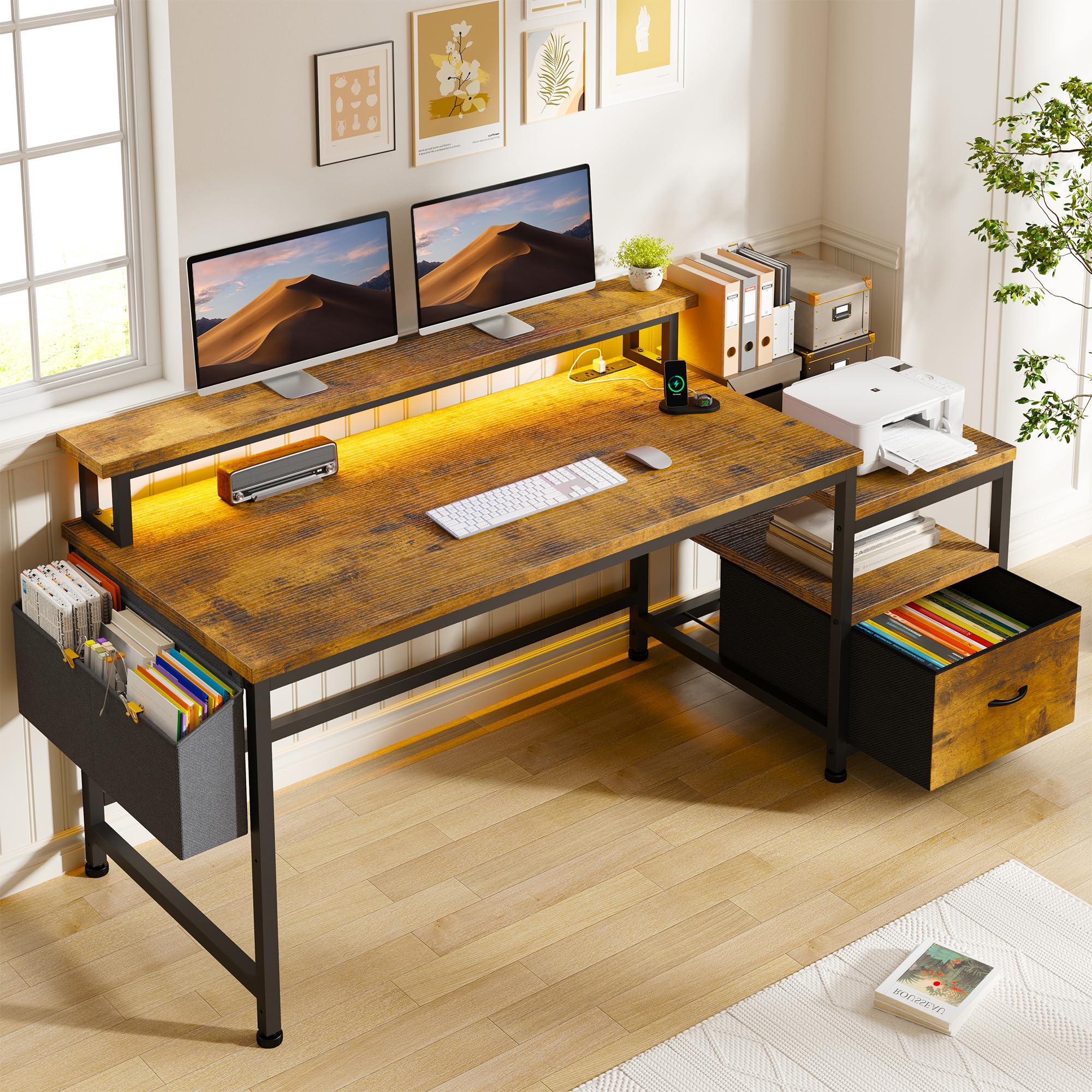
| EnHomee 56.5″ Desk★ Best Overall | Overall value & storage | 56.5″ x 23.6″ | 1 fabric file drawer + side pockets | 3 AC + 2 USB | Amazon |
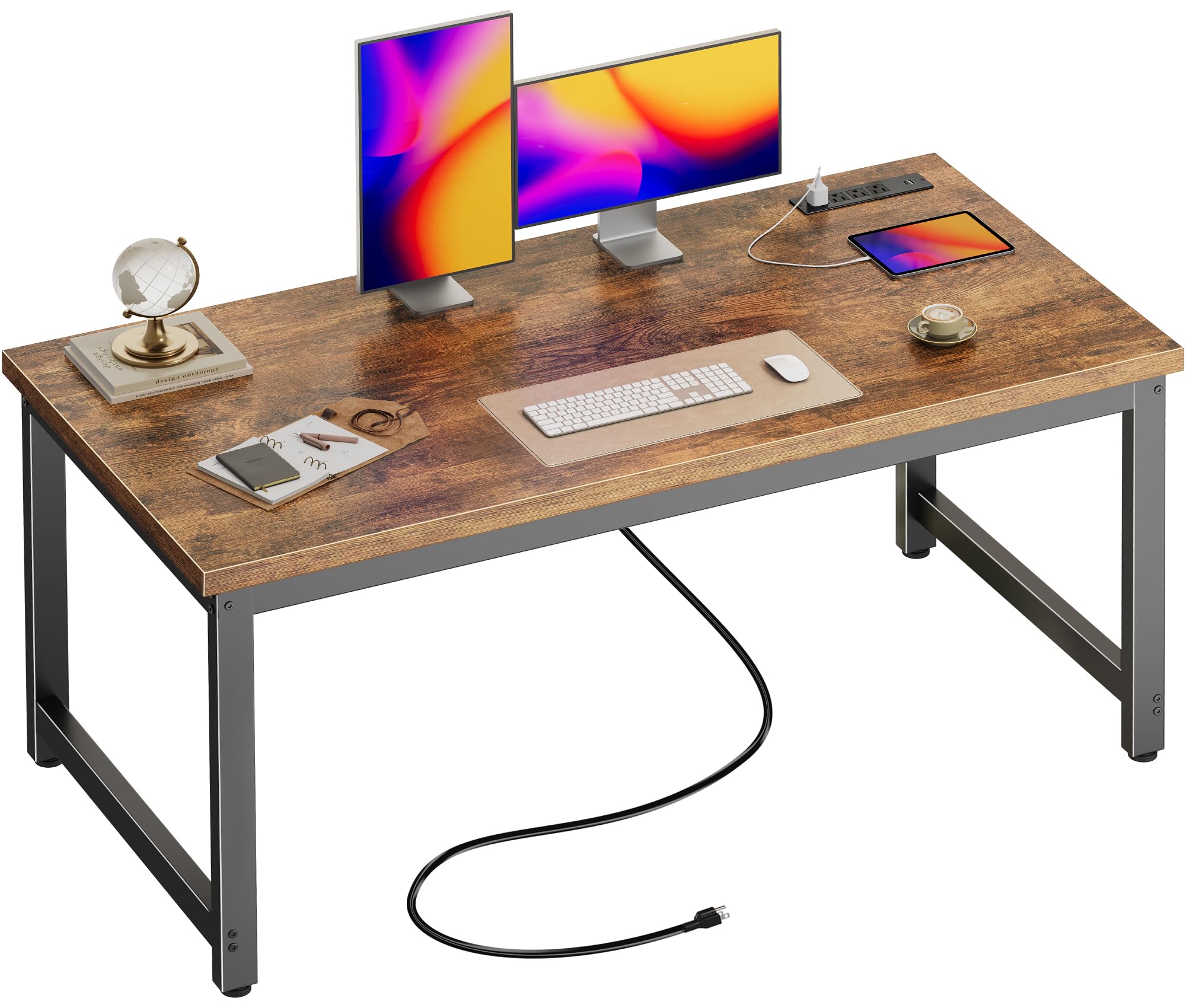
| Huuger 55″ Desk | Maximum stability | 54″ x 23.6″ | 0 (open legroom) | 4 AC + 2 USB + 1 Type-C | Amazon |
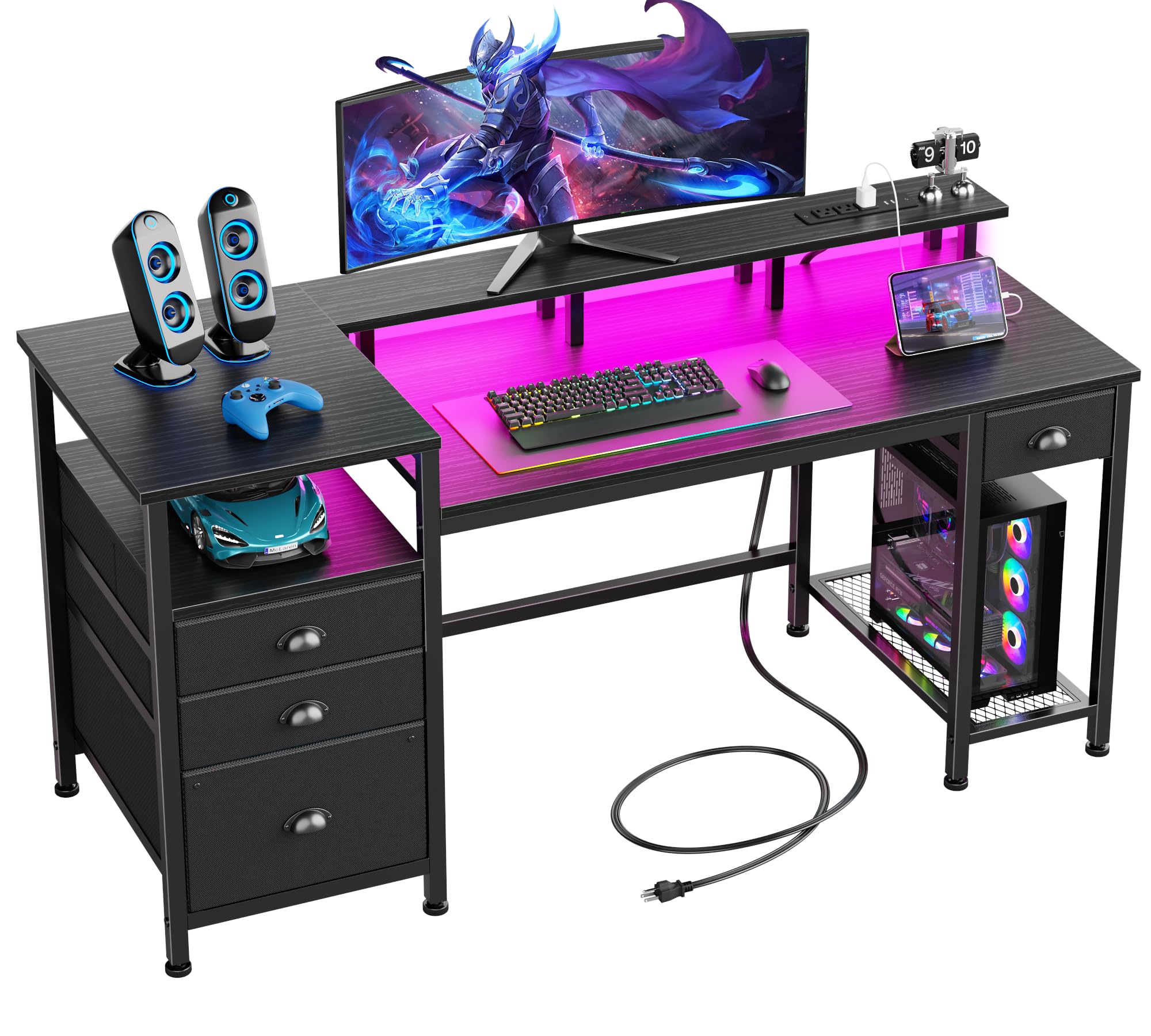
| Furologee 60″ LED Desk | Gaming & lighting | 60″ x 23.6″ | 3 fabric + 1 file drawer | 3 AC + 2 USB | Amazon |
| Korfile 59″ L-Desk | Corner layouts | 59″ x 18.8″ | 4 non-woven fabric drawers | 3 AC + 1 USB + 1 Type-C | Amazon |
In‑Depth Reviews
1. AODK 51 Inch Computer Desk with Drawers & USB Power Outlets
The desk that slides into tight corners and still gives you real storage and power.
At 51.2 inches wide and just 18.9 inches deep, this desk is built for rooms where every inch counts. Despite the compact footprint, it still squeezes in three fabric drawers (one extra-deep bottom drawer), a double-tier storage shelf, and a built-in power station with 3 AC outlets, 1 USB port, and 1 Type-C port. The reversible design lets you mount the storage cabinet on the left or right side, making it adaptable to almost any room layout.
Buyers consistently praise the easy assembly — as owners put it, the instructions are clear and “this took me about an hour to put together and by myself.” The alignment is well-regarded and the quality is considered good for the price, especially for a college student or a home office that does not need a giant work surface. The desktop is deep enough for dual monitors, though some note the 18.9-inch depth means a keyboard and monitor fill the space quickly.
The main trade-off: the desktop is noticeably shallower than the other picks at 18.9 inches, so if you need room for a deep monitor arm or lots of paperwork, this will feel cramped. The narrow computer tower space fits only a medium-sized case.
Compact and Clever: The shallow footprint is the defining feature — it fits where a 24-inch deep desk simply will not, while still offering drawers, shelves, and a full power station.
Know The Fit: The 18.9-inch depth works for laptops and a single monitor, but a deep monitor arm or full desktop printer will eat up the space fast.
Best for small rooms: if your dorm room, apartment corner, or small bedroom cannot fit a standard 24-inch deep desk, this is the one that fits without sacrificing storage.
Not your pick if: you need a deep work surface for paperwork, extensive monitor arms, or a full-size PC tower with room to breathe.
2. EnHomee 56.5″ Office Desk with Drawers & Printer Space
The balanced all-rounder that proves a smart budget desk does not feel cheap.
This is the pick that owners consistently call a genuine upgrade — “seriously love this new desk, it’s made my workspace so much better” is a recurring note. The key is the 40″ by 7″ monitor stand that runs across the full width, lifting dual screens to eye level so you stop hunching. The rustic brown finish and black metal frame deliver a look that blends into both a home office and a dorm room without screaming “budget.”
The fabric file cabinet swallows A4 folders and there is a dedicated shelf underneath for a printer, which frees up the entire 56.5-inch desktop for your actual work. The built-in power station gives you 3 AC outlets and 2 USB ports — enough for a laptop, monitor, phone, and a lamp. One owner noted that the desk fits two laptops and a monitor easily for a home business setup. The crowd favorite: assembly is described as a breeze with multilingual picture instructions, and the desk feels solid once built.
The honest trade-off is that the desktop depth is 23.6 inches, which is standard but still snug if you use a deep monitor arm. Also, size gets mixed feedback — some find it spacious while others wish for more width. If your space allows, this desk earns its place as the top contender.
Why It Wins
- Full-width 40″ monitor stand raises screens to eye level
- Integrated 3-plug power strip + 2 USB ports built right into the top
- Printer shelf frees up the entire desktop for work
- Sturdy metal frame and wooden top resist wobble while typing
Know Before You Buy
- 23.6-inch depth limits deep monitor arm placement
- Fabric drawer is not built for heavy binders or files
Reach for this if: you want the most balanced desk — solid build, real storage for a printer, and a built-in charging station that actually works from the start.
Think twice if: your setup demands a deep surface (over 24 inches) or you need wooden drawers for heavy supplies.
3. Huuger 55 x 24 inch Desk with Power Outlets & USB-C
The desk that feels like it belongs in a corporate office, not a cramped bedroom.
If stability is your number one concern — and it usually is after you have owned a wobbly desk — this is the one. The desktop is a full 0.95 inches thick, which is noticeably beefier than the standard 0.6-inch tops at this price. The metal tubes are 1.97 inches wide, meaning the frame does not flex when you lean on it. Buyers using it for 3D printing and heavy monitor setups report zero shake.
The power station is the most complete in this roundup: 4 AC outlets, 2 USB-A ports, and 1 Type-C port all integrated into the desktop, with a 6.6-foot cord that gives you flexibility in room placement. The rustic brown finish with a black frame looks more expensive than it is — one owner called it “nice looking” and noted it was the perfect height for both standing and sitting. Assembly is straightforward enough to do solo, and a cable management tray is included to keep cords off the floor.
The catch is that this desk has zero drawers or shelving — it is a pure open work surface. You will need your own storage solution for files and supplies. Also, the thick frame makes attaching monitor clamp arms or headphone hooks difficult, so plan for that.
Solid, No-Nonsense: You get the thickest desktop in this group (0.95 inches) paired with the most sturdy frame, so your monitor stays steady and your typing does not cause a wobble.
One Real Limitation: No built-in storage means you need a separate file cabinet or drawer unit for your office supplies.
Go for this if: stability and a thick, premium-feeling desktop are your non-negotiables, and you already have a drawer unit or shelving for your files.
Look elsewhere if: you need integrated storage drawers or a monitor stand included in the desk package.
4. Furologee 60″ Black Computer Desk with 4 Drawers and Printer Space
The most feature-packed desk on the list — lights, drawers, outlets, and a full 60 inches of space.
This desk brings the most extras to the table. The built-in RGB LED strip offers 20 colors and 22 dynamic modes, with 5 brightness levels and 10 lighting rhythms. That is serious customization for gamers or anyone who wants mood lighting without buying separate strips. The 60-inch long monitor stand is a full surface-width shelf that lifts your screens to a more natural viewing angle. The power station provides 3 AC outlets and 2 USB ports, all integrated into the desktop.
Storage is where this desk really pulls ahead. You get 3 fabric drawers plus a dedicated file cabinet that fits A4 documents, and 3 open shelves underneath for a printer, scanner, or PC tower. The reversible design lets you mount the drawer cabinet on the left or right side. Owners consistently praise the build quality — “sturdy, well-made desk with durable, spacious drawers” is a typical sentiment. The LED lights are a genuine bonus that upgrades the whole setup without extra wiring.
The downside: the drawers are made of cloth and paper (not wood), though buyers report they are strong enough for normal use. A small number of buyers mention the remote for the LED strip can malfunction. It is also the deepest desk at 23.6 inches, so measure your room before ordering.
Packed With Features
- RGB LED strip with 20 colors and 22 dynamic modes for atmosphere
- Four total drawers (3 fabric + 1 file cabinet) plus 3 open shelves
- 60-inch long monitor stand lifts screens to eye level
- Reversible drawer cabinet fits left or right side
Watch For
- Cloth/paper drawers — adequate for normal use but not heavy filing
- LED remote can be hit-or-miss; some units arrive with a dead remote
Perfect if: you want the most complete desk package — storage drawers, printer shelf, monitor stand, and integrated RGB lighting — all in one box.
skip it if: you do not want to deal with LED wiring or you need solid wooden drawers for heavy office binders.
5. Korfile 59 inch L Shaped Computer Desk with Power Outlets
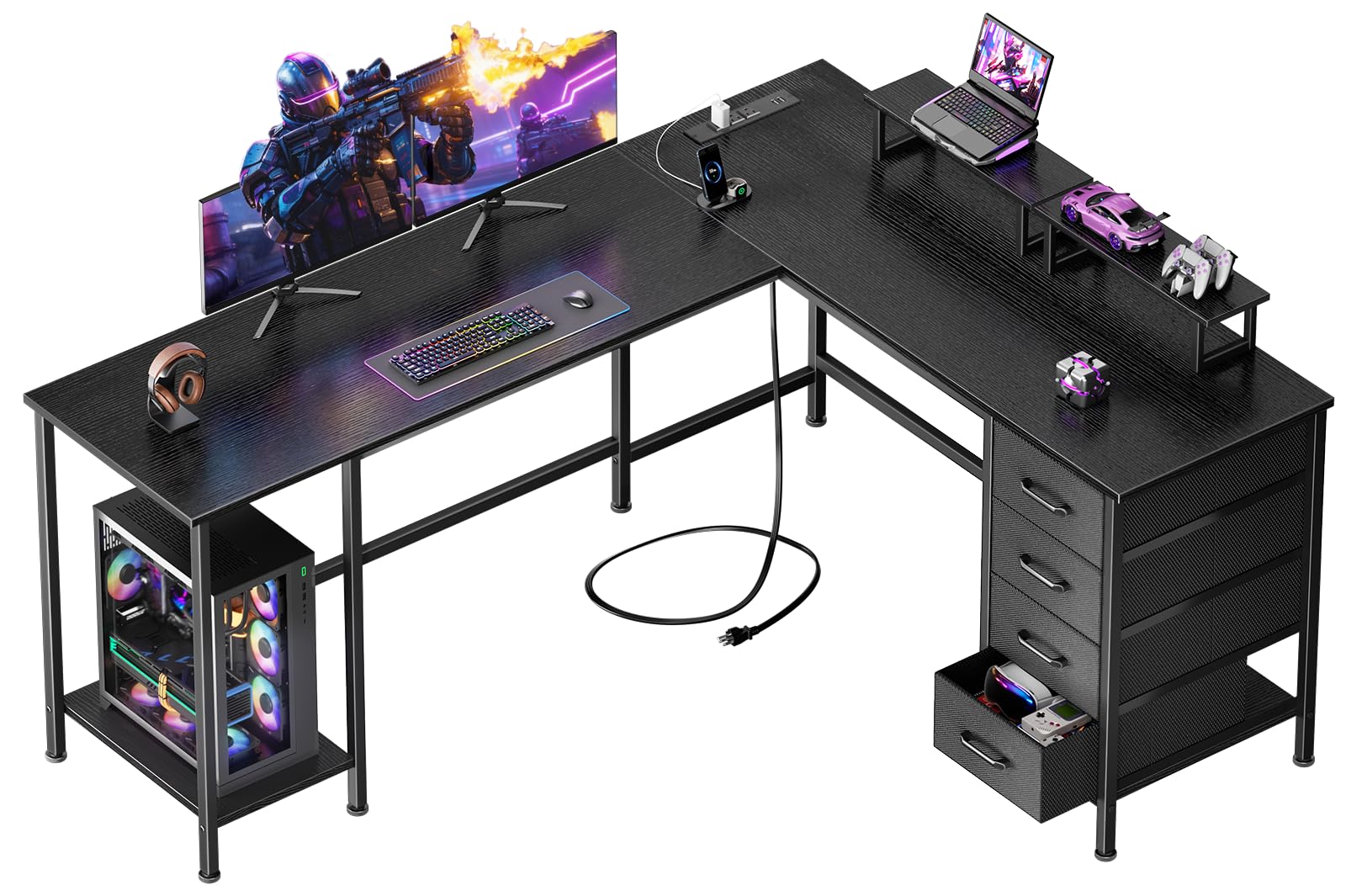
The L-shaped desk that gives you two full work zones without taking over the room.
If you have a corner to fill, the L-shape is the most efficient use of that space — and this one from Korfile is the best value execution we found. At 59 inches wide, it provides two separate surfaces: one for your main monitor setup and one for paperwork, a second machine, or a drawing tablet. The desk includes 4 non-woven fabric drawers that are fully repositionable, so you can move them anywhere along the frame depending on your setup. A dedicated PC tower stand lifts the computer off the floor, protecting it from dust.
The desk comes with two adjustable monitor stands that let you raise screens to an ergonomic eye level. The reversible structure means you can convert it between an L-shaped corner unit and a straight configuration if your space changes. The built-in power station gives you 3 AC outlets, 1 USB, and 1 Type-C port. Owners describe it as solid, spacious, and easy to assemble, with the L-shape providing ample workspace without dominating the room. The 180-pound weight capacity means you can load it up with gear.
The consistent downsides: the desk lacks any integrated cable management, and a few buyers found the assembly instructions complicated, which can stretch the build time significantly. The 18.8-inch depth on each leg is on the shallower side, so deep items like a printer may overhang.
Corner Layout Advantages
- 59-inch L-shape makes the most of an unused corner
- Two adjustable monitor stands reach eye level for ergonomic viewing
- Dedicated PC tower stand protects the computer from floor dust
- Reversible design converts to straight desk if you move rooms
Layout Quirks
- No built-in cable management — you will need clips or a tray
- Instructions can be confusing; plan for a longer assembly session
- Each leg is only 18.8 inches deep, limiting deep item placement
Perfect for corner setups: if you have an empty corner and want to turn it into a dual-zone workspace without buying a massive desk, this L-shaped layout is the smartest use of that space.
Not ideal if: you dislike complicated assembly or need a deep (24-inch) surface on both sides for large gear like a deep printer or scanner.
Understanding the Specs
Desktop Thickness & Frame
The thickness of the desktop board and the material of the frame determine how stable the desk feels under everyday use. A 0.6-inch top is the minimum you want — anything thinner can flex or sag over time, especially with dual monitors. Thicker tops, like the Huuger’s 0.95-inch surface, resist that flex noticeably. The frame should be metal, preferably steel tubes around 1.5 to 2 inches wide, with adjustable feet so the desk does not wobble on uneven floors.
Built-In Power Station
A desk with integrated AC outlets and USB ports keeps your cords centralized and saves you from hunting for a wall socket. Look for at least 2 AC outlets and 2 USB-A ports as a baseline. Type-C ports are a premium addition — they charge newer phones and laptops at faster speeds without a separate adapter. The cord length from the desk to the outlet matters for placement flexibility; a 6-foot cord is standard and gives you room to position the desk away from the wall.
FAQ
Are budget desks stable enough for dual monitors?
How long does a budget desk typically last?
Is a 51-inch desk wide enough for two monitors?
What does a desk with “fabric drawers” mean?
Do I need a desk with built-in power outlets?
How hard is it to assemble a budget desk alone?
What is the ideal desk height for working?
Can a budget desk support a heavy PC tower?
Final Thoughts: The Verdict
For the majority of shoppers, the best budget desk winner is the EnHomee 56.5″ Desk because it balances a full-width monitor stand, a built-in power station with 3 outlets and 2 USB ports, and a dedicated printer shelf — all at a price that undercuts the competition while earning the highest rating. If you want the most stable surface, grab the Huuger 55″ Desk with its 0.95-inch thick top and 7-port charging station. And for a compact space, the AODK 51″ Desk is the one to reach for.
How We Picked
We do not accept paid placement. Every pick is matched to a real buyer and a real use-case; we do not hands-on test units.
Sources & Methodology
Specifications: manufacturer listings and product documentation. Review insights: verified customer reviews, as of July 2026. Pricing: not shown on this page (it changes often); check the current price via the retailer link.
As an Amazon Associate, FitlyFast earns from qualifying purchases. This does not affect which products we feature.