
Our readers keep the lights on and the weekend projects moving. As an Amazon Associate, I earn from qualifying purchases.
Specs are compiled from manufacturer listings and verified buyer reviews and can change over time — please confirm the key details on the product page before buying.
You need sound from your computer, but you do not need to spend a paycheck to get it. A great budget pair delivers clear dialogue, usable bass, and reliable connections without falling apart after three months. Focus on driver size, RMS power, and connectivity rather than peak wattage.
I’m Rikta — the founder and writer behind FitlyFast. This guide is built by comparing the manufacturers’ published specifications and the patterns across verified customer reviews, so you get each pick’s real strengths and trade-offs instead of marketing spin.
Whether you are upgrading from monitor speakers, setting up a home office, or building a first gaming rig, these are the budget pc speakers that actually earn their spot on your desk.
Our Picks at a Glance


How To Choose The Best Budget PC Speakers
Affordable speakers can still deliver clear, full-range sound. Choosing between 2.0 vs 2.1, USB vs AUX, and driver size determines your experience.
Know the difference between 2.0 and 2.1
A 2.0 system is just a pair of left and right speakers (a stereo pair). It is simple, takes up less desk space, and costs less. A 2.1 system adds a separate subwoofer for low-end bass. If you watch action movies or play games with explosions, the subwoofer makes a real difference. For Zoom calls, podcasts, and background music, a good 2.0 set is all you need.
Check how it connects to your computer
USB-powered speakers pull both power and audio through a single cable — very clean for a desk. They also bypass your computer’s internal sound card, which often reduces background hiss. Speakers that use a 3.5mm AUX cable rely on your computer’s own audio output, which can introduce noise if the motherboard is cheap. Bluetooth 5.0 or newer gives you the freedom to connect a phone or tablet too, but keep in mind that wireless audio always has a tiny delay.
Pay attention to the drivers
The driver is the actual speaker cone that moves air and creates sound. A larger driver (measured in inches or centimeters) generally moves more air, which means fuller sound and better bass. A 2.25-inch driver, for instance, can produce noticeably deeper tones than a 1.5-inch driver. The tuning — how the manufacturer adjusts the frequency response — matters just as much. Digital Signal Processing (DSP) can clean up harsh highs and reduce distortion at higher volumes.
Quick Comparison
| Model | Best For | Power Output | Connectivity | Driver Size | Amazon |
|---|---|---|---|---|---|
| Amazon Basics 2.0★ Best Overall | Basic Laptop Use | — | USB, AUX | — | Amazon |
| Bluedee 2.1 with SubwooferAlso Great | Gaming & Movies | 80W Peak | Bluetooth 5.4, USB-A, USB-C, AUX | — | Amazon |
| Creative Pebble V3 | Home Office & Music | 8W RMS / 16W Peak | Bluetooth 5.0, USB-C, AUX | 2.25″ (5.71 cm) | Amazon |
| KASOHQEE Soundbar | Minimal Desk Setup | — | Bluetooth 5.3, AUX, USB-C | — | Amazon |
| ROSON 2.0 Speakers | Ultra-Budget Desktop | 3W x 2 | USB, AUX | — | Amazon |
In‑Depth Reviews
1. Amazon Basics Stereo 2.0 Speakers
Rock-bottom price, but owners say the sound is “good volume for videos, music, meetings” — a functional 2.0 set that just works.
The Amazon Basics Stereo 2.0 speakers are exactly that: a pair of compact speakers that plug into a USB port for power and a 3.5mm AUX jack for audio. The in-line rolling volume control is simple and effective — you do not have to reach behind the speaker. Owners call them “Great little speaker for my laptop” and note the sound quality is “good volume for videos, music, meetings.” Despite the low price, the metal finish and blue LED lights give them a more modern look than you might expect. A bottom radiator is designed to produce a “springy” bass sound, which helps keep things from sounding too thin.
The real-world limitation is that these are strictly 2.0 speakers — there is no Bluetooth, no subwoofer, no USB-C. They are best used with a laptop or a PC on the desk where the USB cable can reach. A few buyers mention they are not great for gaming consoles like the PS5, where the bass ceiling is noticeably low. But for a classroom, a dorm room, or a home office where the main use is Teams calls and YouTube, they punch well above their price.
When to reach for it: Your budget is as tight as possible and you need a functional, clean-sounding pair of desktop speakers for everyday computer use.
Look elsewhere if: You want Bluetooth, wireless streaming, or any kind of deep low-end bass — this is a pure wired 2.0 set.
2. Bluedee 2.1 Computer Speakers with Subwoofer
A separate subwoofer makes this the only budget pick that delivers real bass without drowning out dialogue.
Most speakers in this price range ask you to choose between clear vocals and deep low-end. The Bluedee 2.1 system sidesteps that trade-off entirely by adding a dedicated subwoofer — a separate box that handles bass frequencies while the two satellite speakers stay clean and focused on mids and highs. The result is deep, punchy bass that does not drown out dialogue, which makes a real difference for movies and immersion-heavy games.
Built-in DSP tuning (Digital Signal Processing, which shapes the audio signal to reduce distortion) keeps harsh highs in check, so the sound stays comfortable even during long listening sessions. On the connectivity side, this is the most future-proofed pick in the roundup: Bluetooth 5.4, plus USB-A, USB-C, and 3.5mm AUX inputs. An all-in-one control knob handles volume, playback, lighting effects, and mode switching, keeping everything simple. The RGB lighting is desk-friendly, offering dynamic colors or a soft static glow — bright enough to look good, not distracting enough to bother you during work. Buyers consistently point to the subwoofer’s performance as the standout feature, calling the sound clear, balanced, and impressively powerful for the price.
The honest trade-off is that the 80W peak power rating can lead to distortion if you push the volume too high on bass-heavy tracks — a few owners note that the system loses composure when it “gets a little too excited.” But at normal listening levels, this set delivers a level of fullness and depth that the other picks here simply cannot match without a separate sub.
Where It Wins
- Dedicated subwoofer adds real depth — low bass without muddying the vocals
- DSP tuning keeps harshness in check; comfortable for hours of listening
- Bluetooth 5.4 is the newest wireless standard in this group; also has USB-C and AUX
- RGB lighting controlled by the same knob; bright but not distracting
The Give-and-Take
- Peak volume with bass-heavy tracks can cause distortion — keep it reasonable
- Subwoofer adds space under the desk; not a minimal all-in-one solution
Reach for it when: You want cinematic bass and clear dialogue from a single affordable setup, and you have room for the subwoofer under your desk.
Think twice if: Desk space is extremely tight or you mostly listen to spoken-word content where a 2.0 set would suffice.
3. Creative Pebble V3

Its 2.25-inch drivers and USB-C single-cable design give you the cleanest desk and clearest dialogue under.
Creative has been making PC speakers for decades, and the Pebble V3 shows exactly what that experience buys you. A pair of custom-tuned 2.25-inch full-range drivers (that is about 5.7 cm across each) pushes 8W RMS with a peak power of 16W — and the company claims the V3 is 50% louder than earlier Pebble models. More important than the number is how it sounds: the audio is clear, voices are natural, and there is enough bass for a 2.0 system that does not try to pretend it has a subwoofer. A built-in gain switch lets you push the volume further if your computer has a 10W USB-C or USB-A port.
The single USB-C cable handles both power and audio, which keeps your desk nearly wire-free. Creative includes a USB-C to USB-A converter for older computers, so compatibility is not an issue. When you want to step away from the desk, Bluetooth 5.0 lets you stream music from a phone or tablet. Sound quality is the aspect owners mention most — over 1,100 buyers single it out positively — and value for money is the second most praised trait. As buyers put it: “small, space-saving Pebble 3 speakers” that deliver “clear voices for Zoom calls” and work as a “great little desktop speaker.” The 45-degree improve drivers angle the sound directly toward your ears, placing you in what Creative calls the balance without needing to tilt the speakers.
The catch? There is virtually no real bass extension. A few owners note that the cable connecting the left and right speakers is short — too short for dual 27-inch monitors placed far apart. And if you use a desktop tower that sits on the floor, the USB-C cable may barely reach your ear level. This is a desk companion, not a room-filling system.
Why It Stands Out
- USB-C single-cable design keeps the desk clean; includes adapter for older USB-A ports
- Clear Dialog processing makes voices in YouTube, movies, and TV shows easier to follow
- Bluetooth 5.0 for wireless streaming away from the desk
- 45° improve drivers aim sound directly at your ears
The Trade-Off
- Very little bass — not the pick for heavy movie or gaming low-end
- Inter-speaker cable is short; may not fit wide monitor setups
Best for: Home office workers, streamers, and anyone who values clear dialogue and a tidy desk over earth-shaking bass.
Skip if: You need a subwoofer-level rumble for action movies or bass-heavy music without adding a separate unit.
4. KASOHQEE Compact Bluetooth Speaker
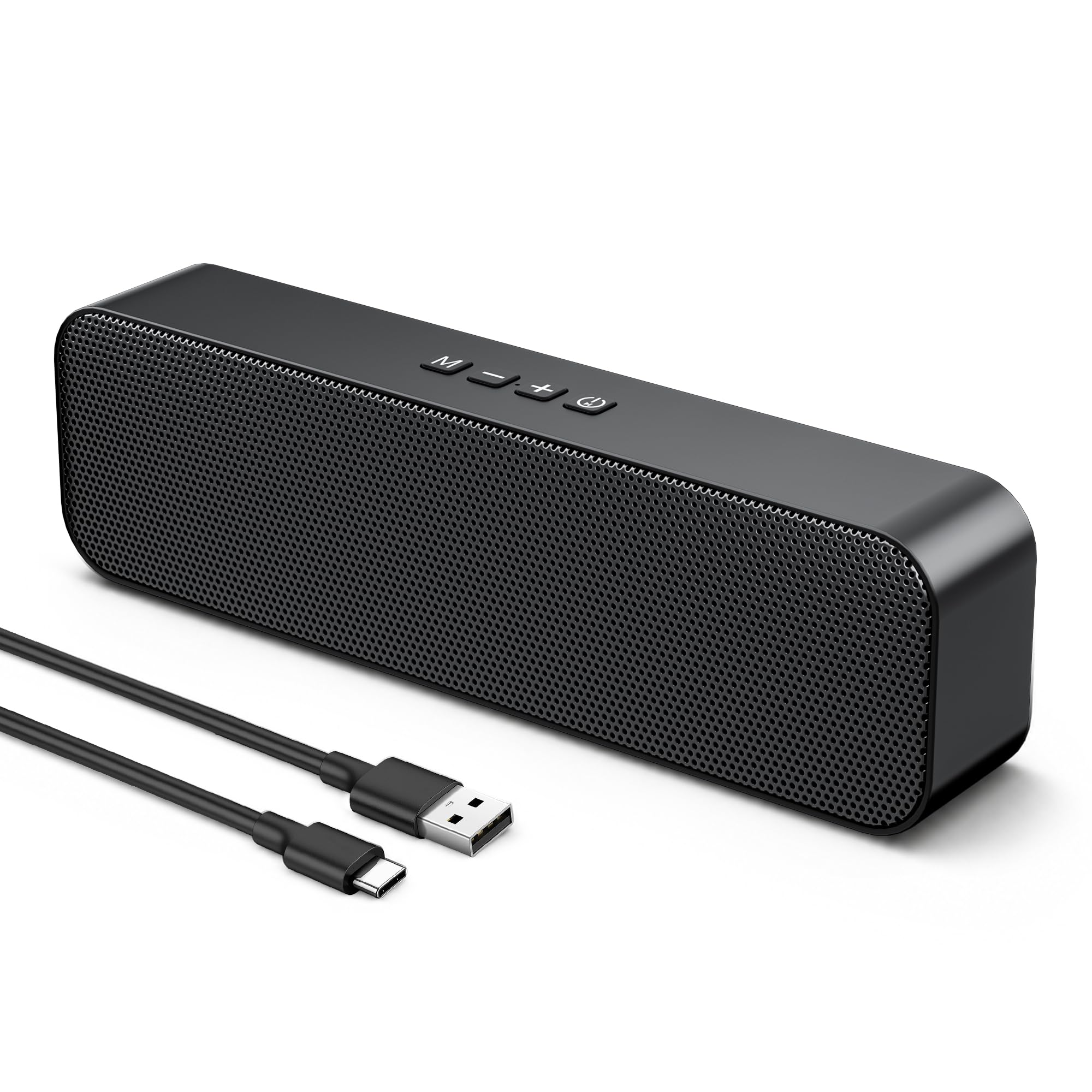
One slim bar sits under your monitor and handles all your connections — no speaker clutter on either side.
Traditional 2.0 speakers take up space on either side of your screen. This soundbar does the opposite — a single 2.56-inch-wide, 1.46-inch-tall enclosure that fits directly under most monitors, saving desk space while delivering stereo sound from two built-in 5W magnetic drivers. The dual-channel interface creates a sense of space and immersion that a single mono speaker just cannot provide. Buyers describe the sound as “clear, crisp audio with minimal distortion” and note that vocals come through cleanly for calls and video content.
For a budget soundbar, the connectivity is genuinely impressive. Bluetooth 5.3 delivers stable wireless transmission, and you also get 3.5mm AUX input plus USB-C wired options. The USB power means you plug in and it just works — your computer recognizes the speaker in seconds with no drivers needed. At approximately 1.5 inches tall, it is low enough that it should not block the bottom of your monitor. Owners appreciate the “punchy” character and note that it handles high volume well without clipping.
Where it falls short is bass. The compact design simply cannot move enough air to produce low frequencies — a few buyers mention that sound loses clarity at higher volumes and that bass is noticeably limited. One owner notes that the lowest volume setting is still too loud for a quiet open office. The product is newer with fewer reviews, so long-term reliability is less proven than the more established picks here.
Smart desk move for: Minimalists, dorm dwellers, and anyone who hates the clutter of two separate speaker boxes. The trade-off is that real bass is off the table — but for podcasts, calls, and YouTube, this is a clean win.
5. ROSON Computer Speaker 2.0

A front headphone jack and a 3W-per-channel output make it the simplest pick for a super-budget desk, not the richest.
At just under 7 inches wide and about 3 inches tall, the ROSON A-293 is among the most compact pairs in this lineup. It delivers 3W of power per channel through a full-range 2.0 stereo core, which is enough to fill a small room with clear sound. The design puts the volume control and headphone jack on the front of the right speaker, so you can plug in headphones without reaching behind your PC. Multiple buyers confirm the speakers “play loud & clear” and call them “good quality for the price.” The 31.5-inch cable between the left and right speakers and the 39.4-inch USB/AUX cables give you decent flexibility for placement.
The weak point is low-end performance. As one owner puts it, “They don’t handle low volume bass well” — the speaker assembly resonates with bass frequencies, which lowers overall sound quality on tracks with heavy low notes. The design is plain (black plastic with a blue power LED and foam feet), and the sound, while decent for the price, is not comparable to higher-end options like Bose. Some buyers report compatibility issues with certain tablets, and a few received units where only one side worked initially.
Good for: A super-budget desktop setup where the main use is spoken audio, web browsing, and casual video — and you want the convenience of a front headphone jack.
Not for: Music listeners who care about bass extension or anyone needing Bluetooth wireless. Stick to the Creative Pebble V3 or the Bluedee 2.1 for noticeably richer sound.
Understanding the Specs
RMS vs Peak Power
You will see two numbers on speaker specs: RMS (Root Mean Square) is the continuous power the speaker can handle during normal use — this is the honest number. Peak power is the maximum burst the speaker can handle for a fraction of a second. A speaker rated 8W RMS vs 16W Peak is not a “16-watt speaker”; it is an 8-watt speaker that can handle short spikes. Always compare RMS between models.
Driver Size and Tuning
The driver is the actual cone that creates sound waves. A larger driver normally means fuller bass, but tuning matters just as much. A well-tuned 2.25-inch driver can sound richer than a poorly tuned 3-inch driver. DSP (Digital Signal Processing) is a chip inside the speaker that adjusts the frequency response in real time — it can tame harsh treble or boost clarity for human voices.
USB Audio vs AUX
A USB connection sends digital audio directly from your computer to the speaker, which processes it using its own built-in DAC (Digital-to-Analog Converter). This often results in cleaner sound with less background hiss because it bypasses your computer’s potentially noisy internal sound card. AUX (3.5mm) carries an analog signal that your computer already converted — the quality depends on your computer’s audio hardware.
Bluetooth Version
Bluetooth 5.0 and newer (5.3, 5.4) offer better range and more stable connections than older versions. For a desktop speaker that sits right next to your computer, the version matters less for range and more for future-proofing if you plan to stream from a phone across the room. Every Bluetooth speaker adds a tiny audio delay, so wired connections are still preferred for gaming where lip-sync matters.
FAQ
Can I use budget PC speakers with my gaming console?
Will USB-powered speakers sound better than my laptop’s built-in speakers?
Do I need a subwoofer for PC speakers?
Can I leave USB speakers plugged in all the time?
What is the difference between Bluetooth 5.0 and Bluetooth 5.4 for speakers?
Do budget speakers with RGB lighting affect sound quality?
Why do my speakers buzz or hiss?
Can I use a USB-C speaker with a USB-A port?
Final Thoughts: The Verdict
For most people, the budget pc speakers that deliver the best balance of power, features, and everyday enjoyment are the Bluedee 2.1 with Subwoofer — the separate subwoofer and DSP tuning give you bass and clarity that nothing else at this price matches. If you want the cleanest desk setup with excellent dialogue reproduction, grab the Creative Pebble V3. And for the leanest, most minimal footprint that still sounds good, the KASOHQEE Soundbar is the one to reach for. Each pick earns strong owner satisfaction and delivers on its price promise.
How We Picked
We do not accept paid placement. Every pick is matched to a real buyer and a real use-case; we do not hands-on test units.
Sources & Methodology
Specifications: manufacturer listings and product documentation. Review insights: verified customer reviews, as of July 2026. Pricing: not shown on this page (it changes often); check the current price via the retailer link.
As an Amazon Associate, FitlyFast earns from qualifying purchases. This does not affect which products we feature.