
Our readers keep the lights on and the weekend projects moving. As an Amazon Associate, I earn from qualifying purchases.
Specs are compiled from manufacturer listings and verified buyer reviews and can change over time — please confirm the key details on the product page before buying.
You want to record vocals, a podcast, or streaming audio without emptying your bank account. The key is identifying budget mics that provide clear, professional audio rather than just attractive packaging. This guide reviews nine budget mics that deliver rich, full vocal capture, not hollow or distant sound.
I’m Rikta — the founder and writer behind FitlyFast. This guide is built by comparing the manufacturers’ published specifications and the patterns across verified customer reviews, so you get each pick’s real strengths and trade-offs instead of marketing spin.
Whether you’re starting a YouTube channel, building a voiceover studio, or upgrading your game chat, these picks offer reliable real-world performance. This is your total guide to finding the best budget mics for recording that deliver premium sound without a premium price tag.
Our Picks at a Glance


How To Choose The Best Budget Mics For Recording
Finding the right budget recording mic is about matching the right tech to your space and your voice. The single most important spec is the pickup pattern — it decides how much of your room the mic hears. A cardioid pattern picks up sound mostly from the front, which is ideal for rejecting echo and ambient noise like fans or traffic. Omni-directional picks up sound from all around, which is great for capturing a whole room but terrible for noisy environments. For most home recording, cardioid is the safest and smartest choice.
USB vs. XLR: Which connection matters for you
USB microphones are the clear winner for beginners and mobile creators. You plug them directly into your computer or phone — no mixer, no audio interface, no extra cables. XLR mics, on the other hand, require a separate audio interface or mixer that supplies phantom power and converts the signal. XLR gives you more room to upgrade components later, but it costs more upfront and adds complexity. For a first budget recording mic, USB is almost always the better choice.
Sample rate and bit depth — what makes audio sound full
Your mic captures a snapshot of sound thousands of times per second — that is the sample rate, measured in kHz. For video and podcasting, 48 kHz is the standard, while 96 kHz captures more detail and suits music production. Bit depth (16-bit or 24-bit) controls dynamic range — the gap between the quietest and loudest sounds. 24-bit gives you more headroom so you can raise your voice without distortion. For spoken word and streaming, 48 kHz / 24-bit hits the balance.
Quick Comparison
| Model | Best For | Connection | Pickup Pattern | Sample Rate | Amazon |
|---|---|---|---|---|---|
| ZealSound K66★ Best Overall | ASMR & detail capture | USB / USB-C / Lightning | Cardioid | 48 kHz | Amazon |
| ZealSound BKD-11 PROPro Feature Set | Streaming & versatility | USB / USB-C / Lightning | Cardioid | 96 kHz | Amazon |
| Mackie EM-91CUBest Value | Beginners & voice lessons | USB | Cardioid | 48 kHz | Amazon |
| Razer Seiren V3 Mini | Compact desktop use | USB-C | Supercardioid | 20 kHz | Amazon |
| HyperX SoloCast 2 | Plug-and-play simplicity | USB-C to USB-A | Cardioid | 96 kHz | Amazon |
| sktome Podcast Bundle | All-in-one with effects | XLR / USB-C | Super Cardioid | — | Amazon |
| FIFINE AM8PROT | XLR upgrade path | USB / XLR | Cardioid | 24-bit / 48kHz | Amazon |
| Blue Ember | Pro XLR sound | XLR | Cardioid | 20 kHz | Amazon |
| Blue Yeti | Versatile multi-pattern | USB | Multi-pattern | 20 kHz | Amazon |
In‑Depth Reviews
1. ZealSound Podcast Microphone K66
The ZealSound K66 captures ASMR-grade detail without forcing you into a pro studio budget.
This mic is built for creators who need to hear every whisper, tap, and breath. Its cardioid pattern (which focuses on sound from the front while rejecting side and rear noise) is paired with a 40Hz to 18kHz frequency range that reproduces quiet textures with natural tone. The wide range means your voice stays present and clean, whether you are an ASMR artist or a podcaster. You get a one-button noise reduction mode that tames keyboard clicks and fan hum — a real lifesaver if your desk sits in a shared room.
The K66 runs on USB with no drivers needed, and it includes both USB-C and Lightning adapters to connect to iPhones and newer Android tablets. Onboard knobs let you control mic gain, headphone volume, and echo in real time. The echo knob is particularly fun — roll it back for dry studio takes or dial it up for an rich “big room” sound. The 360° rotating body and weighted metal base keep it planted during energetic sessions. Buyers report that after trying very expensive mics, this one still wins on sound quality and background noise reduction.
The honest downside: reliability gets mixed feedback in the count of owner mentions. Some units arrive with operational issues, and the warranty support is something to keep in mind. Durability also scores lower in the data. This mic is amazing for the price, but treat it gently and keep the box during the first month.
Stellar detail for the dollar: sound quality is the top praise among owners (45 mentions), with quality second (35). The things that win people over are the crispness and the noise handling.
Who should think twice: if durability and long-term reliability are your top concern, the mixed feedback on those fronts suggests looking at a sturdier build in this list.
Reach for this if: you record ASMR, quiet vocals, or podcasts and want clean detail without breaking.
Look elsewhere if: you plan to travel with your mic or need a tank-like build for constant handling.
2. ZealSound BKD-11 PRO Gaming Mic
A 96 kHz sample rate in a budget mic is rare — the BKD-11 PRO makes it accessible.
This mic packs studio-level sampling (96 kHz versus the standard 48 kHz) to capture more detail in your voice. The cardioid pattern focuses on your mouth while the built-in noise reduction chip helps suppress background chatter. You get both a scissor boom arm and a foldable tripod, giving you the flexibility to mount it at mouth level or keep it on the desk. The boom arm extends up to 30.8 inches and rotates 360°, so you can keep your workspace clean.
Another big win is the plug-and-play compatibility with Windows, Mac, PS4/PS5, and mobile devices via the included Lightning and USB-C adapters. The tap-to-mute button has a clear red indicator, and the 3.5mm headphone jack gives you zero-latency monitoring — what you speak is what you hear, with no delay. The RGB lighting adds a stream-ready look, and you can turn it off with a long-press. The build quality gets high marks, with owners calling the sound clear and sharp.
The main trade-off: the gain knob is bottom-mounted, which keeps it out of the way but is less convenient than a front-facing dial. Some owners also note that the noise cancellation is good but not perfect in very noisy rooms. This is a solid step up from basic USB mics.
What owners rave about
- crisp voice with active noise cancellation on iPhone and Android
- Boom arm and tripod both included for flexible mounting
- smooth integration with Discord, Twitch, and OBS
The practical caveats
- Gain knob on the bottom is not the quickest to access mid-stream
- Noise cancellation helps but does not eliminate loud ambient sounds
Best for: streamers and podcasters who want 96 kHz clarity and a full mounting kit right from the start.
Skip if: you need instant access to gain during recordings.
3. Mackie EM-91CU
Mackie brings decades of pro audio experience to a sub- USB mic.
The EM-91CU is a no-frills condenser mic built for content creation, voiceover, and online meetings. It captures at 16-bit / 48kHz (standard for clear spoken audio), and its cardioid pattern keeps room reflections to a minimum. The build is rugged — stainless steel enclosure and a weight of 210 grams that feels substantial despite the low price. One owner dropped this mic a few times and it still runs like new.
The sound signature leans warm and slightly dark, which owners say helps reduce sibilance (those harsh “Ssss” sounds in voices). This makes it a clever pick for teaching videos or voice acting where you want a natural tone without a de-esser in post. The plug-and-play USB connection means zero setup friction, and it is recognized by the New York Times as a runner-up in budget mic tests. For trained vocalists at 5 to 8 feet, it replicates the feel of a dynamic mic like the SM58.
On the flip side, it is a darker microphone, so you may need a 100Hz low-cut filter in post to tighten the low end. Some packages were missing the threaded adapter, so open your box quickly and check. It is not ideal for Zoom calls without that filter, as the low-frequency bump can reduce volume.
Value above all: value for money leads the praise at 15 mentions, with sound quality right behind at 14. Owners agree this is a steal for the price.
One flaw to know: the recording performance score is mixed (6 mentions). It is great for voice, but less ideal for music recording without post-processing.
Ideal for: voice actors and teachers who need a simple, durable mic with a warm, sibilance-reducing sound.
Consider another mic if: you record in untreated spaces where a brighter capsule would cut through better.
4. Razer Seiren V3 Mini

Razer shrinks the studio mic down to the size of a soda can without skimping on clarity.
This mic is barely 6.38 inches tall and weighs just 8.32 ounces. The supercardioid pickup pattern is even tighter than regular cardioid — it focuses more on your voice and rejects typing sounds and mouse clicks superbly. The tap-to-mute sensor on top is a neat trick: one tap silences the mic, and the LED indicator turns red so you never accidentally broadcast a cough. The built-in shock absorber in the stand dampens bumps and knocks, and the whole stand tilts to find your balance.
Plug-and-play via USB-C means you are up and running in seconds with any PC or laptop. Razer Synapse software open up advanced customization, including studio-level sample rates and separate volume mixes for your headphones versus the stream. The compact design earns praise for blending into a white or minimalist computer setup. Quality got the most mentions from owners (82), followed closely by sound quality (66).
The recurring note: noise cancellation gets mixed marks (26 mentions). It blocks out some ambient noise, but a few owners say it picks up too much room sound for quiet environments. If your recording space is noisy, you will need to use software to clean it up.
Compact and clear: build quality, sound, and value all score high in owner feedback. The tap-to-mute is called a 10/10 feature by some.
Noise cancellation catch: not a total room isolator; paired with a noise gate in OBS or Discord, you are golden.
Pick this if: you value desk space and want a clean, minimalist look with good voice capture for calls and streams.
skip it if: you need physical gain or volume knobs — there are none on the V3 Mini.
5. HyperX SoloCast 2

HyperX packs a full studio feature set — pop filter, shock mount, and 96 kHz — into a one-piece desktop mic.
The SoloCast 2 is an all-in-one design that needs no extra accessories. The built-in foam pop filter reduces plosives (the burst of air on “P” and “B” sounds), and the internal suspension system acts as a shock mount to dampen desk vibrations. It captures at 24-bit / 96kHz (high-resolution audio), which gives you extra headroom for dynamic vocals without distortion. The cardioid pattern focuses on your voice from the front while minimizing side noise.
Setup is truly plug-and-play via USB-C to USB-A, and the tap-to-mute function with red LED gives instant visual feedback. The tiltable stand has a weighted base for stability, and the mic also features 3/8-inch and 5/8-inch threads for attaching to a boom arm. Through HyperX NGENUITY software, you can apply high-pass, low-pass, or voice enhancement filters and save them directly to the mic. Quality (31 mentions) and reliability (28) are the top praised aspects in owner feedback.
A design note: the USB-C port is located on the lower back left, and some owners found it a bit loose — movement can unplug it. Using a boom arm and securing the cable solves this. The mic weighs 330 grams and is light enough for casual portability.
What works perfectly
- crisp, professional audio right from the start
- Built-in pop filter and shock mount simplify setup
- Software customization via HyperX NGENUITY
What to watch out for
- USB-C port placement can cause accidental disconnects
- Very sensitive to background noise; a quiet room helps
Who it fits: gamers and streamers who want a clean setup without extra gear — one cable, one mic, done.
Who should read the fine print: if you share a loud room, the sensitivity may require a noise gate in software.
6. sktome Podcast Equipment Bundle

This bundle throws the kitchen sink at beginners — XLR mic, sound card, voice effects, and a stand.
The sktome bundle is designed as a starter set for podcasters, streamers, and party hosts. The core is a 48V XLR condenser microphone with a super cardioid pattern (tighter focus than standard cardioid) and a dual DSP noise reduction chip to keep audio clean. But the real star is the M300 sound card: it includes 4 voice changers (female, male, child, and monster), 23 built-in sound effects, and 6 professional modes. The sound card runs on a 1800 mAh rechargeable battery that delivers up to 10 hours of HD broadcast time. The cool breathing light and LED display make the unit feel interactive and modern.
Connectivity covers the bases: XLR to USB-C cable, 3.5mm TRRS cables for phones and consoles, and compatibility with Windows, iOS, Android, and Mac OS. The desktop stand, shock mount, pop filter, and anti-wind foam cap are all included. This is a one-box solution for TikTok, YouTube, Twitch, and karaoke.
The catch is that the effects (applause, cheering) do not output to the device you are recording on — they only play through the headphones. Some units arrive with a mislabeled port, so immediate check after opening is wise. Sound quality gets mixed feedback in owner mentions, and reliability reviews are split, with some units failing after three months. The 12-hour support window is a comfort, but lower your expectations for long-term durability.
Best for beginners who want to play: the voice changer and effects are fun for live streaming and karaoke. The bundle is a great starter set for the price.
Honest limitations: sound quality is mixed (some love it, some find it noisy), and reliability can be hit-or-miss. Good for learning; plan to upgrade later.
Grab this if: you are new to podcasting or streaming and want every accessory in one box for experimenting.
pass on it if: you need professional-grade, consistent audio or plan to rely on it for a daily show.
7. FIFINE AmpliGame AM8PROT
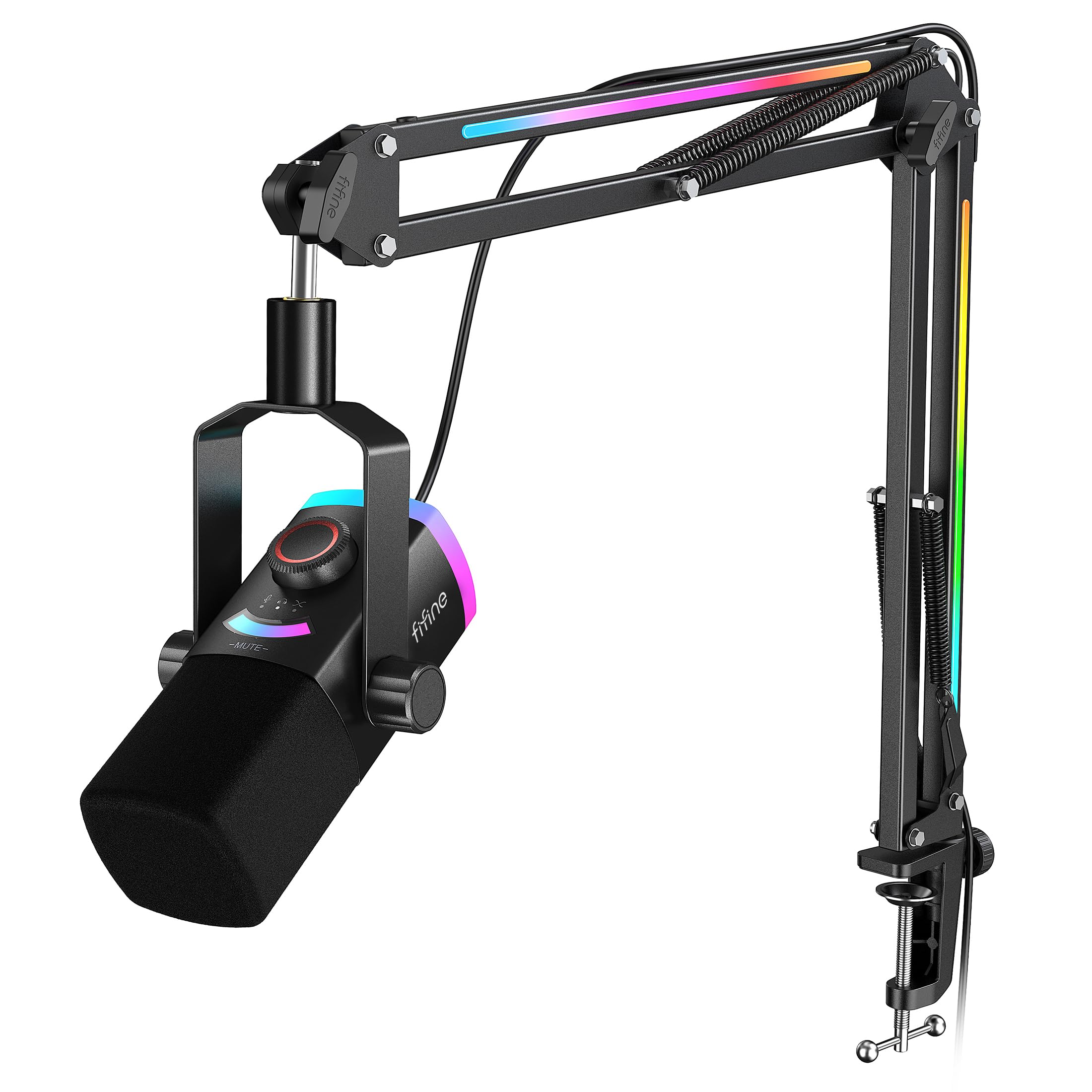
The AM8PROT gives you both USB and XLR connectivity so you can start simple and grow your studio later.
This is a dynamic microphone (different from the condenser mics above — it uses a moving coil that handles loud volumes without distortion). It captures at 48kHz / 24-bit with a 115 dB SPL (Sound Pressure Level), which means it can handle loud vocals, guitar cabs, or a screaming stream without clipping. The cardioid pattern plus a 75 dB SNR (Signal-to-Noise Ratio) reject low-level interference from multiple devices running nearby — a common issue in a home office or game room.
The kit ships with a thickened boom arm that extends up to 30 inches and has multi-angle joints to save desk space. The tap-to-mute and RGB lighting system offers over 240 color combos that can sync to your game audio. The 3-in-1 silent knob lets you fine-tune gain and headphone volume during a session. Owners call the sound quality rich and natural, with the dynamic nature reducing background noise better than typical USB condensers.
The RGB system needs USB power to work even when you use XLR for audio, so plan for two cables if you want the lights. The tap-to-mute sensor is sensitive — some owners mention accidental taps. The FIFINE Genie app adds background noise filtering and EQ, which is a nice bonus for refining your sound.
Why owners love it
- Rich, warm vocal quality with excellent background noise rejection
- Premium RGB system covers both mic and boom arm
- USB/XLR flexibility for future upgrades
Minor friction points
- RGB needs USB power even in XLR mode
- Tap-to-mute can trigger accidentally
Pick this for: streamers and gamers who want the cleaner sound of a dynamic mic with the convenience of USB and the upgrade path to XLR.
Consider another option if: you want a simple plug-and-play mic with no software tweaks.
8. Blue Ember

The Blue Ember proves that premium XLR sound can arrive under with a tiny footprint.
Blue Microphones is famous in the streaming world (their Yeti is a legend), but the Ember is a purpose-built XLR condenser for those who already have an audio interface. Its custom cardioid capsule delivers “open, accurate sound with impressive headroom,” as the brand puts it. The physical design is a slim cylinder — only 1.5 inches in diameter and 8.62 inches long — that stays completely out of your camera frame. The all-metal chassis weighs very little (no exact weight is listed, but it feels light), and the impedance is a standard 40 ohms for clean signal transfer.
What wins owners over is the sound quality, which tops the list at 72 mentions. One owner who used it for two years reports that viewers consistently ask “Woah, nice mic” — praising the crisp, detailed audio. Another calls it an “exceptional value due to Logitech acquisition clearance pricing.” The cardioid pattern ensures focused capture, and the adjustable mic stand mount connects to standard boom arms.
The trade-off: it requires close proximity — 2 to 4 inches from your mouth — and needs more gain than some other XLR mics. No cable is included (a common complaint from 7 owners), and it does not come with a shock mount or pop filter. If you are on a tight budget and already own an interface and a cable, this is a steal. If you are starting from zero, factor in those extra costs.
Stunning clarity for the price: sound quality (72 mentions) and value for money (32) dominate owner feedback. The general opinion is that you cannot beat it at this price.
Be prepared to supply: you need an XLR cable, a boom arm, and an interface. This is not a USB plug-and-play mic.
Best for: singers and streamers with an existing interface who want professional-grade vocal clarity without spending hundreds.
Not for: beginners who need a full desktop setup — buy a Yeti or a USB ZealSound instead.
9. Blue Yeti
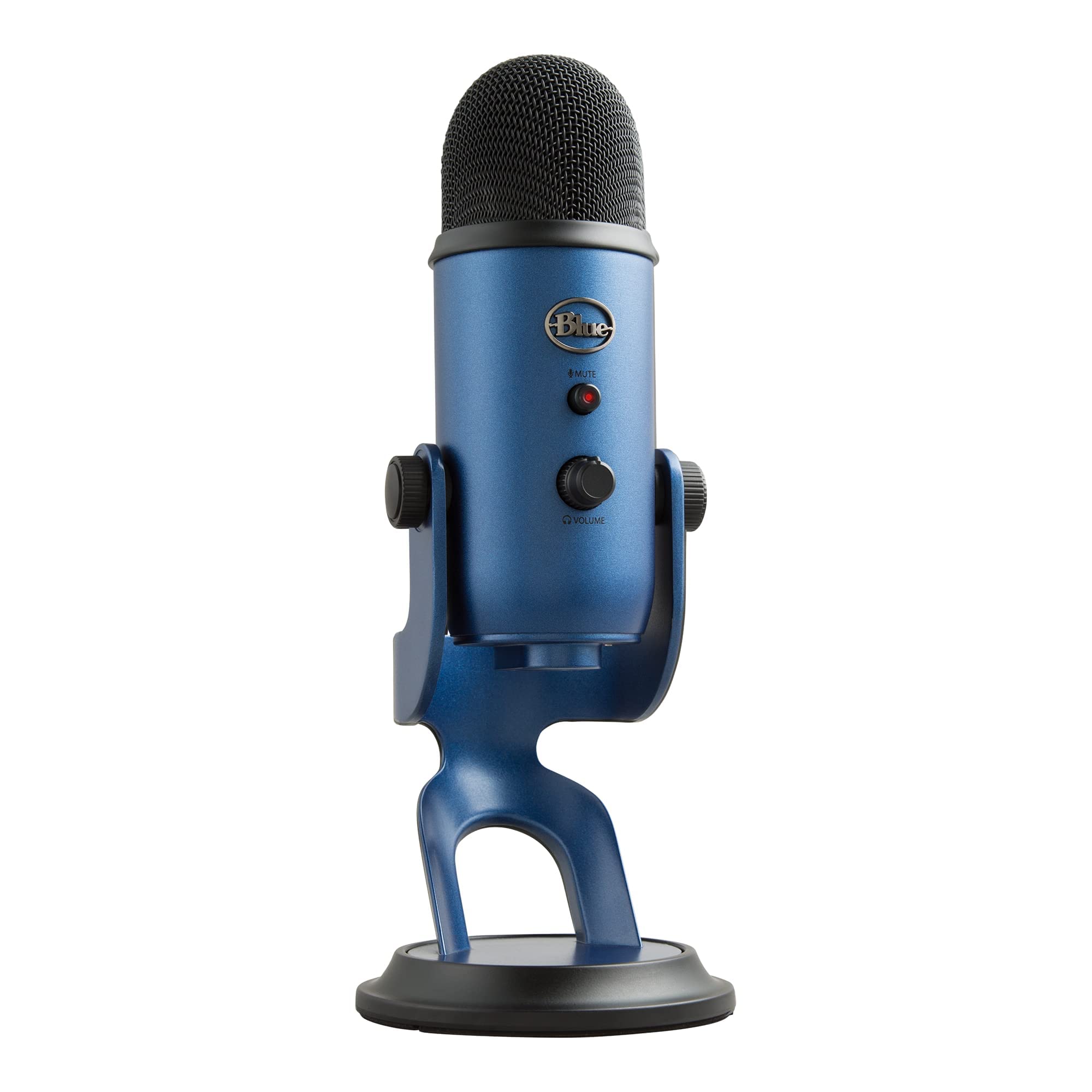
The Yeti remains the crowd-favorite USB mic because four pickup patterns let you record any scenario.
The Blue Yeti uses a custom three-capsule array to offer four pickup patterns: cardioid (vocal focus), omni (360° room capture), bidirectional (two-person interview), and stereo (wide ambient sound). That flexibility normally requires multiple microphones. The Yeti delivers broadcast-quality sound right from the start with USB plug-and-play. The adjustable desktop stand lets you pivot the mic to tune your sound source, and the onboard controls (headphone volume, pattern selection, mute, and mic gain) put everything at your fingertips.
Blue VO!CE software adds broadcast vocal effects, advanced modulation, and HD audio samples to polish your stream or recording. The build is heavy-duty metal with a Midnight Blue finish. Owners consistently praise the studio quality, clear sound, and ease of setup — one calls it a “dramatic improvement” over headset mics. It is perfect for podcasting, voice-over, music recording, and Zoom meetings. At 4.9 x 4.7 x 11.6 inches, it has a solid desk presence.
The Yeti is sensitive to room noise, so a pop filter is recommended for the best results. It is not portable (no battery, no tiny case). Some owners note that the cardioid mode is what they use most, and the multi-pattern feature is a nice bonus rather than an everyday necessity. If you plan to record only yourself, the ZealSound K66 or Mackie EM-91CU may save you money with similar sound quality. But if you want a one-mic solution that covers everything, the Yeti is still the benchmark.
Why it is the icon
- Four pickup patterns replace multiple microphones
- True professional broadcast sound in a USB mic
- Sturdy metal construction that looks premium on any desk
What to plan around
- Sensitive to background noise; a quiet room and pop filter help
- Not travel-friendly due to size and weight
Reach for the Yeti if: you need a single USB mic that can handle solo podcasts, two-person interviews, and music recording with equal ease.
Consider a simpler mic if: you only record one person at a desk and want a smaller footprint or a lower budget.
Understanding the Specs
Pickup Patterns (Cardioid, Supercardioid, Omni)
The pickup pattern determines where the microphone listens. Cardioid captures a heart-shaped area in front of the mic, rejecting sound from the sides and rear. This is perfect for a single speaker at a desk. Supercardioid is even tighter — it rejects more side noise but picks up a tiny bit from the rear. Omni captures sound equally from all directions, which is great for a roundtable but terrible for noisy rooms. For most budget recording mics, stick with cardioid.
Sample Rate (kHz) and Bit Depth
Sample rate is how many times a second your mic converts sound into a digital signal. 44.1 kHz is CD quality, 48 kHz is standard for video, and 96 kHz captures more high-end detail suitable for music. Bit depth (16-bit vs 24-bit) controls dynamic range — the gap between the quietest and loudest sound. For spoken word, 48 kHz / 16-bit is fine. For music and dynamic voice acting, 96 kHz / 24-bit gives you cleaner headroom.
Noise Reduction vs. Noise Rejection
Noise reduction is an electronic feature that the mic applies to clean up unwanted sound after capturing it — like the ZealSound K66’s one-button mode. Noise rejection is a physical property of the pickup pattern — cardioid mics naturally reject sounds from the sides. Mixing these two is common in budget mics. A built-in noise reduction chip helps, but a good cardioid pattern is what you should rely on for a clean recording space.
Impedance (Ohms) and Sensitivity (dB SPL)
Impedance measures how much the mic resists the electrical signal. Lower impedance (like the Blue Ember’s 40 ohms) is easier for audio interfaces to drive and results in cleaner sound over long cable runs. Sensitivity (measured in dB SPL) tells you how well the mic picks up quiet sounds. A high dB SPL means it can handle loud sources (like a guitar amp) without distortion. For voice recording, aim for a mic that balances good sensitivity with low self-noise.
FAQ
Can I use a USB microphone with my iPhone or Android phone?
What is the difference between a condenser mic and a dynamic mic?
Do I need an audio interface to use an XLR microphone?
What does “zero-latency monitoring” mean?
How far should I sit from my recording microphone?
Will a budget mic pick up my keyboard and mouse clicks?
What does the dB SPL rating tell me?
Is RGB lighting on a mic just a gimmick?
Final Thoughts: The Verdict
For most buyers, the budget mics for recording winner is the ZealSound K66 because it combines the best ASMR-ready detail, one-button noise reduction, and a Lightning adapter for mobile use — all for a price that leaves room for other gear. If you want a 96 kHz sample rate and the flexibility of a boom arm plus tripod, grab the ZealSound BKD-11 PRO. And for the absolute beginner who wants a legendary multi-pattern mic with thousands of happy owners, the Blue Yeti is the one to reach for.
How We Picked
We do not accept paid placement. Every pick is matched to a real buyer and a real use-case; we do not hands-on test units.
Sources & Methodology
Specifications: manufacturer listings and product documentation. Review insights: verified customer reviews, as of July 2026. Pricing: not shown on this page (it changes often); check the current price via the retailer link.
As an Amazon Associate, FitlyFast earns from qualifying purchases. This does not affect which products we feature.