
Our readers keep the lights on and the weekend projects moving. As an Amazon Associate, I earn from qualifying purchases.
Specs are compiled from manufacturer listings and verified buyer reviews and can change over time — please confirm the key details on the product page before buying.
Most budget handheld PCs promise portability but deliver underpowered chips, tiny screens, or a battery that dies before your coffee break. The real challenge is finding one machine that balances a capable processor, a solid screen, and enough RAM (random access memory, the short-term memory your games use) to keep modern games running without stuttering. This guide cuts through the confusion to land on five handhelds that actually deliver playable performance without demanding flagship money.
I’m Rikta — the founder and writer behind FitlyFast. This guide is built by comparing the manufacturers’ published specifications and the patterns across verified customer reviews, so you get each pick’s real strengths and trade-offs instead of marketing spin.
Whether you are hunting for a Steam Deck alternative or a Windows machine for AAA (big-budget, graphically demanding) titles on the go, the right budget handheld pc needs a sharp display, a modern Ryzen chip (a processor from AMD that includes both CPU and graphics cores), and at least 16 GB of RAM — specs that the picks below prove are achievable without crossing into four-figure territory.
Our Picks at a Glance
How To Choose The Best Budget Handheld PC
A budget handheld PC is a straight trade-off — you are choosing which compromises matter least to you. Focus on the parts you cannot upgrade later (the processor, the screen, the RAM), and you will end up with a machine that stays playable for years rather than months.
The Processor and Graphics are Everything
The AMD Ryzen Z1 series (Z1 Extreme and Z2 Go) is the current gold standard for these devices. The Z1 Extreme, with 8 cores (individual processing units) and Radeon RDNA 3 graphics (the latest graphics architecture from AMD), handles modern AAA titles at 1080p low-to-medium settings — meaning you can play demanding games at a 1920×1080 resolution with decent detail. The Z2 Go is a slightly scaled-down version but still outpaces older laptop chips like the Athlon 3050e. If the machine runs a Zen 2 or older chip (a processor architecture from 2019 or earlier), you will struggle with anything beyond indie games — skip it.
Screen Resolution vs. Battery Life
A 1080p (1920×1080) display is the balance for performance and clarity at this price tier. Higher resolutions like 2560×1600 look sharper but drain the battery much faster — expect 1-2 hours on a high-res screen versus 2-4 on a 1080p panel at similar settings. A 120 Hz refresh rate (how many times per second the screen updates the image) is nice for smoother motion, but dropping the frame cap to 60 Hz in demanding games can extend your play session by an hour.
RAM and Storage — 16 GB is the Floor
16 GB of unified LPDDR5 RAM (Low Power Double Data Rate 5, the latest fast memory that both the CPU and GPU share) is the minimum for any handheld running Windows 11 and a modern game at the same time. 8 GB models starve the system when Windows has taken its share, forcing background apps to close and causing stutter. Storage is easier to upgrade later via a microSD card or a larger M.2 SSD (a small, fast solid-state drive that plugs directly into the motherboard), so prioritize RAM first and storage second.
Quick Comparison
| Model | Best For | Processor | Screen | RAM | Amazon |
|---|---|---|---|---|---|
| WIN600 (Athlon 3050e)★ Best Overall | Entry-level / Office + light gaming | AMD Athlon Silver 3050e | 5.94″ 720p | — | Amazon |
| Lenovo Legion Go (Z1 Extreme)Also Great | Screen enthusiast / Docked play | AMD Ryzen Z1 Extreme | 8.8″ WQXGA 144 Hz | 16 GB LPDDR5x | Amazon |
| Lenovo Legion Go S (Z2 Go) | Balanced performance / Long travel | AMD Ryzen Z2 Go | 8″ 1080p 120 Hz | 16 GB | Amazon |
| ASUS ROG Ally (Ryzen Z1 Extreme, Renewed) | Budget-conscious / Refurbished bargain | AMD Ryzen Z1 Extreme | 7″ 1080p 120 Hz | 16 GB LPDDR5x | Amazon |
| ASUS ROG Xbox Ally (Ryzen Z2 A) | Xbox ecosystem / Long battery runs | AMD Ryzen Z2 A | 7″ 1080p 120 Hz | 16 GB LPDDR5 | Amazon |
In‑Depth Reviews
1. WIN600 (Athlon 3050e)
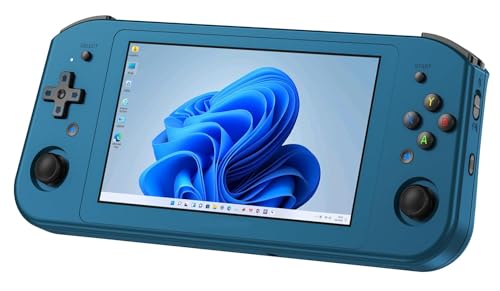
A 490-gram Windows machine that slips into a coat pocket — but do not expect to run Elden Ring on it.
This is for the buyer who needs a portable Windows device for office tasks, retro emulation (running games from older consoles), and very light indie gaming, not for AAA blockbusters. The 5.94-inch OCA (Optical Clear Adhesive, a type of lamination that reduces glare) full-lamination touchscreen at 720×1280 resolution is fine for spreadsheets and web browsing, and the AMD Athlon Silver 3050e CPU paired with the Radeon RX Vega3 GPU (a very basic graphics chip from 2018) can handle older titles (think 2D platformers and pre-2015 games). The 256 GB M.2 SATA SSD (a slower type of solid-state drive) is slower than the PCIe drives in other picks but is less prone to failure from bumps and vibration, which matters for a device you will carry daily. Pre-installed with Windows 10 Home, it also supports Steam OS for those who prefer that library.
The 3050e processor is the limiting factor — do not expect playable frame rates in anything released after 2018. The 720p screen is soft for reading text compared to the 1080p panels on the other picks, and the 490-gram weight, while light, still feels bulky in a pocket. The single USB cable included in the box means you will need extra accessories for full connectivity.
The Pocket Windows PC
- 490 grams — genuinely portable and easy to carry
- 256 GB M.2 SATA SSD resists vibration damage
- Windows 10 Home and Steam OS compatible for flexible library access
- Dual speakers and touchscreen for basic media
The Performance Gap
- Athlon 3050e cannot handle modern AAA titles — stick to indie and retro games
- 720p screen is noticeably soft for reading and detailed games
- Only comes with a USB cable; no charging brick or case
Perfect for office-on-the-go: If you want a Windows device for docs, browsing, and light gaming that fits in a jacket, this fits the bill. Not for modern gamers: If you want to play anything from 2018 onwards, this processor will struggle — look at the Z1-powered options like the Legion Go or the ROG Ally instead.
2. Lenovo Legion Go (Ryzen Z1 Extreme)
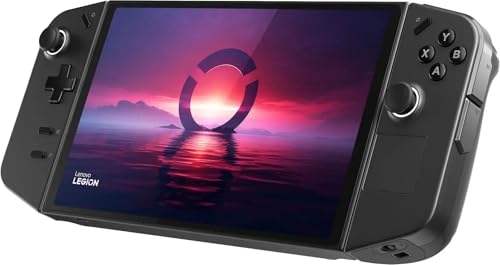
An 8.8-inch WQXGA 144 Hz screen that swallows the competition and keeps your games looking sharp.
This handheld earns its top spot because its 8.8-inch IPS (In-Plane Switching, a type of LCD that gives wide viewing angles) touchscreen delivers a 2560×1600 resolution at 144 Hz with 500 nits (a measure of brightness; 500 nits is bright enough for outdoor use) of brightness and 97% DCI-P3 (a color standard for digital cinema, meaning rich, vibrant colors) color coverage — a display that makes your desktop monitor envious. Under the hood, the AMD Ryzen Z1 Extreme with 8 cores, 16 threads (each core can handle two threads, allowing for better multitasking), and Radeon graphics paired with 16 GB of LPDDR5x-7500 RAM (the fastest type of LPDDR5, running at 7500 MHz) runs AAA titles smoothly, so you can play demanding games like Cyberpunk 2077 without severe stutter. The 512 GB SSD (plus a PCIe 4.0 slot for expansion) gives you room for a deep game library, and the detachable controllers and built-in kickstand turn it into a mini console dock — buyers report using it for schoolwork and as a laptop replacement.
The honest trade-off is battery life: at full resolution, expect about 1-2 hours of modern gaming. Dropping the resolution to 1200×800 extends that by roughly 50%, according to owner reports. The sound quality from the built-in speakers is described as underwhelming, so plan on using headphones. The Windows 11 interface also demands some tinkering — the crowd recommends the Bazzite OS (a custom version of Linux designed for gaming) for a better gaming experience.
The Screen Obsession
- 8.8-inch WQXGA 144 Hz display — 33% more pixels than a standard 1080p screen, making text and textures crisp
- Detachable controllers and kickstand for docked or tabletop play
- 512 GB SSD plus PCIe 4.0 slot for future upgrades
- Build quality praised by owners — the thing feels solid in hand
The Battery Reality
- 1-2 hours of play at native resolution on modern games
- Speakers are quiet — owners say headphones are a must
- Windows 11 on a handheld needs patience; many switch to Bazzite OS
The display king: If a gorgeous, large screen and the flexibility of detachable controllers are your priorities, this is your handheld. Think twice if: you want all-day battery life without tweaking resolution or if you refuse to tinker with the operating system.
3. Lenovo Legion Go S (Ryzen Z2 Go)

The 2025 refresh that swaps pixel count for play time — 1080p at 120 Hz with a 55.5 Whr battery.
Lenovo listened to the battery complaints from the Legion Go and delivered the Go S, a 2025 model that gives you roughly 3 hours of unplugged gaming — the most in this list. The 8-inch 1080p 120 Hz PureSight display with 500 nits of brightness and 100% sRGB (a standard color space for web and PC) is plenty sharp for gaming, and the AMD Ryzen Z2 Go processor paired with 16 GB of unified memory handles high-demand titles without the resolution-induced drain of its bigger sibling (the Legion Go with its 2560×1600 screen). The 55.5 Whr (Watt-hours; a measure of battery energy) battery is the star — owners mention roughly 3 hours of play. The ergonomic TrueStrike controllers with anti-slip texture keep you comfortable during longer sessions, and a 1-year Legion Ultimate Support warranty with 24/7 priority access adds confidence that most budget handhelds skip.
The Z2 Go processor is not as powerful as the Z1 Extreme — think of it as a well-tune lower-tier chip that runs older and indie titles beautifully. The shared 8 GB memory pool (system RAM + VRAM, meaning the graphics chip and the CPU share the same 8 GB) means you cannot max out texture settings on AAA games. A few owners hit firmware hiccups during setup, and the included 3 months of PC Game Pass is a nice bonus but does not fix the occasional driver headaches.
The Battery Champion
- 55.5 Whr battery gives ~3 hours of real gaming — best in this list, beating the Legion Go by about an hour
- 8-inch 1080p 120 Hz screen is sharp and bright (500 nits, 100% sRGB)
- Ergonomic controllers with anti-slip texture for all-day comfort
- 1-year ultimate support warranty with priority tech help
The Performance Ceiling
- Z2 Go processor is less powerful than the Z1 Extreme in AAA titles
- 8 GB of shared RAM (system + VRAM) limits high-res texture settings
- Some units arrive with firmware update warnings and driver gaps
Great for long flights: If you need a handheld that lasts through a movie-length session on a single charge and still looks good doing it, this is the one. Look elsewhere if: your game library is filled with the latest AAA blockbusters that demand raw GPU grunt.
4. ASUS ROG Ally (Ryzen Z1 Extreme, Renewed)

A Z1 Extreme-powered 7-inch 120 Hz machine at a refurbished price that undercuts the Steam Deck.
For budget-minded buyers, the math is simple: the same Ryzen Z1 Extreme processor and 16 GB of LPDDR5x 6400 MHz RAM found in the premium Legion Go, wrapped in a 7-inch 1080p 120 Hz IPS touchscreen with FreeSync (a technology that synchronizes the screen’s refresh rate with the game’s frame rate to prevent tearing) and a 2-pound chassis — all for hundreds less than its new-counterpart price. Customers note that the unit runs Elden Ring and other demanding titles flawlessly, so you get flagship-level performance on a budget. The 512 GB PCIe SSD (a drive that uses the PCI Express bus for fast data speeds) leaves room for a healthy library, and the 40 Whr battery is modest, but the 65W power supply and fast charging (0% to 50% in about 30 minutes) keep the downtime short. The fingerprint security sensor is a rare convenience at this price tier.
The refurbished nature is the double-edged sword. Most units arrive looking brand new and perform perfectly, but the reliability data is mixed — one buyer had their unit fail to turn on after a month, and ASUS’s warranty response was not stellar. The 90-day warranty from the seller is short, so consider an extended plan if you want confidence. The built-in webcam is also missing, which matters if you plan to use it for video calls.
The Spec Steal
- Z1 Extreme + 16 GB RAM = identical core specs to the premium Lenovo Legion Go
- 7-inch 1080p 120 Hz screen with FreeSync for smooth motion
- Fast charging — 30 minutes to 50% battery
- Fingerprint security sensor on a budget handheld
The Refurb Gamble
- 90-day warranty is short; reliability is mixed per owner reports
- No webcam for video calls
- Battery life is short — best kept plugged in for demanding games
Core bargain: If you want the raw power of a Z1 Extreme without paying full price and are comfortable with a short warranty, this is the smartest value pick. skip it if: you cannot tolerate the risk of a refurbished unit or need a webcam for school or work.
5. ASUS ROG Xbox Ally (Ryzen Z2 A)
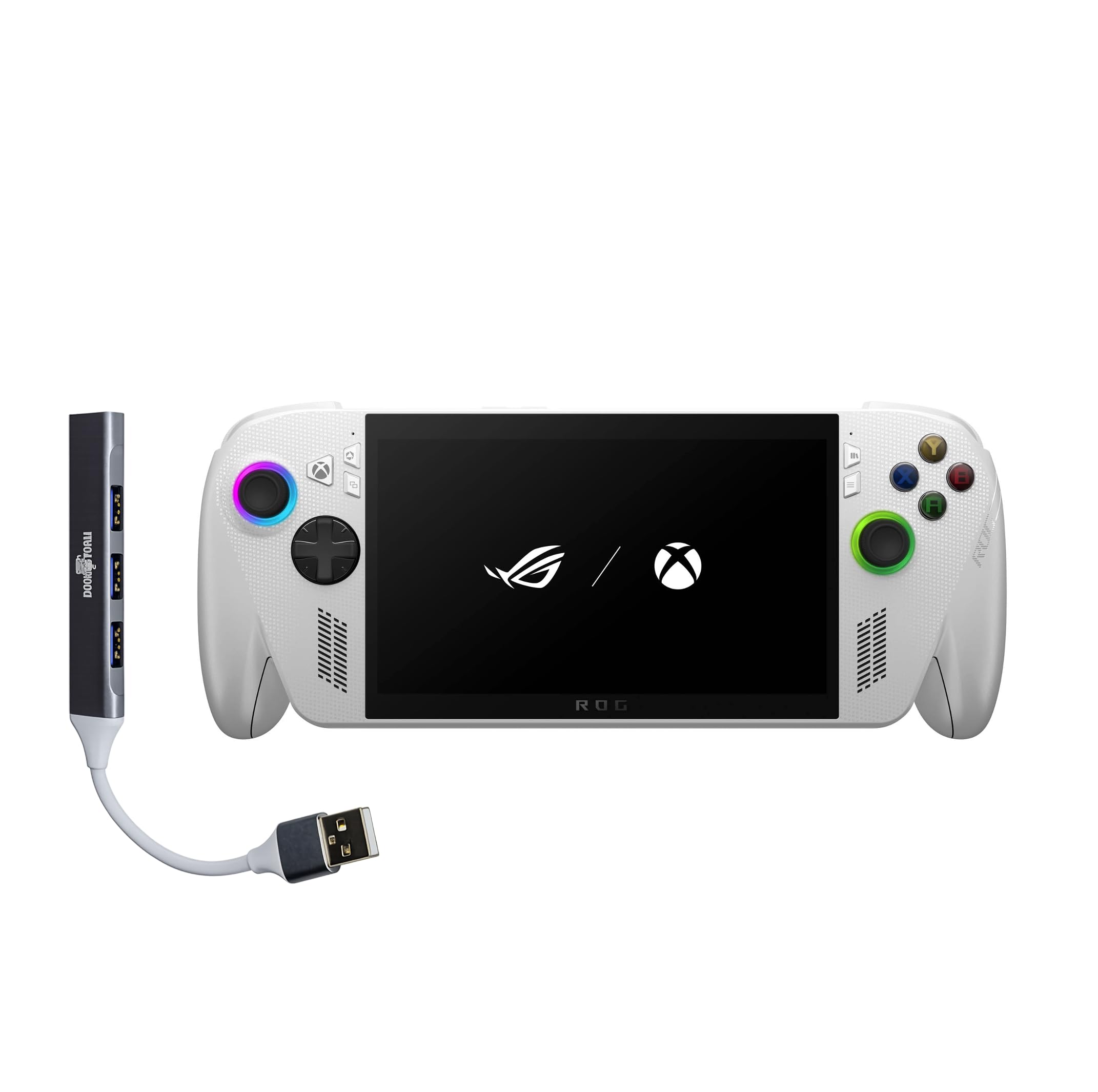
The Xbox-made handfeel meets a 60 Whr battery — the luxury build that wants to stay in your hands.
This is the handheld that feels like a console controller first and a PC second. The 7-inch 1080p 120 Hz display with FreeSync Premium and Gorilla Glass (a tough, scratch-resistant glass) delivers a vivid, tear-free picture at 500 nits, and the AMD Ryzen Z2 A processor plus 16 GB of LPDDR5 6400 MHz RAM handle a broader range of games than the Steam Deck, according to owners. The 1 TB SSD is double the entry-level storage of other picks (like the Legion Go’s 512 GB), and the 60 Whr battery keeps you gaming for hours away from the wall — though owners note it is best played plugged in for demanding titles. The chassis is redesigned with contoured grips inspired by Xbox Wireless Controllers, weighing 1.47 pounds for a balanced feel during long sessions, and the fast charging (0% to 50% in 30 minutes) is genuinely useful.
The battery still gets negative marks from buyers — “short battery life” is the top complaint, and for heavy gaming you will be tethered to a charger. The upfront Windows 11 tinkering (driver updates, app configurations) is a hurdle that not every buyer expects. The lack of a black color option is a minor aesthetic gripe, and a few units have a start-screen glitch that requires pulling up the accessibility keyboard to log in.
The Console Feel
- Xbox-inspired contoured grips for all-day comfort
- 1 TB SSD gives you room for a deep game library — double the Lenovo Legion Go’s 512 GB
- 60 Whr battery lasts longer than the standard Ally’s 40 Whr
- Fast charging — 30 minutes from 0% to 50%
The Power Hungry
- Still short battery life for AAA gaming; best played plugged in
- Windows 11 setup needs patience and tinkering
- Some units have a login glitch that slows first boot
- No black color option
Luxury refined: If you want the premium build quality, the larger 1 TB storage, and the Xbox controller feel, and you are willing to pay for it, this is the one. Not ideal if: you want all-day unplugged gaming on modern titles or dislike initial Windows setup.
Understanding the Specs
Processor (CPU) and Integrated Graphics (GPU)
This is the brain of your handheld. The AMD Ryzen Z1 series (Z1 Extreme, Z2 Go, Z2 A) is the current balance — these chips include powerful Radeon graphics on the same piece of silicon, so the system does not waste battery moving data between separate chips. A Z1 Extreme with 8 cores handles modern games at medium settings, so you can play titles like Cyberpunk 2077 at decent detail. An Athlon 3050e is fine for retro titles but will struggle with anything released after 2018.
Screen Resolution and Refresh Rate
A higher resolution (2560×1600) makes textures and text look sharper, but it also pushes the GPU harder and drains the battery faster — expect 1-2 hours on a high-res screen versus 2-4 hours on a 1080p panel. The refresh rate (120 Hz vs 144 Hz) determines how many frames per second the screen can display; 120 Hz is plenty smooth for handheld gaming, and you can drop it to 60 Hz in the settings to stretch battery life further.
RAM — Why 16 GB is the Minimum
Windows 11 uses roughly 3-4 GB just to stay on. If you have an 8 GB machine, that leaves only 4-5 GB for your game and background apps, causing stutter and crashes. 16 GB of unified LPDDR5 RAM (shared between system and graphics) means the game can use whatever it needs without running out of headroom. The Lenovo Legion Go S shares its 8 GB pool between system and VRAM, which is a real limitation for high-texture games.
Battery Capacity and Fast Charging
Battery life is measured in Wh (watt-hours) — higher numbers mean longer sessions. The Lenovo Legion Go S has a 55.5 Whr battery and delivers about 3 hours of gaming, while the ROG Xbox Ally packs a 60 Whr pack. Fast charging matters: the ROG Ally hits 50% in about 30 minutes, so even short breaks can top you up. If you plan long trips, prioritize a 55 Whr or larger battery over a high-resolution screen.
FAQ
Will a budget handheld PC run Elden Ring or Cyberpunk 2077?
How long does the battery last on a budget handheld PC?
Is 16 GB of RAM really necessary, or can I get by with 8 GB?
Can I use a budget handheld PC as a regular laptop for work?
What is the difference between the ASUS ROG Ally and the ROG Xbox Ally?
Will a budget handheld PC overheat during long gaming sessions?
Can I upgrade the storage on a budget handheld PC?
Is a 120 Hz display worth it on a handheld, or is 60 Hz fine?
What is the difference between a budget handheld PC and a Steam Deck?
Final Thoughts: The Verdict
For the majority of shoppers, the budget handheld pc winner is the Lenovo Legion Go because its 8.8-inch 144 Hz screen is a genuine standout in this price tier, and the detachable controllers give it a versatility that pure gaming handhelds lack. If you need longer battery life for travel without sacrificing too much performance, grab the Lenovo Legion Go S. And for the best raw value per dollar — a Z1 Extreme chip at a fraction of the new price — the renewed ASUS ROG Ally is the one to reach for.
How We Picked
We do not accept paid placement. Every pick is matched to a real buyer and a real use-case; we do not hands-on test units.
Sources & Methodology
Specifications: manufacturer listings and product documentation. Review insights: verified customer reviews, as of July 2026. Pricing: not shown on this page (it changes often); check the current price via the retailer link.
As an Amazon Associate, FitlyFast earns from qualifying purchases. This does not affect which products we feature.