
Our readers keep the lights on and the weekend projects moving. As an Amazon Associate, I earn from qualifying purchases.
Specs are compiled from manufacturer listings and verified buyer reviews and can change over time — please confirm the key details on the product page before buying.
You want a flight stick that feels real, not like a flimsy toy. The problem is that many cheap options drift, need endless driver downloads, or break quickly. Several budget sticks deliver smooth control and solid build without breaking your budget.
I’m Rikta — the founder and writer behind FitlyFast. This guide is built by comparing the manufacturers’ published specifications and the patterns across verified customer reviews, so you get each pick’s real strengths and trade-offs instead of marketing spin.
A good budget flight stick boils down to knowing which specs matter and which compromises are worth making. Whether you are logging hours in Microsoft Flight Simulator or looking for reliable control on a tight budget,
Our Picks at a Glance


How To Choose The Best Budget Flight Stick
Finding a budget flight stick means balancing price against features that improve your flying. Focus on durability, control, and game compatibility instead of flashy extras.
Sensor Technology: The Heart of Your Stick
The sensors inside the stick control its accuracy and how long it lasts. Potentiometers are common in cheap models, but they wear down over time and can start to “drift” — meaning the stick registers movement even when it is centered. You want a stick with Hall Effect sensors (also called magnetic or contactless sensors) for drift-free performance that lasts for years.
Button Count and Programmable Options
More buttons reduce keyboard reliance during flight. A stick with 12 to 16 programmable buttons lets you map controls like landing gear, brakes, and views directly to the stick. An 8-way hat switch (a small joystick on the top) is also key for looking around your virtual cockpit without a mouse.
HOTAS vs. Stick and Throttle Combo
A true HOTAS (Hands On Throttle And Stick) system gives you a separate throttle unit, which gives you more precise speed control. Many budget sticks bundle a throttle lever onto the base, which saves space but feels less rich. Decide between the compactness of an all-in-one or the flexibility of a detached throttle.
Platform Compatibility is Key
Not every stick works with every console. Most budget sticks are designed for Windows PCs, but some officially support Xbox or PlayStation. Always check the compatibility list — a PC-only stick will not work on your Xbox.
Quick Comparison
| Model | Best For | Sensor Type | Programmable Buttons | Platform | Amazon |
|---|---|---|---|---|---|
| PC Joystick (PXN 2113)★ Best Overall | Ultra-Budget Entry | Potentiometer | 12 | PC | Amazon |
| Thrustmaster T-Flight Hotas XAlso Great | Versatile HOTAS Starter | Potentiometer | 12 | PC, PS3 | Amazon |
| Turtle Beach VelocityOne FlightstickPremium Pick | Console & PC Hybrid | Hall Effect | 27 | Xbox, PC | Amazon |
| Thrustmaster TCA Sidestick Airbus | Civil Aviation Enthusiasts | Hall Effect | 17 | PC | Amazon |
| Thrustmaster T16000M FCS | Precision & Ambidextrous Use | Hall Effect | 16 | PC | Amazon |
| Thrustmaster T-Flight Hotas One | Xbox & PC Cross-Play | Potentiometer | 14 | Xbox, PC | Amazon |
| PXN-2119 Pro | Dual Vibration Feedback | Potentiometer | 16 | PC | Amazon |
| HORI HOTAS Flight Stick | Xbox Enthusiasts | Potentiometer | 16 | Xbox, PC | Amazon |
In‑Depth Reviews
1. PC Joystick (PXN 2113)
The PXN 2113 is the absolute entry point — you get vibration feedback and 12 buttons for less than the price of a new game. It features a built-in vibration function (controlled by a switch at the bottom), 4-axis control, an 8-way hat switch, and 12 programmable buttons. The design includes four powerful suction cups at the base to keep it stable on a smooth desk. It works with many PC flight simulators including World of Tanks, War Thunder, and Microsoft Flight Simulator.
Some owners mention it works fine from the start with all axes and buttons functioning. The main appeal is the low barrier to entry. The trade-offs are significant. It is strictly for Windows PCs only (not Mac, Xbox, or PlayStation). Setup can be tricky — while it can work without a driver, some users find they need to download and install the driver from the PXN website, then manually map all functions in the game (especially in MSFS 2020). The suction cups are non-removable and problematic on fabric or wood desks, where they are hard to un-cup. The vibration function is also reported to be nearly unnoticeable below 50% strength. This is a stick for the absolute lowest budget, but be ready for some configuration effort.
Best for: Someone who just wants to try flight sims for the first time with minimal financial commitment.
skip it if: You want a plug-and-play experience or use Windows 11 — where manual setup is almost guaranteed.
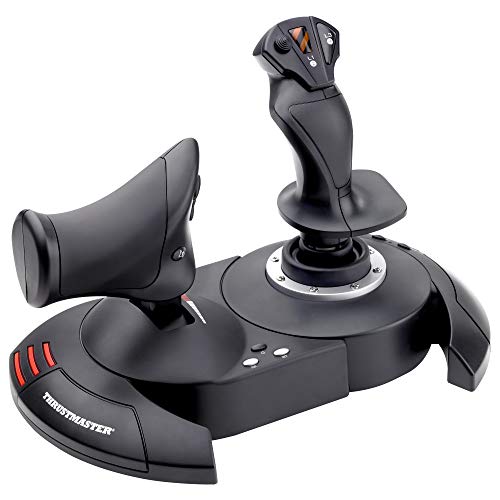
2. Thrustmaster T-Flight Hotas X
You get a true HOTAS system with a detachable throttle and adjustable stick tension at a budget price. That is the main reason it outranks every other stick here. The Thrustmaster T-Flight Hotas X gives you 12 fully programmable buttons, a real-size throttle unit you can separate from the stick, and adjustable resistance so you can tune the feel. The plug-and-play setup is a huge relief; Windows recognizes it instantly with all functions pre-configured. Reviewers report it has earned its reputation among tens of thousands of owners as the entry-level HOTAS that actually holds up.
The standout feature is the detachable throttle unit. You keep it attached for a compact desk or separate them for a more rich cockpit feel — rare at this price. It has 5 axes and a dedicated preset button to swap between control profiles mid-flight. The dual rudder control (via handle rotation or a tilting lever) means you do not need separate rudder pedals. The main trade-off is the stiff neutral spot on the throttle, which some find annoying during delicate speed changes. The connecting cable between the stick and throttle is about 3 feet (0.9 meters) long, fine for most desks but short if you want them far apart. The stick base can slide on the desk when separated. This is the best balance of quality and price for anyone wanting a true HOTAS experience.
Why it stands out
- Detachable throttle for flexible setups
- Adjustable stick resistance
- Plug-and-play with no driver headaches
A few notes
- Throttle has a stiff neutral spot
- Stick base can slide on the desk when separated
- Long-term durability concerns with heavy use
Perfect for: The simmer who wants a proper HOTAS — separate throttle and stick — without spending over.
Think twice if: You need a stick that works on Xbox consoles; this one is strictly for PC and PS3.
3. Turtle Beach VelocityOne Flightstick
It packs 27 programmable buttons and a built-in OLED screen — more features than any other stick here. The Turtle Beach VelocityOne Flightstick is a serious contender if you want console compatibility without sacrificing PC features. It uses high-precision non-contact Hall Effect axes (sensors that use magnets so they never wear out) for drift-free performance. The integrated OLED flight management display shows settings and profiles directly on the stick, so you can adjust sensitivity without tabbing out of your game. Reviewers describe it as durable and well-made.
For Xbox Series X|S and Xbox One owners, this is one of the few premium options that works natively. It connects to PC via a 10-foot USB-A to USB-C cable. It has an ambidextrous design suitable for both fighter jets and airliners, plus a flight configuration wheel and touchpad navigation sensor for full cursor control. The reliability is mixed in feedback — some owners find the stick very stiff at first (it does break in over time), and a few report calibration drift early on. On Xbox, compatibility is essentially limited to Microsoft Flight Simulator; other titles like War Thunder have very limited functionality. This is a fantastic stick for the right user, but it is not a universal solution.
Great for: Xbox simmers who want a feature-rich stick with Hall Effect precision and tons of programmable controls.
Watch for: Xbox compatibility is essentially limited to Microsoft Flight Simulator; not a universal console solution.
4. Thrustmaster TCA Sidestick Airbus Edition

If you fly airliners in Microsoft Flight Simulator or X-Plane 12, this 1:1 scale replica of the Airbus A320 sidestick is pure immersion. The Thrustmaster TCA Sidestick Airbus Edition uses contactless magnetic sensor technology (Hall Effect sensors) that eliminates drift and gives it an effectively unlimited lifespan. It has 17 action buttons, 4 swappable joystick head modules, and 12 remappable buttons with braille-style physical identification so you never look away from the screen. The built-in throttle axis includes a unique thrust reverser mechanism, and rudder control is handled via a lockable rotating handle.
Setup is plug-and-play. Owners note it is a significant upgrade over the basic HOTAS One for MSFS landings, especially in bad weather, because of the superior gimbal (the internal mechanism that moves the stick). Its compact desk footprint is a bonus for smaller setups. The quality is praised widely. Some issues appear isolated and possibly related to early manufacturing runs, but the throttle is also quite sensitive from the start — most adapt quickly. This stick is PC-only (Windows 10/11), so console users should look elsewhere. For an Airbus simmer, this is your budget dream stick.
Reach for this if: You fly airliners in MSFS or X-Plane and want the most authentic Airbus stick feel at this price.
Look elsewhere if: You need console support; this stick is PC-only (Windows 10/11).
5. Thrustmaster T16000M FCS

Drift-free Hall Effect accuracy in a fully ambidextrous design — the Thrustmaster T16000M FCS is for anyone who values precision above all else. Its H.E.A.R.T magnetic sensor technology uses contactless Hall Effect sensors that never drift over time. It has 16 action buttons with braille-style identification, an 8-way hat switch, and 4 independent axes including a built-in twist rudder (rotate the handle to control yaw). The design is fully ambidextrous — you swap the hand rest and some buttons — making it a rare find for left-handed pilots.
The build quality is frequently praised, and buyers report it works well with X-Plane 12 and Elite Dangerous after calibration. The T.A.R.G.E.T software allows deep customization of button mapping for different games. The biggest catch is the strong spring-loaded centering, which makes trimming (fine-tuning the aircraft’s pitch) feel less realistic compared to a real aircraft. Some owners find the twist rudder awkward, and the stick can slide on a mousepad desk mat (adding rubber feet is a common fix). The trigger feels a bit cheap to some. On sensor quality and ambidextrous design, it beats the T.Flight Hotas X for long-term accuracy but falls short on the throttle experience since there is no separate unit.
Our take: The T16000M leads on sensor quality and ambidextrous design, beating the T.Flight Hotas X for long-term accuracy but falling short on the throttle experience (no separate unit).
6. Thrustmaster T-Flight Hotas One

The officially licensed Xbox stick that also works on PC — this Thrustmaster T-Flight Hotas One is the go-to for Xbox simmers wanting a proper HOTAS while staying affordable. It has a detachable throttle module, adjustable stick resistance, a responsive trigger, a hat switch, and 14 programmable buttons. The plug-and-play USB connection works instantly with Xbox Series X|S, Xbox One, and Windows PC. The modular design lets you use them together or separate for a lap setup.
Owners consistently praise it as fantastic value, with many calling it a great budget stick for Elite Dangerous and Microsoft Flight Simulator. The throttle is noted to be a bit too loose for some, barely staying in place. The build quality is mixed — many find it solid for the price, but others note the plastic feels kitschy (a bit cheap). The most common complaint is that it does not work with all Xbox One games; it is primarily designed for flight simulators. For Xbox users, this is the most accessible budget HOTAS option available.
Why it works
- Officially licensed for Xbox Series X|S and Xbox One
- Detachable throttle for flexible setups
- Fan-favorite for Elite Dangerous on a budget
The trade-offs
- Throttle can be too loose
- Kitschy plastic build feel
- Limited game compatibility on Xbox
7. PXN-2119 Pro
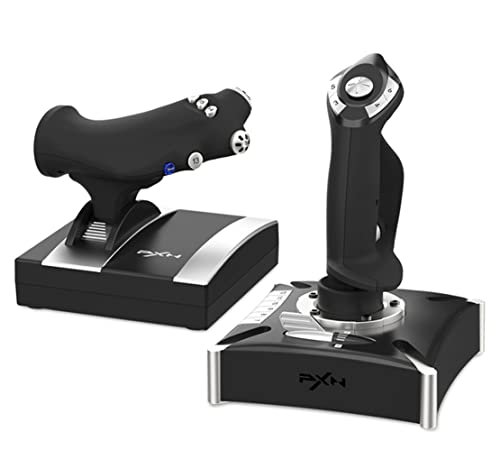
The PXN-2119 Pro has dual vibration motors to simulate engine rumble and turbulence. That is a unique feature at this price. It also has a separate throttle unit with damping feel, 16 fully programmable function keys, an 8-way POV hat switch, and a rapid-fire trigger. The ergonomic grip and heavy-duty base with strong suction cups are meant for stability during long sessions.
A few owners praise the sturdy build and steady speed control, but this stick has the most serious red flags in the list. The most concerning issue is that Windows 10 and Norton antivirus flag the required driver software as malware — a serious security risk multiple reviewers confirm. The driver installation is described as difficult, with vague Chinese instructions. Many customers note the joystick is not recognized by Microsoft Flight Simulator 2020 at all, and the throttle has large dead zones (movement that does nothing) with no resistance. Given the malware concerns and deep compatibility issues, this stick is a high-risk purchase. It is hard to recommend when safer, more reliable options exist at similar or lower prices.
Reach for this if: You are willing to tinker with potentially unsafe drivers and have a very specific, non-MSFS use case.
Strongly consider: The Thrustmaster T-Flight Stick X instead — it costs about the same and actually works from the start.
8. HORI HOTAS Flight Stick

Officially licensed by Microsoft for Xbox, but it lacks a twist rudder — a critical feature most flight sims need. The HORI HOTAS Flight Stick has a separate joystick and throttle with full HOTAS controls, an integrated headset jack, and adjustable sensitivity settings. Some reviewers point out it works great with Flight Simulator. The design is generally considered well thought out, and the separate throttle is appreciated.
The flaws are substantial. The biggest issue is no twist rudder (rotation control for yaw). Without it, you must buy separate rudder pedals or use binary button mapping, which is very imprecise. Many buttons on the throttle are non-functional plastic molds — permanently glued dummy buttons that do nothing. On Xbox, the stick is sometimes recognized as a regular controller, preventing proper remapping in Flight Simulator. One owner explicitly states it does not work with Ace Combat 7. Given the price, this stick feels incomplete compared to the Thrustmaster T-Flight Hotas One, which is a safer, more feature-complete choice at a lower price.
Our advice: For Xbox simmers, the Thrustmaster T-Flight Hotas One (above) is a safer, more feature-complete choice at a lower price.
Understanding the Specs
Hall Effect Sensors vs. Potentiometers
The sensor type directly affects your stick’s accuracy over time. Potentiometers are cheap but wear down, eventually causing axis drift (the stick registers movement when it is centered). Hall Effect sensors use magnets and no physical contact, so they never wear out. You get consistent, drift-free performance for the life of the stick. This is the single most important spec for long-term satisfaction.
Programmable Buttons and Axes
More buttons mean you can map critical flight controls directly to the stick, reducing keyboard reliance. A stick with 12-16 buttons plus an 8-way hat switch lets you handle most functions without reaching for the keyboard. Axes control the main flight surfaces: pitch, roll, yaw (rudder), and throttle. Four independent axes (pitch, roll, yaw, throttle) give you full control without extra peripherals.
FAQ
Will a PC flight stick work with my Xbox console?
What is the difference between a joystick and a HOTAS?
My flight stick has a dead zone. Is that normal?
How do I configure a budget flight stick for Microsoft Flight Simulator 2020?
What is a twist rudder and why do I need it?
How long should a budget flight stick last?
Can I use a flight stick for space sims like Elite Dangerous or Star Citizen?
My stick is sliding around on my desk. What can I do?
Final Thoughts: The Verdict
Across the board, the budget flight stick winner is the Thrustmaster T-Flight Hotas X because it packs a true HOTAS setup with a detachable throttle, adjustable resistance, and thousands of positive reviews. If you need Xbox compatibility without sacrificing features, grab the Turtle Beach VelocityOne Flightstick for its Hall Effect accuracy and massive button count. And for pure, drift-free precision on PC, the Thrustmaster T16000M FCS is the one to reach for.
How We Picked
We do not accept paid placement. Every pick is matched to a real buyer and a real use-case; we do not hands-on test units.
Sources & Methodology
Specifications: manufacturer listings and product documentation. Review insights: verified customer reviews, as of July 2026. Pricing: not shown on this page (it changes often); check the current price via the retailer link.
As an Amazon Associate, FitlyFast earns from qualifying purchases. This does not affect which products we feature.