
Our readers keep the lights on and the weekend projects moving. As an Amazon Associate, I earn from qualifying purchases.
Specs are compiled from manufacturer listings and verified buyer reviews and can change over time — please confirm the key details on the product page before buying.
Dropping a new graphics card into your PC is the single most satisfying upgrade for 1080p gaming. The right budget card turns choppy gameplay into smooth, high-frame-rate action. The wrong one just frustrates you. So which card gives you the most performance for your money, and where are the real trade-offs?
I’m Rikta — the founder and writer behind FitlyFast. This guide is built by comparing the manufacturers’ published specifications and the patterns across verified customer reviews, so you get each pick’s real strengths and trade-offs instead of marketing spin.
You need a card that balances modern features with raw speed for 1080p. Here are the top budget gpu for 1080p options, broken down by real-world performance and buyer feedback.
Our Picks at a Glance



How To Choose The Best Budget GPU For 1080p
Sticking to a 1080p resolution is a smart way to get great performance without spending a fortune. However, not all budget graphics cards are equal. Some are built for esports titles at lightning speeds, while others have the memory to handle modern AAA games at high settings.
VRAM: The Memory That Keeps You Playing
VRAM (video memory) is the card’s short-term storage for textures and scenes. For 1080p gaming, 6GB is the baseline for most modern games, but 8GB gives you a noticeable safety net for newer titles and higher texture packs. A card with only 6GB may force you to lower texture quality in some demanding releases to avoid stuttering.
Power Supply Requirements
Some budget GPUs are designed to run solely off the power from the motherboard’s PCIe slot (the expansion slot on your motherboard), making them perfect for pre-built office computers. Others require a dedicated 8-pin power cable from your power supply unit (the PSU, which supplies all power to your PC). Before buying, check if your PSU has the right connector and enough wattage — a card like the ASRock Arc A580 recommends a 650W power supply, so a standard 300W office PC won’t cut it.
Physical Size and Form Factor
Not all graphics cards fit in all cases. Standard cards are often 9 to 10 inches long, while “low-profile” or “small form factor” (SFF) cards are shorter and slimmer, designed to fit in compact Dell Optiplex or HP cases. If you are upgrading a pre-built office PC, measuring your case clearance is the most important step before picking a card.
Quick Comparison
| Model | Best For | VRAM | Core Clock | Power Connector | Amazon |
|---|---|---|---|---|---|
| AISURIX RX 5500 XT★ Best Overall | Entry-Level 8GB | 8GB GDDR6 | 1750 MHz | 1x 8-pin PCIe | Amazon |
| ASRock Arc A580Also Great | Best Overall 1080p | 8GB GDDR6 | 2000 MHz | 2x 8-pin PCIe | Amazon |
| ASRock RX 7600RDNA 3 Speedster | RDNA 3 Speed | 8GB GDDR6 | 2695 MHz | 1x 8-pin PCIe | Amazon |
| MSI RTX 3050 LP | Small Cases | 6GB GDDR6 | 1492 MHz | None (slot power) | Amazon |
| GIGABYTE RTX 3050 | Entry-Level RTX | 6GB GDDR6 | 1477 MHz | None (slot power) | Amazon |
| XFX RX 7600 | High 1080p FPS | 8GB GDDR6 | 2655 MHz | 1x 8-pin PCIe | Amazon |
| ZER-LON GTX 1660 Super | Budget Reliability | 6GB GDDR6 | 1530 MHz | 1x 8-pin PCIe | Amazon |
| maxsun RTX 3050 | Slim SFF Builds | 6GB GDDR6 | 1470 MHz | None (slot power) | Amazon |
| Nvidia GTX 1080 FE | Renewed Power | 8GB GDDR5X | 1733 MHz | 1x 8-pin PCIe | Amazon |
In‑Depth Reviews
1. AISURIX RX 5500 XT 8GB GDDR6
An 8GB RDNA card at a giveaway price that outperforms pricier rivals.
Getting 8GB of VRAM for this low price is the headline, and for many buyers, it is exactly the spec they need. The AISURIX RX 5500 XT runs on a 1750 MHz core clock with a 128-bit memory bus, and it uses AMD’s RDNA architecture (a graphics engine design from 2019). Reviewers point out it works perfectly from the start for budget gaming rigs, and one owner noted they could run BeamNG.Drive on Ultra settings at nearly 60 FPS on a 165Hz monitor.
The card includes three DisplayPort 1.4a connections and one HDMI 2.0b port, supporting up to a 3840×2160 resolution output. The semi-automatic intelligent fan system stops the fans completely when the GPU is cool or under low load, making it silent for office work. Power draw is rated at 130W maximum, drawing from a single 8-pin power connector, which is reasonable for most entry-level power supplies.
The quality control is the sticking point here. Some shoppers say the card arriving with bent brackets that require manual straightening, and several note that only one of the three DisplayPorts works after a reboot. The reviews are split — many have a flawless experience, while enough describe failures that this card is best suited for someone comfortable troubleshooting hardware issues.
entry level: Budget builders on a tight budget who specifically need 8GB of VRAM for games that demand it, and who are comfortable inspecting and possibly straightening a bracket on arrival.
better options exist: Performance is praised by 35 owners as the top aspect, but port quality earns negative feedback — you may need to use the HDMI port if a DisplayPort fails.
2. ASRock Intel Arc A580 Challenger 8GB OC
A 2000 MHz beast that makes 1080p ultra settings feel easy for a song.
You get smooth 1080p gaming at high to ultra settings thanks to this card’s 2000 MHz overclocked core. The ASRock Arc A580 uses Intel’s Xe HPG architecture (the latest Intel graphics engine). Buyers report that after a month of use, it runs most games on 1080p at high or ultra graphics with at least 60 FPS (frames per second, enough for fluid motion), and it keeps temperatures between 64 and 68 degrees Celsius while gaming — cool enough for reliable long sessions.
The 256-bit memory interface (a wide data pipe to the memory) paired with 8GB of GDDR6 memory gives it bandwidth that rivals cards costing significantly more. It also supports DisplayPort 2.0, a future-proofing feature you rarely find at this price point, and the 0dB silent cooling stops the fans completely when temperatures are low for dead-quiet office work.
There is a catch that matters for older builds. This card requires two 8-pin PCIe power connectors and a recommended 650W power supply, so it is not a drop-in upgrade for a standard office desktop. The installation is straightforward for a gaming PC, but you need to verify your power supply can handle it before buying.
Arc A580 value
- Overclocked from the start at 2000 MHz for smooth gameplay
- Stays cool (64-68°C) under load for reliable long sessions
- DisplayPort 2.0 support keeps it relevant for years
driver maturity
- Requires two 8-pin power connectors and a 650W PSU
- 2.4-slot design (48mm thick) needs ample case clearance
budget pick: This is the pick for anyone building a new budget gaming rig or upgrading a capable desktop who wants 1080p ultra performance without paying the NVIDIA premium.
check support: You are trying to upgrade a standard office PC with a small power supply — this card will demand a new PSU first.
3. ASRock Radeon RX 7600 Challenger 8GB OC
AMD’s RDNA 3 architecture tuned to 2695 MHz for silky 1080p frames.
This card focuses on raw speed. The RX 7600 Challenger boosts to 2695 MHz (megahertz, a measure of processing speed) and its game clock sits at 2280 MHz, putting it among the fastest options for pure 1080p frame rates. Buyers consistently call it one of the better budget GPUs, noting it keeps up to 180 FPS in games and runs “damn near silent” during operation.
The 8GB of GDDR6 memory on a 128-bit bus running at 18 Gbps provides plenty of bandwidth for modern game textures at 1080p. It also comes with hardware ray tracing support and PCIe 4.0, needing only a single 8-pin power connector and a recommended 550W power supply. The 0dB Silent cooling stops the fans entirely under low loads, so it is completely quiet during desktop work or less demanding titles.
This card handles Linux better than most. One buyer running Ubuntu 24.04 found it plug-and-play with standard kernel support, requiring no manual driver installations. For steamOS gamers, it works well with Bazzite, though it does struggle with the most demanding AAA titles at max settings.
price champ: You want the highest possible 1080p frame rates on a budget, especially if you play fast-paced shooters or competitive titles where every frame matters.
skip for ray tracing: You need to run the most demanding AAA games at ultra settings with ray tracing fully enabled — that is the territory of more expensive cards.
4. MSI Gaming RTX 3050 LP 6G OC

A tiny RTX 3050 that slides into cramped office PCs and open up 1080p gaming.
If you have a small form factor Dell Optiplex or an HP desktop sitting around, this is the card that breathes new gaming life into it. The low-profile design means it fits in cases where standard GPUs simply cannot go. Owners mention it fits Dell Inspiron 3471 SFF machines without any modifications and handles demanding games at 1080p with DLSS (a smart upscaling tech that boosts performance) and ray tracing enabled.
This card is a genuine RTX 3050 with a 1492 MHz boost clock and 6GB of GDDR6 memory on a 96-bit interface. The key feature here is that it draws all its power from the motherboard’s PCIe slot — no external power cables from the PSU are needed. This makes it the most powerful drop-in upgrade for pre-built office PCs that lack dedicated power connectors for a graphics card.
The trade-off is that the 96-bit memory bus and 6GB VRAM are the absolute floor for modern gaming. You will get solid 1080p performance at medium to high settings in most titles, but you cannot expect to max out texture quality in the newest releases. The noise level is a mixed bag — some find it near-silent with the zero RPM idle mode, while others report the fan is noticeable under sustained load.
low profile: This is the best card for anyone upgrading a small office PC into a capable 1080p gaming machine without buying a new power supply or case.
not for 1440p: You have a standard mid-tower case and a proper PSU — the ASRock Arc A580 or RX 7600 will give you significantly more raw performance for the same or less money.
5. GIGABYTE GeForce RTX 3050 WINDFORCE OC V2 6G

An RTX 3050 that runs on motherboard power alone for quiet, entry-level ray tracing.
You get RTX features without needing a new power supply. This GIGABYTE card shares the same DNA as the MSI RTX 3050 LP above, but it arrives in a standard dual-fan design with the WINDFORCE cooling system. The key spec that makes it special for budget builders is that it pulls all its power from the motherboard — no external PCI-E power connection needed. Buyers confirm it works perfectly in low-power Dell systems with a 75W board limit where other cards simply refused to run.
With a boost clock of 1477 MHz and 6GB of GDDR6 memory, it delivers solid entry-level 1080p gaming performance. You get access to NVIDIA features like ray tracing, DLSS (which uses AI to boost frame rates), and Reflex (which reduces input lag). It supports up to 7680×4320 pixels resolution output, so it can drive a 4K or even 8K monitor for desktop use or media playback, even if gaming at those resolutions is not realistic.
The WINDFORCE dual fans kept the card cool during testing, and one reviewer noted the card is described as being for basic 1080p gaming with ray tracing, using it in a media center PC. The main limitation is the 6GB VRAM — it is enough for today’s games at medium settings, but you will likely run into VRAM limits on the most texture-heavy releases within a year or two.
quiet option: Anyone with a slim or standard pre-built PC who wants a guaranteed drop-in upgrade with RTX features and solid 1080p gaming performance.
check VRAM need: The 6GB of VRAM and 96-bit bus mean you are capped at medium settings in the most demanding new titles — this is an entry-level card, not a long-term powerhouse.
6. XFX Speedster SWFT210 Radeon RX 7600 8GB

XFX’s take on the RX 7600 pushes up to 2655 MHz for high-octane 1080p action.
Nearly 500 ratings from owners make this the crowd’s favorite RX 7600. The XFX Speedster SWFT210 boosts up to 2655 MHz (megahertz), and its dual-fan cooling keeps temperatures manageable even during long sessions. Customers note hitting over 100 FPS in most games with FSR (AMD’s FidelityFX Super Resolution, an upscaling technology that boosts frame rates) enabled, and one owner notes they upgraded from a GTX 1650 Super and saw a massive jump in performance.
The 8GB of GDDR6 memory is the balance for 1080p gaming, giving you enough headroom for high-resolution texture packs in modern titles. It supports PCI Express, DisplayPort, and HDMI outputs for multi-monitor setups. On Linux, one buyer found the swap from an Nvidia card was easy, with all three displays working immediately and the open-source Vulkan and Mesa drivers running smoothly.
The main issue reported by some owners is that the card can experience coil whine (a high-pitched electrical noise) which some find annoying. Additionally, the card runs hot from the start — buyers recommend updating the drivers immediately and ensuring good case airflow, as the initial setup can push temperatures into the 80s Celsius before the proper driver configuration is applied.
solid performer: High frame rates at 1080p and 1440p gaming, especially if you are okay doing the driver update and configuring fan curves for optimal temperatures.
no RGB: The card tends to run hot on factory settings; a case with good airflow and a quick driver update is essential to keep temps in the upper 70s.
7. ZER-LON GeForce GTX 1660 Super 6GB

The GTX 1660 Super still anchors the budget bracket with proven, reliable 1080p speed.
Do not let the age fool you — the GTX 1660 Super remains a staple for budget builders because it simply works. The ZER-LON version runs on a 1530 MHz core clock with 6GB of GDDR6 memory on a 192-bit interface, which is a wider memory bus than many newer cards. Buyers consistently praise its performance, with one noting it runs all high-end games without issues and is an excellent value for 1080p gaming with high frame rates.
This card supports up to 8K display output through its HDCP 2.2 ports, though gaming at that resolution is out of its league. It also includes NVIDIA VRWorks, making it a capable entry point for virtual reality gaming. The dual-fan cooling system uses composite heat pipes that contact the GPU directly for efficient heat transfer, and the fans turn off under light load for quiet operation.
The biggest trade-off here is the lack of ray tracing hardware — you simply do not get RTX features like real-time ray tracing or DLSS. The card also comes in generic packaging with no accessories like driver disks or power adapters, which some first-time builders find frustrating. It requires a single 8-pin power connector, so it is not a drop-in for a slot-powered office PC.
1080p king: A kid’s first gaming PC, a budget build for esports titles like Fortnite, Roblox, and Minecraft, or anyone who wants reliable performance without worrying about ray tracing.
no DLSS: Compared to the ASRock Arc A580 at 2000 MHz, this card runs at 1530 MHz — a noticeable difference in raw speed for newer games — but it is a proven workhorse with years of driver maturity behind it.
8. maxsun GeForce RTX 3050 6GB Low Profile

A 1-slot slim RTX 3050 that fits NAS cases and the tightest SFF builds.
This is the narrowest RTX 3050 on the market at just 6.65 inches by 2.71 inches, making it a perfect fit for small form factor cases, NAS boxes (network-attached storage units you might convert to a gaming PC), and slim Optiplex machines. The maxsun RTX 3050 runs on NVIDIA’s Ampere architecture (the 2020 design behind the RTX 30-series) with a 1470 MHz boost clock and 6GB of GDDR6 memory. It is a low-profile card that draws all its power from the PCIe slot — no external power cables needed, which is crucial for upgrading office PCs with limited power supply connections.
Buyers report it fits the Dell Optiplex 3080 SFF with a 200W power supply and delivers between 100 and 140 FPS in Warcraft Reforged at 1080p max settings. It supports up to 8K resolution output through its HDMI 2.1 and DisplayPort 1.4a connections. The NVIDIA DLSS 3 technology is available for supported games, using AI to boost frame rates while maintaining good image quality.
The biggest compromise here is heat and noise. The card runs hot in cramped cases with limited airflow, and buyers who run dual 4K monitors report it gets “very hot” and “loud” under full load. One owner noted they had to add a case fan just to keep temperatures acceptable. The price has also climbed from its original entry point, making it less of a pure value proposition than it once was.
small case: Anyone building a tiny SFF PC or upgrading an Optiplex 3080/3060 who needs the smallest possible RTX-level card with no power cable requirement.
limited performance: The fan is loud under load and the card runs warm; make sure your case has at least some airflow, and be prepared for audible fan noise during gaming.
9. Nvidia GeForce GTX 1080 8GB Founders Edition (Renewed)
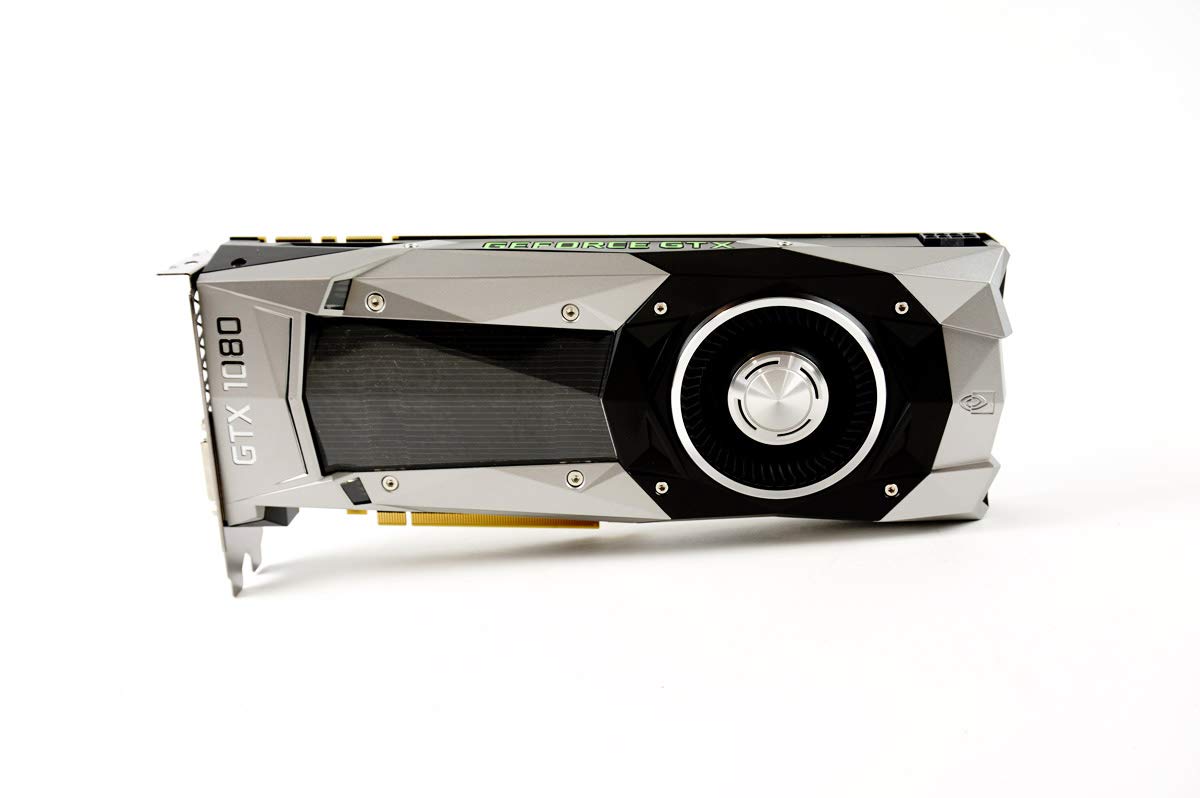
A renewed GTX 1080 with 8GB of GDDR5X — still a beast for 1080p at a budget price.
You get 8GB of GDDR5X memory (a high-speed memory standard, 8GB versus the 6GB on many cards) at a low entry price. The GTX 1080 Founders Edition runs at a 1733 MHz boost clock. Owners mention it works great with no bugs, no black dots, no sudden blackouts, and it maintains consistent temperatures under load.
The card supports up to 3840×2160 resolution output and uses a PCI-Express x16 interface (the standard slot on modern motherboards). It weighs just 12 ounces and measures 10.7 by 3.7 inches, making it a dual-slot card that fits most standard cases. For creative work, one buyer confirmed it handles Photoshop, Illustrator, and DaVinci Resolve for moderately demanding projects without issue.
The catch with a renewed card is that you are buying a used product, and the condition can vary. One buyer mentioned their motherboard tab was bent on arrival and the DisplayPort failed after a restart, though the HDMI port worked fine. There is no warranty beyond whatever the seller provides, and some of these units have been through heavy use. For the price, the performance potential is high, but so is the risk of receiving a card with wear issues.
used gem: Experienced builders who are comfortable with the risk of a renewed product and want the raw power of a GTX 1080’s 8GB GDDR5X configuration for the lowest possible entry price.
check condition: You want a new card with a full manufacturer warranty — the ASRock Arc A580 at 2000 MHz is a safer bet and offers similar 1080p performance without the used-product risk.
Understanding the Specs
VRAM (Video Memory)
Think of VRAM as the graphics card’s short-term memory for textures and scenes. For 1080p gaming, 6GB is the bare minimum for modern titles, but 8GB gives you room to turn up texture quality and handle bigger game worlds without stuttering. The type matters too — GDDR6 is faster and more efficient than older GDDR5 or GDDR5X memory.
Core Clock Speed (MHz)
This measures how fast the processor on the graphics card can crunch numbers. A higher number in megahertz (MHz) generally means faster performance in games. Cards like the ASRock RX 7600 at 2695 MHz are faster than the ZER-LON GTX 1660 Super at 1530 MHz — but clock speed is only one part of the performance picture, as the architecture and memory also play huge roles.
FAQ
Is 6GB of VRAM enough for 1080p gaming in 2025?
Will a budget GPU fit in my Dell Optiplex office PC?
Can I use a budget GPU with a 300W power supply?
What is the difference between a GTX 1660 Super and an RTX 3050?
Do budget GPUs support ray tracing?
How do I install a new graphics card in my computer?
What power connectors do I need for these GPUs?
Is Intel Arc A580 good for 1080p gaming?
Final Thoughts: The Verdict
Across the board, the ASRock Intel Arc A580 Challenger 8GB OC is the best budget GPU for 1080p because it combines a 2000 MHz overclocked core, 8GB of GDDR6 memory, and DisplayPort 2.0 at a price that undercuts the competition on performance-per-dollar. If you need the smallest possible card for a compact office PC upgrade, the MSI RTX 3050 LP 6G OC is the clear choice with its slot-powered design. And for pure 1080p frame rate chasing with RDNA 3 architecture, the ASRock Radeon RX 7600 Challenger 8GB OC pushes up to 2695 MHz and keeps things quiet with 0dB Silent cooling.
How We Picked
We do not accept paid placement. Every pick is matched to a real buyer and a real use-case; we do not hands-on test units.
Sources & Methodology
Specifications: manufacturer listings and product documentation. Review insights: verified customer reviews, as of July 2026. Pricing: not shown on this page (it changes often); check the current price via the retailer link.
As an Amazon Associate, FitlyFast earns from qualifying purchases. This does not affect which products we feature.