
Our readers keep the lights on and the weekend projects moving. As an Amazon Associate, I earn from qualifying purchases.
Specs are compiled from manufacturer listings and verified buyer reviews and can change over time — please confirm the key details on the product page before buying.
Finding a mechanical keyboard that actually delivers competitive speed without wrecking your budget is the real challenge. Most cheap options feel mushy or skip the features that matter for fast-paced gaming. This guide cuts through the noise to find the boards that give you a genuine performance edge—rapid trigger, high polling rates, and satisfying switches—without the premium price tag.
I’m Rikta — the founder and writer behind FitlyFast. This guide is built by comparing the manufacturers’ published specifications and the patterns across verified customer reviews, so you get each pick’s real strengths and trade-offs instead of marketing spin.
Every keyboard here is genuinely mechanical, not a membrane imitation, so you know you are getting the real tactile feedback and durability that matter. This is your straight-to-the-point shortlist for the best budget gaming mechanical keyboard you can buy right now.
Our Picks at a Glance


How To Choose The Best Budget Gaming Mechanical Keyboard
You do not need to spend a fortune to get a keyboard that gives you a genuine edge in competitive gaming. The key is knowing which specs actually translate to faster reactions and a better feel, and which ones are just marketing buzzwords. Here is what to look for.
Switch Type: Hall Effect vs. Traditional Mechanical
The switch is the core of the feel and speed. Traditional mechanical switches use a physical metal contact to register a keypress. Hall Effect (magnetic) switches use a magnet and a sensor—no physical contact means less wear and tear and significantly faster response times. For a budget gaming board, a Hall Effect switch with features like Rapid Trigger and adjustable actuation gives you the most competitive performance for your money.
Polling Rate and Rapid Trigger
You get near-instant response with an 8000 Hz polling rate (a polling rate is how often the keyboard reports a key press to your PC; 8000 Hz means it reports once every 0.125 milliseconds, compared to the standard 1000 Hz which reports once every millisecond). Rapid Trigger is a software feature that lets you reset a key without lifting your finger all the way up—this is a standout for strafing in shooters like Valorant or Counter-Strike, letting you peek and stop faster than opponents.
Layout: 60%, 75%, or Full-Size
You save desk space and keep your mouse hand closer with a 60% keyboard (it removes the number pad and function row)—great for competitive gamers. A 75% or TKL (tenkeyless, meaning no number pad) adds arrow keys and a few extra keys without getting huge. A full-size 100% board keeps the number pad, which is essential for data entry or specific games. Think about what space you have and if you need the extra keys daily.
Quick Comparison
| Model | Best For | Switch Type | Polling Rate | Connectivity | Amazon |
|---|---|---|---|---|---|
| Aula WIN60 HE★ Best Overall | Overall Budget Beast | Hall Effect | 8000 Hz | USB-C Wired | Amazon |
| AULA WIN68 HETop Performer | Arrow Keys in 60% | Hall Effect | 8000 Hz | USB-C Wired | Amazon |
| ATTACK SHARK X68 HEBest Value | Ultra-Precise RT | Hall Effect | 8000 Hz | USB-C Wired | Amazon |
| RK ROYAL KLUDGE R98 Pro | Creamy Typing & Gaming | Traditional Mechanical | — | USB-C Wired | Amazon |
| SOLAKAKA A75 | Wireless & Thocky Sound | Traditional Mechanical | — | 2.4G / BT / USB-C | Amazon |
| Redragon K768 PRO | Incredible Battery Life | Traditional Mechanical | — | 2.4G / BT / USB-C | Amazon |
| Redragon Typewriter K710 | Retro Clicky Vibe | Traditional Mechanical | — | 2.4G / BT / USB-C | Amazon |
| ASUS ROG Strix Scope II X | Premium Build Quality | Traditional Mechanical | 1000 Hz | USB-C Wired | Amazon |
In‑Depth Reviews
1. Aula WIN60 HE
The board that brings Hall Effect speed down to a price anyone can afford.
The biggest win here is the switch technology. The Aula WIN60 HE uses Hall Effect magnetic switches, which means there is no physical contact to wear out or slow down. It delivers an 8000 Hz polling rate (at 8000 Hz versus 1000 Hz for a standard board), so your key taps reach the game in a fraction of a millisecond. The Rapid Trigger feature has a tiny 0.02mm step distance, making repeated taps for strafing or building feel nearly instant.
Its 60% layout is tiny at just 11 inches wide, but that is a feature for competitive gamers who want their mouse hand closer. The PBT keycaps and vibrant RGB are nice extras. The crowd favorite here is the Standard White variant, which owners say sounds cleaner and feels more reliable than the Max Red version. The main trade-off is the web-based software, which buyers describe as “unpolished”—you set your actuation points and lighting once and then forget it, but the initial setup can feel a bit clunky.
At a price that undercuts many traditional mechanicals, this keyboard offers a near-Wooting experience for a fraction of the cost. The sound and feel are surprisingly refined for a board at this level, with a clear, satisfying keystroke.
What wins people over
- Hall Effect switches with 8000 Hz polling for ultra-responsive gameplay
- Rapid Trigger with 0.02mm step distance for fast strafing
- Compact 60% layout saves desk space
The honest downsides
- Web-based software feels unpolished and requires a bit of tinkering
- Some buyers report occasional connectivity drops
- Not compatible with PlayStation or Xbox consoles
The Hall Effect speed and 8000 Hz polling are a genuine advantage.
Consider the WIN68 instead if: You absolutely need dedicated arrow keys for work or games that rely on them; otherwise this is the clear winner.
2. AULA WIN68 HE
Slightly bigger than the WIN60, this one keeps the arrow keys and still feels compact.
This is the natural upgrade if you love the WIN60’s speed but need a few more keys. The WIN68 HE has the same Hall Effect magnetic switches (Hall Effect uses magnets to detect key presses, so there is no physical contact and less wear) and an 8000 Hz polling rate, but it adds a column of keys including the arrow cluster, making it more practical for non-gaming tasks. The adjustable actuation point (the distance you must press a key for it to register) goes from a hair-trigger 0.02mm all the way to 3.44mm, with each key tunable in 0.1mm steps—so you can set your WASD keys to be super sensitive for shooters while keeping your number row firmer for typing.
Build quality is a strong point. At 686 grams (about 1.5 pounds), it feels dense and stable on the desk. The sound is often described as “creamy” and smooth, and the RGB lighting is vivid. The biggest compliment owners give is that it feels better than many keyboards costing five times as much. The software can be tricky to locate—the web driver link is a bit buried—but once connected, it works fine for key mapping and lighting.
At 14 inches long, it eats up a bit more desk space than the 60% versions, but the added functionality of the arrow keys makes it a better daily driver for mixed use.
Strengths
- Hall Effect switches with 8000 Hz polling for lag-free gaming
- Dedicated arrow keys in a still-compact layout
- Sturdy, high-quality build weighing 686g
Watch for
- Software drivers can be hard to find without the provided link
- A few owners mention keys stopping after a week of use
Best for mixed use: This is the balance for gamers who also use their computer for work or school. You get the same Hall Effect speed as the WIN60 but with arrow keys that make navigation far more practical.
Skip if: You prioritize the absolute smallest footprint. The WIN60 is narrower and lighter for pure competitive travel.
3. ATTACK SHARK X68 HE
A precision tool that comes dangerously close to a Hall Effect flagship for a fraction of the cost.
This is the board that some owners say actually feels better than the Wooting 60HE v2 in-game, and it costs a sixth of the price. The ATTACK SHARK X68 HE uses Hall Effect magnetic switches with an adjustable actuation range from 0.1mm to 3.4mm and a Rapid Trigger accuracy of 0.01mm—the tightest tolerance in this price bracket. The 8000 Hz polling rate and 0.125ms theoretical latency mean your inputs are practically instant.
what separates it is the construction. It has a top-mounted aluminum alloy plate with double-layer PORON foam (PORON is a type of soft, dense foam that absorbs vibration), which gives it a quiet, stable feel that eliminates the hollow sound common in cheaper boards. The Cherry profile double-shot PBT keycaps (double-shot means the lettering is molded into the plastic, so it never wears off; PBT is a tougher plastic than ABS) feel more durable and resistant to shine than the ABS alternatives. It also works with both PC and Mac, switchable with one button. The web driver at qmk.top is functional, though some owners note it feels a bit unfinished compared to established brands.
For shooters like Valorant, Apex, and Fortnite, the combination of rapid trigger and polling speed gives a noticeable edge. One experienced owner reported it improved their movement tech in Apex Legends immediately after switching from a much more expensive keyboard.
What stands out
- 0.01mm Rapid Trigger accuracy for outstanding speed
- Aluminum top mount with PORON foam for a premium, quiet feel
- Durable PBT keycaps that resist shine
The trade-offs
- The included keycaps feel slightly cheap to some hands
- Web driver is functional but feels half-baked
Ideal for the competitive gamer: If you play FPS games at a high level and want the absolute fastest input possible without paying for a premium brand name, this is the one. The 0.01mm RT accuracy is a real competitive feature.
Look elsewhere if: You need a more polished software experience or prefer a heavier, all-metal chassis. The plastic build is good, but not premium.
4. RK ROYAL KLUDGE R98 Pro

A creamy-sounding 96% board that keeps the numpad and delivers a luxurious typing feel.
While the other picks focus on competitive FPS speed, the R98 Pro focuses on the feel and sound of the typing experience itself. It uses a gasket mount structure with five layers of sound-absorbing foam, which produces a “thocky” sound that enthusiasts rave about. The pre-lubed linear cream switches are exceptionally smooth, and the MDA profile PBT keycaps offer a unique, wrapped feeling under the fingers.
With 98 keys, it is a compact full-size layout—it saves desk space compared to a 100% board while keeping the number pad and arrow keys. The detachable aluminum volume knob is a nice touch for quick media control. For work, owners rate it a perfect 10/10 for typing comfort. For gaming, it is rated around an 8/10 because the smooth switches can be a touch too sensitive for some players. The RGB lighting has over 20 modes, though some note the backlights are a bit dimmer than on dedicated gaming boards.
If you spend half your day typing and the other half gaming, this is the most satisfying hybrid choice in the list.
The good stuff
- Gasket mount with 5-layer foam for incredibly creamy sound
- 98-key layout retains numpad in a compact form
- Hot-swappable for both 3-pin and 5-pin switches
Notable feedback
- Volume knob sits very close to the Page Down key
- Some customers note a sticky or cramped space bar
Best for the hybrid user: This is the pick if you want a spectacular typing sound and feel for work, but still need a capable gaming board. The creamy switches are a joy for long writing sessions.
Skip for pure competitive gaming: If your only use is fast-paced shooters, the Hall Effect boards above will serve you better with their faster response times.
5. SOLAKAKA A75
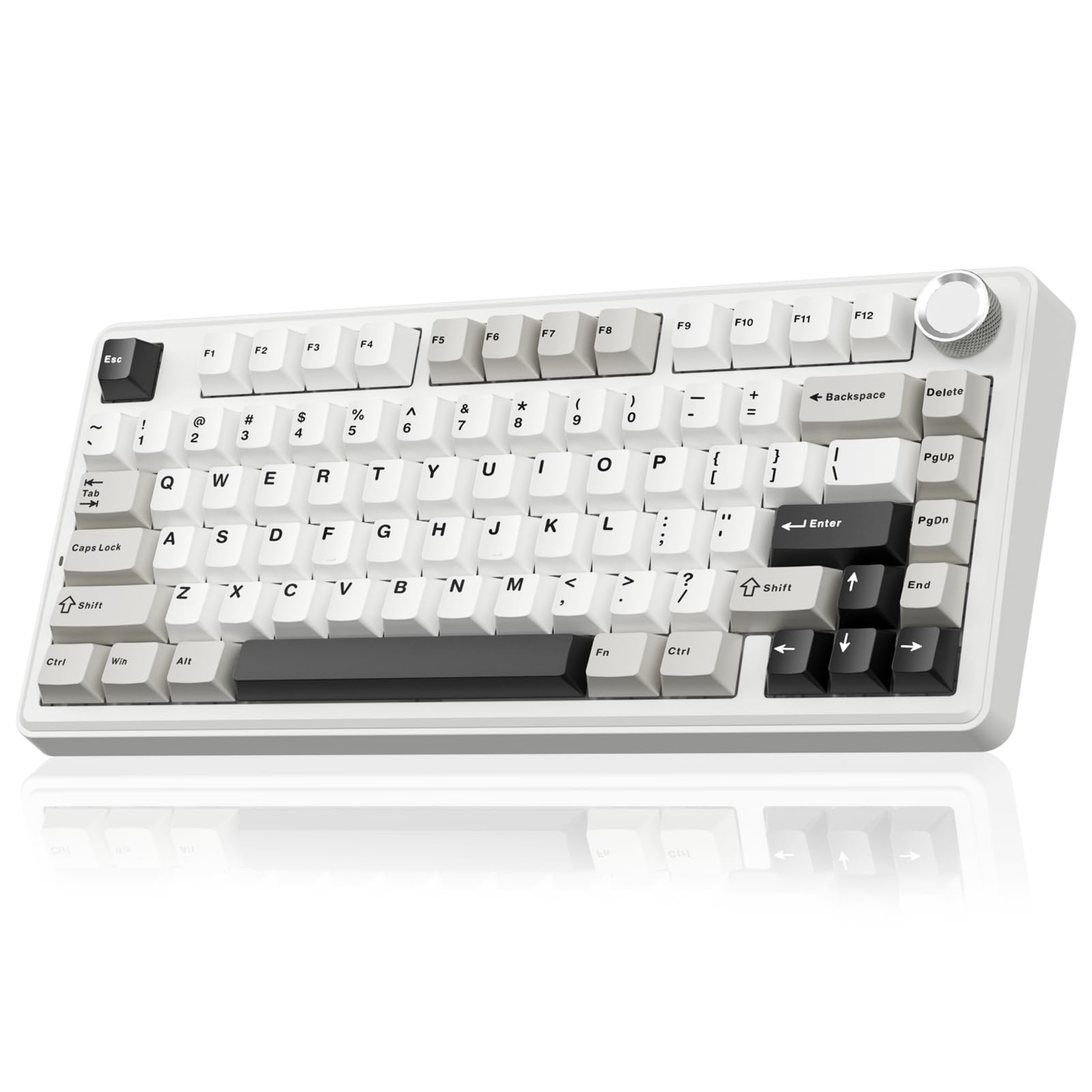
A 75% board that goes wireless with a creamy thock and a massive battery.
This one offers the convenience of tri-mode connectivity: you can use it wired via USB-C, with a 2.4GHz dongle, or over Bluetooth 5.0. The 4000mAh battery is large enough to last for days of heavy gaming or weeks of office use, so you are rarely hunting for a charging cable. The gasket mount structure with a PCB single-key slotting process and multiple layers of foam produces the satisfying “creamy” sound that has made the brand a quick favorite among enthusiasts.
The LEOBOG reaper switches are pre-lubricated and feel smooth right from the start. The 75% layout (81 keys) keeps the function row and arrow keys while being noticeably more compact than a full-size board. The multi-function metal knob switches between controlling lighting and volume, which is a very handy feature. Owners consistently mention that the build quality, sound, and feel exceed their expectations for the price, with many saying it outperforms more expensive custom keyboards they have used. The keycaps are double-shot PBT, so the legends will not fade over time.
On the down side, the programmable software only works on Windows, not Mac, and you have to run it in wired mode for customization.
Pros
- Tri-mode wireless (2.4G, BT, USB-C) with massive 4000mAh battery
- Gasket mount for creamy, satisfying keystroke sound
- Pre-lubed switches feel great immediately
Cons
- Software is Windows-only and requires wired mode
- Occasional reports of connectivity issues in wireless mode
Perfect for: Anyone who wants a clean, wireless desk setup without sacrificing the feel of a high-quality mechanical board. The battery life is a genuine daily convenience.
Not ideal for: The absolute fastest competitive response times. For hardcore esports, a wired Hall Effect board is still more reliable.
6. Redragon K768 PRO
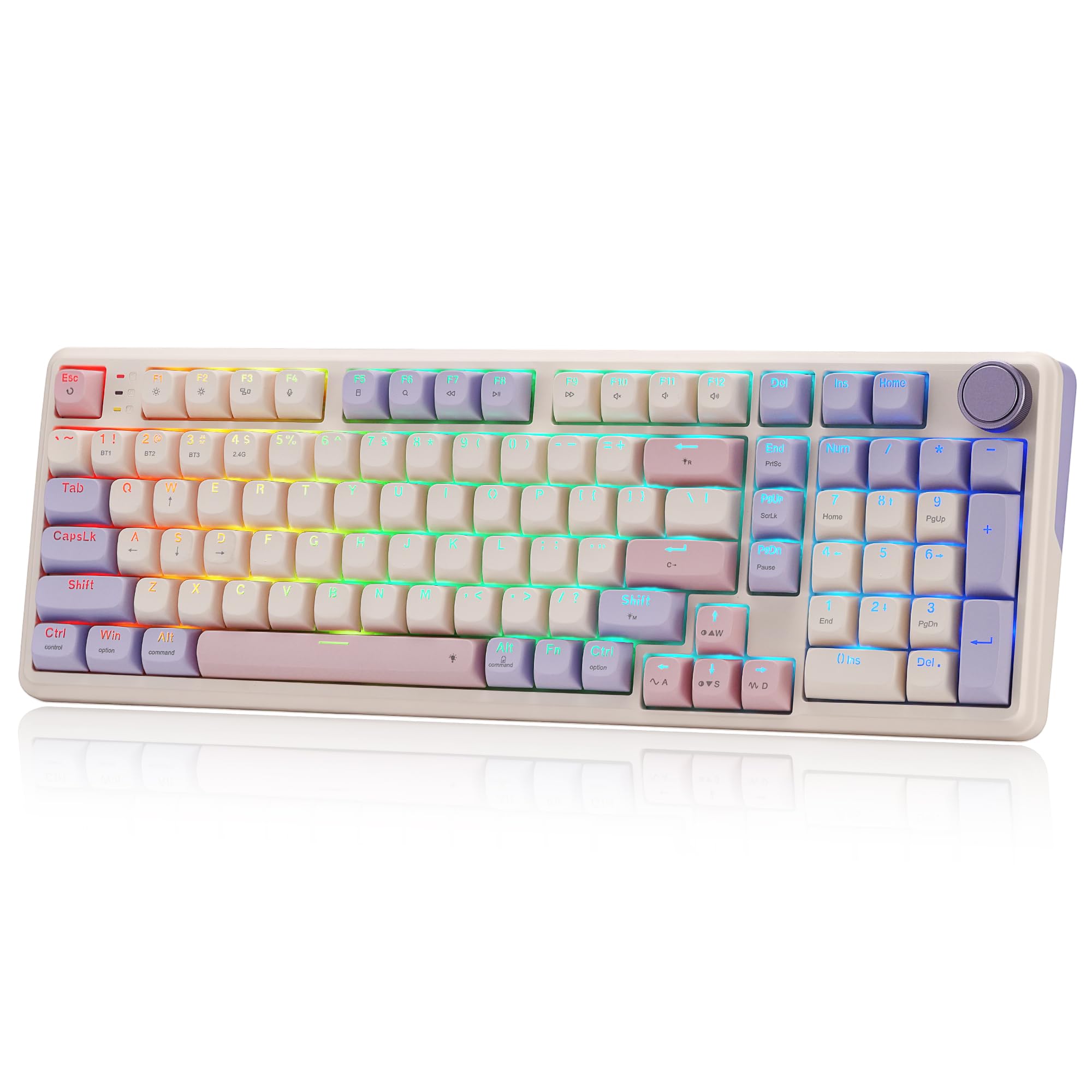
A wireless board that makes battery anxiety a thing of the past.
The headline feature here is the enormous 8000mAh internal battery—the largest on this list by a huge margin. This means you can use it wirelessly for days on end without worrying about recharging, making it perfect for those who move between workstations. It uses a gasket-mount design with 5-layer cushioning foam for a creamy, soft typing feel that is quiet and pleasant. The PBT keycaps resist shine and wear better than ABS caps, which is important for a board you will use constantly.
The K768 PRO uses a precision-locked gasket cover with custom Redragon linear switches that feel silky and responsive. It supports both 3-pin and 5-pin hot-swappable switches, so you can customize the feel later. The single control knob manages both backlight brightness and media playback, keeping things simple. Owners praise the aesthetic (the “Lilac Land” color is a hit) and the satisfying “thock” sound that has coworkers asking for the link. The Pro software allows for deep macro and lighting customization.
The board sits in a practical 95% layout with 100 keys, so you get a numpad without the full-size footprint. A small number of owners found the keys too clicky for their taste, but this is subjective.
Highlights
- 8000mAh battery for exceptional wireless uptime
- Gasket mount with 5-layer foam for a cushioned, creamy sound
- 100 keys in a 95% layout saves space vs full-size
Potential drawbacks
- The stock linear switches may feel loud or “clicky” to some users
- Occasional reports of a sticky space bar
Best for the wireless warrior: If you hate plugging in your keyboard to charge, this is your board. The 8000mAh battery is a genuine standout for convenience.
Consider a different switch: If you prefer a silent, non-clicky typing experience, the pre-installed yellow yolk switches might be a bit too loud for you.
7. Redragon Typewriter Style K710

A full-size, clicky typewriter board that turns every keystroke into a satisfying event.
If you want your keyboard to make a statement, this is it. The Redragon K710 uses classic Blue mechanical switches that produce a loud, crisp “click” with every press, reminiscent of a vintage typewriter. The round keycaps and metal panel give it a steampunk aesthetic that stands out on any desk. It is a full 104-key board, so you get every key you could need, including a full number pad.
Connectivity is tri-mode with USB-C, Bluetooth 3.0/5.0, and 2.4GHz wireless. It is heavy at 2 pounds, which keeps it planted during intense gaming sessions. The RGB lighting has 16 presets and 7 solid colors, and each key is individually customizable. Durability is a strong point—one owner reported theirs surviving two coffee spills after a quick clean-up. The tank-solid metal material and 104-key anti-ghosting make it a reliable daily driver.
The main downsides are the noise level (Blue switches are loud) and the fact that the Pro software link on the official website can be hard to find. The typewriter-style keys also sit farther apart than a standard keyboard, so there is a brief adjustment period.
What it delivers
- Authentic clicky Blue switch feel for satisfying feedback
- Full 104-key layout with metal panel for stability
- Tri-mode wireless and durable build
What to be aware of
- Very loud; not suitable for shared offices or quiet rooms
- Software for lighting customization is difficult to locate
Perfect for the retro fan: If you love the sound and feel of old-school mechanical boards and want a conversation starter on your desk, this is a fantastic choice.
Avoid if: You need a quiet keyboard for gaming or for open-plan workspaces. The clicky Blue switches will be heard across the room.
8. ASUS ROG Strix Scope II X

A full-size workhorse with pre-lubed switches and a truly premium build from a top brand.
When you want a keyboard from a major gaming brand with a rock-solid reputation, this is the pick. The ASUS Strix Scope II X features pre-lubed ROG NX Snow V2 linear switches that are smooth, quiet, and satisfying. The full aluminum top plate and PBT doubleshot keycaps make it feel incredibly sturdy—at 2.1 pounds, this board does not budge on your desk. Integrated sound-dampening foam and switch-dampening pads absorb pinging noises, giving you a refined, thocky acoustic profile.
The 100% layout includes a number pad, which is essential for many work tasks and certain games. It comes with a detachable wrist rest (which feels slightly firm but comfortable), a multi-function wheel for media and lighting control, and pre-programmed hotkeys for Xbox Game Bar and recording. The hot-swappable PCB accepts both 3-pin and 5-pin switches, so you can experiment with different switch types later. Owners consistently rate it as a top-tier keyboard for its responsive feel and high-quality construction.
The price is higher than the budget options, and it lacks the 8000 Hz polling rate of the Hall Effect boards. It also requires ASUS’ proprietary Armoury Crate software for full lighting control, which some users find bloated.
Strengths
- Pre-lubed ROG NX Snow V2 switches for a smooth, quiet keystroke
- Full aluminum top plate and PBT keycaps for a premium, durable feel
- Detachable wrist rest and intuitive media wheel
Potential downsides
- Requires ASUS software for deep lighting customization
- Some reviewers point out a sticky space bar or shift key on arrival
Buy this for: A premium, full-size keyboard that will last for years. The build quality feels a step above everything else on this list. It is an excellent choice for a primary workstation or for competitive gamers who want a durable, responsive board.
skip it if: You are strictly budget-constrained, or you want the absolute fastest hall-effect speed for FPS games. The Aula or Attack Shark boards offer better latency at a lower price.
Understanding the Specs
Polling Rate (1000 Hz vs 8000 Hz)
The polling rate is how often your keyboard reports its position to your computer, measured in hertz (Hz). A standard keyboard has a 1000 Hz polling rate, which means it sends data once every millisecond. A keyboard with an 8000 Hz polling rate sends data once every 0.125 milliseconds, compared to 1 millisecond for a standard 1000 Hz board. In fast-paced games, this lower latency means your keypress registers on-screen slightly sooner, which can make strafing and aim correction feel snappier and more responsive.
Rapid Trigger and Adjustable Actuation
Rapid Trigger is a software feature found on Hall Effect keyboards. Instead of waiting for the key to travel all the way back up to reset, it detects the exact millisecond you start lifting your finger and reset the input. This lets you tap a key repeatedly much faster than with a traditional switch. Adjustable actuation lets you set the exact depth (measured in millimeters) at which a keypress registers. You can set your WASD keys to a hair-trigger 0.1mm for shooters, while keeping your number row at a firmer 2.0mm for typing.
Hot-Swappable Switches
A hot-swappable keyboard lets you change the mechanical switches without any soldering. You just use a small puller tool to remove the switch and push a new one in. This is a great feature for a budget board because you can start with a basic linear switch and later upgrade to a smoother or quieter switch without buying a whole new keyboard. Most hot-swap sockets accept both 3-pin and 5-pin switches, which covers virtually all standard mechanical switch types.
Gasket Mount vs. Tray Mount
The mounting method determines how the keyboard plate sits inside the case. A gasket mount uses soft silicone or foam pads to suspend the plate, which makes the typing feel bouncier and creates a deeper, “creamy” or “thocky” sound by absorbing vibrations. A tray mount is the standard, cheaper method where the plate screws directly into the case, resulting in a stiffer feel and a louder, sometimes hollower sound. Gasket mounts are generally preferred by typing enthusiasts for their comfort and acoustic quality.
FAQ
What is a Hall Effect keyboard and do I need one for gaming?
Will a 60% keyboard work for games that use the function row or number pad?
Can I use a budget mechanical keyboard with a PlayStation or Xbox?
How long does a cheap mechanical keyboard last compared to a premium one?
Is a hot-swappable keyboard a good idea for a beginner?
What does “Rapid Trigger” do and why is it important for shooters?
Why are some budget keyboards wired and others wireless?
Do I need PBT keycaps or are ABS keycaps fine?
Final Thoughts: The Verdict
Across the board, the best budget gaming mechanical keyboard winner is the Aula WIN60 HE because it delivers the competitive advantages of Hall Effect switches—rapid trigger and 8000 Hz polling—at a price that makes it a no-brainer for any gamer. If you want a bit more space with arrow keys, grab the AULA WIN68 HE. And for a premium, full-size workhorse that will last for years, the ASUS ROG Strix Scope II X is the one to reach for.
How We Picked
We do not accept paid placement. Every pick is matched to a real buyer and a real use-case; we do not hands-on test units.
Sources & Methodology
Specifications: manufacturer listings and product documentation. Review insights: verified customer reviews, as of July 2026. Pricing: not shown on this page (it changes often); check the current price via the retailer link.
As an Amazon Associate, FitlyFast earns from qualifying purchases. This does not affect which products we feature.