
Our readers keep the lights on and the weekend projects moving. As an Amazon Associate, I earn from qualifying purchases.
Specs are compiled from manufacturer listings and verified buyer reviews and can change over time — please confirm the key details on the product page before buying.
Buying a budget capture card feels like a gamble — will it drop frames mid-stream, introduce audio delay, or just refuse to work with your console? This guide cuts through the noise to find the seven best cards that actually deliver clean 1080p60 video, steady audio sync, and plug-and-play setup without crashing your wallet.
I’m Rikta — the founder and writer behind FitlyFast. This guide is built by comparing the manufacturers’ published specifications and the patterns across verified customer reviews, so you get each pick’s real strengths and trade-offs instead of marketing spin.
If you want to stream on Twitch, record gameplay for YouTube, or run a live virtual event without spending a lot, you need a capture card that gives you solid video quality for the price. The cards below each earn their spot as a top contender for the best budget capture card right now, based on real specs and buyer feedback.
Our Picks at a Glance


How To Choose The Best Budget Capture Card
Many cheap capture cards exist, but the real difference between them depends on three things: passthrough resolution (the video quality your monitor sees), capture resolution (the video quality your computer records), and connection stability (whether the feed drops out). Here is what to watch for.
4K Passthrough vs 1080p Recording
A card that supports 4K passthrough lets you game on your monitor at full 4K resolution while recording or streaming at 1080p. This means your gameplay looks sharp on your screen, and your audience sees a smooth 60fps stream. Without passthrough, you are stuck playing at whatever resolution you capture.
Latency — the Hidden Delay
Latency is the delay between what happens on screen and what your stream shows. Budget cards with low latency (around or under 60ms) feel responsive for live broadcasts. Higher latency creates a distracting lag that makes chat interaction feel clunky — look for phrases like “zero-latency” or “near-zero delay” in the specs.
Connection Type and Compatibility
A USB 3.0 connection is non-negotiable for smooth 1080p60 capture. USB 2.0 simply lacks the bandwidth for clean high-frame-rate video. Make sure the card works with your console (PS5, Xbox, Switch, or PC) and your streaming software like OBS Studio. Most modern cards are plug-and-play with no drivers needed, but always double-check that your operating system is supported.
Quick Comparison
| Model | Best For | Capture Resolution | Passthrough | Connection | Amazon |
|---|---|---|---|---|---|
| Fulfalic Pro Capture★ Best Overall | Streaming & Online Class | 1080p60 / 2K30 | 4K60 | USB 3.0 / USB-C | Amazon |
| Dcyfol ozc3Best Value | Gaming & Twitch | 1080p60 | 4K60 | USB 3.0 | Amazon |
| Hagibis UHC10 | VR / Quest 3 | 1080p60 | 4K60 | USB 3.0 / USB-C | Amazon |
| Redragon VC321 | Zero-Latency Gaming | 1080p60 | 4K60 | USB 3.0 | Amazon |
| SUDTREEV C7 | Switch 2 & Consoles | 1080p60 | 4K30 | USB 3.0 | Amazon |
| VANGREE VC-003 | Casual Streaming | 1080p60 | 4K30 | USB-C 3.0 | Amazon |
| NearStream CCD10 | High-FPS Passthrough | 1080p60 | 4K60 / 2K120 / 1080p240 | USB-C 3.0 | Amazon |
In‑Depth Reviews
1. Fulfalic Pro Capture
The reliability champion that pairs 4K60 passthrough with a built-in 3.5mm audio port for clean game-plus-voice capture.
You get smooth 1080p60 capture and 2K30 recording alongside a 4K60 loop-out, meaning your gaming monitor stays sharp at full resolution while your stream runs at the standard broadcast rate. The aluminum alloy shell pulls heat away from the chipset, so you avoid the thermal frame-drops that plague lesser cards during marathon sessions. Owners call out the reliability above all — the single most-discussed theme across hundreds of buyers is that this card simply works, stream after stream.
The 3.5mm audio input is the standout feature here for streamers. You can plug a microphone directly into the card and blend your voice commentary with game audio into a single OBS track, eliminating the post-editing sync headache. The 3.5mm output lets you monitor everything through headphones. A tiny handful of owners note that the initial audio setup requires restarting OBS Studio after configuring the sound source — one quick step that fixes it every time.
Carrying this card is easy at 0.21 kg, and the detachable USB 3.0 to USB-A/USB-C cable means you can swap between a desktop and a modern laptop without an adapter. The crowd favorite among budget buys, this one earns its top spot through proven build quality and rock-solid reliability night after night.
Streamer’s Dream Setup
- 4K60 passthrough keeps your monitor crisp while capturing 1080p
- 3.5mm mic input blends voice and game audio into one track
- Aluminum body sheds heat during long broadcasts
The Fine Print
- Audio input requires restarting OBS Studio after first config
- Video and audio quality can vary — double-check your source device settings
Reach for this if: you want a proven daily driver for Twitch streaming or online classes that prioritizes reliability above all else.
Think twice if: you need guaranteed perfect audio from the start — some owners spend a few minutes dialing in the OBS audio settings.
2. Dcyfol ozc3
The no-drills, no-fuss card that delivers sharp 1080p60 video and perfect audio sync for under thirty dollars.
This is the card that owners call a steal — and the math backs it up. You get a simple, reliable stream box that produces crisp 1080p60 video from sources like the Nintendo Switch, PS5, and Xbox. The plug-and-play design means you plug it in, launch OBS Studio, and see your feed instantly. No driver downloads, no configuration headaches. The real winning point here is the audio-video alignment: the review pages repeatedly note that sound stays perfectly synced with the picture, a problem that plagues many budget alternatives.
The zero-lag loop-out lets you play on your monitor at full resolution while your stream captures at 1080p60. At 0.21 kg and with a full metal build, it feels durable and travels well. A few owners mention the USB 3.0 connection feels a bit fragile — jostling the cable mid-stream can freeze the feed, so get your cable routing set before you go live. The occasional note about headphone volume being too loud on the 3.5mm output is worth knowing if you monitor in a quiet room.
Compared to the Fulfalic Pro above, the Dcyfol trades the 2K30 recording mode and the USB-C cable option for a slightly lower price point and a simpler single-USB-A setup. For a first-time streamer or a console-only gamer, this is the smarter buy.
Why It Wins
- Sharp 1080p60 video with perfect audio sync from the start
- True plug-and-play — no drivers, no complex setup
- Full metal build feels more premium than the price suggests
Know Before You Buy
- USB 3.0 cable is sensitive to movement during active streams
- Headphone output can run louder than ideal for quiet environments
Get this if: you are starting your streaming journey and want the best video quality per dollar without learning a complicated setup.
skip it if: your streaming desk gets a lot of physical movement — the cable connection needs a stable position.
3. Hagibis UHC10

The VR streamer’s secret weapon — a capture card with 100W Power Delivery to charge your tablet mid-game.
This card solves a unique pain point. If you stream from a tablet, iPad, or phone, the USB-C port on your device is your only connection. The Hagibis UHC10 captures video at 1080p60 while simultaneously feeding your device with up to 100W of fast charging power via the Power Delivery 3.0 and Quick Charge 5.0 protocols. You never have to worry about your iPad dying mid-stream. The dual USB-A/USB-C interface means it connects to old and new computers alike without an adapter.
It works from the start with OBS Studio, XSplit, and PotPlayer as a true plug-and-play device — no drivers, no external power supply. The built-in MS2130 chipset handles YUY2 and MJPEG formats at 1080p60, and the capture supports 4K60 input. The real audience for this card is the VR crowd: Meta Quest 3 and Quest 2 buyers report flawless 1080p60 capture for streaming VR gameplay to Discord or Twitch. A handful of owners note that the card can be picky about USB-C orientation — flipping the connector sometimes fixes a no-signal issue, and it does not work with the Nintendo Switch.
At 3.7 ounces, it slips into any bag. The cable is on the short side, so keep your source device close. Owners praise the functionality above all — the most-mentioned aspect by a wide margin — and the 100W PD passthrough is the feature that defines this card as a niche hero.
what separates it
- 100W PD passthrough keeps tablets and phones charged while capturing
- Dual USB-A and USB-C connectors for universal compatibility
- Ideal for Quest 3 / Quest 2 VR streaming at 1080p60
Heads Up
- Does not work with Nintendo Switch consoles
- USB-C connection can be finicky with orientation on some devices
- Limited to 1080p60 capture — no 2K or 4K recording
Best for: VR streamers, tablet users, and anyone who needs to charge their capture source while broadcasting.
Not for: Switch-only streamers or anyone who needs 4K recording from the card itself.
4. Redragon VC321
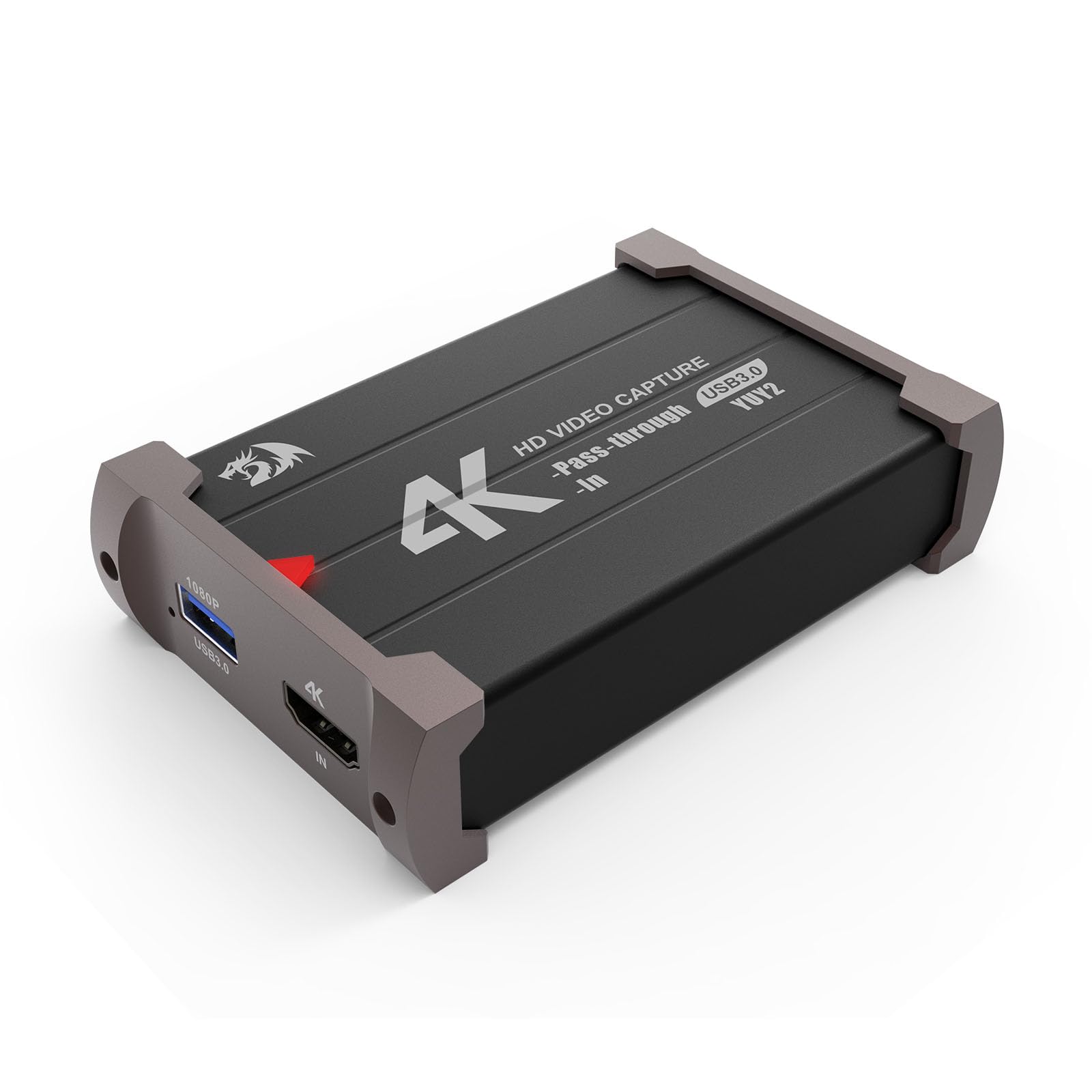
The budget card that outperforms pricier rivals — delivering near-zero latency and flawless 4K passthrough at a fraction of the usual price.
This is the card that makes the bigger brands look expensive. The Redragon VC321 supports up to 4K30 input and 1080p60 capture, but the headline is the latency — owners describe it as near-zero, with no audio desync issues. The 4K passthrough is flawless, meaning your gaming monitor runs at full resolution while the card handles the 1080p stream. Owners consistently call it a “best budget friendly capture card” and note the picture quality is “really clear” on OBS Studio.
Plug-and-play functionality is the standard here: no driver installation required, no external power source. It works with Windows 7 and above and Mac OS 10.15 or newer. The dual audio and video capture means you can monitor your sound in real-time while streaming. The one honest trade-off that surfaces in the reviews is frame drops during busy game scenes — when the on-screen action gets heavy, the recorded footage can stutter slightly. For competitive shooters where every frame matters, this is the limiting factor.
At 113 grams and dimensions of 5.63 x 5.12 x 1.57 inches, it is compact enough for a travel stream kit. The build quality punches well above its price point, and the Redragon brand reputation for peripherals backs it up. For anyone who wants to start streaming without spending a lot, this is a serious contender.
Why Streamers Love It
- Near-zero latency for real-time interactive streaming
- Flawless 4K30 passthrough to keep your monitor sharp
- Plug-and-play simplicity with no driver downloads
The Limitation
- Recording can drop frames during visually dense game scenes
- Best as a starter card — not ideal for pro-level 4K production
Ideal for: first-time streamers who want the lowest possible delay between gameplay and broadcast on a tight budget.
Consider alternatives if: you stream high-motion competitive shooters where every recorded frame must stay smooth.
5. SUDTREEV C7
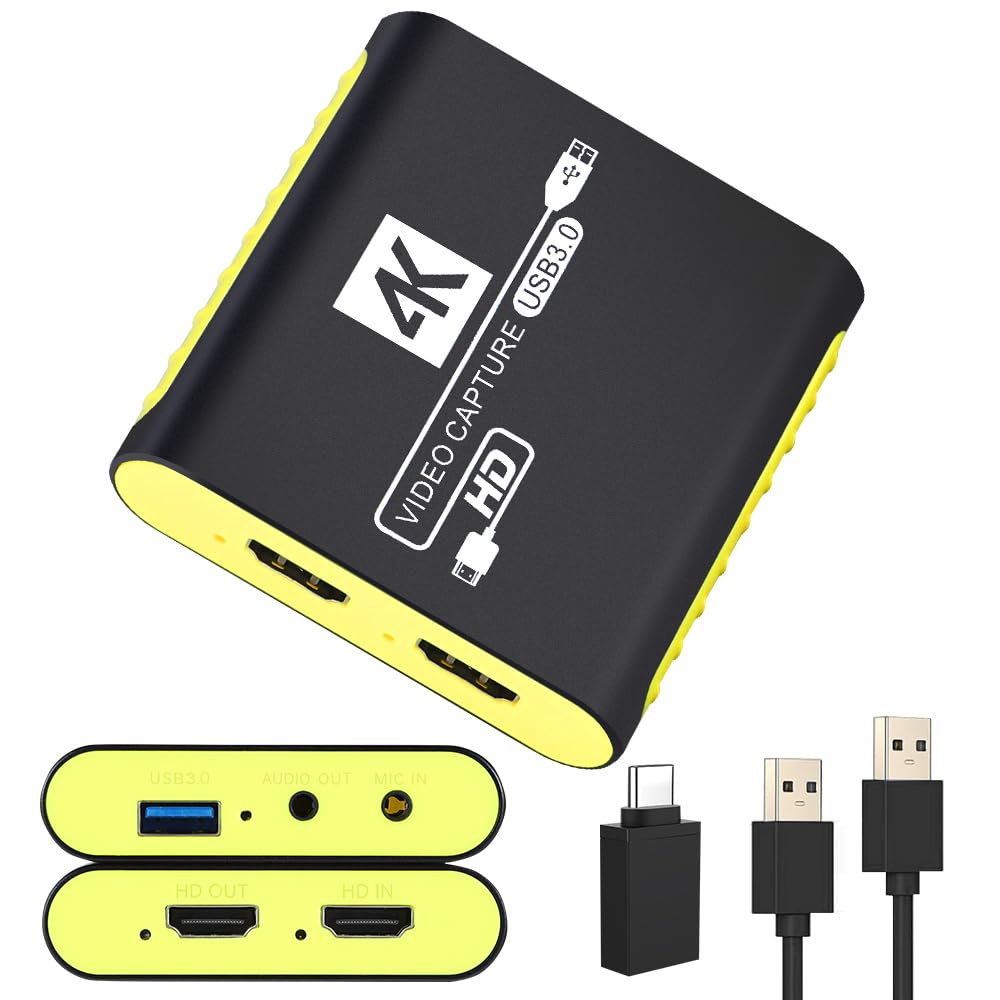
The aluminum-armored card built for Nintendo Switch 2 owners who want immediate OBS recognition and no black screens.
This card was engineered with a full aluminum alloy housing designed to prevent the thermal throttling that causes black screens and signal drops in cheaper cards. It records crisp 1080p60 video via YUY2 and MJPEG formats while passing through a full 4K30 signal to your monitor. Owners across the board say OBS Studio recognizes the card immediately — no driver search, no troubleshooting. The included USB-A to USB-C adapter means MacBook, iPad, and modern laptop users connect without extra dongles.
For Switch 2, Switch OLED, PS5, and Xbox Series X/S owners, the 4K30 passthrough keeps console games looking sharp on a 4K TV while the stream runs at 1080p60. The 3.5mm mic-in port is a clean solution for blending commentary into a single OBS track. One subtle point from the data: a tiny bit of delay is present on the captured feed, according to some owners, though the passthrough signal itself stays instant. The compact dimensions (3.07 x 2.95 x 0.75 inches) and 90-gram weight make it the lightest card on this list — easy to stash behind a monitor or throw into a bag for LAN events.
Functionality and setup are the top-praised aspects among the buying crowd for this card. It comes bundled with a clear troubleshooting guide, a warranty card, and support that actually responds — a safety net that makes a difference for first-time streamers.
Console Streamer’s Pick
- Aluminum body prevents thermal frame-drops during long sessions
- USB-A to USB-C adapter included for modern laptops
- Immediate OBS recognition with clear included setup guide
One Trade-Off
- Captured feed has a tiny bit of audio delay — monitors the passthrough, not the USB feed
- 4K passthrough limited to 30Hz, not 60Hz
Grab this for: Nintendo Switch 2 streaming with instant setup and no HDCP headaches.
Pass if: you need 4K60 passthrough for PC gaming at high refresh rates — the 4K30 limit will cap your monitor.
6. VANGREE VC-003

A straightforward USB-C card that handles Switch streaming to Discord without fuss — once you get past the audio setup.
The VANGREE VC-003 takes 4K30 HDMI input and streams out at 1080p60 via USB-C 3.0. It works with Switch, Switch 2, PS5, and Xbox Series X/S, and the near-zero latency on the pass-through keeps your gameplay feeling responsive. The card is truly plug-and-play with no driver installation, compatible with Windows, macOS, Linux, and Android. Owners mention it is perfect for casual streaming to Discord friends or sharing gameplay on a small channel — no performance handbrake for non-pro use.
The major caveat that comes up in the feedback is audio. A number of owners experienced crackling and popping sounds during initial use, with one describing the audio as “unusable” before the company sent a free replacement that resolved the issue. The company’s customer service response is quick — replacements arrive without hassle — but the inconsistency is worth knowing if reliable audio matters on day one. The setup instructions could also be clearer: some owners advise connecting the card to your computer or laptop first before plugging in the HDMI source, a step not fully explained in the box.
At 2.81 x 2.81 x 0.67 inches, it is almost square and fits neatly into a pocket. For casual streamers sharing gameplay on Discord without demanding pro-grade audio 100% of the time, this card does the job at a fair price. The VANGREE is a solid entry-level choice that pairs well with the Dcyfol if you want a backup card for travel.
What Works Well
- USB-C connection works with modern laptops and tablets directly
- Near-zero latency passthrough keeps gameplay responsive
- Great for casual Discord streaming without performance overhead
Watch Out For
- Audio crackling reported on some units — customer service replaces quickly
- Setup steps are not fully explained in the manual
Good for: casual streamers who want an affordable USB-C card for sharing Switch gameplay on Discord with friends.
Look elsewhere if: audio reliability is non-negotiable on day one — you might get a unit that needs a replacement.
7. NearStream CCD10

The high-refresh hero — 1080p240 passthrough means competitive gamers never sacrifice smoothness while streaming.
This card is in a different league from the others here. The NearStream CCD10 supports HDMI passthrough at 4K60, 2K120, and crucially, 1080p240 — a spec that matters to competitive shooters and fighting game players who demand silky smooth motion on their monitor while streaming at 1080p60 to Twitch. The 1080p240 passthrough means your local display runs at 240Hz while the capture chip handles the 60fps broadcast. No other card on this list offers this flexibility.
This card captures video via USB-C 3.0 at 1080p60 (full HD at 60 frames per second) with low latency, meaning the video on your computer stays nearly in sync with the live action. The dual 3.5mm ports — one for mic input and one for headphone output — let you control all audio without a separate mixer. Customers note the setup is easy plug-and-play on Windows, macOS, and Linux. The card runs cool, with no overheating after hours of use. The most common praise is the value: you get passthrough specs usually found on cards costing double this price. However, one owner streaming from a gaming PC to a tablet noted a performance handicap when running capture software. Also, the card does not pass HDR (high dynamic range) or HDMI audio to the capture feed, so you will need an alternative audio source for your stream. This card suits a budget-conscious streamer who wants clean 1080p60 capture and simple audio control, but pass on it if you need HDR passthrough or HDMI audio in your capture feed.
At 76 grams and 4.57 x 2.2 x 0.87 inches, the CCD10 is the lightest option here and includes both an HDMI cable and a USB cable in the box. For competitive gamers who refuse to compromise on monitor refresh rate, this is the only budget option that keeps up.
Why It Stands Out
- 1080p240 passthrough for high-refresh-rate gaming monitors
- Dual 3.5mm ports for independent mic and headphone routing
- Runs cool with no thermal throttling during long sessions
Know the Limits
- No HDR passthrough — colors stay in standard dynamic range
- No HDMI audio passthrough to capture — use speakers or a separate device
Made for: competitive gamers who stream at 1080p but refuse to drop from 240Hz on their own monitor.
Not the right pick if: you need HDR support or HDMI audio passthrough in your capture chain.
Understanding the Specs
4K Passthrough vs 1080p Capture
Passthrough is the signal that goes from your console to your monitor. A card with 4K passthrough lets you play at 4K while the card captures a 1080p signal for your stream. Without it, your monitor is stuck at the capture resolution. All cards here support at least 4K30 passthrough, but the NearStream CCD10 goes further with 1080p240 for high-refresh competitive gaming.
YUY2 vs MJPEG Color Formats
YUY2 is a video color format that preserves more detail and produces sharper, more accurate colors than MJPEG, but it requires more USB bandwidth. MJPEG compresses the video stream more, which can introduce slight color banding. Cards that support both give you the flexibility to switch formats depending on whether you prioritize image quality or system performance.
Latency and Zero-Lag Capture
Latency measures the delay between what happens on your screen and what appears on your stream. Budget cards aim for “near-zero” latency — typically under 60ms — which feels instant to viewers. Higher latency creates a visible gap between gameplay and broadcast, making chat interaction feel disconnected. The Redragon VC321 and Dcyfol ozc3 are the strongest performers here.
3.5mm Audio Input vs Audio Passthrough
A 3.5mm mic input lets you plug a microphone directly into the capture card to blend your voice with game audio into one stream track. This eliminates post-editing sync. Audio passthrough carries the HDMI audio from your console to your capture software. Some budget cards (like the NearStream CCD10) omit HDMI audio passthrough, meaning you need separate speakers or a headphone connection for game sound.
FAQ
Does a capture card work with the Nintendo Switch 2?
Do I need a USB 3.0 port for a capture card?
What does HDCP mean and why does it block my capture card?
Can I use a capture card with a MacBook or iPad?
What is the difference between passthrough and capture resolution?
Will a budget capture card work with OBS Studio?
Can I use a capture card for live streaming on Zoom or Teams?
How long do budget capture cards typically last?
Final Thoughts: The Verdict
For most people, the budget capture card winner is the Fulfalic Pro Capture because it combines 4K60 passthrough, a 3.5mm mic input, and the most reliable performance across hundreds of owner experiences. If you want the absolute best value per dollar, grab the Dcyfol ozc3 — it delivers sharp 1080p60 video and perfect audio sync for the lowest entry price. And for competitive gamers who refuse to compromise on monitor refresh rate, the NearStream CCD10 is the one to reach for with its 1080p240 passthrough that no other budget card can match.
How We Picked
We do not accept paid placement. Every pick is matched to a real buyer and a real use-case; we do not hands-on test units.
Sources & Methodology
Specifications: manufacturer listings and product documentation. Review insights: verified customer reviews, as of July 2026. Pricing: not shown on this page (it changes often); check the current price via the retailer link.
As an Amazon Associate, FitlyFast earns from qualifying purchases. This does not affect which products we feature.