
Our readers keep the lights on and the weekend projects moving. As an Amazon Associate, I earn from qualifying purchases.
Specs are compiled from manufacturer listings and verified buyer reviews and can change over time — please confirm the key details on the product page before buying.
A bad gaming mic makes you the teammate everyone mutes — a tinny voice, constant keyboard clicks, and fan noise. You do not need to spend a fortune to sound clear. A good budget mic filters out the chaos of your mechanical keyboard and puts your voice front and center.
I’m Rikta — the founder and writer behind FitlyFast. This guide is built by comparing the manufacturers’ published specifications and the patterns across verified customer reviews, so you get each pick’s real strengths and trade-offs instead of marketing spin.
Finding the right budget microphone for gaming depends on a few key specs that matter for clear voice capture during ranked matches, Twitch streams, or Discord calls.
Our Picks at a Glance


How To Choose The Best Budget Microphone For Gaming
Picking a gaming mic on a budget means knowing which features clean up your sound without costing a premium. Here are the three specs that separate a good-sounding mic from one that makes you sound distant or muffled.
Pickup Pattern: Cardioid vs. Supercardioid
This determines where the microphone hears sound from. A cardioid pattern (heart-shaped) picks up sound mostly from the front and rejects noise from the sides and rear — perfect for ignoring your mechanical keyboard and mouse clicks. A supercardioid pattern is even tighter, rejecting more side noise but requiring you to stay more directly in front of it. For gaming, either is a big upgrade over a headset mic.
Noise Reduction: Hardware vs. Software
Some mics use a built-in noise reduction chip or careful acoustic design to minimize background noise automatically. Others rely on software installed on your PC. For a budget mic, hardware-based noise reduction is often more reliable because it works with any platform (including consoles) without extra setup. Check for a dedicated mute button too — that panic button will save your stream.
Gain Control and Monitoring
A physical gain knob lets you adjust how sensitive the mic is to your voice in real-time. This matters because a low gain setting can reject more room noise, while a high gain picks up every whisper. Zero-latency monitoring (a headphone jack on the mic) lets you hear yourself without delay — essential for not shouting over your own voice during intense gaming sessions.
Quick Comparison
| Model | Best For | Pickup Pattern | Weight | Special Feature | Amazon |
|---|---|---|---|---|---|
| TONOR TC30★ Best Overall | Best Overall Value | Cardioid | 400 g | Shock mount, pop filter included | Amazon |
| FIFINE A6VBest Budget RGB | Best RGB + Features | Cardioid | — | Quick mute, gain knob, iF Design Award | Amazon |
| ZealSound BKD-11 PROBest Accessories Bundle | Most Accessories Included | Cardioid | 1.7 pounds | Boom arm + tripod, Lightning adapter | Amazon |
| TONOR TD510 AIR S+H | Best for Future Upgrade Path | Dynamic (Supercardioid-ish) | 850 g | Dual USB/XLR, AI noise cancellation | Amazon |
| InnoGear CM38XW | Best Noise Cancellation for Price | Cardioid | — | 4 RGB modes, zero-latency monitoring | Amazon |
| Razer Seiren V3 Mini | Ultra-Compact Premium | Supercardioid | 8.32 ounces | Tap-to-mute, Razer Synapse software | Amazon |
| HyperX SoloCast 2 | Best Plug-and-Play Simplicity | Cardioid | 330 g | Built-in pop filter, internal shock mount | Amazon |
| Logitech G Yeti Orb | Best Brand Ecosystem | Cardioid | 230 g | LIGHTSYNC RGB, G HUB software | Amazon |
| Razer Seiren V2 X | Best All-Around Premium | Supercardioid | — | Integrated digital limiter, built-in shock absorber | Amazon |
In‑Depth Reviews
1. TONOR USB Microphone TC30
Most buyers start here because it delivers clear, natural sound and a full kit for the price. Buyers report it sounds like a much more expensive mic right from the start.
This TONOR weighs 400 g — a solid, premium-feeling heft that surprises you given its price. The cardioid pattern (shaped to capture sound from the front while ignoring sides and rear) does a real job silencing your mechanical keyboard. The included shock mount (a suspension cradle that stops desk bumps reaching the mic) and pop filter (a foam screen that catches breath pops) mean you buy nothing extra. Owners mention it is an “excellent microphone for meetings and podcasts,” and for gaming, that same clarity comes through in call-outs. It works on PC, Mac, and Linux with no drivers, and connects to PS4 and iPad with an adapter. It is not compatible with phones or Xbox directly.
Unlike the FIFINE A6V which has a physical gain knob, the TC30 lacks one — you adjust volume in software only. In louder rooms, it picks up background hums (fans, for example). The included tripod is functional but basic, so you might want a boom arm later. It is honest about its limits: excellent sound for the price, but you need a reasonably quiet environment.
Why It Wins the Spot
- Exceptional sound quality for the price — clear, crisp voice capture.
- Comes with a full kit: shock mount, pop filter, tripod, and USB-C cable.
- Cardioid pattern effectively reduces unwanted room noise.
The Honest Trade-Offs
- No physical gain control — you adjust volume in software only.
- Picks up background noise (fans, AC) if gain is set high in software.
- Tripod stand is basic and can feel a bit flimsy on a cluttered desk.
Grab this if: you want a reliable, great-sounding mic right from the start without extra purchases, and your room is reasonably quiet.
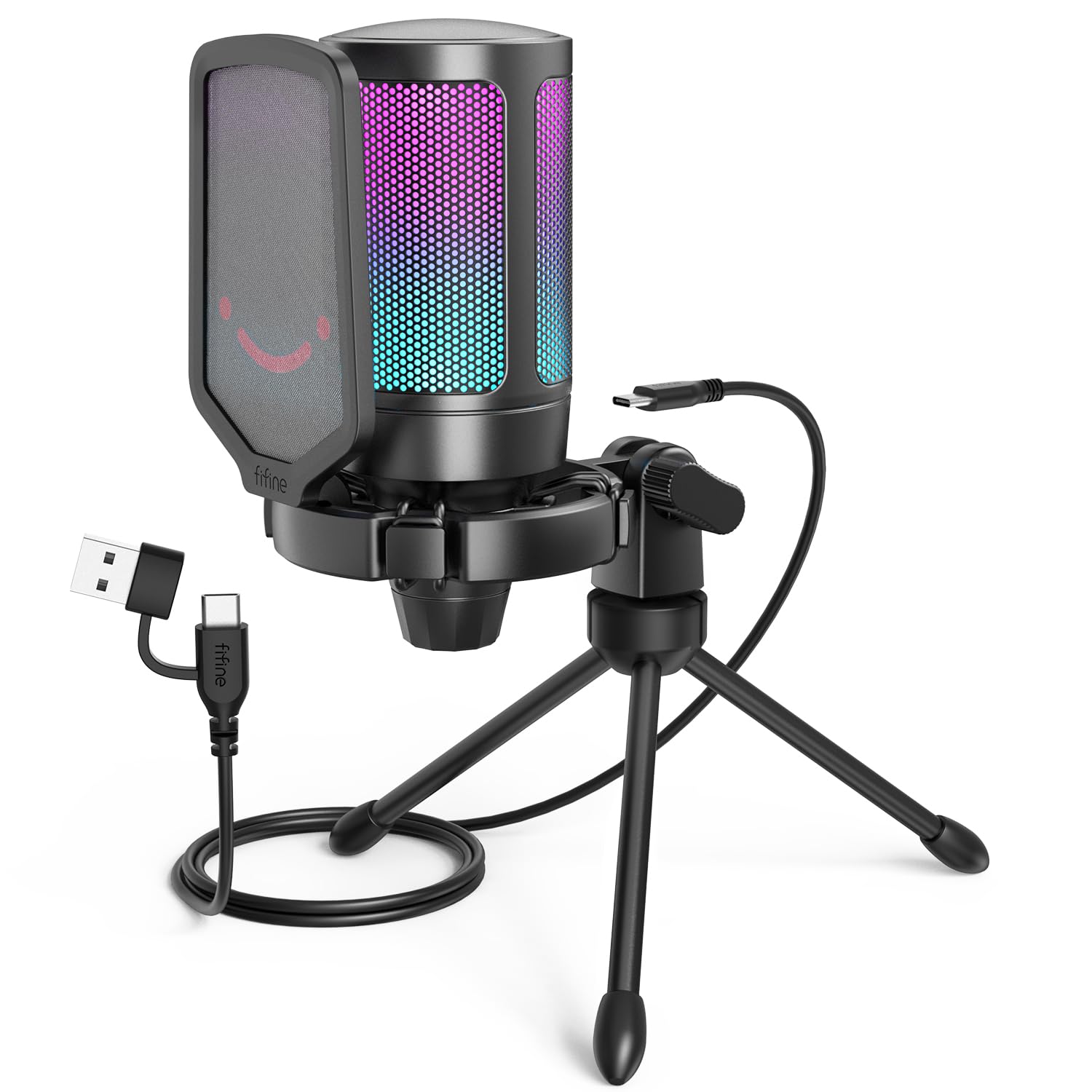
2. FIFINE AmpliGame A6V
The FIFINE earned an iF Design Award, and it shows. The headline number is 192kHz sampling — that means it captures high-resolution audio with more nuance than most mics in its range. The cardioid pattern works alongside a 70dB signal-to-noise ratio (a very clean signal that leaves less room for background hiss). The quick mute button is a godsend for streamers who need to sneeze or cough without fumbling in software. The RGB lighting cycles through 7 gradient colors. Many owners call it a “perfect as a standalone mic” with a noticeable improvement over headset mics. The tripod stand has rubber feet and an adjustable thumbscrew, and the included 6.6-foot detachable USB cable reaches a PC under the desk without a fuss.
Unlike the TONOR TC30’s simpler setup, the A6V has a gain knob on the mic itself. However, a fraction of customers note the mic stopping working after six months. It also picks up background noise (TV, AC) if the gain isn’t turned nearly all the way down. The shock mount uses four rubber bands to absorb desk vibrations.
What Stands Out
- 192kHz sampling provides exceptional audio fidelity for a budget mic.
- Physical quick mute button with RGB status change is streamer-friendly.
- Gain knob on the mic lets you adjust sensitivity without touching software.
What to Watch For
- A small number of reviewers point out durability issues after several months.
- Background noise pickup is very sensitive if gain is not adjusted properly.
- RGB is always-on when mic is active (no quick-off toggle on some units).
Best for: gamers who want stylish RGB, a physical mute button, and high-resolution audio for streaming or content creation. skip it if you want a mic you can set and forget without adjusting the gain occasionally.
3. ZealSound BKD-11 PRO
This kit refuses to leave anything out — a scissor boom arm extending up to 30.8 inches, a foldable tripod, a shock mount, a detachable pop filter, a 78.7-inch USB cable, and even a Lightning adapter for iPhones and a USB-C adapter. You can clamp this mic to your desk for gaming, then pop it off for mobile content creation on your phone or iPad. Its 96kHz sampling rate with a built-in noise reduction chip and cardioid pattern delivers clear, detailed speech.
Owners rave about the “crisp voice” and active noise cancellation that works well on both PC and mobile. The zero-latency monitoring (3.5mm headphone jack) lets you hear yourself in real-time — critical for not shouting over your own voice. The bottom-mounted gain knob is textured and precise, and the RGB lighting has multiple solid colors and dynamic effects that can be turned off via a long-press. The mute button has a red LED indicator clearly visible on camera. The desk clamp fits surfaces up to 1.8 inches thick. The only real caveat is that the boom arm can feel slightly less premium than more expensive dedicated arms.
The kit that keeps giving: The sheer volume of included accessories — boom arm, tripod, pop filter, shock mount, and mobile adapters — makes this the best value if you are starting from zero.
Ideal for: content creators and gamers who want a complete studio-style setup from the start, including the ability to record on a phone. Consider a different mic if you need a super-premium, heavy-duty boom arm.
4. TONOR TD510 AIR S+H

This is a dynamic microphone — different from the condenser mics here because it inherently handles louder environments better and picks up less room echo. The standout feature is dual USB and XLR output: you can use it as a simple USB mic today, and later upgrade to a professional audio interface (an external mixer) with XLR cables without replacing the microphone itself. The AI noise cancellation has three modes, actively suppressing keyboard clatter and other desk noises.
Reviewers highlight the “good value” and “professional sound” for gaming and voice chats. The clamp is noted as being sturdier than on cheaper mics, and the customizable RGB enhances the gaming atmosphere. It weighs 850 g, giving it a sturdy, desk-anchoring feel. The supplied boom arm is functional, though some note it can be bulky. The XLR cable is not included in the box, so you need to buy that separately when you upgrade. For entry-level streaming, it is excellent, but for serious studio work, you might find the physical controls limited.
The upgrade path: The dual USB/XLR connectivity is a huge win for anyone who thinks they might want to move to a professional setup later. It saves you from buying a new mic when you buy an audio interface.
Best for: gamers who plan to grow their streaming setup over time. Skip if you need a setup as simple and compact as possible — the included arm takes up desk space.
5. InnoGear CM38XW

The InnoGear uses “advanced noise cancellation” that minimizes background noise with precision, according to the brand. In practice, your voice comes through clearly even from a distance, while keyboard clicks are dramatically reduced. It uses a 20Hz-20KHz frequency range (the full human hearing spectrum) to capture your voice with clarity. The touch-sensitive mute button on top is easy to find mid-game, and the large gain control knob at the base gives you precise volume adjustments.
Owners consistently praise the noise cancellation as being “surprisingly good” for the price. The RGB lighting has four modes — solid color, multi-color gradient, single-color gradient breathing, and single-color gradient transition — all controllable. It is a plug-and-play USB-C mic with a 6.56-foot USB cable, compatible with PC, Mac, PS4, and PS5. It is not compatible with Xbox. The one recurring note is that the screw on the stand can loosen over time, requiring simple tightening. The instructions can be a little unclear, but the mic is intuitive enough to set up without them.
Strong Points
- Noise cancellation is genuinely effective at suppressing keyboard and background noise.
- Four distinct RGB modes for customizing your setup’s look.
- Touch-sensitive mute with LED indicator is quick and easy to use.
Minor Issues
- Stand screw can loosen over time and needs occasional tightening.
- Instructions are not the clearest, but setup is straightforward anyway.
- Not compatible with Xbox consoles.
Best for: gamers in a slightly noisy environment (roommates, fans) who want a mic that aggressively filters out the mess. Skip if you need more advanced software integration for fine-tuning your audio profile.
6. Razer Seiren V3 Mini

The Razer Seiren V3 Mini is built around a supercardioid pickup pattern — even more directional than a standard cardioid. It focuses intensely on your voice directly in front of it while aggressively rejecting noise from the sides and rear. It uses a custom condenser capsule that captures more detail, especially at higher frequencies, so your call-outs are bright and clear. The tap-to-mute sensor on top with an LED indicator feels premium. Audio professionals have called it an “excellent value” with durability that “surpasses many expensive mics.” The built-in shock absorber dampens vibrations from knocks, and the stand is tiltable for finding the perfect angle. At 8.32 ounces, it is highly portable. It works with Discord, OBS Studio, and XSplit from the start, and offers customization via Razer Synapse software. The noise cancellation receives mixed feedback — it blocks background noise better than a standard headset mic, but it is not a magic bullet for very noisy rooms. It also lacks a physical gain/volume control on the mic itself.
Desk-space friendly: At just 3.59 x 3.59 x 6.38 inches, this is one of the smallest quality mics you can buy. It’s perfect for minimalist setups.
Best for: gamers with limited desk space who want a premium brand with a supercardioid pattern. Skip if you want physical knobs for mute and gain on the mic body itself.
7. HyperX SoloCast 2

The HyperX SoloCast 2 is a no-fuss solution. It has a built-in suspension system (an internal shock mount) that reduces vibrations from bumps on your desk without needing a bulky external rig. It also has a built-in foam pop filter, so there is no extra screen to attach. It records at 24-bit / 96kHz — studio-quality resolution. The cardioid polar pattern focuses on your voice from the front while reducing side and rear noise. The tap-to-mute sensor has a red LED for when you are live. Reviewers describe the sound as “crisp and natural” with effective noise reduction. The compact design and weighted base make it stable, and it includes built-in 3/8″ and 5/8″ threads for mounting onto any standard boom arm. Through the HyperX NGENUITY software, you can customize audio filters (high-pass, low-pass, voice enhancement) and save settings to the mic itself for consistent sound on any PC. A design detail: the USB-C connection on the lower back can unplug with sudden movement. At 330 g, it is lightweight enough for a boom arm without drooping.
The Simple Life
- Internal shock mount and pop filter mean zero setup hassle.
- 24-bit / 96kHz studio-quality recording for crisp voice.
- Customizable audio filters via NGENUITY software save to the mic.
Watch Out For
- USB-C port on the back can be dislodged with an accidental yank on the cable.
- Very sensitive and can pick up background noise without software suppression.
- Plastic build, while tough, doesn’t feel as premium as metal-bodied mics.
Best for: streamers and gamers who want a clean, no-fuss mic with built-in features. Think about another mic if you have a very active desk setup where the USB cable is likely to be jostled.
8. Logitech G Yeti Orb

The Yeti Orb uses a condenser capsule with a cardioid pickup pattern tune for game streaming. It connects via USB for plug-and-play simplicity. The standout feature is LIGHTSYNC RGB, which works with Logitech’s G HUB software to adapt lighting effects to your gameplay or sync with other Logitech G peripherals. The software gives you total control over mic settings from one dashboard alongside your mouse and keyboard. It has a 20Hz-20kHz frequency range and a 600 ohm impedance (a measure of electrical resistance, roughly meaning it needs a standard audio source to drive it). Users call it a “quality at a low price” with “fantastic noise suppression.” It picks up your voice clearly and filters out background noise better than many. The build is solid for a plastic frame, and audio quality is praised as “crisp and clear” for streaming and Zoom meetings. The main downside: no physical mute buttons or switches on the mic itself, so you must mute via software. For some, this is a dealbreaker for quick in-game muting.
Ecosystem power: If you already have a Logitech G keyboard and mouse, this mic brings everything into one G HUB dashboard. The LIGHTSYNC RGB sync across devices is very satisfying for stream aesthetics.
Best for: gamers invested in the Logitech G ecosystem. Consider another mic if you require a physical mute button on the microphone itself.
9. Razer Seiren V2 X

The Razer Seiren V2 X houses a 25mm condenser capsule — a larger diaphragm that captures voices with high accuracy, especially at higher frequencies. Its supercardioid pickup pattern focuses tightly on your voice and suppresses background sounds like typing and mouse clicks. The integrated digital limiter automatically prevents audio clipping (distortion) when you shout during notable moments, so you never sound distorted to your viewers. Owners consistently praise the “excellent sound quality” and reliability. It has a built-in shock absorber for dampening knocks, and it includes both gain control and a mute button on the mic itself — a welcome return to physical controls after the Yeti Orb. It also has a headphone jack for mic monitoring (hearing your own voice in real-time). The desk stand is included. A few nuances: it is definitely directional, so you need to stay on-axis. One audio engineer chose the V2 X over the V3 Mini specifically for the mute button. Some found the plastic build lighter than expected, but this makes it easy to mount on a boom arm. The software can cause occasional Windows errors, but the hardware mute works without the software installed.
Why It’s a Top Performer
- Large 25mm condenser capsule provides exceptional detail and high-frequency clarity.
- Digital limiter prevents embarrassing clipping during loud moments in-game.
- Physical gain control and mute button on the mic for instant adjustments.
The Nitpicks
- Plastic build feels light but is durable, not premium metal.
- Very directional — you must speak directly from the front for best sound.
- Software suite can cause minor Windows errors on some systems.
Best for: serious gamers and streamers who need a reliable mic with a large capsule, physical controls, and a limiter for loud moments. You might prefer a more compact mic like the V3 Mini if desk space is tight, but you will lose the mute button.
Understanding the Specs
Pickup Pattern: Cardioid vs. Supercardioid
This is the most important spec for a gaming mic. A cardioid pattern (heart-shaped) picks up sound primarily from the front and a little from the sides, while rejecting sound from the rear. For a gamer, this means your keyboard and mouse clicks are dramatically reduced. A supercardioid pattern is even tighter — it rejects more side noise but has a small rear lobe that can pick up sound from directly behind you. Both are great; cardioid is more forgiving of your position.
Sample Rate and Bit Depth
This determines how detailed the audio is. Most voice communication runs at 44.1kHz/16-bit (CD quality), but many budget gaming mics offer 96kHz or even 192kHz with 24-bit depth. A higher sample rate (like 96kHz) captures higher frequencies, making your voice sound more natural and less “tinny.” The 24-bit depth provides a wider dynamic range — quieter sounds are clearer, and loud sounds don’t distort as easily. For gaming, 96kHz/24-bit is more than enough to sound professional.
FAQ
Is a USB mic good enough for gaming, or do I need XLR?
Will a budget mic work with my PS5 or Xbox?
What is the difference between a condenser and a dynamic microphone?
What does “cardioid pickup pattern” mean for my gaming?
How important is a gain control knob on a budget mic?
What is “zero-latency monitoring” and do I need it?
Will a better microphone make me a better gamer?
Can I use a gaming microphone for Zoom calls and podcasts?
Final Thoughts: The Verdict
For most gamers, the budget microphone for gaming winner is the TONOR TC30 — it delivers exceptional sound quality and a complete accessory kit at a hard-to-beat price. If you want stunning RGB and a physical mute button for streaming, get the FIFINE A6V. For the best accessory value with a boom arm and mobile support, the ZealSound BKD-11 PRO is the one.
How We Picked
We do not accept paid placement. Every pick is matched to a real buyer and a real use-case; we do not hands-on test units.
Sources & Methodology
Specifications: manufacturer listings and product documentation. Review insights: verified customer reviews, as of July 2026. Pricing: not shown on this page (it changes often); check the current price via the retailer link.
As an Amazon Associate, FitlyFast earns from qualifying purchases. This does not affect which products we feature.