
Our readers keep the lights on and the weekend projects moving. As an Amazon Associate, I earn from qualifying purchases.
Specs are compiled from manufacturer listings and verified buyer reviews and can change over time — please confirm the key details on the product page before buying.
A tangle of charging cables, a power strip that slides off the desk edge, and a vacuum that constantly snags a wayward cord — this is the reality of a messy workspace. The fix is simpler than you think: a single tray under the desk swallows all the chaos at once, so your desk stays clean and you never have to kick anything loose again. The winner is the Univivi 36-inch tray because it has the largest usable space, clamps or screws on, and its fabric hammock handles a full power strip plus all your adapter bricks without sagging. This guide walks you through seven options, from no-drill fabric caddies to heavy-duty metal channels, so you can find exactly the one that fits your desk and your gear.
I’m Rikta — the founder and writer behind FitlyFast. This guide is built by comparing the manufacturers’ published specifications and the patterns across verified customer reviews, so you get each pick’s real strengths and trade-offs instead of marketing spin.
For any clamp-on tray, screw-in channel, or extra-wide fabric hammock, there is a cable management for desk solution here that will finally banish the tangles for good.
Our Picks at a Glance

How To Choose The Best Cable Management For Desk
Picking the right under-desk tray depends on three things: how your desk is built, how many cables and power strips you need to stash, and whether you are okay drilling a few holes or want a zero-damage clamp. Here is what to look for.
Mounting Style: Clamp, Screw, or Stick
Clamp-on trays are the most popular for a reason — they grip the desk edge with no drilling, work on wood, glass, or metal, and you can move them any time. Screw-in trays are more permanent but rock-solid; if your desk is thick particle board or solid wood and you never plan to rearrange, screws give you the most secure hold. Adhesive tape mounts are the easiest (peel and stick), but they have a strict weight limit — most top out around 4 pounds — and need a clean, smooth surface to stay put. For most people, clamps are the balance between convenience and strength.
Length and Weight Capacity
The tray needs to be long enough to hold your power strip end to end (standard strips are 12-18 inches, but some surge protectors run longer). Measure your strip before you buy. Weight capacity matters too — a loaded power strip plus a half-dozen wall warts adds up fast. Look for at least 10-15 pounds if you have a full desktop setup. Fabric trays often support more weight than they look like they can because the material flexes under load, but metal trays are stiffer and won’t sag over time.
Material: Metal vs. Fabric
Metal trays (usually carbon steel or alloy steel with a powder-coated finish) are rigid, dissipate heat well, and resist dust buildup thanks to open mesh or slotted designs. Fabric trays, typically made of 600D Oxford cloth, are lighter, quieter (no metal rattling), and sometimes flame-retardant, but they can sag if overloaded and may trap more dust. Each has its place: metal for a permanent, heavy-duty setup, fabric for a quick, budget-friendly, or rental-friendly install.
Quick Comparison
| Model | Best For | Length | Weight Capacity | Mount Type | Amazon |
|---|---|---|---|---|---|
| Univivi 36″ Fabric Tray★ Best Overall | Best Overall, huge capacity | 36″ | Heavy (bottom support) | Clamp or screw | Amazon |
| BIWIST 31″ Extendable MetalBest Value | Adjustable length, no-drill | 31″ (extendable) | Not specified | Clamp | Amazon |
| Xpatee 2-Pack 31.4″ Metal | Great value, 2-pack | 15.7″ each (31.4″ combined) | 10 lbs each | Clamp | Amazon |
| LOVJOYSE 25.3″ Metal | Highest-rated, sleek mesh | 25.3″ | 15 lbs | Clamp | Amazon |
| Cinati 28.4″ Fabric | Large fabric hammock, 30 lb limit | 28.4″ | 30 lbs | Clamp | Amazon |
| Delamu 2-Pack 15.75″ Metal U-Channel | Premium compact, tape or screw | 15.75″ each | 4 lbs tape / 11 lbs screw | Tape or screw | Amazon |
| VIVO 2-Pack 16.5″ Metal | Premium low-profile, sturdy | 16.5″ each | 11 lbs each | Screw-in | Amazon |
In‑Depth Reviews
1. Univivi No Drill Under Desk Cable Management Tray, 36″ Cord Organizer
Our pick — over 4.5★ from 700+ verified ratings; the strongest balance of quality and price.
The fabric hammock that swallows your entire power strip and still has room for more.
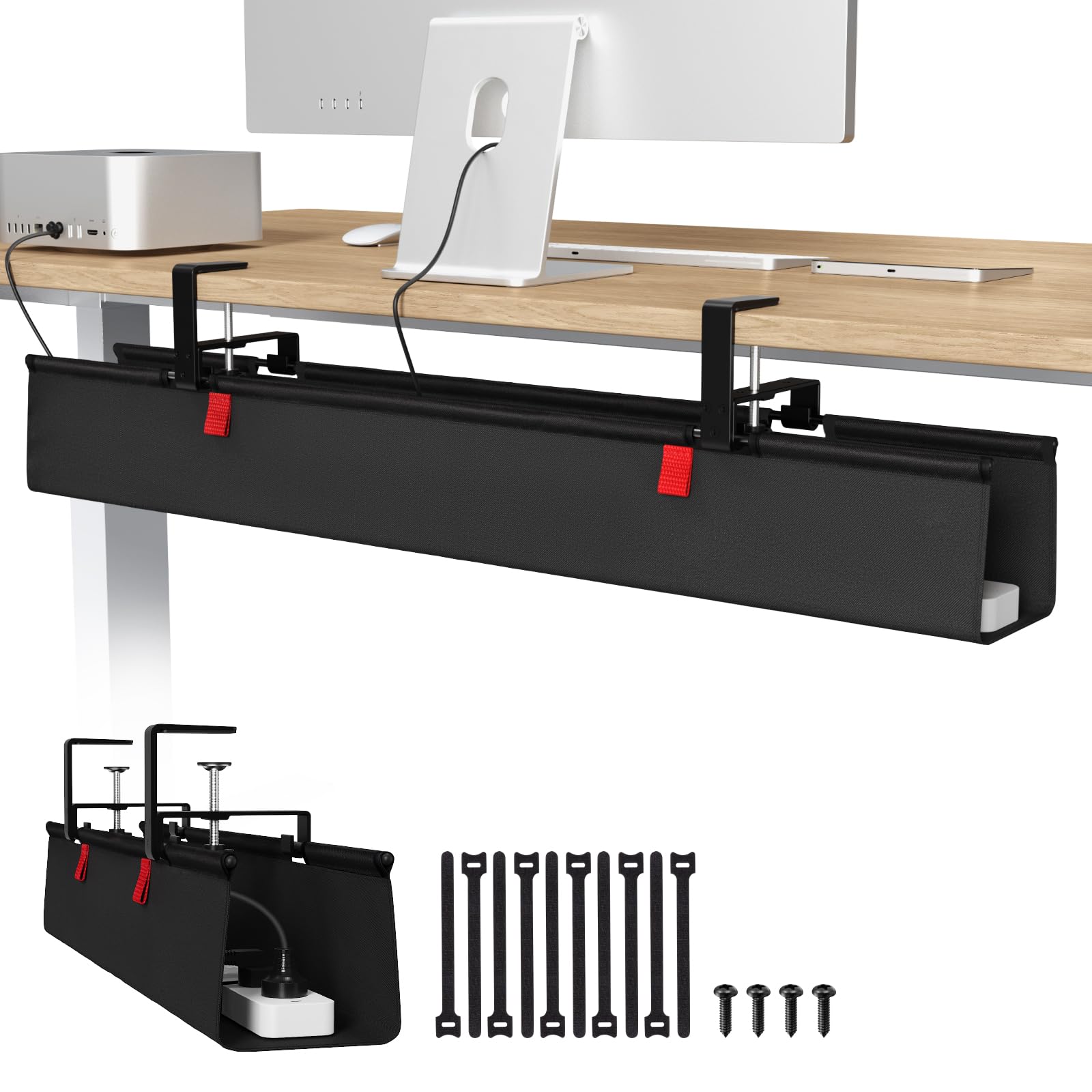
The top pick earns its spot by doing everything well. At 36 inches long and 5.5 inches deep, this tray has the largest single-compartment capacity in the roundup — it easily holds a full-size surge protector (a power strip with built-in overload protection) alongside all those wall warts and adapter bricks that never fit anywhere else. The 600D Oxford fabric is flame-retardant, and the tray includes a bottom support bar that prevents sagging even when it is packed full. You get two mounting options: clamp-on (no drilling, works on wood, glass, or metal desks) or screw-in for a more permanent hold. What wins people over is the sheer ease — the tray unclips from its brackets so you can load cables on it flat and then re-hang the whole thing cleanly.
The one real caveat comes from owners with wider-than-standard power strips or bulky outlet bricks. A few found that an oversized surge protector barely fit the width and had to hang off one side. Measure your outlet before you buy — the tray interior is about 5.5 inches across, which fits most standard strips but not every oversized model. The clamps also need about 5.3 inches of clearance along the desk edge, so desks with built-in drawers or a back rod may not work.
Buyers report the build quality is excellent for the price, with thick metal brackets and plenty of built-in Velcro ties to strap everything down. One long-term owner summed it up as “worth every dollar” for how much cleaner their desk became. If you have a standard desk and a normal-size power strip, this is the most forgiving and roomy solution you will find.
No-drill 36-inch span: 36 inches of usable space, dual mounting, flame-retardant fabric, and bottom support that eliminates sag — this is the tray that fits the most gear with the least hassle.
Spacious tray: you have a standard desk (0.4–2.4 inches thick) and a normal-size power strip and you want the biggest, most flexible single tray possible without drilling.
Tight corners: your outlet brick is unusually wide or your desk has built-in drawers along the edge — the clamp clearance is a real constraint.
2. No Drilling Extendable Under Desk Cable Management, Metal, 31″
The expandable metal channel that adapts to your exact desk width.
This is the pick for anyone who hates committing to a fixed length. The BIWIST tray telescopes out to a maximum of 31 inches — you can shorten it to exactly match your desk or leave it extended for extra storage. It is made from high-quality carbon steel with a hollow mesh design that lets heat dissipate (important if your power strip runs warm) and resists dust buildup better than a solid tray. The clamp-on installation is truly tool-free: you mount the brackets, snap the tray in, and you are done in about 30 minutes. The brand’s own data says it can hold three 9.45-by-4.33-inch power strips side by side, which is a lot of gear for the price.
What buyers praise most is the sheer cable capacity — one owner who had the tray for 1.5 years called it “amazing for value and sheer cable capacity” and said it kept their desk “super clean.” The downsides are minor but worth knowing. The tray is designed for standard-size power strips, not a large uninterruptible power supply (UPS) — a backup battery unit that keeps your computer running during a blackout. And because it hangs below the desk, it is slightly visible from low angles — a non-issue for most people but worth mentioning if your setup has a glass desk or a low sightline. Some owners added extra Velcro strips for additional organization (the included ties are useful but minimal).
Compared to the longer fabric Univivi above, this metal tray is lighter per inch and easier to adjust after installation, but it does not have the same sheer volume for oversized adapters. For a budget-friendly metal tray that fits any desk width, this is the one.
Expandable metal build: you get the flexibility of a custom fit without drilling, and the hollow metal design keeps everything cool and dust-free.
Flexible length: anyone with a non-standard desk width or a standing desk who wants a lightweight, heat-dissipating tray that can be adjusted on the fly.
Fixed setups: it is not designed for bulky UPS units, and the included Velcro ties are a bit sparse for a full cable bundle.
3. 2 Pack Cable Management Under Desk Tray, 31.4″ No Drill, Xpatee

Two sturdy metal trays that combine into one extra-long 31.4-inch runway for all your cables.
This is the smart-value option for people who want a premium metal feel without paying premium prices. The set includes two 15.7-inch trays that can be installed separately (one under the left side of a wide desk, one under the right) or placed end-to-end to create a continuous 31.4-inch channel. Each tray is fully welded and powder-coated — no sharp edges, no rust worries over time. The clamp-on system uses anti-scratch pads to protect your desk surface, and it works on desks up to 2.4 inches thick — among the thickest in this roundup. Each tray supports up to 10 pounds, so two loaded trays can handle a full desktop setup plus accessories.
The design has a thoughtful touch: both ends of each tray are open, so you can slide a power strip in from either side without unplugging everything first. That is a small detail that saves a lot of frustration during setup. Owners say these trays clamp on tight and “hold a ton of gear and cables,” with one buyer calling them “a lifesaver” for a messy desk. The included accessories — 4 cable clips and 8 cable ties — are generous and actually useful.
One catch: the assembly process requires fitting the clamps together, and a few owners found the screw length barely adequate for thicker desks. If your desktop is near the 2.4-inch maximum, take your time during assembly. And unlike the fabric Univivi, these metal trays do not have a bottom support bar — the rigid metal itself provides the structure, which is fine but less flexible for oddly shaped adapters.
Two-pack value
- Two trays give you layout flexibility (separate ends or one long channel)
- Open-sided design means no unplugging to install the power strip
- Anti-scratch pads protect glass and wood desktops
Narrow width
- Screw length for clamps is tight on very thick desks (close to 2.4″)
- Sturdy, but not designed for extremely heavy items like a large UPS
- Some owners wished more cable ties were included
Budget twin: you have a wide desk (60+ inches) and want a coordinated two-tray solution that looks built-in, or you want the option to split trays across different desks.
Wide cables: you need a single continuous tray longer than 31.4 inches or your desk is a hair over 2.4 inches thick — the clamp may not fit.
4. LOVJOYSE 25.3″ Under Desk Cable Management Tray, No Drill Metal
The tidy metal mesh tray that holds 15 pounds without a hint of sag.
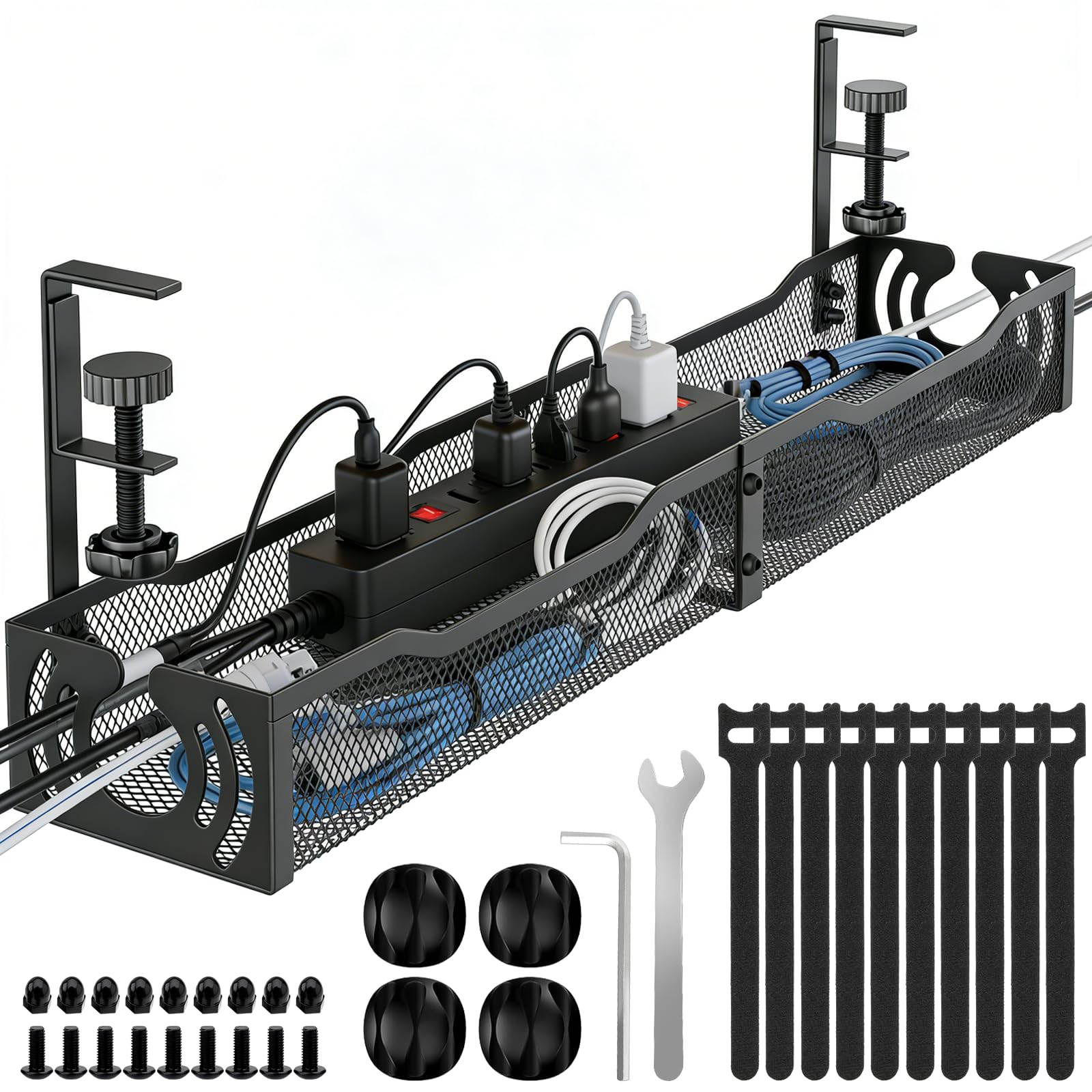
This tray achieves the highest star rating in the lineup. Made from stainless steel with a clean black mesh design, the LOVJOYSE tray is 25.3 inches long and 4.72 inches wide — enough room for a standard power strip plus a tangle of charging bricks. The open mesh construction is a real advantage here: it promotes airflow so your power strip stays cool, and it prevents dust from settling into a solid layer the way a closed tray does. The clamp-on installation is a genuine 10-minute job — you mount the brackets, slide the tray in, and tighten. It comes with Velcro straps, clips, and even the small tools you need, so there is no last-minute hardware store run.
Owners consistently highlight how sturdy this tray feels once installed. The clamps have soft rubber pads that protect the desk surface (the brand says it fits desks up to 2 inches thick), and the tray itself does not move or rattle. One reviewer noted it “easily holds heavy power cables securely” and noted that the open ends mean you can route cords in and out without disconnecting anything — a detail that makes a bigger difference than you might expect. The 15-pound weight capacity is among the highest in this group for a single metal tray, so you can load it up without worry. The only real trade-off is the length: at 25.3 inches, it is shorter than the 31-to-36-inch trays above. If you have an unusually long power strip (some surge protectors are 20+ inches), measure first. But for most standard setups, this length is exactly right.
Against the extendable BIWIST, this tray gives up adjustability but gains a higher weight limit and a simpler, cleaner installation with no assembly of sliding parts.
Small desk: you want the highest-rated single tray with a premium mesh feel, excellent airflow, and a 15-pound load capacity that handles a full desktop setup without sagging.
Large gear: your power strip exceeds about 19 inches in length or you need to accommodate a very wide UPS backup unit.
5. [Upgraded] Large Under Desk Cable Management Tray, Cinati, 28.4″ Fabric
The fabric tray with a 30-pound limit that hides even the bulkiest gear in a dustproof hammock.
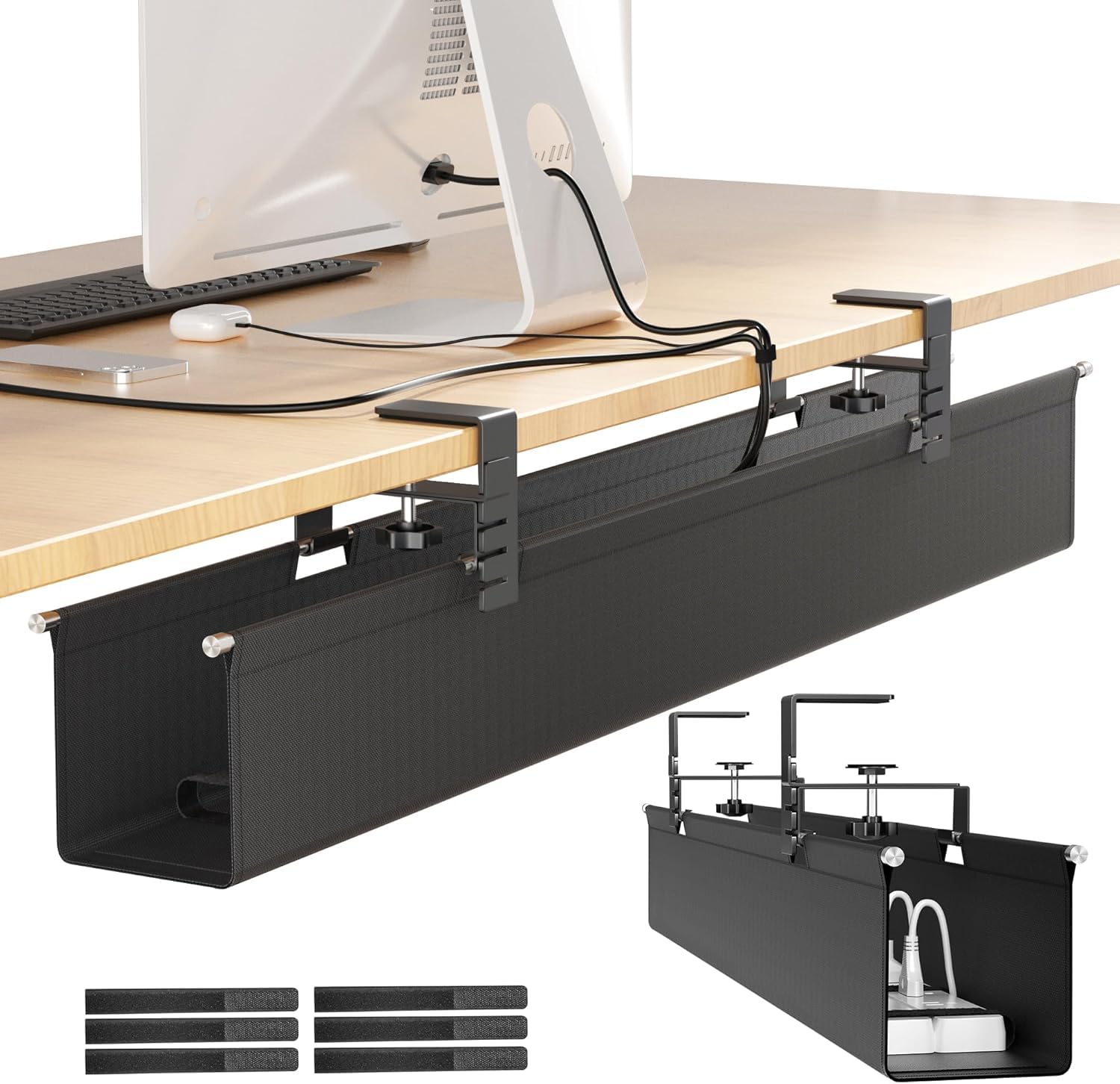
If you are hauling heavy adapters or multiple power strips, this is the tray to beat for raw capacity. The Cinati holds up to 30 pounds — more than any other tray here — thanks to its sturdy metal clamp brackets and a fabric sling made from water-washable, flame-retardant Oxford cloth. At 28.4 inches long and 4.7 inches deep, it offers nearly the same length as the LOVJOYSE mesh tray but with the flexibility of fabric: the sling cradles oddly shaped bricks and wall warts that a rigid metal tray might struggle with. It comes with 7 built-in cable ties plus 6 more, so you can strap everything down securely.
The installation is clamp-on only, and it fits desk thicknesses from 0.4 to 2.4 inches — the same wide range as the Xpatee. The brackets include scratch-resistant pads. Owners mention that the tray works great for multiple-device setups (one buyer mentioned it hides cables from three sewing machines plus an air purifier and lights). The front of the tray lifts up for easy access, so you can plug and unplug without removing the whole assembly. A couple of buyers noted that the tray sits slightly lower under the desk than they expected, and the fabric can be a bit flexible — it is not as rigid as a metal channel. For most people that is fine, but if you want a stiff, permanent-feeling structure, the metal options above may suit you better.
Compared to the Univivi fabric tray (the Best Overall), the Cinati gives up 8 inches of length but gains a higher weight capacity (30 lbs vs. unsupported bottom support). Choose the Cinati if your load is heavy but your desk is on the shorter side.
Big bundle: your cable setup is heavy — multiple power strips, lots of adapters, or a small UPS — and you need a 30-pound capacity that a typical metal tray cannot match.
Heavy loads: you prefer a rigid, non-sagging structure or your desk is longer than 28 inches and you want a single continuous tray (not two separate ones).
6. Delamu 2 Pack Metal Under Desk Cable Management Tray, U Channel, 15.75″
The U-shaped metal channel that hides cables in a low-profile raceway with two mounting styles.
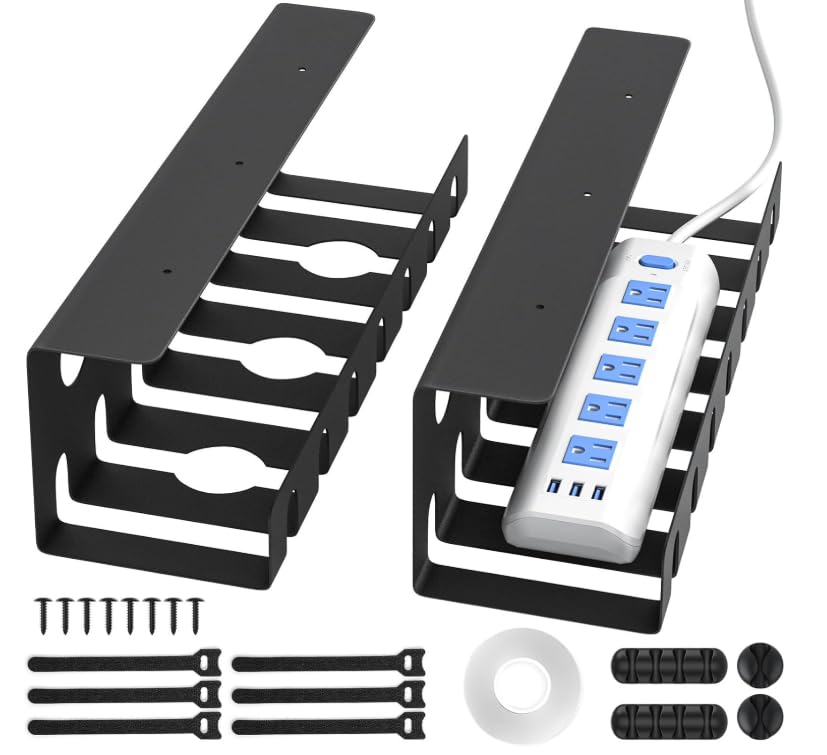
This Delamu set is for the user who wants a clean, built-in look without a big fabric hammock or a wide mesh basket. Each tray is a U-channel measuring 15.75 inches long and 4.72 inches wide — perfect for a single power strip or a bundle of cables that you want to route neatly from one side of the desk to the other. The alloy steel construction feels substantial, with rounded corners and a smooth surface that will not snag cables or scratch your hands. what separates it is the dual-mount system: you can stick it on with the included strong adhesive tape (up to 4 pounds) or screw it in for a firmer hold (up to 11 pounds).
Here is the honest trade-off: the tape mount is convenient for renters, but multiple customers note that the adhesive failed after a few days or weeks, especially with a power strip loaded inside. The overwhelming consensus in the reviews is to use the screws from the start. The screw mount is genuinely sturdy — you drill pilot holes, drive in the included screws, and the tray holds securely. Just know that if you go tape-only, you may be re-sticking it. The channel design also has three pre-drilled holes and multiple grooves for routing cables, plus it promotes heat dissipation for your power strip. The accessory kit is generous: 2 U-channels, 6 cable ties, 8 screws, single- and four-hole cable holders, and a roll of tape.
Compared to the larger metal trays like the Xpatee, the Delamu is more compact and less visible under the desk. It is ideal for a secondary desk, a kitchen counter, or a small workspace where you do not need a 30-inch span. But for a primary desk with a lot of gear, the bigger trays offer more flexibility.
Sturdy pair: a clean, small-footprint setup on a secondary desk, a standing desk with limited underside space, or a kitchen office nook where you want cables routed neatly without a bulky tray.
Rental walls: almost every owner says screw it in for a reliable hold — the adhesive is the weakest link here.
7. VIVO Under Desk 16.5″ Cable Management Trays, 2 Pack, DESK-AC06-2C
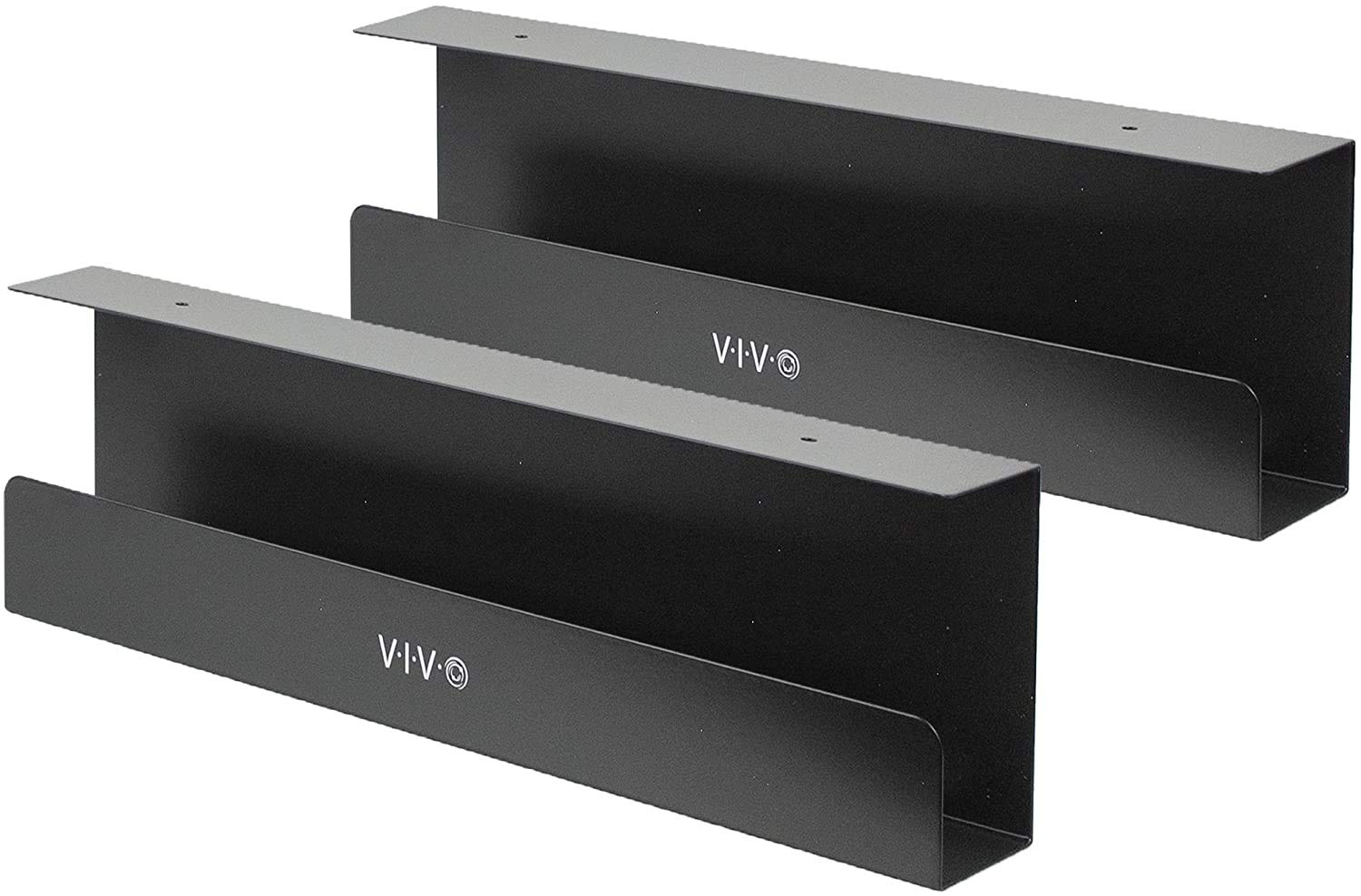
The rock-solid screw-in channel that VIVO standing desk owners call the perfect match.
If you already own a VIVO standing desk, this is the obvious companion — it is designed to work smoothly with VIVO desktop frames, but it also mounts easily to any wood or particle board desk with the provided screws. Each tray measures 16.5 inches long and 3 inches wide, giving you a slim, low-profile channel that hides cables without eating up underside space. The trays support up to 11 pounds each, and the durable metal construction means zero flex under load. The subtle black finish and minimalist design look clean and intentional, not like an afterthought.
What owners consistently call out is the quality and how well these trays integrate into a complete VIVO standing desk setup — one owner reported the 17-inch size was “perfect for holding power strips” and that the metal construction “holds everything without sagging or bending.” Reviewers also note that the trays hold an extensive setup: a 12-outlet power strip, two monitors, a laptop, and a PS5 all fit with room to spare. The screw-in installation is straightforward (pilot holes are recommended), and the open front makes adding or removing cables easy even after the tray is mounted.
The catch is the width. At only 3 inches wide, these trays are narrow. Standard-width power strips fit fine, but some wider surge protectors or models with side-facing outlets may not fit. One owner who had a wider strip ended up using Velcro and cable management wires instead, saving money but losing the built-in look. If your power strip is anything other than a slim standard model, measure the width before you commit. For VIVO desk owners with standard strips, this is the cleanest match you will find.
Trusted brand pair
- Perfect integration with VIVO standing desks — designed to match the brand’s frame holes and aesthetic
- Rock-solid screw-in mount with no sagging or bending at 11 lbs per tray
- Open-front design means easy cable changes without removal
17-inch limit
- Only 3 inches wide — slim power strips fit fine, but wider surge protectors may not (measure your strip’s width before buying)
- No clamp-on option; you must drill small pilot holes into the desk
VIVO fans: VIVO standing desk owners or anyone with a wood/particle board desk who wants a low-profile, screw-in solution with a clean, intentional look.
Long cables: renters who cannot drill, or anyone with an oversized power strip wider than about 2.5 inches — measure first.
Understanding the Specs
Tray Length and Your Power Strip
The most common mistake is buying a tray that is too short for your surge protector (a power strip with built-in overload protection). A standard power strip is 12 to 14 inches long, but some models run 18 inches or more. Always measure your power strip end to end (including the plug) before picking a length. A tray that is 15 to 17 inches works for most strips; if you have an oversized model or multiple bricks, go for 25 inches or longer. You can also use two smaller trays (like the Xpatee or VIVO 2-packs) spaced apart to support a very long strip.
Weight Capacity and Real Loads
Tray weight limits are usually listed for a static load — cables and a power strip lying flat. In practice, a loaded power strip with six to eight wall warts and a few charging cables weighs about 3 to 6 pounds. A 10-pound tray is more than enough for most desktop setups. The 15-to-30-pound capacities on the top trays here are overkill for cables alone but become useful if you stash a small uninterruptible power supply (UPS) — a backup battery unit — or a heavy adapter brick in the tray. The mounting method matters: clamp-on trays can typically handle 10-15 pounds, screw-in trays up to 30 pounds, and adhesive mounts top out at 4-5 pounds.
FAQ
Will an under-desk cable tray work with a standing desk?
Can I install a cable management tray on a glass desk?
How much weight can most under-desk trays really hold?
Do I need to drill holes to install a clamp-on tray?
What is the difference between a fabric tray and a metal tray?
How do I measure my desk before buying a tray?
Can I use a cable management tray for a TV or entertainment center?
Will the adhesive on tape-mount trays hold over time?
Final Thoughts: The Verdict
For most people, the cable management for desk winner is the Univivi 36″ No Drill Tray because it offers the largest single-compartment capacity, dual clamp/screw mounting, flame-retardant fabric, and a bottom support that eliminates sag. If you need an adjustable-length metal tray that fits any desk width on a budget, grab the BIWIST 31″ Extendable. And for a heavy-duty fabric hammock that can hold up to 30 pounds without breaking a sweat, the Cinati 28.4″ Fabric Tray is the one to reach for.
How We Picked
We do not accept paid placement. Every pick is matched to a real buyer and a real use-case; we do not hands-on test units.
Sources & Methodology
Specifications: manufacturer listings and product documentation. Review insights: verified customer reviews, as of July 2026. Pricing: not shown on this page (it changes often); check the current price via the retailer link.
As an Amazon Associate, FitlyFast earns from qualifying purchases. This does not affect which products we feature.